



LG 2017-2026+ OLEDs - Optimized Settings for Xbox One/Series X|S+, PS4/PS5+, Switch 1/2, PC and webOS/Movies (SDR, HDR, DV)
Hello everyone,
I would like to share my FINAL set of Optimized Settings for all LG OLEDs from 2017 to 2026+ Series for both SDR / HDR / DOLBY VISION Movies & TV Shows + Xbox One/Series X|S+ , PC, PS4/PS5+ and Switch 1/2 gaming with the best PQ and lowest Input-Lag results possible (from 4ms to 21ms based on model).
These settings are the results of 9+ years of gathering professional calibration results (using external equipment and software), valuable online knowledge from the most reliable sources and direct testing & analysis.
Yeah, I know, "settings cannot be copy/pasted from TV to TV as they're all different" , but tested LG OLED variance between models is much lower then average, and even within a 3% variance you will still experience a much more accurate image compared to default presets, plus CMS and WB advanced options weren't touched in order to avoid variance error as much as possible.
There are 6 Profiles to independently 1-time-Setup for each source/content combination, and then forget about it.
In order to do it, just change the video source to the one you want to calibrate (for example: webOS Netflix app, or to HDMI1 connected to Xbox Series X / PS5) and then load up the type of video content you want to calibrate (for example: launch an SDR Game, or an HDR Game, or a Dolby Vision movie).
Once you're ready, apply the Optimized Settings specifically for your LG OLED Series (see the sections below to identify your TV settings).
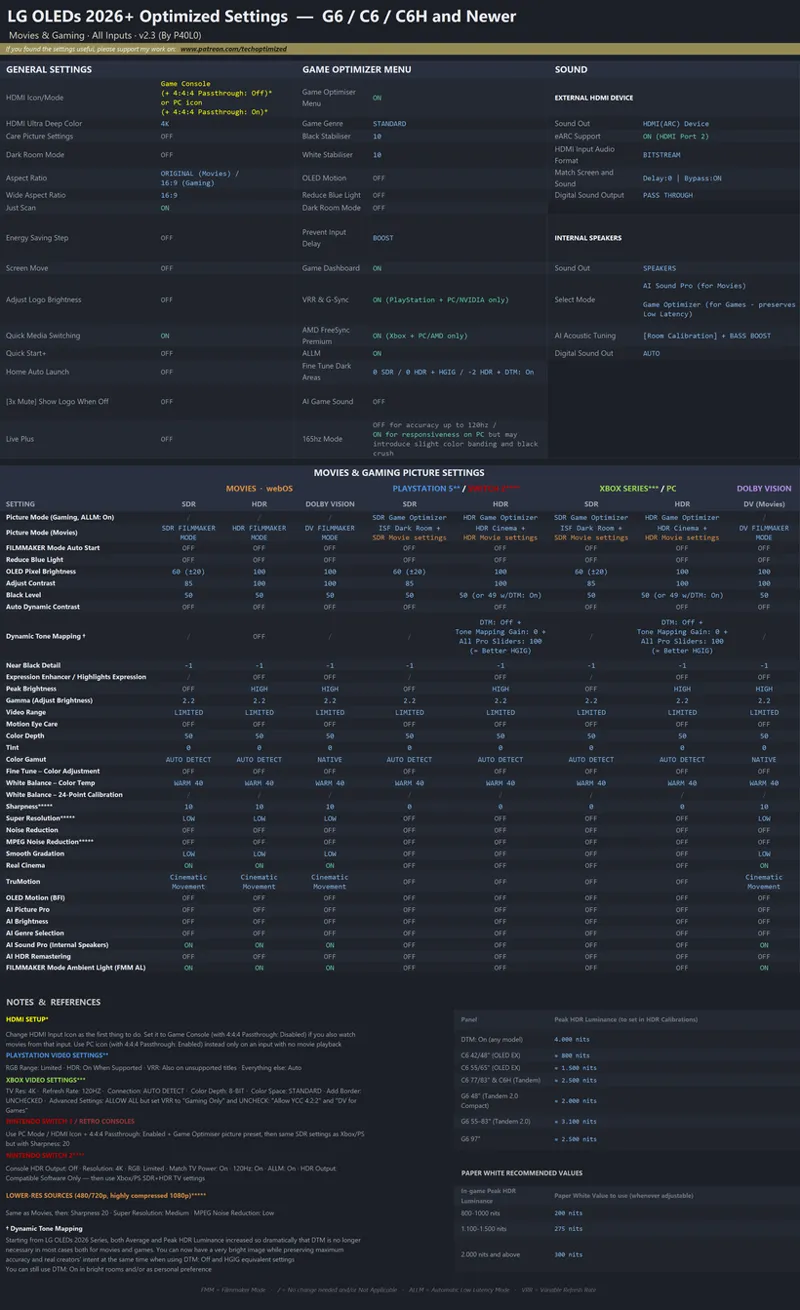
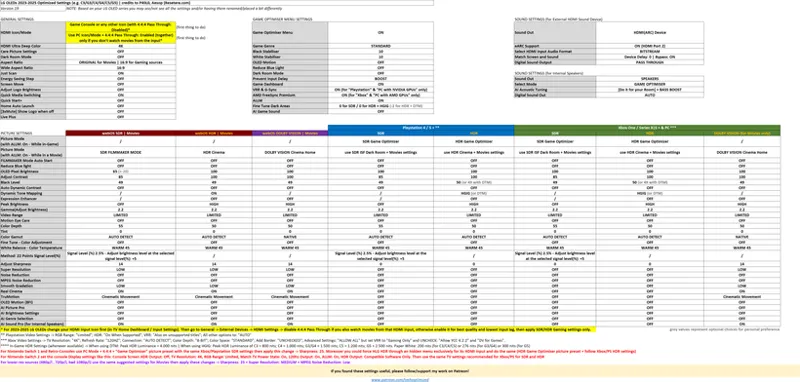
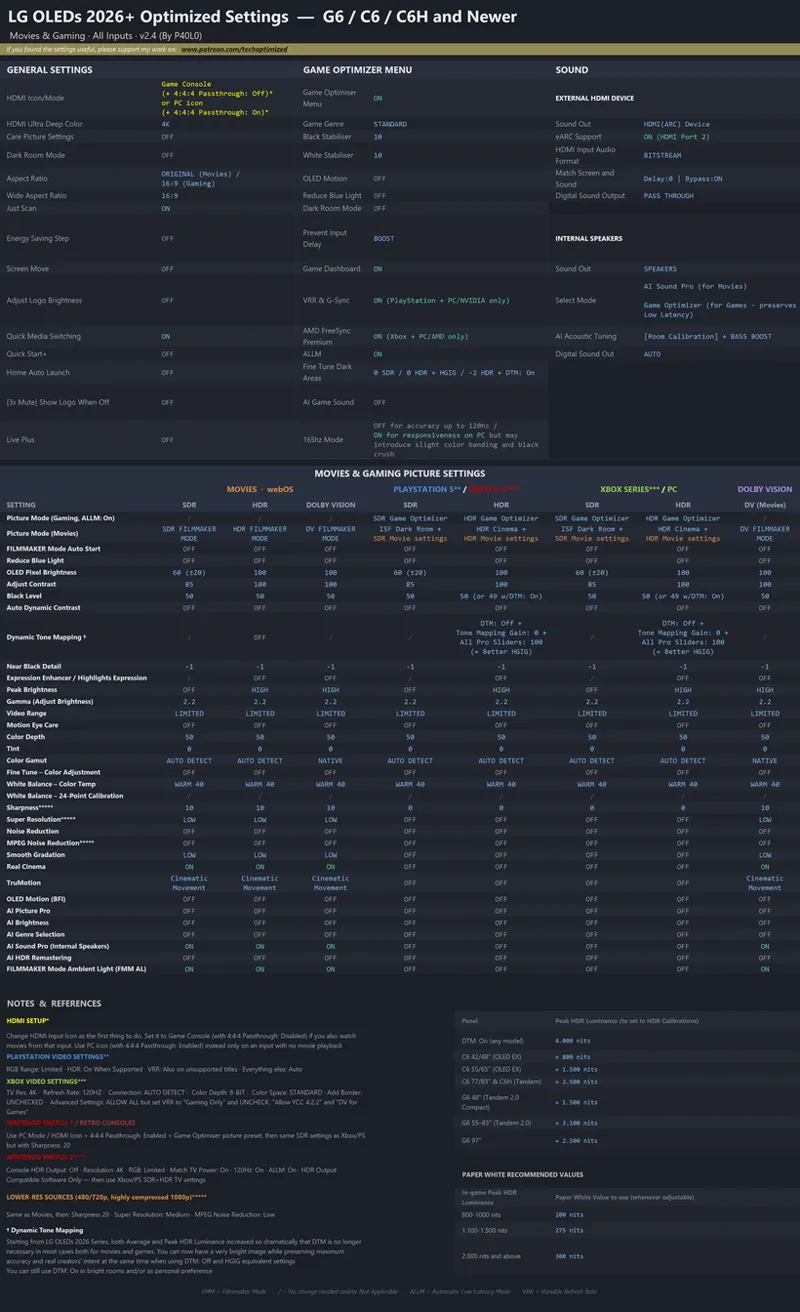
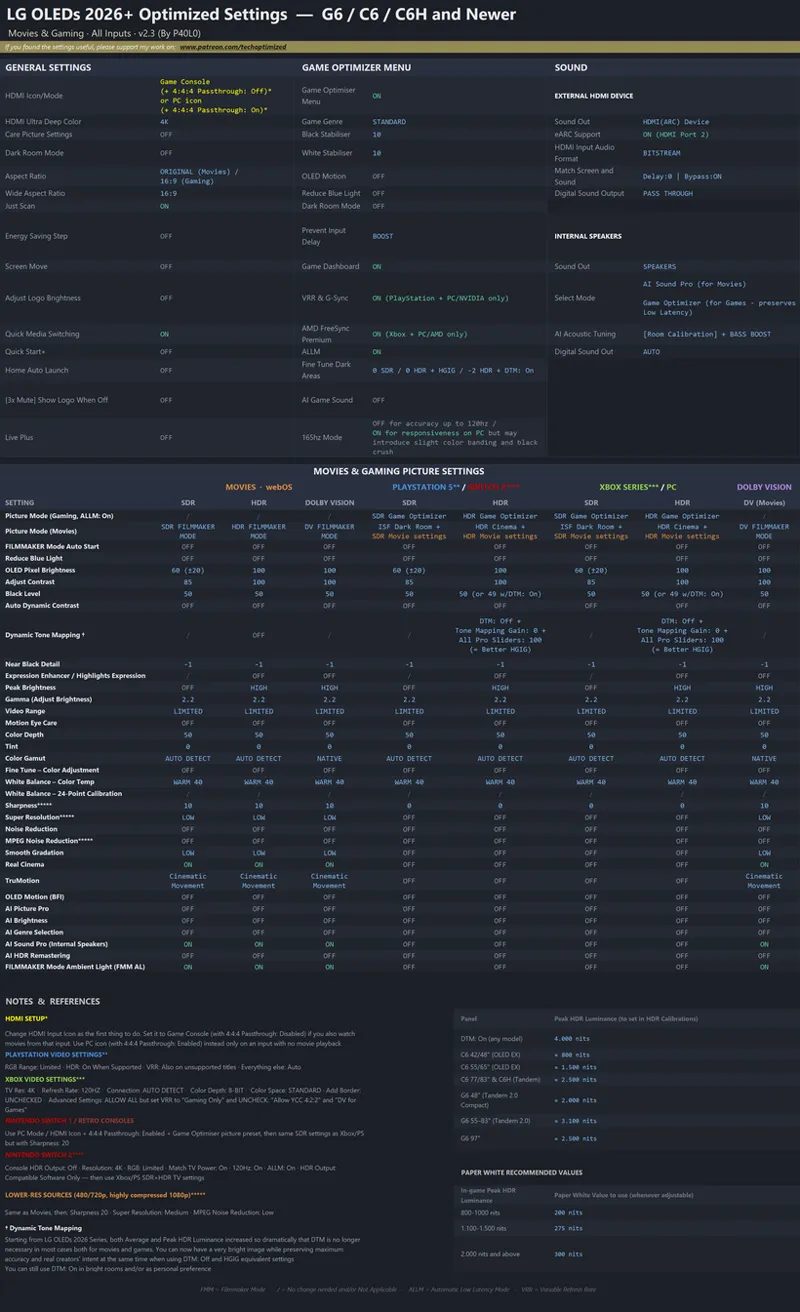
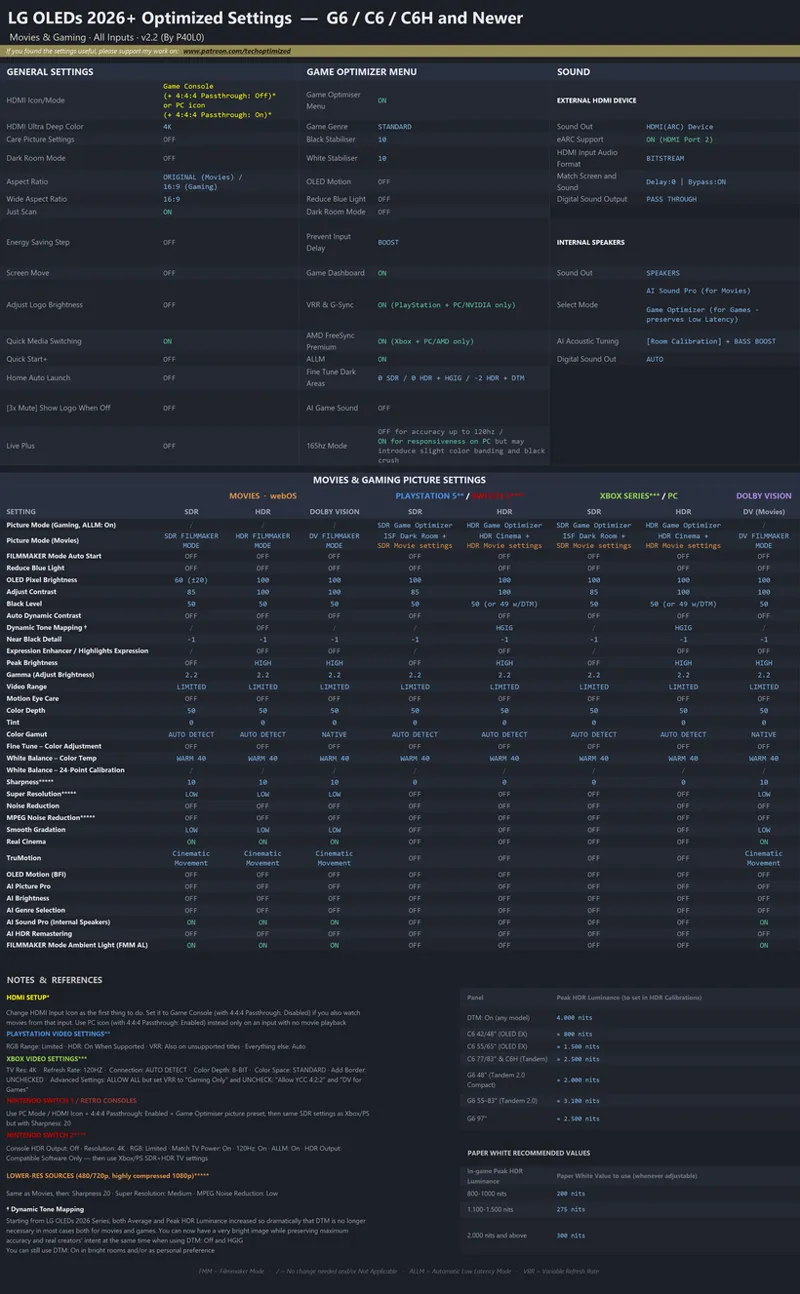
Optimized Settings for LG 2026+ OLED Series:
Click for Full Screen.
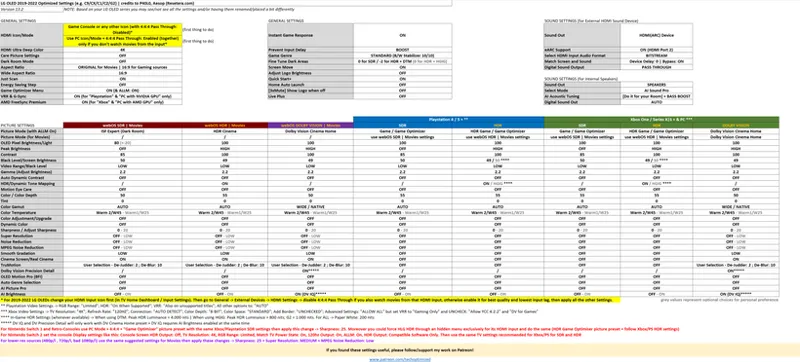
Optimized Settings for LG 2023-2025 OLED Series:
Click to open the video.
(Use the video as a walk through menus/settings but apply the latest settings you can find below)
Click for Full Screen.
More information and reasoning about the settings here.
For LG G5/C5 Only: while using the HDR Game Optimizer picture preset, set DTM: Off + All Pro Sliders: 100 to have an HGIG equivalent accuracy but at max actual Peak luminance of the TV
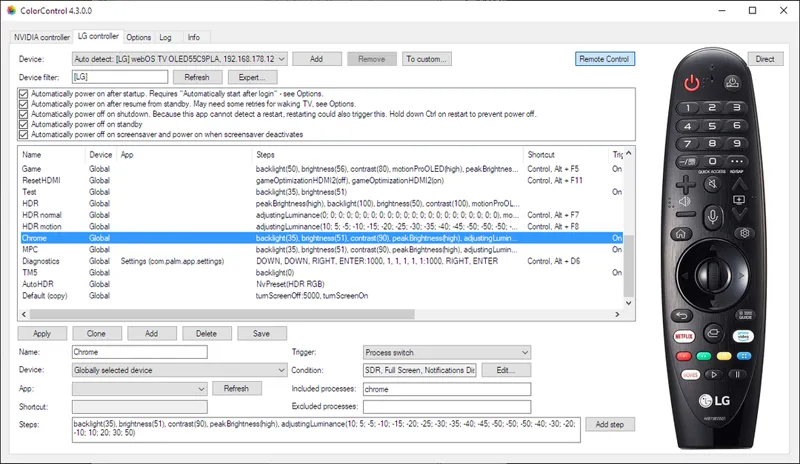
You can also unlock ALL settings and apply further tweaks by using the ColorControl app (on Windows). Read more
Optimized Settings for LG 2019 up to 2022 OLED Series:
If you have a 2019-2022 LG OLED apply the following changes first, then proceed with the updated Overall Settings Chart below:
Use "Game Console" Icon for game consoles and mixed usage scenario (Games + Movies & Media);
You can change the HDMI icon going into "TV Home Dashboard" and then "All Inputs" section;
Use "Original" aspect ratio for all sources except for gaming ones: for those use the "16:9" aspect ratio in order to fix potential input lag bugs.
Click for Full Screen.
You can also unlock ALL settings and apply further tweaks by using the ColorControl app (on Windows). Read more
Optimized Settings for LG 2018 OLED Series only:
Use the same settings of 2017 series below, then apply the following changes:
SDR Game and SDR ISF Dark presets: bring back Tint to 0;
Disable Dynamic Contrast everywhere;
HDR Cinema Home: be sure Dynamic Contrast is OFF; set Dynamic Tone Mapping: ON;
HDR Game: set Color value back from 65 to 55; be sure Dynamic Contrast is OFF; set Dynamic Tone Mapping: ON;
Dolby Vision: change OLED Light value from 50 to 100.
Optimized Settings for LG 2017 OLED Series only:
Click to open the video.
Unlock ALL settings by using the ColorControl app (on Windows). Read more
__
__
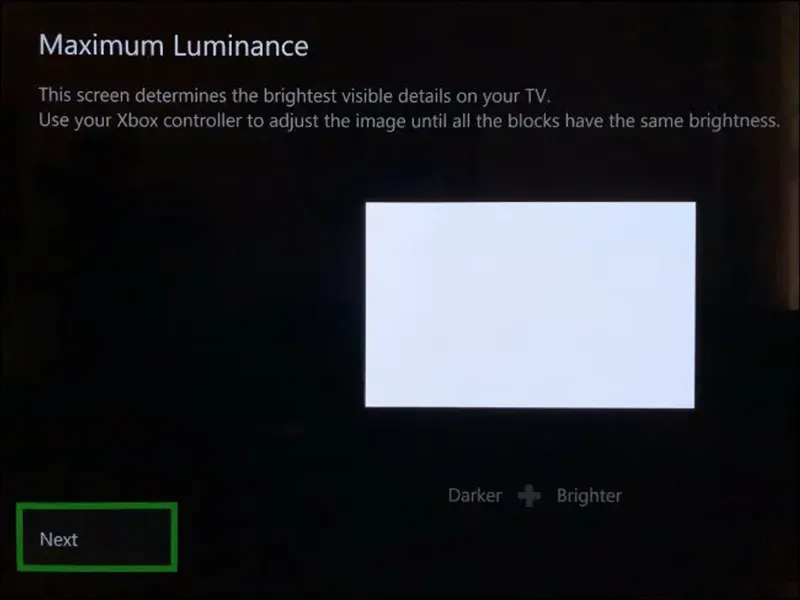
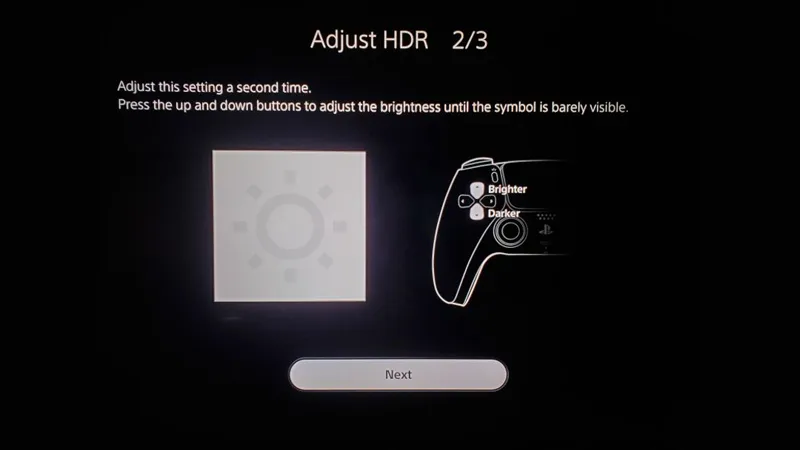
Playstation HDR Calibration Guide
Nintendo Switch 2 HDR Calibration Guide
__
__
NOTE: Don't forget to adjust HDR "Sliders" also in game settings if available. Usually, for these TVs, you need to "increase" the level of Max HDR Brightness "Slider" to make the game logo/icon totally disappear in a white background, or set it to a numerical number around 4.000 nits (for Dynamic Contrast or Dynamic Tone Mapping: On) or 800 nits for HGIG (1.000 nits for LG G2/C4; 1.500 nits for LG G3/G4/C5; 2.400 nits for LG G5; 2.900 nits for LG G6)
Dolby Vision gaming is not recommended. Click here to know more.
Paper White could be set around 200 nits in most cases (276 nits for LG G3/G4/C5 only; 300 nits for G5/G6 only)
This is the reason why, even with both the console and the TVs properly calibrated, some games may look "dark" or "washed out" if these settings are left to default.
FAQ & Useful Insights:
The new NVIDIA RTX HDR and NVIDIA App: a literal Game Changer for HDR on PC
Dynamic Tone Mapping (DTM) vs HGIG - There's actually no "versus"
Dolby Vision for Games - Sky high expectations, Mediocre results
How to dramatically improve "SDR-only" HDMI devices (like Nintendo Switch) thanks to forced HLG
Unlock ALL your LG TV settings with ColorControl app + New Tweaks (Windows)
How to unlock your LG OLED true potential using the hidden Service Menu [Easy Way]
How to STOP your LG OLED bombarding Ads & Notifications on you
OPTIMIZED IN-GAME HDR SETTINGS:
You can also find the latest, personally curated Optimized Settings for 300+ HDR games by following/supporting me on my Patreon, including:
A Plague Tale: Requiem (Public)
Callisto Protocol (Public)
Cyberpunk 2077 (Public)
God of War: Ragnarok (Public)
Grand Theft Auto 5: Remastered (Public)
Grounded (Public)
Halo Infinite (Public)
Horizon Forbidden West (Public)
Saints Row (2022) (Public)
Starfield (Public)
The Last of Us Part I (Remake) (Public)
The Quarry (Public)
Zoo Tycoon: Ultimate Animal Collection
______________________________
Let me know what you think.
Hope you enjoy it :)
Cheers,
-P












Comments (290)
I have the lg c5 and using filmmaker mode for gaming is that correct
No. Game Optimizer preset with DTM: Off + Tone Mapping Gain: 0 + all Pro Sliders: 100 is now recommended there and on newer models as well
Hi P40L0 i was wondering which settings to follow if you have a LG B5. Can you let me know? Thanks!
Apply the 2023-2025 chart
I still have a LG CX with a Series X and was wondering if leaving 120hz on all the time will be correct
Yes it is
Hey P40L0, thank you very much for putting in so much work and effort for clueless guys like myself! I have encounter some weird phenomenon after applying all of the settings above (I use RTX 5070 TI with LG C1): In some game Menus (for example EA FC 26, Blazblue Entropy Effect or Dimraeth) i have some white flickering but only in the game menus most of the time. In game itself i dont see the same flickering and its most visuable on darker/blue/grey backgrounds. I dont know what it is. I set FPS cap to 117 fps an RTTS, V-Sync is on in NVIDIA Control Panel and not in game. G-Sync is on in my LG C1 settings. Do you or somebody maybe got an idea where this might come from? Big thanks!!!
That's probably just VRR flickering which may happen on menus during loadng screens and/or when fps suddenly drops below 40fps (which is very common during shsders' compilation, loading screens etc.) The important thing is not having it or having it very rarely during gameplay instead. Also RTSS cap for 120hz should be 116fps not 117fps. I suggest RTSS Reflex Limiter too
On the LG TVs (G3 in my case) is anyone having any issues with their PS5s reverting from “PC” mode back to the “Game Console” input setting? I’ve reset it numerous times, tried with CEC on/off on both the PS5 and TV and it still switches back.
Hi P40L0, I've been following your work for quite some time now and your guides have been really helpful! I'm very pleased with the results on my LG OLED TV's. I've got a question regarding my 48'' LG OLED B4 though: Usually I turn on HGIG when I play on my PS5 Pro in HDR Game Optimizer Mode. But when I set DTM to off, it gives me control over those Professional Sliders. So I wondered if it would be beneficial to set all three to 100 just like you recommend for the C5/G5 and newer. Or is there a difference between the B4 and those TV's in what that does? I'm currently on webOS 25 with the B4 btw since webOS 26 has not been rolled out for it yet. Thanks in advance and keep up the great work! 🤌🏼 ✌🏼
Hi, no unfortunately those sliders don't work the same as 2025 models and newer that's why I didn't recommended them for previous models
Hi P40L0, thank you for this excellent guide. I follow it but it seems LG G6 in Game Optimizer does not reach 3100 nits max peak brightness "only" 2700 nits according to RTINGs. Indeed if i calibrate using the Xbox HDR calibration the pattern disappears a few clicks sooner. Only in FMM it reaches 3100 so I'm a bit confused by this. WHat do you think?
It can actually reach 3.100 also in GO but not on 10% pattern but more like in 2% smaller highlights. The problem if you put 2.900 there (not 2.700 as Rtings is outdated) is that games which will read the system calibration will apply 2.900 to their peak, so even if the TV is capable of reaching 3.100 on smaller highlights it will never do that in games. So my advice is to still put 3.100 with GO both there and games' peak whenever the slider is available
Hi Paolo, i have a LG C6 upgrading from C2. The default color depth in game optimizer is now 50? Has this been tested? Just making sure since it’s been 55 since forever.
It may still be 55 but that's an LG preference, 50 is accurate
43.21.68 for C6
Hi P40L0! Sorry to bother but i need to ask you a question. Probably a lot of people asked you this so if ther is already an answer, sorry again: what do you think is for now the best 2k OLED monitor to get?
UPDATE - 14/09/2026 Updated LG 2026+ OLEDs chart with the following changes: - For HDR gaming switch to DTM: Off + Tone Mapping Gain: 0 + All Pro Sliders: 100 while using HDR Game Optimizer picture preset in order to have an HGIG equivalent at actual max HDR Luminance of the panel AND the lowest input latency possible at the same time - Lowered SDR Game Optimizer picture preset's OLED Pixel Brightness to 60 as a better universal suggestion (as 100 was too bright for many) then I left the usual (+-20) where you can regulate it a bit higher or lower depending by your room light conditions and your personal eye comfort
I'm still on 24 until LG rolls out 26 to my model - should I switch from DTM to HGiG in preparation, or just wait until the update actually lands?
Any idea why my Xbox is exhibiting occasional white flashes? I am using Game Optimiser, DTM Off, Pro to 100 for all, configured HDR to 2.500 but in hogwarts legacy, for example, walking around results in occasional white flashes (sort of like VRR flicker except it’s white instead of black). I set colour depth to 12 bit in the Xbox HDR settings but I noticed your guide here suggests 8 bit? Is this still up to date as I believe the LG G5 is a higher bit panel no? On PS5 Pro it reports as outputting 12 bit HDR when using a 60Hz container (when I press the green button 7 times in a row to display the VRR overlay). I haven’t noticed these flashes on PS5 Pro. Have I done something wrong?
First you need to set Xbox console to 8-bit. My guides are updated. That means that the console will use original color depth both for SDR (8-bit), HDR (10-bit) and Dolby Vision for Movies (12-bit) automatically without any reconversions in between, so colors will be most accurate in all cases. Second the white flashes are usually VRR flickering when fps suddenly goes below 40fps (so out of VRR range) which usually happens during loading screens...but also if specific games have unstable fps and/or stutters/microstutters, like most unoptimized Unreal Engine titles (including Howard's Legacy) On PS5 at 60hz it doesn't happen probably because in that mode VRR is Off.
UPDATE - 12/09/2026 Added a note: For LG G5/C5 Only: while using the HDR Game Optimizer picture preset, set DTM: Off + All Pro Sliders: 100 to have an HGIG equivalent accuracy but at max actual Peak luminance of the TV (for example: 2.500 nits for G5)
What are the pro sliders?
Hi Paolo, tell me pls, I have found this information everywhere, but can't understand should I use 144hz mode on my LG G4 (PC gaming HDR) or it will be better stay at 120? I saw only for G5 recommendations for 165Hz. Also, we now don't need to HDR profile min 0 and peak 1500 via windows HDR calibration app cause of Game Optimizer settings, right? Btw updated webOS26 and your latest settings. Thanks!
You can use 144hz on PC for more responsiveness but it may look slightly less accurate than 120hz (a bit more color banding, a bit more black crush) so your choice. Personally I would stick with 120hz. Min HDR 0 nits and Max Peak 1.500 in all calibrations is still valid for G4 also using Game Optimizer + HGIG
Im little confused and not sure if i did it right. I am using the Series X with my G5 TV. Xbox app Calibration i went with 2500 for both values aka Maxtml and fftml with HGIG enabled is this correct ?
Yes
Question brother I have a c5 65in on some settings I see you put 1200 peak but others 1500 nit? Which is correct should I do 18 clicks for 1500 or should I leave it 16 clicks for 1300ish for ps5 hdr calibration tool! Thank you!
The problem with C5 is that there are different models in different regions like the "Pro" models which can go up to 1.400-1.500 nits while "regular" ones in other markets are around 1.200-1.300 nits (the range is also due to panel lottery) Also LG firmware increased Game Optimizer picture preset luminance over time but it's still a bit lower than ALLM + FMM luminance...which is not not viable anymore with latest firmwares as the input latency got too high there compared to GO. So basically it's a mess and actual peak HDR luminance can vary from 1.200 to 1.500 nits based on the combination you're getting, so 1.500 covers the "extreme" cases too but you should actually do the calibration and see what the 10% window peak actually is for your TV
Brother sorry to bother you. I was watching your video on the settings. And you had BT.1886 as the Gamma for SDR. Just wanted it double check. Do we still want 2.2 Gamma across all the settings ?
The video is old and in the Description I expressly adviced to click the link to apply the updated settings of latest chart
For SDR gaming, a lot of other sources recommend a brightness of 42. Why do you recommend 100?
Because SDR Game Optimizer is dimmer than SDR FMM so 42 in GO could be too dim
UPDATE - 03/09/2026 After the official release of webOS 26 for all LG OLEDs from 2023 to 2026 models, I needed to update all my charts for those with the following changes: - Unfortunately ALLM/VRR + SDR/HDR Filmmaker Mode has now noticeably higher input latency at 120hz compared Game Optimizer picture preset (from around 8-10ms of before to around 30-35ms now). Game Optimizer picture preset is still around 5ms in comparison, therefore I switched my recommendation back to it. That said it seems that GO also received a luminance boost, at least in some models like G3 (while still not having color boosting there) and an accuracy fix for HGIG, so the actual differences between the updated GO and FMM should be small if not unnoticeable unless you have two TVs set side by side or switching back and forth repeatedly really trying hard to spot differences - When using SDR Game Optimizer again, OLED Pixel Brightness needs to be set to 100 in order to be similarly bright to SDR FMM previous value - Quick Start+ is now recommended to Off for these models as it seems to fix a lot of HDMI eARC/CEC handshakes between different devices, memory leaks, apps performance issues and crashes. From 2023 model onward the TV processors are still fast enough to "cold start" your TV in few seconds, so the impact of having it off will be small - I also updated Peak HDR Luminance recommendations for all models in nits after all firmware updates so far Enjoy ;)
Hi P4olo, I'm on the latest firmware of the webos25 on my G4. Do you recommend to update or stick with it ?
If I have a dedicated 4k bd player, which settings should I use for that input for sdr/hdr/dv? The ones for the webos or the xbox ones?
webOS
UPDATE - 18/08/2026 Overall Settings Chart for LG OLEDs 2026+ updated with slight adjustments after latest firmware updates: - SDR OLED Light slightly lowered to recommended value 60 (then you can lower/increase it to your personal preference/light condition) - 165hz Mode is recommended ON on PC for lowest input lag and best responsiveness but with slight additional color banding and black crush as a cost (but it's still worth it) - LG G6 Peak HDR Luminance is now around 3.100 nits! (and I also adjusted other 2026 model peaks but may still vary a bit in real world due to panel lottery) - FMM Ambient Light is now recommended to OFF for gaming inputs in order to keep input latency lowest when using ALLM + FMM for gaming Enjoy ;) Click -> https://raw.githubusercontent.com/P40L0X/P40L0-Image-Archive/main/Patreon/LG_OLEDs_2026+_Chart_Modern_P40L0_v2.png
Just a few questions, what input icon do I use with switch 2 and do I use passtrough 4:4:4 enabled (pc icon with or without 4:4:4 or game console with or without 4:4:4) Switch 2 just used for gaming on an LG C2. thanks in advance
Only for gaming = PC Icon + 4:4:4 Passthrough: Enabled together.
Thank you for this. I subscribed! I’m trying to understand the correct HDR setup for the LG G6 on PC I really hope you can help me specially with my 48 inch. I have both the 48” and 55” G6 and their HGiG behavior is clearly different. On the 48” G6, I can clearly see HGiG working and changing the highlights compared to DTM Off. However, HGiG clips at around 1490 nits in Windows HDR Calibration, even though the panel itself is capable of higher peak brightness. (No information on this how much it is exactly) I’ve read in your page it’s 2000? On the 55” G6, HGiG and DTM Off look virtually identical in actual gameplay, which wasn’t the case on my 48”. So my main questions are: If I want to get the maximum HDR/highlight performance out of the 48” G6 and 55 should I forget about HGiG and instead use Filmmaker Mode + DTM Off + the Professional Tone Mapping sliders? If I do that, what should I use in Windows HDR Calibration? FMM + DTM Off/Professional Tone Mapping seems to keep the calibration pattern visible until close to the 4000-nit range. (I think not to sure about this) Should I actually calibrate Windows to ~4000 nits, or should I ignore that clipping point and enter the panel’s measured peak brightness instead? And then, most importantly, what should I set the HDR Peak Brightness slider to inside games? Should it match the ~4000-nit clipping/tone-mapping range, the Windows calibration value, or the actual measured peak brightness of the panel? The same question applies when using DTM On. I currently use DTM On with a 4000-nit target because the TV is tone-mapping that 4000-nit input to its actual capabilities. Is 4000 nits therefore also what I should use in games, or should in-game peak brightness still be set to the panel’s physical peak? One last thing: the guide recommends Video Range LIMITED for PC. Why Limited? Almost every PC recommendation I’ve seen says to use RGB Full + Full. Is there a specific advantage or fix on the 2026 C6/G6 when using NVIDIA RGB Limited + LG Video Range Limited, particularly regarding HDR/HGiG/tone mapping? Thank you !
Thanks for the support! :) LG G6 48 is dimmer than 55 which is perfectly normal due the smaller size. Even in your case, for gaming enable ALLM and/or VRR and then set DTM: Off + Tone Mapping Gain: 0 and all Pro Sliders to: 100. This will be equivalent to HGIG but at actual max nits of the display is capable of, so if when set this way the Xbox/PC HDR Calibration app will peak around 1.500 nits, that model can only go up to 1.500 nits (at 10% window) and maybe I need to update the chart for that model (please be sure to be on latest firmware before giving me the confirmation) About RGB Limited and not Full, I posted the reasoning here: https://www.resetera.com/threads/lg-2017-2026-oleds-optimized-settings-for-xbox-one-series-x-s-ps4-ps5-switch-1-2-pc-and-webos-movies-sdr-hdr-dv.73304/post-99290590
UPDATE - 29/07/2026 As promised, here's my updated and completely overhauled Overall Settings Chart for LG OLEDs 2026+ to align both with the many changes needed for newer models but also with a new, more complete and easier to read presentation. Hope you like it ;) Click -> https://raw.githubusercontent.com/P40L0X/P40L0-Image-Archive/main/Patreon/LG_OLEDs_2026+_Chart_Modern_P40L0_v2.png
Can I use the G5 settings if I have a 77" G6?
Yes for now. Except the peak HDR Luminance to set for games is 2800 nits
Hi, been subbed on and off for a good few years now. I've just got a ps5 pro and I honestly can't remember if during initial hdr set up should you calibrate in HGIG and then switch to DTM or calibrate in DTM from the start? Seeing conflicting sources online.
Calibrate for DTM directly (4000 nits target)
Does the LG C5 (48 inch) have any input lag when using FMM + ALLM compared to Game Optimizer? If I use Game Optimizer mode, do you recommend using HGiG or DTM?
I always recommend FMM + ALLM and HGIG equivalent (so DTM: Off + all Pro sliders to 100) over Game Optimizer from C3/G3 and newer. Only G5 and G6 will have the exact same low latency as Game Optimizer there, while all the others will have a very tiny higher latency which you shouldn't even notice while you will definitely notice the much higher luminance and better colors
Hey P40L0, sorry for being annoying for asking the almost same question twice now but I'm considering upgrading my C2 to a C5/C6 ( all 42 inch) and the peak brightness is still around 800 nits on all of them if I'm correctly informed. In your recommended settings it's stated to use 1500 nits for the C5. The 42 inch only has 800 nits. Should you still set up Windows for 1500 nits? (and 276 nits Paper White of course)
No, for the smaller sizes use 800 nits peak and 200 nits Paper White
Buon pomeriggio Paolo, ho collegato la PlayStation 4 Pro (HDMI porta 3) alla LG C5 con gli stessi identici settaggi alla tv che uso con la PlayStation 5 Pro (HDMI porta 1) ma è presente un input lag clamoroso. Da cosa può essere dovuto? Consigli di utilizzare la classica Game Optimiser Mode invece che la combo Filmaker Mode+ALLM?
Probabilmente è dovuto al fatto che PS4 non supporta ALLM quindi, sì, lì conviene usare il classico preset Game Optimizer sulla TV
Hey, everything okay? I have a question. Would you recommend the G5 in 48? From what I've heard, it has fewer nits (probably about the same as the G3 55). Would you say that's sufficient for a dark room, or is the G5 55 significantly better?
I'm not sure what exact peak luminance G5 48 has, but it will be for sure noticeably less than G5 55 (as it hasn't the new tandem panel) and I think also lower than G3 55
Is there a reason you disable OLED Motion Pro (BFI)? I figured Black Frame Insertion would be nice for gaming, especially older retro titles.
It noticeably dims the picture and add very noticeable input latency so it's not recommended universally enabled for most games
Hi, the image embedded into the page is very blurry on both phone and laptop. When I click full screen it take me to imgur (which is blocked in uk) any other ideas on how I can view this properly?
Try temporarily using a VPN to bypass the imgur block
Is there a difference in the nits setting when using a 42“ c oled because it’s dimmer than the bigger versions? Also would you still recommend HGiG only for PC?
Yes there is a difference (you will have less nits than bigger sizes), but I still suggest HGIG (forced in FMM) on 2023+ models
Paolo one question if my game does not soppurt HGIG like Zelda would you recommend DTM or ?
On paper yes but in reality it depends as DTM may overbright UI/UX too much in this case and HGIG may still be better.
And why dou recommend screen shift on older lg like C1 but on newer 2023 models you say off ?
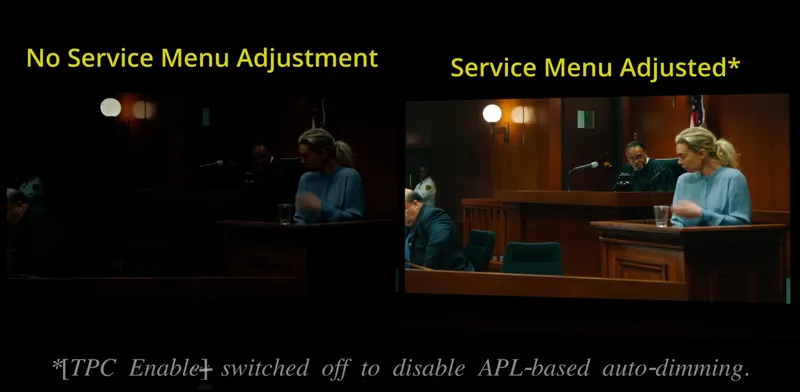
Because on newer model TPC/GSR (and their auto-dimming bug) were fixes so you don't actually need Pixel Shift. On older model the auto-dimming bug is still there so it's better to disable TPC/GSR altogether from the Service Menu, but then still use Pixel Shift to mitigate this
P4OLO is it still up to date to use limited on tv and console because I often read auto is the better option ?
Yes is still valid. More info here: https://www.resetera.com/threads/lg-2017-2025-oleds-optimized-settings-for-xbox-one-series-x-s-ps4-ps5-switch-1-2-pc-and-webos-movies-sdr-hdr-dv.73304/post-99290590
Hi P40L0, i'm unable to view the LG settings as its says the content is unavailable in my region (UK). Is there anyway I can get a latest copy of the page for the G5? Also, what picture settings would you use for a different connected device such as an Apple TV. Would you use the WEB OS settings or XBOX/PS settings? Sorry if this sounds like a daft question. On my old LG (G3) I used the XBOX settings for the Apple TV and SKY, just questioned it when setting up my new TV. Thanks in advance and thank you for the great work!
Imgur is blocked in UK for stupid reasons, so you may try to temporary use a VPN to get the images. Yes. For AppleTV but also Sky, media players and movies' only inputs you can use webOS/Movies columns
Really nice work! Really appreciate your effort! Just one quick question. I assume I should set my C2 video range to limited right? As it's equvalent to black level low? Cause on C2, there is video range instead of black level.
Yes, Video Range Limited = Black Level Low also there
Hi P40L0, when using tv speakers. do i need to use PCM or bitstream? My tv is now on PCM for xbox. and in the audio settings for xbox. things like passthrough are unchecked. Is that okay as well?
if i understand correctly, do i need to switch icon for xbox to pc and why is that? last time it was console icon. I have an LG C1.
If you only game (and do not watch movies also) on Xbox, yes, stick with PC Icon as it will automatically enable 4:4:4 which will make texts clarity and fine color details better. If you also use it as a media device so also watching movies from it, stick with the Console HDMI icon in order to correctly leverage ALLM (auto switch from movies presets outside games to Game Mode while in-game)
Why do you recommend DTM on over HGIG now?
I don't. Better read what I wrote. On C5/G5 and newer now you can set DTM: Off in HDR FMM, then manually set the new Professional sliders to 100 and you will hard clip exactly the same as HGIG but at the real max luminance of the panel (e.g. at 2400-2500 nits on G5 instead of 2000-2100 when forcing HGIG in FMM via ColorControl) It will basically be HGIG but at max luminance ;)
UPDATE 2025/11/03: For LG C5/G5+ Only: You don't need to use ColorControl to force HGIG in HDR FMM preset (for gaming) anymore. When using ALLM/VRR + HDR FMM preset, just set DTM: Off and then set all the new "Professional sliders" to 100 to have the same HGIG accuracy but at the real max luminance of the panel.
Hello. When using this DTM method with professional sliders, should I then follow HDR calibration PS5 settings for HGiG or for DTM still? Thank you
Could us UK people get a mirror to the recommended settings table image, as Imgur has been blocked in the UK? Cheers!
Try temporarily using a VPN and download them for local use
Paolo buonasera, che settaggi consiglieresti per l'utilizzo dell'app GeForce Now sulla serie OLED? Ho visto che, ovviamente, non si può applicare la Gaming Mode perché non è un output esterno.. Suggerisci di usare sempre la FMM coi relativi settaggi? Posseggo sia C2 55 Pollici e C5 48 Pollici. Grazie mille come sempre in anticipo! 🙏🏻
Se utilizzi l'app direttamente da webOS ti conviene usare il picture preset Game Optimizer per tenere l'input lag più basso possibile, perchè ALLM non è supportato lì. Non sono sicuro se funzioni VRR/G-Sync tramite GeForce Now via webOS: se sì potresti provare a tenere VRR/G-Sync attivo e abbinarlo a FMM per avere sia input lag basso che miglior qualità visiva, ma non sono sicuro funzioni, quindi nel dubbio vai di Game Optimizer
Do you still recommend sharpness 0 (optional up to 20) for the CX, or would you now recommend 14 like you do for the newer TVs?
0 for games, 14 for movies is also ok
2023-2025+ LG OLEDs Settings Chart v18.3 Changelog (07/15/2025): - TruMotion: Cinematic Movement is now recommended again for Movies on 2023+ LG OLEDs: after latest July 2025 firmware, LG finally fixed it. No more noticeable Soap Opera effect, no visible artifacts and it's better at removing judders than my previous Custom preset. It also works good on both 24p, 30p and 60p video contents - LG G5 HDR FMM + HGIG Peak Luminance is now suggested at 2.400 nits (to be more accurate) - HDR Optimized Settings' list updated
UPDATE 2025/06/05 - Added final Switch 2 recommended settings for both 2019-2022 and 2023-2025+ LG OLEDs - Added Switch 2 system-level HDR Calibration app recommended settings
Why do you have recommended “Console Screen HDR Output: Off?”
UPDATE 2025/05/22 For 2023-2025+ LG OLEDs: Changed recommended Color Temp from W50 to W45: to remove a slight yellow tint on whites (probably introduced after last few FW updates) while still remaining color accurate and within the D65 standard (used by all movies and games as well) For people preferring a colder temp (for example if they watch TV in a bright room most of the time) I added W25 as a personal preference option. I don't recommend ever going colder than that or you will drift away too much from color accuracy and things will just become too bluish
I'm amazed by your work :) everything is very well detailed. I struggle only with one things, what is Warm 2 or Warm 1, I understand that w50 is the value, but I don't get it for the 2 or 1 things ?
And should the series X be on standard
Just wondering why you use black level video range low on the series x
More info here: https://www.resetera.com/threads/lg-2017-2025-oleds-optimized-settings-for-xbox-one-series-x-s-ps4-ps5-switch-1-2-pc-and-webos-movies-sdr-hdr-dv.73304/post-99290590
Hey I have a question so you talk about hgig but that only works on game optimized mode and not any other modes like filmmaker or anything
You can force enable HGIG also in HDR FMM through ColorControl. More info here: https://www.patreon.com/posts/77041300
Paolo I just bought the ps5 pro and there is a settings called enhanced visual for ps4 games should I turn this on its off by default maybe because it has input lag what do you say ?
I would have it on honestly
Paolo if I use only the tv speakers should I disable Dolby Atmos on the tv and just use linear pcm on ps5 ?
No, keep Atmos on the TV enabled (as it will still process multi channel audio as best for the internal stereo speakers)
UPDATE (04/12/2025): LG 2023-2025+ OLEDs Settings updated with the following changes: - Added LG 2025 OLEDs settings - Further reduced input latency when using ALLM/VRR + Filmmaker Mode for gaming (which is now virtually identical to Game Optimiser latency) thanks to the following changes compared to previous settings: AI Game Sound: OFF AI Sound Pro: OFF A/V Sync: BYPASS - Added Switch 2 recommendations (based on what we know and have seen about it so far) - Restructured the chart with new, more complete settings (especially for Game Optimiser Menu) + better labels and notes for more clarity/readability during first setup
Should black level still be 49 if using hgig?
No, as you can see in the chart it should be set back to 50. Same thing for FTDA to be set back to 0
Confused about the rgb range on tv and ps5 using limited/limited i can see the sun at 15 click on the ps5 hdr calibration but when i use auto/auto i cant see it on the calibration screen at 15 clicks
Limited/Limited is correct for these TVs as they are precalibrated from the factory at 4:4:4 (which is only Limited) and not Full RGB. If you use Auto/Auto you're probably using FullRGB and/or crushing black or clipping white, therefore you see that change there.
Can you do me a favor can you load up last of us 1 with unlocked frame rate 120hz and play for 5 to 30 min as it normaly starts within that time frame and have the vrr overlay open and tell me if you get the stutter in this video that a lot of people are getting ama post the reddit link aswell https://youtu.be/bbbGep47Y60?si=SIavl0hnO3nh7F31 https://www.reddit.com/r/PS5pro/comments/1ivp03u/followup_ongoing_vrr_issues_on_ps5_ps5_pro_more/
:(
P40L0 is there a reason why you dont use fmm on g2? Oh and what have you noticed to be normaly better hgig or dtm?
On pre-2023 models, so including G2, ALLM + FMM has noticeably higher input lag so it's better using Game Mode, but HGIG in Game Mode is too often too dim so it's better use DTM there instead
Hi pablo ive got the 55 g2 atm do you think it would be worth and upgrade it to a g4?
It's Paolo and I think at this point I would wait for G5 (after a price drop) to maximize the upgrade
Any changes needed for the g2/c2 ? Also is it enough to change to 4:4:4 in external devices or do i also need to change the icon?
No changes needed. Use both PC + 4:4:4 together
Man time to sell the ps5 and just game pc since im having these 2 issues one is a ps5 issue the other is a webos2024 issue on lg c2/g2 https://www.reddit.com/r/LGOLED/s/Z7epmhPiGt
If I'm using my PS5 to watch a blu-ray, do i have to change the aspect ratio to original or is 16:9 okay?
You can use Original when you watch 4:3 contents, otherwise you can go back to 16:9 for anything else
You've mentioned in the video that "TPC" and "GSR" do a good enough job so that we can safely disable Screen Move and Adjust Logo Brightness without worrying about damage. I've been using these features for my LG CX, but it seems like you're saying it's not necessary for the LG G4. Can you give a brief elaboration of why we no longer have to worry about using these options for burn in protection? What exactly did LG fix that no longer warrants turning them on?
I find the internal apps sometimes don't handle DV content well (mostly Max on my CX). I'm using all your settings recommendations. The brightness will fluctuate mid-scene, seems to be an issue with the DV IQ as it doesn't happen in Cinema mode but I find Cinema too dim. My "fix" was to use a streaming stick for Max and force it to just display HDR instead of DV. Within these settings on the Chromecast, it asks for color format "4:2:0 10-bit", "4:2:0 12-bit", "4:2:2 12 bit". From what I've seen and read it doesn't seem to practically matter much, but curious if you have any thoughts on what I should choose?
Try just disabling AI Brightness when in DV. Use 4:2:2 at 12-bit for movies 4:4:4 at 10-bit for PC and games
I'm a bit confused about if I should use HGIG or DTM with my C2. On PC there are so many games in which you have to use DTM but for me HGIG looks better and is not so extremely bright. Especially when browsing and on the desktop. Is there any compromise/solution or do you have to switch the picture settings everytime when you switch between HGIG and DTM? Right now I'm just using DTM because of the switching issue and setting up everything again. Still not sure about the RTX HDR settings though...
In extreme summary: - If you game on PC always use HGIG - On Consoles + (mostly) Dark Room: use HGiG - On Consoles + (mostly) Dim/Bright Room: use DTM Choose one and never change again
Ciao Paolo, mi servirebbe una mano per svelare un mistero; ho preso da qualche giorno un G4 65" ed ha un comportamento diverso dal G3. In pratica se sul G3 abilito il passtrough 444 il livello dei neri aumenta, mentre sul G4 ha l'effetto contrario e migliora l'immagine. Secondo te come mai? Preciso anche che sul G4 c'è un ps5 pro mentre sul G3 una ps5 slim. Grazie mille!
Quando abiliti 4:4:4 verifica che non siano cambiati i settaggi, soprattutto che il livello del nero sia su Limitato sia sulla TV che su PS (e non Alto o Auto). Inoltre se usi i 144hz, spegnili sulla TV per PS5. Servono solo su PC
Mi sono accorto che non è stato pubblicato il mio precedente messaggio in cui dicevo in sintesi che il mio G3 65" acquistato a fine gennaio presenta già un burn-in in basso a destra di un videogioco che uso per una mezz'ora al giorno. Eseguo il pixel refresh ogni tanto come complemento a quello automatico del TV. La luminosità ai bordi è molto pronunciata. Nemmeno il vecchio C7 aveva presentato questi problemi nei primi anni di vita. Qualche considerazione o consiglio. Ho impostato i settaggi da te raccomandati. Grazie mille
Ciao, mi spiace molto sentire questa storia. Mi fa anche molto strano perchè utilizzando preset come HDR Cinema per i film o FMM + HGIG per i giochi non si dovrebbe "stampare" nulla permanentemente (così come non mi è mai successo in 1 anno e mezzo dal lancio del G3 infatti). Ti consiglierei di seguire questa procedura di "Short Breeak-in" per "pulire" il pannello da tutti i difetti possibili: https://www.resetera.com/threads/lg-2017-2024-oleds-optimized-settings-for-xbox-one-series-x-s-ps4-ps5-switch-pc-and-webos-movies-sdr-hdr-dv.73304/post-105626212 Con un po' di fortuna dovrebbero sparire anche tutte le image retention. Dopodichè assicurati di avere esattamente tutti i miei ultimi settaggi che trovi nella chart per il G3 così come per Xbox/PS/PC e non dovrebbe più accadere nuovamente. In bocca al lupo... P.S. Se non dovesse sparire, manda la TV in assistenza e chiedi di fartela sostituire. Sei coperto per 5 anni dal burn-in, se riesci a comprovarlo.
Tanto per la cronaca ho un C3 48 che i miei figli utilizzano per giocare molto più di me essendo in due a fornire ed è perfetto... Non ho parole...
Sono allibito... Ho acquistato un G3 65" a fine gennaio. L'ho calibrato seguendo le tue impostazioni e fin qui tutto bene. Adesso mi ritrovo con un bel burn-in di una scritta di un videogioco che gioco tutto i giorni per forse mezz'ora. Eseguo un pixel refresh ogni tanto a supporto di quello che fa già il TV. La luminosità sui lati è visibilmente più elevata... Nemmeno il mio vecchio C7 ha avuto questi problemi nei primi anni di utilizzo... Qualche consiglio in merito? Grazie mille e perdona il disturbo
Ciao, mi spiace molto sentire questa storia. Mi fa anche molto strano perchè utilizzando preset come HDR Cinema per i film o FMM + HGIG per i giochi non si dovrebbe "stampare" nulla permanentemente (così come non mi è mai successo in 1 anno e mezzo dal lancio del G3 infatti). Ti consiglierei di seguire questa procedura di "Short Breeak-in" per "pulire" il pannello da tutti i difetti possibili: https://www.resetera.com/threads/lg-2017-2024-oleds-optimized-settings-for-xbox-one-series-x-s-ps4-ps5-switch-pc-and-webos-movies-sdr-hdr-dv.73304/post-105626212 Con un po' di fortuna dovrebbero sparire anche tutte le image retention. Dopodichè assicurati di avere esattamente tutti i miei ultimi settaggi che trovi nella chart per il G3 così come per Xbox/PS/PC e non dovrebbe più accadere nuovamente. In bocca al lupo...
Ciao Paolo,
Should I leave my Series X on 120hz if I am playing a game at 30fps?
Yes (with also VRR enabled)
2023-2024+ chart updated to v15.6 (10/06/2024) with the following changes: - Changed "Prevent Input Delay" suggestion to BOOST: which you can still enable when using ALLM + FMM by temporarily switching to Game Optimizer picture preset, switching from Standard to Boost and then reverting to Filmmaker Mode picture preset. Boost will further lower input lag by 2-3ms for 60hz only sources (like Nintendo Switch) - Playstation Video Settings note below the chart updated recommending to enable VRR "Also for unsupported games" - Nintendo Switch red note below the chart updated recommending using "Game Optimizer" preset for low input lag (as ALLM and VRR are not supported) there - FTDA suggestion' wording made more concise/clear ___________________________________________ 2019-2022 chart updated to v12 (10/06/2024) with the following changes: - General Settings' suggestions expanded including more options (following 2023-2024 chart structure) - Fine Tune Dark Areas' settings changed to 0 for SDR, -2 for HDR + DTM and 0 for HDR + HGIG as LG backported their 2024 fix for it also to previous models! Recommended Color Temperature is now W45: as it's the most accurate on previous sets - Playstation Video Settings note below the chart updated recommending to enable VRR "Also for unsupported games" - Nintendo Switch red note below the chart updated
For a streaming box like apple tv or nvidia shield, does it need to be set up?
For movies always use the webOS/Movies columns as well. For gaming the Xbox/PS columns .
For LG C2, is "2019 up to 2022 OLED Series" sheet still recommended and updated? If it is not, what should I change from the sheet to still maintain the best picture? Or should I use 2023-2024 sheet? Also, is it recommended to still keep game optimizer on with input delay boost, fine tune dark areas, etc on my Shield TV for watching movies?
2019-2022 chart is still valid for those sets, including using Game Optimizer preset , input delay Boost and the rest.
YouTube and the internet is driving me crazy with setting xbox series x to 120hz all the time, digital foundry said "120hz in a 60hz game results in extra blurring/trailing" i think switching between 60hz and 120hz is the way to go
120hz for 60fps games is good, while unfortunately Xbox apps at 120hz are still outputting at 60hz therefore they will have a middle conversion for 24p movies. Also YouTube app at 120hz lags in general while Netflix and Prime will be fine. Plex and Blu-Ray apps on Xbox on the other hand will auto switch to 24hz when watching movies so it will look perfect even when leaving 120hz system wide. The most important thing on Xbox for mixed usage is to enable ALLM + set VRR only for games so to not ruin movies outside games.
Could you please review the free to play game Honkai Star Rail?
I'm writing from the PC thread, you wrote there that for movies to use SDR/HDR Filmmaker Mode, and here in the table as I understand the Cinema settings for hdr content, here are the actual settings in the table, the same for games? And for movies use WebOS settings? I also wanted to ask, for hdr games on the PC brightness 49, or 50 to set, or 50 to set if HGIG is enabled, I understand everywhere it is necessary to set what is written in bold...? And on Dolby Vision, should I set Cinema home with AI brightness? Why not Cinema, just say everywhere it is the most accurate? And are you familiar with Dolby Vision rgb tunneling in media players, what do you say about it, is it better, even if it's a fake, or is it better not to use it?
Yes, I meant SDR ISF Dark, HDR Cinema and DV Cinema Home for movies (with webOS settings applied). On 2023+ LG OLEDs you can use ALLM and/or VRR to game with SDR/HDR FMM for a better picture compared to SDR/HDR Game Mode/presets and those will auto switch to the movie presets above on current gen consoles (Xbox/PS) but not on PC unfortunately, like I explained in the PC thread... Brightness 49 if you use DTM, 50 if you use HGIG. In bold it's my main recommendation for most, but you can also try/choose the gray values as a personal preference. DV Cinema may be the most accurate on paper but only in pitch black rooms, otherwise it's just too dark... Dont' use "fake" HDR/DV signal containers, but only native signals except for Microsoft AutoHDR or even better: NVIDIA RTX HDR which are not containers, but true HDR reconstruction via AI
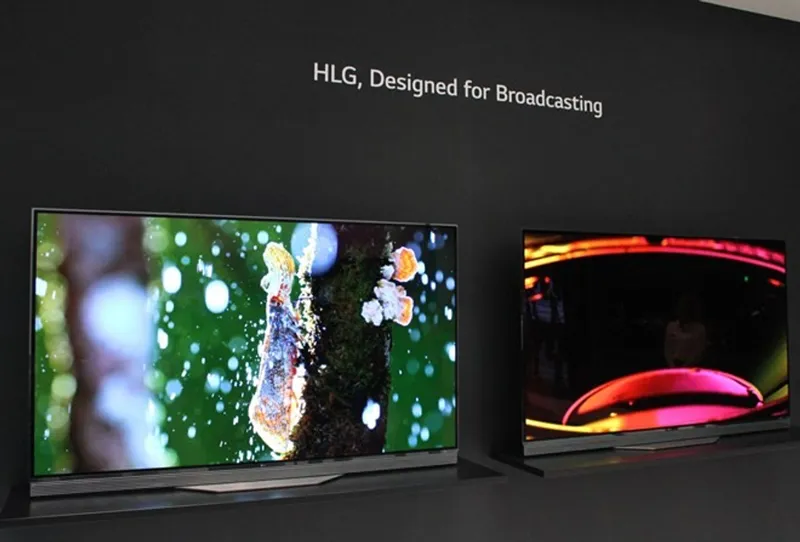
On the referenced file, LG OLED 2017-2024 optimized Settings, I’m with you all the way, but for life of me I can't figure out what “HLG” refers to under Nintendo Switch entry Seems I can’t attach a screenshot here directly https://share.icloud.com/photos/07dyX8pA9BfLpfBjbimj09q8g Current Switch output on LG TV, taken with my iPhone. The not-goodness should be able to be seen https://share.icloud.com/photos/064uvhb6jMORG-wWgaADLRT3Q Is the “HLG option” preferred the first entries you describe? Thx very much in advance.
Follow this guide: https://www.patreon.com/posts/69076578
Howdy P40LO - Props to you old-timer. I started myself in 1988 on a 486 PC playing Kings Quest, and using AOL dialup for Internet - stuck you receiver ends into modem. Can’t believe that worked. Anyway. Thanks for all your time and effort creating and maintaining all these files
Hello P40L0 & everyone. Your settings for my LG C3 are beyond great. Thank you so much. However about the VRR part it seems to me VRR and FreeSync Premium Pro seems to be complimentary and work better when both checked on my setup (Xbox Series X). Wishing you all a great Sunday o/
Is it safe to turn off screen shift on 2019-2022 models ?
Yes on 2021-2022 models (as LG fixed TPC/GSR also there), no on 2019-2020 (LG didn't fix them there)
Did some settings change for 2019-2022 chart like using pc mode like it changed for 2023 models wild o an update on the chart or ?
Basically 2019-2022 chart doesn't need to be changed. Except for the same old PC Mode suggestions, ALLM + FMM is not worth using there as there is no Dynamic color boosting and input lag will be higher so Game Mode (which is dimmer) + DTM (which is brighter and compensates for it) remains, along with the optional HGIG suggestion (with Black Level 50) for who prefers it. Noise Reductions were already Off with optional Low if people want to try those. FTDA -4 is still correct there and doesn't need to be changed etc.
Does fine tune dark areas -2 also count for lg c1 ?
No, only 2023-2024 series
Using a G3 What does the “Care recommendations” setting do under OLED panel care? Should this be off? Does turning “adjust logo brightness” off increase risk of burn in? The settings under clarity like noise reduction, MPEG noise reduction, smooth gradation, etc. are recommended to be “off” in your table but the values are grayed out for me as “low”. Is this right? Or does grayed out effectively mean they are off?
The Care and Logo options will further auto-dim the screen when static elements are detected but those are unnecessary since LG finally fixed their TPC/GSR algorithm which will already do that correctly and in a more efficient way (after the dimming with static elements it will gradually recover when elements are moving again). I have them off since I bought my G3 on launch and had zero image retention so no burn in issues (along with all my other settings) If you see clarity options greyed out you're probably in a game with ALLM auto enabled, so greyed out there = Off.
Any chance of the Planet Zoo / Coaster games calibration being added?
Is it okay to use black level auto instead of limited ?
It is ok as long the source is always Low/Limited.
I came across a Reddit post where someone said that one of the recent updates in the last few months has fixed the colour boosting issue in Game Optimizer. Is that true? Separate note, I find FMM with DTM on or with HGIG forced too dim at times. Is there another mode that can lift the brightness a bit more? Perhaps Cinema mode?
No, dynamic color boosting in game mode is only in 2024+ models. That said, I still recommend ALLM + FMM also there as it's still brighter on average. Yes, if you need another brightness jump you can use ALLM + Cinema + DTM
Why do you recommend black level 49 ind HDR Gaming ? Doesn’t that crush blacks ?
Not while using DTM, which will raise black level a tiny bit so 49 will compensate. When using HGIG this is not necessary and Black Level can be put to 50 again.
Using an LG G3 - what should I use for Apple TV for content that is in HDR, not Dolby.
webOS column for HDR (same for SDR and DV)
Grazie
Ciao Paolo, nel file che hai postato non vedo l'impostazione dell' HDR di sistema da ps5. Per il G3 quanto click bisogna dare nelle prime 2 schermate? Mi riferisco alle opzioni FMM+ALLM in HGiH e in FMM+ALL in DTM. Grazie mille
https://www.patreon.com/posts/63780325
Ciao Paolo, ho un
To have a great picture, do I have to force HGIG because I don’t know how
If you want to force HGIG in FMM you have to use ColorControl app via PC
Ciao Paolo grazie per l’ottimo lavoro che svolgi, una domanda, secondo le tue conoscenze esiste il modo di giocare in HDR con le impostazioni che consigli (Fmm+Dtm) e attivare contemporaneamente smooth gradient e ALLM mantenendo un input lag accettabile su G3? Grazie
No, non è possibile in alcun modo. Smooth Gradation viene automaticamente disattivato dalla TV non appena si entra in uno stato di input lag basso (Game Optimizer preset e/o ALLM e/o PC Mode). Detto questo, se vuoi migliorare un po' i gradienti senza Smooth Gradation ti consiglio la PC Mode (icona HDMI messa su PC) ma considera che così facendo sconsiglio poi di vedere film da quell'input (perché PC Mode disattiva quasi tutto il resto delle altre impostazioni di Clarity).
Thanks for the extended work, y just have 2 questions wich game can be a good example for notice the advantage on ALLM + FMM +DTM vs HGiG and GOpmtimizer, in color and brightness. The other is for switch you have any recommendations on settings apart or HLG, thanks again
The difference between the two will be noticeable on any game, really. If you turn around the camera on brighter colors it will be much more noticeable. For Switch input force HLG: On and then use PC Mode and/or HDR Game Optimizer preset (as Switch doesn't support ALLM) + the same suggestions for HDR gaming while adding Sharpness 20 or 25 + Super Resolution: High.
Do you recommend LG’s native apps for streaming? I tried using the Roku 4K stick, but it seems to artificially upscale everything to Dolby Vision, thereby limiting my ability to faithfully apply your recommended settings. Thinking about getting an Apple streaming device but I’m not sure if that has the same problem.
webOS apps are perfectly fine
Great stuff! For the Xbox columns, I’m not sure if the settings apply to movies (non-ALLM) or games. I’m just not sure which settings apply when configuring SDR/HDR video game content vs movies content. Also, am I correct that “movies” basically applies to any non-video game video content? Thanks!
After you launch a game, apply the "game settings" under Xbox Columns by selecting SDR/HDR Game presets (if you're on pre-2023 model) or SDR/HDR FMM presets (if you have a 2023+ model) Then when you're outside games, you can use the same settings as "movie columns" for webOS, so SDR ISF Dark, HDR Cinema and DV Cinema Home presets with their respective settings. After everything is setup for every scenario, all will switch automatically based on content. ;)
I have an LG C3 and am using a Hue Sync Play Box into HDMI 1 with a Switch, laptop, and Amazon Fire Stick attached to it, and a soundbar with eARC into HDMI 2. I can apply most of the settings you listed in your spreadsheet for the various media types, however, I cannot change the HDMI symbol due to the Hue Sync box. Are there any other settings that I should adjust to accommodate for this?
If I only use Xbox, should I turn that “VRR & Sync” off?
Yes. Only keep AMD Freesync Premium on the TV for Xbox input
Could you do the outer worlds spacers choice edition? It's currently in the PS Plus catalogue and I'm not sure what settings to apply
I'm sorry if this has been asked, but is HGIG gone as an option for HDR? And if so, is DTM now more accurate than the old LG C1 HGIG?
HGIG is still there and still an option for C1. If you always play in a dark room you can try HGIG otherwise try DTM and choose what looks best for you for most games.
Hey P! The C2 has recieved a couple of updates, are there any changes for the C2 config as of 2024? Thanks You for all your hard work! GRACIAS !!!!
Nope, all the same as far as I've seen ;)
Thanks for all the hard work that goes into developing and sharing information. Are you absolutely certain that there is no latency penalty when using Filmmaker mode with ALLM on vs Game Optimizer mode? what measuring tools did you use to confirm this? 1000 FPS camera? The picture quality difference is significantly better in FMM but curious if it comes with a penalty.
Yes, there is a small but negligible lag penality when using the new DTM and even less when forcing HGIG on it via ColorControl. Something around +4-5ms in the first case and +2-3ms in the second case. When you play at 120hz + ALLM + VRR you won't even notice, while you will always notice the much better PQ.
Hey. Thank you so much for this. Even signed up because you deserve it. Quick question. If i have the lgsc9s would i still stay in bitsream or go over to pcm? Also with ps5 connected to my tv and sounbar connected to the earc
Bitstream also in your case ;)
What is your black level for FMM+HGiG
50
Hello I got G3 and going to mount it tomorrow. I’m confused with the HDMI icon, should I have the game console icon for APPLE TV, PS5, BLU RAY PLAYER(UB820) AND MAC MINI? Still disable the 4:4:4 pass through for all of them?Thanks PS- Which do you recommend FMM+DTM or FMM+HGiG(color control) Thx again
Yes, Game Console and 4:4:4 disabled is ok for all them (if you also watch movies/video from them). For PS5 and Mac Mini you can opt for "PC" HDMI if you don't mean to watch movies/video but only game and regular browse/work from them, otherwise stick with "Game Console". Personally I use ALLM + VRR + FMM + (forced) HGIG for gaming on my G3 ;)
Sono d'accordo con te, ma il problema cardine in questi pannelli è la luminosità.
Non con i settaggi giusti ;)
Do you have a post that compares the visual difference between FMM + DTM On/Off/HGIG vs Game Optimizer with HGIG? If not, it’d be a great idea for a new post so people can see the difference 😉
Yes, here: https://youtu.be/T81PDB0rME8 (Cinema with DTM: Off vs Game Optimizer with HGIG vs FMM with the new DTM: On) FMM + forced HGIG is missing (I found out only later) but imagine it with the brightest and most accurate highlight/sun ;)
Do you turn on VRR for unsupported games? I keep wondering if I should have it on lol
Yes, VRR should always be on when gaming. If a game has issues with it just remember to disable it only for that game
Hey, is there anyway you could use a different image hosting service for the images with all the settings? Imgur on mobile is actually trash. There is no way to zoom in on the images in the Patreon app, Imgur app, or Imgur website. End up needing to do a whole workaround to just to save them to the phone to finally be able to zoom.
Click the thumbnail image to enlarge it, then you can zoom. Better if you download it first and/or use a PC (or Desktop mode) anyway. Even if imgur is not ideal on mobile, it's still the only one not auo-deleting the images after a while...
Merry Christmas honestly your settings for movies really helped me out I really forgot to ask on that day is this same is applicable for hdr 10 and dolby vision movies also as they both are different formats
Yes, it's the same for both
hello :) is it me or in the main image of Optimized Settings for LG 2019 up to 2022 OLED Series: the value "49" is meant for britghness and not for black level?
Yes it's Brightness, but in most recent model (e.g. 2022 series) it's named "Black Level" now ;)
What is your advise on sharpness for HD 1080p content as I owns c2 currently 4k hdr is best with zero but 1080p is 10 is good to go please advise or 0 only
Like you can see in the 2023 chart, I recommend Sharpness 20 for Movies and TV (no matter if sub-4K or 4K) and 0 for Gaming.
For a PS5 hooked up to a LG CX, should you have VRR enabled in the system settings?
Yes
I'm confused over the colour space on the series x..I'm good at figuring things like this out for myself usually but i can't get my head around if i should stick to standard as recommended or pc RGB i have an LG G2.it seems to look better in pc RGB but that could just be in my head lol cheers for any help
Stick with Standard and also Limited on the TV. You can read more here: https://www.resetera.com/threads/lg-2017-2023-oleds-optimized-settings-for-xbox-one-series-x-s-ps4-ps5-switch-pc-and-webos-movies-sdr-hdr-dv.73304/post-99290590
For 2019-2022 LG's, why do you recommend not using the "PC" mode for game consoles? PC mode allows full 4:4:4 chroma subsampling which consoles utilize.
I recommend Game Console input icon as PC Mode will force disable very important settings for movies as Smooth Gradation, TruMotion and others which work perfectly fine with Game Console icon and ALLM. Also on Xbox even with Game Console icon you will preserve RGB Output which will be almost the same as 4:4:4 so you are not losing anything. PC Mode should only be used on PC and only when not watching movies from it.
Any advice on sharpness? Should we put at 0 or 10? How is it working? I've noticed that if i Increase sharpness it "enlight" as well a bit the picture. Any input will be appreciated 👍🏾 thxs . LG OLED 2021 / XSX
0 is best for Games (which already do their upscale to 4K and then add their sharpening pass), 20 for Movies (for improving the sub-4K upscale and definition when also coupled with Super Resolution: Low, all without introducing noticeable negative effects). Sharpness 0 will also have lower input lag in games.
Hi I have a question : fine tune dark areas to -4. I realised that it was changing the HDR black level settings within the console (the panel with the columns that should disappear until not be seen in the black square). Vincent teoh suggested to push the value to the left until it's maxi (so even further after you stop seeing the lines) . What's your take on that? Leaving the value at soon as the line disappears and blender in black and put -4 in fine tune dark area or pushing to the max withing the console AND fine tune as well? LG OLED 2021 here.
Just use the recommended settings for PS5 and Xbox HDR Calibration apps: +25, +25, 0 Clicks for DTM or +14, +14, 0 Clicks for HGIG on PS5 0, 4.000, 4.000 nits for DTM or 0, 800, 800 nits for HGIG on Xbox (you can see the exact nits for each section in the upper right corner by pressing LT + LB + RT + RB) FTDA -4 is then being applied on top of that.
If I click to see full image of settings it asks me to get the image on Imgur app. Before I was just opening the image directly in my browser.
The link is the same, so maybe try with a different device (e.g. PC) or open it as Desktop when using a mobile browser.
Which OLED do you recommend for gaming? Looking to upgrade from a C1 and a Sony A80J. Along P4 but also ask of you, thr community 🙏
G3 is definitely the biggest upgrade you can have right now, both for gaming and anything else 😉
I'm playing Ghostrunner 2 (LG C1) and it just went from 120FPS to 59 after I adjusted HDR settings... Edit: Figured it out, you have to restart the game and enable re-enable VRR for unsupported games.
Can you please do the optimized settings for Ghostrunner 2?
I'll have a look into it
Hello P4ol0! Oh boy i have a little problem with my 55C3 bought this week. I already using your update settings to SDR content, HDR and DOlby Vision. HOWEVER, in SDR GAMES PS5/ Advanced Setting/ Clarity i ONLY have a option to choose OFF in Super Resolution! At Noise Reduction, MPEG Red, Smooth Gradation are LOW ( i cant change them), and TruMotion is chosen Cinematic MOvement in TruMOtion! PLz Help me dude. OBS: I will try HDR in PS5 now
OH and of course. I became a patron cause your work is superb, awesome. Same problem with "hdr gaming" as explain above.. I bought the LG soundbar S90qy too. Do you know some video on youtube or something like this with some tips about configs about this soundbar? Thx for all.
Hi P4olo! First, thank you for your awesome work!! I have recently bought a 77G3 and have followed all the settings you have recommended. There is an issue with the FMM+ALLM for gaming in HDR (PS5 and XSX. ) The screen dims in a few seconds, gets darker and stays very dark when I switch to FMM. When I switch back to Game Optimizer, it gets again brighter but when I switch again to FMM, it gets again dark. I don’t understand why because I have followed all your recommandations and energy saving + AI are disabled. I have also the last firmware installed. Can you please help me?
Are you sure you've applied all the recommended settings both in SDR and HDR? For example Gamma 2.2 in SDR FMM and DTM: On in HDR FMM? It should actually be the opposite, with ALLM + FMM being brighter than Game Optimizer presets. I would double check everything with the most updated 2023+ Settings' Chart. Also consider that Game Optimizer preset with DTM: On may "seem" brighter but it's actually the old DTM overexposing/overblowing the mid range compared to the much better and more accurate new DTM of HDR FMM.
Anyone else getting a lower res picture of the tv setting recently? Both through this app and imgur I get the same thing
Try using a PC or download the full res version from the imgur link
Apologies for my ignorance but when playing media on PS5 or Xbox series, is there anyway to make the picture mode switch over? For example from game mode to dark picture mode automatically?
Yes, you can do it by enabling ALLM (Automatic Low Latency Mode) on both consoles and then setup SDR ISF Dark and HDR Cinema outside games and SDR/HDR Game presets (on 2019-2022 LG OLEDs) or SDR/HDR FMM presets (on 2023 Series and newer) inside games, each of them with suggested settings. Then all will switch automatically... ;)
Hey i have C1 and ps5 , Why is it necessary to set rgb range limited and not auto or full?
You can read more here: https://www.resetera.com/threads/lg-2017-2023-oleds-optimized-settings-for-xbox-one-series-x-s-ps4-ps5-switch-pc-and-webos-movies-sdr-hdr-dv.73304/post-99290590
Do you not get the dreaded “no image” screen on the G3 with the Series X? I had to turn off 120hz to get it to stop randomly doing that
Nope, all good here. That most probably is a cable issue
I have a question regarding of the fine tune dark area setting. I have an LG GX Oled 2021 I think and sometimes -4 can look a bit dim and GX it's notably less bright than CX. With all LG updates do you know if LG corrected this issue (so we can put it back to 0 ) or should we stick to -4? Thanks !
Stick with -4. It will not "dim" the entire picture but just fix a slightly raised black level when using VRR compared to no-VRR
Thanks man. Do you maybe have a recommendation for AI upscaling in combination with the G3 or settings in General for this combination? :)
As you can see in the updated 2023 chart in this post: Leave everything AI (for Picture): Off ;)
Alright. Does it make a Difference in General that im using a Nvidia shield?
Nope, same thing as webOS input.
Hey man, thank your very mich for your Work!! Do you have Settings for Sports SDR? I have a LG G3 77 inch
You don't actually need a "Sport" variant honestly. Just use the suggested webOS SDR settings for everything SDR except games.
Hey the picture table settings from 2019 2022 LG Oled series isn't appearing anymore ?
My bad, should be fixed now!
Thanks for the hard work brother !
I'm sure you've answered these questions regarding 2019-2022 OLEDs several times but I'm struggling to find the answers. What is the benefit of 49 over 50 brightness? What is recommended about low smooth gradiation? Why isn't clear cinema recommended? On average, if a game doesn't support the system level HDR calibration, would you recommend DTM in most cases? Thanks for your hard work.
Brightness 49 will fix some very slight raised black level issue without crushing blacks Smooth Gradation: Low will remove color banding artefacts without scrubbing away fine details TruMotion: Cinema Clear will introduce noticeable "soap opera effect" ruining movies original motion while Custom 2;2 will fix/smooth out judders without any noticeable SoE DTM: On with Peak HDR Luminance set to 4.000 nits and Paper White to 150 or 200 nits max (whenever possible) is the best "set it and forget it" option, even if could be a bit too bright in some games. On 2023 models it's the only recommended option as coupled with ALLM + HDR Filmmaker provides the best picture quality of all, in all cases (even compared to calibrated HGIG in Game Mode).
The new note to disable DTM for Switch HLG HDR on the 2023 series chart, does that apply to older series as well? Makes it significantly dimmer on my CX.
Yeah, it applies for those as well. The dimming you see is mostly for UI/HUD elements and Gamma, but should still be much brighter than SDR Game preset. If not, re-enable DTM.
Can you reupload the pciture for 2022 LG OLED? The picture in the link are super blurry
Did you try to click for full screen and then clicking again the picture for max res? You can even download it from there. Otherwise try also zooming the Patreon thumbnail or use a PC for viewing, not a phone.
Paolo mi aiuteresti ad impostare la mia g1 in inglese non riesco a capire come impostare i miei 6 profili
Scrivimi un messaggio privato spiegandomi cosa non capisci
For a Nintendo switch are you supposed to set black level to low and limited on the console? Or auto
Always Limited-Low in all cases with these TVs.
Hi i receive a mail with New optimise setting for lg c1 you replace pc icon by game console icon its normal ?
Yes, you can see the reasoning behind the HDMI icon switch here: https://www.resetera.com/threads/lg-2017-2022-oleds-optimized-settings-for-xbox-one-series-x-s-ps4-ps5-switch-pc-and-webos-movies-sdr-hdr-dv.73304/post-101180311 While the latest version of my 2019-2022 settings is here: https://i.ibb.co/171q23s/LG-OLEDs-2019-2022-Overall-Settings-Chart-P40-L0-v11-8.png
Quick question: for some of the settings like white balance and what not. You have two values. One in black and one in gray. Which do we put?
See the keys of the table. The black value is my recommended value, the gray value is a "personal preference" value if you like it more that way ;)
Hi! Thanks a lot for these numerous tips, thanks to you, setting this up has become much easier! However, I have a few questions, (waiting for approval on the forum) so I'll ask them here as well. 1. In all these cases of image settings (SDR, HDR, etc.) should we leave the AUTO FILMMAKER option selected? 2. Is it possible to check how much real FPS the game gives? For example, in Flight Simulator Game Optimizer shows about 116fps, the pop-up window after pressing the green button seven times shows 117Hz, and in fact the game is supposedly 30fps (?). 3. Staying on the topic of Flight Simulator. I have all options set as in the tables, i.e. VRR and 120Hz enabled. By disabling any of these options can I get a nicer picture at the expense of smoothness or does it not matter and the game will always give me the same experience? 4. In gratitude for your work and in order to get the best image, I became a patron. However, I do not know how to understand the settings for some games that are described, such as Sniper Elite. "The game DOES USE/APPLY Xbox & Playstation HDR Calibration app settings." Ok, but which setting will be better DTM or HGIG? Thanks in advance for your reply and thanks again for all your work!
1. In all cases "AUTO FILMMAKER" should be OFF. This because apps with Filmmaker metadata like Prime Video could force TruMotion: Off even if you've set it to Cinematic Movement (which is great), so you don't want that 2. Yes, summon the purple game bar by pushing the gear button when in SDR/HDR Game Optimizer mode to see at how many FPS the game is going. Anyway, Flight Simulator with VRR enabled will unlock the framerate and can actually go even above 60-70fps in some spot! 3. I highly recommend leaving Xbox console in 4K/120hz + VRR enabled all the time, then on the TV disable regular VRR + G-Sync and only leave enabled AMD Freesync Premium. Then you can choose in-game which Performance/Quality mode you prefer. In the case of Flight Sim, you don't need to do anything as the game already unlocks the framerate (while mantaining the same resolution and image quality) 4. There isn't a definitive answer to what's better between DTM and HGIG. It will depend on the game specific HDR implementation + if you're usually playing in a totally dark room or not + if you're willing to change settings from a game to another or just want a "set it and forget it" approach. You can read my overall analysis and suggestions after personally testing around 200 HDR games on Xbox & Playstation here -> https://www.patreon.com/posts/78943775 Thanks for your support :) -P
I don’t see the option for setting VRR for games only on Series X, is this not available yet?
Yeah, it's still for the Insider builds but should be available for everybody soon.
How do you come to the hdr paper white figure of 150?
I came to that figure after personally testing almost 200 HDR games both on Xbox and Playstation, both using Dynamic Contrast, HGIG and DTM. 150 nits as Paper White (or White Point) seems the most balanced value in order to have enough bright UI/HUD, bright whites without clipping highlights and proper night rendition in most cases. They also seem beneficial in compensating DTM over exposure of night scenes along with setting HDR Brightness to 49 for 2018-2022 series when using it. If you're using Dynamic Contrast: Medium on LG 2017 instead, you can even settle with Paper White 200 or 250 for improving the overly dim preset of those models (with no HGIG and DTM support).
I saw you recommended to change the input back to game instead of PC. Only question I have is on the PS5 side, should we change the 4k video transfer rate to -1 when using 60hz or leave it on automatic? I ask since on 60hz it defaults to RGB instead of 422, given only the PC input can fully display 444, I wasn't sure if this could potentially cause issues. 120hz already displays at 422, but 60hz defaults to RGB when on automatic. Interested to hear your thoughts on this.
Yes, you can see the reasoning behind the HDMI icon switch and full changelog of latest version here: https://www.resetera.com/threads/lg-2017-2022-oleds-optimized-settings-for-xbox-one-series-x-s-ps4-ps5-switch-pc-and-webos-movies-sdr-hdr-dv.73304/post-101180311 PS5 side: I would leave "Automatic" video transfer rate, but just making sure RGB range is manually set to Limited, so basically the same as XSX suggested settings. This means that instead of the console directly output 4:2:2 to the TV, the console will still "try" to output 4:4:4 RGB Limited but then it's the TV doing the chroma subsampling for the "Game Console" input, providing better results. Transfer Rate (or Chroma Subsampling) and Video Range are two separate things. You can also see why RGB Limited range is always recommended for these TVs here: https://www.resetera.com/threads/lg-2017-2022-oleds-optimized-settings-for-xbox-one-series-x-s-ps4-ps5-switch-pc-and-webos-movies-sdr-hdr-dv.73304/post-99290590
I'm sorry, but Cinematic movement ABSOLUTELY adds a soap opera effect. I've seen it myself. It's certainly diminished but I can absolutely see it very easily. The fact that you now make this your recommendation is insane and this makes me not want to support you further.
Only a very trained eye would notice SOE with Cinematic Movement, especially on 2022 series (and newer I imagine) while the inherent judders of 24 fps movies on these (Instant Response Time) OLEDs would be much more noticeable, even with Real Cinema / Cinema Screen enabled. For these reasons my recommendation shifted, but this doesn't mean you can't still prefer Real Cinema over it, so I'm sorry for you to leave just for that. As you wish tho
Hola P40L0, te quiero mucho
Which one of the settings do I apply to a Nintendo Switch on my 2021 LG OLED. The graph never really goes over that, unless I'm supposed to copy the settings of the Web OS SDR?
Read the red note at the bottom... ;)
Have an option for Dolby Precision Detail, Should that be on or off?
DV IQ should be on, but if you notice a luminance change too often and it bothers you, turn it off.
Just a quick one. You say turn on AI brightness (DV IQ). I can't find this setting on a C2. There's an AI brightness setting under general but I can't find a reference to DV IQ
It turns on DV: IQ when Dolby Vision is activated.
Why is Cinema Home recommended for Dolby Vision and not Cinema? I understand that Cinema is considered more accurate than Cinema Home, no? Also, why is DV IQ recommended on? I would think that should be left off.
DV Cinema Home is preferrable for movies as DV Cinema is overly dim (for most rooms except pitch black, 100% light controlled environments) most of the time, even when setup correctly. On the contrary, DV Cinema Home can often be a bit too bright, that's where DV IQ can counter it when necessary. Absurdly the most accurate DV preset for most room condition is DV Game preset (which doesn't need DV IQ) but where you can't enable Real Cinema tho. That said, even with Real Cinema Off, DV Game motion is much better than regular DV Cinema and DV Cinema Home with Real Cinema off, so it could even be a valid alternative to DV Cinema Home with RC: On.
Why 8 bit color depth for hdr? Why not 10 bit?
Xbox "Color Depth" option is misleading as actually 8-bit is equal to an "Auto" setting where: 1) For SDR: it will preserve the native 8-bit depth of the source content without any reconversion and just pass it to the TV as is (also in 4:4:4 when using PC Mode); 2) For HDR: the console will auto switch to native 10-bit, again just passing the HDR content original color depth without any conversion (YCC 4:2:2 should be OFF too for this to happen); 3) For DV: the console will auto switch to native 12-bit, just passing the DV content original color depth without any conversion If you change Xbox "Color Depth" option to something else, it will only affect the point 1) above for SDR, where the console will also "re-convert" (and usually compress) the original 8-bit signal to something else, for example forcefully reconvert and upscaling it to 10-bit or 12-bit (at 4:2:0 chroma instead of original 4:4:4 in PC Mode too), so it's not recommended.
Ahh that makes perfect sense. Vincent had recommended high but was using the PS5 UI/HDR setup when measuring, if I remember correctly. Like you said, makes more sense to just stick to limited if the games were made with that in mind. Weird that the PS5 always seem to stick to full when auto is on. Anyway, been using your settings the last day, looks great. Thanks!
I have the LG G1, setting up your recommended settings for PS5 HDR, would you still recommend limited over full for this model? Just curious as to why limited is preferred over full. Thanks!
Except for internet browser and pro apps, all movies and games are created within Limited/Legal video range/target. Ideally only on PC you should have: - 4:4:4 RGB Full + High Black Level with SDR @ 8-bit; - 4:4:4 RGB Limited + Low Black level for HDR/DV @ 10-bit (for HDMI 2.1 devices); On PS5 this is not necessary as only its Dashboard UI will actually leverage Full RGB but nothing else. Trying setting PS5 to "Auto" RGB range and the TV to "Auto" Black Level could also create black levels mismatches sometimes due to a bug where the console will correctly trigger "Limited" RGB when HDR is handshacked, but the TV's "Auto" setting will actually remain to High black level. By manually forcing Limited/Low you will avoid that and basically everything will always look correct.
Quick question. For an Apple TV would you just recommend. The WebOS settings?
Yes
Interesting. Going over the updated chart for the 2019+ OLED and am wondering if you could explain why turn on AMD FreeSync Premium? From previous posts I’ve read, the built in HDMI already has its own form of VRR. Thanks!
Initially AMD FreeSync had issues coupled with Dolby Vision at 4K/120hz output on XSX but this got fixed, therefore it's the preferred VRR method as it is platform agnostic + it includes additional benefit for LFC and input lag when VRR is active.
I’m confused. The old settings were 49 for Brightness and 95 for SDR content. What’s changed?
Well, I retested newer models with updated hardware and software and Brightness 50, Contrast 85 is now more accurate for SDR.
Even if results will be very similar, I would use DTM in your case. See also the section for 2018 Series in the post where you can find other small changes to do compared to 2017 docs.
If I have a 2018 series (B8) tv should I keep Dynamic Contrast on low in HDR Cinema or should I use DTM insted ?