
How to dramatically improve "SDR-only" HDMI devices (like Nintendo Switch) thanks to forced HLG
Thanks to recent GamingTech findings, there is a new way for noticeably improving all "SDR-only" devices connected to LG OLEDs, like Nintendo Switch for example.
Trying to simplify it as best as I can:
There is another TV "Hidden Menu" which will allow you to "force" HLG (Hybrid Log Gamma) HDR to all SDR/HDR contents for the specific HDMI input currently in use when changing this setting;
HLG is meant for TV broadcast and not an ideal replacement for native HDR10 contents (which are still better), but it actually represents a big improvement over standard SDR range contents;
See it mainly like a free "Auto HDR" feature similar of what Xbox does but for all things SDR. It is also better than the forced HDR done by PS5;
That's why these points above should fit very well to all "SDR-only" HDMI devices (like Nintendo Switch in particular) which are using at least one specific port of your LG OLED. You can safely apply this trick for those without any actual drawback, as the other HDMI ports won't be affected;
Avoid forcing HLG for all the other devices which are capable of both SDR/HDR10 instead.
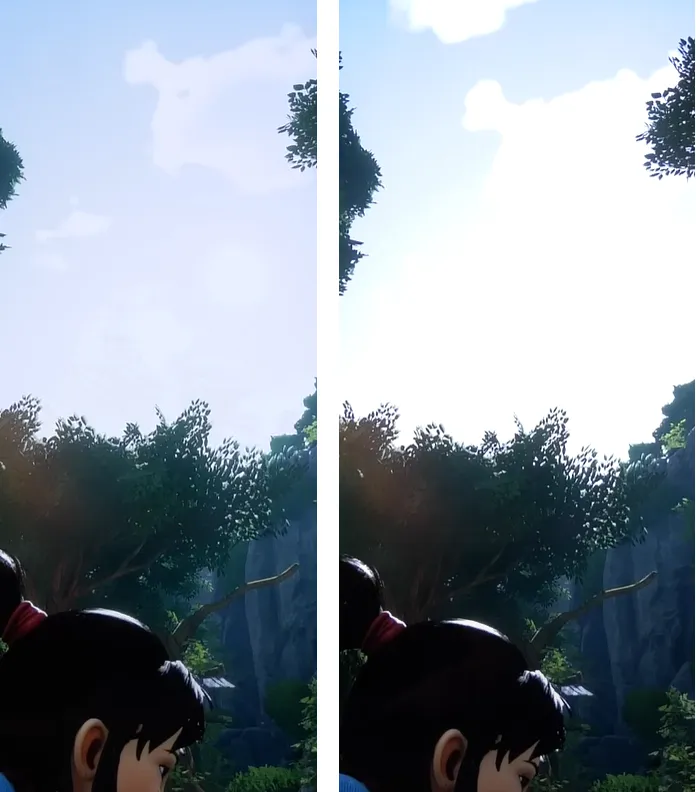
(Regular SDR on the left; Forced HLG HDR on the right)
To force HLG HDR for a specific HDMI Input:
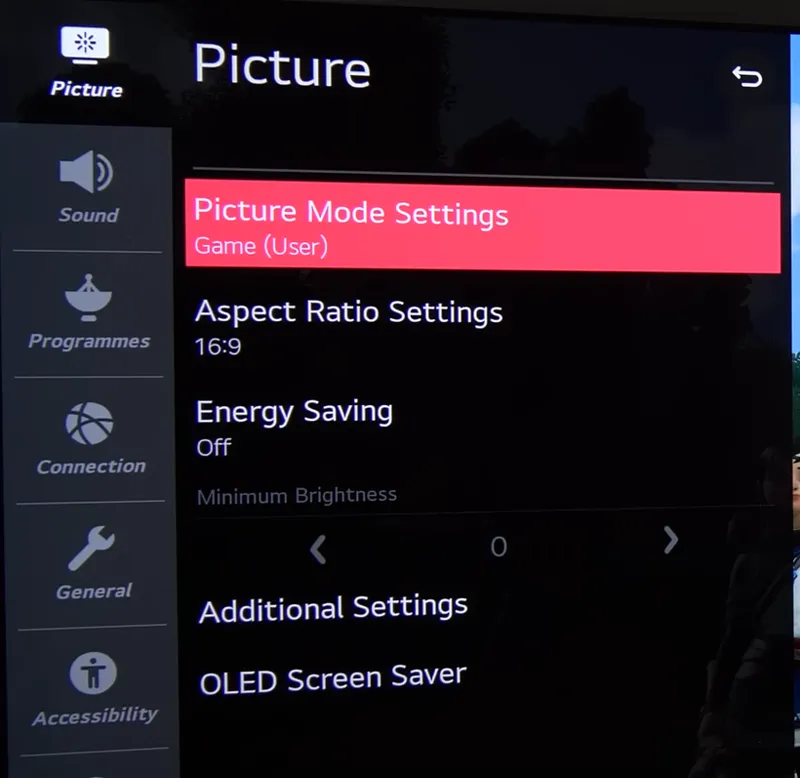
Switch to the device on that input (e.g. Nintendo Switch) and open the Picture Setting menu, then leave the selection/highlight on the picture setting itself:
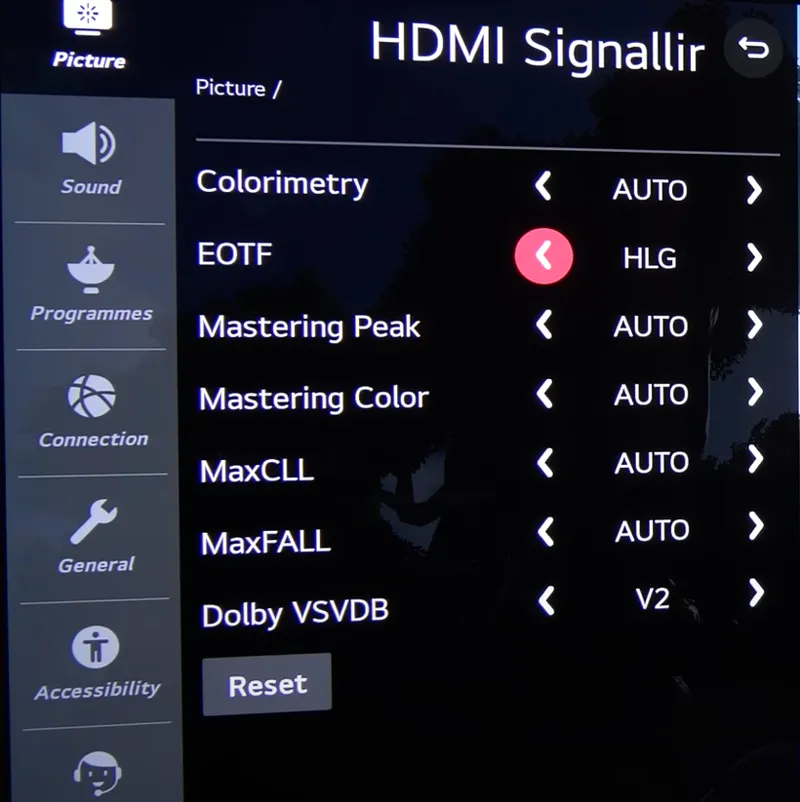
Now press 1113111 and the Hidden "HDMI Signal Override" menu will appear
Now go into the EOTF section and just select/enable HLG
And that's it!
Just keep in mind that HLG HDR will be the new default and different preset for all SDR for that HDMI input. So just use the recommended settings for HDR instead after the switch.
Do NOT change any other setting in this menu (you don't need to)
I personally tested this on Nintendo Switch and the PQ improvement was insane, but this could not fit all games, contents and cases so if you somehow prefer the old/standard SDR look you can safely revert that setting to AUTO and everything will be back to normal like before.
Enjoy! :)
-P
Comments (15)
Which tone mapping standard should be used when forcing this? HGiG?
This is only meant to be used on SDR only consoles like Switch 1. Don't use it with consoles that do support HDR
Can I use this on my PS5 when I play SDR games like withering waves for example ?
I don't recommend it as it affects the entire HDMI input, so also "ruining" HDR and manually switching the option between SDR and HDR is not ideal either
Would you recommend this on the Switch 2 instead of its native HDR support, since it doesn't really do a proper job of displaying or converting to HDR?
No, Switch 2 has native HDR and a system level calibration app for it. Only Nintendo games have bad native HDR currently but hopefully they will improve in the future
Can you post sdr settings for dying light 2?
If everything is setup as suggested (TV, Console/PC) then usually default in-game SDR settings are almost always already good.
Hello! I’m sorry for being so late, I just discovered your Patreon and it is amazing. Great work! If, for some reason this “auto hdr” looks weird … do you have a “normal” way of setting a C1 for switch? I put Color Gamut on Native and Color on Warm 10 , Sharpness 10 … I think that is the most decent picture I got for my switch. (It looked infinitely better on my former Samsung QLED 2017 😞). Have you seen a game on switch that doesn’t look good with your auto hdr settings? Thank you so much. Keep up the good work. I can’t believe how incredible Forza Horizon 5 looks now thanks to you! (I was using Dolby vision and didn’t change bright for more than a year!)
If you're using the forced HLG HDR method you need to use the same settings of HDR Game preset (in my chart) for it with just Sharpness 25 and Super Resolution: MEDIUM or HIGH and then try to enable Dynamic Tone Mapping. What does seem off to you with this? Another alternative for Switch would be sticking with SDR and the same settings for SDR Game preset but with OLED Light 100, Sharpness 25 and Super Resolution: MEDIUM. In both cases be sure to use RGB Limited on the console.
Do you think there’s any way to make this only affect game mode? I have my Apple TV and Switch through an HDMI switcher due to needing more HDMI on my G1. When I switch the switcher to Switch (lol) it jumps into game mode. Ideally I’d want this HLG only affecting game mode on that HDMI input so when I go back to the Apple TV and it switches to cinema it would be regular SDR. Probably not possible, but I figured I’d ask. Also, do you plan on doing an HDR settings post on Hogwarts Legacy? Thank you for all that you do!
Hi! Unfortunately once you force enable it will override everything SDR for that input, not only SDR Game Mode (that's why I only suggest it for SDR only gaming devices like Switch for now). About HL, I've already posted my Optimized Settings for it 4 days ago, here: https://www.patreon.com/posts/hogwarts-legacy-78353303 ;)
👍
it doesn't work for me LGC7
Sorry, I forgot to mention this seems to work from LG CX and later models only for now. I've yet to test it on previous ones, but thanks for the clarification for 2017 Series in the meanwhile!