
Xbox HDR Calibration app - HDR Optimized Settings
The idea behind having the same calibrated system-wide HDR settings (or "metadata") for all HDR games is noble and both Microsoft and Sony really tried to make this a reality in order to finally fix the pain in the ass the average user is facing manually adjusting in-game HDR to the real HDR capabilities of the TV in a different way: every time, on every game. (if he's lucky enough to have the bare minimum control over it, of course).
Unfortunately, even if system HDR Calibration is a reality for years now, very few games (and devs) actually leveraged on it.
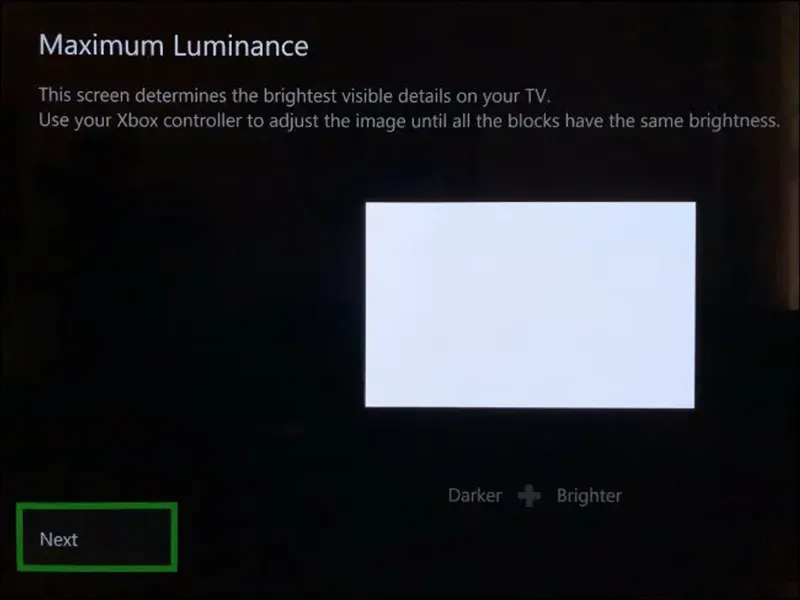
For those cases, let's see the Optimized values for Xbox HDR Calibration app:
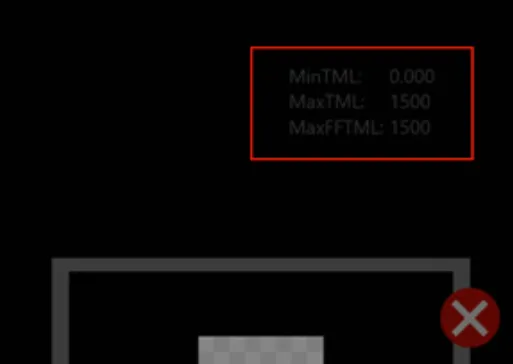
Press LT + LB + RT + RB at the same time.
Then check in the upper right corner the current entered values for each of the three section of the app.
If you have an LG OLED and:
> you're using Dynamic Tone Mapping or Dynamic Contrast, set:
First screen / MinTML: 0.000
Second screen / MaxTML 4.000
Third screen / MaxFFTML: 4.000
> you're using HGIG:
First screen / MinTML: 0.000
Second screen / MaxTML: 800 or 1.000 (for G2/C4) or 1.500 (for G3/G4/C5/C6) or 2.500 (for G5) or 3.100 (for G6)
Third screen / MaxFFTML: 800 or 1.000 (for G2/C4) or 1.500 (for G3/G4/C5/C6) or 2.500 (for G5) or 3.100 (for G6)
If you don't have an LG OLED and:
> you don't have an HGIG option:
First screen / MinTML: 0.000
Second screen / MaxTML: Increase it until the logo will totally disappear
Third screen / MaxFFTML: Increase it until the logo will totally disappear
> you're using HGIG:
First screen / MinTML: 0.000
Second screen / MaxTML: Set your real TV Peak HDR Brightness (in nits)
Third screen / MaxFFTML: Set your real TV Peak HDR Brightness (in nits)
Much easier and accurate than PS5 HDR Calibration app.
Comments (11)
What HDR settings to use for games that ignore the system calibration? Specifically max brightness, paper white, contrast etc (LG G5). I noticed GTA (X/S version) caps out at 1500 but some games (Crimson Desert) allow a lot more.
Possibly the same of system calibration (if the game also offer similar Min/Max HDR Luminance sliders in nits values) If not it should me measured with external tools before a suggestion. I did it for you for over 300 HDR games here so far ;)
UPDATE - 18/08/2026 - Updated Peak HDR Luminance for C6/G6 after latest TV firmware updates.
should i be using DTM or HGIG for games that are using auto hdr?
HGIG
Ciao Paolo, dopo l'ultimo aggiornamento su LG c5 che settaggi devo utilizzare se uso l'HGIG non tramite Color Control ma tramite l'attivazione degli slider professional impostati a +100? Sempre i settaggi relativi all'utilizzo dell'HGIG? Grazie in anticipo!
Dipende da che pannello ti è capitato. Il C5 può arrivare fino a 1.500 nits nei casi migliori, ma mediamente dovrebbe essere attorno ai 1.300-1.400 nits. Ti direi di mettere 1.400 ma vedi tu stesso nella calibrazione di sistema fino a dove puoi arrivare quando sparisce il logo, dopodichè dai giusto un click extra in avanti (+50-100 nits di margine) e sei a posto
UPDATE 2025/07/16 - Added values for LG G5/C5 OLEDs
Should I calibrate the HDR with STM on or off? Series X with non HGIG display. Thank you!
If it's not an LG OLED, calibrate with DTM: Off (and no HGIG) then re-enable DTM.
Dude. Best idea to subscribe to your patreon. Thanks for all those info. I feel I didn't use my LG OLED to its full potential !