
Cyberpunk 2077 - HDR Optimized Settings
The game is NOT using/applying Xbox/Playstation HDR Calibration app settings.
The game had one of the worst HDR implementation with its initial release (washed out/wrong colors and wrong gamma) but after 1 year and a half since release things noticeably improved with Patch 1.5 (and free Next-Gen consoles Upgrade) and now even more with patch 2.3
First of all "Use HDR10 PQ" over "HDR10 scRGB" in order to have a true/native HDR10 presentation (and not a SDR->HDR conversion)
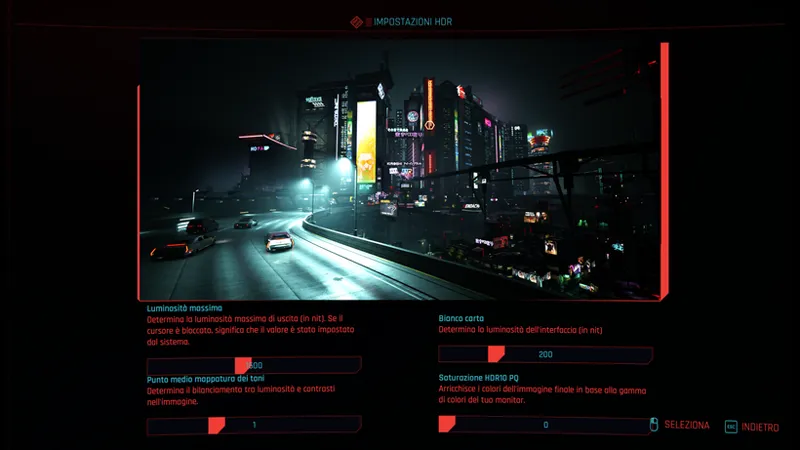
Peak HDR Luminance can be controlled with "Maximum Brightness" slider now up to 3.000 nits;
"Paper White" value will just modify the UI luminance;
"Tone-Mapping Midpoint" will control the gamma;
The "HDR10 PQ Saturation" slider was introduced with Patch 2.1 and will alter the peak luminance also of colors, not only highlights.
With patch 2.3 finally the reference image used in this section is now accurate and represent the actual changes you make with the sliders.
If you have an LG OLED and:
> you're using Dynamic Tone Mapping or Dynamic Contrast:
Set Maximum Brightness slider to: 3.000 (nits; Max);
Set Paper White slider to: 200 (nits);
Leave the HDR10 PQ Saturation slider to: 0 (Default).
> you're using HGIG:
Set Maximum Brightness slider to: 800 (nits) or 1.000 (for G2/C4) or 1.500 (for G3/G4/C5) or 2.400 (for G5);
Set Paper White slider to: 200 (nits)
Leave the HDR10 PQ Saturation slider to: 0 (Default).
If you don't have an LG OLED and:
> you don't have an HGIG option:
Set Maximum Brightness slider to: 1.000 (nits);
Set Paper White slider to: 200 (nits);
Leave the HDR10 PQ Saturation slider to: 0 (Default).
> you're using HGIG:
Set Maximum Brightness slider to the corresponding real Peak HDR Luminance of your TV in "nits";
Set Paper White slider to: 200 (nits);
Leave the HDR10 PQ Saturation slider to: 0 (Default).
In all cases, set "Tone-Mapping Midpoint" to 1.10 in order to have a balanced tone mapping between dark/bright scenes.
BONUS:
Disable "Film Grain" & "Chromatic Aberration" from graphics options section in order to have a cleaner and more pleasant PQ
Use the Performance Mode on XSX/PS5 for the best IQ/Smoothness combo
On PC ONLY:
- Try the NOVA LUT 3 Mod (Also don't install Nova City 2 or other ENV mods, but only the LUT). This will completely fix black levels and bad colors in HDR
- Also try the Environment Textures Overhaul Mod to much improve textures quality (at the cost of a slight increase of VRAM usage)
- I also recommend Remove UI Shadow Glow Mod to do just what it says in HDR ;)
Enjoy ;)
-P
Comments (46)
For nova lut 3.0 do I use your recommended settings or need further tweaks? Also is UI shadow flow mod still newd in 2.31?
Yes, all will apply
I don't see detailed brightness options for series x
Some settings are only visible on PC but you should still see the HDR Calibration page, just press the button to open it
UPDATE 2025/07/20 - After further testing with patch 2.3, Tone-Mapping Midpoint is now recommended at 1.10 (both on Consoles and PC) in order to improve shadow detail while still being balanced between dark/night and bright/daylight scenes
On ps5 pro, I have the tone mapping midpoint to 1 and everything is so dark it makes it difficult to see anything, are you sure this is correct? I have a LG G4 using hgig and your recommended settings
Did you set the system level HDR calibration correctly?
UPDATE 2025/07/18 - Patch 2.3 now fixed the reference image in the in-game HDR section, which now accurately represent the changes you make with the sliders there - Tone-Mapping Midpoint is now recommended to 1 both for Consoles and PC, even when using NOVA LUT 3 mod
Is there a fps hit with the nova lut mod?
zero hit
UPDATE 2025/06/07: For PC version only: - Updated "NOVA LUT 3 Mod" suggestion + Tone-Mapping Midpoint tweak when using it to finally fix blacks and have accurate colors in native HDR10 (without the need to use ReShade or similar post-processing mods) - Added "Remove UI Shadow Glow Mod" suggestion All suggested mods and settings won't affect the stability of the game and should also be compatible with future patches like the upcoming v2.3 ;)
Looking to play this for the first time afte the next patch later this month. Mod wise, I see you recommend ETO for Textures. Have you also tried HD Reworked Project. It seems that many people use it as well.
Why no mention of RenoDX?
RenoDX is great, but in this case the game already provides a native HDR output so using Nova LUTs is sufficient to fix it and improve the game colors as well.
UPDATE 2025/04/17: - Reverted Tone-Mapping Midpoint to 1 both for Consoles and PC: this because on my last measurements I had a bugged game installation with broken HDR. I re-did it after installing it again from scratch - I also reverted my suggestion for the NOVA LUT HDR Mod on PC: use v2.2.1c instead of 3.x as the previous one is more accurate HDR wise. Tone-Mapping Midpoint to 1 is also good with v2.2.1c Sorry for the confusion...
No ENV at all either?
Hello Does the new recommendation also applies for ps5? midpoint 2 makes everything washed out and blown up highlights. Whereas the old recommendation of 1.10 seems more correct or even 1.3 would really appreciate some insight Thank you in advance
Are you using HGIG or DTM? I mainly tested on PC but should be the same also on PS5. Maybe try with HGIG
Nova LUT 3 was just released. Does the HDR settings for that still apply?
I just tried it and, yeah, it is completely different now. No more need to change in-game HDR settings anymore and I also updated those to reflect game v2.21 changes. I updated the post with new suggestions Thanks for letting me know :)
It feels like the game is way too dark at only 1.1 on a C2 with DTM enabled. I have to crank it up to set least 2.0 to see in night time scenes. The game is pitch black at times.
Isn't scrgb 16 bit though?
HDR10 PQ is the correct option for native HDR at 10-bit with 4:4:4 (Limited) with Gamma 2.2 target, the correct standard format for TVs scRGB is for HDR monitors with Gamma 2.0 and Full RGB.
Still 1.10 midpoint?
Yes for consoles and stock PC version. If you use NovaLUT Classic HDR Mod on PC set it to 1
G3 with DTM, 3000 nits instead of 1500 which is the G3 max?
DTM usually works best at 4.000 nits but the game max brightness is 3.000 nits, so you can't go beyond that. 1.500 for G3 should be used with HGIG (but if you install the latest NOVA LUTs HDR mod on PC, use 2.000)
When using a oled hdr monitor are you supposed to follow the hgig settings or the tone settings?
Follow the same setting you used for the Win11 HDR Calibration app to clip. Usually it's 1.000 nits. Paper White 200 nits.
Hi P40L0! I have a one question regarding Cyberpunk 2077 HDR settings on PC. So first of all, I'm using your FMM +DTM settings and have calibrated my devices for 4000 nits. The problem is that on PC, Cyberpunk is really blown out at brightness 3000 / tonemap 1.1 / paper white 200 settings. On PS5 the problem doesn't exist and all the highlights preserve detail as expected. To me it seems that my PC doesn't give anykind of metadata for my LG C3 to work with. I can workaround this issue using LG's hdmi signal override menu and by setting mastering peak, maxCLL and maxFALL settings to 4000 nits, but I'm not sure if this is the correct way. Do you have any information regarding this issue? Edit: I'm using RTX 4090 if that matters. What made me think that PC isn't giving any metadata to the TV is that without using HDMI signal override menu, the dynamic tonemapping doesn't do anything on Cyberpunk. If I'm using the aforementioned settings (mastering peak, maxCLL, maxFALL 4000 nits) then I can instantly see a difference on picture when I switch DTM on and off.
Does NOVA LUT Mod plus the env hurt fps? Also does the settings for the game with those mods enabled work on any tv?
No, FPS is the same. It will work for any TV when the game is in HDR10PQ mode (just follow my suggestions to the end)
Do these settings apply with hdr10+ turned on for PC?
Didn't test that because it's a Samsung thing only, but yes it should. If you have LG use regular HDR10
I’m following all your recommended settings on the G3. Using FMM with DTM, but I find this game a bit too dim. Are these settings still valid after all the updates? Would you recommend changing something to brighten things up a bit?
Yeah they're updated/valid. If you still find it too dim, try increasing the Tone Mapping Mid Point of the game a bit more (like 1.2) but don't overdue or you will raise blacks in dark scenes even more
so still a 1 hdr midpoint?
I'll re-check it again after 2.1 and update the post soon
I just redownloaded this game on PS5 and set everything as recommended but I see there’s now a HDR10 PQ saturation slider below the Paper White slider. I’m curious what that is and if I should touch it? It’s at 0 by default.
I would leave it at default
With the release of 2.0 has anything changed HDR wise?
Yes, the Tone Mapping Midpoint is now recommended at 1.10 from 1.20
Is it have proper Dolby Vision implementation?
No. It's native HDR10.
I just noticed that the PS5 version has a HDR10 picture setting option, what is that?
That's probably inherited from the PC version and should just be a trigger for the HDR or SDR version of the game (without the need to disable HDR system wide in the second case)