
Starfield - HDR Optimized Settings
The game DOES USE/APPLY Xbox and PC HDR Calibration app settings now.
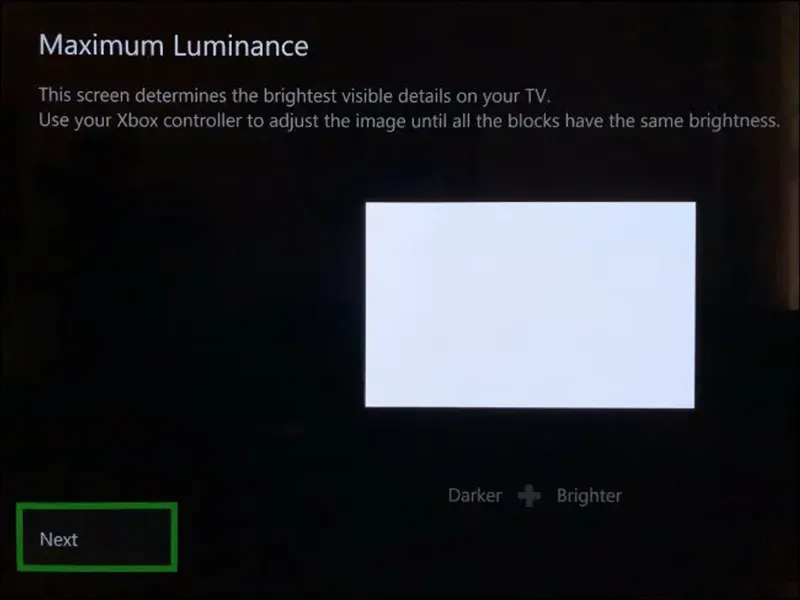
Starfield had one of the worst HDR implementations I've ever seen at launch (very raised HDR black level, fixed and dim Peak HDR Luminance, washed out colors with bad color filters) but after official Patch 1.8 the HDR presentation vastly improved (even if not perfect yet) by actually leveraging the system-level HDR settings on both Xbox and Windows 11 (with Auto HDR or even better NVIDIA RTX HDR enabled), so just make sure to have properly setup those and you should already be mostly done.
"Mostly" because the actual in-game Peak HDR Luminance seems maxing out at 1.000 nits (from 400 nits of before), so for example if you have an LG G3 OLED (or any other TV with higher Peak Luminance), Dynamic Tone Mapping is still recommended over HGIG there.
For all other TVs the values of the system-level HDR calibration app will be applied correctly up to 1.000 nits.
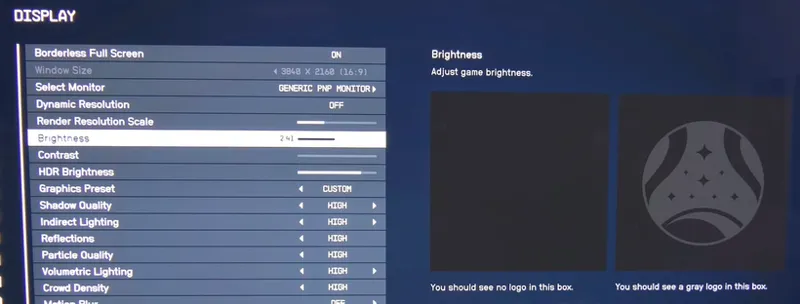
Also the game now introduced 3 new "Brightness", "Contrast" and "HDR Brightness" sliders which don't work as good as hoped as even when changed drastically, the actual difference of the picture is minimal and often to the worse side
I found that it's best to leave those slider to their default values except for HDR Brightness slider to be set at 1.0 for further improving the contrast between darkest and brightest part of the image.
I also recommend to set the "Interface Opacity" slider to 70% to lower the otherwise excessively bright HUD elements after the patch.
That said, the original/excessive game filters are still there as a "creative intent", but this will inevitably still lead to not yet perfect black levels and a bit washed out look. The only way to fix this is to install the latest Normalized LUTs Mod (Chroma 2.0.0 Main variant) on PC and then make sure that on Windows 11 the Auto HDR is enabled or even better use RTX HDR if you have an NVIDIA RTX card.
Mod support will come to Xbox versions as well but only in 2024, so keep an eye for this mod also there when it will come.
BONUS:
On Xbox Series X:
If you have a 60hz only TV: Target 60fps + Performance Graphics Mode (V-Sync: On)
If you have a 120hz TV with no VRR: Target 40fps + Visuals Graphics Mode (V-Sync: On)
If you have a 120hz TV with VRR: Target 60fps + Visuals Graphics Mode (V-Sync: Off - Greyed Out)Disable Film Grain: by setting it to 0.00 in order to improve image clarity
Evaluate using other Mods for the PC version: to noticeably improve performance with the same picture quality and almost fix all the game issues right now
I currently highly recommend the following (Free):
HD Reworked Project Mod
60fps HUD Mod
Achievement Enabler ModOptimize your PC for Gaming by following my guide
Enjoy :)
-P
Comments (17)
Could I get your opinion on this mod? Sounds and seems good, but I'm not a expert and the AI assisted tag has me even more skeptical. From the description at least, I like that it respects the unique planetary settings eg. blue star = blue light etc. https://www.nexusmods.com/starfield/mods/17733?tab=description
Anyone one who has played Starfield with PS5 Pro on LG G4 what in-game display settings do you guys use to fix frame drops at certain point during gameplay?
I've seen people saying the PS5 version does not have HDR, is this correct? Should I be forcing HDR off with my PS5 pro?
Use HDR: On When Supported on PS5 and the game should launch in SDR. On Xbox it was a custom AutoHDR implementation so not real native HDR either
Any update for the PS5 release?
Same suggestions as Xbox so far
Is the hdr same today and need any changes?
No changes
Omg it make sense . The better image quality I found was when I putted gamma 2.4 to have darker black level overall.. I will try the -30 fine tune dark area thxs
My God, this game is even more broken than Bethesda usually makes them!
I disagree. In fact I think it's Bethesda most polished one actually, just disappointing from a color grading and, consequently, HDR side of things (which can be "fixed" with TV settings or mods). Performance is also another problem but not because they're inconsistent, but because the game is heavy AF at the moment and could/must be optimized a bit more both on XSX (hopefully with patches, introduicing at least another 40fps @ 120hz and/or an Unlocked FPS + VRR Performance mode) and PC (which can also be vastly improved right now with mods, especially with the Optimized Ultra settings + DLSS & Frame Gen mods). Other than that, the game is mindblowing.
I'm using Reduced LUTs + Enhanced Contrast at 75% Contrast and LukeFZ564's DLSS + Frame Gen mod with settings you posted in comments on NexusMods and I'm playing in SDR currently. Everythings looks great but every bright element glows like crazy when moving camera. For example floating artifacts in the Lodge. Do you have the same thing or maybe know if something can be done about it?
Mmmh, maybe try reducing Motion Blur in-game from High to Medium/Low or Off and then also try increasing Render Resolution a bit (above 60%)
Bethesda support acknowledged the problem with Hdr and they are looking into it.
I was the one who open the ticket and even if they "thanked" me on Twitter, I have my doubts they will actually do something about it (considering it's more a "creative intent" than an issue for them)...
I assume you tried the Game Pass version on PC? On Steam the game does not seem to support Auto HDR at all unless you rename the exe.
Yes, PC Game Pass version. What I meant was enabling HDR manually on Windows 11 before launching the game and you would get a similar rendition of Xbox HDR in-game (which at the same time is very similar to SDR) which could be decent if not for elevated black levels that needs to be adjusted (or adjustable) ASAP