
LG 2023-2025 OLEDs - Final Optimized Settings
After years of incremental upgrades, LG 2023+ OLED Series dramatically improved upon previous years' models, especially since G3 and its brand new MLA panel.
Luminance is much higher, ABL is much more relaxed, TPC & GSR got fixed, all presets and processing got revamped, accuracy OOTB has never been so good so all my previous Optimized Settings needed to be renewed (especially for gaming)
It's almost like buying an OLED for the first time…again. :)
Like promised, here's my Full Setup - 1 Hour Video Guide along with my Ultimate Settings for it (use the video as a walk through menus/settings but apply the latest settings you can find below)
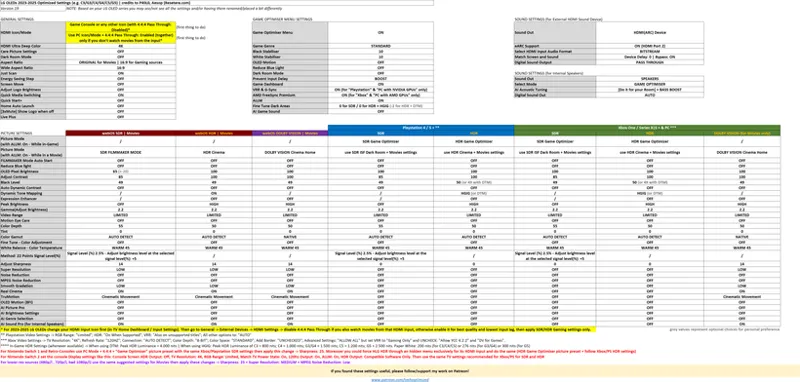
Optimized Settings for LG 2023-2025+ OLED Series:
Click for Full Screen
For LG G5/C5 Only: while using the HDR Game Optimizer picture preset, set DTM: Off + All Pro Sliders: 100 to have an HGIG equivalent accuracy but at max actual Peak luminance of the TV
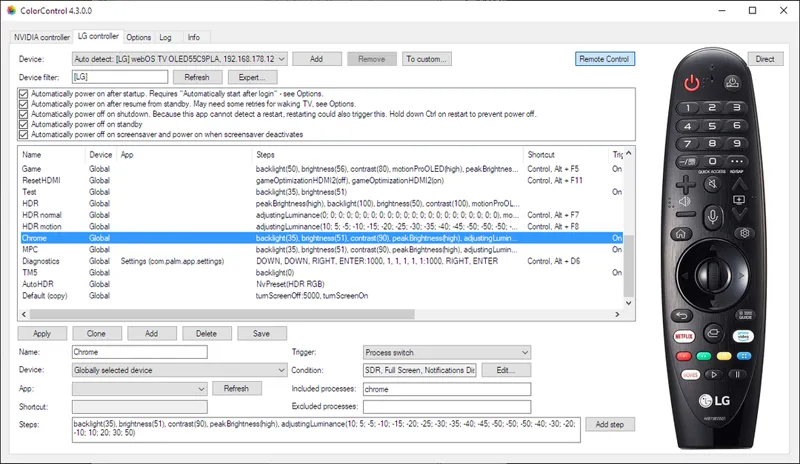
You can also unlock ALL settings and apply further tweaks by using the ColorControl app (on Windows). Read more
I'll try to explain the most noticeable changes below.
v19 Changelog (09/03/2026):
After the official release of webOS 26 for all LG OLEDs from 2023 to 2026 models, I needed to update all my charts for those with the following changes:
Unfortunately ALLM/VRR + SDR/HDR Filmmaker Mode has now noticeably higher input latency at 120hz compared Game Optimizer picture preset (from around 8-10ms of before to around 30-35ms now). Game Optimizer picture preset is still around 5ms in comparison, therefore I switched my recommendation back to it.
That said it seems that GO also received a luminance boost, at least in some models like G3 (while still not having color boosting there) and an accuracy fix for HGIG, so the actual differences between the updated GO and FMM should be small if not unnoticeable unless you have two TVs set side by side or switching back and forth repeatedly really trying hard to spot differencesWhen using SDR Game Optimizer again, OLED Pixel Brightness needs to be set to 100 in order to be similarly bright to SDR FMM previous value
Quick Start+ is now recommended to Off for these models as it seems to fix a lot of HDMI eARC/CEC handshakes between different devices, memory leaks, apps performance issues and crashes. From 2023 model onward the TV processors are still fast enough to "cold start" your TV in few seconds, so the impact of having it off will be small
I also updated Peak HDR Luminance recommendations for all models in nits after all firmware updates so far
v18.3 Changelog (07/15/2025):TruMotion: Cinematic Movement is now recommended again for Movies on 2023+ LG OLEDs: after latest July 2025 firmware, LG finally fixed it. No more noticeable Soap Opera effect, no visible artifacts and it's better at removing judders than my previous Custom preset. It also works good on both 24p, 30p and 60p video contents
LG G5 HDR FMM + HGIG Peak Luminance is now suggested at 2.400 nits (to be more accurate)
v18.2 Changelog (06/05/2025):
Added final Switch 2 Recommended settings: both for the console Display settings and TV settings. See the new red note
v18.1 Changelog (05/22/2025):
Changed recommended Color Temp from W50 to W45: to remove a slight yellow tint on whites (probably introduced after last few FW updates) while still remaining color accurate and within the D65 standard (used by all movies and games as well)
For people preferring a colder temp (for example if they watch TV in a bright room most of the time) I added W25 as a personal preference option. I don't recommend ever going colder than that or you will drift away too much from color accuracy and things will just become too bluish
v18 Changelog (04/12/2025):
Added LG 2025 OLEDs settings
Further reduced input latency when using ALLM/VRR + Filmmaker Mode for gaming (which is now virtually identical to Game Optimiser latency) thanks to the following changes compared to previous settings:
AI Game Sound: OFF
AI Sound Pro: OFF
A/V Sync: BYPASS
Added Switch 2 recommendations (based on what we know and have seen about it so far)
Restructured the chart with new, more complete settings (especially for Game Optimiser Menu) + better labels and notes for more clarity/readability during first setup
v17 Changelog (01/05/2025):
HGIG in FMM (enabled via ColorControl) is now preferred over DTM: this because
1) PC/Windows HDR Calibration cannot reach 4.000 nits (needed for DTM)
2) Most recent games are now providing in-game Peak HDR Luminance controls which can be set accurately for HGIG (or are directly supporting system level HDR calibration) and will look better than DTM when this is the case
3) HGIG enabled in FMM via ColorControl coupled with ALLM and/or PC Mode + 4:4:4 + VRR will further lower input latency compared to DTM
4) Some users are reporting occasional "auto-dimming" with ALLM + FMM + DTM. This isn't happening with forced HGIG in FMM
DTM remains suggested as an optional preference tho.TruMotion is now suggested to Custom: De-Judder 2, De-Blur 10: this is almost an exact match of the old (and sadly gone) "webOS 23 Cinematic Movement" (which I always thought was the best but now was replaced with the new and worse "webOS 24 Cinematic Movement" which unfortunately introduces noticeable Soap Opera effect). I've tried these new Custom values on regular TV, 24p Movies, 60p videos and other formats and it always looked good/smooth/natural but never once entering into noticeable SoE instead. Before making the change I also gathered some extra user feedback and it was very positive as well :)
Re-worded some suggestions to make it more clear/complete
v16.1 Changelog (11/05/2024):
Dialed down "Adjust Sharpness" value for Movies from 20 to 14: in order to eliminate all visible sharpening and flickering artifacts, even if very minor (especially in DV).
On LG OLEDs the Sharpness value up to 10 is not adding any sharpening yet, but it will just enable the LG upscaling algorithm (which will benefit sub-4K upscale by removing its aliasing while will usually ignore native 4K contents). In doing so, the image gets a bit blurrier so adding another +4 on top of it will restore its reference sharpness without visible artifacts.
For Gaming Sharpness is still recommended to 0 as both consoles and PC have their own upscale + sharpening algorithms (like FSR/PSSR/DLSS) and with 0 you will also ensure the lowest input lag possible.
v16 Changelog (10/22/2024):
Changed TruMotion suggested setting to User Selection - De-Judder: 2 ; De-Blur: 2 as the previous "Cinematic Movement" introduced noticeable Soap Opera Effect and motion artifacts after latest updates of webOS 24. Those custom values will still remove judders but without those artifacts
v15.6 Changelog (10/06/2024):
Changed "Prevent Input Delay" suggestion to BOOST: which you can still enable when using ALLM + FMM by temporarily switching to Game Optimizer picture preset, switching from Standard to Boost and then reverting to Filmmaker Mode picture preset. Boost will further lower input lag by 2-3ms for 60hz only sources (like Nintendo Switch)
Playstation Video Settings note below the chart updated recommending to enable VRR "Also for unsupported games"
Nintendo Switch red note below the chart updated recommending using "Game Optimizer" preset for low input lag (as ALLM and VRR are not supported) there
FTDA suggestion' wording made more concise/clear
v15.5 Changelog (08/26/2024):
After firmware 03.31.82 (for B3/C3/G3) and latest one for 2024 series, LG finally fixed the raised black levels when using VRR.
Now black level is perfect with Fine Tune Dark Area left to 0 when using SDR and HDR + HGIG (I've tested it with 6 different Black Level patterns to be sure!)
For HDR + DTM, FTDA was changed from -4 to -2 (to still compensate for a slight gamma raise inherent in the use of DTM)
v15.4 Changelog (07/10/2024):
I've found that enabling PC Icon/Mode coupled with 4:4:4 Pass Through: Enabled at the same time will provide a better image (more accurate and with less color banding) with even less input lag in all presets outside Game Optimizer (so including ALLM + VRR + FMM), even better if on real PC usage when you select YCbCr444 instead of RGB (like in NVIDIA Control Panel)
I've updated my PC Gaming Optimization Guide accordingly
I've explained a bit better in the chart (and in the relative note) that you should use PC Mode and/or 4:4:4 Pass Through only if you don't watch movies from that HDMI input, otherwise you should use any other HDMI Icon and disable 4:4:4 Pass Through (in order to restore all important Clarity options for movies as Smooth Gradation, Real Cinema, TruMotion, Super Resolution and more)
v15.3 Changelog (05/28/2024):Added PC Icon/Mode recommendation only for inputs where movies are not being watched: as most useful Clarity options (as Super Resolution, Smooth Gradation, TruMotion) will be locked out and cannot be enabled even when using ColorControl. If you don't watch movies, PC Mode will enable 4:4:4 and provide slightly better color banding while also lowering input lag in all presets
Added HGIG (forced via ColorControl) to ALLM + HDR FMM as a personal preference alternative to DTM: this will provide the absolute best and most accurate results for all those games which let you control Peak HDR Luminance while also further lowering input lag a bit compared to DTM. For games without Peak HDR Luminance control it may look a bit off (sometimes a little too dim or too bright with clipped highlights) but as my personal preference I still prefer it to DTM on LG G3 in most games I've played so far. That said I only game in a dark room and considering it will require fiddling with ColorControl app via PC and a wireless connection: ALLM + HDR FMM + (new) DTM remains the universally recommended setting for most on 2023+ series. If you also choose HGIG in the end, set back Black Level to 50 and re-calibrate system-level calibrations and games to your actual max nits (e.g. 800 nits or 1.000 nits for G2/C4 or 1.500 nits for G3/G4)
Fine Tune Dark Areas setting recommended to -2 when using HGIG (forced via ColorControl): for the most accurate black levels compared to VRR: Off
Noise Reduction and MPEG Noise Reduction are now recommended to OFF: I'm not sure if this started with most recent firmwares, but now with those enabled motion clarity took an hit with noticeable ghosting/smearing (especially on Apple TV) so universally it's better to always have those OFF right now. If you watch movies from very low res sources (analog/SD devices, low bitrate YouTube videos) you can try to turn them back to Low or at least MPEG Noise Reduction: Low for digital sources
For Nintendo Switch and Retro-Consoles (at low res) Super Resolution is now recommended to MEDIUM: still coupled to Sharpness 25. SR to HIGH was adding too much noise to the image
v15.2 Changelog (04/10/2024):
Added support for 2024 Series which basically shares the same suggestions except C4 HGIG Peak HDR Luminance to 1.000 nits (G4 is still 1.500 nits)
Paper White is now recommended at 276 nits for both G3 and G4
You can leave FMM DTM: On when using forced HLG HDR instead of SDR for Nintendo Switch
v15.1 Changelog (10/30/2023):
SDR, HDR and DV Black Level is now recommended from 50 to 49: this because:
-SDR Black Level at 49: will be slightly closer to BT.1886 gamma but with the benefit of not crushing details
-HDR Black Level at 49: will slightly improve DTM gamma accuracy for movies without crushing details and also making it closer to calibrated HGIG for gaming
-DV Black Level at 49: will slightly improve DV Cinema Home gamma accuracy for movies without crushing detailsXbox Refresh Rate is suggested back at 120hz: after latest console + games update, the few cases of severe flickering and stuttering (e.g. Halo Infinite) were fixed. If you are still experiencing them with some games, you can set 60hz only for them (just remember to go back to 120hz for all the others)
v15 Changelog (10/11/2023):
TruMotion is recommended to "Cinematic Movement" (again): after latest firmware updates, "Cinematic Movement" is back to my top TruMotion recommendation for Movies as it provides the smoothest and clearest motion without introducing noticeable SoE (Soap Opera Effect);
Sharpness is now recommended to 20 for Movies and 0 for Games: unless you mainly watch uncompressed 4K/HDR Blu-Ray Movies (where I still recommend Sharpness 0 for neutral value), Sharpness 20 will help in both upscaling and sharpening all other compressed/streaming contents without introducing haloing or shimmering. For Gaming, set it to 0 to further slightly improve input lag and avoid redundant overprocessing (as both Consoles and PC will already do the upscale + games already provide their native sharpening techniques);
Super Resolution and Noise Reductions are now recommended to Low for Movies: as those provide tangible signal/picture improvement without any noticeable downside. Super Resolution is tied to the Sharpness value, so in the case of Sharpness 20 + Super Resolution: Low its effect is very minimal, but is nice to have for compressed/streaming contents. Turn it Off for Gaming in order to keep input lag low;
Warm 50 is now the only recommended color temp: as starting from 2023 Series, LG really nailed the pre-calibrated temp out of the box and there's no need to use anything else;
Xbox Refresh Rate is now recommended to 120hz for whom mostly play at 120fps and/or 40fps, while to 60hz for whom mostly play at 60fps and/or 30fps (both cases with VRR active): this mainly because
@ 120hz + 60fps + VRR: many games have stuttering and/or flickering issues with VRR (Halo Infinite, Ghostwire Tokyo, Lies of P and many more). These are gone at 60hz + 60fps + VRR
@ 120hz + 60fps + VRR: you would have more color banding in gradients. Those will be better at 60hz + 60fps + VRR
@ 60hz + 60fps + VRR you would have very similar if not identical input lag compared to 120hz + 60fps + VRR
Obviously, if you need/want to play at 120fps and/or using 40fps modes, you need to set the console to 120hz
This doesn't affect PC, as for example G-Sync is always working better when Windows + NVCP are set to 120hz, along with all other PC Suggested Settings
v14 Changelog (08/30/2023):
SDR OLED Light is now recommended at 65: with a +-20 points adjustment depending on preference. The previous value of 80 was VERY bright, especially in a dark room (and especially on G3) so this may be a better starting value for most;
SDR Gamma reverted from BT.1886 to 2.2: this because after latest firmware updates for G3/C3, the entire black level floor was changed/fixed by LG around 2.2 both for SDR and HDR, along with the other changes below;
HDR Filmmaker, HDR Cinema and DV Cinema Home Black Level values reverted from 48 to 50: as, like mentioned in the point above, LG fixed all black level issues for the stock value of 50, making 48 a bit too crushed now. Setting it back to 50 will also make all those presets "future proof" for additional LG fine tuning, so without the need to manually changing them again;
When using the Forced HLG method for SDR-only sources (like Nintendo Switch), DTM is no more recommended: to avoid HUD elements to bee too bright, increasing the risk of image retention. I added this to the relative note below the chart;
SDR ISF Expert (Dark Room) is now recommended with ALLM: Off (with same settings for SDR Movies): while SDR FILMMAKER MODE remains suggested with ALLM: On. This way you will automatically have Super Resolution enabled for movies and disabled for games ;)
v13.5 Changelog (05/10/2023):
Just changed HDR Filmmaker Mode to HDR Cinema preset for Movies: as DTM is working differently between the two. HDR Cinema will have the "old" DTM which is better for Movies (which would be too dim/dark without it) while HDR Filmmaker Mode has the "new" DTM which is better for Games, being closer to properly setup HGIG results in highlights when games are set to 4.000 nits.
v13.4 Changelog (05/05/2023):
TPC & GSR got finally fixed by LG. No more need to access the Service Menu to Disable them: also avoiding risking your 5-years warranty. Finally, movies will not auto-dim anymore while the slight games' remaining auto-dimming when leaving them fixed on the same scene for over 5-8 minutes won't be noticeable during normal gameplay;
For these reasons, you can safely disable the "Screen Move" feature: as this always had a very small effect in preventing burn in, so with TPC & GSR properly working you can disable it to regain a bit more sharpness and you won't notice the entire screen moving around from time to time;
PC Mode & 4:4:4 are still Not Recommended: even if color banding and texts are very slightly improved when using PC Mode/Input Icon (or enabling the new separate "4:4:4 Pass Through" toggle), the EOTF and colors are getting raised, noticeably drifting from accuracy when using it. PC Mode is also no more necessary to reduce input lag outside of Game Optimizer preset as ALLM: On is sufficient in doing so. I also found that Xbox Series X (with YCC 4:2:2 disabled on the console) will still be able to output a 4:4:4/RGB signal in both SDR 8-bit and HDR @ 10-bit even when using the "Game Console" icon, then it's the TV doing the subsampling, further minimizing the few remaining PC Mode advantages;
Quick Media Switching is Recommended: if you have a capable/certified HDMI 2.1a cable, this will reduce the "black transition" you usually see when handshaking between different signals;
"GAME OPTIMIZER" Sound Mode is Recommended (for Internal Speakers): to unlock Game Optimizer gaming "profiles" (when using the Game Optimizer preset) but also to preserve the Game Optimizer Menu and options (including ALLM, VRR and Fine Tune Dark Areas) also when using "non-Game" presets for gaming. You can then perform an "AI Acoustic Tuning" and Enable "BASS BOOST" to improve the internal speakers' performance for your room, but it's highly recommended to just use an external soundbar or speakers for an actually better quality;
Using the Game Optimizer Menu (with ALLM: On) + SDR/HDR Filmmaker presets is a better alternative to SDR/HDR Game Mode + HGIG: with the same identical low input lag as Game Modes. This because it was measured that Game Modes are not only around 100 nits dimmer, but also have the new 2023 background "Dynamic Color Boosting" technology forcefully disabled resulting in 50% less luminous colors on the higher spectrum. LG has received the user feedback for also enabling it in Game Modes but, apparently, they're not going to do anything about it for now. "Dynamic Color Boosting" was the key new feature which was able to make LG G3 not only comparable to Samsung S95C QD-OLED's color luminance, but even surpass it most of the time in SDR/HDR Filmmaker for movies, so using Game Optimizer (with ALLM: On) and SDR/HDR Filmmaker will preserve "Dynamic Color Boosting" also for gaming while keeping the lowest input lag possible. The only thing to remember using HDR Filmmaker for gaming is to set both the system-level HDR Calibration and HDR games' Peak HDR Luminance to 4.000 nits whenever possible, while Paper White or equivalent should be set around 200 nits. Will it still be accurate without HGIG? Yes;
DTM is much improved, especially when coupled with HDR Filmmaker Mode: DTM now analyzes 20.000 different zones for each frame (!) instead of 5.000 and finally won't excessively overbright night/dark scenes anymore (I've already tested this with dozens of games and movies in different scenes and Peak HDR Luminance). What it does now is similar to what HGIG does: making specular highlights "punchier" and more pronounced (by always leveraging the actual Peak HDR Luminance of the TV, which is insanely high now around 1.500 nits on G3) without screwing up everything else. The only side effect is a slight elevation of black level which can be offset/fixed by just lowering the HDR Black Level setting from default 50 to 48 when using it. DTM is especially useful for completely replacing HDR Game Optimizer Preset + HGIG with HDR FMM, even in the long term (just remember to set games to 4.000 nits instead of 1.500 for G3 or 800 nits for C3 whenever possible, but if you can't: DTM will also better accommodate any other "fixed" HDR game as well) while it will have a very minor (but pleasant) difference in Movies (which do have metadata) between DTM: On and Off;
Prevent Input Delay: STANDARD is Recommended for always 120hz signals (as Xbox) while BOOST for 60hz signals: this because BOOST has no input lag effect with 120hz signals but could still raise gamma a bit. Better use it only for 60hz only signals (as Nintendo Switch or 60hz gaming on PS5). If you use a receiver with multiple consoles attached, leave it on BOOST. Gaming with ALLM: On + SDR/HDR Filmmaker Modes will force it to STANDARD;
SDR FILMMAKER MODE (with Color 55) and HDR FILMMAKER MODE (with DTM: On + Black Level: 48), DV Cinema Home (with Black Level: 48) are now Recommended for Movies: SDR/HDR FMM are the most accurate presets OOTB and the closest match to a Sony HX310 (30k$ Hollywood Reference Monitor 👀) using a G3, which basically means they're pre-calibrated from the factory and you don't even actually need an in-place calibration as you wouldn't notice any difference by naked eye after (crazy stuff!) and DTM: On on top of this is not making a big difference for Movies. For Dolby Vision the "DV Cinema" preset, instead, even if it's the most accurate on paper, presents visible black crush OOTB and a much more "muted" presentation over HDR FMM with similar "real-world" contents outside of patterns and benchmarks (even with DTM: Off), therefore DV Cinema Home is more universally recommendable as it's actually closer to HDR FMM with DTM: On (great) rendition: just decrease HDR Black Level value from 50 to 48 also for it;
SDR Recommended Gamma is back to BT.1886 both for Movies and Games: with just a minor Method: 22 Point Signal Level(%) luminance adjustment to improve dark detail;
Smooth Gradation: LOW is now Recommended for Movies: as this is very effective in removing basically all color banding and macroblocking artefacts without losing fine details. Unfortunately, it can't be enabled for gaming when ALLM is On so you may notice additional color banding in 4K/120hz/HDR10 games and the only solutions for this are waiting for LG to enable it also for gaming or just to improve color banding in games over time via firmware updates;
Noise Reduction and MPEG Noise Reduction to LOW are good now (for Streaming & TV): as those will preserve original film grain in movies while visibly removing macroblocking or other compression artifacts without ruining fine details. Those are Recommended for streaming services (with compresses their video sources by definition) and regular TV, but you may turn them off for 4K/HDR Blu-Rays;
Sharpness slider is much better than previous years: as even cranking it up to 50 will not introduce that bad haloing or over sharpening artifacts as before. You can literally increase it up to 20 to make regular TV & Streaming picture clearer, sharper and apparently higher resolution without any visible downsides. It's better to keep it at 0 or 10 for 4K/HDR Blu-Rays;
Super Resolution: Low does a good job coupled with Sharpness 20: as it will slightly improve texts and textures' definition without screwing up anything else or creating visible over sharpening artefacts. With Sharpness 25 its effect will noticeably increase and could only be useful for very low res contents (480p/i, 720p/i or bad 1080p/i), especially with Super Resolution: HIGH. Also notice this will increase input lag a small bit, so it's better to turn it completely off for XSX and PS5;
TruMotion: Cinematic Movement is good…but can be better: as for previous models, the new TruMotion: Cinematic Movement setting really helped in removing the inherent stutters of 24p contents but still didn't completely remove the noticeable Soap Opera effect in many scenes. On G3 I found that TruMotion set to "User Selection" with De-Judder: 2 and De-Blur: 2 provided the smoothest 24p movement without noticeable SoE. This has become even more needed with G3 as MLA and the increased brightness exacerbated the inherent 24p stutters on OLED panels (even with Real Cinema enabled). A correctly setup Motion Interpolation (with a 120hz panel) will solve that;
AI Brightness and all other AI Picture settings are now Recommended to Off in all modes: as those may have the opposite effects than wanted, for example further dimming the screen in already accurate modes (for a dark room) when small light sources are detected in the room or messing around with Color Temperature (which is great as is at Warm 50) or with skin tones and contrasts. You don't want that;
DV for Gaming was Not Recommended before and it's even Less Recommended now: Disable "DV for Games" on Xbox advanced video settings and stick with Game Optimizer Menu (with ALLM: On) + HDR Filmmaker (with DTM: On + Black Level: 48) + Console & Games set to 4.000 nits Peak HDR Luminance for the absolute best results for gaming. You can keep regular "Dolby Vision" for Movies enabled;
Fine Tune Dark Areas setting was changed to -4: to better reflect the black levels rendition between VRR: Off and On. Just remember that each preset and input (SDR/HDR/DV) has an independent FTDA setting to setup through the Game Optimizer menu;
2023+ Overall Settings Chart overhaul: all settings got renamed and reordered in a more coherent way to reflect the new TVs, many new settings were added and a lot of values got re-tweaked after new analysis and direct testing. So please, ignore any previous chart a re-start from here if you have a 2023 LG OLED or newer;
ALL my personally curated in-game Optimized Settings for 200+ HDR Games got updated and aligned for G3 and latest 2023 series' settings as well. You can find them by kindly following/supporting my work here.
Enjoy the next generation of LG OLEDs: Optimized! 😉
-P
Comments (186)
Hi, super settings thnks for the hard work.. question, now with the new update, shoud we use GO with hgig or only with the pro sliders on 100? I have the G5.. thnks a lot!!
Hi, My C3 has 4:4:4 pc icon, Xbox series x, DTM. The GO menu and settings for some reason feels highly sticky to activate compared to non 444 and FMM+vrr+allm this normal. Everything is working on MS side and screen picture quality side superb tho. Then this must be said. Man you are absolute legend with these settings and HDR optimizes for games. You have saved my time and nervess countless times and hours, as it is hugely important for me to get most of it as fast as possible because otherwise i would play with settings and not game and then it would be kids allready bothering to do something else. I cant thank you enough seriously you have literally enabled So much joy i need you to know that please never stop with these settings There are many busy dads there like me. Thank you and bless you
That's normal as if you enable 4:4:4 the TV menus are getting slower (as the TV processor works at max) I'm glad to be helpful. Enjoy! ;) -P
Hello, could you please help me out? I'm a bit confused—for PC games in 4K HDR with HGIG, should I set it to "Game Optimization" mode or "FMM"? This is for an LG C4 TV.
Starting from webOS 26 update, use Game Optimizer picture preset instead
Just want to double check that with eARC, in the PS5 audio settings, I went PCM in the main settings for games, but in the sort of secret blu ray audio settings I want bitstream so it sends the Atmos track to the receiver. Is that correct?
Thank you so much for your invaluable recommendations and help! Do you think LG may have improved the black level on the G5? I feel that Black Level 50 is now quite accurate, while 49 can crush some near black details. Would 50 + Near Black Details -1, like on the G6, be the better approach on the G5 with the latest firmware? Thanks again!
Yeah you can try that also on G5 so to fine detail to look a little better
Good afternoon. Please help me figure it out. I have "dynamic tone processing is turned off" - professional - strengthening tone processing 5 is the maximum indicator, the maximum brightness of mastering is 0 (it does not change) for some reason. 1000 mastering 100, 4000 mastering - 100, 10,000 mastering is also 100. The question is - for LG G6, are these the right settings?
Lg G5 and switch 2. Applying the same settings of the PS5 SDR (as suggested into the screen), i notice that color gamut set to auto causes washed colors. Much better native. Do you confirm?
Color Gamut Auto is correct, if you followed the suggested settings both for the TV and Switch 2 it shouldn't look washed out but correct.
Hello, Thank you very much for the settings, the image quality is really impressive with my LG C3! 🙏🏻 I had 2 questions that were perhaps a little subsidiary: 1) On the guide, it is indicated to leave Quick Start+ activated: this is really necessary because does it have an impact on the image / sound quality or the recording of these settings or not at all? (knowing that my TV is not connected to the internet, neither in Ethernet nor in Wi-Fi and that I do not use any app integrated into the TV - I have a multimedia box for this) 2) On games (on all consoles), I have a kind of auto-dimming where the brightness of my image will change a lot instantly (example during camera movement, or simply in play with the scrolling on the environment - it's quite obvious on Mario Kart for example): is there a hidden parameter to fix this problem? Or maybe via the ColorControl app? (I tried a lot of settings on the TV, and it doesn't change anything, whether in DTM or HGIG) Thank you in advance!
1) No Quickstart is not mandatory, just a commodity. You can turn it off if you don't need it 2) The auro-dimming when leaving the TV on a static screen (like a game menu or if you go away and leave the controller still) is normal and is meant to reduce the risk of image retention and burn in on the OLED panel. When you change/move the scene again the luminance shold return back to normal again
Good afternoon. Please tell me, based on your recommendations, why set a limited range on the TV and the same on the PS5? I have a number of questions 1. Right, I do what on my LG G6 together with the ps5 pro console, I put 4.4.4 and a limited range everywhere? 2. After I made these settings (on the example of God of war ragnarok), the sun's rays began to flicker when moving, I did not notice this before. I will be grateful for your comment
I also want to add, if you have the opportunity, compare this video demonstration with a colleague - God of war ragnarok. https://youtu.be/17lTm13d81Q 4:27 - 4:58 I really liked the color correction in this video, I have a very oversaturated picture, all colors are "not realistically saturated", I tried to set Adobe RGB color correction on my LG G6, and my color became almost 1 in 1 as in the video. Please tell me, can it be correct?)))
Hey P40L0, hope all is well, will you be updating for the new LG G5 firmware and LG C6/G6 settings? Thanks
I don't think G5 needs an update but will wait for more consensus about C6/G6 before updating the chart, yes
Hi. If I can't use color control as im on a C3 is DTM still recommended?
On C3 yes
Excellent work Paolo! Thank you! Has the HDR brightness issue in Game Optimizer now been fixed on the C5?
Not fully. ALLM/VRR + HDR FMM with DTM: Off and all Pro sliders set to 100 is still brighter
I'm using the optimized settings for Windows 11 for HDR, but I think that the panel is kinda dim and low brightness even tho I use maximum settings on my LG C5, do you have any suggestions?
Also, when I use this video in HDR (https://youtu.be/fAhxR-gMU_U), I have a lot of black crush around the lowest I can see is 4.1, after that, all the boxes are black
Hello, Wanted to clarify something. When I'm using G5 as TV display - can I use other sound modes instead of Game Optimiser one? The problem is that the AI GAME SOUND function in Game Optimiser turns on automatically sometimes and I have to turn it off manually. So I was wondering if I use CINEMATIC sound preset while keeping everything else the same - will I get more latency?
Yes you will get additional latency if not using Game Optimizer sound with AI Sound for games: Off
UPDATE 2025/11/03: For LG C5/G5+ Only: You don't need to use ColorControl to force HGIG in HDR FMM preset (for gaming) anymore. When using ALLM/VRR + HDR FMM preset, just set DTM: Off and then set all the new "Professional sliders" to 100 to have the same HGIG accuracy but at the real max luminance of the panel. Does this setting apply to the LG C4, or should I use it as before via ColorControl and fmm?
No, that's only for C5/G5 and newer. On C3/G3/C4/G4 use ColorControl and force HGIG in HDR FMM instead
Hello brother, RTings and others sources confirm that LG C5 has Peak brightness around 1.180-1.200 nits, why do u point 1.500 nits? (it's a sincere question)
There are some "Pro" models in some regions which, combined with ALLM + HDR FMM + DTM: Off and all Pro Sliders set to 100 can exceed 1.400 nits, therefore 1.500 is to just cover any model/panel lottery possible while aiming a bit higher
Hi Paolo, In my G4 I got the professional sliders. Do I still need Color control for hgig or its the same that the C5/G5 ? I got 3 sliders 1000 4000 and 10000
That's not the same as G5 Pro Sliders (which you can set to 100 in order to have the equivalent of HGIG) so yes, you still need ColorControl to force HGIG in FMM to have it there
Thank you for everything you do! Quick question: if using Game Optimizer with DTM instead of Filmmaker Mode with DTM, do you still recommend all of the same settings (ie black level 49, -2 fine tune dark areas)? Same question for the SDR setting in Game Optimizer vs Filmmaker Mode.
Yes
Hello P40L0, First of all, thank you for great guide! I'm sorry if it was asked before, but I have RTX 5090 and LG G5 - should I set in Nvidia control panel "Output Dynamic Range" to Limited (just like on tv) and "Output colour depth" to 10 bpc? Thank you!
Yes, YCbCr 4:4:4 + Limited + 10-bit is best for LG OLEDs
Hello P40L0, and updates on the C5/G5 33.30.97 FW? I was seeing a FMM Dolby Vision content fix for brightness. Should I still use the setting of 14 Sharpness, Low,off,off,low + Cinematic movement with 49 black level? Or use the default +20 sharpness, low,low,low,low + Cinematic movement with 50 black level? Thank you!
I just updated mine and I think no changes are needed compared to my latest chart so far
I now have a C5 55 in my bedroom, and from what I've seen, it only manages a maximum of 1100 nits. Why do you recommend 1500 nits here? Thanks.
Panel variance basically. Rtings measured something like 1.350 nits, some users reported 1.450 nits, but others 1.200 etc. So better be slightly above variance than below. Anyway, make sure you're actually using ALLM + FMM + DTM:Off and all Pro Sliders to 100 as suggested before doing the calibration in order to reach your actual peak in a "simil-HGIG" scenario without the need to use ColorControl as with previous models
P40L0, is still recommend the Cinema Home for Dolby Vision with last version of fireware 33.22.80? because i play movies with Dolby Vision on Cinema Home with tv player but is looking very dim to me, and the Dynamic Tone Mapping is missing from Brightness Menu, but in HDR mode is still there!
Yes it's still recommended and also yes, it's normal that DV Cinema Home doesn't have a DTM tab: it's Dolby Vision, it has native Dynamic Tone Mapping with actual dynamic metadata!
Do you have any recommended settings to turn on or off while watching sports like football/soccer?
Nope, same settings for Movies apply there
Hi, For HDR10 gaming , does FMM + ALLM with professional sliders apply to the B5 considering it’s a 2025 model?
Yes but you'll get a bit lower luminance there
Hello On tv I should use pc icon or game console icon ? I play only on consoles
PC Icon if you only game on the consoles, while if you also watch movies from them: use Game Console icon
Ciao Paolo! Un consiglio al volo: ho un LG G4 OLED evo collegato a una PS5 Pro, che uso anche per vedere film in Blu-ray e 4K UHD (formato fisico). Per le impostazioni avanzate della TV cosa mi consigli: devo mantenerle come su webOS (nit a 14, Super Resolution e gradazione cromatica su “basso” ecc.), oppure visto che sto usando la PS5 è meglio lasciare tutto a 0/disattivato e far fare “il lavoro sporco” alla console? Se possibile, dammi info sia per Blu-ray che per 4K UHD, separati. Grazie in anticipo! 🤝
Se usi PS5 non solo per giocare ma anche per vedere i film, innanzitutto imposta l'icona HDMI di PS5 come vuoi ma NON metterla su PC (per esempio metti l'icona su Game Console invece), oltre a disabilitare 4:4:4 Pass Through sulla TV. Fatto questo assicurati di avere abilitato ALLM sulla console e poi dalla mia chart puoi usare gli stessi preset SDR/HDR per i film / webOS (ISF Dark e HDR Cinema rispettivamente) mentre sei sulla dashboard o usi app multimediali da PS5 (incluso il lettore Bluray), mentre quando apri i giochi imposta i preset consigliati per giocare (in questo caso SDR e HDR Filmmaker Mode che abbinati ad ALLM e/o VRR manterranno l'input lag basso alla migliore qualità d'immagine possibile) Una volta fatto questo la prima volta, ALLM li cambierà automaticamente in base a cosa stai facendo (giocare o qualsiasi altra cosa), senza doverlo più fare manualmente ;)
I have an LG G5 with an Xbox Series X, and when adjusting the console's HDR calibration app with DTM enabled, the blocks disappear at 3800 nits, not 4000 nits. Is this normal? And should I still leave it (and also the in-game slider) at 4000 nits? Or should I drop them both down to 3800?
That's normal as usually you need to go further a bit after the blocks disappear, so 4000 nits is still correct for DTM...but I don't recommend it on G5. Just set DTM: Off with all Professional sliders to 100 (which will be equivalent of HGIG) and you can set 2.500 nits to be as bright AND accurate AND with lowest input lag that the TV can get ;)
Hey there just a quick question about VRR. I switched from Series X to PS5 Pro and you recommended VRR Gsync on PS and not FreeSync why is that? The PS5 has a AMD chip just like the Xbox
Because PS5 and PS5 Pro don't support AMD Freesync Premium like Xbox does. They only support base HDMI Forum VRR, probably to save a bit on licensing.
Want to use these settings with a LG C5 and Denon x3800. Does it make sense to have the HDMI cables from PS5, Xbox Series X, and AppleTV 4K plugged into the AVR itself or direct to the TV?
Personally I would directly connect the consoles to dedicated HDMI port of the TV, Denon on HDMI2 (eARC) port and AppleTV is ok to be connected to the Denon.
When I click to expand the image (of settings) it now says content is unavailable in my region. This wasn't previously the case. Any ideas?
If you're in UK, Imgur was blocked there :/ Maybe try temporarily using a VPN to open and download it for local use.
UPDATE 2025/11/03: For LG C5/G5+ Only: You don't need to use ColorControl to force HGIG in HDR FMM preset (for gaming) anymore. When using ALLM/VRR + HDR FMM preset, just set DTM: Off and then set all the new "Professional sliders" to 100 to have the same HGIG accuracy but at the real max luminance of the panel.
Does this method have more input lag than game optimizer with hgig ? I know it’s supposed to be virtually identical but I still feel it
I had a curious question. Are there any soumd settings on PS5 that you change from default to optimize for LG OLED internal speakers?
Paolo buongiorno, ho appena acquistato un LC C5 48 Pollici, devo seguire questi settaggi o quelli dell'altro post? (https://www.patreon.com/posts/lg-2017-2025-for-63754947)
Questi che hai linkato sono aggiornati. Semplicemente segui la sezione/chart per LG 2023-2025 ;)
Question. Why do you recommend AI Sound Pro on for all webOS categories. I looked through your changelog notes but didn't see it mentioned in there. Just AI Acoustic Tuning.
For webOS/Movies yeah that's ok. For games no, turn everything AI Off and use Game Optimizer Audio preset to keep input lag low when using ALLM/VRR + FMM for gaming
Cinematic Movement still does not look right on the G4. The latest firmware is 23.23.05, which is what I’m on.
Looks much better on both G3 and G5. It should be like that also on G4 but if not you may return to previous custom settings (De-Judder 2, De-Blur 10)
v18.3 Changelog (07/15/2025): - TruMotion: Cinematic Movement is now recommended again for Movies on 2023+ LG OLEDs: after latest July 2025 firmware, LG finally fixed it. No more noticeable Soap Opera effect, no visible artifacts and it's better at removing judders than my previous Custom preset. It also works good on both 24p, 30p and 60p video contents - LG G5 HDR FMM + HGIG Peak Luminance is now suggested at 2.400 nits (to be more accurate)
Hmm I’m still seeing a noticeable Soap Opera effect on my G4 when switching to Cinematic Movement. And I don’t see a firmware update available for this month yet: https://www.xlr8yourmac.com/audio/LG_firmware_updates.html
Hello Paulo! After latest update (23.23.05) my G4 for some reason started forcing Dolby Vision mode when I turn on my PC. Nothing seems to have changed in my PC settings or drivers (using Nvidia). Is there a reason for that, or should I just switch back to HDR Filmmaker via ColorControl? Also, will you be adding this new Quick frame transport feature to the table or is this not impactful enough? Thank you for your work!
I think the issue started with one of the latest Windows 11 updates, not with LG firmwares. This is a note I added in my PC guide: NOTE: Starting from Windows 11 24H2 Build 4202, Dolby Vision may be automatically enabled system wide instead of HDR on specific displays. My advice is to turn it OFF in favor of HDR (by going into Display Settings -> HDR - > Expand the HDR options -> untick "Use Dolby Vision" ) as DV may have both a worse picture compared to properly setup HDR + HGIG and an higher input lag as well. I need to better investigate about QFT. For example if it's enabled by default no need to update the chart
I have a question about the lg c3. In the GO menu, there is a slider called "Adjust Game Sharpness," which is set to 10 and greyed out. You suggest using the standard game genre, so I think this might be the reason. However, we want the sharpness set to 0 for a pure picture. Do I need to change this setting, or is it not actually being applied? My second question: I have both G-Sync and FreeSync enabled for all my consoles. The system automatically selects the appropriate one in-game, but are there any downsides, such as input lag? Should I enable only one of the two? Thank you for all your work. It’s amazing.
You can change sharpness not from Game Picture menu but from Picture Preset menu (and will be reflected also there) I recommend it at 0 for gaming. I would also enable AMD Freesync Premium only on Xbox and VRR/G-Sync only on PC and Playstation
Ps5 gaming only. Would you recommend 4:4:4 pass through on or off
For gaming only you can use both PC Mode/Icon + 4:4:4 Pass Through enabled at the same time
Ciao Paolo ma con un c3 da 55 quando un gioco mi da la possibilità di scegliere tra 800 e 850 nit, cosa scelgo?
Entrambi dovrebbero andare bene. Fra le due forse meglio 850 per essere sicuri
New recommendation (W45) tested with FW 23.20.69?
Yes, but I think the tint was there for a while now. W45 now looks correct again
The video settings are amazing, thank you. Quick question, I’m changing setting for the ps5 but when I change the mode to filmaker mode I am unable to enter the game optimiser menu to change settings in there and make sure vrr etc is on. Pressing just the gear icon doesn’t work (only works if the video mode is game optimiser not filmaker)
Make sure that the audio preset for Internal Speakers is set to Game Optimiser otherwise you won't enter in Low Latency mode also in FMM
I just got a G4 and so glad I found this page but I do have one question: Can you clarify why FMM specifically is "best" for gaming but cinema / cinema home / isf dark are best for media? I noticed that HDR cinema and home are brighter, but does that mean it's too inaccurate for games (and if so why is it okay for media?) Or is it just to keep those presets separate from each other? Is it because "Dynamic Color Boosting" is only available in FMM? Is FMM just lower latency for some reason?
FMM + (forced) HGIG via ColoControl is both brighter and more accurate than GO + HGIG for gaming and with the same input lag when coupled with ALLM/VRR. SDR ISF Dark is identical to SDR FMM with same settings. I only choose it for ALLM to switch different presets between games (FMM) and movies automatically. HDR Cinema + DTM for movies for the same reason but also because FMM + DTM for movies is too dim/dull. DV Cinema Home also because DV Cinema/FMM is too muted for movies.
Would it be possible to make a sheet per platform in the future? I mostly check for the Xbox settings every now and then and it's kinda difficulty to not get lines mixed up. And I assume most people are only interested in their specific platform + the TV settings. Either way, I appreciate all you do!
I tried to consolidate everything in a single chart for all people, so I suggest to open the chart full screen on a laptop or print it while setting up the TV. It should be much easier this way.
Can I get rid of the VRR flickering somehow? I'm playing on PC and it's really annoying.
I agree, when I’m gaming on the G4 i turn off gsync and just use adaptive sync and an app called special k
v18 Changelog (04/12/2025): Added LG 2025 OLEDs settings Further reduced input latency when using ALLM/VRR + Filmmaker Mode for gaming (which is now virtually identical to Game Optimiser latency) thanks to the following changes compared to previous settings: AI Game Sound: OFF AI Sound Pro: OFF A/V Sync: BYPASS Added Switch 2 recommendations (based on what we know and have seen about it so far) Restructured the chart with new, more complete settings (especially for Game Optimiser Menu) + better labels and notes for more clarity/readability during first setup
I've come across something strange that I don't know if it has been mentioned, and that is that the configuration of my PS5 changes completely when I turn my earc sound system on or off, so console configurations such as the RGB range or the HDR configuration are different.
Probably the TV is auto changing HDMI icon when you do that change. Double check and revert to the icon you were using before
Is this the same for the lg g3?
Yes
What is the best trumotion setting for Software version 23.20.44 LG g4?
Custom TruMotion: De-Judder 2 , De-Blur 2
Is game optimizer fine for g4? Id rather not use the app
It's better than G3 but still dimmer on average than FMM. If the average brightness is ok for you, you can go for it + HGIG
Is there any downside to using ISF dark rather than filmmaker? Idk if slightly more latency or any other issues.
They're literally identical when setup the same
You have recommended Tru Motion De-Blur should be 10 for movies. Is this not quite high? Most recommendations seem to suggest Tru Motion should be completely turned off?
De-Blur by default is already at 10 when you enter in Custom TruMotion settings. It means to eliminate blur on all movements leveraging the 120hz+ panel and does NOT introduce Soap Opera Effect: that is the one to avoid like the plague and it's tied to De-Judder option instead (which by default is 0 for this reason) You can go as high as De-Judder 2 to make movement less juddery and natural WITHOUT introducing Soap Opera Effect. Anything higher will start introducing it more and more.
Hi, I was wondering if rgb range should be limited on ps5 pro as well
Yes it should
Are these settings for WebOS24 or 23? Or do they work for both? My B3 is asking me to update to WebOS23 so wondering if I should update if it would change or affect anything
Both
I'm testing Arkham Knight with SDR settings and selecting limited range instead of auto makes it look very dark and loses detail in areas like the cape or gauntlets. Should I turn up the game brightness or am I missing some previous settings?
You need to match Limited range both for the Console/PC and the TV or you will have a black level mismatch
LG C3 newest firmware. I use Series X and PS5. I cant use/access HGIG while in your recommended FMM+ALLM, 4:4:4 passthrough, PC mode icon settings, only DTM on or off. To use HGIG I need to use Game mode. What should I do or recommendations? Thank you 🙌
Like written in the chart, you need to use ColorControl app via PC to "force" enable HGIG also in FMM. I've made a guide on how to here: https://www.patreon.com/posts/77041300
In white balance, do we set method to 22 points code value or leave it at 2 points?
22 points (it's written in the chart) and only for SDR
I switch back and forth between FMM+HGiG and Game Optimizer+DTM on PS5 based on peak brightness support in-game. I’d prefer to stay in FMM and only switch between HGiG and DTM but that’s not practical as I’d have to launch Color Control fairly regularly.
Exactly, that's not practical at all and honestly I would just stick with HGIG and adapt the things when you can. If you can't: highlights may look a bit less bright or a bit clipped in the upper end but whatever, that's still better than changing things all the time
Now that you're recommending HGiG instead of DTM, does that include games like Elden Ring where you specifically recommended DTM?
Elden Ring can go up to 2.000 nits so it can be set accurately for HGIG but if it's still too dim for you you can switch to DTM I also recommend HGIG for 2023+ OLEDs (because it's brighter with ALLM + FMM), while on previous models Game Mode + (old) DTM is still the recommended one.
How do you test what peak brightness Dynamic tone mapping is built for? You said it’s 4000, but on my LGB3 I am getting 2500, maybe because it’s a B model. I got this because that’s when it clips on windows HDR test but also that does not go to 4000
Windows HDR test can't go past that and it's not the whole picture. DTM is in fact based on standard tone mapping of both HDR Cinema/FMM and Game presets which targets 4.000 nits on all LG OLEDs since 2017
I believe this is normal for OLED gaming monitors, but is there any way to reduce the OLED flickering when gaming on a LG G4 55inch?
Ciao Paolo e grazie per il tuo ottimo lavoro. Ho un C3, per i giochi in sdr consigli gamma bt1886 o 2.2? Grazie
2.2
Hello sir How you change TruMotion ? Because my settings are close
Picture Settings -> Advanced -> Clarity Options -> Go to bottom and select TruMotion: User Selection, then you can change De-Judder to 2 and De-Blur 2 there -> go always back to save
v16 Changelog (10/22/2024) question. You changed from Cinematic Movement to User selection in all picture modes (SDR, HDR and DV content modes)? :) Should that be done on the C3 aswell?
Yes, it regards all 2023 and 2024 models after latest updates
Hello, this german dude https://m.youtube.com/watch?v=tLcGhVt9s1s mentioned that after extensive testing the LG G4 apparently got a huge brightness boost of over 300 nits in both filmmaker and game mode on the latest firmware update while the overall heat on the panel has also been reduced massively which is just INSANE 😲 ! My question that now since filmmaker mode will be able to reach about 1700 nits according to his analysis what are the values I need to change in nvidia profile inspector (also for 1600 nits) to get this with RTX HDR in games and movies ? Of course I already followed all your recommendations closely including forcing HGIG in filmmaker mode with Color Control. Thank you very much in advance for taking your time and for writing such amazingly detailed guides. They helped me a ton to get the best out of my TV and PC for gaming/movies 👍 .
+300 nits seems unrealistic to me, but to be sure turn off the lights (so be in a dark room) and then try going into Windows or Xbox HDR Calibration app using HDR FMM + HGIG and see if you can still clearly see the patterns in brightness squares above 1.500 nits and report how far you can go (just stop at the click which will totally hide it in the white background. That's your actual new limit...if any)
I noticed C3 and G3 have gotten Dolby Vision Filmmaker Mode through an update. Is this worth using or stick to your current settings?
No, DV FMM is identical to old DV Cinema preset (which was and still is too dark/dim for movies), so my settings still apply after the update
Hello sir . A just little question Witch HDMi icon I should use only for gaming (PlayStation ,Xbox ) pc icon or console ? And always FFM?!
PC + also enable 4:4:4 Pass Through and ALLM, then yes: use SDR/HDR Filmmaker presets instead of Game Modes
Hello, thank you for your work. I have a few questions: 1. I am unable to enable both “AI Sound Pro” and the sound select mode “Game Optimizer” at the same time. What am I doing wrong? 2. In the HDR Filmmaker mode settings on PS5, there is a “Method” setting, but in your table, this setting is not included for HDR content. Should I adjust this setting similarly to SDR, or should I do something to remove this setting? 3. What does “bad 1080p/i” mean? 4. I’m also interested in whether I should enable “Apply to unsupported games” in the VRR settings on PS5? 5. Lastly, I am unable to enable super resolution, as you recommend for the Nintendo Switch.
1.Use AI Sound Pro audio preset for movies inputs, Game Optimizer audio preset for gaming inputs. 2. No, the method adjustment is only meant for SDR 3. Means low resolution/quality contents (SD, HD or FullHD broadcast via antenna or cable for example) 4. Yes you should 5. Strange, you should. Try using PC Mode/HDMI icon + enable 4:4:4 Pass Through on top for Switch, then use SDR Filmmaker Mode and see if you can enable it from there.
Should’ve read further down, you’d already answered the Switch Latency question! Thanks for all the great answers!
Unfortunately Switch doesn't support ALLM so you either have to resort back to Game Optimizer preset or you may try changing the HDMI Input Icon to PC and also enable 4:4:4 Pass Through option on top of it. Just remember to re-enter all settings after the icon change. Input lag won't be as low as Game Optimizer but still decent for gaming even in FMM this way.
Hello, did you update the G3 to 13.40.75 version? I've seen people on various forums saying the update improved the image quality. Most noticeably in brightness. Wonder what your thoughts are if you have it installed already☺️
I've 03.31.82 right now with no new firmware available at the moment. I'll let you know.
Hi. What was the main reason you switched from filmmaker to cinema mode for HDR content? :) Looks amazing though
Because HDR Cinema has the "old' DTM algorithm (coupled with the new analysis zones) which makes movies look better. ;)
Hi. Just received my 55 C3. Copied everything from your first youtube guide and it looks stunning. Then I saw you made an updated guide (EXCEL) for the final best optimized settings. There is some changes I see but I wanna change them to make it look excactly like yours :) But I do have some few question that I dont understand. I saw you reduced SDR movie OLED brightness from 80 to 65. Im happy with 80 so Ill keep that. But need a little support when it comes to PS5 HDR gaming. I see you put HDR Filmaker mode and «use HDR cinema + movie settings» as picture modes. What does that mean? I saw you set HDR filmaker mode in the first video guide. Should it stay be the same mode for this update guide aswell? Would appreciate some support :) Thanks
SDR OLED Brightness for Movies is 65 (+-20), this means that you can start from 65 and increase/decrease 20 based on your room light condition and liking. So 80 is good (with SDR Peak Brightness also Off) ;) On PS5 HDR Cinema preset + Movies settings should be used...for movies, which when using ALLM means the console will use it every time you're outside a game. When you enter a game, ALLM should auto-trigger HDR FMM with games' settings (which you can find both updated in the chart). Enjoy :)
Question regarding v15.5 Changelog (08/26/2024): After firmware 03.31.82 G3 I have a G3 with PS5 setup Should I now leave VRR on? And ALLM both? Should I still use DTM in filmmaker mode? Or HGIG in game optimizer mode? Have the fixed HGIG on lack of color boosting?
All suggestions are the same as before (yes, use VRR for games along with ALLM: Enabled and FMM instead of Game Mode. Then choose DTM or HGIG based on your preference. Personally I use HGIG in FMM enabled through ColorControl app). When using DTM set Peak HDR Luminance to 4.000 nits (FTDA -2 now instead of -4). When using HGIG set Peak HDR Luminance to 1.500 nits in your case (FTDA 0 now instead of -2). For SDR also use FTDA 0 now. FTDA will only apply when VRR is enabled. It won't do anything with VRR: Off
On G3, enabling 4:4:4 passthrough applies to all inputs correct? I currently have all my devices connected to my receiver including my PC, but was curious if I could have 4:4:4 passthrough enabled just for HDMI 1 if I chose to only have my PC connected to my TV while my receiver for all other devices uses HDMI 2.
No, 4:4:4 should only be enabled on "gaming-only" inputs (as it locks many useful settings for movies) so, yeah, in your case you can enable 4:4:4 only for the PC input to separate from all the other (if you game only there) and use any other HDMI icon you like for the receiver HDMI.
Is it normal for DTM on FMM to be noticeably dimmer than DTM in GO? It autodims when I switch to FMM. Also DTM on FMM is very similar to HGIG on GO and honestly I feel the color is better on GO?? FMM adds a brightness filter it almost looks like. Like bloom.
Also how do I enable 444 and PC mode? When I change the game console icon to PC it blocks out 444
No banding anymore on my C3 with Xbox Series X ! Thank you so much P40L0 for the update 🙏
Enjoy! :)
Low latency becomes OFF if I set FILMMAKER mode with my Nintendo Switch. Is that expected? Thanks!
Yeah as Switch doesn't support ALLM... You can try using PC Mode / HDMI input icon to lower input lag or switch to Game Optimizer preset to have the lowest input lag possible (but with reduced picture quality)
Thanks for these incredibly detailed settings for our TVs. I have a C3 and prefer to track Gamma 2.4 instead of 2.2, as I mainly watch movies and play games in a dark room. Do I need to change other settings in this case?
No, only use BT.1884 for SDR movies. Leave SDR games at 2.2 (as they're graded for it in mind)
I only use my LG C3 for PS5 gaming. Is it ok to set the RGB range to auto/auto on both console and TV?
FTDA will do nothing with VRR: Off
Is fine tune dark areas -4 needed for SDR gaming or should I leave that at 0?
FTDA is related to VRR in general so, yes, also SDR
What about G4 settings it is about 100 nits brighter then G3, and due to alpha 11 chip it will just get better over upcoming patches?
No, calibrated G4 in HGIG is still clipping at 1.500 nits like G3, so you can use the same settings for it.
Hey P40L0, thanks a ton for your work ! I have a couple questions : Is it confirmed that the C3 also comes with “dynamic color boosting” ? I can’t tell the difference switching back and forth between game mode and FMM in SDR, 65 OLED light looks the same as 100 OLED light in game mode, in both brightness and color. I can see a difference in HDR, but it seems to only be the case when using the new FMM DTM ?
Yes, C3 is also using it.
Just last question as my hubby brought q95 9.1.4 lg meridian soundbar also is a sync issues are fixed by lg as I am seeing buddy now you aren't recommending bypass in earc as a sync issues were always problem with external speakers system with lg oled series that's all for today Paolo🤗🤗
Dolby Atmos still as some audio delay when using it from Xbox so I still recommend usind DTS Surround there. Other than that, yes, Bypass on the TV is not needed as A/V Sync is fine with just the Pass through enabled and Sync value set to 0.
Hey buddy hope you are doing well I finally got surprise from my sweet hubby 77 g3 i am looking your settings now I am honestly confused why you are recommending filmmaker for hdr gaming as hdr game mode and filmmaker seems almost same to my eyes plus after installing latest firmware I am unable to change prevent input delay from standard to boost what would be the issue as I am unable to understand it's stucked on standard unable to change on boost kindly help as I am yelling like anything on my hubby😕😕
Because as I explained in both my video and my article, starting from 2023 series LG OLEDs now have an invisible/background feature called "dynamic color boosting" which will automatically maximise the luminance of specific colors to match if not even surpass QD-OLEDs results. It works reallly well on all presets...except Game Optimizer ones, where it is forcefully disabled by LG there and you can't re-enable it manually. The difference is very visible on yellow/orange colors and light sources and you'll also get around +100 nits average outside Game presets. Coupling ALLM + SDR/HDR FMM + the new DTM (or forced HGIG in HDR FMM preset via ColorControl if you prefer) + VRR, you will basically preserve the low input lag of Game Optimizer while also keeping the new "dynamic color boosting" algorithm and the +100 nits brighter picture all at the same time ;) You can't use the "Boost" input delay when doing so but it's a non-issue as Standard is perfectly fine when the console (like XSX) or PC is already set at 120hz: you would already have the lowest input lag possible when doing so. Also apply all my other suggestions for it in my latest table and you will be fine both for movies and games.
Hello! What are your recommended settings for LG G3 on Apple TV? Should I follow one of your columns in the spreadsheet?
Yes, follow the webOS SDR/HDR/DV columns also for it ;)
Thanks for the guides, really helped me get around my new TV! One issue is still bugging me though: is there a way to enable Low Latency:ON in FMM without ALLM? Or am I stuck with Game Optimiser in such case? Tried the Input Lag (different setting, I know) in ColorControl, but nothing changes, in the game panel it still says it's OFF. I'm talking specifically about PS4 Pro, which doesn't support ALLM.
You can by enabling VRR, which will also trigger low latency without ALLM. Otherwise the only way to lower input lag is using PC Mode / HDMI Icon, but it would still have a bit higher input lag compared to ALLM and/or VRR
Hi, Many thanks for your work! I want to use FMM + ALLM + DTM, like your settings in general. But something is annoying. For example, Gran Turismo 7: I have a 77 C3, and when I set the HDR settings with 25 clicks like in your PS5 HDR posts, the sun is looking very ugly and unrealistic. Too bright without any transitions. The same with Cyberpunk 2077: When I set the brightness value to its maximum, the light bulbs are looking very ugly at night too. Another example from Spider-Man 2: The faces of the NPCs during daylight have too much contrast, and this is looking very unrealistic. What can I do? Re-calibrate the PS5 HDR settings with 14 clicks, like HGIG? Many thanks.
Try that and see if it's improving
I just snagged a G3 last week and your settings are like gospel - a complete game changer! I had a few questions: 1. Your most up to date spreadsheet says to set black level to 49 but the YouTube video and some older posts say 48. Should I assume that the spreadsheet is the latest and most up to date value, hence 49 is correct? 2. When playing a 4K blu ray on PS5, the spreadsheet says “use HDR cinema + movies settings.” Does this mean that after setting it to cinema mode I should follow the settings in the column titled “webOS HDR | movies.” 3. I’ve always heard that neutral or zero sharpening is best but you’re suggesting a pretty high value of 20. Do you find any issues with this? 4. When playing a 4K blu ray on PS5 in cinema mode, should anything be changed in the game optimizer menu? I noticed that VRR and ALLM are still enabled when watching a movie. Sorry for bombarding you with questions. Hope to hear from you soon!
1. Yes, spreadsheet is always the most current, so go 49 2. Yes and it will work not only for Blu-Rays but also for PS5 streaming apps like Netflix, Prime Video etc. Only when you launch a game ALLM will trigger and switch to different presets presets (SDR and HDR Filmmaker Modes in this case) 3. Neutral 0 is best for games as the consoles/PC are already doing the upscale and sharpening passes + this will further lower input lag a bit. But for movies, Sharpness up to 10 will make the TV only do a good upscale and the +10 after will do a very slight sharpening pass which will help sub-4K but also streamed 4K definition without any visible side effect at all 4. Mmmh, this shouldn't happen. When watching movies the Game Optimizer bar shouldn't appear as ALLM will quit low latency and restore all Clarity options in HDR Cinema. Maybe double check in PS5 settings that ALLM is enabled and VRR is enabled only for gaming too (it should auto disable outside games as it should)
Hello, I'm having some issues with my brand new G3 and latest firmware. For some reason I'm having an issue matching your gaming HDR and DV gaming settings.
What issue?
Great settings and a great person with fast responses to any questions I had on Reddit, happy to support :)
Thank you for the awesome work and updates!!! „after latest firmware updates“ It would be helpful if you added the firmware version the new settings are based on, since LG doesn’t release firmware globally simultaneously. Thx :)
Hello again :) Short question! Why input delay on C1 on Boost and on C3 on Standard?
Because on C3 using Game preset is no more needed with ALLM + FMM + DTM, and with this Input Delay is fixed on Standard ;)
What’s the meaning of “/“ in the spreadsheet cells, particularly with regards to the signal levels?
Usually it means "Not applicable" if it's alone, otherwise if it has 2 values the black one is the recommended one, the gray one is personal preference.
And for 2019/2022 models like the lgcx there's an new update of settings calibration?
Nope
Why calibrate 4000nits for dtm? Other Channels like GamingTech do it all with the correct peak brightness of the TV and uses it for hgig and DTM!
You can read more here: https://www.patreon.com/posts/68309490 and here: https://www.patreon.com/posts/78943775
Okay I'll have to watch it then. Just wanted to make sure I was selecting everything correctly. Will you eventually test those settings to see if it is better and if so update us? Thank you
I've replaced my C1 with G3 so I couldn't test it right now, but if feedback from users will be positive I could start recommending 2023 settings also for previous series as well ;)
Would you make a video for the ultimate settings for lg c1?
No, I think that this one may be enough to show how everything works while the specific settings for 2019-2022 Series are in their relative chart. That said, a lot of people are telling me they tried my 2023 settings on both C1 and C2s and now those are looking even better than before, so you could also try that (but just keep in mind that I've only directly tested them on a G3 for now).