


Who is this creator?
No community tags yet.
Showing 1 - 50 of 96
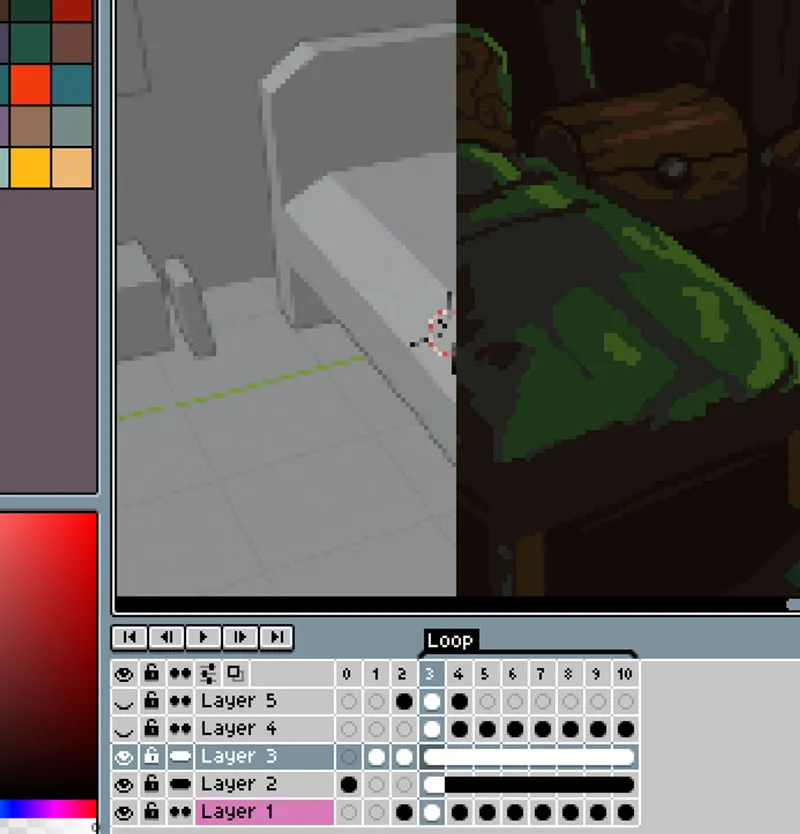
Using 3d models as pixel art reference
One cool trick for making complex animations in pixel art, specially when it involves rotating or complex perspective is to use blender or other simple 3d tool to mock it up first. Let's start with a use case, I wanted to create a simple café sign that rotates, this was my initial sketch: First I tr
Jul 18, 2023 0 8

My Thoughts on Style Consistency
I wrote an article about this! Check it out here: https://saint11.org/blog/consistency/ Edit: Fixed the link!
Apr 20, 2023 0 1
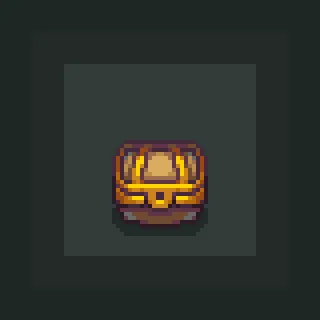
Chest animation
Little chest animation I won't use anymore. It's a simple animation but uses a lot of classic animation principles like easing, anticipation and "squash and stretch". You can also use that in a game or however you want, it's released under public domain. This work is free of known copyright restrict
May 13, 2022 0 12

Pixel art alignment
Quick tip on a pixel art technique that I really like. This is usually one of the first things that I notice when looking at beginners pixel art, since it's not very intuitive. Having everything aligned can be bad because it creates a secondary resolution on top of your main one. For example, 2x2 or
Mar 31, 2022 0 1
The Art of Celeste
Now you can watch my last year's talk at Full Indie Summit about the postmortem art of Celeste! I talk a bit more about my process for making and implementing pixel art for the game and also answer some questions the public had. Feel free to ask me anything in the comment session below! I'll reply a
Jun 3, 2020 0
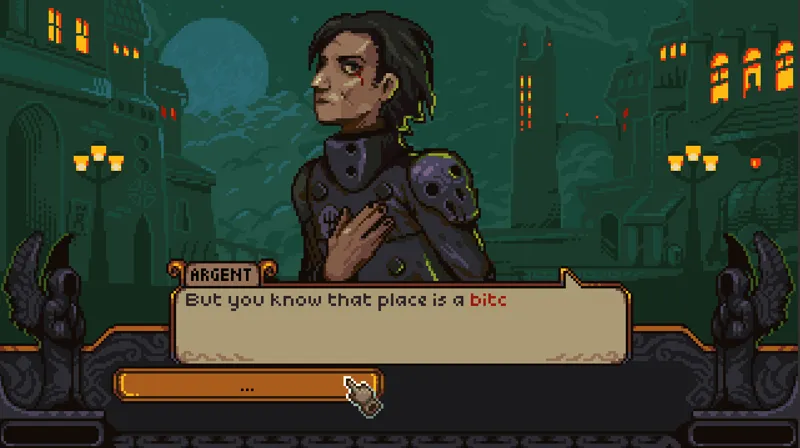
Medic game prototype, and streams are back!
Here's some screenshots of my latest prototype. I've been working on it while streaming too, feel free to join and ask questions in my Twitch channel I'm streaming every Saturday at 11:30 am (GMT-8) and some Wednesdays after 6pm too! See you there! <3
May 26, 2020 0 3
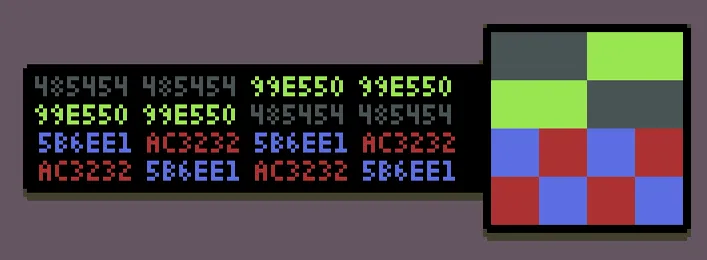
Making pixel art #8 - Saving and Exporting
Another article on my getting started series! This one has a lot of very basic and very advanced things, so, I hope it's useful! Read it here: https://medium.com/pixel-grimoire/how-to-start-making-pixel-art-8-eb218a4637dd As always, thank you for the continuous support!
Jun 5, 2019 0 1

#79 Jumping
It's been ages since the last tutorial, but now I'm finally settled in and hopefully I'll be able to keep making my tutorials again :) Thanks everyone so much for all the support and patience! Here's some other tutorials related to the topic: - Impact: https://www.patreon.com/posts/impact-23417521 -
Apr 1, 2019 0 1

I Made a Palette Generator: CCHIMERA
Hey there! Today I want to announce a little tool that I'm making to help me (and anyone else) with something I struggle with a lot: color palettes. For now it only generates simple randomized 16-color palettes optimized for pixel art, but in the future I want it to become a much bigger and a multi-
Jan 28, 2019 0 1

Pixel Grimoire #6, Basic Color Theory
Here's my first post of the week, another article in my series. Read it on Medium: https://medium.com/pixel-grimoire/how-to-start-making-pixel-art-6-a74f562a4056
Jan 8, 2019 0 1
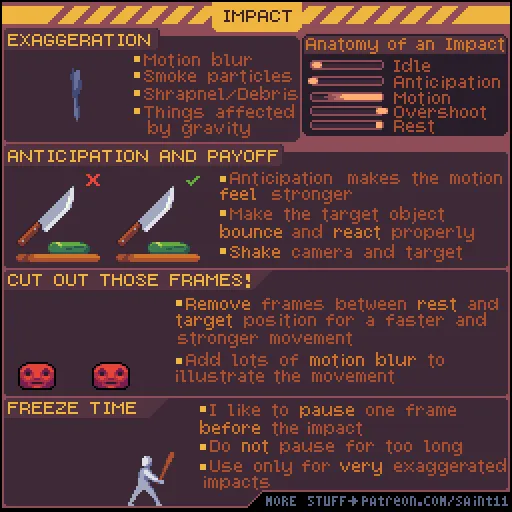
Impact!
After a very busy month I'm back :) This tutorial works well with some other tutorials I made, check them out: Attack animation: Motion Blur: https://www.patreon.com/posts/motion-blur-11596285 Squash and Stretch: https://www.patreon.com/posts/squash-and-11713421 Smoke: https://www.patreon.com/posts/
Dec 18, 2018 0 1
How to start making pixel art #4 - Shading
And here's the number 4 again :D Well, I just upgraded the previous article to #5 and now shading is the new #4. I think I'll actually do this a lot, so the whole series have a better flow to it. I'm also planning, in the future, to review the whole thing and switch them around even more for more co
Nov 21, 2018 0 1

How to start making pixel art #4 - Anti-Alias and Banding
And again, here's another pixel art article! I went with some more advanced topics with this one, so maybe I'll make some extra articles about simpler topics and order them before this #4 article. Here's the link: https://medium.com/pixel-grimoire/how-to-start-making-pixel-art-4-ff4bfcd2d085 As alwa
Nov 6, 2018 0 1

Isometric part 1
Here's some tips and tricks about drawing in the isometric perspective, I decided to call this "part 1" because I think this is a really big topic with a lot of room to explore. Also, check it out this great cheat sheet, it helped me a lot while making this tutorial: http://www.dennisbusch.de/knowho
Sep 25, 2018 0 1
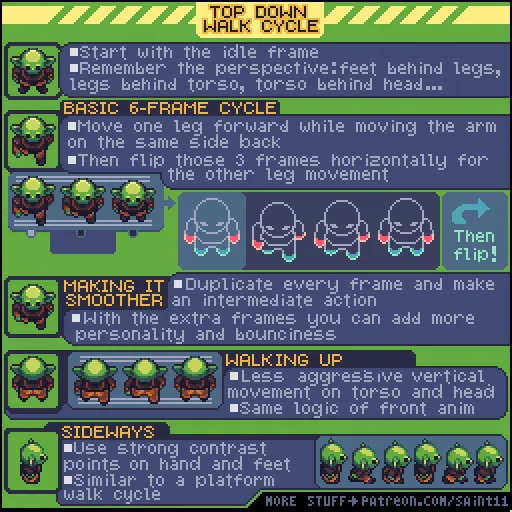
Top Down Walk Cycle
This tutorial is very similar to another tutorial of mine, the Top Down Run Cycle but walking, as you can see has some differences. Also I tried to use this to share some more tips on the subject and how I usually work when making this type of animation. Don't forget that the walk cycle is a very im
Sep 11, 2018 0 1

How to start making pixel art #3 - A basic Aseprite animation
Finally publishing my incredibly late article on how to make a simple animation on Aseprite! I focused on people that are really starting out and I'll start focusing on advanced techniques in the future. Here's the link: https://medium.com/pixel-grimoire/how-to-start-making-pixel-art-3-c9eb70270fa1
Aug 27, 2018 0 1

Making Pixel Art #2 - Cluster sketching and painting
I just posted my second article on my in-depth series about how to start learning pixel art! Check out the post on Medium: https://medium.com/pixel-grimoire/how-to-start-making-pixel-art-2-bcd705cb04d7
Aug 3, 2018 0 1
Making Pixel Art #1 - An absolute beginner’s guide
I just posted my first article on an in-depth series about how to start learning pixel art I'm planning to make! Check out the first post on Medium: https://medium.com/@saintjust/how-to-start-making-pixel-art-2d1e31a5ceab I tried posting it on Patreon too but the formatting was too broken :/ If you
Jul 20, 2018 0
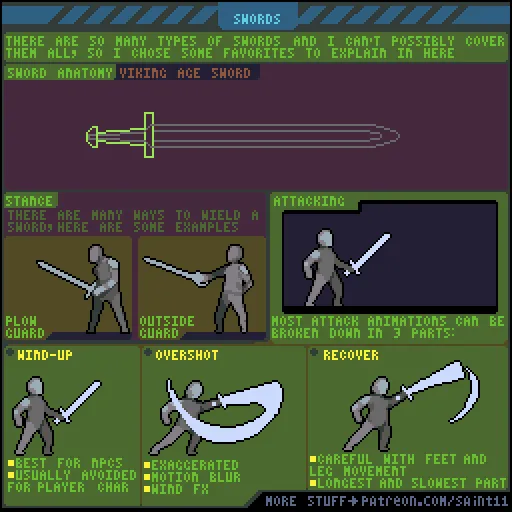
Swords!
This tutorial is a little similar to my second tutorial, about attack, but this time I've focused on swords. Many of the stances and poses were based on videos by Skallagrim, check his stuff out if you need more info on the subject :) Remember, when drawing historical weapons is always good to do so
Jul 6, 2018 0 1

Wood Textures
Here's a little guide on how to draw wood textures! Wood is not a necessarily hard thing to draw, but if you want to make it detailed it is very time consuming. I always try to focus first on the big shapes and only when I'm happy with it I draw the texture. Otherwise I may waste a lot of time drawi
Jun 20, 2018 0 1
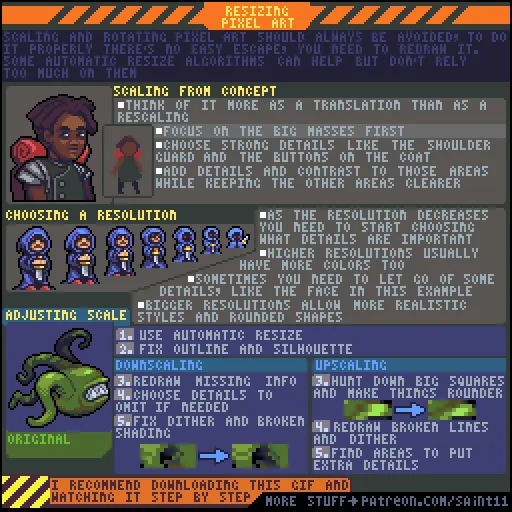
Resizing Pixel Art
Before anything, sorry for all the text, I always try to keep my tutorias as compact as possible but for this I couldn't think of a way of explaining all that without lots of text. If you want to resize your pixel art you are in for a rough ride, this is one of the most annoying things about this ar
Jun 5, 2018 0 2
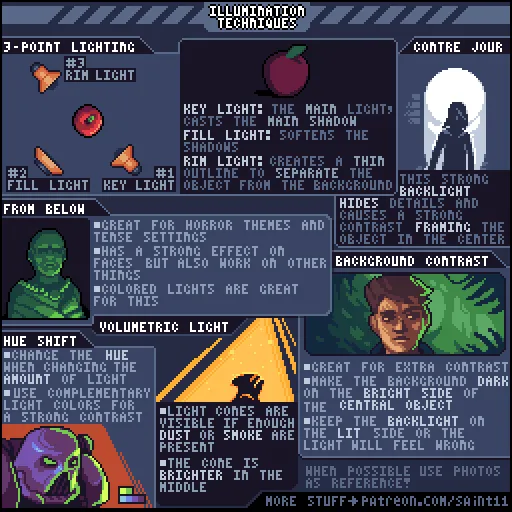
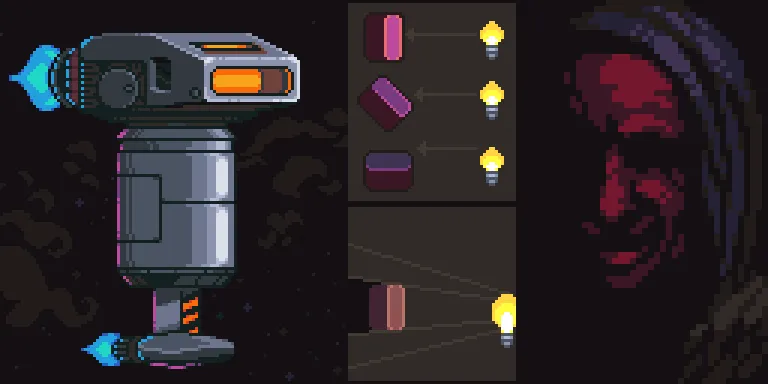
Illumination Techniques
Here's my 70th tutorial! I had to do a lot of research for this one and leaned a lot in the process. Researching photography techniques is always a good way to learn how to draw and frame subjects. Other tutorials where I talk about similar subjects: Shading Process Portraits
May 15, 2018 0 1
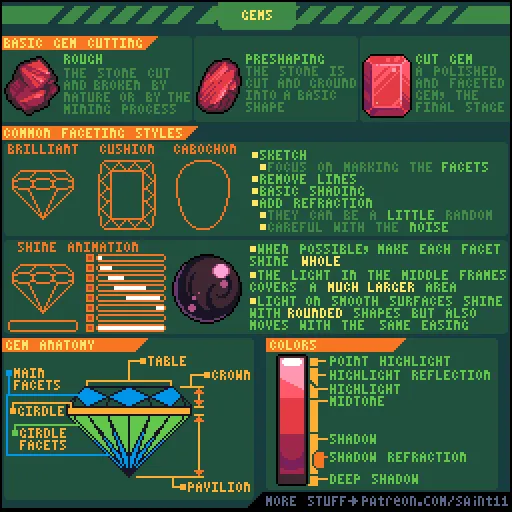
Gems
This tutorial is about gems, something that I really like drawing, but I never really gave too much though about how it's really made and researching for this tutorial was very fun. The gem cutting process is very interesting and much more artesanal and precise than I expected. Another reference for
May 1, 2018 0 1

Firearm Design
When designing firearms my main advice is: always have some real world reference. Firearms are very complex mechanical devices and it's very easy for them to look fake or like a toy gun. Having the right details is what sells the realism. Even though I'm not really into guns (I never even touched on
Apr 18, 2018 0 1

Holograms/Ghost effect
This tutorial took way longer than I expected, but finally, here it is! I decided to make a tutorial about ghosts and holograms because they have a lot in common, they both are semi-translucent human shapes. Of course, one has a sci-fi theme the other is usually more macabre, but the effect is very
Apr 3, 2018 0 1
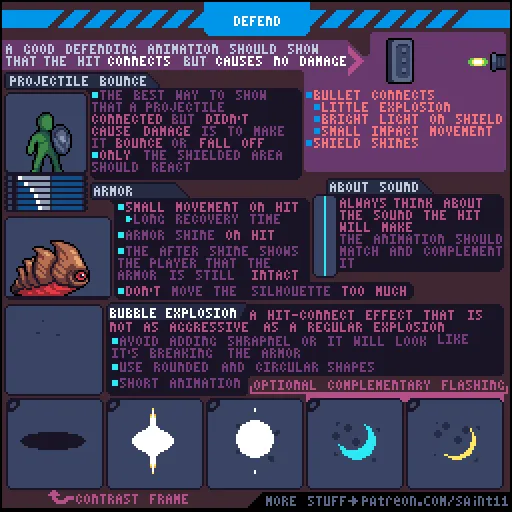
Defend/Take Hit
And here's another tutorial about getting hit! Just remember that player feedback is a very important thing and communicating that characters took damage is just as important as if they didn't. Not having a "defend" animation or feedback might confuse the players into thinking that the hit missed an
Mar 20, 2018 0 1
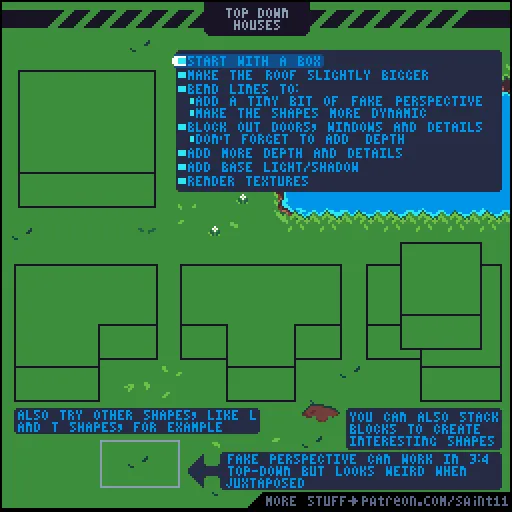
Top Down Houses
For making houses and other structures in top down I always recommend looking for reference, for example, this tutorial was based on Zelda: Minish Cap art. Representing things in top down 2D comes with a very hard perspective problem that's very hard to solve. Here I use one of my favorite methods,
Mar 6, 2018 0 1

Ice and Snow Tutorial
Here's my ice and snow tutorial! I have to admit that I don't have much experience with snow myself (I live in Brazil) most of what I've learn is from pictures and videos. My ultimate advice is always search for reference, ice colors can change in weird ways, become over saturated and very glossy. A
Feb 20, 2018 0 1
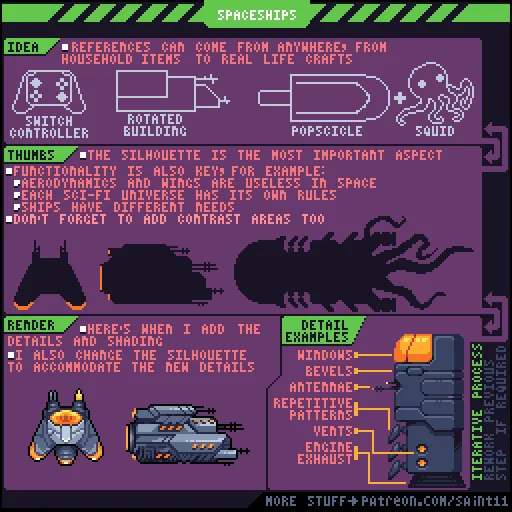
Spaceship Design
When designing spaceships I always follow a iterative process and if something doesn't work I can always fall back one step and change things. I also urge you to read this amazing article by Arne: https://androidarts.com/spaceships/spaceship_design.htm And here are some other tutorials that I made t
Feb 6, 2018 0 1
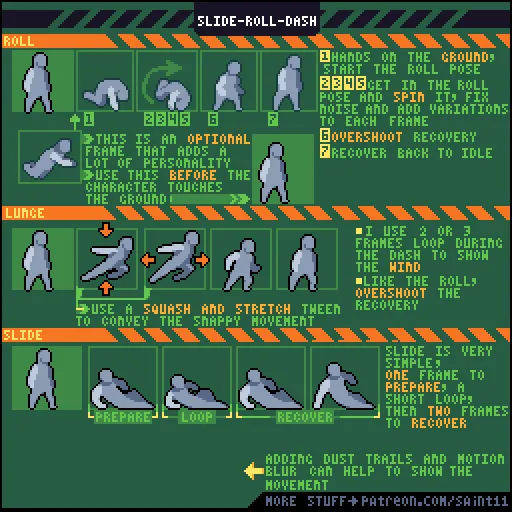
Slide/Roll/Dash
I decided to group these three animations because they are all variations on the same theme, an abrupt movement for escaping or reaching something. They all follow the same pattern, a very short or non-existent preparation (especially for player characters) a loop for the duration of the action and
Jan 23, 2018 0 1

Wall Slide / Wall Kick
And we are back with another animation tutorial! It's kinda weird to explain wall slide and kick before explaining jump, but I think it's all about conveying a strong horizontal movement for the kick and the pressing on the wall for the slide. Although this is how I usually draw my characters I thin
Jan 9, 2018 0 1

Modern / Indoors
It's been a very intense end of year, but I managed to finish this week's tutorial! It's about modern indoor scenery. The tips here are built around my personal style, so they definitely don't apply to all cases, but can work as a starting point. On another topic, I'm considering switching to making
Dec 26, 2017 0 1

Death / Take Hit Tutorial
This week's tutorial is about death and take hit animations. Remember that most of this action can be conveyed through the correct use of easing. Here some other tutorials that can be useful on this subject: Blood and guts Animation easing Explosion As always, thanks a lot for all the support! PS. I
Dec 12, 2017 0 1

Sand
I like drawing sand because it's one of those things that I can use some simple tricks to draw and that's basically: draw wave > make the center thicker > add a shadow > repeat Also, I'm trying to make my tutorials a little more focused, like I used to do before, a little less text and a little more
Nov 28, 2017 0 1
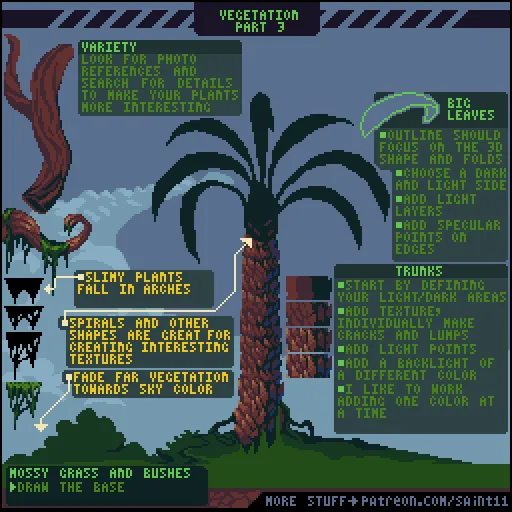
Vegetation part 3
After a one week break, here's another vegetation tutorial! I love making those. In this one I focused on making more realistic textures from photo references and on tropical and jungle vegetation. If you want, here part 1 and part 2. Thank a lot for your support and let's draw some plants :)
Nov 21, 2017 0 1

Cuteness
Here's this weeks tutorial and it's about drawing cute stuff! Drawing cute characters is not really my specialty but I put some guidelines of what I usually think when trying to draw cute characters. Just remember that there are many different ways to achieve this cute effect, this tutorial show onl
Nov 7, 2017 0 1

Modular Animation
One day late, but here it is! Modular animation :D Honestly, I don't like making modular animation, I try to use them only for big sprites or other situations where it would save me lots of time. Even with many advantages, like being able to animate procedurally it's still feels stiffer and unnatura
Nov 1, 2017 0 1

Breaking Objects
Those are some general guidelines for animating breaking objects that I usually use. Just don't forget that different materials have different behaviors! Some other useful tutorials on this subject: Explosion Fire Smoke Thank's a lot for the support :)
Oct 24, 2017 0 1

Darkness
This is my take on darkness and how to use it in cool ways. When drawing dark things I like to appeal to the viewers imagination, showing only what I really have to show and letting them complete the image by themselves. As always, thank you a lot for the support and until next week!
Oct 17, 2017 0 1

UI: The 9-Slice
I decided to break up the UI theme into several parts and this is the first one. The 9-slice (and the 3-slice) is, in my opinion, the basic element of every UI and a good place to start, since you can reuse it pretty much everywhere. Here's a quick reference of what I like to call the parts of the 9
Oct 10, 2017 0 2

1-Bit
This is a hard theme, but it's also something I really like to work with. The good thing is that learning 1 bit is very useful for working with any type of pixel art, for example: These props I made for Celeste are not 1-bit per se, but knowing how to work with 1-bit helped me a LOT while designing
Sep 26, 2017 0 2
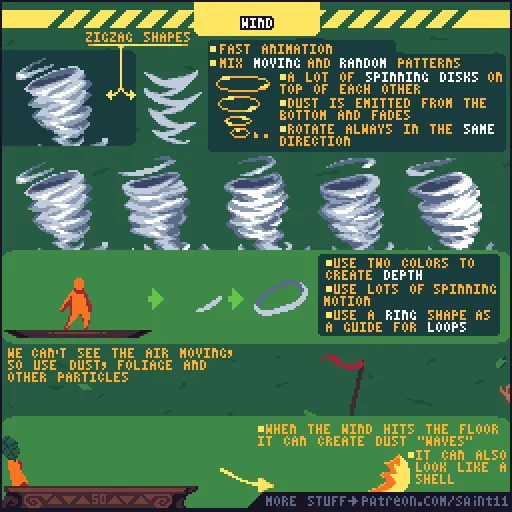
Wind/Tornado, tutorial #50!
Finally, my #50 tutorial! And probably the theme that stayed for the longest time in the voting poll. This is my take on wind. In my opinion wind is very hard to animate, it's a weird balance between random patterns and ordered patters and sometimes it's hard to find the middle. As always thank you
Sep 19, 2017 0 1

Stars and Planets
This is one of my favorite things to draw, I love making BG stars. My main concern when working with this is the contrast, you need to keep it under control and be careful to avoid noise. Thank you so much for all the support!
Sep 12, 2017 0 1
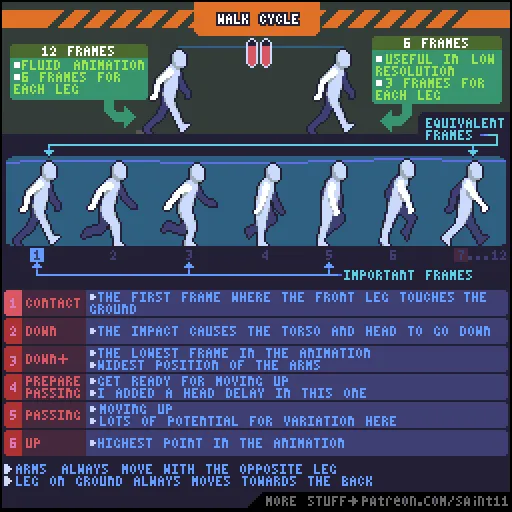
Simple Walk Cycle
This is the simplest walk cycle I could come up with. I made it 12 frames long, so I could easily cut it down to 6. Unlike this cycle I made most of the walk cycles have 8 frames +2 (10) for fluidity. A nice tip that I forgot to include is to focus first on the legs and then on the arms if you are g
Sep 5, 2017 0 1

Outlines
Usually I avoid too many outlines in pretty much all pixel art I make, since I work with very low resolution, except for a black outside border. I put that outside border almost everywhere because it helps a lot with the contrast and silhouette. I also have talked about lines before in this tutorial
Aug 29, 2017 0 1
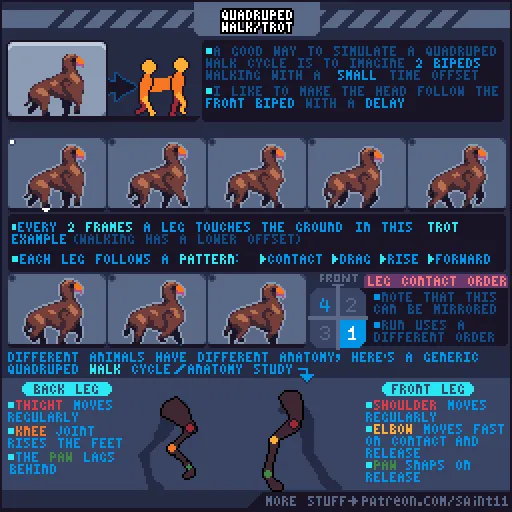
Quadruped walk/trot cycle
This is probably one of my most complex tutorials. If you want to learn how to make a quadruped walk cycle you need to make a biped walk cycle first then do it twice and offset the time by around 25% or so, depending on the walk style you want. Quadrupeds are very complex and can walk, trot, run, ma
Aug 23, 2017 0 1

Shading
Those are some simple tips on how to work with shadows and how to avoid muddy/boring shadows. Hue shifting, and band compression are simple and effective techniques to handle that. For a more in-depth guide on colors, check this awesome tutorial: http://www.writedesignonline.com/resources/design/rul
Aug 15, 2017 0 1
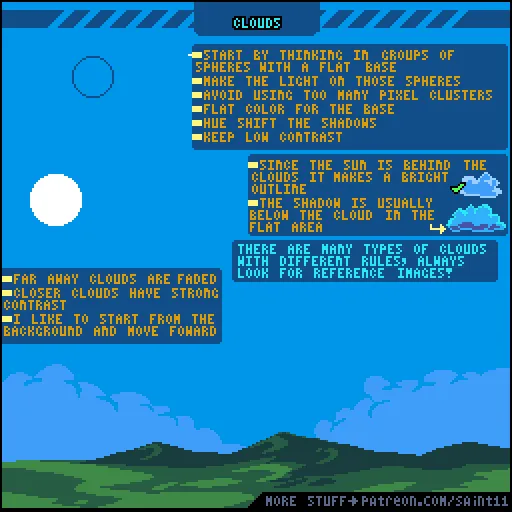
Clouds
This is my tutorial about clouds, I was going to explain about the many types of clouds but I think it's better to focus on how to draw a "basic" one first and then later I can do one on cloud types. Clouds are very similar to smoke, so you might want to check my Smoke tutorial too. I also made a tu
Aug 8, 2017 0 1

Environmental Hazards
This is not exactly a tutorial, it's more like a reference sheet, so I would recommend you to refer to it when in need for some inspiration for environmental hazards in games. Also, feel free to download this gif and check it frame by frame, that's always a good thing to do. Other useful tutorials:
Aug 1, 2017 0 1
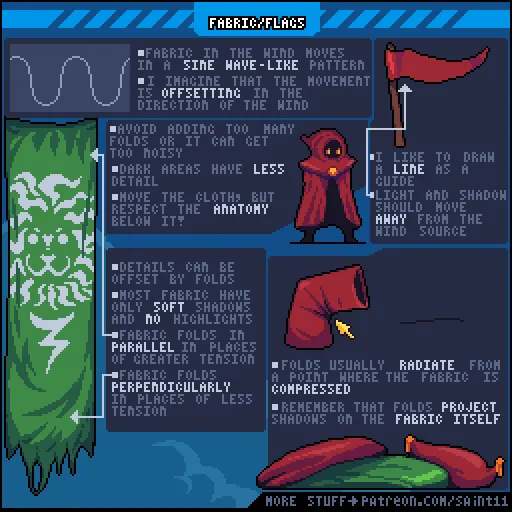
Fabric/Flags
When making flags always be careful to not overdo the folds and details, or everything will get very messy. For the movement, when not sure always remember sine waves. Other tutorials that might help you with the subject: Chacter Idle Fundamentals Part I and Part II <1 Pixel Movement
Jul 25, 2017 0 1
Showing 1 - 50 of 96