
[HS/KK/AI] HSUS/KKUS/AIUS 1.8.1
My apologies for this huge delay, I got sick recently and that completely threw my schedule off.
Anyway, as you can see HSUS is getting ported to AI too. I took the time to greatly refactor the code and homogenize certain features between versions (there are still differences though, mainly because some features are needed or not depending on the game, or simply because they will come later).
What's new?
For HS:
- Coordinate names aren't cut anymore when overwriting them.
- Delete confirmation dialog is smaller now.
- Delete confirmation dialog can also appear when using the "Delete" key (can be configured separately from the workspace button, disabled by default).
For KOI:
- Compatibility with BepInEx5.
- The configuration file will follow the dll.
- Delete confirmation dialog is smaller now.
- Delete confirmation dialog can also appear when using the "Delete" key (can be configured separately from the workspace button, disabled by default).
For AI:
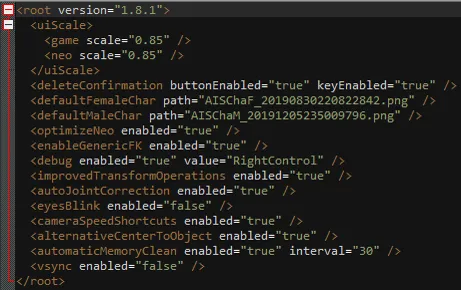
Alright this time I can't say "everything" because it's not everything. On the preview picture, you can see the config file and thus the features provided in the AI version. You can still look at my website section HSUS to see exactly what each feature does, but it's not extremely reliable since the documentation was written for HS. Anyway, I'll quickly explain everything:
- uiScale: allows you to scale down (or up I guess) the UI. Pretty useful in the studio mostly, 0.85 is a good value.
- deleteConfirmation: asks the user for a confirmation when trying to delete an item in the studio.
- defaultFemaleChar/defaultMaleChar: default characters loaded in the maker. I believe this feature is already provided by another plugin but I already ported this code a long time ago so it's not like I would remove it.
- optimizeNeo: the name is a bit abstract here since the config file is also shared with other games but here is what this does: adds search fields to costumes, characters, and the workspace window.
- enableGenericFK: forces FK on items, bones are taken dynamically based on the MeshRenderers and SkinnedMeshRenderers on them (does not conflict with items that have bones assigned manually).
- improvedTransformOperations: Copy/Paste/Reset Transform buttons added, allows the user to drag the letters next to the coordinates of an object to change those, and finally allows to scale items negatively.
- autoJointCorrection: automatically enables joint correction on a character upon spawn (in the studio).
- eyesBlink: by default disables the blinking on characters when spawned (in the studio again).
- cameraSpeedShortcuts: hold shift or ctrl to respectively increase or decrease the speed of the camera. Those shortcuts can also be used in the improvedTransformOperations feature.
- alternativeCenterToObject: F can now center the camera on individual FK/IK nodes and not just the object in general.
- automaticMemoryClean: cleans the ram every X seconds.
Requirements (for first time users)
For HS:
A fully updated game with the 630 patch (under "Game Update")
For KK/AI:
The latest BepInEx
Download
Comments (12)
Became a patron, and am patiently waiting for HS2US port for that enableGenericFK. I Didn't realize how many mods FK depended on this plugin. Really the only thing holding me back from fully transitioning to the new game at this point. Keep up the good work!
After accidentally deleting a character I was animating for the last hour, I found this plugin, installed it, and immediately became a patron. 1hr/10 would confirm to delete again.
Search by character's name is not working in chara maker (Koikatsu Party). Letters won't appear unless you click on the text box or press enter, cursor jumps to the middle of the seach box after 1 letter typed. Plus characters still blink. All functions works flawlessly in Studio though. (I have latest bepinex installed.) Can this be fixed please?
Where do I put AIUS 1.8.1 in the a.i shoujo game?
Joan, could you create a mod for export honey select studio voices to AI shoujo studio ?
No, I'm not interested, sorry.
Out of curiosity is there a comparable program for Playhome that you're aware of?
Absolutely not.
Hi, Joan. I've been using your HSUS to clear cache while modding for HS along the way. Thank you very much for that. I'm now trying to work on AI, but seems your AIUS doesn't have that right-ctrl function, will you update it? It could be very helpful if you add the Clear AssetBundle Cache function.
Hi, this feature is included but disabled by default actually. Why? Simply because my debug console isn't as useful as it is in HS, meaning there are better things out there for AI/KOI (RuntimeUnityEditor by Marco). Still, if you want to enable it on your side, look into the config file and enable the "debug" feature.
when i use it,in HS the chara and cloth list is blank,but 1.8.0version is ok.
You have to send me your logs otherwise I can't see what's happening, HoneySelect_64_Data/output_log.txt