
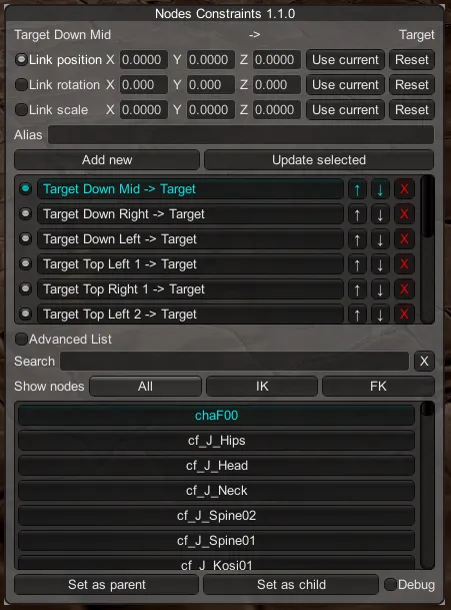
[HS/KK/AI] NodesConstraints 1.1.0
Yet another port (and a new feature too).
What's new?
For HS:
- Bug fixed where some parts of the hierarchy were missing in the advanced list mode.
- New "Link Scale" feature.
For KOI:
- Bug fixed where some parts of the hierarchy were missing in the advanced list mode.
- New "Link Scale" feature.
- Linking a rotating gimmick to the head bone would make only the hair rotate if FK was disabled. Apparently this bug was old but I couldn't reproduce it until last week or something. But anyway, it's fixed now.
For AI:
Everything. Like always, read my website section NodesConstraints to know how to use it.
Requirements (for first time users)
For HS:
A fully updated game with the 630 patch (under "Game Update")
For KK/AI:
The latest BepInEx
The latest BepisPlugins
Download
HS NodesConstraints 1.1.0 (Mega)
Comments (13)
Excuse me ai Where to put
for AI f_t_shoulder_R(work) is wrong
Its probably just me, but any idea why my KK is not loading NodeConstraints? Can't open the window with ctrl + n and can't find any config or anything. All other plugins I have installed work flawlessly.
Sorry for the late answer, was in vacation. You probably solved it already but just in case the shortcut is different for Koi, it's ctrl + i.
running into a bit of trouble with shoulder nodes being named the same. https://imgur.com/XnSBbyL
Yeah I saw, you can thank Illusion for that. I don't plan on releasing an update right now but I suppose you can take this file and put it in "abdata/studio/base" (yes it's a hardmod). https://mega.nz/#!k1wXVCCb!-2TIC4GmytdQyrAX-7spyLnFxiA2uBJfhp9b4YxTDHU Also make sure not to have the mod called "boobs_floor_collider" by stringer722, I don't know exactly what it does but it conflicts with this file.
Awesome work Joan6694. This mod make all difference.!
In the last node constraint you could link coordinates to 0/0/0 and make a duplicate without the constraints at the linked position, this was an easy way to position stuff onto the character without having then to keep the link. Now when I duplicate something it resets to the originals "pre link" position. Was that considered a bug?
Yes, I believe I fixed this explicitly, and no I won't bring that back since it is likely that I will get reports from other people saying that I introduced this bug. However you still have ways to do what you want. You can use the Copy/Paste transform feature of HSUS/KKUS/AIUS for example, the vanilla "Move Copy" feature also works here.
for AI NC: the link to the position (as child) of the submesh does not work for me.
That's not very precise, what do you mean by "submesh", you need to give me a proper way to reproduce that, or at least send me a scene that has this issue.
Nicey
Yes, even for AI.