
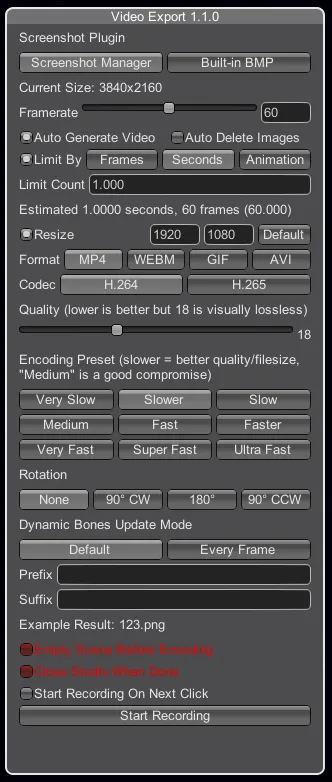
[HS/KK/AI] VideoExport 1.1.0
So as you can see, VideoExport was ported to Koi (that was a commission) and to AI as well (because why not), and since I've had a bunch of requests and made some minor improvements since the first version, it's time for an update.
What's new?
For HS:
- It is now possible to configure where temporary images and output videos are saved (in modprefs). No more full ssd.
- Temporary images can now have text appended and prepended to their name, which can be interesting if you only care about the images.
- A built-in BMP screenshot plugin, saves images as BMP, which is faster than PNG but takes waaaaay more space (take a look at this comparison made by Metagraphy).
- New option that makes the plugin close the studio when it's done making the video. It can be useful if you want to render something overnight but don't want your studio to run after it's done.
- Another new option that empties the scene when it's done taking screenshots. This option might sound weird, but it actually speeds up the encoding process.
As you can imagine, those two last options can be dangerous if you're not careful (you could lose your data if you didn't save your scene before rendering a video), that's why they're in bright red and not saved throughout sessions.
For KOI/AI:
Everything. If this is your first time seeing this plugin, feel free to check my website (section VideoExport) for a full explanation.
Requirements (for first time users)
For HS:
HoneyShot or PlayShot24ZHNeo
For KOI/AI:
The latest BepInEx
The latest BepisPlugins
Download
HS VideoExport Version 1.1.0 (Mega)
Comments (30)
Configuration screen pop up by F1 key allows to configure frames and output folders, but regardless the setting, every time the default folders seem to be used. Is there any hint?
can this be used for the main game hs2 as well? i know it works for studioneo2 but im not sure if it works for the main game
No, this cannot be used in the main game.
Hi, Is it possible to capture the images with transparency in KK studio? I was able to do this in HS with "HoneyShot" tab which does not exist in KK studio, Could you give some info on this?
Sorry for the very late answer, I was sick recently. I assume you already found out how, but just in case: in KK studio you use make sure you use the Screenshot Manager plugin, then the transparency is done via the plugin itself, meaning it's configured in the F1 menu (under "Screenshot Manager").
Hi Joan, awesome plugin, one quick question, is there a HS2-compatible version of VideoExport? I tried the AI version but I cannot bring up the UI in studio NEO with ctrl+e
The AI version isn't compatible with HS2 (I mean, I didn't try myself, but it's probably not). In any case, it will be soon. I have other things to take care of first, but don't worry, it'll be released soon.
Sorry I'm a little confused does this work with Koikatu's chara studio? i thought thats what KK mean but the instructions thingy looks like its explaining it for honey select :/
That's because it works the same way in HS and KK, only the sceenshot plugins change there.
i uploaded it to mediafire. I hope it helps https://www.mediafire.com/file/xi0jas2zoh7pfwz/output_log.txt/file
Unfortunately no, this file resets each time you start the game/studio, and I don't see anything related to VideoExport here, which means you restarted the Studio at some point. You need to send this file just after you used the plugin or it's useless.
Hi Joan. I have a problem with the plugin with AI. I use screenshot manager (v 14), too. But the problem also occurs with build-in bmp: When the plugin renders a video it falls into an infinite loop. It still renders on, but the progress numer (in yellow) on the bottom doesn't go up. It goes up at first, but then stops. I can't close the plugin and I can't start a new video. The CPU usage stays high and the studio is stuttering. If I wait some time and close studieoneo the video is generated fully. Do you have an idea what causes this?
No idea, you have to send your output_log.txt
Sorry for poor English. It is the frame of the red circle. https://imgur.com/a/OBBeWk9 I want to make a video with a camera frame like an image. For example, can't I use a screenshot using F9 because a frame using F11 doesn't show a frame?
Ok I see. No, it's not possible to do that with VideoExport right now. You can still use a video editing software to do it though.
Hello I always use it to post to AI少女 pixiv UGOIRA. Is there a way to display the front frame? For example, I would like to express a movie shooting with a smartphone.
Sorry, I'm not sure I understand what you mean here.
Hi, thank you so much for this plugin. I am wondering, is it possible to export PNG from AI StudioNeoV2 including the scene background color? I set the background color to green in StudioNeoV2, but the exported images have the background as a sort of not-quite-black color. (I am trying to do some compositing and black doesn't work well for green-screening.)
Sure it is. This plugin is using the capabilities of "Screenshot Manager" (the modded screenshot plugin), so whatever this is capable to do, VideoExport can.
Hey, I downloaded this for Studio Neo and I made two short videos with it just fine. I tried to make another one later but when I clicked record, nothing happened The box did change to "stop recording," but clicking it does nothing, and no videos get recorded.
I get this error message every time. Exception IOException: Win32 IO returned ERROR_INVALID_NAME. Path: C:\Users\chase\Downloads?? Honey Select - Final Repack 3.5
Hey, just installed this Plugin into KK. The Issue is that I don't get the Configuration-Window to open up. If I open the PluginList with the F1 Key and select the VideoMaker1.1.0 I only get the two top "tickboxes" shown. If I go into Advanced Mode it shows me some of the available options.. but not with that graphical overlay. My ScreenshotManager is neither showing anything regarding the VideoMaker :<
As stated in the post, if this is your first time using the plugin and you come from AI or KK, you should look at my website (linked in the post) and look at the VideoExport section, which in its turn says "Bring up the UI with Ctrl E."
You've done a great job. Thanks!
I've been using OBS to record, will check this out though...
I bought a new PC and tried out the BMP output with NVMeSSD. It's not as fast as real time, but it's amazing speed. My previous PC took more than an hour to output 4 minutes... lol Thanks. Ryzen7 3700X, RTX2060, Mem32GB, NVMeSSD1TB https://thumbs.gfycat.com/QueasyGlisteningChital-mobile.mp4
Nice, but how fast is it compared to PNG? Can you do a comparison on the same scene and the same video length? I'm curious of the result.
There a bug for KK version from Build-in-BMP tab when i try create a GIF, Error while generating the video . I try use mp4 format and work i try use web format and work i try use avi format and work.
thanks!
Thank you for fulfilling my request. I was impressed by how fast the BMP output was faster than I expected. I want to try it with NVMe M2 SSD someday. The result is probably close to real-time speed. I respect you. Thank you very much!