


Sadie Gets a Life 0.3.0 Dev Log, 2026-03-12
Welcome to another dev log. I'm going to start this off with the bad news (for some definition of "bad"), just so I don't bury it. After that, we'll talk about some neat functionality that you'll see in 0.3.0.
The Two-Week Delay
As I've been working on new content for 0.3.0, I realized that there's no way I'm going to be able to get it all in place, tested, walkthrough updated, etc. in a normal sprint. Instead, I'm going to add two weeks
to this release cycle.
What this means is that Tier 3 patrons will get access to the new version on April 2nd, and gen pop will see it on April 9th. But hopefully the next couple of dev logs will give you a glimpse of why I think it'll be worth it.
Tracking Strengths and Weaknesses
In the prior dev log, I mentioned that every foe will have its own strengths and weaknesses. You can, of course, guess at what that particular strength or weakness is, but I don't think it'd be very fun, especially because there's no "Hey, you just found his weakness!" messaging.
What we will have, however, is the ability to scan an enemy.
Scan is a new combat option that I'm introducing (and we'll talk about the one below it next!). Scan will take up a character's entire turn, but it will allow you to track important information about one enemy.
When scanning an enemy, you get their current HP and MP, their biggest weakness, and a reminder to check the encyclopedia for more detail. The main intent of this is to get a quick glimpse at a specific foe. The secondary intent of this is to add an enemy class to the Encyclopedia. You only need to scan an enemy once for it to show up in the Encyclopedia, so my recommendation is to Scan each new enemy up-front, so that you know the best way to attack it. Then, if you meet that enemy again later, you still know the best way to take it down.
One thing that's important to keep in mind about weaknesses is that the game only considers something a weakness if you deal more than 100% damage using that skill element (attack type or class of magic). This can lead to an annoying situation in which Scan tells you that an enemy doesn't have a weakness because you do at most 100% damage for any given skill element. Thus, if you're facing a tank of an enemy with, say, 50% Pierce damage, 70% Slash, and 75% Blunt, the scan command will tell you that this enemy does not have a weakness. And in fairness, they don't. But you probably will still want to use Blunt attacks against this foe because they'll do the most damage.
The Encyclopedia
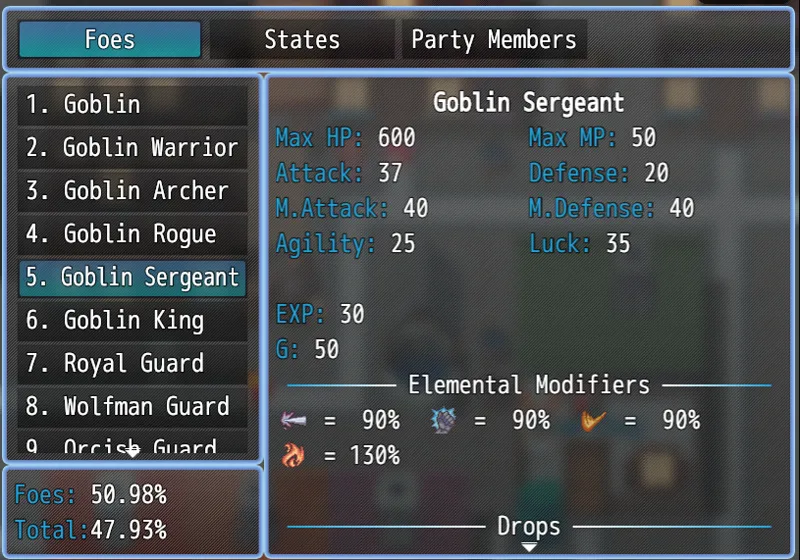
There's no way I would expect you, dear reader, to memorize the relative weaknesses of every class of enemy in the game. That's why we have an encyclopedia! You can access the encyclopedia outside of combat using the main menu (Escape) or by pressing the "e" key on the keyboard. You can also access it in combat for a quick peek at a foe.
For each enemy, I show you the most relevant information. The top box shows stats like HP and MP, the amount of XP Sadie and company receive from defeating the foe, and so on. Then, in Elemental Modifiers, I include three of them by default: Pierce, Blunt, and Slash damages, respectively. Each modifier has its own icon, and any additional modifiers that are not 100% show up here. That's why fire (130% modifier) shows up, but not ice, water, etc. That way, you don't have to scroll through a series of 100% values to find the relevant skill elements.
In addition, you can see what the enemy drops. But, because I'm a sneaky type, I don't show what you can steal from an enemy (assuming that enemy is wearing pants).
The encyclopedia also includes a breakdown of each state a friend or foe can receive. It can be annoying seeing some icon associated with a foe but not understanding what it's supposed to mean. This is where you can look it up.
The User Guide
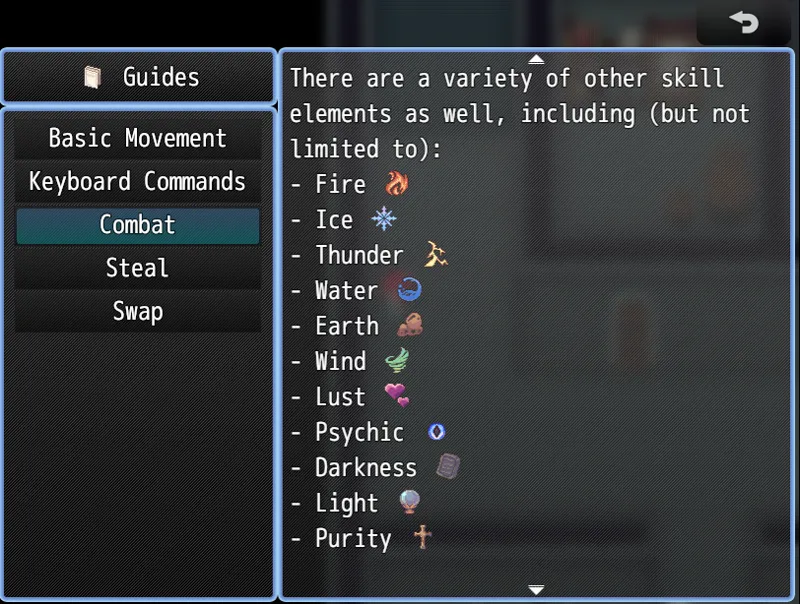
I've also revamped the user guide / manual, adding in some more content on combat and a more rational set of keyboard commands.
This is an example of one section in the Combat guide, showing the various icons. There's a lot going on here with skill elements, but I want to reiterate that the game introduces these gradually, so you won't have a shotgun blast of skill elements and no clue of when to use what.
And Much More
There are several other menu-related items that I could highlight here, but I think this dev log is getting long enough as it is. In the next update, I'll talk about a few quality of life improvements, a new way to sink your hard-earned G into customizing your characters, and one scene that has taken waaaay too much of my time but is worth it.
