
Spreading the word
You’ve been working hard to create your Patreon — and the people need to know it! Time to spread the word.
Yes, talking about your Patreon might feel a little awkward at first. That’s normal. But the more you do it, the easier it gets.
Here’s a reframe for you: You created this space for a reason. Talking about it simply lets people know they’re invited and welcome to join.
Start with one clear ask
Let’s rewind it back for a second. Before you spread the word, remind yourself:
Why did you start this Patreon?
Who’s it for?
What do members get?
Why does it matter right now?
Sound familiar? Yep, these are the same questions you started your launch journey with. Sigh, memories.
Reflecting back on the answers leads to one key thing: your call to action.
A call to action is just a fancy name for the sentence that tells someone what to do next.
For example:
Join here.
Become a member.
Get the full version on Patreon.
Be part of the community.
Your call to action should be clear and repeatable. You’ll use it across social posts, videos, emails, and conversations.
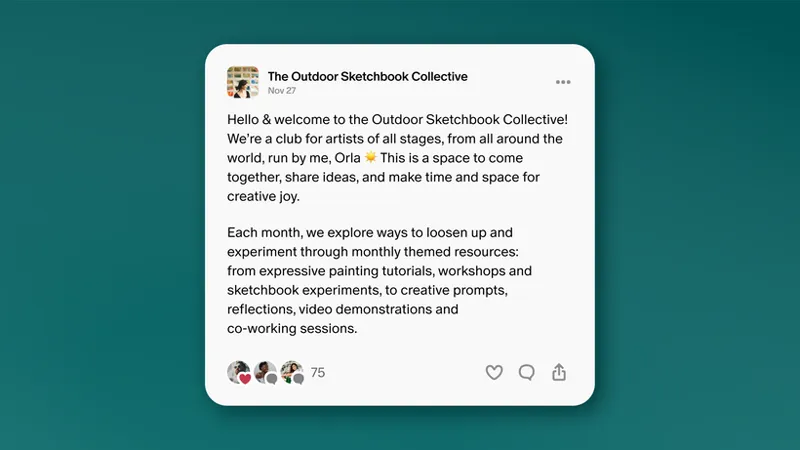
Creators like visual artist Orla Stevens do this well by clearly explaining what her Patreon offers and inviting people to take the next step.
"When I'm trying to share what I do with people, I want them to get the feeling of what it's like to be in the Patreon... you can imagine that we're all sat like a big table together, we're in the shared studio space almost, we're drinking tea, there's paint everywhere. And I try and get that feeling into [my public content]."
Launching your Patreon is a marathon, not a sprint
“Hey everybody - Check out my Patreon!” Whew! One post and we’re done talking about Patreon forever, right? … not quite.
In reality, a strong launch is a build up. Especially because people rarely act the first time they hear something.
They’re busy. They need to be reminded. They want to see a little more before committing.
That’s why repetition matters. Seeing your message multiple times helps people remember it. And when they remember it, they’re more likely to take action.
Show and tell
Did you do show-and-tell when you were younger? You’d bring in an item, show it off, and tell your classmates all about it.
It works for your Patreon, too!
Instead of saying: “I launched a Patreon.”
Use a show and tell approach like: “This week I’m sharing a behind-the-scenes peek into my latest project. The full version is available on Patreon.”
Now you’re showing the value while you’re telling people about your Patreon. Bam!
Cooking creator Kitchenista shows how this can really work for you. She shared recipes on Instagram that people were crazy about, while also pointing people to her Patreon where she’d make those recipes live. The result? A “show and tell” moment her audience loved.
Be authentic
As you’re doing the showing and the telling, be sure to sound like yourself.
Share why this matters to you. Say it in your own voice.
You are building this community. So make it authentically you. That energy is welcoming and contagious.
Consider a launch video
One way to bring all of this together is with a launch video.
A launch video gives people a clear, personal way to understand your Patreon — and it’s something you can share more than once across platforms.
This can be a simple, authentic video where you:
Share what you’re building on Patreon
Explain why it matters to you
Invite people to join
It doesn’t need to be highly produced or flashy. It just needs to sound like you.
⚡Pro Tip: Want a little more help with your launch video idea? Check out the How to nail your Patreon launch video post on Patreon for Creators.
Build → Launch → Reinforce
Let’s piece this all together here:
You’re spreading the word
Using a call to action
Repeating your message to reach your audience
Showing value while you’re telling
Being authentic as you do it
Look at you go! But wait… there’s more.
Take a look at your 30-Day Editorial Planner & Calendar Templates. You can build all of these launch messages into your plan.
Here’s how — Let’s use a two week plan as an example:
Week 1: Build anticipation
Start planting seeds and warming people up. You might:
Tease the concept of your Patreon
Share behind-the-scenes media
Post a preview of something members will get
Mention that something new is coming
You’re growing their curiosity.
Week 2: Launch and reinforce
Now it’s time to launch and keep the momentum going:
Drop your first major Patreon post
Announce your Patreon clearly
Show what membership unlocks
Follow up with reminders
Share another post at the end of your launch week
Add a limited-time incentive, like a membership discount for anyone who joins in the first two weeks
You’re creating awareness and familiarity.
Having a structured plan keeps your energy steady and your launch strong.
Keep showing up
Spreading the word is more than one announcement. Keep promoting and mentioning your Patreon as you continue to share your work.
Make it feel natural. Repeat your call to action in ways that feel authentically you. As Hannah de Winton of de Winton Paper Co. shared:
"The more you mention it just like casually and naturally in various bits of content where it feels relevant, or even if it's just your own mini little ad break for your own Patreon, the more you do that and the more you practice, the more natural it will feel. And then it does feel less like... especially if you're at that stage where you're like, 'I hate selling, it feels like I'm pushing this on people.' I promise you, it really isn't."
Over time, that consistency helps more people discover what you’re building.
Because launching isn’t the finish line. It’s the starting point.
🧭 Your next steps
Write a clear, authentic, repeatable call to action to use across social posts, videos, emails, and conversations
Use your 30-Day Editorial Planner & Calendar Templates to create your launch plan that drives fans to your Patreon.
Build anticipation with pre-launch activities.
Keep the momentum going with post-launch activities.
Next up: Launch, engage, and keep going.
📌 How helpful was this material? Click to let us know: 👍 | 👎


Comments (9)
No entiendo mucho
i accidently connected another face book account how i remove it even i click cancel button it keep showing up
Hey Ragul, we would recommend reaching out to our Support team for assistance with this so that they can take a closer look at your page. You can reach them here: https://support.patreon.com/hc/en-us/requests/new
Thank you for inspiring ❤️
love
this is actually really helpful. thanks!
okay
Vamos a e charle un ojo, que ando un poco perdida de cómo se promociona una por aquí ajajaj.
Have I done