



How do i update to the new CSP properly?
(You don't get CSP here! I just inform you how to install it properly)
You get the latest CSP here:
https://www.patreon.com/x4fab/posts
If you like to try the new CSP update, please do this:
First install the new Content Manager!!!
Replace your existing ContentManger.exe with the new one!
This is very important!
Then install the latest puplic version CSP 0.179 !!!
Then click on the link inside the CSP preview post:
This will force CM to install the latest CSP preview version.
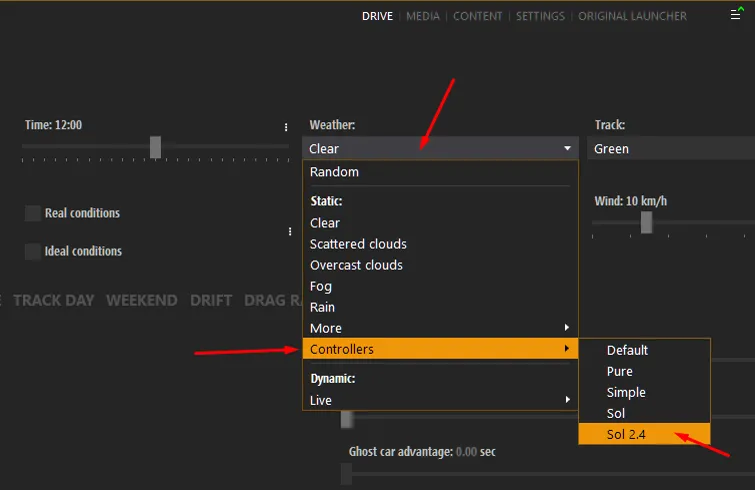
In the new CSP preview version, the weather controller was moved!
To select the Sol 2.4 controller, to use Sol Planner app, goto Drive menu!

Comments (142)
I dont get it. Where exactly am i dropping the new csp? and do i extract it first?
Just open the zip and extract the dwrite.dll and the extension folder to AC root folder (steamapps/common/assettocorsa)
I didn't install SOL and it's working perfectly, I just put PURE and CSP.
you tried it online? u sure you didnt forget to un-install.bat old sol?
I also have lost the "rain drops. I did the lua debug. I have red dot
Did you already read this post: https://www.patreon.com/posts/attention-dont-0-83551324
Hello Peter, thanks for your work. I (think) correctly installed Pure 0.180 with CSP 1.80 preview 218 and SOL 2.2.8, everything's working fine except the puddles, i can't find which settings are stucking me. The only hope i had was on the reflectionfx debug menu by disabling IBL but it just had cheap reflection on every surfaces... any idea ?
Have a look in the CSP weather debug app. There you can change the puddles to the older style, where they are randomly set over the track.
For rain you need a CSP preview version. Do you have one installed? Which CSP are you using?
THANKS i'opened lua debug and no red dot....... in the background I have pure rule on "heavy rain" but nothing. I clicked on debug graphic and debug memory but without result
Use the ingame app menu. Move the mouse to the right screen border. Then click the first symbol "all apps list". Then scroll to the bottom and select "Lua Debug".
can you tell me where i can open the debug app in game ? if you have un screen it will be perfect. sorry i'm newbie ......
Is there any error if you have Pure installed. Open the Lua Debug app ingame. Is there a tab with a red dot....
if i remove pure the rain works again ..........
i have pure 0.165
no rain even i put sol on "heavy rain" i don't understand. Have you an idear of my problem ?
in game when i run sol it's sol planner 3.8
controllers doesn't exist and no "sol 2.4"
Hello, thank you, i unchecked both and the menu only offers me : CLEAR / ALEATOIRE / ORIGINALE / BY TYPE / SOL / MODS.
hello, i have a problem ; i followed the method exactly and in the "drive" tab the time remains grayed out ! impossible for me to select sol 2.4. So i don't have the rain anymore. I deleted CM and reinstalled the latter and then light patch but nothing is done about it. If someone can help me please ?
Uncheck "ideal condition" or "real condition"
im really confused I dont see the wipers setting and controller script shows on my weather fx.
Did you install the latest ContentManager from Ilja's patreon? You need to downlaod it and replaye your ContentManager.exe
I don't know if it was with this latest update but the tires don't get dirty when going over dirt or grass. Does it happen to anyone else?
Where the heck did i get the SOL 2.4? i only have the 2.2
Sol 2.4 is the weather controller, actually Sol 2.5 with the newest Pure or Sol. Sol 2.2.8 is the weather style/script version.
I found everything wonderful. I just wondered if you can write a patch to make me look as good?
Does anyone know how to go back to previous CM? Mine keeps crashing when it didnt before
Did you install it, like the way I describe above? Otherwise you can goto github and download the latest public version there, but actually it's not CM which leads to crashes. https://github.com/gro-ove/actools/releases
Hello peter i take some picture in AC but i have an problem i update my CSP and CM, and now i have the flash on picture :( i cant find where to disable them do you have an idea ? I tried disable flashing effect in AA acumulation but it's not that
Do you use FSR, the super resolution? If so: Settings - CSP - graphics adjustments - AMD FidelityFX... Try to set "disable for screenshots" on or off.
Sorry, but where do I find the PureVR filter... can't seem to find it anywhere.
There is no special VR filter inside the Pure Install pack. Just try the inuded filters.
I have a problem that I encounter with some mods..and others less so..it forms like a frame for a thousandth of a second, especially in curves where there are more cars, like a flash of a piece of car, it didn't happen a few days ago, now yes and I don't know why .. what could it be? for the shadows behind the cars that splits or I solved it by removing TAA, but this frame thing I don't know what to do .. help! :)
How can I disable Post Race results that you see when you exit a session ? I remember doing it before where it skips it and goes straight to CM but I don’t remember where to enable it.
Hello Peter, is it possible to reset the CSP by default because I still can not use my game with the latest version.
yes, delete or rename the /Documents/Assetto Corsa/cfg/extension folder. This will remove all CSP settings and CM/CSP will restore the folder. Please be sure Microsoft Onedrive is not synced to the Documents/Assetto Corsa folder or even better, uninstall Microsoft Onedrive, if you not use it.
I got the rain to work but wipers arent clearing the water off the windshield...
That's a shame to hear, thats one of the reasons I rolled back to 1.79 from an earlier 1.80 preview release with the same issue
I followed the instructions for the update. It's easy. . replaced the content manager.exe . switch to version 0.1.79 . closed content manager . clicked on the link and updated to 0.1.80 - 218 . In the Drive page I chose Weather - Controllers - Sol 2.4 But impossible to launch with this new version 0.1.80-218 I get an error message : Unfortunately, Assetto Corsa has crached. Some general tips that might help : try different car or track Reset CSP settings to default Checking AC's integrity blah blah blah ... No problem with the free version 0.1.79 Thanks for your help
I get similar. CSP 1.80 preview 115 works OK. Any ideas?
Hi Peter. I have another issue occurring in AC. I can play the sim for a bit but when I come out and go back in it crashes. My work around is to restart the PC. This is occurring in both the recommended version of CSP and the latest preview version. I’ve been doing the workaround of restarting my PC but at this point I would like to nail down the issue with a proper fix. Please help. Thanks!
Hi Peter, Where can i find the new curved monitor app? ~I have it checked but i don’t see it in the apps lists in game or out of game... thanks
After installing everything, the option 'Controller script' in Weather FX has disappeared. I don't see anyone else having this problem. The only option left is 'Weather Style'. I don't get where Controller script has gone? Have you heard of this issue?
correct me if i'm wrong but isn't that what the screenshot is about?
I have a lot of problems with this version of the CSP, I can not even go back to the old version the game crashes all the time and what it starts I a completely black sky. Did you have a solution to my problem thank you in advance.
Did you install it the way I described?
Bonjour, j'ai tout installé le skydome fonction avec pure et sol mais je n'arrive pas a avoir les menus de pure configuration . J'ai pure config en jeu sans les options .Pure fonctionne mais je ne peux rien régler .Dans pure config Il n'y a rien sauf une flèche en triangle et un engrenage . En dessous il devrait y avoir les onglets Main , AI , Leight , Cloud, etc ,mais il n y a rien .
J'ai trouvé ! La fenêtre avait rétrécie je ne voyais pas les onglets il fallait juste l'agrandir . Super travail Peter Boese, le skydome PURE est vraiment beau et en VR aussi ! ( occulus quest 2)
Ou puis je envoyer capture d'écran pour que vous puissez voir ce qui s'affiche chaque fois que je lance une course ?
https://discord.gg/nJUMnp6Q
De quel dossier parlez vous Peter ???
Rename your "extension" FOLDER in /Documents/Assetto Corsa/cfg/. That will reset your CSP settings.
J'ai suivi la procédure pas à pas comme tu l'as indiqué mais aucun changement, crash systématique, il faut que je revienne à la version 1.79 pour que cela fonctionne. Merci pour ton aide.
You could try to rename your /Documents/Assetto Corsa/cfg/extension folder. Then all you settings are reset to default. You can restore it later. But then you see, if it's a settings thing. After renaming the folder, restart CM. It will restore it. Then reselect pure as weather style and Sol 2.4 as controller and try again.
Bonjour Peter, je ne sais pas pourquoi mais avec cette mise à jour impossible de lancer une course dans n'importe quel mode, le jeu crash même si je lance le benmarch.
Capt_Cannlolo I am having the exact same problem
Get it figured out? The controller needs to be set in DRIVE > WEATHER> CONTROLLERS. There you should see SOL 2.4
moi je n ai pas le nouveau menu météo/contrôleurs
It's only with the new CM from Ilja Jusupov's patreon page.
When running 1.80pre218 with Pure 0.165, Sol Planner throws the error "Sol 2.2 Controller not running". in 1.79 everything works well. I tried reinstalling Sol, and Pure. Anyone else having this?
Did you select the Sol 2.4 controller in Drive menu, weather drop down?
I can't wait to get my hands on the new PURE version! Masterpiece, Peter… your work is masterpiece!
I had in addition to reinstall pure to get the new weather/controllers menu
Actually that's just CSP and CM for now. With the upcoming version of Pure and Sol, there will be a new menu item in the weather menu.
Assetto Corsa-DESKTOP-XXXX, Assetto Corsa-DESKTOP-XXXX-1, Assetto Corsa-DESKTOP-XXXX-2.... and so on in the Documents folder. I find that this occurs when I close out of Content Manager. I also have to rebind my wheel and pedals when I go back in and it won't let me save it even after the message says to save it in the intial directory 'cfg\controllers\savedsetups'.
Never have seen such folder creation. Actually it just should create a "Assetto Corsa" folder.
AC is creating new folders in documents folder. I'm currently at 5 Assetto Corsa folders. Anything I need to change to get this to stop occurring?
Don't know, how they are named?
I only see weather style and not weather script.
Yes. This is right. We changed the terms. Weather script is now weather style. To make the function of it more clear. Also the weather controller has been moved to the place where it belongs: to the weather selection in the Drive menu. Here you choose which Programm controls the dynamic weather. With the new version of Pure, I will release a change in Sol 2.5 controller too. Then you will see it as dynamic weather controller there.
I don't know what I did wrong, but since it's CSP 1.80 each time I want to have rain, the track is green and I need to disable the puddles to make the track has real colours... but no water. Can someone help me please ? By the way, Pure works really great Peter, thanks for your work and patience to explain everything :-)
You switched on the rain debug. In the newest version of CSP this is a hidden settings. So you need to deactivate it in the file. Goto you Documents/Assetto Corsa/cfg/extension folder and open the rain_fx.ini Search for the block [RACING_LINE_DEV] ENABLED=1 ... Remove the complete [RACING_LINE_DEV] block with all its lines below.
I have installed Pure 0.165 but the controller is only showing as Sol 2.3 (in the new place), what would be the way to update that? I have tried uninstalling and reinstalling pure.
Try to copy its folders (apps, content, extension and system) from the 7z file to ac root folder. This will install it too.
Its OK that I dont have the pure cotroller in drop down list in DRIVE screen after installing new CM and CSP? In WeatherFX screen is still there...
Yes! Pure has no own weather controller for now. So it includes the Sol 2.4 controller. It will have its own controller in the future.
Bit OT question - I race in VR and especially with heavy rain it gets so dark that it looks almost like I'm driving in the night. I tried different pp filters and different CSP version but I have this issue for a long time now. Does anybody know how I can fix this? Or is it normal that is gets so extremely dark when it rains?
BTW when using a Pure filter I can adjust the brightness in Pure config - with other filters the brightness slider doesn't work.
Hello :) I did installed apps in wrong order. 1st I did cps and it broke my sol planner. So I did install CM, then went back to 1.79 public, then installed new csp and reinstaled sol. Nothing of those helped, I did also all of the fixes listed here and still no results. I have black sky and all textures are super bright. It works fine only with 1.79 aplayed. Same problem on .115 and .218 :( Im looking for possible fix, its definitly sol planner not working correcty. EDIT: Of course I didnt use the HUGE RED BOXED LINK after an update, so this point is definitly crusial XD
How did you install Sol?
OK. I installed the updates in the right order and I made sure Sol 2.4 was active and I'll still seeing everything overexposed like others,
Deactivate "shot Cubemap around car" in the CSP reflectionsFX settings. This is not compatible with Pure's exposure logic.
Thank you. Quick reinstall of Sol worked out
I've followed this guide and still Sol Planner is asking for 2.2 in game. Any idea why?
Do you still have Sol installed and you did not update it to version 2.2.7. If so uninstall Sol (there is a uninstall.bat in its download archive). Copy this bat to AC root folder and execute it. If this is too complicated, just delete the other Sol apps in /apps/python, BUT leave Sol Planner there.
Thanks for all the help, everything up and running correctly now (user error) 😃
Hi, i only have Sol 2.2 do you know why ?
Install Sol 2.2.7 or/and Paure 0.165. Both have Sol 2.4 weather controller included.
TIP: Ensure "Shot Cubemap around focused car rather than camera" is turned off under Settings>CSP>ReflectionsFX
Yes. It's already added to the Pure Config app checklist. Will come with the next version.
i dont see the pure in the controller is that normal
Pure is the script, SOL is the controller! :)
Hi Peter, since installing the latest CSP 1.80-preview218 and even rolling back to 1.79, Sol Planner 3.8 is no longer working. I have turned all the weather controllers to Sol as you have posted above, used the sol uninstall and manually reinstalled but no change, the app appears on screen and all the icons disspear within half a second, the X,+, - buttons are the only ones working on the app. If I reload the app, it tells me its missing Sol 2.2 Controller even after uninstalling and reinstaslling 2.2.7 multiple times. it used to work before. UPDATE: I got working, went into settings/assetto corsa/python apps, turned all the Sol apps off, shut down, then went restarted AC/CM then reactivated them all, weather planner now appear to be working
If you selected the "Sol 2.4" controller, like this post shows you how to do, then also select a Sol weather type. I had it set to "Live" before, and the controller said the same thing until I re-launched with "Broken Clouds"
I am seeing the same as Boocollective. Everything looks over exposed like I have the brightness maxed out. Yes, I followed the above directions. :)
nevermind. after a few resets, it is working normally
On mine CM (0.8.2467) weather controller still is in same place.. Settings>CSP>WEATHER FX. I used CM from new zip (readme says 0.8.2549) but it still shows 0.8.2467. What am I missing? Thanks
Now ive added the new csp pure is extremely bright and washed out durig the daytime hours, also at the same time the clouds are barely visible. If i change the script to sol it works fine. Any ideas what may have happened Peter?
try hitting reset in the weather fx csp settings. I also reset my csp general patch settings. One of those seemed to fix it for me.
Why after selecting sol 2.4 in controllers it still says " Needs default or compatible controller to override weather type during the race." Not sure how to fix
Just ignore this for now. Its just a new style to say "this is not a dynamic controller". But Sol 2.4 is a dynamic controller, but CSP don't know for now, but will know with the next version.
Hi,now I no longer have the option on the right in the applications bar the post processor to change filters?
You can also use the Photo mode app.
in the CM install readme it says "Don't forget to go to settings and install all addons you want" Not quite sure what this means.
Game now always crashes with "AI spline might be missing or broken."
There is a NEW setting in CM setting CSP "new AI behavior" : Use simpler Spline for... deactivate this!
Thank you for the heads-up!
The controller option is missing from your file!!!
I don't know what you mean. Which file?
Cant find the CSP File
I just describe how to avoid problems with the install. CSP is always released at Ilja Jusupovs patreon: https://www.patreon.com/x4fab/posts
wheres the csp file i cant find it at all???
Its on Ilja's patreon. You need to be a his patreon. Look in the latest post. https://www.patreon.com/x4fab/posts
i get this error Not supported request: “csp/preview”. Make sure it’s in valid format.
Did you update Content Manager with the attached version in Ilja's new post?
hey thanks for the update. did it like described but i only have weather controller 2.3 i reinstalled pure, but its the same. only weather controller 2.3
did everything again. installed sol 2.2.7 first, then pure 165. now its working
Ive tried to load into an online session and i got an error saying the game is running in safe mode? how do i fix this?
fixed it. just dont change the UI scale (new csp feature)
What's the difference between the "Real conditions" check box and the "Live" selection in the weather drop down?
The live weather controller will change the weather while you drive every 10 min to the current real weather of the location. "Real condition" just sets the starting weather to the real weather, but it is static for the race.
Oops, I hadn't realised Ilja's post's CM was a newer version than the auto-updater inside CM! Now I understand why people say there's a "use extended physics" checkbox........ - thank you!
Hello, my weather forecast is in ghost mode, I don't have the ability to switch to 2.4, do I have to be in the CSP in 0.1.79 or 0.1.80, thank you
Did you read the post? Maybe just reinstall Sol 2.2.7 and/or Pure 0.165.
I've installed the new content manager and now ALL of my previews of cars, tracks etc. are missing. Have tried clicking update previews but get unautorized accesss errors. Any help please? Also, when I try to select Sol in the drive section, I only get 2.2 version, when I select it, weather defaults to "clear" any ideas? Cheers,
Please use the latest Sol 2.2.7 pack. It includes Sol 2.4 weather controller.
Hello, does the Wearher/Dynamic/Live option in the Quick/Drive page only work with SOL? When I activate it, I don't have access to the sol planner 3.8 panel in the game.
For Sol Planner you need the Sol 2.4 controller!
People got so lost with this stuff last night that it was funny hahaha.
Thanks Peter.. waiting for the new PURE update! <3
I'm not seeing Pure as an option in the new weather controller menu: should it be there?
Not yet, but it will come! But I need more time to develop it. Currently Pure is delivered with the Sol weather controller.
Appreciate it 🫡
Do I find the New Content Manager.zip on x4fab Patreon Page
Yes, look at the pictures please...
I'm glad I did it this way to begin with! One question - should I have V2.4? Mine shows 2.3, but I thought I was using the latest versions. I'm using pure and it seems to work fine anyway. Thanks, Peter.
Weather controller Sol 2.4 is the current one. It is included in Sol 2.2.7 and Pure 0.165!
thank you!! and thats what i get for not following directions lol (lesson learned)
Hi Peter, what's the benefit in installing the latest public release before the new version? Thanks
We have reports of non working CSP updates after installing it. This is the ultra safe way to install it. Maybe in 95% of cases you don't need it. But we must handle a big crowd, so always the safe way will reduce support time.
Thank you for this clarification, it was driving me mad .. I lost count on reinstalling and restarting