
















Pure 0.180 development preview
How to install Pure:
https://youtu.be/lv18r-b1nmA
This new Pure release is all about to support the new CSP features of 0.1.80p218 or later.
!!! Please read the prior post, to install the new CM and CSP properly !!!
https://www.patreon.com/posts/how-do-i-update-81980284
Hello my dear Patreons,
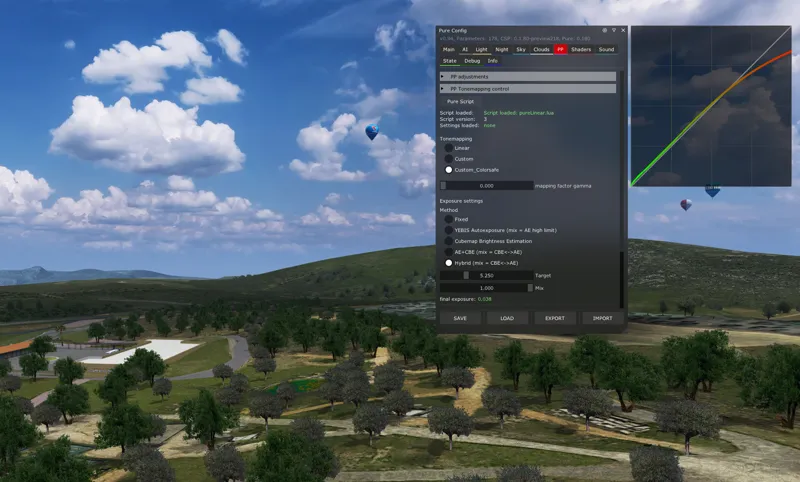
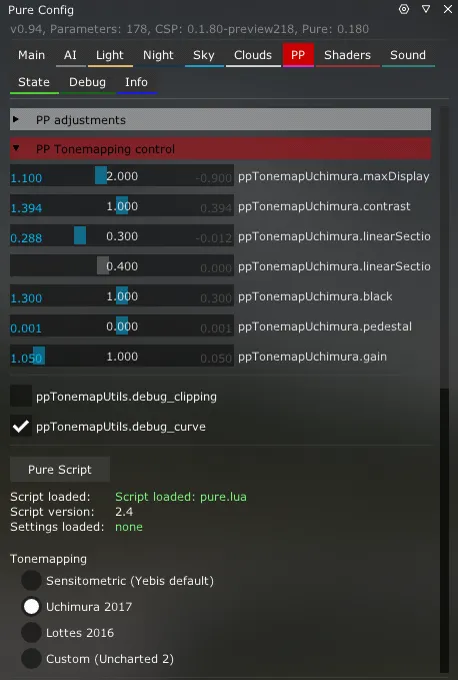
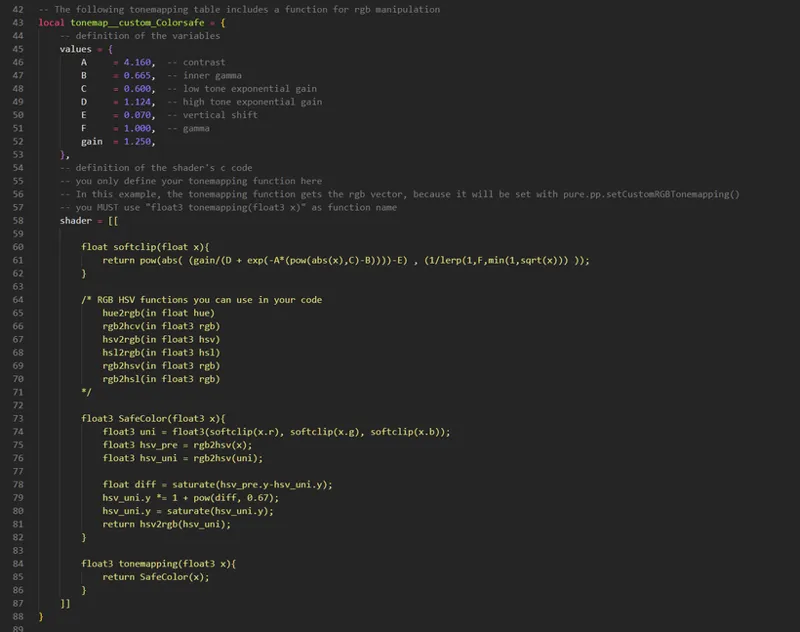
Pure 0.180 includes some very exciting new features. With CSP 0.1.80p218 new tonemapping functions are available. It is even possible to define custom functions.
Tonemapping is needed to compress the dynamic of tones. Internally the colors have no real limit, but to display them on a monitor, its important to lower those tones, to fit the monitors range. Otherwise the displayed tone would be just white.
The way how this works and which function is used, mainly defines how the picture looks after this process. Before CSP and Pure 0.180, we were limited to use the existing YEBIS functions, colorgrading or Reshade. Colorgrading is done in the LDR range, so colors are already compressed. Colorgrading can also lead to banding in its worst case. Reshade could be used, but can cause additional GPU load, which lowers the fps and it can cause other difficulties and it is an external effect, with no connected control.
With Pure 0.180 I integrated very easy to use functions to add extended tonemapping and even custom functions. For the casual user, I added thise new tonemapping to the pure, pureCandy and pureLinear ppfilters. So you can easily choose different methods and make your custom settings.
For ppfilter creators, i added functions to insert very own code.
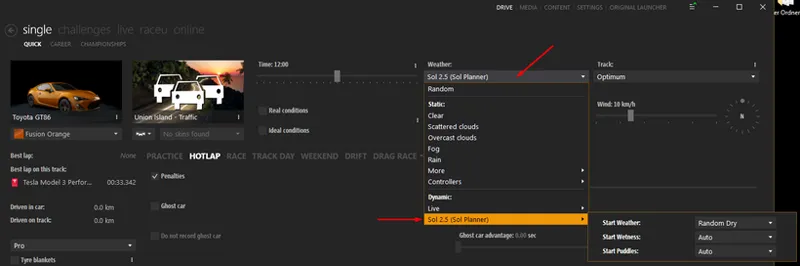
Also with CSP 0.1.80p218 a new Conten Manager (0.8.25...) was released. It now supports a custom weather selection in the Drive Menu. The Sol 2.5 weather controller will have its own submenu there.
If you play challenges and want to use the weather which is defined in the event, please use the dynamic controller and set the Start weather to "Predefined".
If you use "real condition", please select the Sol 2.5 controller in the controller submenu!
Highres version (16k skydomes set) / 1.6GB:
mega: Pure_0.180a_Highres
mediafire: Pure_0.180a_Highres
Actually, the highres skydomes have no influence on your FPS. Also, only 2 textures are buffered in your GPU's VRAM. So it will only take 128MB of VRAM. But if you want to check with smaller skydome textures, or you don't have the internet connection to download a 1.6 GB file, please use the Lowres pack (240 MB).
Lowres version (4k skydomes set) / 240 MB:
mega: Pure_0.180a_Lowres
mediafire: Pure_0.180a_Lowres
https://www.patreon.com/posts/how-do-i-update-81980284

Comments (201)
ur just dumb no one else is at fault
i did follow the instruction , if i keep download for the new version , is it will update itself or i need i remove the old version? thankjs
oh my god , can someone please telll me how to un install pure ? after paid and all the content but nothing s work ,make it even worst, why no simple instruction ? they told me to re install as video but nee to un install first and which video is un install . is it how it end after buy all the content ??????
Why don't you use the newest Pure 0.222 and install everything like shown on its install video. Really 99.999% of things not working is because the people don't install it like in the video. You can also try to reset your CSP settings. If you want to uninstall Pure, you can use its uninstall script in the archive.
where is the downloadable files?
Please use the newer Pure version like 0.190 or 0.205....
hello sol planer 2,2,9 not working 1,80 0,80 download
Salve a tutti ragazzi. Ma a voi in caso di temporale si vedono i lampi? A me si sente solamente il rumore dei tuoni, devo impostare qualcosa? Grazie
Lightnings will come with later versions...
How do i turn post processing off i want the sky black cause i get way better fps but i also want to switch it back so in single player i get rain. Any suggestions? i have to install 0.180 to get rain and then install 0.115 to get better fps,
You mix up many things here. Just deactivate PostProcessing in Content Manager - settings - Assetto Corsa - Video. It doesn‘t matter if you have a CSP preview or a public version. Pure is made to work without PP. It will give you the good visuals. Also please install the latest version of Pure which is 0.180a...
Hello, i installed the new content manager, the new lights patch and the new pure setup. Everything works, beside that my pure filters are not there anymore. Only pure simply is there and i cant find the other filters. Did they got deleted or have i made something wrong in the installation? Also the rain drops on the 3rd person screen are missing now. The rest seem to work fine so far.
Maybe try to install Pure manually. Extract the 4 folders apps, content, extension and system to AC root folder (steamapps/common/assettocorsa)
Maybe a dumb question, but i'm new here at Peter's patreaon page. I used the Sol and Csp for long ,now i decided to get the Pure as i had black sky issues and now i finally solved with new Pure and CSP , but the question is that do i need separate Sol installation beside Pure and CSP , or i can leave like as it is right now with Pure 0.180 with Newest CSP , or there is more benefits if i install SOL too ???? As i know Pure has incorporated the SOL 2.5 , which is the newest SOl or ?? im confused , if i just use Pure ,will i have the latest SOl integrated ? Thanx in advance for your help Peter youre Pure is pure fantastic ;)
https://www.patreon.com/posts/attention-dont-0-83551324
Peter, my issue is everything works great up to installing .180 when i have it active and am in VR and start a race, none of my devices work, eventhough they are showing output and mapped in CM. when i try and quit the race. VR hangs and eventually crashes. what could this be related to?
But this is not related to Pure?! It would be the same with default weather style/script.
?Someway of use sol/pure weather/night mode in replays?
What do you mean?
All fixed, thank you for the fast response!
Hey Peter, I've uninstalled (using the .bat) and reinstalled Pure and Sol a few times trying to fix this. I'm using CM 0.8.2561.39678 and CSP 0.180-preview218. Pure is selected as the WeatherFX style and Sol 2.5 (Sol Planner) is selected as the controller in the Drive menu. Sol Planner says "Sol planner not running, select sol 2.5 as controller script in settings > CSP > weatherFX" so I can't change weather. Debug rain works. Here's the error from LUA Debug in WeatherFX controller: Error: extension\weather-controllers\sol2\CM-Drive.lua:109: attempt to call field 'output' (a nil value) extension\weather-controllers\sol2\CM-Drive.lua:109: in function 'SOL2_CM_DRIVE _buildMenu' extension\weather-controllers\sol2\controller.lua:769: in main chunk [C]: in function 'dofile' ...\extension\weather-controllers\sol2static\controller.lua:5: in main chunk Let me know if you need anything else, thank you!
Please read the newest post here. The latest Content Manager Version has a bug, so please read the post. It will describe you, how to revert to the latest working version... https://www.patreon.com/posts/83551324?utm_campaign=postshare_creator
I just have to say again how awesome your work is. I had a wonderful cruise at Targa Florio earlier... with a Pista Spider. I kept looking up in the sky (VR) while driving, because the clouds look so wonderful. They add so much to the immersion of this game. Truly spectacular. Thank you a lot for your continuous effort.
managed to get it back by uninstalling sol pure and csp to 1.79 . then renaming my documents assetto corsa folder to old and then deleting every instance of content manager even the one in assetto corsa folder called assettocorsa.exe 11mb ish and deleted update exe version and download the proper content manager again that is link above. opened content manager so it set everything back up in my documents and disabled all automatic updates for CM shut it down and delete the new assetto corsa my documents folder and restore your old one and re installing sol 2.2.9 pure1.80 and csp 1.80 p218 and sky is back again. my [problem was content manager was updating its self to the latest version without me knowing in the beck ground so disabled it and got everything back after a full reinstall of sol pure and csp.
lol any one found a fix as i cannot get my sky back even after down grading ,
It depends. If you open the Lua Debug app ingame, is there a tab with a red dot? If so, please switch to the tab, and expand the error. Then tell me what it says.
I removed CSP, sol and Pure. Rebooted my PC. Installed the latest version of csp manually and the latest version of Pure manually. I still have the same sol planner and black sky errors. Before all this, I downgraded the driver version of any graphics card and it didn't change anything. It seems that the problem comes from the Content Manager update. Maybe I'm wrong, maybe together we'll find the problem. Thanks for your help.
I have no SOL planner since the content manager update im sure it will be fixed soon though
Are any of you having problems with the new Nvidia drivers (532.03) or content manager update? Since this update, the SOL planner script don't works. Also i dont have sky.....all sky is black....
Hi Peter, the skydomes dont want to appear, i dont understand because the occlusion and the sky color change but it is like there is no clouds at all. Can you help me ?
Maybe try to install Pure manually. Copy the 7z file with 7zip and extract the 4 folders apps, content, extension and system to AC root.
For anybody who wonders why puddles don't build up as fast in a private server as in single-player with sol planner, is because in multiplayer water builds up differently with different types of rain, refer to the weather_params.lua for more info about which type of rain is the most intense....I thought this could help someone, cheers!
I have resolved the issue with just a fresh install of AC and manually installing CSP preview, Sol and Pure. I appreciate all the help and I have to say my game looks a million times better. Keep up the great work!
Hi I have an issue where in-game I look at the Pure Config app it is constantly flashing and when I look at the PP section it says I do not have post processing enabled when I definitely do. I am new to modding AC so I followed all the guides exactly yet still have come in contact with problems. For more detail I have the 0.1.80-preview115 CSP, have installed the newest version of SOL and have the newest version of Pure. I would really appreciate any help.
Please try to install all manually. Open the CSP preview zip and copy the dwrite.dll and the extension folder to AC root folder. Open the Sol 2.2.8 7z file with 7zip and extract the 4 folders apps, content, extension and system to AC root folder. Open the Pure 0.180 7z file with 7zip app and extract the 4 folders apps, content, extension and system to AC root folder.
hi Peter, i had some trouble with AC/CM pure : thank in advance. Fabrizio
Try to reset your CSP settings. Rename the folder /Documents/Assetto Corsa/cfg/extension. Then start CM, it will restore this folder with default settings. If this does not solve the problem, you can restore it...
00007FFA91E9E380 (DWrite): (filename not available): DWriteCreateFactory 00007FFA91E9E1C1 (DWrite): (filename not available): DWriteCreateFactory AC\directinput.cpp (107): DICarControl::sendFF AC\dicarcontrol.cpp (535): DICarControl::sendFF AC\physicsdrivethread.cpp (246): PhysicsDriveThread::run 00007FFAF754D24C (MSVCP120): (filename not available): std::_Pad::_Release 00007FFAF5794F87 (MSVCR120): (filename not available): beginthreadex 00007FFAF579512E (MSVCR120): (filename not available): endthreadex 00007FFB0F0926AD (KERNEL32): (filename not available): BaseThreadInitThunk 00007FFB1032A9F8 (ntdll): (filename not available): RtlUserThreadStart
anybody elses Pure Config Completely blank?
When did you download Pure 0.180? I made a hotfix of this problem some days ago. Please download it again. Actually it is a sign that CSP is not installed properly. If you use the newest CSP preview 0.1.80p218 then please follow this steps: https://www.patreon.com/posts/how-do-i-update-81980284 If you use the public version, please download the latest version at: https://acstuff.ru/patch/ Open the zip and copy the dwrite.dll and the extension folder to AC root (steamapps/common/assettocorsa)
hi Peter, i had some trouble with AC/CM since i installed new sol and pure, i did like the install guide says but a had this msg poping : Error might have something to do with: 00007FFD264B6E3F (d3d11): (filename not available): D3D11CoreCreateDevice 00007FFD264B7762 (d3d11): (filename not available): D3D11CoreCreateDevice AC\game.cpp (23): Game::Game AC\acs.cpp (450): wWinMain f:\dd\vctools\crt\crtw32\dllstuff\crtexe.c (618): __tmainCRTStartup 00007FFD2BCF7614 (KERNEL32): (filename not available): BaseThreadInitThunk 00007FFD2CFA26A1 (ntdll): (filename not available): RtlUserThreadStart can you help me please ..?
You can reset you CSP settings. Rename the folder /Documents/Assetto Corsa/cfg/extension. Start CM, it will restore it with the default CSP settings. Set pure as weather script/style again. Maybe after this it will work. You can restore your older extension folder later....
hi peter after following the install guide and installing pure, in the weather fX setting i can select only "sol" for weather style and the weather script option disappeared completely. can you please help me?
Weather script is now called weather style in the new CM and CSP. You select the controller with some options in the Drive menu weather selections. Do you use Pure also or only Sol. Did you already install the newest Sol 2.2.8?
hey just wanted to know how i get the vao patches when i install pure
They are automatically downloaded from CM. The track modders or config modders can provide them in the new format. I had them in older versions of Pure, but actually the modders are aware of the new VAO bakery....
Too bright, my eyes, what's going on I don't have force ai headlight.
Please always open Pure Config app! Its your assistent for Pure. You will see what causes the problem. You can even solve it there!
so i installed this and set sol 2.5 as controller and pure as script. but when i try to open planner in session it says that sol isn't set as controller...what am I missing?
Do you play online or offline?
Where can I download the MODS folder for the skydomes? I have the pure downloaded.
There is no MODS folder for the skydomes. Please extract the whole Pure 0.180 folder to Desktop with 7zip app and then run the install_pure.bat in that extracted folder. Then select the AC root folder (steampapps/common/assettocorsa).
Link is broken!!!
Please always use the links from the patreon post and not from the email. I do hotfixing in the first days, so the links are changing...
I don't know if it was with this latest update but the tires don't get dirty when going over dirt or grass. Does it happen to anyone else?
Wow great update... is there a setting for rain appearing on screen shots? As no rain appearing on mine
Install it like it is described here: https://www.patreon.com/posts/how-do-i-update-81980284
No, i've already tried to click and unclick that, it doesn't fix the issue.
Try changing your ppfilter see if that helps.
I've tried with many different weathers. Always same problem. But maybe i don't understand you right about that. I will try to look at Pure Config as you say.
there is a possible setting in weatherFX "force AI headlights" maybe this is set?!
Hi Peter, since update, everything is too bright and AI cars have always the lights turned on and it's impossible to turn them off. Have you any idee on what i do wrong? Thanks for your awesome work :-)
Please open Pure Config app ingame. I tells you which CSP setting is not compatible. Which weather do you use in the Drive menu?
Hi Peter, i just installed the last version of pure but in the "pure config" the options are missed, i mean there is nothing inside the pure config TAB, i made a post on RACEDEPARTMENT but no answer. May you help ? Regards
Please download Pure again. I added a fix, but it actually means, that CSP might not be installed properly. If you are a patreon of Ilja, please install CM and CSP like it is described in this post: https://www.patreon.com/posts/how-do-i-update-81980284 If you are at a public CSP, please download the latest 0.1.79 from https://acstuff.ru/patch/?get=0.1.79 Open the zip file and copy the dwrite.dll and the extension folder to your AC root folder (steampapps/common/assettocorsa)
Awesome! Thanks for the updates!
Hi Peter all work Good but when i try to go in PP tonemapping control i have this message « No advanced tonemapping control with old YEBIS » how to fix it ? Ty for all you make something Amazing
You need to use the pure ppfilters or the ppfilter updates from the modders that already integrated this new feature. You can't use it with older 3rd party ppfilters.
my pure config shows up blank and ive installed correctly and switched weather fx and updated csp
Please download Pure again. I added a fix, but it actually means, that CSP might not be installed properly. If you are a patreon of Ilja, please install CM and CSP like it is described in this post: https://www.patreon.com/posts/how-do-i-update-81980284 If you are at a public CSP, please download the latest 0.1.79 from https://acstuff.ru/patch/?get=0.1.79 Open the zip file and copy the dwrite.dll and the extension folder to your AC root folder (steampapps/common/assettocorsa)
I normally have no issues and I always follow the guide very carfully. But with this update I cannot get the game to launch at all. No matter the track / car combi nation. I play in VR with a Reverb G2 (12700K/RTX4080/32gb ram) This is the message I get every time. AC\stereocameraforwardvive.cpp (471): StereoCameraVive::render AC\sim.cpp (2564): Sim::renderScene AC\game.cpp (275): Game::render AC\game.cpp (275): Game::render AC\game.cpp (275): Game::render AC\game.cpp (126): Game::onIdle AC\game.cpp (210): Game::run AC\acs.cpp (477): wWinMain f:\dd\vctools\crt\crtw32\dllstuff\crtexe.c (618): __tmainCRTStartup 00007FFAD6D226AD (KERNEL32): (filename not available): BaseThreadInitThunk 00007FFAD844A9F8 (ntdll): (filename not available): RtlUserThreadStart
Did you maybe update csp as well? Check CSP settings>Tweaks:VR> Custom mirror something. There's a new feature there that about the way the game is rendered on your monitor while you are in VR. It needs to be turned off. It should have a label "new" next too It. If you can't find it watch sir pats latest video on CSP update. Not the pure update. The csp update. Hope it helps.
my pure is greyed out when i click into the app in-game ive did literally everything i know too do, ive had all pures and never had this problem so im clueless
Please download Pure again. I added a fix, but it actually means, that CSP might not be installed properly. If you are a patreon of Ilja, please install CM and CSP like it is described in this post: https://www.patreon.com/posts/how-do-i-update-81980284 If you are at a public CSP, please download the latest 0.1.79 from https://acstuff.ru/patch/?get=0.1.79 Open the zip file and copy the dwrite.dll and the extension folder to your AC root folder (steampapps/common/assettocorsa)
Hi Peter, new Pure version looks great in VR, especially with PureLinear. One thing to note, when selecting the "live" weather, it defaults my headlights to ON. Is this part of Pure, is it part of CSP again?
I'll have a look, what is your setting about automatic headlights in weatherFX?
I'm having an issue with "weather script" option box not showing up in content manager. I have csp, pure, and sol installed. How would I go about fixing this?
But you have a weather style setting in weatherFX?
Hello Peter, when I place the CSP 1.80 Preview 218 The game works as long as I am on the dry, but as soon as I pass in the rain and the rain falls the Frame Rate games falls, a small fenter opens briefly behind Plan, with unfortuly, Assetto Corsa Ahas Crashed, etc etc ... And that whatever the circuit, the car, I drive alone or with more cars, can you give me help? I try to install it by following your procedure, then in manual, then putting it in the mods folder, but it's always the same, By cons I game continues to turn but I have to click on one of Met Écrans to regain control. Ci attached photo of the window that is displayed. THANKS
Did you update CM and CSP like this: https://www.patreon.com/posts/how-do-i-update-81980284
Hello Peter, unable to download the new one for the link tells me that the file no longer exists. thanks for your return
Please use the links in the post here and not from the email.
for some reason I cannot find the predefined option?
Please download Pure again. I just reuploaded it this morning. Then for the first time, please select Sol 2.5 (Sol Planner) dynamic controller and start a session. Then quit it and close CM, then open it again. Sorry for this procedure, but the controller recreates the list you see in the weather menu, so you once need to run it first, to see it.
is there a reason why brightness is way too high by default settings? I can fix it from Pure Confiq by lowering overall brightness from 1.0 to under 0.2. I've had this issue since the new csp 1.80.
What the Pure Config main tab says. I guess you have activated a not Pure compatible CSP setting.
the pure config is completely greyed out for me and I cannot see rain this is my first download am i missing something>
Install the new things like this: https://www.patreon.com/posts/how-do-i-update-81980284
Hi Peter. Great job! Every release makes the game more realistic. Thank you so much! One question, though: Where did that beautiful sparkle glare go? I mean, Pure Candy still got its glare, but the sparkles are no more. Cheers!
Such particles are steuped in the particlesFX. Maybe it needs to be set or their trigger was changed.
Is it just me when i clicked the pure config app in ac no settings appear its just pure blank
How did you install Pure? Did you extract the whole Pure 0.180 folder to Desktop and launched the install_pure.bat in that extracted folder?
Hi there, I am getting an issue with the weather being random in my championships. The champ file track weather is set manually for each round/track eg, "weather": "sol_01_clear"...
Did you set the controller to Sol 2.5 in CM drive weather menu? There is now a submenu "controller"
YEAH THE LINKS DONT WORK CAPS, FOR MEGA OR MEDIAFIRE
please use the links in the post, not in the email.
sol stays on 2.4 for me
Please try to install Pure manually. open the 7z file with 7zip app and copy the 4 folders apps, content, extension and system to AC root folder (steamapps/common/assettocorsa)
Mega and Mediafire links not working
please use the links in the post, not in the email.
slow download
there are links for 2 different hosters. If its slow for both, maybe its slow at your location.
File no longer available? On either download platforms
Have another look into the post please. I fixed some errors and reuploaded all files.
Hi, i have an issue with this version of pure, the pure config in game flickers and i am unable to adjust settings there, the framerate also slowly gets less and less starting out at 40fps and slowly decreasing, i have the latest CSP preview version from Lija, controller script is 2.5 and this only happens when selecting pure as weather style, framerate is 120fps locked if i choose SOL (playing at 4k). Hardware is 5800x 3d, RTX4090 and 32gb ram. any help would be appreciated, have tried reinstalling pure but with same result, cant find any settings which would be causing this issue, cheers.
Could you please have a look in your pure config: common\assettocorsa\extension\config-ext\Pure\pure_config.ini Search for "clouds2D.preload" if there is "clouds2D.preload=true", please change it to "clouds2D.preload=false"
Thanks!
Hey there, I still have sol 2.4 not 2.5 which is weird, everything else is on new content manager, pure 0.180 with csp on 1.80p218 and pure candy filter.
It did not install it right. Please try to install Pure manually. open the 7z file with 7zip app and copy the 4 folders apps, content, extension and system to AC root folder (steamapps/common/assettocorsa)
Just one more thing I just see: I can only select Sol 2.5 as weather controler not 2.4 Will try your suggestions when I am back home
2.5 is right. 2.4 is the former version of the controller! 2.5 is the new version which supports the new menu in CM.
Hi Peter, before writing I missed the step with installing csp 0.179. Now I followed the instructions CM->CSP 0.179->click the link->copy the Pure 0.180 folders into Assetto's root folder, Updated NVidia driver Still the same behaviour. Still PP is activated in CM. Is there more I can do?
Maybe try to downlaod CSP 0.1.80p218, open the zip and copy the dwrite.dll and the extension folder to AC root folder (steamapps/common/assettocorsa) If there is still the problem, please come to Sol/Pure Discord Server: https://discord.gg/WmvhUGGm
Hi Peter, thank you for your great work. This time I ran into troubles. After upgrading CM, CSP and installing new Pure as recommended I have no PP filters any more. Self check of PureConfig is all green. PP tab says: Post processing filters are deactivated The new bar with Tone mapping states: Tone mapping not available with old yebis I checked versions multiple times, I see the new drop down for the weather setting.and I am running out of ideas.
Just try to copy the 4 folders app, content, extension and system from the 7z app with 7zip app to AC root folder (steamapp/common/assettocorsa).
Thank you, it works!
The link in email doesn't work.
Yes, please look in the patreon post!
Hello Peter! Thanks for the update, but i don't see a link to download. Best wishes!
In the post there is a "Pure 0.180" download banner. with green download symbols. Choose one of the Pure 0.180 Highres links.
i just got a trojan warning from windows defender Trojan:Script/Wacatac.H!ml
Maybe i problem with the windows defender and a windows update. We have tousands of users and it would have more messages of such virus then. Also there were no reports while the testing phase. Maybe its a problem with Windows Defender's AI learning: https://www.reddit.com/r/antivirus/comments/1268bqz/trojanscriptwacatachml_determining_if_its_a_false/
window defender detecting virus and wont download Trojan:Script/Wacatac.H!ml
Maybe i problem with the windows defender and a windows update. We have tousands of users and it would have more messages of such virus then. Also there were no reports while the testing phase. Maybe its a problem with Windows Defender's AI learning: https://www.reddit.com/r/antivirus/comments/1268bqz/trojanscriptwacatachml_determining_if_its_a_false/
Thank you for this update Peter, I run on a 4k lg oled and the tone mapping settings make it really easy to get the perfect image dialled in! Looks marvellous 👍👍
Yes i extracted folder out of zip file...hot uninstall and install, tried 5 times same scenario
Please try to install CM and CSP this way: https://www.patreon.com/posts/81980284?utm_campaign=postshare_creator You can also try to install Pure manually by copying the 4 folders apps, content, extension and system to AC root folder.
is anyone getting a virus/Trojan warning with this download?
Which Virus app you have? Which Virus/Trojan is shown?
Hi, Got my Pure installed. But in game the exposure is too much (just in Pure), how do I adjust this?
Please open the Pure Config app. There you see a checklist of needed settings.
on pure 0.180 running a 4090 on max video setting...getting 40-55 fps only When going back to 0.165 220+ fps
Please install it as described! You need to extract the whole Pure 0.180 folder to Desktop with 7zip before you run the install_pure.bat in that extracted folder.
After updating Pure the this new version, the game crashes whenever it starts raining. Is it just me?
The game did not crash if you switch to default weather script/style?
great work as always, works like a charm
The new csp not work for me,the sky is bright, I see nothing on most of the filters I put...with csp 0.1.80preview115 no problem
Please check the Pure Config app. Maybe you have a setting active, which is not working with Pure.
Great update but now everything seems a little over saturated, where can I look to change the settings for this?
Pure Config app "PP" tab, pp adjustments. Actually there is no oversaturation. It now has the real saturation. But you can adjust it to your liking.
Bravo!!! Klasse!!! Thousand Thanks!!!
Really Masterpiece! <3
can not have acess to download files, can you please fix?
Have you tried the links at the top of this post? They work for me.
Looks incredible!!! Going through the different cloud types with the morning sun hitting them is stunning!!!
Hello, unfortunately both HIGH RES download links are down. It says the file was removed from the service.. Could somebody please help me out and either provide me with a new download link or if Peter could create a new Link? In my opinion this is a project worth supporting so I don't want to get it from one of the people pirating it, I want it directly from the source, as it should be! Pirating from small Creators is a No Go in my opinion!
I found if you try to download them from the email, they get this error. Try it from Patreon if you're not already.
Hi Peter, small weird thing - under Weather - Sol 2.5 (Sol Planner) I saw 3 submenus this evening, 'Start weather, start wetness and start puddles. All those 3 submenus had the value '1'. Now, without installing or changing anything, they have the values 'No clouds, Auto and Auto'. Seems like a bug that they showed the value '1' earlier instead of 'No clouds, auto and auto'. Will let you know if that happens again, but thought I'd let you know this.
Just restart CM.
I do not like putting complaints in, but I keep getting an error saying "Attempt to call a nil value". Seems to be referencing the tyre smoke generation
Where does it say it?
why does my game say warning directinput devices take unusually this long to intiliaze
Hello I have installed everything the last csp and the last pure and the last cm, in weather fx I am well in sol2.5 and a pure weather style and in drive in meteo I am not sol 2.5
Please install it this way: https://www.patreon.com/posts/how-do-i-update-81980284
Ok ok Peter, now it works! Don't ask me how I did it but I solved it ;-)! A thousand thanks!
Thank you so much for the amazing work Peter. I wanted to ask you; As for the download, the Mega link gives me "Link not found or removed". Very strange honestly. Thanks so much again for your help.
Sorry Peter where can I find Sol 2.5? I only have Sol 2.4 as option under controller!
Please install it how i describe it. You need to extract the whole "Pure 0.180" folder to desktop and then you run the install_pure.bat in that folder!
Peter, you have always been a wizard/brilliant developer - been following your stunning work since the days of good and bad weather what a decade ago? But THIS release is just... utterly *insane*. In Varjo Aero with the clipping tool I have settled on the PureLinear with exposure lowered to 1ish and half the night pollution brightness and it's literally perfect. Insanely lifelike. The sim looks entirely different with new tonemapping. It's utter madness/wizardry/coding skills to be able to make this. I am besides myself with how Asetto looks now. Unbelieavable.
Feels like 20 years away when i think of "good and bad weather". With all this new possibilities. I hope the ppfilter creators are satisfied with the new tonemapping features. And yes - pureLinear is my new baby. I was able to develop a very own function to have that non high gamma look and i hoped it will be a big step for such devices....
Thanks a lot
If it's all about the CSP 0.1.80p218, does it mean I shouldn't update if I use the previous CSP version?
Yes. But it will make no difference, if you install Pure 0.180. Its still working
thanks
Hi Peter, i installed everything as shown in your "how-do-i-update" post but i still didnt get the Sol-Planner 2.5 its still at version 2.4
same, im on new CM, newest pure and CSP. Got a Live/Dynamic option and in controllers it shows sol 2.4
Dear Peter, or anyone else with a solution. I don't get the Sol 2.5 (Sol Planner) option in "Drive" layout. Reinstalled CSP 0.180.preview218 and this version of Pure. Didn't work. Thank you in advance!
Did you installed CM as well: Here is a step by step install guide of the newest things: https://www.patreon.com/posts/how-do-i-update-81980284
I did the usual and unpacked with 7zip then ran the install.bat. Completed without errors. It shows Pure 1.80 in Weather FX and and Sol 2.5.0 in the controller in drive section. I am seeing these bars in several weather types, light clouds, scattered clouds, windy, broken clouds. I have a screen shot but not sure how to attach it here?
Maybe post it in Sol/Pure Discord: https://discord.gg/N28cmXgm
Have a wierd issue with clouds in the distance appearing as vertical bars. Also the engine sounds seem to be coming in and out, does it for kunos and mod cars but not the AI cars, only the player car.
is it with all weathers? Actually i removed the most of that clouds artifacts. How did you update Pure?
i got it, good work bro!
why doesnt mine say controllers or dynamics? i downloaded pure 0.180 the new csp
Did you install CM and CSP like this: https://www.patreon.com/posts/how-do-i-update-81980284
Thanks so much Peter! A huge request I was hoping to see in the tonemapping area. Well done
These new tonemapping functions look great. I'll just sit here patiently until someone makes the perfect VR filter for the G2.
Have you tried any vr filter? I dont think there are any besides Pure CS. :) U can find it on racedepartment. U can also just search up vr ppfilter i think
Awesome job! no more Reshade? ;-) What is the difference between pureCandy and pureLinear?
pureCandy is a filter to have some bling bling effects like glare and high contrast and such. Like to emulate cameras. pureLinear is a very accurate filter. Its tonemapping curve is very strait and for the lower and mid tones there is nearly now change, So it reproduces the colors like they are. For the higher tones it has a decent managment to compress the colors, but it will restore the saturation after the compression, so colors are still saturated and don't burnout.
my bad i didnt see it take your time
wheres the link for 0.180
up again. i needed to reupload it...
Hi Peter, seeing the comments I think it's maybe a bit confusing that besides the latest Pure, a new Sol update was also released. I also still got the 2.4 after installing Pure and then checked if there was maybe a new version of Sol out. I'm sure you mentioned it somewhere but I also overlooked it.
Please wait some minutes and download again. I fixed a little bug in the installer, it will work then. I reuploading the files now.
Same just installed it and can't see 2.5 either?
please install it manually, copy the folders from the 7z "apps, content, extension and system" to AC root folder (steamapps/common/assettocorsa)
I updated everything, but it comes out as 2.4
please install it manually, copy the folders from the 7z "apps, content, extension and system" to AC root folder (steamapps/common/assettocorsa)
Thank you, I am still searching for how can I upgrade my CM from 0.8.24 to 0.8.25.. Cant select SOL 2.5 cuz of that... Edit: I upgrade CM to 0.8.25 but still cant pick SOL 2.5 planner. any idea ?
I have the same issue
Can't wait to taste it! Thanks a lot Peter, your work is awesome
Hope it tastes like pure candy for you. lol
Where can I activate the new curved screen app for curved monitors from previous update please?
Pure has no curved screen app! I'm sure you mean CSP curved screen app. You can have a look in the CSP Discord Server: https://discord.gg/aUetWruP Have a look in the CM - Settings - CSP - GUI / New apps: if the app is activated Then it should be available in the apps side bar.
Thank you! Where do I get the new content manager? On the CM website it's still 2.24 - I don't get 'weather style' nor the option to select Sol controller in the weather drop down menu under drive... CSP updated to latest preview
patreon.com/x4fab/posts Its on Ilja's patreon. Please read my post, how to do a proper install of all: https://www.patreon.com/posts/how-do-i-update-81980284
Muchas gracias. Te mereces cada euro que ganas
Thanks for your work Peter
🥵
Thank you 😊