

Beautiful Sky Shader | Release
The time has come to release, probably, the most complex shader I ever worked on. It's a beautiful skybox shader with volumetric clouds, day/night cycle, real-world star map and more!
Main features:
Just a single material. No extra meshes and scripts. It just works!
Suuuper configurable
Volumetric clouds with configurable parallax layers count
Day/night cycle with beautiful sunsets and downs
Real-world rotatable star-map with star-blinking
Clouds light scattering
VR-ready!
Works perfect in VRChat
Much-much more!
Note, that this asset is for my Tier III patrons only.
You can download it here:
A video about how beautiful it is: https://youtu.be/uY0EOznepxY
All the features:
It's just a single material, no scripts.
You can configure the clouds quality with parallax layers count
Automatically sets the sun position depending on your directional light
Automatically changes colors depending on the day or night time
You can set the sun position manually too
Supports moon with it's own settings
Clouds scatters light from the sun and moon
You can change the cloudiness to make any weather you want
You can animate your clouds position automatically or by animator/script
Cloud shape control (feathering, etc.)
2 cloud layers
Stars supports blinking
You can physically move relatively to the clouds
Clouds pattern is based on a texture map. so you can make your own unique cloud pattern.
Fully editable with Amplify Shader Editor
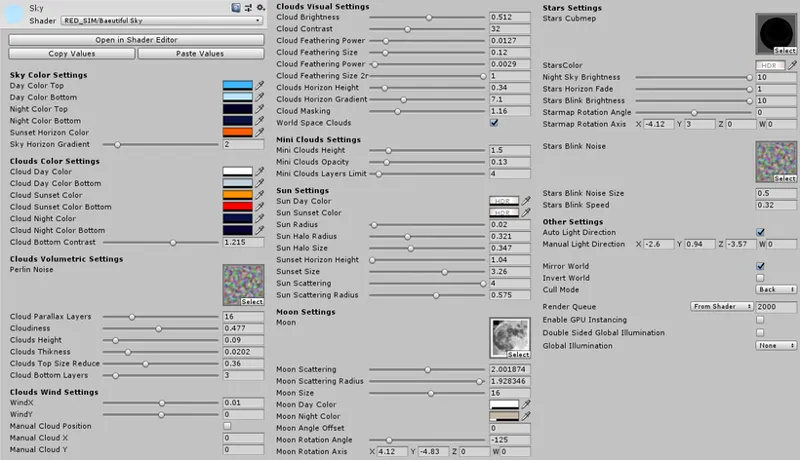
All the shader properties:
Sky Color Settings - Controls the sky color on day, night and sunset time.
Clouds Color Settings - Controls the clouds color on day, night and sunset time.
Clouds Volumetric Settings - Clouds settings which controls their shape.
Perlin Noise - A texture that used to create clouds. Basically a tiling clouds height-map texture. Can be an RGB texture. Channel R is a main height-map, channel G is a heigt-map for secondary "mini-clouds". Channel B represents clouds feathering.
Cloud Parallax Layers - defines the quality of the volumetric clouds. More layers - better quality, but less performance. I would not recommend to use more then 16 layers for VR usage.
Cloudiness - You can change weather ^__^
Clouds Thickness - More thickness, more visible parallax layers, but thicker cloud shape.
Clouds Size Reduce - Defines the gradation how cloud's upper part size will be reduced in size.
Cloud Bottom Layers - Additional layers to make clouds bottom part a little bit darker. Better use only two or three layers for better performance.
Clouds Wind Settings - You can set an automatic clouds animation, or manually control their position.
Clouds Visual Settings - Controls some visual aspects.
Cloud Contrast - Very useful property to control clouds softness.
Feathering options - Controls clouds deformation post-effect.
Clouds Horizon Height and Gradient - Controls how far you can see the clouds. Must be configured properly if you're using fog.
Cloud Masking - How much clouds masks the sun, stars, etc.
World Space Clouds - You can move relatively to the clouds in horizontal space.
Mini Clouds Settings - Properties for secondary clouds. (G noise-texture color channel)
Sun Settings - You can configure your sun's shape, scattering, etc.
Moon Settings - You can configure your moon, it's light scattering, colors, rotation etc.
Stars Settings - Configure how your star map will look like. Made to work best with NASA's star-map (included in the archive). Star Blink Noise - is a noise texture, which scrolls through the sky to make a star blinking effect. Uses a B color channel.
Other Settings
Auto Light Direction - Sun can be set automatically by your directional light
Mirror World - Mirrors your world vertically. Useful for water reflections. No any performance impact.
Invert World - Basically mirrors your world horizontally.
Cull Mode - Back culling is a default option for using the material for a skybox. Front culling if for using it with a default unity sphere, for example.
Comments (3)
Hey! I think, yes. But I can not promise a good performance :P
Hello! Do you think that mobile Vr (VrChat on Quest 2) could support this beautiful sky?!
Thanks for your time in advance :)