
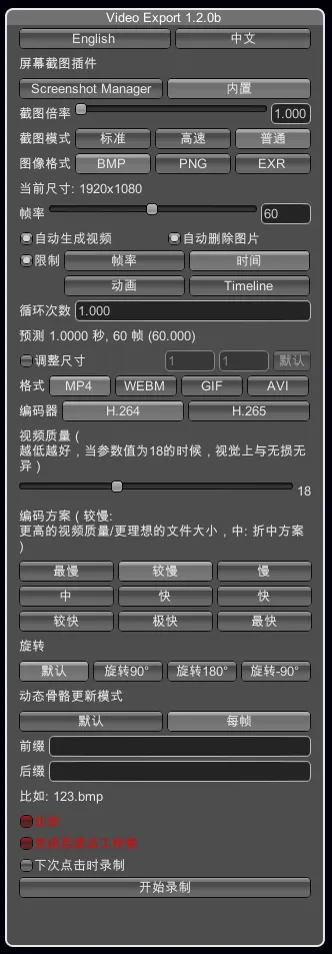
[HS/KK/AI/HS2] VideoExport 1.2.0
So it's been a while since the last update, a lot of things changed, let's see what's new.
What's new?
For everything:
- Chinese translation. Big thanks to GEEK_CHEN for the work!
- Attempting to fix some issues that would arise with a game path containing spaces.
- A new "Immediate" mode for the built-in screenshot tool. This mod disables normal rendering when taking screenshots making the screen go black during the process. This means that the whole process should be faster and maybe more precise (in theory).
- A new "Win32" mode for the built-in screenshot tool. This was made to capture ReShade effects properly, but it also captures the whole UI, and you cannot upscale your screenshots.
- The ability to choose another image format with the built-in screenshot tool, it's not just BMP anymore!
- Improved warning system that prevents the user from having incompatible screenshot tool/image format/video format combinations that could result in errors.
- Updated ffmpeg and gifski.
For HS:
- A new "Limit By" mode compatible with Timeline, works the same way as the "Animation" mode.
For KK:
- 10 bit mp4 videos when using the "EXR" format with the built-in screenshot tool.
- A new "Limit By" mode compatible with Timeline, works the same way as the "Animation" mode.
For AI:
- 10 bit mp4 videos when using the "EXR" format with the built-in screenshot tool.
For HS2:
- The plugin is now compatible with the game. Look at this tutorial to get started if this is your first time using it.
Requirements (for first time users)
For HS:
HoneyShot or PlayShot24ZHNeo
For KK/AI/HS2:
The latest BepInEx
The latest BepisPlugins
Download
HS VideoExport Version 1.2.0 (Mega)
KK VideoExport Version 1.2.0 (Mega)
Comments (8)
很好用,非常感谢你的分享!😘👍
Hello, this plug-in seems to be unable to record the scene blur effect in HS
Hi. Did I miss it or is there no timeline plugin for AI/HS2? Are you planning to bring it out for AI/HS2?
It will come to AI/HS2 eventually yes.
Hi. When I encode MP4/AVI with HS2, I get the error message "Error: while generating the video. please check your output_log.txt file." - Not found the output_log.txt. No log in the BepInEx/LogOutput.log. - BepInEx, BepisPlugins, HS2API is latest version. - Images are existed in the path.(VideoExport\frames).
Sorry. Resolved. The resolution of the resize was not a multiple of 16. This seems to have caused the error. Thanks for all the great mods.
Hi. I tried to create an animation as a gif image, but it keeps showing "genarating video" and won't create a gif image. I tried waiting for a while, but it didn't change. [HS2]
Thanks for the report, I took care of the issue. The attachments of this post were updated so feel free to redownload them. It should work now.