
[HS] Timeline 1.0.0
This plugin was a commission.
So, this is the thing you've been hearing about for a few months already. As stated above, I was asked to do a commission last summer and I started properly working on it last september. After a few design iterations, I managed to get something good and relatively easy to use, so I made a beta.
Today I deem it stable and complete enough to be released publicly.
I'd like to thank the commissioner and everyone who supported me and gave me ideas during those few months.
That was a wild ride.
So yeah, enjoy Timeline.
What does this mod do?
Timeline is an animation plugin where you can... well animate stuff.
Features
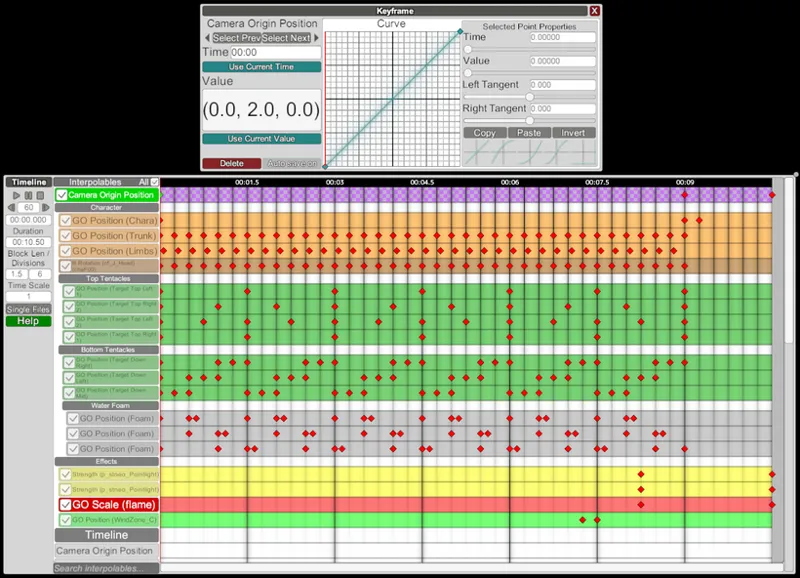
It works like this: on the left of the main window, you'll see a list of "Interpolables". An "Interpolable" is "something that can be interpolated" (changed over time). So, for example, you'll be able to find a "GuideObject Position" interpolable that can be used to change the position of a GuideObject during your animation. The actual animation part is done through things called "keyframes" (if you're not new to animations, then you should probably know what this is). A keyframe is an object that holds a certain value of an interpolable at a certain time (they're the red diamonds on the picture above). In any case, here is a (non-exhaustive) list of what it can interpolate out of the box:
- Camera position/rotation/fov
- Object position/rotation/scale
- Object color/specular color/metallic/smoothness
- Light on/off/color/strength/range/angle
- Compatible with HSPE (please get the latest version)
- Compatible with RendererEditor (please get the latest version)
The plugin contains an in game help panel, so make sure to read that fully before starting anything.
Requirements
A fully updated game with the 630 patch (under "Game Update"). This is not necessary if you're using the Fakku version with the Extended DLC.
Download
Installation
Just put Timeline.dll in your "Plugins" folder.
Uninstall
Remove Timeline.dll from your "Plugins" folder.
How to use it?
- Open the UI with "Ctrl + T".
- Click on "Help" and read that whole essay (I'm not joking, read it).
- If you read everything then you should know how the plugin works. If you still don't really know what to start with, spawn a character, enable IK, select its hand and use the "Selected GuideObject Position" to interpolate its position as to make a waving motion.
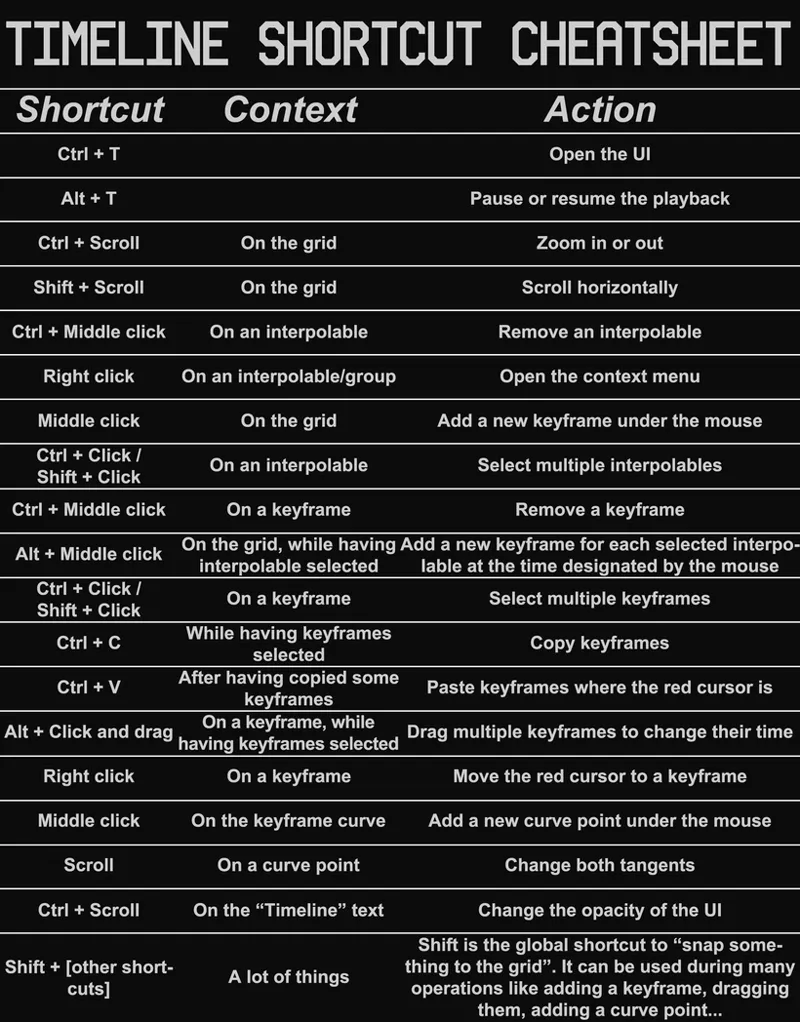
Also, if you don't want to read the whole help section another time just to find a single shortcut, here is a cheatsheet you can use:
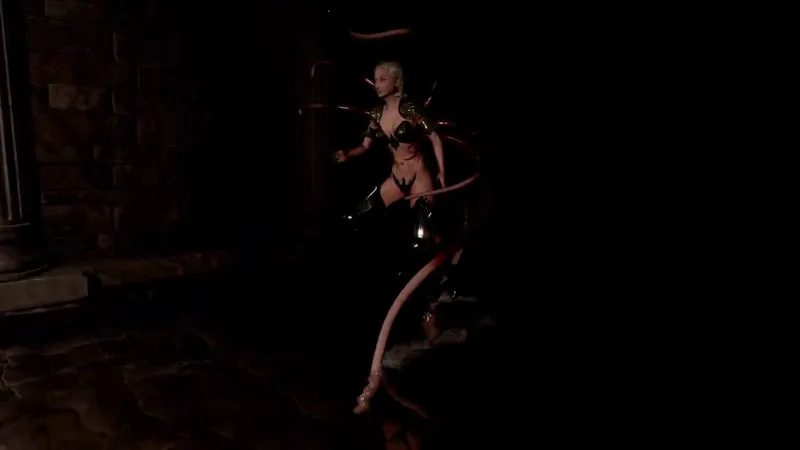
Here are a few more examples if you're curious.
This first one was completely rushed and it's kinda bad honestly.
This last one was made by the commissioner.
If everything goes well, I will be doing a "showcase stream" on Saturday 25 (next Saturday) at 19:00 CEST on the Discord server (that will be just me streaming StudioNEO while using Timeline so I can show people some the basics of it).
Comments (51)
Hello friend, first I want to thank you for being very useful. But I have a doubt? how do i control eyebrows? I couldn't and if there is any way to do it I would like to know. And is there a possibility to convert VMD files to Timeline? Something like that would be very useful. Thanks.
Hello! Great line here! Only today i was added this to setup. But something goes wrong. I have the messenges like; [10:19:33] The referenced script on this Behaviour (Game Object 'ring_y') is missing! [10:19:33] The referenced script on this Behaviour (Game Object 'R Elbow Goal') is missing! [10:19:33] The referenced script on this Behaviour (Game Object 'Cube') is missing! And this is too long list to continue. Can you help? All i can say is that every described bone or aspect described can never be animated. HSPE 12.2
That's the thing, I would need the entire log file to be able to help.
The mouse has no middle button,How to enter the middle click?
How do I do the half states with this plugin?
With the "[Clothing Name] State" interpolables.
Ahh, just what I been hoping to get in AI. So, really hope you get your inspiration back and port it to AI as well. Great work.
Congratulations on the release. This tool will be of interest to people who have never been interested in animation before. By the way, Is it impossible to enter a keyframe if the mouse does not have a middle click?
Well, I assume you're talking about Mac mice? I completely forgot about that, so yeah, it's impossible unfortunately.
This is wonderful and a million times better than trying to pull my hair out using VNGE (which, no offense to VNGE which also does so much more other stuff too). The interface and nice and clean and perfect for doing the type of detailed animations VNGE wasn't equipped for. Definitely had a few pain points though and a few suggestions I figured I'd share. Do what ya will with em! Biggest issue for me was setting up my initial rough animation. I could select a lot of interpolatables and add keyframes all at once, but if I had to update things, I'd have to manually go to each bone, take from current, save. Easiest solution might be if new making keyframes could overwrite old ones (maybe maintaining current interpolation settings?). It could be convenient (though not really needed) if I could simply click a group and hit "add keyframe" and have it add a keyframe through everything. Doing interpolation for every keyframe gets to be a real drag. It doesn't seem currently like you can select multiple keyframes and set them at all the same time? A hotkey combo for 'snap to the red scrubber' would be nice. Maybe just use shift and the scrubber is treated as a division? Definitely agree with the person who wants autosave for the interpolation setting screen. Again, the plugin -as is- is totally amazing, but some stuff like how slow it is to update keyframes (especially over multiple interpolatables) is kinda stopping me from doing anything super involved yet.
Thanks for your feedback, a lot of good ideas in here, I'll see what I can do (can't promise anything). Btw, autosave is already present, as stated in the Help menu you can change that setting in modprefs.
Can you provide help txt file QQ I need to translate to understand
Here you go https://pastebin.com/dWSHhSJA
Amazing! Is it theoretically possible to port mmd animations into timeline?
Yeah I suppose.
This gives me a nice alternative to VNGE. Thanks a ton. Though I probably missed, but is there a way to delete all keyframes that are specifically selected?
Nah, you didn't miss anything, there is no real way to do that now that I think about it. I didn't do it because I didn't want to change the default behaviour of "Ctrl + Middle click" (delete the keyframe under the mouse) but I suppose I could introduce that in a future update through the right click context menu. If it helps though, you can delete a whole interpolable with the same shortcut (Ctrl + Middle click).
Many thanks for adding my requested feature and all the new stuff! I was also wondering what are your plans for this plugin in the future? Do you plan to port this to other illusion games' studios using BepinEx - namely KK, AI and the upcoming HS2 and would that even be viable or require complete rewrite?
No problem. For future plans, that would be making it compatible with my other plugins, like IBL first and I suppose LightingEditor + FogEditor later. Porting to another game is definitely possible since it doesn't require a complete rewrite (unlike MoreAccessories who is a complete pain to make each time) but it's not in my plans right now because it's still a lot of work (making sure all the interpolables run correctly, save/load without problems, etc).
Really happy to see this amazing update, Joan! Lot of cool QoL stuff and intuitively done. Semitransparency is useful indeed, Rez' auto-save idea is something I didn't know I needed, and of course I'm ecstatic to see my suggestions realized. As for a bug report, I've observed an issue that appears to still exist. That being, when changing a character, Timeline doesn't carry the blend shapes to the new character.
Also, a suggestion for consideration in a future update :) Some way to loop a range of keyframes. e.g.; select range 00:00.000-00:01.000, set loop indicator until 00:10.000, and keyframes within that first second will repeat until the 10 second mark, and any changes made reflected in the loop, too. This would eliminate a lot of inputs if user needs to change an aspect of their loop, and it'd help reducing some visual clutter too. My screenshot below is an example of how setting up looped animations can get a bit out of hand, hehe https://i.imgur.com/aOeBZHE.png Naturally, take your time as I suspect this is no small endeavor. Just something to put on the document of considerations. Again, thanks so much for the work you've put in!
Awesome plugin Joan. I've been playing a lot with it lately and it completely puts all other animation methods to shame. There's one thing however which breaks my flow. I always forget to hit save when I change settings of a keyframe - thus forcing me to redo every change I make. Could you add an option to always auto-save or at least add a hotkey?
Hi, sorry for the late answer, was in vacation. I suppose it's possible to add such an option, but I really wouldn't know where to put it. Anyway, I'll consider it, thanks for the suggestion.
I got it. XAXA
Joan Hello! It's been using your plug-in. It's really great. There is a problem with the timeline plug-in. I need to ask you. After opening the interface with Ctrl + T, the options under the interpolables item are all gray and cannot be checked or red dot added on the timeline. How to use it? Thank you!
Great update, massively helps workflow. If possible, could you provide an option/toggle for the Timeline window to display only active interpolables across all objects? When making timing changes for example, it's a long process to search through each object to make changes one at a time. The new dragging feature could make this into one action if all active interpolables could be displayed. Thanks again for all your work!
I can, but are you really ready to deal with that unorganized mess? https://i.imgur.com/ud62Ep7.png Just kidding, it doesn't look that bad actually, and I think that's a great idea. It's obviously not perfect like this but I already have good ideas on how to improve this display for more clarity, like having object names constantly displayed between parenthesis (only when "everything" mode is enabled for example), maybe being able to select the object it's linked to when clicking on the interpolable too. Taking into account several objects selected could be interesting too I suppose, but that wouldn't include all the interpolables linked to GuideObjects like IK or FK nodes, wouldn't include RendererEditor stuff either (this is not by choice, it's just a side effect of how I designed the code) so maybe that's not good actually. Anyway I don't have a master degree in designing good UIs and having a good global User Experience, but as you can see there are some things that can be done for this problem. If you have ideas too feel free to send them, that might help me.
Find a bug: color cannot save to sence(or just cannot load from HS sence), and cannot load from this plugin's "sava/load"
Awesome & Powerful!
This is awesome, OMG, thank you modfather, greetings from Argentina.
I can't wait to use it, but when I load it. I cannot select any of the HSPE options. Could it be my plugin setup?
You need to make sure you download the HSPE I gave here too
Pretty nice plugin, right the piece I was waiting for... but would it be possible to prohibit the "del" button from deleting objects in the scene, while the timeline hud is shown and deleting selected keyframes instead...? Would make it way more intuitiv in my opinion and maybe I would stop deleting my objects then, hihihi.
I know it's not intuitive, but you don't delete keyframes with the del button, I'm sure you noticed that. Best I am willing to do is improve HSUS in that regard to make the confirmation dialog show even when using the key.
It needs some tutorial (video welcome) for dummies. I tried it one time, got angry and moved back to VNGE.
Sure, but I hope you read the help panel at least.
Hi. Very nice new plugin. Endless possibilities.But I have question. Is it possible to define keyframes for the whole body of a character? Or do I have to select all the nodes every time? May it be possible to select the nodes in HSPE and then create a keyframe for all selected nodes with a click?
You have to select each node every time. It's "possible" to simplify this process but it's also complicated considering the current state of the plugin and I can't promise anything about this.
This looks amazing! I have 2 questions: 1. Does it complement VNGE at all or is it an alternative (e.g. is there any way of importing/exporting? 2. Can you do animation paths, like a fly zig-zagging? 3. How do you do all this by yourself (are you borg?).
Oh, also, will this be ported to AI?
https://gfycat.com/astonishingoldcow No way....! I now realize that blend shapes can also be animated! This is a great tool. If I can request only one, I would like to translate HELP, so it would be great if you could include the text files.
Yes, this is a very good idea! https://pastebin.com/zsZcxcje Here, take the raw text, but maybe you'll want to wait the end of the beta since I may change it again.
Without your contributions, HS is only a tiny fraction of what it is now
wow.....
wow! Amazing!!!!!
Wow man...you never stop working. :)
Take that Ai Scum! Ha! ..... next up Ai version, sigh.
Bless Joan I’m sad u didn’t get to reach u Patreon goal thx U
Thanks you Joan , i love you .
Joan being Joan. You are the best!
Great, now I have to learn how to animate.