


Rain, DRS, night and start lights on converted tracks: EvoForge 1.1.10
Thank you for supporting EvoForge! 1.1.10 is the converted-tracks update: we compared about twenty tracks from the same viewpoint in Assetto Corsa and in EVO, and fixed what did not match — rain, DRS zones, night lighting, start lights, and a long list of visible faults. On the car side, the AI brakes later and is faster in single-seaters, and you can tune how it drives. Everything stays free for every driver, and your support is what makes that possible.
In the rain, the road is wet
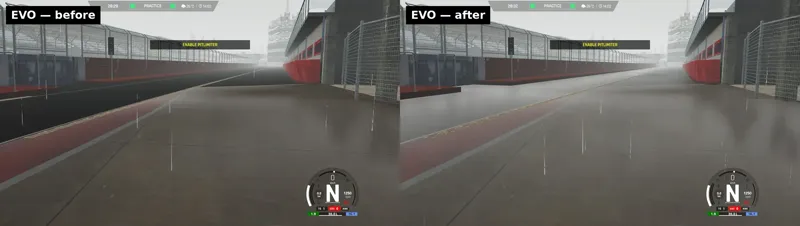
In the rain, the road of a converted track now darkens and gets a water film, like the game’s own roads. Until now it stayed dark and matt.
On some tracks the road did not get wet at all: Imola, Spa, Magione, Laguna Seca, Sepang, Black Cat County, Deutschlandring and a few others. Fixed.
When the track’s author tuned the rain for Custom Shaders Patch (where puddles form, what soaks), that setup is followed.
What a converted road does not have: the animated raindrop rings of the game’s own roads.
DRS zones
A track that defines DRS zones in Assetto Corsa now has them in EVO, at the same places. Until now a converted track had none, so a DRS car could never open its wing on it.
Checked in game with the Ferrari SF-25 at Imola: DRS is offered inside the zone, the wing opens, and a touch of the brakes closes it.
The activation point is dressed like on the game’s own tracks: a “DRS” board on each side and a painted line across the track.
26 layouts of our test set define zones (Imola, Spa, Mugello, Barcelona, Brands Hatch, Nürburgring, Red Bull Ring, Laguna Seca, VIR, Sepang, Magione…).
Night and start lights
Tracks light up at night, like in Assetto Corsa with Custom Shaders Patch — Kunos tracks included. When the mod has no lighting setup of its own, EvoForge fetches the track’s official one on your PC (nothing is bundled with EvoForge; an internet connection is needed the first time). Barcelona went from 0 to 413 lights.
More of the track’s own lights are on: race tower, pit boxes, light strips, spots. And no more blinding windows and buildings.
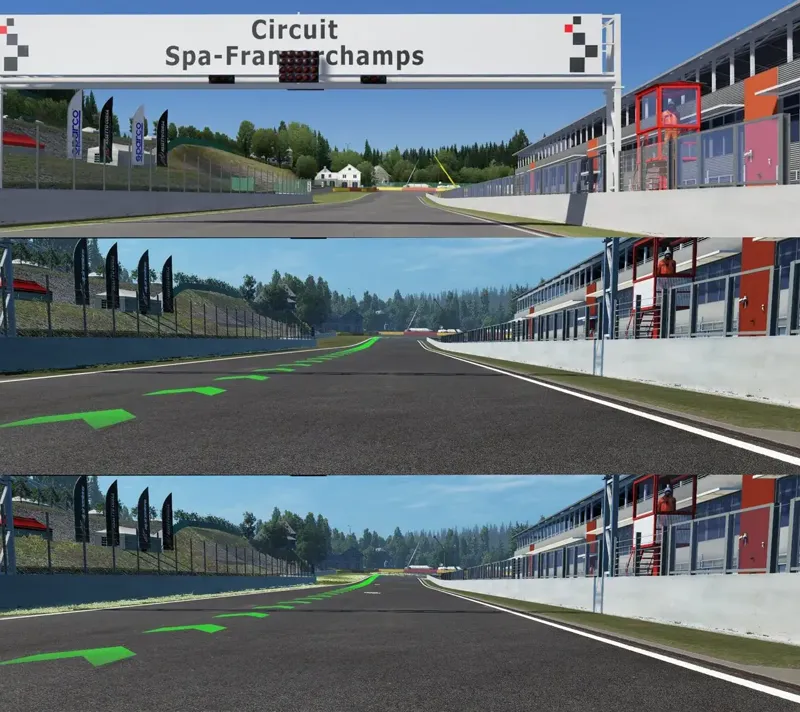
The track’s own start lights work: the gantry lamps light up column by column during the countdown and go out at the start, in step with the on-screen lights.
The gantry is no longer upside down on the Kunos tracks that rotate it (Barcelona, Highlands, Nürburgring).
Closer to Assetto Corsa by day
No more checkerboard patches on the asphalt of many converted tracks.
No more black poles, rails, grandstands and pit buildings: the look follows what the mod says about the surface.
Logos and paint are no longer wiped off buildings and walls (the marshal post at Barcelona, the pit wall of the Nürburgring).
Nets, awnings and power lines stay where the mod puts them: the blue net over the Barcelona pit roof hung like curtains.
Fences and nets as discreet as in Assetto Corsa: only posts and frames remain at a distance, instead of large white panels.
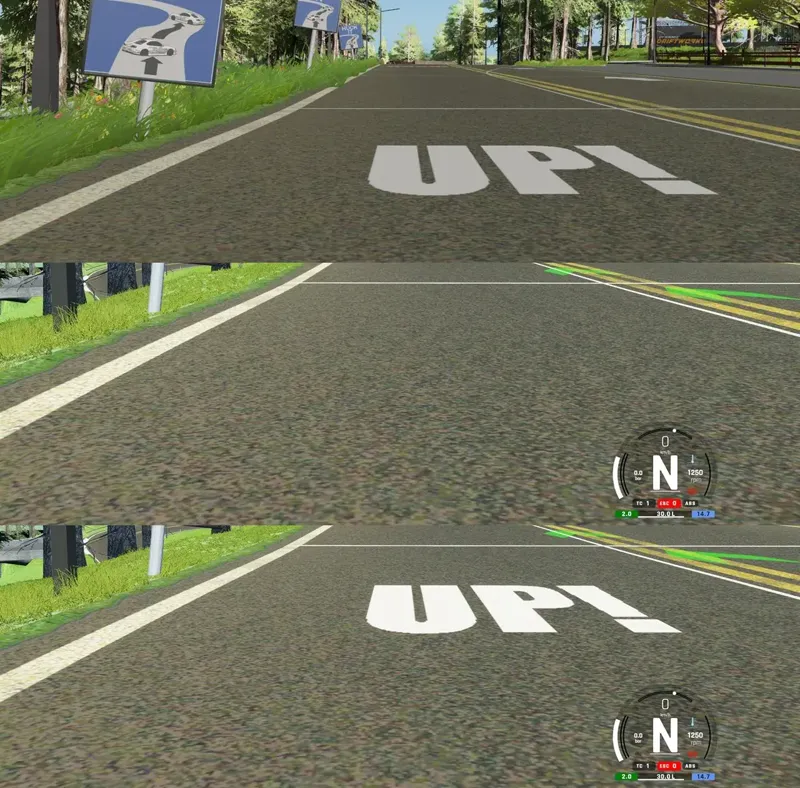
Windows, glass panels and tarpaulins are see-through again (Ebisu, Imola, Spa); faint road paint is back (the “UP!” at Driftworks); painted lines are back (the start line at Magione was black).
The ground sheet covering the road at Spa, the white strip over the dirt at Höljes, guardrails reduced to their posts (Driftworks): gone.
Grandstand roofs and fences are no longer lit on their shaded side (Imola, Highlands). The track’s default skin is applied (flags at Spa).
More of each track’s CSP setup
A mod with its own CSP setup also gets the official one, the way CSP loads both: the mod’s has priority, the official one fills the gaps (Fonteny, Shinjuku, LA Canyons).
Tracks shipped with their own baked shading now use it (Lédenon, Feint Valley, Transfagarasan, Driftworks…).
Kunos tracks follow their CSP tuning: ground and tree lighting, swapped materials and textures, the default skin.
AI: faster in single-seaters, and tunable
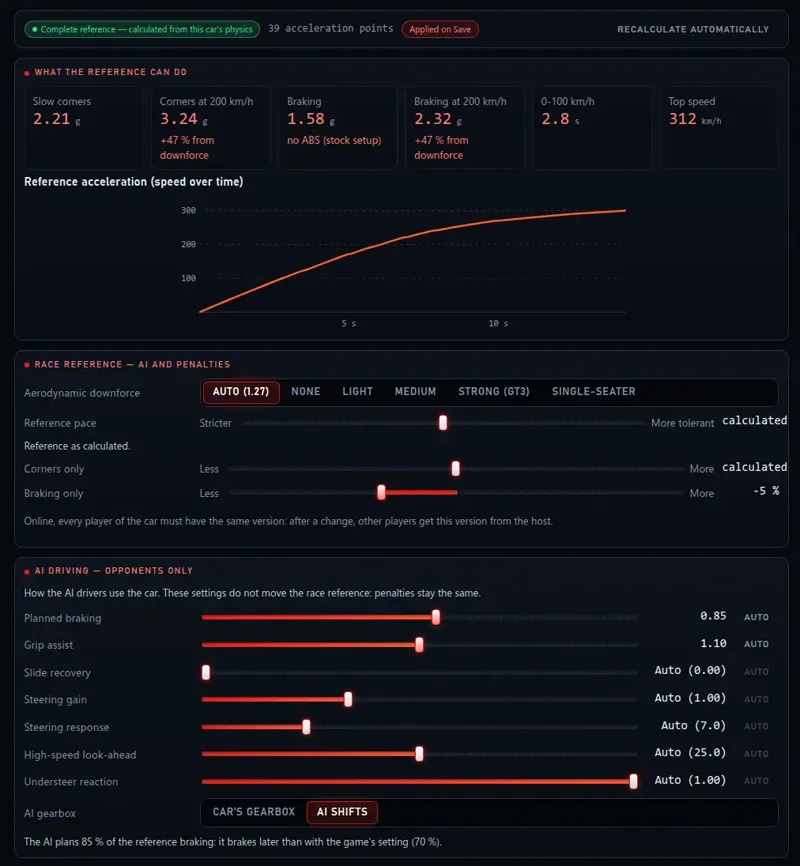
In a converted formula car, the AI opponents braked far too early at the end of straights and crawled through fast corners: they drove at 250 km/h as if the car had the grip it has at 80.
The AI now knows how much harder the car brakes and corners as speed — and downforce — builds up. Cars without downforce are unchanged.
Already-converted cars: open Tuning › Penalties & AI and press Update. The tab now also shows the grip and the braking the AI counts on at 200 km/h, and the downforce family you pick there really changes them.
Real levers on how the AI drives your car, in that same tab. Corners only and Braking only move one side of the race reference without the other.
A new AI driving card that only changes the opponents (penalties stay the same): Planned braking (how late the AI brakes), Grip assist, Slide recovery, Steering gain, Steering response, High-speed look-ahead, Understeer reaction and AI gearbox (let the AI pick its own gears).
Every slider has an Auto button; on one of the game’s own cars, Auto is the value Kunos measured.
Managing converted tracks, safely
Removing a track only removes that track (a track whose name starts like another one could take the other with it).
Track length and grid size are kept when you re-declare, rename, re-enable or share a track.
The game’s content file no longer grows at every re-declare; a declaration is all-or-nothing; renaming is safe.
Fixes
“Creation failed: could not generate a unique id” when converting a car (large collections of cars named alike).
Le Mans, 24 h layout: the game no longer crashes at loading.
Highlands converts again, with its buildings.
Wrong track length when the mod writes it with a comma.
Getting it
Update EvoForge to 1.1.10, or download it from evoforge.fr.
Reconvert your tracks: in the Library, “Repair my content” brings them up to date and keeps your settings.
Already-converted downforce cars: Tuning › Penalties & AI › Update, then tune the AI driving if you wish.
Start a session at night, or in the rain.
Thanks again: you are the reason EvoForge stays free for every driver. Feedback is welcome on the Discord: https://discord.gg/x3w7eCDFkK
Comments (6)
Hello, I just converted a fresh download file and everything is fine again; the only difference compared to the old "rt zolder" file is TreeFX—perhaps that's where the problem lies.
I tried all four options under "3D Vegetation," but without success. If I turn off "3D Vegetation," the original trees appear, but they look terrible. I tried using "Evo factory ground materials" both with and without the setting enabled, but to no avail. When I converted using the previous version of Evoforge, I had your default settings applied along with "Evo factory ground materials," and that worked perfectly.
Just a little problem, since last update, the converted track "rt zolder" looses his trees and i can not rebuild that. In Version before Update everything was fine.
What settings are you using for it ?
Awesome Tool, it is crazy super what you have done, thank you for your work.
Wonderful—this is exactly what I've been waiting for.