




Trophies, records, live timing and express nights: EvoForge 1.1.5
Thank you for supporting EvoForge! 1.1.5 is the biggest Paddock update yet: trophies and helmet finishes you earn, lap records among friends, one-click spectating, a public live timing page with OBS overlays for every event, success ballast for championships, and express nights that almost organise themselves. Everything is free for every driver, and your support is what makes that possible.
Trophies
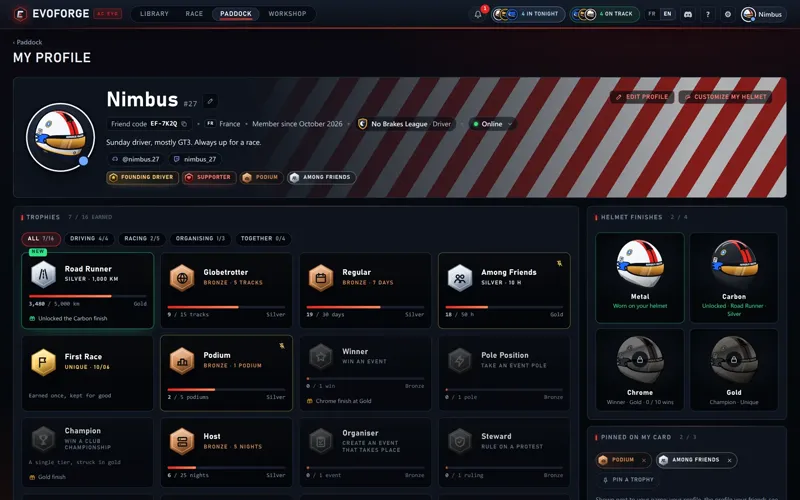
16 trophies in four families: driving (distance, tracks, race days, time on track with friends), racing (first race, podiums, wins, poles, a championship title), organising (nights hosted, events run, protests ruled on) and together (clean-race thanks, team nights, friends who joined through your link, installs of the mods you shared).
Three tiers, bronze, silver and gold, or a single gold tier for the one-offs (first race, champion). Each card shows how far you are from the next tier.
Your history counts: trophies are computed from what the Paddock already knew, so you start with what you have earned.
Pin three next to your name: on your profile, on the profile your friends see and on your public page.
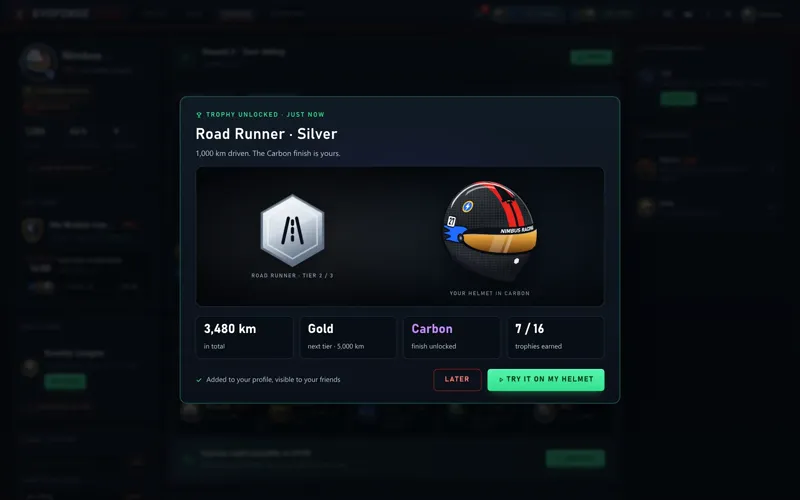
Helmet finishes you earn: Carbon for a silver Road Runner, Chrome for a gold Winner, Gold for a champion. Carbon now replaces the base colour with a real weave. Metal stays a thank-you to supporters.
Lap records among friends
Paddock › Records lists every track · layout · car combo you drove this season: your best time, your rank among your friends and the gap to the leader.
Switch to your team’s board to compare yourself with all your teammates.
Two sources: your best laps from your own sessions, and your official event times, which follow the stewards’ corrections.
▲ and ▼ show where you took or lost the lead since your last visit, and you get a notification when a friend takes your record.
Your times follow your “My season” setting: set it to “Nobody” and they stay yours.
Watch
A Watch button (the eye) next to “Join”: on a friend’s server (friends panel, “On track now”, their profile), in the server list and on a running event.
Spectator mode, no car needed: you follow the drivers on track, and you don’t take a seat on the server.
It shows up wherever “Join” does.
Live timing and OBS overlays
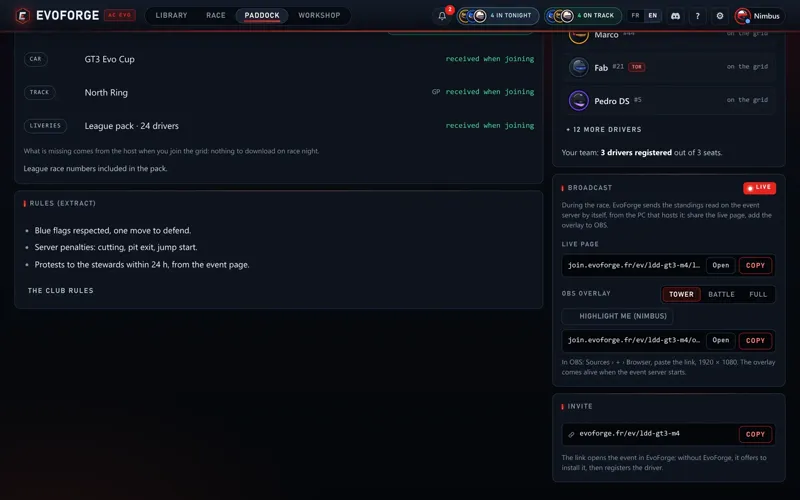
Every event hosted with EvoForge gets a public live timing page: positions, gaps, intervals, last and best laps, and a race feed (overtakes, fastest laps). In English and French, on desktop and phone, refreshed every few seconds.
For streamers, three OBS overlays on a transparent background: the tower, the battle and the full layout, with a driver highlighted if you like. Copy the link from the event page’s “Broadcast” block and paste it into a Browser source.
Success ballast and entrants-only servers
Organisers set a ballast per position in the standings (up to 5 places, 100 kg max), or a restrictor instead, with an optional loss per round finished off the podium, a cap and a ballast-free final round.
The standings show next round’s ballast, and every driver sees theirs on the event page.
When the host starts the event server from EvoForge, everyone’s ballast is applied on its own.
“Only entrants can join”: only registered drivers can take a car on the event server. They need a linked Steam account; the event page shows who hasn’t linked it yet.
Tonight and express nights
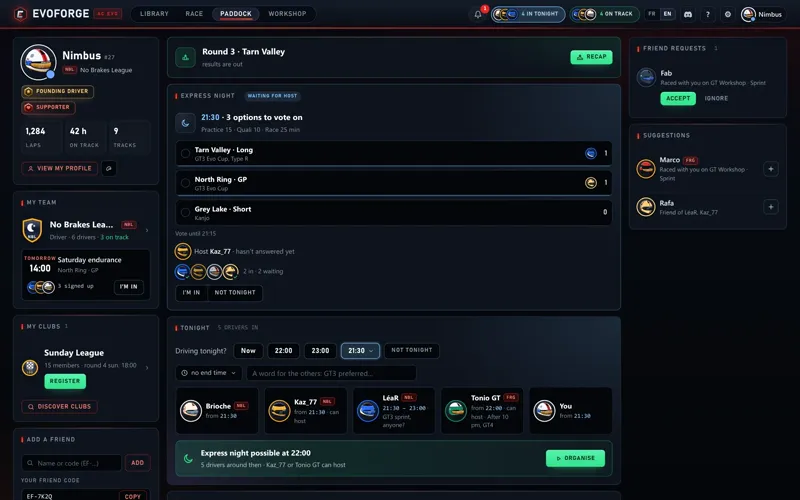
On the Paddock home, “Driving tonight?”: one click on a time. Your friends and teammates see who is in and when; it all clears at midnight.
As soon as two friends or more are around at the same time as you, Organise appears. EvoForge only offers the tracks and cars that everyone in the group already has installed, without showing anyone else’s library.
Put up to three options to a vote (closes 15 minutes before the start), pick the host, the time and the format. Invitations go out together, a reminder pops up 10 minutes before, and the host’s server starts on its own with the winning option.
Also in this update
Mods protected by their creator can no longer be installed through a club’s or team’s shared-mods link. Dropping a file on the app works as before.
When you host a server, EvoForge now keeps a copy of each session’s server log (the server used to overwrite it at every start).
Free for every driver
Everything above is part of the free Paddock: every plan includes it, free plan included. All you need is an EvoForge account. To host an express night, or an event with live timing and ballast, EvoForge hosting needs to be set up on your PC (Race › Host).
Getting started
Update EvoForge to 1.1.5, or download it from evoforge.fr.
Open Paddock › My profile for your trophies, then Paddock › Records for your times.
A friend is on track? Click the eye to watch.
Organisers: turn on success ballast in the championship, and share the live page from the event’s “Broadcast” block.
On the Paddock home, answer “Driving tonight?”.
Thanks again: you are the reason the whole Paddock stays free for every driver. Feedback is welcome on the Discord: https://discord.gg/x3w7eCDFkK
Comments (6)
Hey Bro the software has been awesome, crazy how Kunos couldnt make something like this built in game, kinda how forza has theirs. anyway great work bro but quick question, some of the cars that i modify from existing ace evo cars cause the game to crash on launch . for example the bmw e46 i can mod and apply new parts with no issues, with daytona sp3 would cause the game to crash on launch after modding my own version (using compatible parts of course) is there something i am doing wrong ?
hi, im using the paid version. it only detects 20 of the cars in my folder. why? every track is found just fine.
Yes.. Okey
And some Ai Cars not showing correctly...
Hey.! EvoForge is very good.. But some Cars from AC 1 not correctly working.. Can the Quality of the Cats get even better.?
Naturally, the quality will only improve over time—no need to worry. Development takes time.