







The Tuning workshop, rebuilt: EvoForge 1.1.15
Thank you for supporting EvoForge! 1.1.15 is the Tuning update: the Tuning tab becomes a full workshop, with one screen per system, the effect of every change before you save, equipment you can add to your cars (a turbo, all-wheel drive, a DRS, a hybrid system…) and a track test that brings the laps back to the workshop. Converted cars and tracks get closer to the originals too. Everything stays free for every driver, and your support is what makes that possible.
The Tuning workshop, rebuilt
One screen per system, grouped like a car: engine and forced induction, gearbox and drivetrain, suspension, geometry and steering, tyres, aerodynamics, mass, brakes and aids, garage setup, AI and penalties, spec card and index.
Estimated performance always in view — power, torque, weight, weight/power, top speed, 0-100 km/h, balance and performance index, with the gap to the original — recomputed as you change things, before you save.
The same setting row everywhere: a slider whose light band shows the game’s cars of the same family, the original as a grey mark, quick entry (+5 %, ×1.1), back to the original in one click.
Essential or Expert: the levers that matter, each with one sentence on what it does when driving — or every setting. Undo and redo (Ctrl+Z / Ctrl+Y), and a search box (Ctrl+K) that takes you to any setting.
Overview: every change listed and undoable on its own, versions you can name, compare, restore or share, points to check (a rev limiter past the end of the torque curve, a clutch weaker than the engine…) each fixed in one click, the car’s balance, and recipes (Lighter, Track pack, Drift kit, Rain, Endurance, and your own).
See the effect before you drive
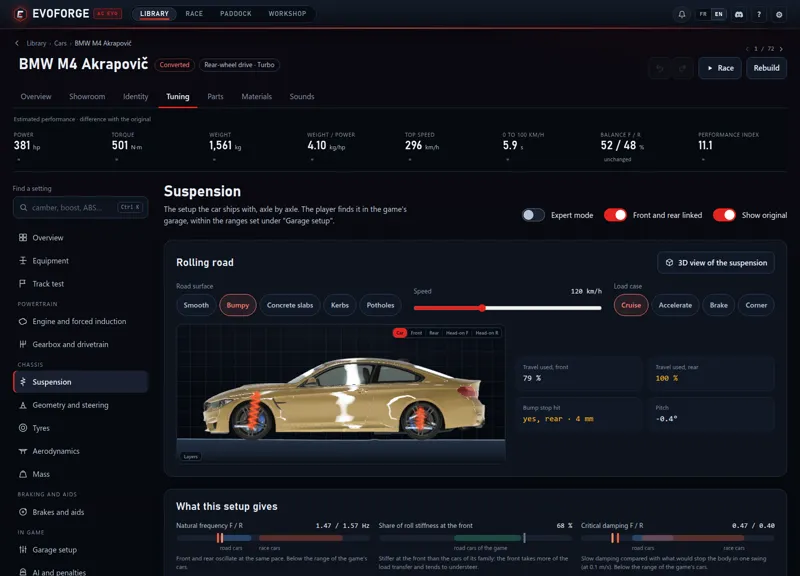
Suspension: the real 3D car on a rolling road — smooth or bumpy road, kerbs, potholes, braking, accelerating, cornering.
Geometry and steering: the car from the front, from behind and from above, the body see-through so the wheels show.
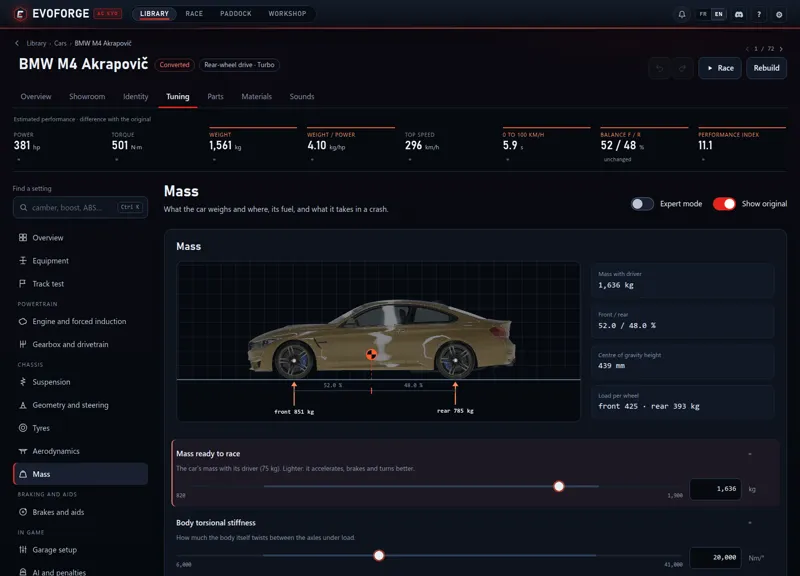
Mass: the car from the side, its centre of gravity where it really is, the load on each axle.
Gearbox: the speed of each gear at the limiter — drag a gear to change it, add or remove a gear in one click —, the automatic gearbox’s shift points, and the differential by type.
Aerodynamics: a wind tunnel around the car (smoke, pressure, air speed), with downforce and drag computed the way the game does.
Engine and tyres: the torque curve with the boost; grip against load, slip and temperature, wear, warmers, rain.
The benches follow the game’s own rules: how boost builds up, how tyres lose grip under load, where the automatic gearbox downshifts.
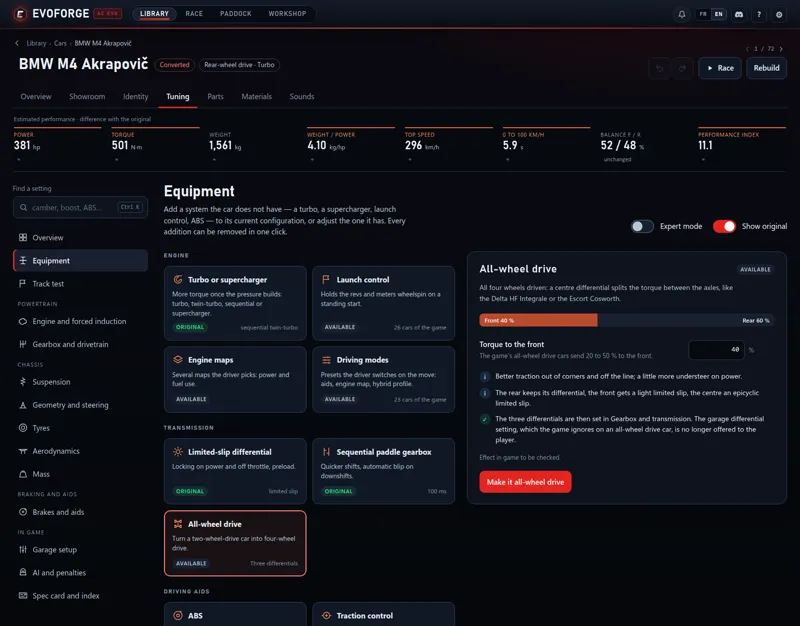
Equipment: add what the car does not have
A turbo or a supercharger on a naturally aspirated engine — turbo, twin-turbo, sequential twin-turbo, positive-displacement or centrifugal supercharger. Choose the pressure, the rpm of full pressure and the response; add a boost dial at the wheel and a blow-off valve. You see the new torque curve and performance index before adding it, and the clutch is uprated with it.
All-wheel drive on a two-wheel-drive car: you choose the share of torque sent to the front.
A DRS on a car with a rear wing: usable anywhere or only in the track’s DRS zones, closed when you brake or in fast corners. The workshop shows the downforce and drag it removes and the top speed it gains — and says so when a wing would gain nothing.
A hybrid system: electric power, battery, three deployment profiles (Qualify, Race, Save) changed on the MFD; the battery recharges off throttle and under braking.
Driving modes (Track, Sport, Road, and your own) that the driver switches on the move, launch control with how to use it in the game, engine maps, ABS and traction control with as many steps as you want, stability control, electronic diff lock, a limited-slip differential, a sequential paddle gearbox, a drift handbrake.
Each addition is made the way the game’s own cars carry it, gets its range in the garage setup, and comes off in one click.
Spec card, index and track test
Choose what the game’s car selection shows, line by line: the mod’s figure, the measured one (which follows your tuning), or your own.
The performance index broken down into what drives it, and Aim for an index: pick a target for your grid and the workshop works out the torque, boost or mass that gets the car there.
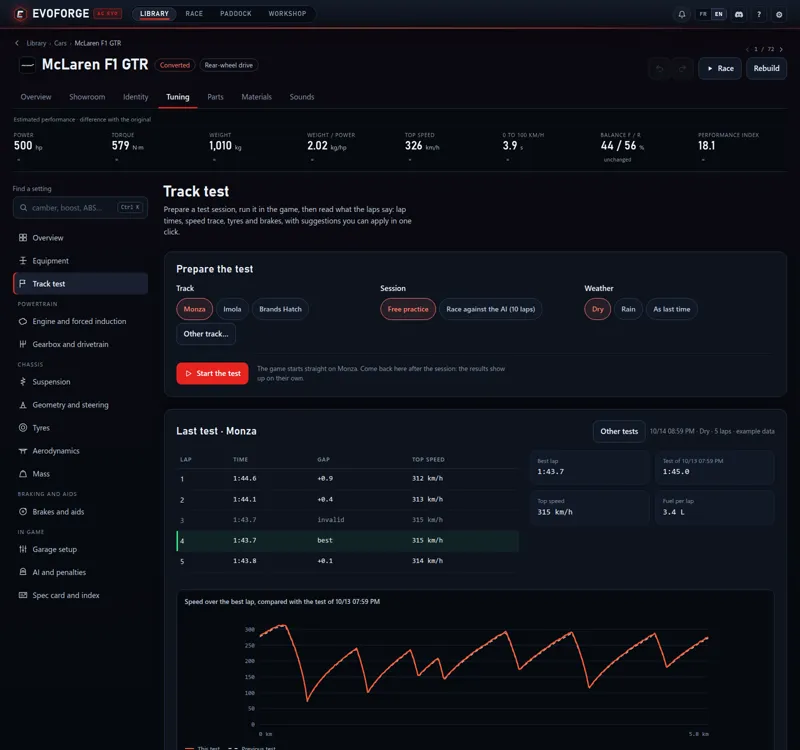
Track test: pick a track, free practice or a 10-lap race against the AI, and the weather — the game starts straight on the track.
Back in the workshop: lap times, top speed, fuel per lap, the speed trace of your best lap against the previous test, tyre pressures and temperatures against the tyre’s window, brake temperatures — with suggestions you apply in one click. Everything is read on your PC; nothing is sent.
Converted cars
A real spec card in the game’s car selection: power, torque, weight, top speed, 0-100 km/h, gears, rev limit and fuel tank, like the built-in cars. The figures the mod’s author wrote are kept; the others are measured on the converted car and follow your changes in Tuning.
The automatic gearbox downshifts where the mod’s author set it — a converted Formula 1 car downshifted around 13,600 rpm instead of 9,000.
Converted hybrids recover energy again (F1 cars, LMP1s, hypercars): under braking and off throttle, on the mod’s deployment profile, with the MGU-H — until now the battery only filled up in the pits.
DRS closes in corners when the mod says so, like in Assetto Corsa.
All-wheel drive cars: the garage no longer offers a differential setting the game ignores.
Spinning tyres blur like the built-in cars. In Tuning, Downshift margin now works, a hybrid setting that did nothing is gone, and every garage setting is named.
Copies of the game’s cars, and part swaps
On copies of the game’s cars, the workshop now shows and edits the engine and turbo the game really runs (the Abarth 695 runs 1.6 bar, not the 1.38 shown before), and the AI and the performance index use the same values.
Swapping a drivetrain or an engine no longer stops the game from starting. On cars that pick their differential or engine through tuning parts (the Mazda MX-5 NA), the swap left a part pointing to a file that was gone: the game closed while loading the car, at every start. Cars already affected are repaired by themselves when the app starts.
Converted tracks
Dirt and snow are slippery like in Assetto Corsa — a rallycross track no longer drives like tarmac. Grass and sand keep the bumps and drag their author gave them, and sound like grass and sand.
Tracks are no longer silent: a background ambience, and the echo zones the author placed along grandstands and pit walls, under bridges and in tunnels.
Converting a track again keeps your choices — element table, vegetation species and amount, grass, the 3D files you left out, the options and the name. The track is replaced and your material edits are applied again; Reset to automatic starts from EvoForge’s choices.
Tracks with dense 3D grass convert in seconds instead of minutes (Karelia Cross: 7 min 20 s → 31 s). Some CSP-protected tracks that stopped the conversion with an error now convert.
Faster conversions, lighter cars
Cars convert about a third faster, tracks about a fifth faster — the result is the same, file for file. Cars with many liveries gain the most: 1 min 54 s → 1 min 07 s for a car with 18 liveries.
Converted cars no longer carry several copies of the same texture: each one is stored once and shared. Same look, smaller package (11 to 38 MB less on our test cars), less video memory.
Getting it
Update EvoForge to 1.1.15, or download it from evoforge.fr.
Tuning: open a car and its Tuning tab — nothing to convert again.
Converted cars (spec card, gearbox, hybrids, DRS, lighter package): Rebuild them, or use Repair my content in the Library.
Converted tracks (surfaces and sound): convert them again — your settings come back — or use Repair my content.
Thanks again: you are the reason EvoForge stays free for every driver. Feedback is welcome on the Discord: https://discord.gg/x3w7eCDFkK
Comments (3)
increíble trabajo, que barbaridad..., solo queda la traducción al español, de verdad, menudo trabajo, de 10.
Maybe you'll answer this time. Why doesn't this recognize all of the cars in my folder, but discovers tracks just fine?
Hi man. I can't tell you, i'm not on your PC sorry.