
[Reshade] Clean UI for DX9
This is a companion tutorial to my Hide CAS UI and More post so if you haven’t seen that tutorial yet then I highly recommend reading it first as the installation process is practically the same and a lot of information there will sound familiar here.
This time, it will feature the ReshadeEffectShaderToggler add-on, or REST for short, which will be used to prevent shaders from affecting certain parts of the game (primarily UI). And yes, you can use both add-ons at the same time!
➡️ This is the DX9 version. For DX11 support, find it here.

How it works:
REST (currently developed by 4lex4nder) is a fork of the ShaderToggler addon where, instead of toggling in-game shaders like hiding UI from view, it will toggle reshade shaders/effects from affecting certain in-game shaders, like the UI.
// ReShade/Gshade requirements
REST v 1.2.3: only compatible with ReShade 5.8.0+ w/ full add-on support. Works with 64-bit version of TS4, but should also work w/ the legacy version.
REST v1.2.1: same as v1.2.3, except for crashing issue. Use this if v1.2.3 doesn't work.
For GShade users: simply check which Reshade version it’s based on and match with the above requirements.
// Download .ini file:
For REST v 1.2.3: SimFileShare / Google Drive
For REST v 1.2.1: SimFileShare / Google Drive [⚠️crashing issue, see more at the bottom]
// Installation
Have ReShade with full add-on support installed for this to work.
Grab the REST add-on from the github release linked in the ReShade/Gshade requirements section. Make sure to get the add-on that works with your Reshade version.
Extract the ReshadeEffectShaderToggler.addon file into the game's \Bin folder where your TS4.exe/TS4_64.exe is (where you had also installed ReShade). Addon32 is for legacy players, addon64 is for non-legacy players.
If you use on GShade: place the .addon file in the gshade-addons folder.
Still in the \Bin folder, drop the x.x_ReshadeEffectShaderToggler.ini file you downloaded. Make sure you grab the right file matching with the add-on version it’s compatible with.
If you use on GShade: place the .ini file in the gshade-addons folder along with the .addon file.
Rename the file and remove the version number in the prefix. Both .addon and .ini file should share the same name for the add-on to recognize my settings.
Open up your game. If you see the same menu as below then you’ve successfully installed the add-on & settings! Restart if needed.
// Previews

Clear UI
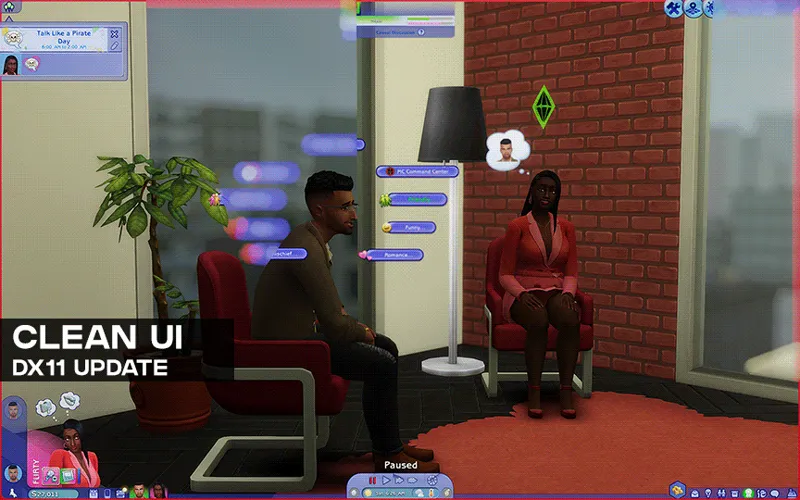
This will prevent all shaders from affecting any sorts of UI. Works in CAS and in build/live mode. Enabled by default.


Alpha Mask for CAS
This will disable a select amount of shaders from affecting CAS items with transparency (alpha hair, transparent clothes). Disabled by default. This does not work for live mode.


Shaders affected by the Alpha Mask for CAS toggle:
Lineart based shaders: Comic & MatCap_Outlines
BG based shaders: Chromakey & DepthAlpha
Various ambient occlusion/AO shaders
Various DoF shaders
ReflectiveBumpmapping
You can add more shaders to exclude by clicking the Change Effects option and select which shaders you want to add.

// Known Issues (no fixes)
Keyboard shortcut issue.
Since you can’t use keyboard shortcuts for the toggle groups (despite assigning a keybind), you’ll have to manually enable them instead.

Issue with toggling individual reshade effects/shaders w/ shortcuts.
When you have the add-on toggler enabled, you won’t be able to toggle individual reshade effects with keyboard shortcuts. Say you want to disable ADOF for the time being, you can only disable it w/ keyboard shortcut when the add-on toggle is off or by disabling it manually in the reshade panel.

// FAQ
Issue: white screen / game crashes when changing resolution, switching tabs, or using SRWE.
This is a known issue with REST v1.2.1. To fix it, you'll need to use REST v1.2.3. In case you can't update and still use v1.2.1, here are some things to keep in mind:
For switching tabs: white screen only happens on Fullscreen mode. Change into Windowed Fullscreen and you should not be experiencing any issue.
For SRWE/changing window resolution: best to not do if you can help it. If you do need to use SRWE, remove or disable the add-on and restart the game.
Issue: enabling the toggle group will instead block all shaders and prevent them from showing up at all, instead of just the UI.
It's likely caused by having the Edge Smoothing on. Turn it off and it should be fixed.
This is characterized by having "Not all depth buffers are available. Disable MSAA..." in the Generic Depth menu under the Add-ons tab.
Go to Game Options > Edge Smoothing dropdown > choose Off
Issue: add-on works in CAS but not in live mode.
This is caused by having the 3D Scene Resolution setting set to Medium and lower. It must be set to High for it to work in live mode.
Go to Game Options > 3D Scene Resolution dropdown > choose High
Issue: UI is still affected by shaders despite enabling the toggle groups for REST.
So far here are the things that can cause the issue:
Post processing effects is set to disabled (must be enabled).
Edge smoothing is set to on (must be off/disabled).
Laptop mode is on (must be off/disabled).
Selected/enabled Vulkan/DXVK API during Reshade/Gshade installation (must select DirectX 9).
Comments (57)
hi i cant click any links to download i click them and they wont open or download
omg this is exactly what I was looking for ❤️
I found something that works!! Alright so this hadn't been working for me in anything other than CAS since MAY last year. I was fed up with not being able to see text so I finally took the time (6 hours!!!!!!!) to figure out how to get this to work. 1. As of now, I've been able to get this to work on ReShade 6.7.3, 6.7.2 & 5.7.0. For older ReShade versions, click on the link that directs to MediaFire (https://reshade.me/forum/general-discussion/294-reshade-repository) 2. I've been able to get 1.1.0 & 1.2.1 REST to work, but not 1.2.3. I noticed that the addon for 1.1.0 isn't linked so here it is (https://github.com/4lex4nder/ReshadeEffectShaderToggler/releases/tag/v1.1.0-testing) 3. I've noticed that when I remove the 64 at the end of the file extension (eg. shadertoggler.addon64 into shadertoggler.addon) for BOTH Hide CAS UI & REST, the addons work. EXCEPT, SMAA doesn't work correctly. If I keep the 64 at the end, everything works correctly, however I'm getting really high memory usage & switching between windows is very slow unlike before. So if anyone has a fix for that pls tell me... I hope this works for anyone else having the same issue!
Doesn't work in cas. Followed all the steps & have no other shaders installed. Flop.
there is no addon file only ini file?
Forme it doesn’t work in gshade and reshade, I believe I followed all of the instructions. Could it be an update issue? :(
Hi, I'm sorry. I'm using this in GShade it is installed and toggled on. My Post-Processing is on, my 3-D resolution is set to the highest setting, and my edge smoothing is off. I'm not on Laptop mode as I'm playing on PC, but still the Clean UI isn't working in Live mode. I'm very sorry for asking for help with a common issue, but I don't know where to go from here.
turn post processing off
Does anyone know how to use this on Gshade?
Guys, currently, with the latest versions of everything, this addon still works perfectly. I myself had a little trouble getting it to work, but I was just being dumb. The thing is, for it to work, as stated in the post, both files: .ini and .addon MUST have the EXACT same name. So you have to delete the "1.2.3" at the beginning of the .ini file.
does anyone have the REST 1.2.1 addon64 file? FOr whatever reason I cannot seem to download it :|
https://www.simfileshare.net/download/3760485/
only works on the basement for me
Simsvie on TikTok has an easy tutorial to fix your UI.
So it seems that no matter what I do, the settings aren't recognized. The game reads it but there's no options for keepui, clearui, all I can do is make new presets.
nvm, found it
Hiii, is there a version for DX11, the update forced me to use DX11 .
hello, i tried it out in both dx9 and dx11 but the UI is still blurred, i have all graphic settings how they are supposed to be, please help! i tried it with the serenity preset
did you fix it?
At a complete loss. :( Attempted to add this to my DX9 game, decided it was a lot to deal with and removed it. Now Reshade doesn't work AT ALL. I go to change presets, select one, and on top of the selected preset not working, it does not let me select ANY presets after. I've uninstalled, scrubbed my PC clean of Reshade and done a complete reinstall. I've verified and repaired the game. I've done everything I can think of and I'm just not finding anything. What in the world happened here?
Alright, I am my own worst enemy, putting this here for anybody who does the same dumb I did: When you put in an add on like this, then decide 'nah' and yank it out, Reshade is still hanging on to a lot of information and attempts to load up shaders and whatnot that it either doesn't have, or are corrupted now because of said yanking. That's what is happening when the preset bar freezes up. So, if you decide to download this, do the thing that everyone actually tells you to do and do a ZIP of your current shaders and such. Save yourself the three day headache I gave myself for no damn reason.
Hello, this only works in CAS for me, but I have already had my 3D Scene Resolution set to High, so I am confused now. Anyone know whats wrong with this?
I have my 3d Thing set to high, yet, in live mode, it still doesn't work. i am using gshade
I have the same issue, unfortunately doesn't work anymore. And so many preset shaders don't work with the DX11 version so I don't know what to do.
How do I troubleshoot this UI mod(DX9) only working in-game on basement level?
have you considered making or do you know anyone who has made a visual tutorial for this? i've tried to follow the instructions so many times but i'm just so lost...
hi please help unable to download REST CONFIG
Thank you for such a necessary thing. I can't imagine the game without it. Unfortunately, after patch 1.109.185.1030 it stopped working and I want to cry and can't play. I redownloaded it and it didn't help. Is it just me?
the patch auto-enables Dx11 and the file from this post is not compatible with it. You'll want to download the file from here instead: https://www.patreon.com/posts/reshade-add-on-109880586
hi!! i use gshade and have tried both REST files from the github. i even put them in the folder for add-ons together but it has yet to work for me :( is this not possible to use anymore for dx9
I don't know if this is a glitch or bug, or this addon simply doesn't fix this but in live mode, the shadows from the shader preset I'm using can be seen through the UI along with the color filters. Dont know how to fix it.
wanted to note that 1.2.1 works for me on Gshade. 1.2.3 seemed to only worked in CAS also, is it supposed to work on the main menu/world selection menu? It doesn't for me but that is a rare enough screen to see that I don't really mind.
i've been getting the same consistent report weirdly enough since on mine it works as intended. Honestly lost as to why and have not yet managed to come up with settings to replicate it x_x I wish i know more It doesnt work on main menu/world select yeah so you shouldnt be too worried about that
1.2.1 works for me bug crashes alot. 1.2.3 is just not working unfortunatly
Afaik it only ever crashes when the game resolution is changed or if ur on fullscreen mode switching out tabs. Avoid those 2 by staying on windowed fullscreen mode (remove the addon first before doing so)
I am having issues with my GShade and I think it is because I have the newer version of GShade which is 5.1.1 for reshade 6.2.1. My UI is see-through like in your gif up top. I see just a few hours ago you did release for DX11 but I am not sure that will fix my issue because I am still using the newest version of GShade. I can't seem to find the older compatible version, but will you be so kind as to help me clean my UI on the newer version of GShade? After the lovestruck update, I lost my old files and had to do all fresh installs and this is the pickle I am in now. Thank you for your time and help.
I've tested all the files mentioned here on both Reshade & Gshade (newest versions) for the DX9 ver of the game and it's still working just fine. (fyi, the files on this post does not work for the game on DX11.) Here are the tests I've done for anyone with issues: - Works fine if DXVK is NOT selected. Only works on DX9. - Works in any graphics settings, from low to ultra. I've also made sure that the other settings are correct at low-ultra graphics (edge smoothing is off, post processing is on, 3d scene resolution is set to high). Unrelated to the issue at hand: while I didn't mention it before, laptop mode should be off. If it's on, it won't work in CAS and live mode. - Works in any of the window mode (fullscreen, windowed fullscreen, windowed, with & without V-sync) - Works with the latest release of Simp4Settings with and without alt-clipping to be used w/ Shadow for Days + SimpSetters. does the toggle group not show up? or do they do and they don't do anything?
hello sorry for repeating questions that people have already asked but it doesnt seem like theres been a solution to it. The Add-on works in CAS but not in live mode despite me making sure all of the settings matched what the FAQ said to do. If you share any insight on how to get it to work outside of CAS for GSHADE I would really appreciate it, thank you!
can there please be an updated version it literally doesnt work, it only works in my sims basement
Neither versions are working for me unfortunately :(
Hii, im not sure why, but it doesnt seem to work in cas and live mode(i have preset where there is a comic and its glitching in the ui). I hope this will be fix!
i meant in live mode only mb
Hey, I downloaded this and its working but there is nothing in the list of toggle groups.
was trying to tough it out and go with 1.2.1 but even with windowed mode i lost game progress cuz of it so im just going back to 1.2.3 and no live mode
so it works if you use reshade but not if you use gshade.
having the same issue. doesnt work in live mode.
this doesn't work for me, it doesn't clean the UI 😭
hii so the clean ui its wrking for me on CAS but it relly isnt on live mode, i see the solution posted but i cant find anything that says 3d scene resolution :( i need a little guidance over where that is on the gshade menu
Hey there! I hope all is well with you! I've been a big fan of your Clean UI and Hide UI Addon for quite some time now. However, I hit a snag today after upgrading my game to DX11 – it seems the add-ons aren't functioning anymore. Needless to say, I'm feeling pretty bummed out about it! These two add-ons have been staples for me, and I was wondering if you have plans to release a DX11-compatible version. That would be awesome!
Hey as well! I've just updated my game and yes, the settings do need an update to make it compatible for the dx11 version. It'll likely take me about a week or so to redo it depending on how similar/different the process is to set them up ^^
Hello! I followed each step thrice over, uninstalled and reinstalled (both the game and the shaders), but I came across 2 issues: It completely removed the shaders altogether, and the other time, the shaders would only apply to the UI Post Processing Effects are Enabled, Edge Smoothing is Off, 3D Scene Resolution is High, and I used DirectX 9 when installing ReShade
Clean UI seems to only work for me in the CAS but just that. I'm pretty sure I did everything right. I redid it a few times but no luck
same here, followed each step and i got no luck at all. tried everything as well.
working on Mac?
Reshade only works on PC, so I don't think so.
REST v1.2.3 add-on works on 64-bit, but the toggle groups aren't showing up. I renamed the ini, it's in the bin folder and my gshade is based on Reshade 5.8.0
hii, so from what I've heard, those who use gshade found it working if they put the .ini file together with the .addon file (in the gshade-addons folder). You might want to move the file around to see if the toggle groups show up :) you can also try going to the add-ons tab in the gshade panel where you see the list of toggle groups, create a new toggle group & save, and see where the new .ini file generates. You can then move my custom .ini file to where gshade generated the file.