
[Reshade add-on] Clean UI for DX11
As using REST 1.2.0 and above cause crashes whenever I create a setting or attempt to use it for a brief amount of time, I decided to use a much older version of REST (1.1.0), which turns out to be more stable to configure and use. While this means being able to use the add-on for the DX11 game, it has its own set of problems, which may/may not be a dealbreaker for some.
I decided to make a new post since the original one is quite lengthy and I want to keep DX9 and DX11 versions separate due to the different information each version has.
➡️ For the DX9 version, find it here. Add-on info can be read there.
In short, with the help of REST (an add-on for reshade/gshade), you can block/prevent shaders from affecting the UI.
// Things to know if using this version ⚠️
Some shaders will not work properly and will cause some gamma issues. If your preset look different than how it normally is (a lot darker/brighter), enable/disable your active shaders and see which one is causing it. It's easily fixed by using an alternative shader that achieve a similar look.
Shaders affected (ones I've known so far): SMAA & MartysMods_SMAA (FMAA is not affected, use this instead), FilmicAnamorphSharpen, ArcaneBloom & NeoBloom, Glamarye_Fast_Effects, MagicHDR, CRT_Lotte.
You will not be able to change your window resolution, either via graphic settings or by using SRWE. This will cause your game to stop and eventually having to force stop it with the task manager. It is recommended that you have your game in Windowed Fullscreen to avoid issues and have the add-on disabled if you want to change the resolution in-game.
// Required Files
REST config for v 1.1.0 (simfileshare only)
// Installation
Have ReShade with full add-on support installed for this to work.
Download the REST_ x64_1.1.0 add-on from the github linked in the requirements section as well as the config.
Extract the ReshadeEffectShaderToggler.addon file into the game's \Bin folder where your TS4_64.exe is (where you had also installed ReShade).
If you use on GShade: place the .addon file in the gshade-addons folder.
Still in the \Bin folder, drop the x.x_ReshadeEffectShaderToggler_DX11.ini file you downloaded.
If you use on GShade: place the .ini file in the gshade-addons folder along with the .addon file. If my config doesn't show up in the add-on menu, move it back to the \Bin folder.
Rename the file and remove the prefix and suffix. Both .addon and .ini file should share the same name for the add-on to recognize my settings = [ ReshadeEffectShaderToggler.ini ]
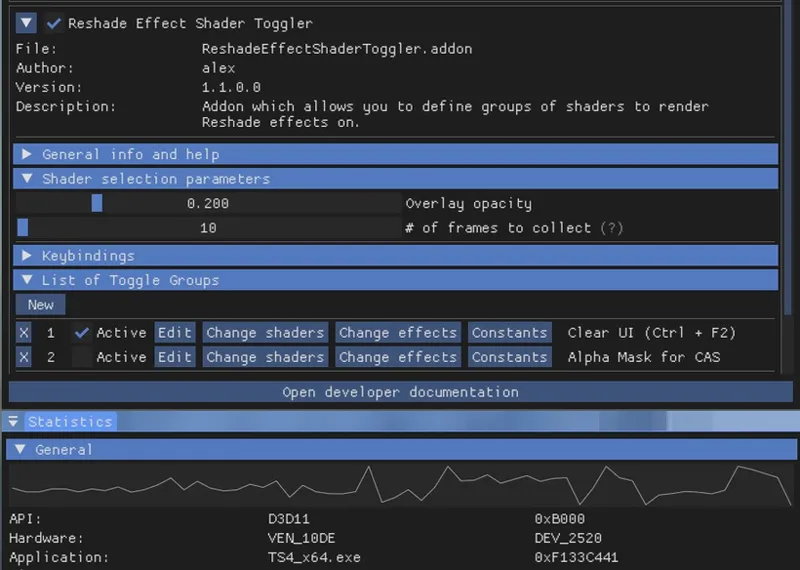
Open up your game. If you see the same menu as below then you’ve successfully installed the add-on & settings! Restart if needed.
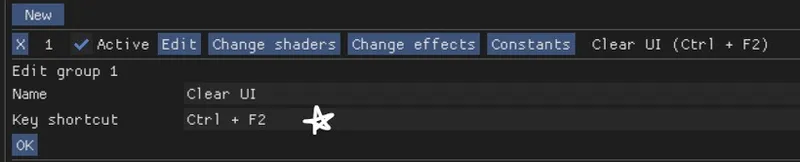
I've set the shortcuts for Clear UI to match with my Effect toggle key, which is Ctrl + F2. If yours are set differently, match the shortcut of this toggle group with your effect toggle key:
To avoid the add-on from not working, make sure to do the following:
Enable post processing effects
Disable laptop mode & edge smoothing
Set 3d scene resolution to high
As long as all of the above are met, you should not encounter any problems. This has been tested to work on all graphics settings from low to ultra. External modifications (like Simp4Settings) may/may not have an effect, but from the testing I've done it has shown no problems so far.
Comments (95)
Please if you don't intend to update this, take this out of circulation! Better than making people wasting their time and getting stressed by a tool that was made to solve a problem and starts crashing the game. "Selling" a broken product
I've encountered no issues when installing until I turned off edge smoothing and clicked 'apply changes' in settings. This causes my game to crash even after I have removed every piece of CC except for the required mods for this reshade add-on
i usually don’t comment, but i’m having a problem with the addons. after installing them my gshade won’t pop up on the game, it’s working but i can’t access the interface for it, i saw the game activated edge smoothing and when i try to turn it off it freezes and i have to force quit the game. i hope there’s a fix for it 🤍
wondering if this will get an update ^^
please update
Can you stop being so rude and stop pressuring the creators? :)
hi vyxated! was wondering when and if u are going to update this mod
hi, this crashes upon loading into any household from the main menu. be glad if we could get a fix, i only just purchased relight and it only works on DX11, looking forward to an update ^^
Thank you - it worked perfectly 😊
please update the mod thanks!!!
sadly i dont think this is working on the current patch as of now :( it crashes the game!
Are you planning on updating this?
Thank you so much for creating the incredibly useful Clean UI add-on. As a Sims 4 gameplay creator, I was really excited to use it. Unfortunately, I'm encountering a persistent issue where the add-on fails to work on my system. I've done extensive troubleshooting but haven't been able to resolve it. I'm reporting this in case it provides useful information for future compatibility. Here is my system and the details of the issue: My System: GPU: Intel Arc A770 OS: Windows 11 Game: The Sims 4 (Running on DirectX 11 via EA App) Shader Tool: Gshade 5.2.0 (DirectX 11 version) The Problem: The "Reshade Effect Shader Toggler" add-on interface loads, but it cannot read or display any configuration. The "List of Toggle Groups" is always empty. Detailed Troubleshooting I've Tried: Correctly installed the ReshadeEffectShaderToggler.addon and ReshadeEffectShaderToggler.ini files in the gshade-addons folder. Tried moving the .ini file to the Game\Bin root folder, but this caused the game to crash on launch. Created a brand new, minimal ReshadeEffectShaderToggler.ini file from scratch to rule out problems with the provided file. Added LateInit=1 to GShade.ini to delay loading. Added the add-on to the DisabledAddons list in GShade.ini and attempted to load it manually in-game. Despite all these steps, the add-on's group list remains blank, and it cannot save any new groups created through the "New" button. Given that the issue occurs even with a minimal configuration and seems unique to my Intel Arc GPU, I suspect it might be a deeper compatibility issue. I understand that my hardware is less common, but I wanted to provide this detailed report in case it's helpful for your development. Thank you again for your time and your wonderful work!
Thank you for your comment. I have an almost identical setup and couldn't figure it out. I'm so glad it's not just me.
Not working with latest patch. (Tested) It crashes every time game loads up. I too have been trying to find a way to fix it, but with no luck :/
i THINK i did everything right since its 'technically' in the game but i keep getting an error saying it cant load and error 193, any one know how to fix thIs??
please give me the file ".addon" I can't find it anywhere, I'm using the latest version of the GShade and i have DX11
read properly, everything has already been linked
I am trying to install this mod but I can't. Every time I put it in my Bin folder, my game crashes to desktop at the initial loading screen.
Does anyone knows what can I do?
There is a file missing which is the one to download
all the links to the files are within the post
Not sure why but the DX11 version immediately makes my loading screen freeze
Tried the gshade version and it's also crashing any time I try to do something in the gshade menu
i did everything as instructed, renamed the files and pasted them into gshade addon folder and they are still not visible in the game :(
same here. i've tried everything and its not working. i can't use gshade on dx9 anymore because it literally wont work. idk if that's on gshade or sims 4. so dx11 is my only option.
Not the type to comment on patreon BUT... I tried both DX11 and DX9 versions and one crashes the game immediately while the other one causes the preset to load infinitely with no way of closing the game, so i need to reboot my pc :( I made sure I did everything correctly but unfortunately I'll need to either give up on presets in the long run or try to get used to a blurry UI
the dx9 version isnt causing that. it's because dx9 is super old, its a bug with g/reshade itself. you will probably eventurally also run into the bug where you can't change presets
i'm not sure if anyone has mentioned this before but fyi if u want to change your edge smoothing settings (like turning it off, cause thats what u should do since you're using reshade/gshade), u need to do it before adding the rest addon, cause your game will crash if u change it with rest installed inside!
Other than the SMAA not working ( like stated 😔), this is working perfectly fine for me!! I will say though I didn't use the .ini file linked here I used one from a different post since they were named the same. It also weirdly fixed the issue of shaders not working in basements for me 🙂
which .ini file did you use and where? maybe it can help vyx figure out the crashing problem.
posting to say that it also crashes my game like others have reported. i can get it to work briefly but after 30ish seconds of playing the game, it freezes and i have to close through task manager. i hope it can be fixed soon but in the meantime, i'll try the dx9 version and say thank you for your hard work, vyx! edit: can confirm that using the dx9 ver. with the 1.2.1 version of the toggle seems to be working for me.
yeah I've been trying on and off to fix it but unfortunately even setting it up keeps making the game crash on me everytime i try a new setting 🫠 it seems to be very unstable on the dx11 ver. and idk if there are any alternative that's as good (I've tried the KeepUI shader that comes with reshade itself and that manages to capture most of the UI)
Afternoon! I was not able to get clean_ui 1.1.0 working for Reshade and Gshade. Your screenshots that tells us this is what we see when we open Reshade doesn't show anywhere. I can't even tell what tab your screenshot comes from. Is it a new tab? Is it under Home? Is it under Add-on or settings? Is the 1.1.0 solution working at all? This is what I have in the bin folder: "ReShadeEffectShaderToggler.addon," "ReshadeEffectShaderToggler.ini." Are the files named correctly and in the right folder? I only ask what seems like dumb questions because I've spent 3 days looking for tutorials and screenshots of how it's supposed to be installed, and how it looks, and there is none. I've added the .addon and .ini files to the resahde_shaders folder under bin and still no joy. When I try to add it on as a preset or add-ons I can only select folders I can't select the actual file itself. Am I doing something wrong when I do that. Thank you for the help, clearly there are no tutorials that answer my questions and its driving me up the effin wall.
what videos did you watch and how did you get it working.? its not working for me and my ui is blurry and ive done exactly what im supposed to.
hey! just installed this and it works very well :) do you know a good replacement for the FXAA preset ?
wait, it didnt crash your game? i wish they would respond so we can at least know the status of the mod. a few months ago it was crashing everyones game and he said he was aware but that was all.
my game doesn't crash, but when i put the cleanui and restoreui, it just disables the whole preset and idk why
game crashes!! using reshade with dx11
please update this
This crashes my game immediately every time I try to click anything. I hope this gets updated cause I really need it. For now it's practically useless since all it does is freeze or crash my game.
DX11 comes with a lot of new benefits for Sims 4, and unfortunately, this mod is outdated or will not work until it's UPDATED !!, Until then, there is a workaround, and it will work without this addon. If you open up Gshade, find, or type in the search bar, keepUI AND restoreUI after that, select both, and now what you will need to do is click and drag keepUI at the top and restoreUI at the bottom, and all done, your UI should be visible when using presets. Remember, you may have to play around with the keepUI setting to match your conditions.
To do this in ReShade, make sure you tick keepUI in "GShade-Shaders by Marot" when you select which effects to install in the ReShade installer.
Did everything right but when I activate the addon it disables my shaders, tried pretty much everything to fix it without success. Now I'm even starting to get a lot of crashes, does anyone have an idea of what I can do to fix the situation ?
the file share site has a report bug...simmers have been warned/advised to refrain from downloading from site until fixed, probably why I got the bad gateway error, but site link seems to work but I'm not downloading till confirmed safe to.
REST config for v 1.1.0 (simfileshare only) link is saying Bad Gateway...
Hello so I followed your instruction and got it to work where the screen to indicate that I installed it properly showed up. I also did the last bit of instruction to make sure that nothing will block it from working but it's not working for me still. I pressed the crt+F2 to toggle it on and off, but nothing changed. I don't know what I did wrong...
do u have post processing on?
I have followed these steps to the T for the DX 11. Putting them both in the add on folder did NOT work, I had to put the other file in the bin folder as instructed. But i'm running into issues of the game crashing 2 seconds after opening. The few seconds that it IS open i see the shader has taken full effect and looks good and as intended. Then bam it crashes. I move the the other file back into the addon folder and the game runs fine but the shader isnt fully enabled? Not to the degree of which it was when one file was in bin and the other is in the g shade addon folder. I've tried it with a fairly new graphics card and brand new CPU and my friend has tried it with a full brand new PC. Any suggestions would be great.
I installed according to instructions, it shows up in game, but it makes my game crash every time
its not working for me... if i activate the clean ui, my presets doesnt work :(
try turning off edge smoothing if you haven't tried that yet
Hi, do you intend to update this UI? Despite all my efforts, it still causes my game to freeze and crash in simulation mode. In the end, I had to remove it completely.
this is also giving me crashes, it works but after about 5 seconds in game it just freezes the game and i have to close it
its because of the january ui patch, they're working on fixing their ui mods right now but they don't work yet!
If you launch into game and CleanUI is showing in addons but doesn't do anything, try doing this: "Using CleanUI, you have to go into the shader selections and tick on KeepUI and RestoreUI and make sure KeepUi is at the top of you shader list and RestoreUi at the bottom. That worked for me and I used my own preset mostly for realism." by ExtraGram on Reddit
For some reason evreytime i add this to my game it crashes
My game crashes too! At first it loads up normally, but after that the screen turns white and I have to use task manager to close it.
How to Install and Set Up the Add-on for GShade 1. Install GShade: Ensure GShade is installed on your system. 2. Download the Add-on: Go to the GitHub link provided in the requirements and download the REST_x64_1.1.0 add-on along with the configuration file. 3. Extract the Files: • Locate your gshade-addons folder (inside your GShade directory). • Extract the ReshadeEffectShaderToggler.addon file into the gshade-addons folder. 4. Add Configuration: Place the x.x_ReshadeEffectShaderToggler_DX11.ini file in the same gshade-addons folder. 5. Rename the Files: • Rename the .addon file to ReshadeEffectShaderToggler.addon • Rename the .ini file to ReshadeEffectShaderToggler.ini (remove the “x.x_” prefix and make sure both files have the same name). 6. Start the Game: Launch the game. If the new menu appears, the add-on is installed correctly. Restart the game if needed. Hopefully, this helps and a bit easier to understand 🥺🫶🏼✨
Its making my game crash but I installed it just like how you did
the group doesnt show anything for me
Is it just me or is it not working for me at all? Whenever I try to turn on the add-on, it just removes the preset I had on the shaders but when I turn it off, the shaders turn back on so I wouldn't even get to use the clean ui with the preset shaders at the same time
For some reason, there aren't any toggle groups when I install it. Any tips?
Installed both your add-ons on reshade 6.3.3 and worked fine as of today, but since I need 5.9.2, it shows add-ons not installed correctly smh, even though it's your test version..
the config file on simsfileshare is a broken link
Hi guys, does anyone know if it is still working normally currently?
For the most part, just crashes on main menu.
Hello, I've been trying to turn off edge smoothing but the screen just turns white and I have to end task. Am I doing something wrong? Should I remove gshade, turn off the edge smoothing, and then reinstall?
You need to take out the plugin, turn off edge smoothing, then put the plugin back in.
I can't open simfileshare. Is there a link I can use?
hi! i did the same things, everything is there in the reshade settings but my presets looks dark, almost black. do you have any idea why? thank u for the mod ^^
Hi, im a bit late but it happened to me too and i fixed it by checking for an effect that maybe conflicted with the addon and it was smaa. i disabled it and my screen wasnt dark no more <3
Hey, is this still compatible with the new patch?
From what I can tell, it may need an update. I had it briefly after updating my game and it caused some crashes. I'll try to test & fix it when I have time
hello, i use gshade and my game turns into green. Can you please make video tutorial for gshade? thankyou
So I did whatt It ttold me but the Add-Ons won't show up in the Add-On tab. (I'm using Gshade)
What causes it to crash my game? It only happens when I have this installed
What causes it to crash my game? It only happens when I have this installed
thank you!!!
straight up just does not work, good job 💀
martymods_sharpen.fx affect the game as well!
I don't know if it helps or not if you're going to update anything in the add-ons. But I have'nt managed to get CleanUI to work for DX9 (either with 1.2.3 or 1.2.1 regarding making the UI clean. For the installation everything seems to have been installed correctly. So I tried installing ReShade for DX11 instead and installed the Clean UI files for ReShade. Well, the UI finally got clean but the game crashes. Either if i go to my second screen or if I just hang in the game for a while. I got windowed fullscreen and checked all settings and it should be fine.
Glad I am not the only one who is having problems... Thought I somehow did it wrong. Mine freezes and crashes, and other times it just crashes. I mainly only see it happening when loading into a lot to edit because that is what I am trying to do right now. But assume it will be like that for other things.
I'd really like to use this addon, because I really need it. The problem is that I simply can't play with it, anything I try to do in the game with the addon working ends up crashing. If anyone knows of a way to make it stop I'd appreciate the advice.
hello, so when i open my game the config menu is there and is checked on. i i followed all the steps, i have my game in windowed fullscreen, and ive made sure to do all the steps at the bottom of the post as well. not sure what i'm doing wrong, so a reply would be appreciated when you have the time!
Omg, I love this UI very nostalgic!! It reminds me a little of the sims 3 as well, cause The Sims 2 wasn't too far off but still an amazing UI!! The loading screen from The Sims 3, Where you play Eye Spy was my favorite part of The Sims 3 Ui!
Hi Vyxated! I have been using your Clear UI for DX9 for a long time and now I have switched over to DX11 so I have changed to this one. Unfortunately I am just unable to get it to work, there will either be crashes or freezing the game completely until I remove it. I have all the required settings toggled and graphics on the highest settings. If you have any advice or ideas why this is happening I would be very grateful, this addon is really a lifesaver! Thank you.
it only crashes when you have set your window mode to fullscreen and alt tabbing out of it. For me windowed fullscreen solved that issue. Since they optimized DX11, I'll see if I can make a new config that doesn't use this specific REST version and instead use the newer ones, though I can't promise anything. ^ Edit: still no luck :') REST v1.1.0 will have to do for now
Hi! So the clean ui doesn't work for me either. I've tried the DX11 version and reinstalled multiple times to make sure I did it right. It shows up in my gshade under effects toggler, but still doesn't clean the ui. I tried running my game in DX9 and reinstalling the DX9 clean ui, neither of the versions for that work either. All my settings in game are correct. I was IN LOVE with the clean ui that I struggle to play without it 😂 everything is so hard to read now! But thanks for all the hard work on the mods 🙏 hope there's a solution soon !
Is there any known crash fixes for the latest version. It's a 50/50 whether I can even get to the main menu without crashing. Of the 20 attempts to start the game past the menu, the game super freezes and makes my whole computer unresponsive. I'm running in windowed full-screen and have the required settings installed/toggled and have tried loading the game with it toggled on and off but results remain the same.
Hello! So I was clawing my hair out for the past week, because my game suddenly refused to be loaded into any household, it freezed permanently after a few seconds in; I digged through all of my mods, reinstalled the game a few times, nothing worked, when I finally decided to try pulling out your addon out and loading my game without it, so that worked, lol I have no clue about what could be the problem, I have my game on windowed borderless, the resolution is right, and basically reshade runs well on its own If you have any suggestions on what could be the problem, please let me know, your addon has been a huge lifesaver on DX9
Hmmm... I have windowed Fullscreen. Unfortunately when I move my game from my laptop screen to my additional screen with SHIFT + Windows Key + arrow key, the game crashes..... It's not Gshade, because I tested this with Gshade before. So... moving the game to another monitor/scree is also seen as changing the resolution? In that case I can't use this, because I don't like seeing the game on my laptop screen. It's too small..... :( I tried disabling the add-on, restarting Sims, moving Sims to the bigger monitor and then restarting the add-on but unfortunately that doesn't work, because the add-on will be enabled on the next restart of the Sims... Which is again on my laptop screen :( I guess I'll need to find another way to get a good UI. Do you happen to have any tips? I run Windows 11 with DX 12. The Sims runs with DX11 via the launcher properties adjustment and I have an nvidia graphics card (3080) Thanks for the help! ETA: I figured out my problem. I hadn't realized the resolution on my laptop screen was 2560 x 1600! When I changed that to 1920 x 1080 the problem was solved. So... Now all I need to remember is to temporary switch the resolution of my laptop to 1920 x 1080 :D
Clean UI still aint working for me either and Ive tried all I can
I don't clean the UI ... 😭 I use the Serenity preset from MissLollypop in Gshade... and I’m not able to get the UI to look like I did without the preset 😭
Disable SMAA. It's a side effect of using this version of the add-on.