
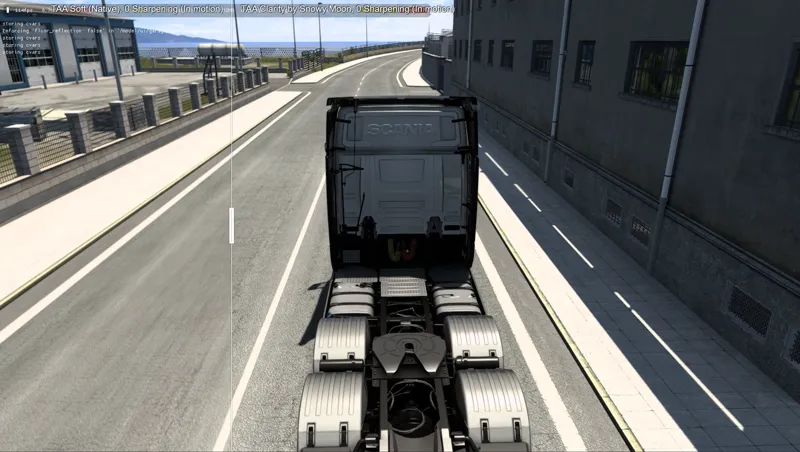
TAA Comparisons for ETS2/ATS
I see some people asking "Why should I use your TAA when ETS2/ATS has it". Lets check with some comparisons.
1080p 120 FPS Comparisons (same vehicle speed for in motion comparisons)
TAA Soft (Native), 0 Sharpening vs TAA Clarity by Snowy Moon, 0 Sharpening (In motion)
TAA Sharp (Native), 0 Sharpening vs TAA Clarity by Snowy Moon, 0 Sharpening (In motion)
TAA Off vs TAA Sharp (Native), 0 Sharpening (Stationary)
TAA Off vs TAA Soft (Native), 0 Sharpening (Stationary)
TAA Off vs TAA Clarity by Snowy Moon, 0 Sharpening (Stationary)
TAA Off vs TAA Sharp (Native), 0 Sharpening (In motion)
TAA Off vs TAA Soft (Native), 0 Sharpening (In motion)
TAA Off vs TAA Clarity by Snowy Moon, 0 Sharpening (In motion)
Also even with TAA Soft option there are a lot of leftover flickering/shimerring in motion. I hope this helps you to understand the difference. You can try in game and see the difference yourself.
Comments (41)
Just updated to 1.53 and although dialogue pops up no TAA is working in game. Put both dll files in bin folder and turned AA off in the game settings. Works fine in 1.49. Thnx EDIT... so it works but mirrors are worse than 1 49. They are really bad... both fixed and virtual.
hi when i use fxaa screen going balck
Everytime now I launch the game it shows a black screen but can hear the truck in background. But, when I disable th mod through the ingame menu of snowy.io. it works. But lately doesn't seem to work for some strange reason, never had a problem with it before.
Make sure in game anti aliasing is turned off
Hey snowy moon. I have a problem. after I started the game the TAA not showed and I can´t open it. It also crashes when I want to play. I also tried to fix it with your methods but It didn´t can you help me? Thank you!
Great post my friend, the best TAA for ETS2/ATS ever
< 3
I got blackscreen when activate for ATS. In ETS2 working OK>
Disable anti aliasing from game settings
I have ETS 1.50.4 and with old Version 1.50 all works fine, but now game atart and crash in 10sec. all times... I have all settings like all the time and I don't know what can I do? Can You help? Thanks
Disable HDR if its enabled, If you have antivirus, try to whitelist .dlls
Hello Snowy! Have a question: When a new version is released, do i need to download it again or there is an automatic upgrade method? Thnx!!!
Unless there is a change in dxgi.dll, you don't need to download again. When I change something from dxgi.dll then you need to download. So if game updated you can continue to play with old dxgi.dll, it should work most of the time < 3
Hi. How I found out just NOW about this mod? I tried that TAA in game in VR, I did not know why my screen is moving when in truck ( like jitter but not really). Found out it was the game TAA on Soft settings. I searched for alternatives, I found this. Uff I am mad that I did not find Your mod sooner. TAA, DLAA, DLSS everything! And it is glorious. I will try a bit more,mess with some settings, then I will try to subscribe from august. I wish Elite Dangerous had one of this mods lol..with opencomposite/OpenXR and this mod would be godly, that game is the worse :). I really think this mod has a huge impact in VR especially! Thanks for Your work.
Thank you < 3
ok brother then in that case you cancel my subscription and refund me!! thanks.
Done, it can take up to 5 – 7 business days depends on your bank < 3
Hello, sorry, I'm new. What am I supposed to download to be able to play EuroTruck simulator 2 properly in VR?
Hello < 3 https://www.patreon.com/posts/taa-v10-2-for-1-105981635 this is what you need to download and use
snowy moon good morning! Yesterday I purchased a 1-year subscription package! But I don't have access to download it. Is there any way to speak to you directly or just here in this message group?
Good morning < 3 Its currently free, you don't need to subscribe. You can just download from https://www.patreon.com/posts/taa-v10-2-for-1-105981635 this link for v10 ETS2/ATS. And other links also posted in patreon for other games. If you want I can refund your subscription because its currently free
Just checked out your latest ETS TAA version again and , yeah, very nice job snowy, even if I was slightly satisfied with the SCS one it really makes a difference, thx ;)
< 3
Great work! Looks fantastic compared to the built-in AA
Thank you < 3
I love your work here!!!i would also like the DLAA mod in House Flipper 1 cause i cant stand anymore that crappy and ugly edges
Thank you < 3 I would like to make TAA/DLAA for every game but I have other projects I'm working on and also I'm making my own game so I don't have that much to time make it for every game :(
Why should I use the Snowymoon plugin? Because I've been using it since the beginning and it's much better than the ingame TAA. I really appreciate your work.
Thank you < 3
Great job as always! thank you very much!
Thank you < 3
How do I get your work to work with reshade
This video shows it https://youtu.be/WfHNp_GvYTw?si=F3RiBGbsF4b3boU4
Не нужно быть экспертом чтобы увидеть разницу между scs TAA и твоим. Твой лучше. Это же очевидно.
< 3 Well some people cannot see the difference and some even think SCS TAA is better so I made this comparison to make sure they cannot lie
First of all thanks again for the very well done TAA mod for ETS2, it really improves the picture quality a lot better than the TAA from SCS and the jaggies are almost all gone. I'm staying subscribed. I've been using your TAA mod for a while now and I've noticed that I'm suddenly experiencing CPU frametime drops/spikes and GPU frame drops in certain areas (when your TAA mod is installed). As soon as I uninstall the mod (not disable it) I have no more FPS drops in the same places and my system runs with stable 90 FPS in every city and every situation. Maybe someone has a tip or you can find out what the reason could be. -> Maybe you can try the following: If I drive to the gas station in ETS2 e.g. in Switzerland in the Zurich garage and stop exactly at the tank icon, then the FPS drops (takes about 10 seconds) from a stable 90 FPS and 80-95% GPU utilization to about 50-70 FPS and the GPU utilization also drops to 50-70% and the system is no longer fully utilized because the CPU frametime increases sharply to 10-15ms and then cannot deliver 90 FPS to the GPU. In other places, however, your TAA mod runs stable at 90 FPS. When I then drive to the trailer at the gas station in Zurich, the system recovers and goes back to 90-95% GPU utilization / 90 FPS without spikes. Back at the gas station in Zurich, the FPS collapses again, only spikes on the CPU. Reproducible. I tried anything but when I run a vanilla ETS2 I have stable 90 fps in every city and every situation and at the gas station in Zurich. I run my system in 9k rendering (4.5k per eye) and stable 90FPS in VR on a VP2 in every situation with no GPU/CPU spikes. I acutally use: ETS1.50/openVR/TAA 10.2.8/Win11/I9-13900k/RTX4090/OC-System Thanks again Snowy for the mod and I hope you or someone can help me get a stable 90FPS with the TAA mod.
It should be better with last update < 3
Try and roll back your nvidia driver ... other games have problem with this version
I solved the problem, but it's not the first time this happens! I remove all bin folder and replace for a new one, and works with TAA.
Snowy can you help me? My game crashes when I go drive truck! In menu game is ok. * TAA version is V10 Without DLSS (I download files again) * Game version is 1.50.3.7 (I update today) * Nvidia Drivers is 560.70 ( I update today) * Windows 11 with last updates (Update yesterday) * No mod in mod folder (I remove for tests) * Reshade folder create for rehsade * I disable all AA options from SCS When I remove TAA files from game > bin, works fine!
Did you try without reshade?