










Update 0.7.9.0 Release
The update contains significant changes to GUI elements, controls, technical innovations, and bug fixes for previous versions of the game.
So, let me say right away that I've been a bit under the weather this month, but at least I tried to get everything done as planned. I also want to apologize right away for overpromising a bit in my last post about my plans for the month. I was working on artificial limitations and new resource management, but during testing I realized that this was a fundamentally bad idea while we only have a sandbox, so I had to abandon most of the announced tasks in the pre-release phase of the update. Today there will be a small update, mostly affecting aspects of the user interface and its new features, as well as a few technical changes.
Player Panel :
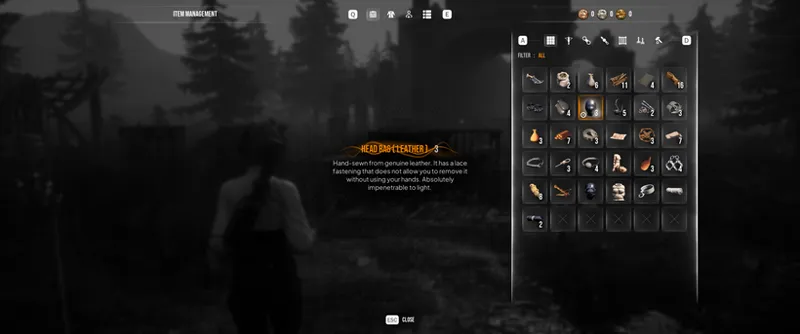
The player panel has been completely rebuilt and adds several new mechanical changes.
The inventory item browser window has been updated.
Added a sorting panel by category.
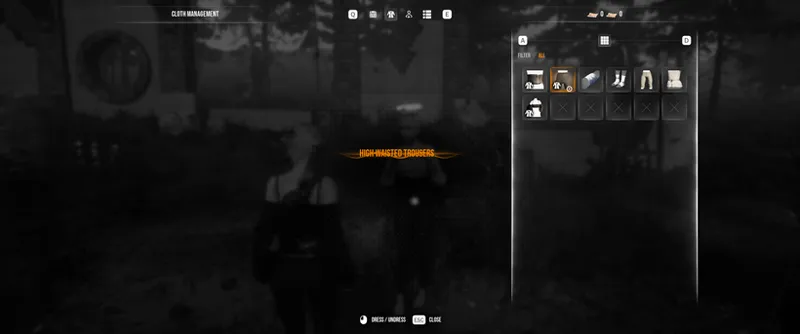
The clothing browser panel has been updated.
All in-game clothing now has a Stack property (identical clothing will be stacked; this feature was previously unavailable due to GUI limitations).
The behavior of locked clothing slots has been improved due to interference with bondage. Widget navigation now works in all cases, and when focusing, the slot will turn red. The locked slot icon will move to the lower left corner.
All Pretty Toys now occupy the corresponding clothing layer (you can only equip/activate one doll at a time).
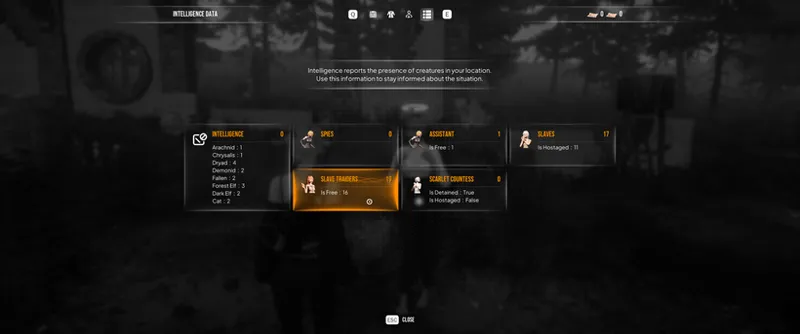
Information about the player's character and his assistant has been moved to one common tab.
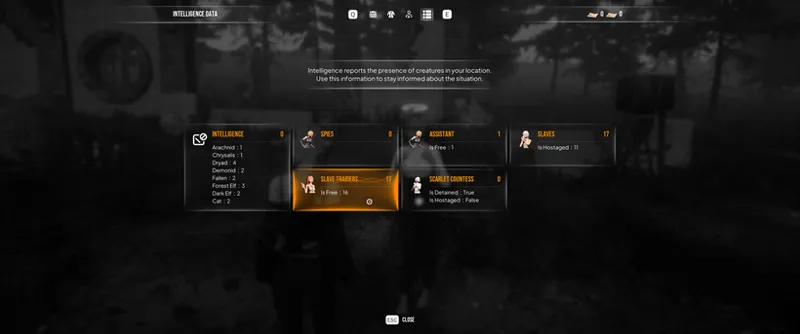
Intelligence widgets have been moved to a separate tab and display the current status of all character classes in the game.
Context Actions :
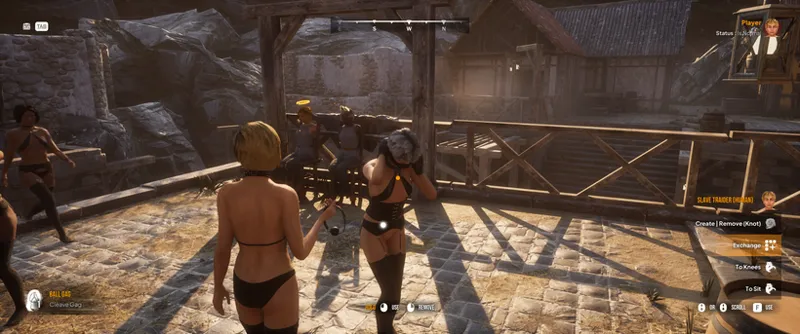
I'm working a bit on simplifying character management. The ability to trade with a character has been added as an option in the context menu (lower-right panel when hovering the camera over a character). Available options:
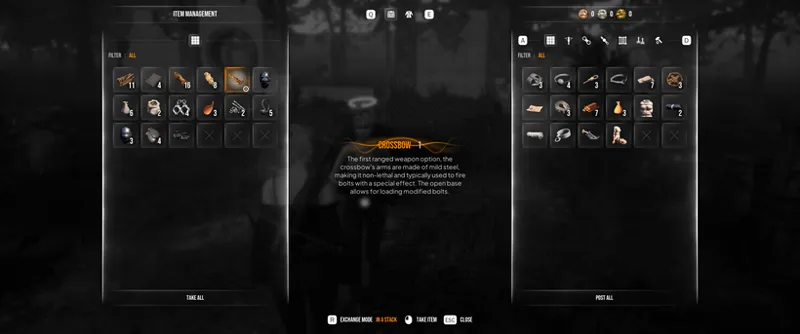
Item exchange.
Clothing exchange.
Remove/equip clothing.
Added a redirect for the "Exchange" action in all CaptivePlace classes. You can now exchange items and clothing with a hostage attached to a captive device.
Added the "Prepare Metal Tools" context action. When you point the camera at a hostage device, this option calls a function that equips metal tools to dismantle the device. Requirements:
You must have Metal Tools in your inventory.
There is no hostage attached to the device.
You are not holding the hostage on a leash.
Storages :
"Personal Storage" has been added. New chests with the corresponding decal can be found on all active maps and modes. Once you place items in one such storage, you can retrieve them from any other similar chest. It's worth understanding that this works within the same scene (you can't move things into the sandbox and back).
An item exchange mode has been added. When using the exchange panel, the current mode will be displayed in the tooltips at the bottom of the screen.
One By One - move one item.
In By Stack - move an entire stack of items.
The number of items in a stack is displayed only if the item has more than one stack and the stack property.
Slots associated with storage are filled adaptively to form a row (no problems with losing navigation between slots when using a gamepad).
Model View :
The "Cloth Manager" action has been removed from the radial menu (as there is now a full-fledged exchange panel, making this action unnecessary).
The "Undress Target" action has been changed. The speed of the action now depends on the number of clothes on the target (0.5 seconds per item of clothing). The action also launches a series of sequential tasks, meaning that clothing will be removed one item at a time.
When using Metal Tools, a drop-down panel will now display that will tell you what resources you will receive after dismantling an object.
Assistant :
Your assistant now stores the items they find in their personal inventory. This means that when they return from a personal quest to find the target items, you must use the "Exchange" action to retrieve the items.
Workbench :
The workbench panel design has been slightly adjusted to the updated GUI visuals.
Widgets :
The aspect ratio of the race selection panel has been adjusted to 16:9.
The race selection panel widget has been adapted to the new GUI design.
The race column is now divided into two groups: "Canon" and "Non-Canon" races.
The overall design of the radial menu has been slightly redesigned.
Opening and closing the radial menu panel is now accompanied by a sound effect.
(Cosmetic Change) The affiliation symbol in the radial menu changes depending on the role you selected in Sandbox mode.
(Cosmetic Change) Adaptive fill has been added to the resource panel in the radial menu (right column in the radial menu).
The adaptive fill conditions in the radial menu have been changed. The maximum number of slots per page is now 15. If there are more items in a given category, additional pages (tabs) will also be created.
The list of tabs in the radial menu has been moved to the left column. They now display the current names associated with a specific item cluster.
Scrolling through radial menu tabs is now done with the mouse wheel when using a keyboard and mouse, and with D-pad Up / D-pad Down when using a gamepad.
The ability to add items to favorites in the radial menu has been removed.
Removed preference settings related to the previous sorting system for the radial menu (in the game settings).
The recruitment panel widget now displays your included abilities (left column), as well as the included abilities of the slave you're hiring as an assistant (right column).
The general controls on the main screen have been slightly modified (item in hand, context actions column, item assignment selector).
The sandbox session widget panel has been partially updated to reflect the new design.
Shading has been added to Common Input widgets to improve readability.
Settings :
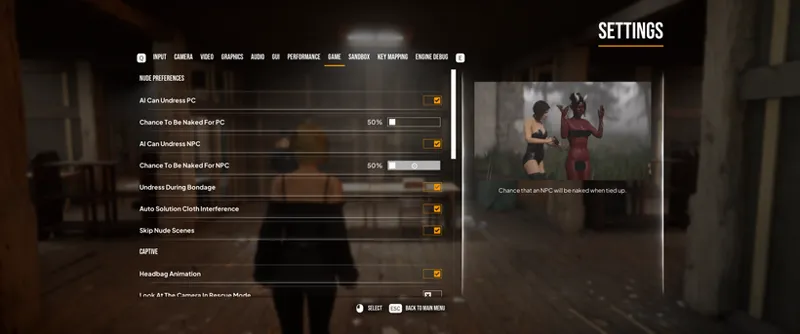
All options affecting nudity preferences have been moved to the "Nude Preferences" category in the "Game" tab.
The Nude Preferences category settings are enabled by default (for new players).
Added a "A chance to end up on a leash" setting - this determines how often NPCs will use a leash (default: 50%).
Two sliders have been added to the preferences settings to control the chance of being undressed when an enemy NPC ties up another character. These sliders control the chance of this action happening for PCs and NPCs (similar to the "AI Can Undress" switches). The sliders are inactive if the higher-priority switches are disabled.
Added a "Undress During Bondage" switch. This option controls whether NPCs can use torso bondage, which, as you know, removes clothing to resolve interference conflicts. This option works independently of the "AI Can Undress PC/NPC" option. The option was added because torso bondage and nudity preferences conflicted with each other.
The active Pretty Toy can now be displayed on your belt as a keychain. This is enabled by default and can be disabled in the game settings (Settings > Game > Display Pretty Toy).
Scenes :
Clothes stored in chests have been moved to baskets (near these chests).
The intro scene for the Refugee role on the Wild Forest map has been slightly changed.
Optimization :
Initialization of storage components at scene startup has been optimized.
The storage component no longer uses permanent slots, which speeds up the construction of widgets related to slots, filtering, and other data iterations, as well as searches and some mathematical operations.
Storing and moving data arrays between storages has been accelerated.
Bug Fix :
The binocular marker became visible and took an odd position in world space if the character was a passenger (Carrying Device) and the player had previously engaged in first-person mode. This has been fixed.
The binocular marker is now attached to the "spine_02" bone during assembly. This eliminates issues with the marker being incorrectly positioned and intersecting with other widgets attached to the body.
The frame widget (the white dot on the character) is now attached to the "Pelvis" bone during assembly. (Previously, the widget was attached to the capsule, and its position could differ significantly from the character's position in the scene.)
The frame widget (the white dot on the character) could become visible if the character it was attached to was a passenger (Carrying Device) and the player had previously engaged in first-person mode.
When using the "Undress Target" action, the task could be in progress even if the target was completely naked. This has been fixed.
Fixed navigation paths near the old town hall (NPCs could get stuck in the wall passage while patrolling).
Objects placed in the scene (traps, anchors, captive places, etc.) were using interaction volumes as surface collision, causing objects to be placed in mid-air. This has been fixed.
Captive Place object meshes now use their own colliders for collisions instead of interaction volumes (this prevents fired bolts from remaining in mid-air and also eliminates incorrect placement of scene objects on device surfaces).
Using the "I'm Stuck" macro allowed the player to teleport outside the playable area in the Spy Hideout map.
NPCs did not use the undress function on other characters, regardless of preference settings. This has been fixed.
NPCs ignored the "AI Can Use Headbag" permission when linking. This has been fixed. NPCs ignoring the "AI Can Use Blindfold" permission when tied up - fixed.
NPCs ignoring the "AI Can Use Mittens" permission when tied up - fixed.
Interference layers for some clothing have been fixed (some clothing could be worn over other clothing, although this should obviously be impossible).
Removed the previously cut cast iron collar from the Slaver Camp map.
Corrected the task name in the Mittens progress bar.
The player was able to put a sleeping bag on a target on all fours - fixed.
Collision of some rock formations in the Blacksmith Village map has been fixed.
Simplified colliders have been added to the stairs in the Blacksmith Village map. Hopefully, the AI will no longer get stuck on them.
If the Scarlet Countess caught the player, it would cause the game to enter an infinite loop of the punishment scene - fixed.
Stuffed Gag caused subsurface rendering (Plug X-Ray) for NPCs - fixed.
Adaptive morph keys on some gags did not work due to Nanite enabled (changing the position of straps and gag fastenings when used simultaneously with blindfolds) - fixed.
Traders would freeze when seeing an ally placed in Captive Place - fixed.
Sometimes, traders could not build a path to a comrade to free them - fixed.
An assistant in the shadows could be detected by other NPCs, who could tie her up and disrupt her functionality - fixed.
After loading a game session, the assistant would enter a strange state (only clothes in Pose A would be displayed) - fixed. I've implemented a workaround by applying the "Stay Close" state by default when loading a session. Since clothing initialization occurs later than the assistant's "Stay Put" state and becomes invisible, the clothing simply overlays the inactive component, becomes visible, and assumes the A pose.
The Scarlet Countess wasn't using patrol routes - fixed.
The Scarlet Countess didn't return to patrol routes after catching you - fixed.
The AMD Fidelity FX plugin stopped working every time you transitioned between scenes - fixed.
Conflicts with some clothing have been fixed.
Download Links :
Google Drive - https://drive.google.com/file/d/1E3GnRAIKwtNpYNOLAqTq7fr5S-s7JJPy/view?usp=sharing
Mediafire - https://www.mediafire.com/file/7uoyizpnwxb4g0h/MPT_Build_0.7.9.0_Alpha.rar/file
Archive Password - RequRec1954
❗The archive should prompt for a password when unpacking. If this does not happen, try a third-party archiver, such as WinRar or WinZip. Unpacking without a password will result in the loss of executable files or even result in an error during unpacking.
The password must contain only numbers, lowercase and uppercase letters! It must not contain punctuation marks or spaces. When copying the password, make sure the website translator has not altered the meaning of the characters or changed the letter case. ❗
Comments (5)
Thank for hard work!
The bug fixes and overall improvements to the game have been really great to see, thank you for your hard work on this project!
Part of the process. Sometimes an idea that sounded good ends up not being as easy or good as we expected; so no big deal. Little busy myself so didn't have time to dive into all the above but will agree, that's a lot. So take care of yourself and don't sweat not getting done what you wanted to or said. We get it.
This is a lot, especially considering you are/where feeling under the weather. Hope you get better soon/are feeling better.
Thank you for your hard work on this project and hope your “weather” gets better 😊