
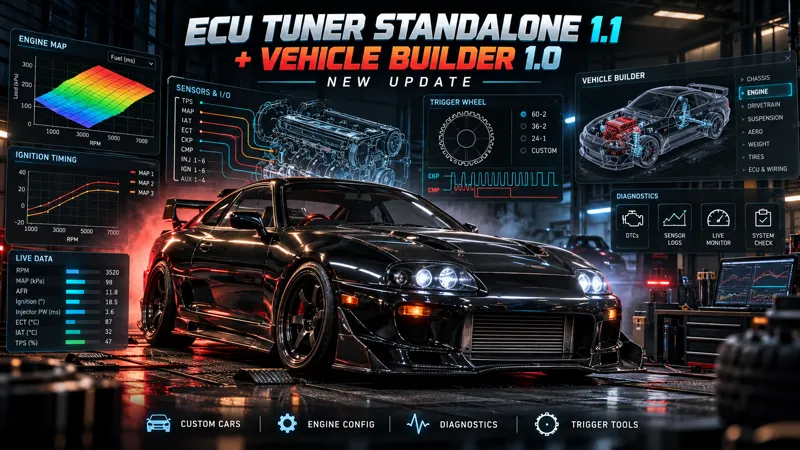
ECU Tuner Standalone 1.1 + Vehicle Builder 1.0 Early Access
A new version of ECU Tuner is ready! Since the last v1495.28 release, many new features have been added for creating custom vehicles, ECU configuration, diagnostics, and engine tuning.
This release includes the complete ECU Tuner and Vehicle Builder 1.0, without the large AI model. Offline help, the encyclopedia, and tuning procedures remain available.
Main Changes Since v1495.28
Vehicle Builder: Create a standalone ECU PRO version of a supported car using an existing vehicle as the base. The original car remains untouched. Engine configuration, trigger setup, and available hardware are based on the newly created vehicle.
More engines and configurations: Expanded support for different cylinder counts, including V8, V10, and V12 engines. The Engine and Hardware sections provide parts based on the specific engine, while newly supported naturally aspirated configurations can also use the available turbo upgrade stages.
Separate wiring and timing configuration: ECU Pinout defines the physical wiring. The Ignition menu assigns ECU outputs to chronological ignition events according to the firing order. Injection defines the timing reference for fuel injection. Sequential, semi-sequential, batch, and wasted configurations are supported, including injector groups and multiple output pages.
New trigger tools: A graphical Trigger Wheel showing First Trigger Tooth, Trigger Angle, TDC, and event references. You can switch between the trigger diagram and Timing Light, use the combined CRANK/CAM scope, and configure Hall/VR and Rising/Falling settings for CAM sensors. The timing light displays the crank pulley position at the actual ignition event of cylinder #1.
Fuel and ignition: Expanded MAF, Speed Density/VE, lambda, and ignition timing behavior for supported Builder engines. Multiplicative fuel corrections and EGO use 100% as the neutral value. Incorrect fueling, timing, or wiring directly affects engine operation.
Starting and antiflood: Redesigned progressive cylinder firing, residual fuel behavior, flooding, and antiflood clearing. Audio and exhaust pops are linked to observed combustion events. Cranking → Afterstart → Idle transitions, starter holding behavior, ignition key animation, and bump starting have also been improved.
Clearer diagnostics: A bottom status icon, compact diagnostics panel, and categorized problems. Left-click to view details; right-click to mark a specific finding as USER OK or restore it. Marking an issue does not change the wiring or disable engine protection features.
Offline help without the large model: Updated encyclopedia and procedures covering wiring, triggers, first start, fueling, ignition, idle, VVT, and boost. Basic help does not require running the large AI model.
Optimizations and UI improvements
And much, much more: There are significantly more improvements, fixes, refinements, and under-the-hood changes in this release than could reasonably be listed here.
Clean Supra for Tuning From Scratch
The included Supra uses the compatible RC218 HOTFIX1 script.
On a fresh installation, it receives clean profiles with:
base maps set to 0
multiplicative fuel corrections set to 100%
The profiles do not contain my personal tune or saved wiring.
You need to configure the ECU and tune the engine yourself — this is not a ready-made pre-tuned map.
Installation for New Users
Close Assetto Corsa.
Extract the apps folder and the main CMD files from the package into the main Assetto Corsa directory, next to acs.exe.
Copy the included Supra into content/cars.
From the main Assetto Corsa directory, run INSTALL_RC218.cmd and allow it to complete the installation. This step is required even on a completely fresh installation.
In Content Manager, enable ECU Tuner under Python Apps. Use Assetto Corsa with Custom Shaders Patch.
Start a session with the Supra and open ECU Tuner. You can use the offline guides and procedures to help you get started.
You do not need an older version of ECU Tuner — this package is complete.
Creating Another Vehicle
Run START_ECU_PRO_VEHICLE_BUILDER.cmd from the included Builder folder.
Select your Assetto Corsa installation directory and the installed apps/python/Ecu_tuner folder, choose the source vehicle, and complete the configuration.
The Builder will create a new vehicle that you can then configure and tune directly in ECU Tuner.
Updating an Existing Installation
Before updating, back up your apps/python/Ecu_tuner folder.
Then extract the new package and run INSTALL_RC218.cmd.
Your existing maps, wiring, and saved vehicle state will be preserved. Clean profiles are only added where no profiles already exist.
Use the installer included with this package.
Thank you for supporting the project!
When reporting an issue, please include the version you are using, the vehicle name, a description of the situation, and the session log.