


Single Block / Layer FLUX LoRA Training Research Results and LoRA Network Alpha Change Impact With LoRA Network Rank Dimension
Patreon exclusive posts index to find our scripts easily, Patreon scripts updates history to see which updates arrived to which scripts and amazing Patreon special generative scripts list that you can use in any of your task.
Join discord to get help, chat, discuss and also tell me your discord username to get your special rank : SECourses Discord
Please also Star, Watch and Fork our Stable Diffusion & Generative AI GitHub repository and join our Reddit subreddit and follow me on LinkedIn (my real profile)
=======
Info
As you know I have finalized and perfected my FLUX Fine Tuning and LoRA training workflows until something new arrives
Both are exactly same, only we load LoRA config into LoRA tab of Kohya GUI and we load Fine Tuning config into Dreambooth tab
When we use Classification / Regularization images actually Fine Tuning becomes Dreambooth training as you know
However with FLUX, Classification / Regularization images do not help as I have shown previously with Grid experimentations
FLUX LoRA training configs and details : https://www.patreon.com/posts/110879657
Full tutorial video : https://youtu.be/nySGu12Y05k
Full cloud tutorial video : https://youtu.be/-uhL2nW7Ddw
FLUX Fine Tuning configs and details : https://www.patreon.com/posts/112099700
So what is up with Single Block FLUX LoRA training?
FLUX model is composed of by 19 double blocks and 39 single blocks
1 double block takes around 640 MB VRAM and 1 single block around 320 MB VRAM in 16-bit precision when doing a Fine Tuning training
We have configs for 16GB, 24GB and 48GB GPUs all same quality, only speed is different
Normally we train a LoRA on all of the blocks
However it was claimed that you can train a single block and still get good results
So I have researched this thoroughly and sharing all info in this article
Moreover, I decided to reduce LoRA Network Rank (Dimension) of my workflow and testing impact of keeping same Network Alpha or scaling it relatively
Experimentation Details and Hardware
We are going to use Kohya GUI
How to install it and use and train full tutorial here : https://youtu.be/nySGu12Y05k
Full tutorial for Cloud services here : https://youtu.be/-uhL2nW7Ddw
I have used my classical 15 images experimentation dataset
I have trained 150 epochs thus 2250 steps
All experiments are done on a single RTX A6000 48 GB GPU (almost same speed as RTX 3090)
In all experiments I have trained Clip-L as well except in Fine Tuning (you can't train it yet)
I know it doesn't have expressions but that is not the point you can see my 256 images training results with exact same workflow here : https://www.reddit.com/r/StableDiffusion/comments/1ffwvpo/tried_expressions_with_flux_lora_training_with_my/
So I research a workflow and when you use a better dataset you get even better results
I will give full links to the Figures so click them to download and see full resolution
Figure 0 is first uploaded image and so on with numbers
Research of 1-Block Training
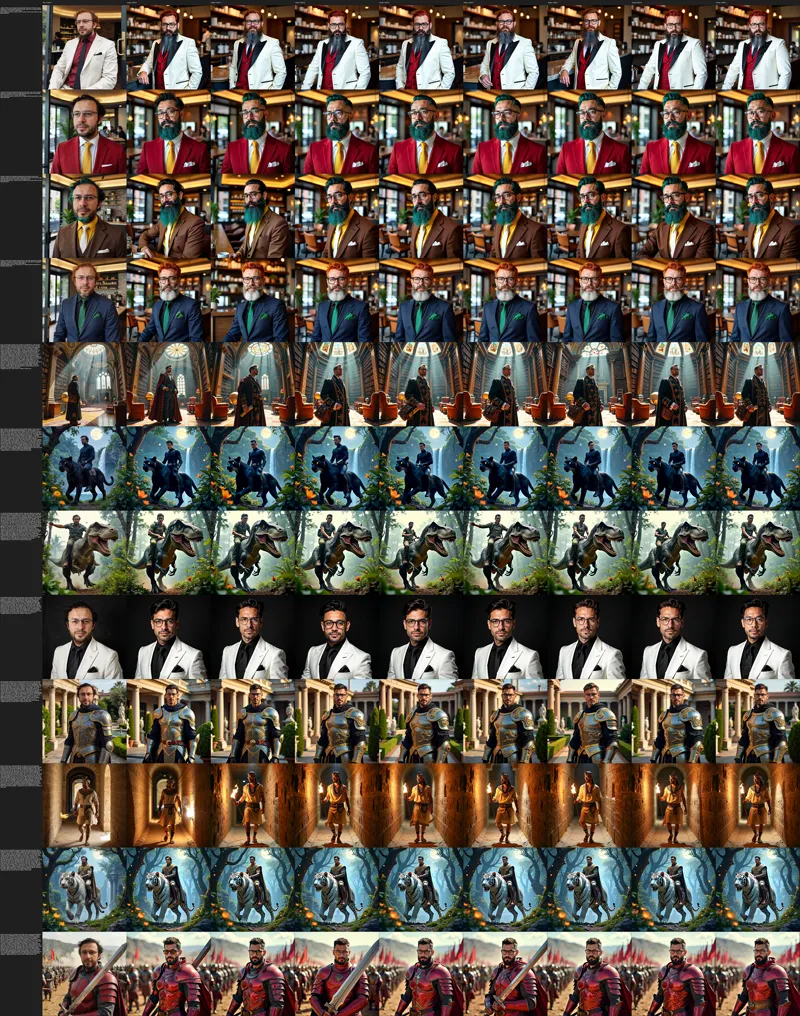
I have used my exact same settings and trained 0-7 double blocks and 0-15 single blocks at first to determine whether block number matters a lot or not with same learning rate of my full layers LoRA training
0-7 double blocks results can be seen in Figure_0.jfif and 0-15 single block results can be seen in Figure_1.jfif
I didn't notice very meaningful difference and also the learning rate was too low as can be seen from the figures
But still I picked single block-8 as best one to expand the research
Then I have trained 8 different learning rates on single-block 8 and determined the best learning rate as shown in Figure_2.jfif
It required more than 10 times learning rate of all blocks regular FLUX LoRA training
Then I decided to test combination of different single blocks / layers and wanted to see their impact
As can be seen in Figure_3.jfif I have tried combination of 2-11 different layers
As the number of trained layers increased, obviously it required a new fine-tuned learning rate
Thus I decided to not move any further at the moment because single layer training will obviously yield sub-par results and i don't see much benefit of them
In all cases Full FLUX Fine Tuning > LoRA Extraction from Full FLUX Fine Tuned Model > LoRA full Layers training > reduced FLUX LoRA layers training
Research of Network Alpha Change
In my very best FLUX LoRA training workflow I use LoRA Network Rank (Dimension) as 128
The impact of is, the generated LoRA file sizes are bigger
It keeps more information but also causes more overfitting
So with some tradeoffs, this LoRA Network Rank (Dimension) can be reduced
Normally I found my workflow with 128 Network Rank (Dimension) / 128 (Network Alpha)
The Network Alpha directly scales the Learning Rate thus changing it affects the Learning Rate
We also know that training more parameters requires lesser Learning Rate already by now from above experiments and from FLUX Full Fine Tuning experiments
So when we reduce LoRA Network Rank (Dimension) what should we do to not change Learning Rate?
Here comes the Network Alpha into play
Should we scale it or keep it as it is?
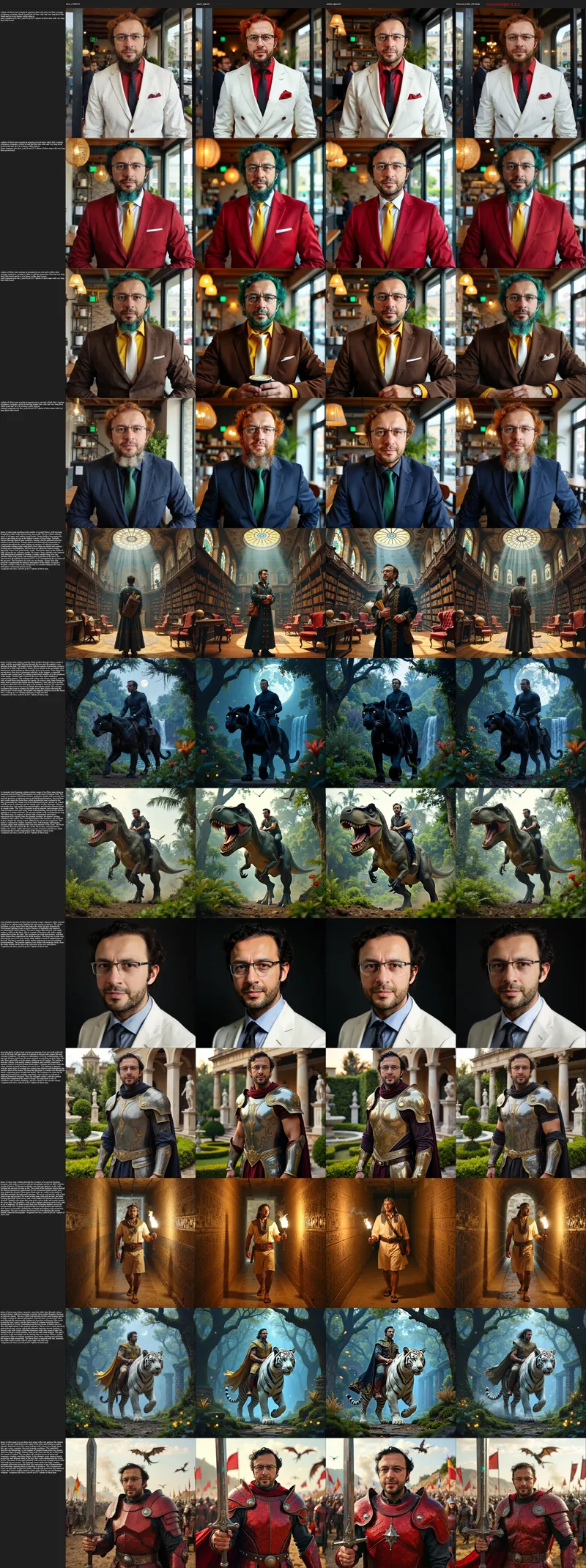
Thus I have experimented LoRA Network Rank (Dimension) 16 / 16 (Network Alpha) and 16 / 128
So in 1 experiment I kept it as it is and in another experiment I relatively scaled it
The results are shared in Figure_4.jpg
Conclusions
As expected, as you train lesse parameters e.g. LoRA vs Full Fine Tuning or Single Blocks LoRA vs all Blocks LoRA, your quality get reduced
Of course you earn some extra VRAM memory reduction and also some reduced size on the disk
Moreover, lesser parameters reduces the overfitting and realism of the FLUX model, so if you are into stylized outputs like comic, it may work better
Furthermore, when you reduce LoRA Network Rank, keep original Network Alpha unless you are going to do a new Learning Rate research
Finally, very best and least overfitting is achieved with full Fine Tuning
Check figure 3 and figure 4 last columns - I make extracted LoRA Strength / Weight 1.1 instead of 1.0
Full fine tuning configs and instructions > https://www.patreon.com/posts/112099700
Second best one is extracting a LoRA from Fine Tuned model if you need a LoRA
Check figure 3 and figure 4 last columns - I make extracted LoRA Strength / Weight 1.1 instead of 1.0
Extract LoRA guide (public article) : https://www.patreon.com/posts/112335162
Third is doing a all layers regular LoRA training
Full guide, configs and instructions > https://www.patreon.com/posts/110879657
And the worst quality is training lesser blocks / layers with LoRA
Full configs are included in > https://www.patreon.com/posts/110879657
So how much VRAM and Speed single block LoRA training brings?
All layers 16 bit is 27700 MB (4.85 second / it) and 1 single block is 25800 MB (3.7 second / it)
All layers 8 bit is 17250 MB (4.85 second / it) and 1 single block is 15700 MB (3.8 second / it)
Image Raw Links
Figure 0 : https://huggingface.co/MonsterMMORPG/FLUX-Fine-Tuning-Grid-Tests/resolve/main/Figure_0.jfif
Figure 1 : https://huggingface.co/MonsterMMORPG/FLUX-Fine-Tuning-Grid-Tests/resolve/main/Figure_1.jfif
Figure 2 : https://huggingface.co/MonsterMMORPG/FLUX-Fine-Tuning-Grid-Tests/resolve/main/Figure_2.jfif
Figure 3 : https://huggingface.co/MonsterMMORPG/FLUX-Fine-Tuning-Grid-Tests/resolve/main/Figure_3.jfif
Figure 4 : https://huggingface.co/MonsterMMORPG/FLUX-Fine-Tuning-Grid-Tests/resolve/main/Figure_4.jpg

Comments (6)
"FLUX model is composed of by 19 double blocks and 39 single blocks" Just out of curiosity. Could it be 20 double blocks and 40 single blocks. since the blocks could start counting from 0?
starts from 0 and ends at 18 as far as i know, and 0 to 38
Hi Dr.Furkan. I have a question. I've heard that Black forest labs will be releasing their open source FLUX Video model soon so I'm looking to upgrade my video card but I'm not sure if I should get a RTX 4090 or a RTX A6000. Is a RTX A6000 worth the extra money? Thanks.
A6000 has speed of like rtx 3090 sadly. hard to tell if it fits into 24 gb, rtx 4090 would be at least 2x faster, if doesnt fit than rtx a6000 would be better. for example current fine tuning of FLUX doesnt fit into 24 gb thus A6000 is faster on there. personally i am gonna wait RTX 5090 TI which is rumored to be at least 32 GB
Interesting results. I was trying to make a character LORA using your latest workflow "rank 7_10200MB" in the Best_Configs. Set the save precision to fp16 and the network rank to 88, left network alpha to 128. Why? Because in my tests the quality between it and a 128/128 was VERY similar but the file size of the LORA was 1,050,673 KB for the 128/128 and 361,201KB for the 88/128. This made a difference for me because the roughly 1GB LORA file was often causing my VRAM to generate Low free GPU memory warnings where the 88/128 was just small enough to not.
nice info you got there and good approach