





How to Extract LoRA from SDXL & FLUX Fine Tuning / DreamBooth Training Full Tutorial and Comparison Between Fine Tuning vs Extraction vs LoRA Training
Patreon exclusive posts index to find our scripts easily, Patreon scripts updates history to see which updates arrived to which scripts and amazing Patreon special generative scripts list that you can use in any of your task.
Join discord to get help, chat, discuss and also tell me your discord username to get your special rank : SECourses Discord
Please also Star, Watch and Fork our Stable Diffusion & Generative AI GitHub repository and join our Reddit subreddit and follow me on LinkedIn (my real profile)
=======
20 June 2025 Full Post Remade / Updated
FLUX LoRA Extract
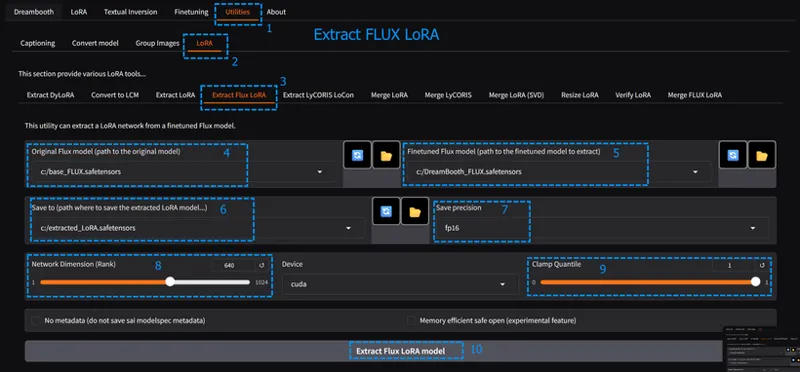
Follow 1st image in the top above images for config and learn how to extract
FLUX LoRA extraction can be useful or may not be useful
As you extract higher Network Dimension (Rank) you get better results
640 is what I found maximum but you can try further like 672 etc
However as you increase Rank, it will take more space
If you truly needs FLUX LoRA, I recommend both try extract and also solo training
To install Kohya use installer from here : https://www.patreon.com/posts/112099700
FLUX DreamBooth / Fine Tuning tutorial : https://youtu.be/FvpWy1x5etM
FLUX LoRA Training Tutorial : https://youtu.be/nySGu12Y05k
Both tutorials and their configs and files are all up to date
Currently I recommend solo LoRA training but each case might be unique
Moreover, LoRA extraction fixes the stripe problem when you do 2x latent upscale
Latent upscale tutorial and quality difference shown here : https://youtu.be/Xbn93GRQKsQ
SDXL LoRA Extract
Follow the 2nd image in the top above images for config
If you need SDXL LoRA I really recommend SDXL DreamBooth and then extract LoRA
As you extract higher Network Dimension (Rank) you get better results
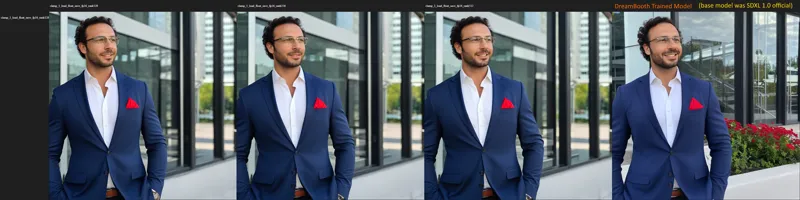
The last image very top shows you the difference of Network Dimension 128 vs 256 vs 512 vs original DreamBooth model
If still not sufficient, you can increase LoRA scale / power / weight slightly like 1.1, 1.2 etc
SDXL LoRA extract really works well and we don't have well researched SDXL LoRA config atm that will reach to DreamBooth then LoRA extract quality
Moreover, I really don't recommend SDXL since it is too inferior to FLUX so unless you have to go with FLUX training
Full up-to-date OneTrainer SDXL DreamBooth / Fine Tuning training tutorial : https://youtu.be/0t5l6CP9eBg
OneTrainer 1-click installer and updated Presets with screenshots of setting up concepts : https://www.patreon.com/posts/96028218
You can also train SDXL with Kohya
Kohya Installer here : https://www.patreon.com/posts/112099700
Kohya SDXL DreamBooth / Fine Tuning configs are here : https://www.patreon.com/posts/very-best-for-of-89213064
Big Kohya DreamBooth / Fine Tuning tutorial for FLUX (i have shown SDXL config usage too) : https://youtu.be/FvpWy1x5etM
Quick config use tutorial for Kohya DreamBooth / Fine Tuning : https://youtu.be/EEV8RPohsbw
FLUX LoRA Extract
SDXL LoRA Extract
Comments (20)
Is it fp16 better than bf16?
i think almost same quality but fp16 more preferred
Is it possible to extract SDXL Lora in the same way? If there are any settings that need to be adjusted differently from FLUX, please let me know. Thank you always for your guidance.
yes you can extract https://medium.com/@furkangozukara/stable-diffusion-xl-sdxl-full-dreambooth-model-vs-lora-extraction-comparison-ce0051c10d51
Hello Dr Furkan, I've been trying to extract lora from my fine-tuned model and I end up with this Error: Traceback (most recent call last): File "C:\AI\Kohya\Kohya_GUI_Flux_Installer_v46\kohya_ss\sd-scripts\networks\flux_extract_lora.py", line 219, in svd(**vars(args)) File "C:\AI\Kohya\Kohya_GUI_Flux_Installer_v46\kohya_ss\sd-scripts\networks\flux_extract_lora.py", line 87, in svd value_t = f_tuned.get_tensor(key) safetensors_rust.SafetensorError: File does not contain tensor model.diffusion_model.double_blocks.0.img_attn.proj.weight I have followed your finetuning tutorial and have amazing results, but not sure what I am missing here, I've used the same method you explained here on a random finetuned model on civitai and it works fine!!
what is your file size? safetensors_rust.Safetensor
Hello Doc ! can we use the merge_lora script to convert an extracted LoRa from BF16 (or FP16) to FP8 ? Is it going to reduce its size drastically here as well ? If this is the case, this would allow to keep a high rank without compromising too much on storage size. Thanks for your work !
yes you can use i already made tutorial for this :D https://www.patreon.com/posts/115376830
Hello Furkan, I have tried all possible settings, but the extracted LoRA file is simply unusable. I trained a DB model of a person, and the results are excellent, but the LoRA shows some similarity at 1.20 but hardly matches the DB results. I get better results when I train the LoRA directly. The dataset consists of 2,500 photos.
so you extracted with 640 rank, quantile 1 and still not matching? in my case 1.1 weight was very close
I was successful - but I have to weight the LORA to 2.75-3 in order to get my subject at all. this affects any other loras i want to run simultaneously...
wow that is huge. the maximum i needed was 1.1
Ey Furkan, I have last Kohya v24.1.7 installed but it doesn't show the "Extract Flux LORA" tab. Any clue? Thanks
Solved with the script "Update_Kohya_and_Fix_FLUX_Step2"
Do you have any idea how to convert my UNET fp16 checkpoint into GGUF Q4 quantization?
sadly i dont know how to do. i asked this kohya and he skipped my question :D i think he doesnt know either
Hi Dr.Furkan. I have a question. I've heard that Black forest labs will be releasing their open source FLUX Video model soon so I'm looking to upgrade my video card but I'm not sure if I should get a RTX 4090 or a RTX A6000. Is a RTX A6000 worth the extra money? Thanks.
A6000 has speed of like rtx 3090 sadly. hard to tell if it fits into 24 gb, rtx 4090 would be at least 2x faster, if doesnt fit than rtx a6000 would be better. for example current fine tuning of FLUX doesnt fit into 24 gb thus A6000 is faster on there. personally i am gonna wait RTX 5090 TI which is rumored to be at least 32 GB
To confirm this is to use the lora we trained from your flux Kohya gui tutorial and input into dreambooth tab or how to train a new flux model with dreambooth? I think I get mess up with the finetuning, we are making a new model, but with dream booth its much more accurate and higher quality then using a lora model training. Dreambooth it will create a new model we do not need an preexisting training ,correct?
dreambooth will generate a new full model (23.8 GB). this is for people who wants to still keep lora but have better quality