


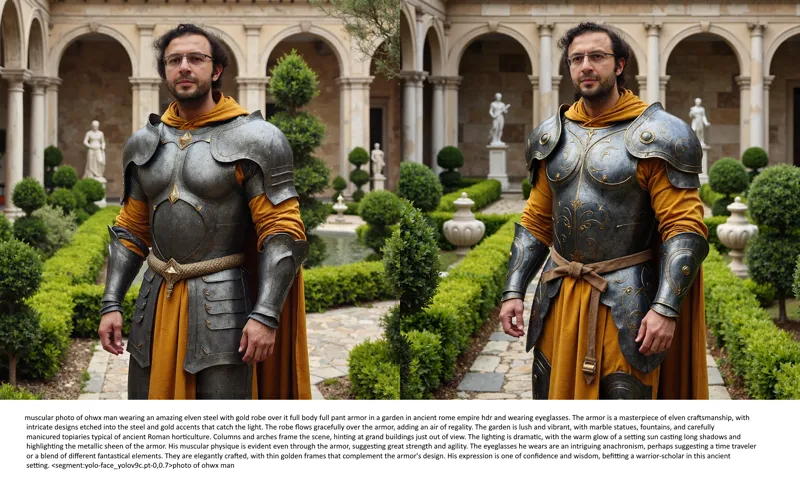


Full Fine Tuning / DreamBooth of FLUX yields way better results than LoRA training as expected, overfitting and bleeding reduced a lot, check oldest comment for more information, images LoRA vs Fine Tuned full checkpoint
Full Fine Tuning / DreamBooth of FLUX yields way better results than LoRA training as expected, overfitting and bleeding reduced a lot, check oldest comment for more information, images LoRA vs Fine Tuned full checkpoint
Configs and Full Experiments
Full configs and grid files shared here : https://www.patreon.com/posts/kohya-flux-fine-112099700
Quality 1 Config better than Quality 2
Quality 2 is only for low VRAM GPUs
Always use higher VRAM config if you are on higher VRAM machine
Details
I am still rigorously testing different hyperparameters and comparing impact of each one to find the best workflow
So far done 16 different full trainings and completing 8 more at the moment
I am using my poor overfit 15 images dataset for experimentation (4th image)
I have already proven that when I use a better dataset it becomes many times betters and generate expressions perfectly
Here example case : https://www.reddit.com/r/FluxAI/comments/1ffz9uc/tried_expressions_with_flux_lora_training_with_my/
Conclusions
When the results are analyzed, Fine Tuning is way lesser overfit and more generalized and better quality
In first 2 images, it is able to change hair color and add beard much better, means lesser overfit
In the third image, you will notice that the armor is much better, thus lesser overfit
I noticed that the environment and clothings are much lesser overfit and better quality
Disadvantages
Kohya still doesn't have FP8 training, thus 24 GB GPUs gets a huge speed drop
Moreover, 48 GB GPUs has to use Fused Back Pass optimization, thus have some speed drop
16 GB GPUs gets way more aggressive speed drop due to lack of FP8
Clip-L and T5 trainings still not supported
Speeds
Rank 1 Fast Config - uses 27.5 GB VRAM, 6.28 second / it (LoRA is 4.85 second / it)
Rank 1 Slower Config - uses 23.1 GB VRAM, 14.12 second / it (LoRA is 4.85 second / it)
Rank 1 Slowest Config - uses 15.5 GB VRAM, 39 second / it (LoRA is 6.05 second / it)
Final Info
Saved checkpoints are FP16 and thus 23.8 GB (no Clip-L or T5 trained)
According to the Kohya, applied optimizations doesn't change quality so all configs are ranked as Rank 1 at the moment
I am still testing whether these optimizations make any impact on quality or not
I am still trying to find improved hyper parameters
All trainings are done at 1024x1024, thus reducing resolution would improve speed, reduce VRAM, but also reduce quality
Hopefully when FP8 training arrived I think even 12 GB will be able to fully fine tune very well with good speeds
Comments (23)
ok thanks
Quality_1_27500MB_6_26_Second_IT, Quality_1_23100MB_14_12_Second_IT, Quality_1_15500MB_32_Second_IT which of these files can be used?
use Quality_1_27500MB_6_26_Second_IT,
i am testing your quality 2 config but it is very slow and that too on a100 it's taking 20 hours for 2600 steps
quality 2 is lower quality you shouldnt use it. it is only for low VRAM GPUs. how should i name these files so you wont get confused :D
So if I downloaded a modified FP8 model I can't train it, but only FP16?
yes fine tuning only fp16 at the moment sadly :(
Hi can you do an app for DeTextify please with batch support? https://github.com/guiyang/detextify
sure nice one adding to my list
great, it would be great if there was a guide (video) on how to train DreamBooth with your configuration. Are you planning to record a video?)
yes i plan to. it is exactly same as LoRA but this time load config into Dreambooth :)
How can we quantize a fine tune that comes out as 23 GB to fp8 or q8 gguf?
i will look for this so i can show in tutorial :D maybe kohya also can add options
Besides your classic 15 dataset images, Did you use, massive regularization images?
nope they dont help in flux yet
What's the overall training times on 24GB and 48GB GPUs in your tests?
each config shows step speed so you can calculate based on your target step count. lets say 150 epoch 2250 steps = 240 minutes on RTX A6000
I remember in prior SD generations that some people would train a fine tuned model like this, then extract a LORA from that model achieving high quality results. Is this something you might test and compare to your other LORA training methods?
ye i plan that later. i think it will work great
Hi there! You're doing an amazing job!! It's incredible how you set everything up so that with just a few clicks, someone can have everything ready on their PC to replicate any face they want. Plus, you explain everything as you go—what you're testing, the results you get—thank you so much for all the effort! I wanted to ask you a couple of questions: Do you have an estimate of when FP8 training might be available? I'm surprised that with my 3090, I feel like I'm "falling behind" in image generation speed hahaha
i asked fp8 he didnt tell time yet :/ but i am hopeful
So it works with 24GB RAM, that's good, but it's slow at 14 secs per it. Is that slower than with SDXL? Does it train faster than SDXL (does it need less time to be accurate enough than SDXL at the same resolution?). What resolutions can it train up to with 1 24 GB GPU (and plenty of RAM) - I've trained at 1280x1280 with SDXL - can it do that too or higher (well I tried at 1536 square with SDXL but that took much too long per it so stopped it)? Rough how much training time does it need per training image? In the examples I assume the one on the left is the Lora and the one on the right is the full fine tune. The one on the right is doing better prompt following but not exactly (doesn't show a blue beard in paris). Also neither of the coffee shop ones exactly follow the prompt as the prompt was "in a luxury coffee in paris" and "in a luxury coffee in china" (not coffee shop/cafe) - maybe for prompt following exactly it should put the person in a cup of coffee :) I assume the 'yolo-face' bit is replacing the face. If it fine tunes it fully shouldn't' it not need to replace the face?
this is not cherry pick so results are expected 1 : slower than sdxl 2 : 1024 best, you can train in higher res too 3 : yes just swap more blocks to reduce VRAM - will be slower 4 : config names has each step speed for rtx a6000 - almost same as rtx 3090