


SwarmUI Master Tutorial - Use Stable Diffusion 3.5 Large and FLUX model with Amazing Performance and more
In this public tutorial post I will share all the necessary stuff regarding how to use Stable Diffusion 3.5 Large, FLUX Dev, SD 1.5, SDXL, Stable Diffusion 3 and on your computer and also on the cloud (RunPod + Massed Compute).
=======
Patreon exclusive posts index to find our scripts easily, Patreon scripts updates history to see which updates arrived to which scripts and amazing Patreon special generative scripts list that you can use in any of your task.
Join discord to get help, chat, discuss and also tell me your discord username to get your special rank : SECourses Discord
Please also Star, Watch and Fork our Stable Diffusion & Generative AI GitHub repository and join our Reddit subreddit and follow me on LinkedIn (my real profile)
=======
Amazing Ultra Important Tutorials with Chapters and Manually Written Subtitles / Captions
Updated Playlist : https://www.youtube.com/playlist?list=PL_pbwdIyffsku5Rfv2CJZSiFdGXtkkdiB
FLUX Tools Outpainting, Inpainting (Fill), Redux, Depth & Canny Ultimate Tutorial Guide with SwarmUI
Stable Diffusion 3.5 Large How To Use Tutorial With Best Configuration and Comparison With FLUX DEV
FLUX Full Fine-Tuning / DreamBooth Tutorial That Shows A Lot Info Regarding SwarmUI Latest
Full FLUX Tutorial - FLUX Beats Midjourney for Real
Main Windows SwarmUI Tutorial (Watch To Learn How to Use)
How to install and use. You have to watch this to learn how to use SwarmUI
Has 70 chapters and manually fixed captions
Cloud Tutorial (Massed Compute - RunPod - Kaggle)
If you don't have a powerful GPU or you want to use powerful GPU this is the tutorial you need
48 GB A6000 GPU is only 31 cents per hour on Massed Compute with our special coupon
Free Kaggle Account Notebook for GPU-Poor
Installs latest version of SwarmUI on a free Kaggle account
Works with Dual T4 GPU at the same time
Supports SD 1.5, SDXL, SD3, FLUX, FLUX Tools, SD 3.5 Large, Mochi Tex to Video and Stable Cascade and more
Download from here : https://www.patreon.com/posts/106650931
18 February 2025 Update
Hunyuan text-to-video support arrived to SwarmUI
Public info link that has full information for how to manually install and execute from the SwarmUI developer below
SwarmUI Unified Downloader that we maintain (recommended)
Unified downloader has so many features including auto download GGUF models (20 steps) and Fast-GGUF (6 steps) models and configuration screenshots for Hunyuan
4 December 2024 Update
Full tutorial for FLUX Tools published : https://youtu.be/hewDdVJEqOQ
Outpainting, Inpainting, Redux Style Transfer + Re-Imagine + Combine Multiple Images, Depth and Canny
28 November 2024 Update
Tutorial : https://youtu.be/hewDdVJEqOQ
New FLUX Tools added to the SwarmUI
I recommend using our updated unified downloader to auto download (Windows, RunPod, Massed Compute) : SwarmUI unified downloader (auto downloads you do nothing)
Download flux1-redux-dev.safetensors into :
SwarmUI/Models/style_models
Download flux1-fill-dev.safetensors , flux1-canny-dev.safetensors , flux1-depth-dev.safetensors into
SwarmUI/Models/diffusion_models
Download flux1-canny-dev-lora.safetensors , flux1-depth-dev-lora.safetensors into
SwarmUI/Models/Lora
7 November 2024 Update
Newest SOTA Text-to Video model genmo/mochi-1-preview now supported by SwarmUI
You can download FP8 scaled unified model from this repo
Put the downloaded model into \SwarmUI\Models\Stable-Diffusion
Alternatively use our updated SwarmUI unified downloader
Mochi 1 Tutorial Prompts : GitHub Gist
26 October 2024 Update
Full tutorial video published and if you also upvote this reddit post I appreciate that
Stable Diffusion 3.5 Large published
Update your SwarmUI to the latest - make sure updated worked
For Stable Diffusion 3.5 Large I have compared 62 prompts and working Samplers + Schedulers
You can download all full grids as a zip : click here
For realism : DPM++ 2S Ancestral + SGM Uniform - This takes 2x time compared to Eular
For stylization like anime : Eular + Beta
Put FP16 and FP8 FLUX models into : \SwarmUI\Models\diffusion_models
Put FP16 and FP8 Stable Diffusion 3.5 Large into : \SwarmUI\Models\Stable-Diffusion
Put FP8 or FP16 T5 XXL and Clip-L and Clip-G into : \SwarmUI\Models\clip
For FLUX Dev best sampler is iPNDM + DDIM Uniform
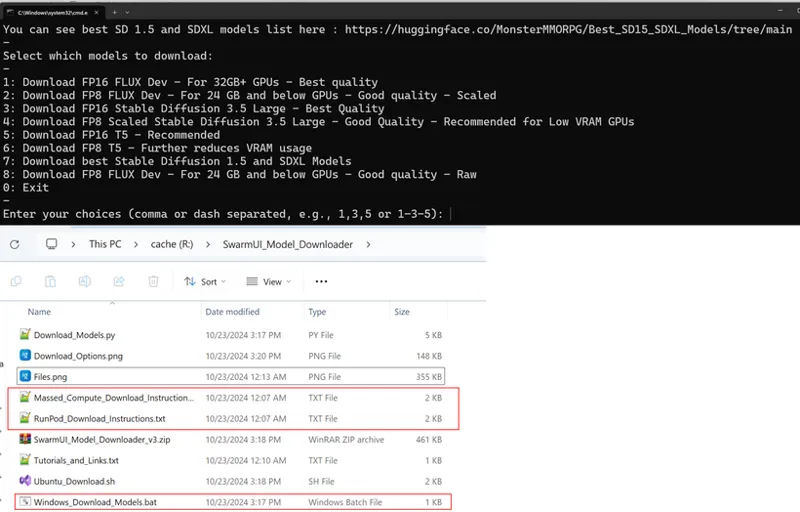
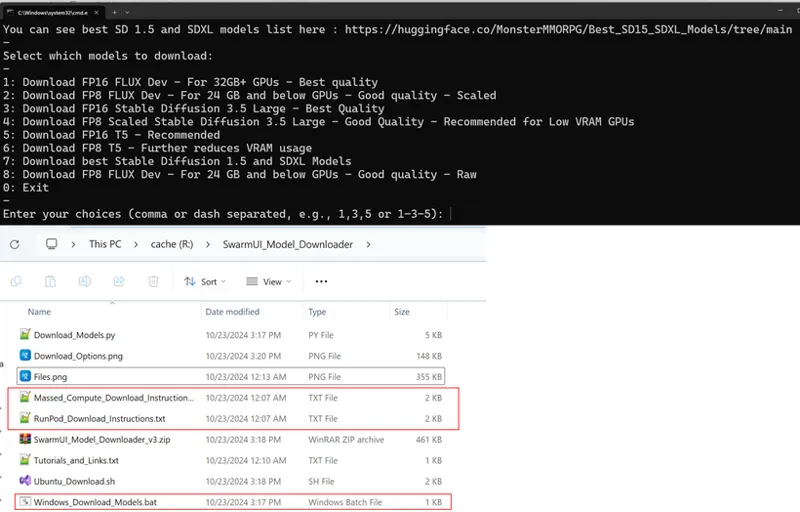
Ultra fast and robust automatic models downloader for Windows, RunPod and Massed Compute : click to download
For manually download click this link to go to downloads repo
T5 XXL Rename to Skip Download : t5xxl_enconly.safetensors
Test results
As FP8 version of T5 XXL it will download t5xxl_fp8_e4m3fn_scaled.safetensors which is supposed to be more closers to FP16 version
Here comparison (excellent quality) : FP8_vs_FP8_Scaled_vs_FP16_T5_XXL_With_FLUX.jpg
FP8 version of Stable Diffusion Large 3.5 contains Text Encoders FP8 versions as well it is from ComfyUI
Here comparison i think FP8 scaled works better : FP8_vs_FP16_SD_3_5_Large.jpg
We also added newest experimental scaled FP8 version of FLUX Dev
I think scaled FP8 FLUX DEV better than FP8 raw : FP8_vs_FP8_Scaled_vs_FP16_FLUX_DEV.jpg
FLUX vs SD 3.5 Large Comparison: FLUX_ vs_SD35.jpg
18 September 2024 Update
install-linux.sh file updated and now auto installs ComfyUI manager extension
Just wait backends to fully load it takes some time
You can check progress from Server > Logs > Debug menu
3 August 2024 Update
SwarmUI now supports newest black-forest-labs FLUX models
Full tutorial here : >> https://youtu.be/bupRePUOA18
black-forest-labs has the original developers that developed first Stable Diffusion models
I am recording a tutorial video
You can find automatic downloaders for FLUX models at below post for both Windows, RunPod and Massed Compute
1-Click FLUX models downloader scripts for Windows, RunPod and Massed Compute are in below post including FP16 T5 Downloader file
The above downloader scripts have resume capability, skip if fully downloaded capability and will auto retry 100 times if an error occurs and continue from where ever left automatically and downloads from Hugging Face directly
Or you can instructions you can see at this image : How To Download And Use FLUX Models On Swarm UI.png
FLUX models official repo : https://huggingface.co/black-forest-labs
FLUX.1-schnell is timestep distilled - turbo model - 4 steps or more
FLUX.1-dev is guidance distilled - best weights public model - 20 steps or more
Non-distilled model is only available via API
FLUX works with only CFG 1 - thus not supporting negative prompts at the moment
FP8 Model works same as FP16-dev model if you are not manually using FP16 sampling (requires 28 GB) : https://huggingface.co/Kijai/flux-fp8/tree/main
FP8 vs FP16 vs Turbo vs FP16 T5 model detailed comparison (16 different tests) : https://imgsli.com/MjgzODYy/7/6
FP16 T5 Text Encoder can be downloaded from : https://huggingface.co/comfyanonymous/flux_text_encoders/tree/main
21 June 2024 Update
Stable Swarm UI migrated into SwarmUI : https://github.com/mcmonkeyprojects/SwarmUI
Links are updated
Update Error Fix
fatal: detected dubious ownership in repository at 'G:/swarm_ui_tutorial/SwarmUI'
If you get above error run below config (fix according to your install path)
git config --global --add safe.directory G:/swarm_ui_tutorial/SwarmUI
General Info
To download and install StableSwarmUI : StableSwarmUI
Very important documents : docs
Very important features : Features
Full prompting syntax : Prompt%20Syntax.md
Download very best new upscalers : released-sorted-by-new
All upscalers as a single zip file : all_models
Helaman upscalers with thumbnails : helaman
SD3 Download model : stable-diffusion-3-sd3
SD3 Official Page : stable-diffusion-3-medium
SDXL model RealVis XL 4 : RealVisXL_V4.0.safetensors
SD 1.5 model : Hyper Realism V3
I have converted Fooocus 275 SDXL styles into StableSwarmUI presets with SD3 configuration
The presets also have updated thumbnail / preview image with SD3
Moreover, scripts to generate and update these presets automatically added to the zip file in below post as well
You can download all presets from here : download 275 presets
Official Stable Swarm UI Discord server to contact its developer : https://discord.gg/q2y38cqjNw
Yolo Face segment into yolov8 folder : https://huggingface.co/Bingsu/adetailer/resolve/main/face_yolov9c.pt
Cloud tutorials are in production as well for Massed Compute, RunPod and hopefully a Kaggle
Massed Compute Instructions
Tutorial : https://youtu.be/XFUZof6Skkw
Please register Massed Compute from here : https://vm.massedcompute.com/signup?linkId=lp_034338&sourceId=secourses&tenantId=massed-compute
After registering and loading balance go to this link : https://vm.massedcompute.com/deploy
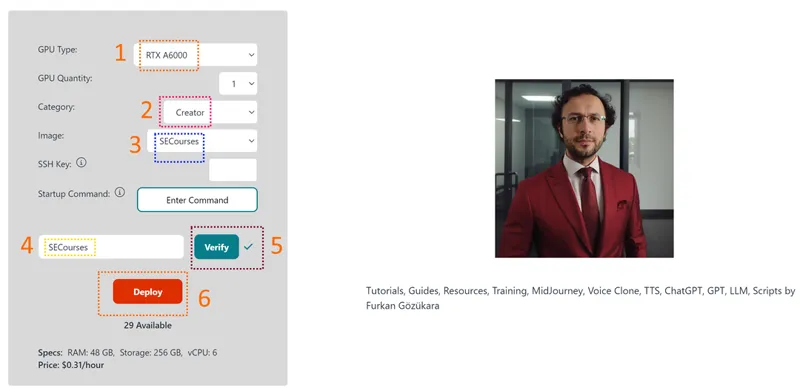
Select RTX A6000, if not available RTX A6000 [ALT Config] (same VRAM, GPU, Disk etc only RAM is 24 GB instead of 48)
Then make the selections as below and deploy your machine
This Massed Compute virtual machine image we have as SECourses has pre-installed SwarmUI with very best SD 1.5, SDXL and SD3 models
You can also increase your GPU quantity to utilize all of them at once with SwarmUI
Don't forget to run SwarmUI (1-click button) update before start using it
If our image gets broken reply to this post and let me know - we will update it ASAP
Also don't forget to apply Coupon code as SECourses to get A6000 GPU as 31 cents per hour (on RunPod cheapest 69 cents per hour)
How To Connect SwarmUI from your PC that is Running on Massed Compute - Preffered Cloudflare Way
First open a terminal and execute below commands to install cloudflared
wget https://github.com/cloudflare/cloudflared/releases/download/2024.8.2/cloudflared-linux-amd64.deb
sudo dpkg -i cloudflared-linux-amd64.deb
Then run SwarmUI to update to update it latest, then close the started SwarmUI terminal
Then open a new terminal and execute below commands and it will start SwarmUI and will give you a cloudflare link like (my-pills-sailing-pad-netherlands.trycloudflare .com) that you can connect
cd /home/Ubuntu/apps/StableSwarmUI/
./launch-linux.sh --launch_mode none --cloudflared-path cloudflared
How To Connect SwarmUI from your PC that is Running on Massed Compute - I dont recommend 1 GB Bandwith
Get your token from here for free : https://dashboard.ngrok.com/get-started/your-authtoken
sudo snap install ngrok
ngrok authtoken replace_with_your_ngrok_token
ngrok http 7801
RunPod Instructions
Follow this tutorial step by step to install on RunPod machine : https://youtu.be/XFUZof6Skkw
Please use this link to register : https://runpod.io?ref=1aka98lq - (it gives me credits thus i can do more tutorials)
RunPod massive tutorial includes runpodctl for fast download to PC : https://youtu.be/QN1vdGhjcRc
RunPod permanent network storage system tutorial : https://youtu.be/8Qf4x3-DFf4
How to download models very fast to RunPod and how to upload files, folders from RunPod to Hugging Face ultra fast detailed tutorial : https://youtu.be/X5WVZ0NMaTg
Choose below template and any GPU
RunPod Pytorch 2.2.0
runpod/pytorch:2.2.0-py3.10-cuda12.1.1-devel-ubuntu22.04
Download install-linux.sh and upload into workspace
chmod +x install-linux.sh
./install-linux.sh
It will auto install and start the SwarmUI
Then connect from 7801 port
If you want to fix No module named 'onnxruntime' error which is 100% caused by SwarmUI itself while the app is running execute below commands after uploading install-linux_fix_step2.sh file
chmod +x install-linux_fix_step2.sh
./install-linux_fix_step2.sh
After executing and installing missing libraries, disable your back-end and enable again for it to become working
If you turn off your pod and start again execute below command to start again
cd SwarmUI
cd launchtools
wget https://dot.net/v1/dotnet-install.sh -O dotnet-install.sh
chmod +x dotnet-install.sh
./dotnet-install.sh --channel 8.0 --runtime aspnetcore
./dotnet-install.sh --channel 8.0
cd ..
./launch-linux.sh --launch_mode none --host 0.0.0.0
SwarmUI Windows Requirements
How to install Git, Python, CUDA, cuDNN, C++ Tools : https://youtu.be/DrhUHnYfwC0
Error and Solutions
If you get below errors
RuntimeError: CUDA error: operation not supported
CUDA kernel errors might be asynchronously reported at some other API call, so the stacktrace below might be incorrect.
Add this parameter to the back-end and try : --disable-cuda-malloc
RunPod Cloudflared
wget https://github.com/cloudflare/cloudflared/releases/download/2024.8.2/cloudflared-linux-amd64.deb
dpkg -i cloudflared-linux-amd64.deb
cd SwarmUI
cd launchtools
wget https://dot.net/v1/dotnet-install.sh -O dotnet-install.sh
chmod +x dotnet-install.sh
./dotnet-install.sh --channel 8.0 --runtime aspnetcore
./dotnet-install.sh --channel 8.0
cd ..
./launch-linux.sh --launch_mode none --cloudflared-path cloudflared
Comments (66)
Hi! I often use your method of inpainting with segment:yolo in swarmui. However, since the last update of swarm I get an error in swarm when including the yolo9c segementation: ComfyUI errored: { "error": { "type": "invalid_prompt", "message": "Cannot execute because node SwarmMaskBlur does not exist.", "details": "Node ID '#102'", "extra_info": {} }, "node_errors": {} } segment:yolo-face_yolov9c.pt-1,0.7,0.5 Edit: A fresh install of swarmui seems to have solved the issue...
yes i was gonna recommend that. also i recommend this tutorial published today : https://youtu.be/fTzlQ0tjxj0
The Flux links on the "28 November 2024 Update" are dead, are these still needed?
not needed. i am also hopefully going to update this amazing tool soon : https://www.patreon.com/posts/114517862 by the way links are working i have no issues
anyone having problems installing Swarm on runpod today? It worked like 2 days ago but been trying to start a new pod all day and the backend wont load. Have tried several times with different templates and different graphics cards and same issue with backend not loading each time? 20:06:47.372 [Init] Self-Start ComfyUI-0 on port 7821 is loading... 20:06:50.331 [Warning] [ComfyUI-0/STDERR] Traceback (most recent call last): 20:06:50.331 [Warning] [ComfyUI-0/STDERR] File "/workspace/SwarmUI/dlbackend/ComfyUI/main.py", line 136, in 20:06:50.331 [Warning] [ComfyUI-0/STDERR] import execution 20:06:50.332 [Warning] [ComfyUI-0/STDERR] File "/workspace/SwarmUI/dlbackend/ComfyUI/execution.py", line 13, in 20:06:50.332 [Warning] [ComfyUI-0/STDERR] import nodes 20:06:50.332 [Warning] [ComfyUI-0/STDERR] File "/workspace/SwarmUI/dlbackend/ComfyUI/nodes.py", line 22, in 20:06:50.332 [Warning] [ComfyUI-0/STDERR] import comfy.diffusers_load 20:06:50.332 [Warning] [ComfyUI-0/STDERR] File "/workspace/SwarmUI/dlbackend/ComfyUI/comfy/diffusers_load.py", line 3, in 20:06:50.332 [Warning] [ComfyUI-0/STDERR] import comfy.sd 20:06:50.332 [Warning] [ComfyUI-0/STDERR] File "/workspace/SwarmUI/dlbackend/ComfyUI/comfy/sd.py", line 6, in 20:06:50.333 [Warning] [ComfyUI-0/STDERR] from comfy import model_management 20:06:50.333 [Warning] [ComfyUI-0/STDERR] File "/workspace/SwarmUI/dlbackend/ComfyUI/comfy/model_management.py", line 168, in 20:06:50.333 [Warning] [ComfyUI-0/STDERR] total_vram = get_total_memory(get_torch_device()) / (1024 * 1024) 20:06:50.333 [Warning] [ComfyUI-0/STDERR] File "/workspace/SwarmUI/dlbackend/ComfyUI/comfy/model_management.py", line 131, in get_torch_device 20:06:50.333 [Warning] [ComfyUI-0/STDERR] return torch.device(torch.cuda.current_device()) 20:06:50.333 [Warning] [ComfyUI-0/STDERR] File "/workspace/SwarmUI/dlbackend/ComfyUI/venv/lib/python3.10/site-packages/torch/cuda/__init__.py", line 971, in current_device 20:06:50.333 [Warning] [ComfyUI-0/STDERR] _lazy_init() 20:06:50.334 [Warning] [ComfyUI-0/STDERR] File "/workspace/SwarmUI/dlbackend/ComfyUI/venv/lib/python3.10/site-packages/torch/cuda/__init__.py", line 319, in _lazy_init 20:06:50.334 [Warning] [ComfyUI-0/STDERR] torch._C._cuda_init() 20:06:50.334 [Warning] [ComfyUI-0/STDERR] RuntimeError: CUDA unknown error - this may be due to an incorrectly set up environment, e.g. changing env variable CUDA_VISIBLE_DEVICES after program start. Setting the available devices to be zero. 20:06:50.626 [Info] Self-Start ComfyUI-0 unexpectedly exited (if something failed, change setting `LogLevel` to `Debug` to see why!)
runpod sucks so bad. takes so much time to setup. so slow. also very likely your pod is broken. i will run a test now.
Hello! I am new at all this and I'm running in a bit of an issue: I am trying to run SwarmUI_Kaggle_v13.ipynb as per instructed in this video: https://www.youtube.com/watch?v=XFUZof6Skkw At the 27:50 mark, it is instructed to ''go to the link you got from step 3 and click visit site'' However, I see in the comment section that step 3 is no longer required as Kaggle now supports Gradio live share. I do not know what Gradio live share is (I am a total beginner), is there any way someone can explain to me how to replace step 3 with Gradio live share so that I can open SwarmUI on Kaggle? Thanks and have a good day!
hi i will now update kaggle notebook with cloudflared. give me some time. it will be hopefully easier and better
Hello Mr. Furkan.. I want to join your discord but it says the invitation has expired. how can I join. I am your monthly member.
hangi link bunu veriyor? burada davet yok direkt katılım var : https://discord.com/servers/software-engineering-courses-secourses-772774097734074388
Great are these tutorials, thank you very much. I have a problem with other checkpoints Flux downloaded from Civitai. The ones you provided work normally, the others don't want to. Can you give some hints which flux checkpoints will be correct in SwarmUI? Sorry for my English, this is an automatic translation, I don't know English :(
you need to ask Kohya to add support : https://github.com/kohya-ss/sd-scripts/issues give the file url and the error so he can fix. since there are too many trainers out there, the files they generate is not consistent
i played now a lot with the inpainting and redux. what i am not able to accomplish is inserting an object. i generated a picture and modified to my liking with inpainting. now i want to insert a picture of an object with inpainting. and the inserted object picture should mach the style of the base picture and also be positioned in a certain place.
sadly no such thing exists yet . but you can look for hopefully i will make tutorial soon : https://github.com/ali-vilab/In-Context-LoRA
Thank you Furkan for this fantastic FLUX Inpaint/Outpaint video. Just one question. Your Flux Guidance Scale is up to 30, but mine is max. 10. I am using 0.9.3.2. They changed this? Whats the difference?
you have to manually enter :D scale not working so just type 30
Seems like the lora links are broken even on hugging face! :(
you need to accept their terms (https://huggingface.co/black-forest-labs/FLUX.1-Canny-dev-lora) . you can also use SwarmUI unified downloader it has permission granted repo so it automatically downloads
Is there a way you could share SwarmUI Presets? Like save all the settings you have where you generate this cool images and share it with us so we can load it in SwarmUI?
sure my recent images shared here have all metadata of swarmui download images and load into swarmui . those uses my best params : https://civitai.com/user/SECourses
hi how do i use my modules ? do i need to download again ? i have stabled dufission it has modules and webui has same modules im running out of space
you change folders watch this video : https://youtu.be/HKX8_F1Er_w
Any good reasons to crop images instead of using buckets? My training images have all sort of aspect ratios with relevant information I would like to keep.
bucketed training may not work as expected. that is why i recommend do training of both and compare. hopefully i will test this issue and several trainings and compare as a next thing
I thought SwarmUI would be great...but it's not. Namely, i cant tell it where i want the generations to be placed(SAVED). Also, i have THOUSANDS of loras/embeddings/models that have spaces in them, and they wont load and crashes. I MEAN WOW... Why do i have to rename thousands of files when ever other UI can use them just fine no matter how they are named. PLUS, when it was loading the folders i placed to maunally point to them, the program was pulling from and compairing my database to one from Civitai!!! thats a serious issue when i didn't tell it to do this. I DONT want my database compromised and it looks like that this UI was doing it. WHY was it verifying my models/loras/embeddings?
can you open an issue thread here and list all? the developer is very helpful : https://github.com/mcmonkeyprojects/SwarmUI/issues
hi, have followed instructions to load swarm on several runpods in the past but today I'm getting this error after the restart. 08:50:09.786 [Init] Starting webserver on http://0.0.0.0:7801 08:50:09.817 [Init] Swarm is up to date! You have version 0.9.2.3, and 0.9.2-Beta is the latest. 08:50:09.825 [Init] Program is running. 08:50:10.547 [Init] Self-Start ComfyUI-0 on port 7821 is loading... 08:50:12.437 [Warning] [ComfyUI-0/STDERR] Traceback (most recent call last): 08:50:12.437 [Warning] [ComfyUI-0/STDERR] File "/workspace/SwarmUI/dlbackend/ComfyUI/main.py", line 90, in 08:50:12.437 [Warning] [ComfyUI-0/STDERR] import execution 08:50:12.437 [Warning] [ComfyUI-0/STDERR] File "/workspace/SwarmUI/dlbackend/ComfyUI/execution.py", line 13, in 08:50:12.437 [Warning] [ComfyUI-0/STDERR] import nodes 08:50:12.437 [Warning] [ComfyUI-0/STDERR] File "/workspace/SwarmUI/dlbackend/ComfyUI/nodes.py", line 21, in 08:50:12.438 [Warning] [ComfyUI-0/STDERR] import comfy.diffusers_load 08:50:12.438 [Warning] [ComfyUI-0/STDERR] File "/workspace/SwarmUI/dlbackend/ComfyUI/comfy/diffusers_load.py", line 3, in 08:50:12.438 [Warning] [ComfyUI-0/STDERR] import comfy.sd 08:50:12.438 [Warning] [ComfyUI-0/STDERR] File "/workspace/SwarmUI/dlbackend/ComfyUI/comfy/sd.py", line 5, in 08:50:12.438 [Warning] [ComfyUI-0/STDERR] from comfy import model_management 08:50:12.438 [Warning] [ComfyUI-0/STDERR] File "/workspace/SwarmUI/dlbackend/ComfyUI/comfy/model_management.py", line 143, in 08:50:12.438 [Warning] [ComfyUI-0/STDERR] total_vram = get_total_memory(get_torch_device()) / (1024 * 1024) 08:50:12.438 [Warning] [ComfyUI-0/STDERR] File "/workspace/SwarmUI/dlbackend/ComfyUI/comfy/model_management.py", line 112, in get_torch_device 08:50:12.438 [Warning] [ComfyUI-0/STDERR] return torch.device(torch.cuda.current_device()) 08:50:12.438 [Warning] [ComfyUI-0/STDERR] File "/workspace/SwarmUI/dlbackend/ComfyUI/venv/lib/python3.10/site-packages/torch/cuda/__init__.py", line 878, in current_device 08:50:12.438 [Warning] [ComfyUI-0/STDERR] _lazy_init() 08:50:12.439 [Warning] [ComfyUI-0/STDERR] File "/workspace/SwarmUI/dlbackend/ComfyUI/venv/lib/python3.10/site-packages/torch/cuda/__init__.py", line 314, in _lazy_init 08:50:12.439 [Warning] [ComfyUI-0/STDERR] torch._C._cuda_init() 08:50:12.439 [Warning] [ComfyUI-0/STDERR] RuntimeError: CUDA driver initialization failed, you might not have a CUDA gpu. 08:50:12.645 [Info] Self-Start ComfyUI-0 unexpectedly exited (if something failed, change setting `LogLevel` to `Debug` to see why!) 08:50:12.645 [Info] Self-Start ComfyUI-0 had errors before shutdown: [ComfyUI-0/STDERR] Traceback (most recent call last): [ComfyUI-0/STDERR] File "/workspace/SwarmUI/dlbackend/ComfyUI/main.py", line 90, in [ComfyUI-0/STDERR] import execution [ComfyUI-0/STDERR] File "/workspace/SwarmUI/dlbackend/ComfyUI/execution.py", line 13, in [ComfyUI-0/STDERR] import nodes [ComfyUI-0/STDERR] File "/workspace/SwarmUI/dlbackend/ComfyUI/nodes.py", line 21, in [ComfyUI-0/STDERR] import comfy.diffusers_load [ComfyUI-0/STDERR] File "/workspace/SwarmUI/dlbackend/ComfyUI/comfy/diffusers_load.py", line 3, in [ComfyUI-0/STDERR] import comfy.sd [ComfyUI-0/STDERR] File "/workspace/SwarmUI/dlbackend/ComfyUI/comfy/sd.py", line 5, in [ComfyUI-0/STDERR] from comfy import model_management [ComfyUI-0/STDERR] File "/workspace/SwarmUI/dlbackend/ComfyUI/comfy/model_management.py", line 143, in [ComfyUI-0/STDERR] total_vram = get_total_memory(get_torch_device()) / (1024 * 1024) [ComfyUI-0/STDERR] File "/workspace/SwarmUI/dlbackend/ComfyUI/comfy/model_management.py", line 112, in get_torch_device [ComfyUI-0/STDERR] return torch.device(torch.cuda.current_device()) [ComfyUI-0/STDERR] File "/workspace/SwarmUI/dlbackend/ComfyUI/venv/lib/python3.10/site-packages/torch/cuda/__init__.py", line 878, in current_device [ComfyUI-0/STDERR] _lazy_init() [ComfyUI-0/STDERR] File "/workspace/SwarmUI/dlbackend/ComfyUI/venv/lib/python3.10/site-packages/torch/cuda/__init__.py", line 314, in _lazy_init [ComfyUI-0/STDERR] torch._C._cuda_init() [ComfyUI-0/STDERR] RuntimeError: CUDA driver initialization failed, you might not have a CUDA gpu.
I'm running the 2.1 torch and 4xa6000, khoya worked fine but now cant get swarm to install to test training
Yea I reinstalled and it works fine now, thanks! By the way, I manually deleted the 'SwarmUI' folder before installing again using your command lines. Was that the correct way? I mean was there a 'proper' way to uninstall SwarmUI first? Thx
yes it sounds accurate
Hi, everything was working for me in Runpod using Swarm with Comfy based on your instructions, until today suddenly ComfyUI is not showing any nodes and the 'Manager' button is missing from the floating buttons part. Please help, thanks a lot. (I have been using the Pytorch 2.1 template in Runpod, should I use 2.4 or 2.5 ? )
did you make a fresh install? i tested this yesterday works perfect
Hi, I am using RunPod with SwarmUI and from there ComfyUI, please can you help me install ComfyUI manager?
just updated install-linux.sh file and added it, reinstall and you will have
Hello, I get an error below as install swarm_ui yordam giris noktası, D:\swarm_ui\SwarmUl\dibackend\comfy\python_embeded\Lib\site-pa kages\torchaudio\lib\libtorchaudio.pyd dinamik baglantı kitaplıgında bulunamadı.
hello please message from discord so i can tell you what to do. we need to report to developer of swarmui he answers all
strange problem. I downloaded your caddy notebook. I did everything according to the instructions. Please help who can. But SwarmUI does not generate on kagli with any model. Attempts were with models in the temporary folder, and the model loaded during installation. The process hangs on loading the model and that's it. == SwarmUI logs 2024-09-02 16:37 == 16:37:34.184 [Info] User local requested 1 image with model 'OfficialStableDiffusion/sd_xl_base_1.0.safetensors'... In debug logs there is constantly waiting for server [Debug] [Load ComfyUI Self-Starting #0] ComfyUI-0 port 7821 waiting for server...
Currently Kaggle is broken due to ComfyUI latest update. I am trying to find a solution. We may be needed to wait Kaggle to upgrade torch 2.4
Bye. I joined your patreon yesterday and plan to follow many of your wonderful guides. I am starting with this one to use flux with SwarmUI on kaggle (I already use flux with forge on lightining.ai and with lora trained models on replicate). i am not an expert so i need a little help on a couple of things: I tried yesterday and managed to get it all started on kaggle. Today however I noticed that I have to reinstall everything every time because obviously the temp folder is deleted. That's fine. But I thought there was no need to reinstall swarmUI on kaggle/working, because it stays. But when I try to start it up it tells me I don't have permissions. So I reinstalled SwarmUI as well. But there's a problem: the backends don't start. They just stay loading. Can the permissions issue be resolved? And why do the backends remain loading? Edit: I have this error when start SwarmUI: 22:04:53.478 [Warning] [ComfyUI-0/STDERR] Traceback (most recent call last): 22:04:53.479 [Warning] [ComfyUI-0/STDERR] File "/kaggle/working/SwarmUI/dlbackend/ComfyUI/main.py", line 87, in 22:04:53.479 [Warning] [ComfyUI-0/STDERR] import comfy.utils 22:04:53.479 [Warning] [ComfyUI-0/STDERR] File "/kaggle/working/SwarmUI/dlbackend/ComfyUI/comfy/utils.py", line 20, in 22:04:53.480 [Warning] [ComfyUI-0/STDERR] import torch 22:04:53.480 [Warning] [ComfyUI-0/STDERR] File "/kaggle/working/SwarmUI/dlbackend/ComfyUI/venv/lib/python3.10/site-packages/torch/__init__.py", line 290, in 22:04:53.480 [Warning] [ComfyUI-0/STDERR] from torch._C import * # noqa: F403 22:04:53.480 [Warning] [ComfyUI-0/STDERR] ImportError: /kaggle/working/SwarmUI/dlbackend/ComfyUI/venv/lib/python3.10/site-packages/torch/lib/../../nvidia/cusparse/lib/libcusparse.so.12: undefined symbol: __nvJitLinkComplete_12_4, version libnvJitLink.so.12 ps. Sorry, I'm italian I'm don't speak english very well. Deepl is my translator ;)
hello. on kaggle each time you have to reinstall everything. so dont use persistence please. this is disadvantage of kaggle sadly
First of all, thanks for all the great tutorials. I've just tried to get this running on Runpod. Everything works up until I have to connect the http connection. It doesn't appear as a button on my pod. And opening 0.0.0.0: 7801 from my browser also doesn't connect. I'm on a Mac.
you need to use runpod proxy 7801 port. please see this video i show there : https://youtu.be/XFUZof6Skkw 15:22 How to install latest SwarmUI on RunPod with accurate template selection 16:50 Port setup to be able to connect SwarmUI after installation 17:50 How to download and run installer sh file for RunPod to install SwarmUI
Do you think kohya will support training on either SD3 or the flux models? Currently my training stopped at SDXL.
Kohya SD3 support already arrived he is fixing some bugs still. I hope FLUX will come too. I plan to research SD3 intensively first hopefully unless FLUX comes sooner
This tutorial is the best one I've seen and watched so far on SD! Wow - just so many details. I have also discovered the incredible power of in comfyui. Nothing could get close to Adetailer until I discovered this feature. I am now generating incredible high quality pictures using this feature. Adetailer was the one item left that was keeping me on A1111 and now I think I am a convert to SwarmUI. The features you describe are so easy to use. Thanks for all your effort on this video as it must have taken quite a long time to put togehter!
Awesome thank you so much for the comment also
FYI Civitai banned SD3 because of their licensing..."as written the creator license seemed to imply that Stability had edit and takedown power over not just any resource trained on SD3 but also on any resources that used its outputs in their datasets." useful to know if you are posting images created with it or training on it.
ye I just read it. I think StabilityAI has to improve its licence
Any plans for comparing SD3 with other models (SDXL, SD1.5) for dreambooth training?
yes once hopefully kohya and onetrainer add SD3 training scripts
Please, if you can post a Kaggle or colab notebook it would be great, as I don't have a GPU intensive machine....
Yes it is on my to do list hopefully if it works
Thanks for the styles , but it is lacking in details too much, I tried to 2x upscale , still coming out very bland. Its fast ,i should accept it. But not worth as of now. WE need loras/checkpoint to make it good. SDXL Still wins
Well I think with custom fine tunes it will shine
Is it possible to have swarmUI running on one machine, say a Mac and using the resources (GPUs and CPU) on another machine (say Ubuntu)?
i just asked this to the developer. the answer is : https://github.com/Stability-AI/StableSwarmUI/blob/master/docs/Advanced%20Usage.md#accessing-stableswarmui-from-other-devices
also looking for the option to point the model folder to look in the A1111 folder for checkpoints instead of the root. anyone find that? EDIT: ANSWER is at 14:24 in the video he put out... SERVER>SERVER CONFIGURATION>PATHS
Deleted my response because SEcourses has a much simpler answer 😋
I am excited for this tutorial! A super one-two punch, as I've haven't used the SwarmUI yet either.
thanks. i am preparing more materials
I see the SD3 devs recommend and released a sample ComfyUI workflow. They also have a few different text_encoders options. Are you planning to do any experimenting with their flow and the various text encoder options? You do such a great job evaluating and finding ideal settings so I was just curious :)
thanks. yes i will show that too. stableswarmui uses comfyui but makes it us many times easier to use :) thus works perfect
This is really cool. Looking forward to the tutorial. Thanks.
yep. thanks i am trying to learn more and more before making
Benefits/drawbacks?
will show in tutorial video hopefully. really great UI with so many features. I am still trying to learn it better