
UI Cheats Extension v1.59.1
v1.59.1 [08/27/2026]
Fixed not being able to pin Wants.
v1.59 [08/26/2026]
Updated for game version 1.127.41.
Reworked the Wants cheat to no longer need the popup dialog.
v1.58 [08/06/2026]
Updated for game version 1.126.78.
v1.57 [07/25/2026]
Updated for game version 1.126.58.
Added a new option to retire to the career cheat.
v1.56 [07/04/2026]
Updated for game version 1.125.59.
Added a new Noble Favor cheat.
v1.55 [05/12/2026]
Updated for game version 1.124.54.
Added the Dynasty Unity cheat.
v1.54 [04/20/2026]
Updated for game version 1.123.66.
Added Formative Moments to the add trait cheat.
v1.53 [03/18/2026]
Updated for game version 1.122.212.
Added a new Luck cheat to the Simology panel.
v1.52 [02/03/2026]
Updated for game version 1.121.342 (Royalty & Legacy patch).
Added new cheats for Dynasty Prestige & Perks.
v1.51 [12/02/2025]
Updated for game version 1.120.111.
Added a new Mastery Perk cheat to the Skills panel.
v1.50 [09/18/2025]
Updated for game version 1.118.242 (Adventure Awaits patch).
Added a new Balance & Imbalance cheat to the Simology panel.
v1.49 [07/02/2025]
Updated for game version 1.116.202 (Enchanted by Nature patch).
Added a new power/water cheat to the Bills & Utilities panel.
Fixed the club points cheat not working.
v1.48 [05/27/2025]
Updated for game version 1.115.216.
Added new small business cheats (renown, alignment, perk points, perk locking/unlocking).
Fixed a few issues related to the skill cheat.
v1.47 [02/25/2025]
Updated for game version 1.113.277 (Businesses & Hobbies patch).
Added the event goal cheat for more event types such as Discovery Quests.
v1.46 [01/14/2025]
Updated for game version 1.112.481.
Added a new cheat for Soul's Journey.
v1.45 [12/03/2024]
Updated for game version 1.111.102.
Added a new Ghost rank cheat to the the Simology panel.
v1.44.1 [11/01/2024]
Fixed this mod blocking hints for tarot cards from showing up in the House Collections panel.
Fixed that cheating aspiration goals using this mod would not mark them as complete.
Fixed that the fame & reputation cheat sometimes would not work due to Soul's Journey.
v1.44 [10/22/2024]
Updated for game version 1.110.265 (Life & Death patch).
Added a new Attraction & Romantic Satisfaction cheat to Sim Profiles.
Fixed some situations where the event goal cheat would stop working due to goals being refreshed.
v1.43 [09/18/2024]
Updated for game version 1.109.185.
Updated the event goal cheat to work for some of the newer events such as Lovestruck dates.
v1.42.1 [07/25/2024]
Updated for game version 1.108.329.
v1.42 [07/23/2024]
Updated for game version 1.108.318 (Lovestruck patch).
Added a new cheat for the Sim Stat panel.
v1.41 [05/28/2024]
Updated for game version 1.107.112.
Added a new cheat for removing workplace rivals.
Fixed that the skill panel would take a long time to update when cheating a skill to level 1.
v1.40 [02/27/2024]
Updated for game version 1.105.297 (Crystal Creations patch).
Added a new scenario goal cheat.
View the changelog from 2015 to 2023 here.
Description
This mod enables the UI cheats extension and allows you to use various cheats by directly clicking on the user interface, as opposed to typing a command.
Features
Needs Panel
Left click on a needs bar to set its value to the position you clicked.
Right click on a needs bar to set value (from -100 to 100).
Right click on the vampire/spellcaster/werewolf XP progress bar to select a rank.
Right click on the Power point/Talent point counter for vampires/spellcasters/werewolves to set it.
Right click on a spellcaster curse or a werewolf temperament to remove it.
Right click on the icon that opens the Needs Panel to fill all needs of the currently selected Sim.
Simology Panel
Right click on the age progress bar to add/subtract the number of days that have passed at the current age stage or the total number of days the Sim has lived..
Right click on the green Traits title bar to add one or more traits.
Right click on the green Lifestyles title bar to add one or more lifestyles.
Right click on a trait, lifestyle, university degree, or Servo behavior module to remove it.
Right click on a character value meter to set value (from -100 to 100).
Right click on the Fame or Reputation meter to select a rank.
Right click on the Fame point counter to set it.
Right click on a Batuu faction reputation bar to select a rank.
Right click on the green NAP title bar to open the NAP voting panel of the current neighborhood (even if your Sim does not live in this neighborhood).
Right click on the Influence point counter to set it.
Right click on a milestone category title bar to add milestones from the selected category of the current age.
Right click on an existing milestone to remove it, or change the Sim/object/location/career/death type/trait the milestone was unlocked with.
Right click on the ghost XP progress bar to select a rank.
Left click on the Balance & Imbalance bar to set the value to where you clicked.
Right click on Luck to set value (from -100 to 100).
Relationships Panel
Right click on a Sim to set friendship/romance values (from -100 to 100), or delete the relationship or romance bar.
Right click on the icon that opens the relationships panel to add any new Sims.
Skills Panel
Right click on a skill bar to select a level.
Right click on the icon that opens the skill panel to add any new skills.
Right click on the Skill Mastery Perks title bar to add mastery perks.
Right click on a mastery perk to remove it.
Career Panel
Right click on a job icon or the green career title bar to promote, demote, retire, change career branch, or select a level of the current branch.
Right click on a promotion task, daily task, prep task, or work from home assignment to complete it.
Right click on a work/school performance bar to set value (from -100 to 100).
Right click on a work reputation bar to set value (from -100 to 100).
Right click on a workplace rival to remove it.
Right click on the degree icon or the green Course Schedule title bar to change your Sim's university GPA.
Right click on the suspension/probation text to remove your Sim from University suspension/probation.
Right click on a university course icon to set grade (from 0 to 100).
Right click on the Noble Favor meter to set its rank.
Aspirations Panel
Right click on an aspiration goal to fulfill it.
Right click on the Soul's Journey meter to select a rank.
Social Groups Panel
Right click on the Club perk point counter to set it.
Right click on a University organization exp bar to select a rank.
Right click on a University organization task to complete it.
Right click on the Dynasty Prestige/Unity progress bar to set it.
Owned Businesses Panel
Right click on the Retail Store/Restaurant/Vet Clinic/Small Business perk point counter to set it.
Right click on the Restaurant/Vet Clinic star rating to change it.
Right click on the Small Business renown/alignment meter to set it.
Money Counter / Moodlet Area
Left click on the money counter to gain $1000.
Right click on the money counter to set household funds (Simoleons, Galactic Credits, bits, and pieces).
Right click on a moodlet to remove the moodlet.
Left click on a want to re-roll it.
Right click on a want to complete it.
Game Speed Controls / In-Game Clock Area
Right click on the in-game clock to set time (from 0 to 23; for example, entering "15" will set time to 3PM).
Right click on the season icon to set the current season.
Right click on the weather icon to set the current weather.
Right click on the lunar phase icon to set the current lunar phase.
Right click on the eco footprint icon to set the lot footprint or the neighborhood footprint (from -500 to 500).
Sim Profile
Right click on the green Relationships title bar add one or more relationship bits.
Right click on a relationship bit icon to remove it.
Right click on the green Sentiments title bar add one or more sentiments.
Right click on a sentiment to remove it or set its value (from 0 to 100).
Right click on a skill bar to select a level.
Right click on a known Attraction or Romantic Satisfaction to set its value.
Event / Holiday / Scenario UI
Right click on an event goal (for parties, dates, active careers, etc.) to complete it.
Right click on a holiday tradition to complete it.
Right click on a scenario goal to complete it.
Buy / Sell Panel
Right click on the left or right arrow to increase or decrease the quantity by 10.
Rewards Store
Right Click on a reward to unlock it.
Perk Purchase Panel (for Retail Stores / Restaurants / Vet Clinics)
Right click on a perk to unlock or lock it.
Perk Purchase Panel (for Clubs & Dynasties)
Right click on a perk to unlock or lock it.
Perk Purchase Panel (for Occults / Fame / Small Businesses)
Right click on a perk to unlock or lock it.
Right click on a werewolf dormant ability to unlock or lock it.
Right click on a fame quirk to add or remove it.
Milestones Panel
Right click on a milestone category title bar to add milestones from the selected category and age.
Right click on an existing milestone to remove it, or change the Sim/object/location/career/death type/trait the milestone was unlocked with.
Sim Stat Panel
Right click on a stat to change its value.
Household Collections
Right click on an item to spawn it to your Sim's inventory.
NAP Voting Panel
Right click on an enacted policy to instantly repeal it.
Bills & Utilities
Right click on power/water to set the storage amount.
Achievements
Right click on an achievement to unlock it.
CAS
Right click on the check button (that's used to confirm changes and exit CAS) to randomize names, traits, and aspirations (to quickly create a Sim for testing purposes).
Compatibility
v1.59 is built with game version 1.127.41 and it will not work for older versions of the game.
If you play Legacy Edition, download the version here.
If you experience UI issues from this mod (such as missing interface, graphical or textual glitches on UI panels, freezing menus, etc.), it is always because there is a mismatch between your game version and the mod version. Make sure your game itself is up-to-date and only have one copy of this mod in your mods folder.
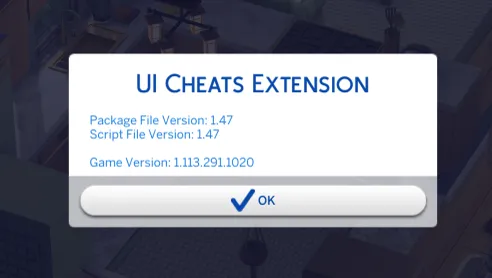
You can check the mod version number in-game by right clicking the notebook icon (next to the phone icon) or entering ui_cheats.mod_version in the cheat console while in Live mode.
Conflicts
This mod only conflicts with other UI mods that override the same resources. It does not conflict with other types of mods such as script mods and tuning mods.
When you indeed have a conflicting UI mod, what happens is that the game will read what's in the first mod and then ignore what's in the second mod. This usually just means the second mod will not function correctly. Unrelated game issues are unlikely caused by a conflict.
Installation
To install, simply extract the zip file and place both the package file and the script file in your mods folder.
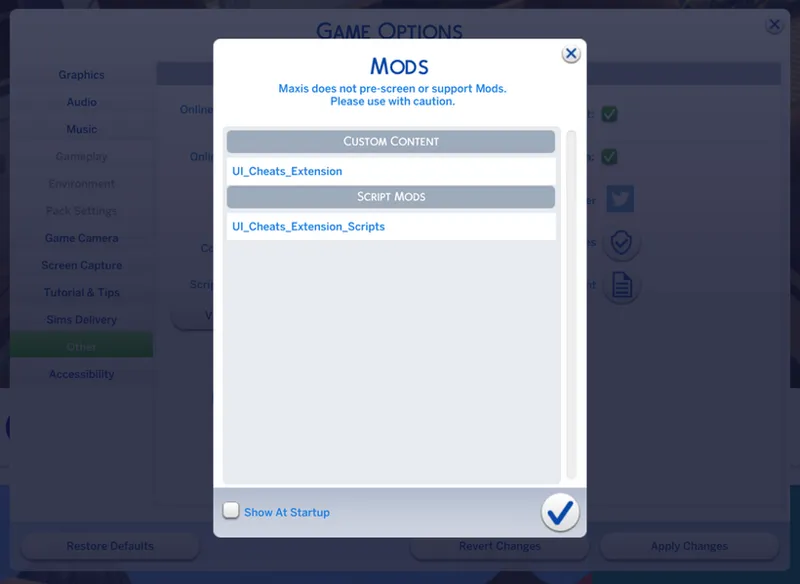
When installed correctly, the package file will show up under Custom Content and the script file will show up under Script Mods.
If some cheat dialogs do pop up but nothing happens after entering a value, it means the package file is installed correctly but the script file isn't. Make sure the script file is installed no more than one subfolder level deep and "Script Mods Allowed" is toggled on in the options menu.
Comments (641)
suspicious download blocked ?
i believe this ui mod is broken after yesterdays update
Broken how? Mine is running like normal
I use UI cheats all the time but haven't used it for wants in a long time. Am I remembering it wrong...didn't we used to be able to right click on a want and have options to either complete it or re-roll it? All that happens if I right or left click it just completes it.
this has been happening to me as well! I thought I was misremembering how it worked
I just got a Better exception that Ui mods is not working
Hey, your mods are awesome, and you're doing wonderfully. Just wanted to give a heads-up about the freelancer careers since the 8/26/26 and 8/27/26 updates. I'm not 100% sure if it's your UI Cheats mod, but Google says it's usually a UI issue or a UI mod that can prevent the gigs from showing up on the gig menu. I can join the freelancer career and pick my trade, but when I go to pick a gig, either from the career tab or the career app on the phone, it is just blank. This started after the update that made you update your UI Cheat Extension mod. I know you're all doing your best, so it's all good, but I wanted to let you know in case anyone else is having the same issue. I have other mods, but none that affect the UI except this one. Thank you so much. Be well.
i had to pay to comment that the latest update still has the issue of being unable to pin wants
Hey. Pinning wants definitely works now in my game w/ the latest version of the mod. Do you have other UI mods? The fix could be blocked if you have conflicting UI mods. Try testing it again with only this mod in your mods folder.
Thank you for another quick update!!
Hi, I'm noticing an issue where I can't pin any wants or fears they just get removed when I try to pin them.
Thank you for letting me know! I've updated the mod to fix this issue.
Thank you!!
Ty soooooo much!!! 😍😍😍😍
Thanks !!! For all you do !
Thank You for being you and doing what you do.
Hi UI cheats is causing exception when the game loads. Game is fine after, and very playable. But just a heads up.
Yeah I'm seeing an issue as well after loading into the main menu. I'll update it soon!
SWEET!!!!!!!!!!!! TY TY!!!!!!!!! ❤️❤️❤️❤️❤️
Hi do you have a update planned for the newest update cause your mod stopped working even in a clean save with no other mods? Can you help please? Is there a work around? Is anyone else having an issue?
Awesome work, thank you :)
I’m having an issue where I can’t add or remove sentiments. I’ve started a new file to test it. I have the update from 7/25. --- still having issues with the 1.57V.
Hey! The sentiment cheat very much still works. If no cheat dialogue box pops up after right clicking sentiments, then you may have a conflicting UI mod that also modifies the sim profile panel. If the cheat dialogue box pops up but the cheat does nothing, then the script file may not be installed correctly.
Zip file does not work
I don't think he see's these
Let me specify that: I get a zip folder and another file that has the exact same name but is not zip folder and has the word 'part' at the end.
Somehow the download seems to be broken for me? Anybody else? I get a zip I can't unpack...
hey, thank you for everything you do, this is such an amazing mod. i just have a teeeeensy suggestion that maybe add a section for the teen character traits(compassionate, responsible, etc.)? a quick click for all positive, negative or random selection, possibly. I just spend a lot of time doing this manually and have to periodically check that I got all 5 lmao
the ui cheats needs an update cause it not working on my game we i took it out it started working my version is 124.73 and i really like your mod soo much
ooh nice add on. thanks for the update as always.
Thank you
THANK YOU! !!!!
Ty ty ty!!!!!!!!!!! 😍😍😍😍😍😍
This appears to be broken for me as well. I was not able to download anything on Marketplace, but as soon as I removed this mod from my mods folder it worked again.
Is it still safe to use?
This mod appears to be broken for me as well. I have Twisted Mexi's Better Exceptions and it flagged it for me last night, right before I attempted to browse the Marketplace, and was unable to click on anything.
This appears to have been broken by the latest (1.126) patch.
Did this mod break during the update?
Are you going to update the mod soon? Scarlet's Realm has marked it as broken. I don't want to play without UI Cheats. Best greetings from germany
Hi! An update is not being worked as no issue has been identified. If you believe the mod is broken, let me know exactly what the issue is and whether you've tested that it indeed only occurs when you have this mod installed.
I love this mod but there is UI cheat extension preventing the filter expansion button in CAS. I cannot select packs, colors etc. And this is what was listed on the report. I am mobility challenged and rely on this a lot expesially on painful days. tnx!
Hey. This issue is not caused by this mod. If you use More Columns in CAS, make sure to update that as it indeed causes this issue if outdated.
Bonjour fonctionne t'il avec la dernière mise à jour ? svp merci pour votre réponse super travail .
Hi, first of all thank you so much for this mod, it is just perfect. However, I'm having a problem with this mod when I access my library. It is blocking the game from loading the interface of my tray files so I can place, for example, a lot in a terrain. Do you know what I can do about it? When I enter the game and click on some lots it stars showing the interface where I see the details and access the button to place the lot, but at some point the Better Exceptions notifies me that it is creating an error and although the game doesn't crash, what happens is the I click on the image of the lot in my library and the interface with the lot details simply doesn't open inspite of me clicking it. Therefore I can't place lots or sims without closing the game, clearing the cache and reloading, and yet the error keeps happening.
Thank you for the update!!!
A million thank yous :)
Hi, where can I find older versions of the mod? Specifically, I need v1.50
THANK YOU !!!!!!!!!!!
thank youu
I appreciate the time and effort you put in to keeping up with the dev's shenanigans. Thanks much!
Thanks so much for the update! Your mod makes my game so much more enjoyable.
Thank you
thank you for the update!! :)
Thank you! Love the MOD makers! You guys make it worth playing!
Yay! Thank you!
Thank you so much! Your work is so much needed and appreciated!
thanks for the update
Thank you again. You help make this game playable.
TY TY TY!!!!!!!!!!!! 😍😍😍😍😍
Thanks bro
Thank you
i think the mod is broken after recent update
Not sure if you are aware but this mod is breaking the Marketplace after 06/30/26 update. It folds the images on top of each other and there is no choice to purchase or even get the free drops. I had to take it out, get the weeks drops and then readd it. I can't live without this mod so I did but....
When Will this mod be updated?
What’s the issue people are having ? I’m still playing no issue .
lag
When is the update :((( Its no fun without playing this mod
I'm disappointed to say that the UI cheats is crippling my marketplace and I need this mod it is my literally sims 4 life
Hi! Thank you for letting me know. I'm seeing the marketplace issue in my game as well w/ this mod installed. I'll update the mod soon!
it's still broken
Mine is lagging the game. I took out the mod and it fixed the issue, so I know it’s UI cheats.
I would like to say I’ve played with no problems but what i assume are basics like life and career improvements cheats
Anyone having issues with ui cheats after update?
Yea I'm having issues as well with ui cheats
Will today's game update require a mod update?
Hi! I absolutely love your mods. However, I was wondering if you would possibly consider updating the Longer Parties & More Guests mod?
Hi! I keep having to replace this mod daily with a new download since my BetterExceptions UI mod tells me the mod is broken every time i open the game :(
Sorry, but is the mod's "open profile" feature working correctly? Because it isn't working in my game. I'm asking because it might be getting overridden by another mod
Unfortunately, my cheats do not seem to be working as well lately :( I can't do anything from menus or profiles like I used to. Not sure whether UI Cheats or MCCC but there's a lot I could do until the last few days. I am still going thru my multitude of mods to see if I recently created some sort of conflict but I had to start over completely this week due to a major corruption to my save. So I'm not sure what's going on. I just cannot use any menu functions to cheat as I could before the corruption. I've deleted and reinstalled all major script mods. Made sure everything is up to date. This is the only mod that hasn't had an update this year yet. I'm hoping you will do so soon! Thank you for all you do. *** I was just trying to do the modifyrelationship manually through the cheats and it says, "Invalid value for amount: 'ltr_friendship_main' (could not convert string to float: 'ltr_friendship_main')" No matter what amount from -100-100 I put in. I've tried 4 times and that error pops up in game. So it seems that I cannot modify my relationships in any way at the moment :( The only what I can cheat needs is through the mailbox too at this time :(
I can't use the mod functions in profiles either. I used them a lot to add new relationship dynamics and adjust satisfaction levels, but aside from that, the mod works perfectly fine for me. If you figure out what happened, let me know
Hi, is there a way to get the v1.53 version please? I haven't updated my game and i can't get this mod to work at all. Thank you!
Hey! This link should give you v1.53: https://www.patreon.com/file?h=26240068&m=631250385
Thank you so so much for being the amazing modder that you are! You make this game enjoyable. This game was literally just updated yesterday and BAM this mod is already updated and available!!! You are literally amazing, don't let anyone tell you different
does this work for the latest 1.124.55.1030 version of the game? Update (I tested it myself): The v1.55 does indeed work for this version of the game as well (for now at least - there's no black menu screen)
You are the master!!!!!!!!!!!!!!!!! 😍😍😍😍😍
Thank you for all you do! It does not go unnoticed!
Thank you!
Thank you !
Thank you very much for such a quick update!! I really love this mod! A top favorite 😍!
I believe it's currently bugged due to the new rework update, I could be wrong, but I did test it like 3-4 times by taking other mods out and reupdating.
It is this. I tested all my other mods; this is the culprit
Hi, this needs updating for the latest patch update: May 12th, 2026 Release. The event bars is showing that strange glitch blur.
I think this mod needs to be updated again because of the new update today (5/12/26)
BE keeps flagging this mod and BBB everytime I try to play as needing an update...ONLY those 2 out of the many mods I have. Please tell me an update is in the works. Can't stand to play without this mod
Hi! For UI exceptions, BE is just listing all UI mods you've installed, not that it's saying these mods need an update. UI exceptions can also be caused by non-UI mods and EA bugs, so it does not necessarily mean any of the listed UI mods is causing the issue (and you can get UI exceptions even if you don't have any mods). If you keep getting the same UI exception every time you play, you have to manually test if it's caused by a mod you have.
Is anyone else receiving a UI last exception?
I am
Thank you so much!!
♥♥♥♥
thank you!!!
thank youuuuuu
Thank you so much!
you're the best modder ever, this is literally the only script mod i use, thanks!
thank you so much for updating this <3
i dont think ui cheats is working
redownload. they updated.
Thank youuu omg you work so fast!!!
Thank you!!
Thank you for always being on top of things!
a million thank yous weerbesu :)
One mod i really need thank you so much!
I cant live without this mod tysm!!1
Thank youuuu
omgg thankk yuuu
thank you so so much!!! :-)
Works fine for me, thank you <3
snad to půjde...
mine goes blank at the menu screen, I dont have any other clashing mods and I've tried a lot to fix it myself, please help!
I'm having the same problem
Thank you!!!
thanks!!!
Thank youuuuuuuu!
thanks so much for the update! can't stand to play without this mod!
Thank you for the quick update!!
thank you so much
Awesome, and Thanks for update
Thank you!!!
Thank you ♥
thank you as always for the update. :)
Thanks for the update!
Thank you sir! Awesome work as always!
Thanks for ypu mods. Are there any news about the bew patch, your mod was said to be broken
Hi! This mod is causing an issue in the Marketplace, but otherwise fine to use. I'll update the mod to fix it soon!
Does anyone know what the error message Cannot create property mbIsLoading on global means? I'm getting that error message in game and also marketplace is not loading (which is fine with me) but it does appear something may be off with the latest version?
Your game is ok, the mod is not compatible with recent update. Best is to remove from game until creator updates it. I always play offline and do not update until my fav mods are good to go. He is most likely already aware but has other things going on in life. He is always extremely responsive with all updates and gets them to us as quick as possible whenever needed.
UI Cheats is causing game to crash in the Marketplace
Can you update the mod it is broken thanks
This mod will cause trouble with my game when I try to interact with the marketplace. To buy there I have to first remove this mod then everything's fine...I hate to play without this mod tho so when I'm done in marketplace I put the mod back. It needs an update to be compatible with marketplace
Hi, how you doing? Could you please send me the 1.52 version? This currently version is not working for me. Thanks
Apparently there's a conflict with the market area after the 4/16 update. I've not had a reason to click on the market area so I couldn't say. Mod still works for my main in-game cheating purposes though without issues. Just the same, playing my Mayhem save til all the mods are up updated or cleared. :)
BE has tagged this mod as problematic after the update
I'm getting a BE error and most of my sims are having transparent faces or body.
maybe it has something to do with you cc #
I'm getting a BE error with this and the UI icons are currently messed up as well as my Sim's phone when it was litterly fine and now BE errors Wednesday.
My game is updated I only have MCcc and UI_Cheats UI does almost nothing something is still wrong
Is it possible to get the previous update file for 1.21? I can't currently update my game and the newest update for this mod causes the black screen for me, as they are incompatible versions.
I am also having the same issue. I have the 1.21 version too. Would love to be able to use this mod if I could :(
hi weerbesu! the click to refill needs hasn't been working on my game since the update, is this a known issue?
Hi! It very much still works in my game. If most other cheats of this mod work fine and only the needs cheat doesn't work, then you may have a conflicting UI mod. If none of this mod's cheats work, check whether the mod is correctly installed.
this mod is not working right, a lot of things I can't do with it anymore
Hi Weerbesu - When are you going to update this? I haven't updated my game since the February update, and I'm going to wait on the fix for this mod, seeing as other people are having problems with it after the March 23 patch.
Hi! This mod still works and no update is needed.
UI is not working properly
Are you expecting to have to update after today's error fix?
Is anybody else having this problem? My UI cheats is not working man I hope you fix the problem soon. I love this mod. I need it back in my game like ASAP.
I’m unable to download this? Whenever i load the page it says it takes too long to respond and It doesn’t prompt the download. this has never happened before ): ugh my one and only necessary mod lol
me to. been trying with patreon support for 4 days.
Hi there, I have just downloading your UI cheats mods, have installed in. but when I load in to the game. it is giving me a black screen. I have removed the old versions of the mod before installing the new version.. is there any advice you can give on how to fix this?
Having the same, any idea if there is a way around it pls?
Wow, that fast! Thank you so much. :)
Thank you so much, that was so fast! This mod is my fave for sure
Thank you so very much for always updating ui cheats so quickly. Thank you :)
Dang dude that was FAST!! Thank you so much!
Thank you for updating so fast.
hey! the ui cheats aren't working with the new sims update. do you have a timeframe to which it will be updated? thank you ,love your work!
Hi! I'm working on an update right now. Note that there is currently a base game issue that causes many mods, including this one, to not load. EA is fixing it soon, and I'll update this mod after that. For anyone who's updated their game, make sure you've removed this mod from your mods folder and wait for an update. The old version of this mod will cause a black main menu screen if left in once EA fixes mods not loading.
Also the UI is affected from the little update for the marketplace.
yes its no longer working for me
Hi! I really love your mods! I was wondering if you were still planning on updating the longer parties more guests mod?
Hate to say it, it' still broken. I did a fresh install, updated every single one of my addons, and put them in one at a time. When I got to this one, I tried to enter CAS and I get a blank screen except for the icons in the top right, and none of those are clickable. Again, fresh install of game, mods, added them in one by one, tested functionality for all of them. Only this one broke my game.
Dang, that sucks!! I was really looking forward to using this mod just now when I went to open my game. I'm glad I listened to my instincts and checked this mod's comments, so thank you so much for saving me hours and hours of hassle with all my mods. Man, I'm bummed out now!
Hi! Thanks for all that you do. Im also having an issue with UI cheats mod. Currently its the only mod in my game and its not working. I cant set needs or anything
Hey update: I checked in my game options and if you don't have it checked off to allow script mods it wont work. I thought to look and make sure I enabled custom content and mods but underneath for script mods was not checked. Once I checked it and restarted the game I was able to set needs and more. Hope this helps anyone that had the same issue.
Hi, for some reason ui cheats doesn't work like I used to use it. Before I could click on the icon that shows the sims needs and simultaneously max each needs, but it's not allowing me and I have to individually drag each bar. I'm also not able to add new skills by the same method and can only cheat the level of the skills etc. I was also hoping for a way to cheat alliance, points and some other things, etc in the new dlc. I do have the latest update of this mod.
Hi! Both these cheats still work in my game. If they are the only cheats that don't work, you may have a conflicting UI mod that also overrides that area of UI.
Hi, would it be possible to request setting luck in the UI? stats.set_stat statistic_LuckSys_Luck ### is the cheat one uses to change luck, the number can go from -100 to 100.
Yeah this is definitely something I can add!
Hi I joined to try and get some help. Your update worked fine for me until this new patch better exceptions is pulling UI and more columns and color slider as issues. With them in my game it causes visual issues and family issues along with infinite loading screen. When i remove them my game is working fine. Any chance you can shine some light on what I could do?
Thanks for all of your hard work as well just wanted to see whats happening i love your mods!!
hey love all the work you do and appreciate you, not trying to rush you, but do you happen to have a timeframe as to when this will be updated?
Hi! The mod works for the current version of the game. No update is needed
Need bar isn't working, the daily pop ups are blurry and it sometimes makes my loading screen stall.
Hey so just came across something that doesn't work as intended. My sims' work, school, etc goals cannot be ticked off like UI cheats intends.
My game is not working with this version of UI cheats extension. And yes i have checked all my other mods and i only had a problem when i had UI cheats extension in my mods folder. I really enjoy using this mod, so i really hope it will work again in the future. I use this mod so much so it is sad that it works for someone and not everyone. But keep up the good work.
hey the only thing thats working is me changing the need bar, nothing else is working . do you know what the problem might be ?
Thank you for being so fast! Almost as fast as I went into offline mode when it started to update the other day lol
Thanks for the quick update. You're the best!
YTB , thank you
Thank you so much for EVERYTHING !!! <3
Thank you !
Thank you!!!!!!
Thank You!!
Thank you
thank you so much!
I'm so glad I waited, ty ty ty!!!!!!!!!!!!!!!!! 😍😍😍😍
YOU ARE AMAZING...thank you!!!!!
Thank you so much for weerbesu for fixing this mod the same day as the patch! I appreciate you so much!
my ui is messed up in the game...I'm only playing 1 sim but there are 4 greyed out (sims) slots instead of just 1 plus my sims pic in the panel is greyed out.
hi weeb does this mod need to be updated? it's my favorite mod please keep it up to date and thank you for making it :)
Hi! This mod works fine for the current version of the game and no update is needed. EA is releasing a game update in a few days and this mod will be updated for it.
Hey, the mod doesn't work after the latest January update. It keeps crashing to the desktop without giving any error or last exception messages
Mine, gives on but no info as to why other one exep about my sim getting a new friend but does not crash til later then no report as to why.
Hello, I'm writing because I'm having a problem with the mod. It used to work, but I recently changed computers (MacBook Pro 2017) and now it doesn't work. I've installed the correct version, I don't have any other mods installed, the mod is recognized, and it appears at the start of the game. But when I try to use it, nothing happens.
Bonjour, je me permets de vous ecrire, car je rencontre un problème avec le mod. Avant il fonctionnait mais entre temps j’ai changé d’ordinateur (MacBook pro 2017) et il ne fonctionne plus. Pourtant j’ai installé la bonne version, j’ai aucun autre mod installé, il reconnaît bien le mod, il safffiche en début de parti. Mais quand je veux l’utiliser rien ne se passe.
Hope you have a Happy, Healthy and Safe New Year!
is there a place we can send you a BE error file? I do not see any residual errors, but, BE will load this mod every time my sims travel. Thank you
This is the only mod i use, everything works fine but when i make a sim and specifically pick their "turn on" none of the buttons appear. I can still click them but it doesn't show the actual button. Mostly just wanted to bring it to your attention, This mod helps my Quadriplegic mother in law play the sims super easy because she cannot use a keyboard. So thank you from us <3
Am I the only one who often gets a message saying that the cheats extension is causing problems? This mainly occurs with certain Sims layouts that have a bug. Certain columns are distorted or letters are not visible. The mod that checks for error messages repeatedly indicates that it is the cheats extension that is causing problems. I have the latest version..
When i install the latest version i cannot click on anything. I took it how now i can click and interact. i've been playing with mods for a while now so im sure this mod isnt working for me. Please fix it i cannot play without this mod.
New to the site here, where do i go to download the files? I'm new to downloading mods so be kind please.
Above the comments, so at the bottom of the entire text, you will find the link. 😉
Thank you for such a quick update!
Thank you for the fast update!!!
Thank you so much for really fast update. Greetings from germany.
Thank you
Dang. I didn't figure you'd have this one ready to go until tomorrow. Impressive. :)
Thank you so very much :)
Thanks so much for the quick update!
Awesome awesome, ty so much!!!
Hi, I paid $2 for the membership because I cannot find any other way to communicate with you. Six days ago, in the comments, Alana stated that her game is corrupted since the update. You didn’t respond. There are almost 300 likes. There are dozens of UI issues. Icons don’t look right in various places and things like booking a getaway for example is impossible until you remove this mod. There are dozens and dozens of issues that I would be happy to screenshot. I kept waiting for the update but from what you said to the last commenter it sounds like one is not coming and I needed to say something for those of us that have played the game after the update and are experiencing dozens of issues. I love your mod, it makes this game fun, however, there are issues since the last update and it needs to fixed. I pulled all of my other mods and cc out of the game and only had UI cheats and all issues are still present. Thank you for your time and attention to correcting this issue.
Hey. I test getaways and it indeed did not work with this mod installed. Thank you for the report and I'll update this mod soon! And I apologize if you feel like I haven't been responding to people. I read all comments but for reports that lack sufficient, specific info I may not respond. For contacting me you can also message me on MTS. They email me when I get a message so I never miss these.
Do we know if this most recent patch broke this amazing mod of yours? I've looked on here & Scarlet's realm & am not finding an actual answer. I apologize if I've just missed it somewhere. Hope you are doing well, and thank you for all you do for our games!
Hi! This mod still works with the latest game version and I have not noticed an issue. If you experience a specific issue & have tested that it indeed only occurs with this mod installed, you can let me know!
The UI cheat keeps corrupting my game - please help! I can't not play with this mod
So my sim in the Romance Consultant Career is stuck at level 8. Every time I try to use the mod to promote her (even when ui cheats is the only mod I have), the whole game stops working. Any idea how to fix this?
have you tried to do this with the MCC Mod - that's what I have had to do
Ever since the newest expansion, this mod hasn't worked. The only mod files in my "Mods" folder are the UI Cheats Script and Package files, and XML Injector Script and Package files - all downloaded from their most recent source. It looks like XML Injector hasn't been updated since September 22nd, though. This is the same folder I've put my Sims 4 mods into for years, so nothing has changed. I made sure all other mods were removed from CurseForge and this "Mods" folder.
Same for me :(
Hi. Just became a member to thank you for this amazing mod that we use a LOT, and to humbly beg for a new feature related to the newest pack Adventure Awaits, which is ruining our Super Sims Challenge and frustrating us to not end. The formative moments has worked incredibly well, and we have now completed over 30 of them, but now the game will not suggest new challenges for our two super sim children to do and complete to get the reward traits. We can't find guides to tell us what items to interact with to kickstart the challenges, and we can not get the children to come up with the ideas on their own, so we REALLY would love if the UI cheat could be used to open up the hidden list, and make it possible for us to choose the challenges we are still missing. We tried removing all mods, repairing the game, and searched the internet, and we still have no solution. If this feature is already in the works, then we apologize for the time spend on this, and will eagerly await the next update. We simply have no idea how to get them to teens when we can't complete the childhood stage to our satisfaction at this point. Much love and gratitude from a couple of Danish simmers. Dag dag.
Hi, I love this mod. But I am wondering if I have an EA bug or one from here. So question is anyone having an issue with random adult sims in the household suddenly becoming neighbors?
Hey! The game assigning a household sim as a neighbor is a gameplay issue. This mod is a UI mod and it cannot cause any gameplay issue from having it installed. Likely to be an EA bug as there are people who don't use any mods that report this issue on EA forums.
Hello im having the same issues with this mod where my icons are also wrong al across the bottom of the screen and when ive removed it, its gone back to normal. my game is updated, so im not really sre what to do now
is this still happening?
I'm having issues with this mod, it's the only mod I use in my game, but when I install it, the UI of the game looks broken, the mod works fine, but the icons are wrong all along the bottom of my screen, I've turned off mods, completely deleted it, ran the game without it, reinstalled it, and turned it back on; all multiple times, and I still get this error. Can anyone help me. I know it's in the correct folder because it worked just fine before the last update.
Hey there. For such UI issues it just means you have UI mods or UI texture mods that aren't made for your game version. If this is the only mod you have, then either you have an outdated copy of this mod, or your game itself is outdated.
Thank you for always providing super fast updates.
Thank you so much!
Thank you! this is my favorite mode!
Thank you! I appreciate all your hard work!
A million thank yous :)
Thank you so much! I appreciate everything you do.
So my daughters got me back into the Sims, so I needed to go back to the mods. You were always the one mod I used. They had some other suggestions, but realistically do I even need things like mc command center or whatever it's called if I am using this?
tysm <3
Awesome, you're the BOSS!!!!!! 😍
Thank you
You're amazingggg!!!
Thank you so much!
Thank you so much for the quick fix!
I think this mod just broke with the new update today. 9-18-25
Yes, it is.
Hey there! The UI just broke for me today. My sim is in the Naturopath career and when you go to work, you get a pop up that has 4 different options to choose from, go to work, work from home, take pto, and something else. But just today it started only showing one option that just says "ok"! It was not doing this yesterday. Just wanted to let you know!
This mod isn't working for me. I removed it and my game loaded my household. I took out all script mods and put it back, it stopped loading my households. Is there an update coming?
Hi. This mod is not capable of causing this issue. Test it again with only this mod in your mods folder.
this doesn't work for me. the only other mod i had was Mc command center and i got rid of mc command center and it still doesn't work
Hi! What do you mean by “doesn’t work”? If none of this mod’s cheats are working and you have no other mods installed, then either it’s not installed correctly or you’re not using the cheats correctly.
I deleted all mods and redownloaded this however when I load Sims 4 - it says there is a UI Cheats Script. I am scared to load any worlds incase it breaks things again
Yeah if you put this mod back in, then the script file would show up under script mods in the list of mods you've installed. This mod's script file does not modify the game's existing code in any way, and it's not capable of causing the issue of kicking you back to the world screen from having it in your mods folder.
Every time I try to load into my household I get kick out to the worlds when I have this mod in my folder.
Hi. Check your gameplay mods. Many script mods are causing it after the new game update. This mod is a UI mod and it does not cause that issue.
Am I able to download 1.47 by chance?
Hi! Will you be updating longer parties more guests? Thank you for all that you do with your mods. They are a game changer!
Yeah I've just updated that mod
I've been having issues with the game loading past worlds and getting stuck in CAS. I've updated my other mods, deleted TOOL, but still continued to have issues. I deleted this mod and the issues resolved. Can we please get an update soon? This mod is a necessity
Hey! Test it again with only this mod in your mods folder. When this mod breaks it generally cause issues with live mode UI. Neither issues you described are something this mod can typically cause.
since today's update the UI is messed up ...also, now my saves won't load
I think its another Mod? In my Game the UI Cheat Mod works very well.
Hi, I keep getting an error message for this and the columns mod. Is there something I need to check or will there be an update?
Hey, I absolutely love this mod - it's so invaluable to my gameplay! One feature that I used to use a lot but haven't been able to for a little while is this one: "Right click on the age progress bar to add/subtract the number of days that have passed at the current age stage or the total number of days the Sim has lived.." I used to turn aging on temporarily and then right click the bar and be able to edit the days but I can no longer do that. Has the feature been removed?
it says when I start the game that the mod and script are in use. but it doesn't work..
UP It works fine, just that in the old version you had to click on your Sims to add trats via the menu, now you just have to right-click in the trait menu to add them.
I want to thank you for all you do to make this game fun and playable. I refuse to play it with out your mode. That said it is the only mod I use. After the update it isn't working.
my game worked perfectly for three days after the new xpack then bam didnt work and still doesnt
Hi! I just wanted to say that I love this mod and really appreciate you keeping it up-to-date. I discovered a small issue today that I wanted to bring to your attention. My UI was broken while playing the Interior Decorator career—specifically, the client preference section under the work tab wasn’t showing up properly. After some testing, I found that removing your mod fixed the issue. So for now, I’m playing without the UI mod. If you’re able to look into this at some point, I’d be so grateful! And if this isn’t the best place to report bugs, please let me know—I wasn’t able to find a different reporting method. Thanks again for all your hard work!
Hi! I tested this and the client preference section works just fine w/ this mod installed. If it's broken for you then this specific client Sim may have certain preferences/traits that are broken. This is something that can be caused by gameplay mods that you have. Test this again with only UI Cheats in your mods folder and see if the client preference section works.
....So many mod breaking updates, over so many years... so many times i've come here thinking "I know its already updated, but i would understand if it's not" but you always come through (quickly) and i appreciate that so much, your mod does so much to make my game play enjoyable. Thank you so much, truly, for your ingenuity and your consistency. May your plumbob always be green!
You make this game playable man... thank you from the bottom of my heart!!! I have a movement disorder. So even typing this is difficult, but i want you to know that these disabled hands can still find joy in my favorite game of over 25 years... because of this mod, because of you..
agreed!
Thank you so much, happy to be a new member.
Hey, I'm trying to download the 1.49 zip file but the link doesn't work for me. Am I doing anything wrong?
Thank you so much for your Ui mod! I never play the Sims 4 without it!
My most loved mod! Thank you :)
Thank you so much!
Thank you
Thank you it was all I could ask for an update.
I've been using this mod for YEARS... Thank you for quickly updating it. I've become a member to pay back all the hard work you put into this. I think it's safe to say we all super appreciate what you do!
Ty :)
Wooo hoo, I couldn't play last night, it seems I'm addicted to this mod. Disable it, nah, I'll wait for the update
Thank you so much for a quick update! You've earned my money now, cheers!~
Yayyy, ty ty!!!! 😍💕
Thank you!!!! So excited to finally download and use this!!!!
Thank you so very much! I want you to know how much we all appreciate your hard work.
Anyone tell you recently how much YOU ROCK!!! Seriously though, thanks for all your hard work and diligence, You are awesome.
You are amazing! Well worth the subscription! Everyone who uses this mod should become a member!!!!!
Thank you for your comment. I just noticed I wasn't subscribed.
Hi Weerbesu! I understand that the recent update significantly affected UICheats and that it'll take a while to implement the necessary changes. Do you have a timeline for when you expect the update to be out? Just trying to set my expectations for how long I'm going to have to go back to playing Civ for. 😂 Thanks again for making such a useful and important mod.
Hi! This is now updated.
I know you're probably busy, but I'm having issues with UI screwing up my interface sections, making it unplayable.
Base game update has messed up every single mod. And its only been a couple of hours since the update. Give modders a couple of days.
Mod seems to have glitched the UI of the game due to the base game update. I suspect its due to the changes to the UI as described in the blog post. https://www.ea.com/games/the-sims/the-sims-4/news/update-7-1-2025
Hallöchen! I think the mod is glitching with Nature's Calling. My top left holidays/events panel had been broken but it was fine until Nature's Calling started. With Nature's Calling, the game loads as expected but as soon as I travel, both the UI and the mouse cursor disappear and I can't do anything other than quit the game using the ESC key. When I remove the mod, everything works as expected. Thank you so much for everything you do!!!!! <3 <3 <3
Hi! Nature's Calling was added to the game files in the May 27 game update and this mod was updated for it. Check and make sure you indeed have the latest version of the mod. I completed week 1 of Nature's Calling in my game without an issue with this mod installed.
Just wanted to thank you for this mod. It saved my save file.
I keep getting a BE saying that UI Cheats is broken. I currently have your recent updated one
BE often flags mods that are not broken sometimes, so if the creator has cleared it, and BE says its broken - trust the creator unless is actually breaking your game and the problem is replicated by only running the broken mod.
My top right panel is glitched out, the buttons are all wrong and showing incorrect icons, though they still work functionally fine.
Check your other UI mod or UI texture mods if the top right panel is glitched. This mod does not touch that area of UI as there aren't cheats associated with it.
The Top right panel is glitched out update: After removing and testing mods one by one TMEX is the issue on my end had to update i
Hi :). Does this work with cracked versions of Sims? I'm using the Anadius version. If anyone knows please let me know!
Hi! I use Anadius too and have not had any problems w/ it!
Thank you so much for always making sure your wonderful mods are updated for all of us so swiftly. Thank you :)
Thank you so much for fast Update. Greetings from Germany
Thank you for the quick update. I am Japanese and was very surprised to see the update when I woke up this morning. Translated by DeepL
You are a litteral wizard. I swear everytime someone goes "oh no, UI cheats is going to break" I am like "it is always updated within 48 hours or less" sure enough, before I even get home from work, you're on it. :)
Just updated the game & the first thing I noticed was when traveling to work & the tasks menu in the top left hand corner was a bit distorted. I'm unaware if anything else was affected. I wasn't in game long enough to check everything out (I didn't want to chance the game freezing like it had done before, so I exited quickly.)
I'll work on an update soon!
Hi. When I go to high school with my teen sims the UI is weird. I see a Llama
That is a known bug with the game. https://forums.ea.com/idea/the-sims-4-bug-reports-en/hsy-issues-with-active-highschool-ui-showing-as-holiday-ui/12137925?before=MjUuM3wyLjF8aXwxMHwzOToxfGludCwxMjEzODA3NCwxMjEzODk5OA
Hello! I see this as a past fix: Fixed that cheating aspiration goals using this mod would not mark them as complete. This is currently happening for me; I'm getting the satisfaction points but the aspiration is still active. I re-downloaded the mod two weeks ago, so it should be up to date. Wondering if it's just me.
Is The Mod Broken
Hi! This mod still works fine and I'm not aware of any issues. I received reports about a UI exception with the new high school day holiday UI introduced in the latest patch, but based on my testing it appears to be an EA bug and you get the same UI exception even after removing this mod. If you have other issues, you can let me know.
Good morning. I have checked in my game - after purchasing the latest "Business and hobbies" EP, I'm not able to divide the rental apartment with UI cheat in the mod file. Please check if anything wrong. Thank you!
have the same problem
Hello:) Sorry to disturb your Sunday. I got a Better Exceptions UI Exception Report for the UI cheat mod.
Hey there! If you have the report listing this mod, you can upload it somewhere and link it here for me to take a look
So, the UI for right-clicking to cheat the eco lot and eco neighborhood state isn't working for me anymore. If I turn the gameplay notion on, the time disappears, and I'm not able to change the state of the eco lot or neighborhood.
Hi , why the mod doesnt appear in my game ? it work on my macbook but not on my pc
Will there be an update soon for small business features ?
Hi there, so I just installed the mod for ui cheats and it seems it doesn't work for the needs etc like bladder (i right clicked on it and entered the value) but it doesn't affect my sim, do you know what kind of problem that I encounter?
For the needs panel, you only use the left-click. You can also determine how much of the bar you want to be filled based on where you click it.
Mine stop working today keep messing up my game
Had to uninstall. I was unable to pull up small business category, inventory, or the needs section. Once I uninstalled the mod, the panel became fully functional. I have the 2/25 version.
Hi! You should not experience these UI issues from this mod, assuming both the mod and your game itself are up-to-date. Test it again with only this mod in your mods folder, and verify the mod version number in-game (right click the notebook icon or enter ui_cheats.mod_version in the cheat console while in live mode).
Thank you for your prompt updates. By the way, the cheats are not enabled in Small Business. Will there be an update soon?
Hey. New cheats will be added the next time this mod needs an update. For now I'd just use EA cheats or other mods for small businesses.
Hello! Love this mod, but something about it is making it so my sims can't interact with objects they otherwise would be able to. For example on a desk, the sim couldn't interact with the computer because of the lamp on the back right slot. It's also happening on a refrigerator that is otherwise unimpeded but shift slight to avoid a column overlap.
Hey there! This is a UI mod. It's not capable of causing the non-UI issues like the one you described.
Hi, I downloaded the latest version v1.47 and when adding skills not all skills are appearing, and when I do add them not all are being added. It does however let me set skill level once the skill is showing, but when I go to add them some are missing and those that aren't are not always adding the skill for me... I've had this issue over the last few versions and was hoping with each update it would be fixed. Am I doing something wrong? Cheers
Hey. This has something to do with the skills panel not showing a skill if it's level 1 with minimal progress. I'll look into fixing this in a future version of this mod.
The Mod wont work for me. I doesnt matter what im trying to do the cheat wont get executed. What can i do ?
Hey. If some cheat dialogs do pop up but nothing happens after entering a value, it means the package file is installed correctly but the script file isn't. If you don't even get any popups from this mod, then neither files are installed correctly, or you have a conflicting UI mod.
There is definitely an issue with this mod - possibly due to a conflict with a different mod that has not been updated. I have a lot of mods and CC and have not started the 50/50 process yet. Tmex's TOOL is catastrophic, and I do not use it. It causes issues every time there is a patch. I do use Better build buy and a few other mods of his. I am still having an issue with the display of photos of sims. There is a gray box behind the photo. The categories for relationships are also gray boxes. I know what is what, and the popup descriptions still function. but the UI photo is just a gray box.
This and the multiple column in CAS are the the only UI mods I use. BE analysis just says unknown issue.
I love this so much. Thank you:))))
there's a small UI issue under the small business panel, the section where you select whether you want caregivers to stay with children, animals or not. the pictures indicating what each option is are grey and the words are also missing. I did some trouble shooting and I'm pretty sure it is this mod although I could be wrong. thank you for keeping this mod updated so regularly. <3
Hey there. Do you mean the supervised customer category when adding your target customers? I'm not seeing anything wrong with it. All icons, texts, and checkboxes show up just fine for me w/ this mod installed.
hun im sorry for being so dumb but how do you cheat the perk points for business
You can't not until mod has been updated with newest pack
your a angel
hi hun how can i cheat renown / perk points
hey, idk if its supposed to work like this but is there a way you can select the small business perks and cheat the level yet? Like how you can cheat the celebrity level
Give him time, we all know that he has a real life outside of the sims, but he always likes to surprise us with stuff like that!
Hi, good morning! Is this version ready for today's Expansion release?
Yeah! Only base game updates can break this mod.
Better Exceptions is saying this one is broken. Im having quite a few UI issues.
Hi! This mod can show up in BE exception reports even if it has nothing to do with the exception. You still need to manually test if the issues indeed only occur when you have this mod installed, confirm that both the mod and your game itself are up-to-date, and then you can let know what the specific issues are.
I'm currently having a problem where the UI for selecting sims to travel with an inviting them to parties, it's just grey squares.
Thank you so much!
thanks for the update!
Thank you!
Hey Im having issues when i run better exceptions? is there anything else that may be causing the issue because its saying the only UI cheat that is broken is this one.
Thanks so much for such a quick update!!
You ROCK!!!!
My hero with this fast update!!!!!
Thank you so much!
Thank you so much for fast update!
Thank you, you are amazing!
I'm seeing some visual issues with this mod, (aging bar is a different color, all the panel headers under simology aren't green like they normally are, skills doesn't show the progress bar, but i can still see level number that they're at) but nothing that's stopping me from using it as I normally do. I did see that other users are having other issues as well. I know you're doing all you can and we appreciate all your hard work ❤️🙏🏻
Just a heads up. UI Cheats is having some issues with the events menu. Thank you for all you do. I hope you'll have time soon to look into it and provide an update.
mod not med
Uh Oh...new update has messed up the med :(
i just tested my mods, and i actually think its a TMex mod that is messing it up. UI Cheats works fine for me! try some of your other mods and see if that fixes it!
Can you update this mod please, because the events UI is all wonky and coming back from the build mode makes the game UI invisible (the build mode become greyed out too). Here's the gifs showing the game and the files I have (removed every mod to test this out). https://imgur.com/a/ui-extensions-potential-problem-kii2xkG
Hey. Check if your game itself is actually up-to-date. This mod should not cause this if both the mod and your game are up-to-date.
I've used this mod for ages now, and for some reason (after replacing the older version with your most recent one from January 14th - v1.46) it no longer works! Both files are sitting right inside my Mods folder. I have no other mods or CC installed. Mods and Scripts are allowed in the Options Menu. Am I missing anything?
Hi. Which cheats did you try to use and they didn't work? If none of the cheats work and you don't even get any pop-ups when trying to use them, it is only explained by incorrect installation or having a conflicting UI mod. Check that both files indeed show up in the list of mods you've installed in the options menu.
I've been getting exceptions since the last update, and often get stuck on loading screens. The thing is, all my mods are up to date and are the same ones I've been using with this one for years without problems, and this is the only mod that ever shows up in any type of exception or error report. I really hate playing without it, and have taken to checking several times a day for an update
Hey! If you randomly get stuck on loading screens, it is much more likely to be a gameplay or save data issue, as opposed to a UI issue. When UI mods cause an issue, it would basically happen 100% of the time and can be easily reproduce. Also, this mod showing up in exception reports does not necessarily mean it caused the exception or it needs an update. If you have reports listing/mentioning this mod, you can upload them somewhere and send me the link. I can take a look.
Could this mod be made to allow us to remove an aspect of the rental agreement? Nothing allows the Landlord to remove a requirement/stipulation if one has been (even accidentally) violated. I can remove it if there's been no violation. I can add a stipulation at any time at all. But, I can't remove something if it's been violated. Any chance this mod could be used to do so? I mean, because it's a menu in the game, one like all the rest that this mod helps us cheat. Does that make sense?
I seriously can't play without this mod now, it makes such a difference to my game. Thank you!
100% agree. I hate CAS without it!
Is this mod still compatible with the new patch that came out on 28th? and thanks for all you do!!
same because my game has been crashing !!!!!
LOVE this mod! I hate playing without it!
Thank you! You are awesome
Thank You <3
Thank you for your work!
You're AMAZING!!
GOAT!!! THANKS
yessss, thank youuuuuuu <3
You are the bomb! Thank you as always for your wonderful work.
Thank you for always updating this mod so quickly.
Thank You
Thank you for your prompt response.
Thank you
Is this the updated one for the newest patch? I have been waiting for it to be announced so decided to come look. If there is 1 mod I can not live without in my game it is this one!
A million thank yous :)
I just happened to reload and saw the new update. Thank you for getting it out so quickly!
since the latest update (1/14/2025) this mod is causing issues with holiday menus. I've tested other mods but it went away once I removed this one. So I'm assumingit needs some updating.
I'm having this same issue! It's not too big of a dealbreaker for me but I'll be glad to have it fixed when he gets around to it.
ui cheats is not working for my game is there anew update for the new year
I'm sure he's working on it. Give him a few days, he'll have an updated version soon. He's really good about being speedy with them.
Boa Tarde, estou com um bug estranho ao colocar a versão mais recente do mod, sempre que eu entrar em construir/comprar e depois sair minha interface do usuário desaparece completamente e não consigo realizar mais nenhuma ação.
To all of you who improve our Sims and to my fellow Simmers I wish you a very Happy New Year. I hope it is a Healthy and Safe one. :)
Good morning. I have some difficulties with the Extention Pack. It seems that the game doesn't recognized it. The Scripts shows in the cc of the game but not the extension pack. I don't know what I did wrong. Can you help me?
Hii! I ran into a weird bug with this mod with the latest update. Whenever I entered build/buy and then left my UI dissappeared completely. Not sure where else to report bugs but I found that it was only this mod causing this issue. Hope you have a Happy New Year!
Wishing you and your Family the joys of the Holiday Season, Merry Christmas
wish I can use the ui cheat to do the season event faster and the life and death icons lol
Hey dear, I pray you're doing well! Just commenting to let ya know that for the last week I have been testing all my mods and CC to see what my game issues are, I keep getting the same red banner error that UI cheats extension is needing an update along with 4 other mods by a creator that I've already informed. As always, no rush, especially because life & health come first! God bless <3
Hey. If you got a BE UI exception report listing multiple mods, it likely just listed all UI mods you've installed. UI exceptions are something that can be caused by non-UI mods or even EA bugs, so it does not necessarily mean any of the mods listed needs an update. If you keep getting the same UI exception, more testing is needed on your part to determine if it's caused by a specific mod.
Thanks for always being so quick on the updates. Appreciate you!
Thank you!
thank you honey :-)
as always your awesome.
Thank you, so much, for this update. :)
Awesome. Thanks :)
You are SO fast! Literally the best!!
Yay!! u are the best! thank you!
Thank you so much :)
Thank you!!!! I appreciate you so much!!
Thank you so much
Ola Eu faço como foi orientado, mas, não aparecem os scripts. O que eu faço?
Thankyou! I appreciate your fast response and love your mods! 🤗
Thank you for your prompt response.
OMG! Total HERO tysm
Thank you so much for always updating so quickly!
so fast. i literally love you!
Thank you so much! You are literally the best.
That was so fast!! Thank you!!!!!!🥳🥳🥳🥳🥳
Hey. I don't know what I might be doing wrong, but my game updated today and now the UI cheats is not working possibly. I have tmex better exceptions and it keeps pulling up the the ui cheats mod is being flagged. I have done all the things you said about deleting past one and uploaded the new version. And making sure its not deep in a folder. Im fairly new to the game but haven't had issues until today. I also noticed some glitching in the top left corner of the game. So I just need some help. Thank you!
I agree with you. I'm having the same problem and can't seem to figure it out as well. I think both the UI mod and the more columns mod need to be updated as they're being flagged as major errors in the game
Just within the past day or two, I noticed the UI Cheats on Needs aren't working for me. A left-click on a needs bar has no effect. A right-click on the needs bar triggers a Set Motive input box for a number between -100 to 100, however, entering a number has no effect on the bar display. I removed MCC mods (thinking there might be a conflict), but that didn't change anything either. I also repaired the game, still not working. I'm going into withdrawal without my cheats!
Hey. This just means only the package file is installed correctly while the script file is not (either too many subfolder levels too deep or “Script Mods Allowed” is not toggled on in the options menu).
Hiii! So, I’ve found out that your mod is messing up my ui and I can’t see my sims traits. It wasn’t working until I removed your mod. Please fix it I can’t live without your mod!!!
And on top of that, (because I just put it back in) it tells me I need to relaunch
Hey Idk if this is happening for anyone else but when I right click the skills tab to give the sims max skills, I'll get a notification that the skill reached max level but will not actually pop up in the skills tab
hey dear, i LOVE your mods ;-) thank you for your work - with that, do I address a glitch here or on discord bc I hate playing without your mods?
Hi! Since the most recent update, the aspiration goals not turning gold upon completion bug has returned
Hey there. They turn gold without a problem in my game after cheating them. Does this issue happen to some aspirations of some Sims, or all aspirations? Also double check you indeed have the v1.44.1 version of the mod. You can enter ui_cheats.script_version in the cheat console and it would tell you which version you have.
Hi! I love this kiddo much but I recently downloaded it and thought it would work but it’s not working at all. It shows the mod is in my game but when I try to use it nothing happens. I’m not sure if this a bug for mac users but nothing I’ve done seems to work to make the mod work.
I meant mod not kiddo 😂
Hi there! Thank you so much for making this epic mod, ita made me game so much easier and more fun when stuck in a tight spot. When trying to click through an aspiration goal it doesn't turn gold and I can click it infinitely for points. This started after I bought L&D. Due to this I can't see which goals have been completed. Do you think this can be an easy fix? And do you have an eta on the next patch? No pressure! Just curious. Thanks for all you do, you're super appreciated!!! 💜
I am experiencing the same issue as Daedriyth.
Anyone know if this is still ok with today's patch or should I wait for an update? thanks
The mod still works! EA just fixed some small bugs
I've been having this UI problem since the life and death patch on the 24th, icons are all in the wrong place and the reaper rewards are showing up as a white box instead of the proper icon, I have screenshots if needed!
Hey! Having wrong icons/messed up looking UI means you still have outdated UI mods or UI texture mods in your mods folder.
Before the Nov 1 update I was able to cheat thru the soul journey...now i cannot...any idea why? Will you be able to cheat the journey on the next patch, maybe?? (pleeeease)
Yeah I had to remove it as it was causing the fame/reputation cheat to not work sometimes. I'll add a new cheat for Soul's Journey in a future version.
First of all a huge thank you for your UI cheats mod, I am using it all the time! Wanted to ask you if you are planning to add a cheat for the new feature of soul's journey from the latest pack
Thank you so much for your amazing work! I genuinely believe this mod is essential for playing the sims, and I really don't get those who manage to play without it :p
Does this current version work with the latest 31 October patch 1.110.294?
Yes!
You're amazing, thank you for all the work you do!
Good evening I think ui cheats are broken again I did the 50 /50 method to see what mods were causing my game to freeze during out my game and it were ui cheats causing my game to crash and freeze
Hey there. The mod cannot magically break on its own. Unless it’s a very specific freeze/crash that can be reproduced every time by performing certain steps in-game (for example, the game always freezes after opening a certain UI panel), the issue is likely caused by something else.
i'm having issues with the grim rewards it wont get past the planting seeds from week two and i've done that task million times yes i have mods in and tried updating or removing, also rn my sims are not eating right... 😦 also annoyed that they picked two plants in two different seasons.. and mentioned over on discord other players are having issues completing these tasks, is there any way that weerbesu or an modder, (twisted mexi or mccc) to help make a by-pass aka UI cheat tasks away, or some, type of bandage, like what 4 weeks and this is still an issue... modders save the games' bacon, even twisted mexi has found a way to remove another cart button may he or someone be are savouring grace 🙏 love your work! please !🥺❣️
Im having the same glitch
Thank you!
Hi there! I checked my game with just this mod and completed aspiration goals are not turning gold (though I am still getting the reward points for it), some sort of visual glitch?
Played without the mod and goals complete and turn gold normally so I'm sure it is this mod.
Thank you!
Thank You
Good lord, how I missed this mod the past 24 hours! Thank you so much for the update, and may your pillow be eternally cool on both sides!
it really does make you appreciate these amazing modders!
Thank you so much!!!!!
Thank you, thank you so very much :)
Thank you soo much for the quick update!! This mod is LIFE!!!
Wow thank you so much for updating so quickly!
Thank you for always updating so quickly!
Beyond excited you've fixed everything already! Thank you so much for all your hard work!
Thank you for the quick update!
I would like to join the crowd & saying THANK YOU!
I cannot play without this cheat! Thank you so much for updating so quickly!!
thank you so much!!! this was so exciting to see the update this morning! i love using this mod so much
Thank you so much for updating this so quickly. Out of all the mods I use I love this mod the most.
You are the best :-) Thank you so much for the speedy update!
Thank you!
Thank you! Thank you! Thank you! ❤️❤️❤️
Thank you so much for the update! You are very much appreciated!
Paying as of today because while waiting for the update I was totally lost without this extension. THANK YOU!! 🙏🏻 ❤️
pls update ui (i appreciate you sm)
UI_Cheats_Extension not working since the new update 10/22/24 I know your working on it:)
hello Im having trouble with your ui cheat mod and columns mod the game saying your mod break my game and freeze it I don't know if another mod is messing up but every time better exception pop up it saying your mods are broken
same
hello im on mac.. and when i put the folder into de mods folder, go into the game i have like nothing, the buttons to activated scripts is active but idk what to do please help mee😭
Hey. Most cheats of this mod are triggered through right clicking. This is known as secondary click on Mac. Make sure you’re using the cheats correctly according to how secondary click is configured in your system settings.
i wish there was away to by-pass stuck grims reward quests, and scencrios including modded/ the ones backed up be twisted Maxi. like I don't wanna fix all my mods/ remove whats part of my game just cuz gardening is buggy...thanks
UI cheats not working after installing new sims update. The whole bottom of my screen disappeared and when I removed UI it was fine. I need UI for my game tho 😭
Hey. The mod still works for me w/ the latest version of the game. Are you sure both the mod and your game itself are up-to-date? If so, test again w/ only this mod installed and see if the same issue occurs.
Having issues with the mod, not able to drag any cheats at all
Hi. If none of the cheats work, it’s only explained by either incorrect installation or having a conflicting UI mod.
Hi. I keep getting an error saying that UI cheats is broken from BE. I use more of your mods as well but this is the only one saying it has an issue. I ont think i use any other UI mods. Have you gotten any other reports?
Hey! UI exceptions are something that can be caused by non-UI mods or even EA bugs. Even if this is the only UI mod you have, it still does not necessarily mean the UI exception is caused by this mod. If you have the BE report you can upload it somewhere and link it here. I can take a look.
Hello, I got a Better Exception for UI cheat and More Columns (4). Does anyone know if there might be a mod/cc that could conflicts with the UI cheat and More Columns (4)? Thank for any help:)
Hey. UI exceptions are generally not caused by a conflict between two mods. It’s usually caused by outdated UI mods, but they could also be caused by non-UI mods or even EA bugs. If BE lists both of these mods in the same report, it means it didn’t identity a cause for the UI exception and just listed all UI mods you’ve installed. More testing would be needed for if it’s caused by a specific mod.
thank you!
Hi - I appear to be having the same issue with the above event option when setting up a date/hang-out from the relationship panel and choosing a specific sim. My latest version is 1.109.185.1030.
Hi! I have always loved your mod but recently I've had to delete the old version and reinstall the updated version but now I have noticed that the UI option that used to be available when you right-clicked on the sim, is no longer there nor accessible? Is that supposed to be normal? I did delete and reinstall it at least five times as well as repaired the sims game instelf so I'm not sure what the issue is.
Hey. Anything that involves clicking on a Sim is either from a different mod or EA’s debug cheat. This mod does not affect these cheats in any way.
Hello, I was having a problem with my Events (live mode) not showing up right and when I would travel or go into CAS my UI main control panel at the bottom of the screen was gone, I had to relog to get it back. I removed mods one by one and yours was next to last and then everything started to work again so I'm assuming it has to do with this UI mod. Just thought I'd let you know.
Hey there. UI issues like these are caused by a mismatch between the mod version and your game version. Either you still had an outdated version of this mod, or your game itself is outdated.
Never mind I got it to work. I had to delete the files and download them again. An old version must have been stuck.
I love this mod but for some reason the events are bugging out. I can't get the reaper event to appear at all. Can you help with this? I had to turn off the mod to get the reaper event to work.
Hi -- Love this mod! I'm playing around with age on my sandbox save and I've gotten a notice of impending death (old age) for my sim after I've reset her age. Her Simology bar is only 50% filled now, so she shouldn't be near death yet.
@weerbesu - As of today I've received 3 "prepare for impending death" game notices for sims that aren't near the end of their life. I've extended their life using the mod, but their "original" death date seems to trigger the notices anyway. The good news is that they don't die, they just keep on following the cheated life span.
this updated version seems not to be working at all I can't cheat my sims needs at all and my daughter who also uses it got a last exception for it as well
Hey! If none of the cheats work, it is only explained by either incorrect installation or having a conflicting UI mod. If you got a UI exception & you’re certain that it only occurs w/ this mod installed, then you can upload it somewhere & link it here for me to take a look.
Not totally sure why it's only the birthday event tab but it looks a little broken. Thank you for all your hard work! Everything else with the mod seems to be working fine
I hate to complain since this is such an awesome mod, but right-clicking on some of the tasks while your teen is at High School isn't working. Things like "study for exam," which EA has borked anyway.
Thank you for letting me know! I’ll fix this in the next version.
Thank you!
Thank you soooo much <333
So awesome! Thank you for updating so quickly! Playing without this is not near as fun!
Always the first place I come after a patch and you never disappoint. Thank you so much for all your work!
You are so awesome! Thank you for updating so quickly!
Thank you so much😍
Thank you for always doing quick updates!
Thank you for all you do. On the next update can you add in the goals for the dates from lovestruck? Some dates I don't want to do the work 😂
Well, especially if a task is Flirt but sim knows said date isn't interested in that way, means can't complete such parts of romance event tasks.
The mod is throwing a UI conflict. Has there been a recent update?
In case it helps, I was getting a ui last exception until I removed the Color Slider mod by ThePancake1. The package file that I was using was 'thepancake1-ColorSlidersUI-v2o-MoreColumnsCompatible-1.108.package'. Haven't had a conflict since.
You're doing the lords work. I wish I could buy you a beverage. You've saved my sanity COUNTLESS times. I literally cannot play without this mod anymore.
Do you have a team helping you with this mod? I am happy to help with updates etc if you need it!! :)
hi can you please make a post or at least reply to a comment to let people know if you're updating this mod at all? appreciate the fact you made it in the first place!
Hi! This mod currently does not need an update.
i'm having ui issues with this mod. ui cheats is the only ui mod i have in my game because i took more columns out to see if it was that mod, but i believe that its the ui cheats is what is causing the problem
UI cheats not letting me load into create a sim. No other mods installed beside the XML Injector and just cc and cc has been cleared by SimAssistant and Sim4Studio. Will UI Cheats receive another update?
In finally getting to play the new ep, I found that UI doesn't let you cheat the new date tasks from the cupid's corner date events. Can you update for the new ep?
Might it be possible to figure out how to use this to complete some of the Discovery Quests? Had a moment where one didn't realize for quite some time that no sim could get a job because all already had one or were in the "high school" job still
How can I download it ?
mine seems to be glitching out my whole game.. I have to keep logging off and back on. no mods or cc are conflicting with this mod. I have reinstalled this mod and the whole game and still does not want to work. seems to be everyone is having the same problem.
Hey. If you experience major UI issues (the entire interface becoming unresponsive and you have to force quit the game), it means you either still have outdated UI mods in your mods folder, or your game itself is outdated. This mod would only cause UI issues when there is a mismatch between the mod version and your game version.
This one still appears to be messed up. Doesn't work, in fact, it appears to have disabled getting into EA's menu system including the Options Menu for Saves.
Hey. If you can’t even open up the menu, it means you’re still UI experiencing issues from having outdated UI mods in your mods folder, or your game itself is outdated.
my cheats are just not working
Hi. If none of the cheats are working, it is only explained by the mod not being installed correctly, or having a conflicting UI mod.
Love this mod! However it's currently causing some glitch where I can't save my game when I am using it!
Hey. Do you get an error code during saving (indicating a gameplay issue; check if you have an LE generated), or is it that you can’t even open the menu to save (indicating a UI issue; check if you still have outdated UI mods, or your game itself is outdated)?
Hey. I'm not sure if this is the right place to pass on a suggestion - sorry if not. I was wondering if it is possible within the coding to be able to cheat the Power & Water surplus bars when you view the mailbox bills page. For those times when you don't have enough power to use the phone/computer to hire a nanny before the baby starves!
Thank you for the idea. It should be something that’s possible.
Hi, my ui cheats are still not working especially for the sims needs.. please help
Hii, quick q: are you planning to add a feature to the UI extension in the future that gives us the option to for example cheat with the relationship satisfaction in the new relationships menu thing?
Yeah it should be something that’s possible.
Firstly, thank you for updating so quickly after an ea update! I also have a question. I can't cheat when on one of the new dates and check of tasks. Since the update I can't do this for weddings and their task either. Any idea what this is causing? I was also wondering if you should be able to cheat by click on their new romantic relationship. Because I find myself trying to when my sims are misbehaving and do something that is not according to my plans haha.
I didn't realize how much I skip out on event tasks until this feature wasn't available for the new hangouts and dates. I didn't realize it wasn't working for the weddings too. It still seems fine with the other events at least
Hello! There seems to be a problem with UI cheats since yesterday's patch-fix EA did. Some things in the UI look odd, especially in CAS, I also can't edit or add things in the calendar since the editing window pops up behind the calendar, icons look blue and I can't click everything. I did a test and removed all the mods and opened my game again and it was back to normal. Then I tried to just add UI cheats back, the latest current version. But then the problem was back. Love your mod and literally can't play without it <3
Hey! Are you sure you tested it without other mods installed? This mod unlikely has anything to do with CAS or the calendar related issues, as this mod does not edit any CAS or calendar related UI files. Additionally I’m not seeing anything odd in CAS w/ this mod installed. Adding or editing events in the calendar also works without a problem.
Thank you so much for always updating so quickly.
Hey, I just made sure to put the updated version of the UI extension in my Mods folder, but still, I notice a feature of the mod not to work properly in-game... The "Kill" option (when clicking on a Sim with shift-LMB) doesn't work properly when that Sim is the one you control. When I give the control to any other Sim in my household and try to kill a certain Sim with the "Kill" option, I can only choose for the option to kill them by the vicious killer rabbit (smth like that), but it ends up killing the Sim I'm in control of at that moment (so not the Sim I clicked on to kill). I noticed I also can't kill children in my household anymore and I used to be able to.
Hey. Anything that involves directly clicking on a Sim is either from a different mod or an EA debug feature.
Hi! Better exceptions keeps popping up for me about UI cheats, it breaks the simology panel for me unfortunately :( I removed it from my CC folder and the simology panel works, not sure if its something else that could be conflicting with UI cheats?
Hi there, I’ve been testing my game and without this mod everything is fine, but with it child aspirations don’t show up except the aspiration category my child sim’s aspiration is in
Hello! So, I found an issue that happens with Parenthood installed with Sims aged Teen and younger. I tested a few UI and Character Value mods I'd ruled it down to to make sure, and I think it has something to do with the fact that Sims aged YA and older don't have a Character Values panel, while Sims aged Child and younger don't get Relationship Boundaries. This is what a younger Sims profile looks like when both UI Cheats and More Columns are installed independently of each other: https://imgur.com/a/8lJJxyf
Hi! EA has released an emergency patch for the character value bug. Make sure to also update this mod again for the fix to apply.
Hey when I download it and put in my mod folder I keep getting unable to start file appears to be currupted
So this just happened mid-game & it was the weirdest thing. I updated to the newest version & before I went to bed last night, I checked the game to make sure that the UI was working & it was. I came home from work & started playing & all was well until I noticed a strange glitch in the traits panel. Then I tried to enter CAS through the option there & my game went BLACK!!! I could still play it but couldn't see it & couldn't exit or Alt+F4 out. I'm about to head back in to see if it's breaking and I need to take it out & reinstall. Will be updating
Thank you so much! I literally can't play without this! You are INCREDIBLE!!!
I've updated the latest update and when I turn the game on, everything seems fine until I start switching between icons and then it just stops working. Better exceptions targets the .package file that is causing the issue. Could this be a conflict with better exceptions?
Hi! By icons do you mean the row of icons that open the careers panels, skills panel, Simology panel, etc.? Keep in mind currently there is a serious EA bug with character values that breaks the Simology panel and makes UI unresponsive. It would cause a UI exception that mentions “LifeSkillMeter.” EA is releasing an emergency patch for it soon.
ty for the update <3333
I just want to say thank you soo much for fixing this sooo fast.. I truly don't think I would play the SIMS as much without your MOD.... You are AWESOME!!!
Mine doesn't seem to be working :( All of the controls have different icons and the event menus aren't visible. Lost the ability to save as that menu ended up getting blocked an hr into gameplay. I re-downloaded and put into my game but still didn't work. Took everything else out of my mods folder to make sure it wasn't anything else but it definitely seems to be the ui extension. Anyone else having this problem???
Your game likely updated. Don't worry I was going through the same scenario earlier. Once the mod receives an update all will be well ^__^b
It works, it will remain a mystery, sorry for the inconvenience. I don't know what happened, everything was blocked this morning, I removed it, it was fine, I put it back, it's fine too, mystery. Thank you for everything you do for us.;)
Let me explain something for all of you: if you have the bug and you open the child panel, there's going to be a problem that's amplified with UI Cheats, that's for sure. You can't exit the game, you can't go into construction, you can't save, everything is blocked. You have to quit via the Windows manager. If you don't touch the child panel, everything stays normal, SO don't touch it again until EA fixes the bugs and you can keep UI Cheats and enjoy it to the max! That's it! Now, when it's fixed and the phenomenon continues, Weerbesu will decide what to do next. Thank you for your attention. Enjoy the game.;)
I just started playing Sims (4) again... haven't played since Sims 1 .... (eek.) I just realized that I hate the Sims without this mod and I should have donated/become a member sooner. Apologies and thank you for your work on this!
Hi Weerbesu, with the corrected version I put in this morning, you can no longer use the game controls on the top left, it's impossible to ask to close the game using the three buttons, for example. That's how I saw it was invalid. Does anyone have the same problem? I have the EA bug in the satisfaction panels, is it related? Your opinion is important, thank you in advance for your help.:)
Thank you so much! Your mod makes the game so much better and I really appreciate the work you put in!
Thank you!!
I truly can't play without UI Cheats. So thank you so much for the time and effort that you put into it.
I'm checking in to see if you have an estimated time for the patch release for the newest EP.
I’m working on an update for this mod rn so it should be soon!
Same here, best mod ever one I can't imagine playing without
Mod broken by the new update, will it be fixed?? its the best mod for sims 4 :D
Mine too. I agree with you, it is the best mod for Sims 4. I feel so helpless playing without it...LOL :)
I'm not sure if this will work, but I had the better exceptions pop up again. It's just showing the UI mod, here's the link if you're able to look at it: file:///C:/Users/audro/OneDrive/Documents/Electronic%20Arts/The%20Sims%204/BE-UIExceptionReport.html in case you can't it also says the cause of the better exceptions UI exception report is: Mods\UI_Cheats_Extension.package
Hey. I do need to see the report to determine a cause. Your link is to your local storage so I’m unable to access it. You’d need to upload it to something like a cloud drive or any kind of file sharing service and then share the public link here.
hello UI cheats not working in my game I just uninstall and reinstall twice and it still working in my game
I keep getting a better exceptions report for the UI extensions, is there something I'm not doing right when installing it?
Hi there! It depends on if this is the only mod listed in the report. For UI exceptions, BE often simply lists every UI mod you’ve installed. It could be caused by one of these mods, or it could also be caused by a non-UI mod or even EA’s own bugs. It would require further testing to see what’s causing it. Alternatively you can also just upload the report somewhere & link it here. I can take a look.
hi the custom content I downloaded doesn't work including ui but curseforg cc and mod work fine pls help
thank you!
the dialog does not pop up for me. It has previously, but after this update is has not done it. This is the is the only cheat that is not working so far.
You may possibly have a conflicting mod if the Sim Profile cheats are the only cheats that don’t work. This can happen if you have another UI mod that overrides the Sim Profile UI file. You can temporarily remove all your other mods to test if it’s indeed the case.
Hi! This my most used mod but I have a problem. The most recent update of it doesnt allow for me to right click and take away the attraction sentiments or cheat relationships in the "about[insert name] profile like previously. Could there be a reason for that?
Hi! I tested this in my game and I can still remove sentiments in sim profiles using this mod. Does a cheat dialog pop up for you when you right click a sentiment? Is this the only cheat that’s not working for you?
Does this mod have the ability to add more lot traits like you can sim traits?
Hi Weerbesu, Love this, makes life easier, just a quick question anything for possible Rental/Business cheats in this list? Would love to be able to manage things easier :(
Hello! I need help. The program isn't installing properly. It's not working. Please help, the "UI_Cheats_Extension_Scripts" isn't installing.
I've been getting a BE error message with the UI cheats mod and the more columns mod, Are these being update or am I the only one with these error messages?
Hey. If both of these mods show up in the same BE report, it usually means BE did not identify a cause for the UI exception and thus just listed all UI mods you’ve installed. UI exceptions can also be caused by gameplay mods, CC, and EA’s own bugs, so it does not necessarily mean any of your UI mods are broken.
Hi, just wanted to say that I love this mod! I’m having an issue with the job panel where I right click I can’t promote and where I can’t complete job daily tasks/Homework. Wanted to see if there’s anyways to fix this? Thanks!
Hey. I tested these cheats in my game and all of them still work for me. If other cheats work fine and only career related cheats aren’t working, you may possibly have a conflicting UI mod that also overrides the career panel.
What should I do or where should I enter to place the ui cheat files, as I mentioned, the mods folders do not appear, much less those shown in some YouTube tutorials
Hello, I have a problem, the mods folders do not appear to place the ui cheats file I get folders called: _installer Data Delta Games support
Hey. You’re looking at the game’s installation folder and it’s the wrong place. Your mods folder is located in Documents -> Electronic Arts -> The Sims 4 -> Mods
any help to get both
can't unzip with Mac only scripts unzip can't unzip package
Hi there. You should not attempt to unzip either the script file or the package file. To install this mod, simply place both the script file and the package file in your mods folder.
I'm getting a tunable perf exception from this. I've been testing for days to find the issue bc it causes lag and loading/saving freezes. This is definitely the issue, and has only been for about the last week max
Hey. If you’re getting an LE that mentions tunable_perf from this mod, you need to update the mod. This mod normally does not contain any script changes to the game and thus can’t cause any regular exceptions. However, the last version of this mod contained a script fix for an EA issue. EA has since fixed this issue so if you’re still using the old version of the mod, you would get a tunable_perf LE.
Hello, I'm having an issue where the pop-up to create jewelry for the new gemology table won't open and the issue did not persist after removing this mod. I'm sure you're busy but if you could look into this that would be great, UI extension is a mod I have a hard time living without. Thanks in advance!
Nevermind! Appears this was a TOOL issue, thought I took out my mods one-by-one but apparently I did not
Hi. Is there a place where I can get UI Cheats v1.39 ? I'm still running 1.103 game version to avoid the mod break madness.
Thank you!!!
After updating my UI cheats quit working.
Hey there. If none of the cheats work, check your installation.
After updating this mod my UI in the upper right corner still has a double image.
Hi. It means you still have other outdated UI mods or UI texture mods.
Thank you so much! This is one of the mods I could not live without!
Yessssss!!! THANK YOU!!! This is just as important to me as mccc. I cannot play without this.
I just realised that despite this being my only TS4 mod, I still hadn't supported you or thanked you for it yet. So ... thank you!! :)
BE giving notification. It said "The following UI Mods may have been responsible for your UI Exception. Make sure they are all updated, or removed if a working update is not available. If the mod is a multi-file mod, be sure to update or remove all files."
Hi Weerbesu, I want to start out by say. I cannot play with our your mod. The money cheat alone as well as the needs cheat are an every session use thing for me. I wanted to ask are you planning to update to include the random maintenance events from For Rent in an update because as of right now they are not working? Next with UI are you the one that created the ability to right click and repair some appliances, tv's, computers, toilets and so on? If so, are you aware that some of those things the cheat is not available on? If not no worries, I only use your mods and Deaderpools so that's where I'll go next.
Received a BE report that the 12/5 version is outdated. its making my game crash :(
Hi there. Exceptions and crashes are two different matters. If your entire game crashes to desktop, the exceptions you received may not actually be related to the crashes. If you have a BE report that says this mod causes an exception, you can upload the report somewhere & link it here. I can take a look.
Does MCCC conflict with this mod? I have seen in other replies that this version is still up-to-date and compatible in-game, So it makes me curious exactly which interface mods conflict! As Sel D has said, I too get this mod popping up in my Better Exceptions.
Hi! This mod only conflicts with other UI mods that override the same resources. It does not conflict with MCCC. If you do have a conflicting UI mod, what happens is that the game will read what's in the first mod and then ignore what's in the second mod. It usually just means the second mod will not work. Exceptions and other issues are very rarely caused by a mod conflict and are much more commonly caused by simply a broken mod. UI exceptions are typically caused by broken UI mods, but gameplay mods and even CC can cause UI exceptions as well. There are also EA bugs that can cause UI exceptions, meaning that you can get UI exceptions even if you don't have any mods. If you have a BE report that only lists this mod as broken, you can upload the report somewhere and link it here. If multiple UI mods are listed in the same report, it's typically because BE didn't identify a cause and just listed all UI mods you've installed.
the mod isn't working for me anymore! :( Better exceptions said it was broken and my game is pretty broken now too!
Hey. This mod still works fine for the latest version of the game. If you got a UI exception and BE says that it’s caused by this mod, you can upload the BE report somewhere and link it here. I can take a look.
The mod seems to not work for me. When I click on "view custom content" it shows the mod under custom content but not under script mod. I don't know if that's where it's supposed to be. I go into a saved game and try clicking on needs, money area, where ever and it doesn't do anything. I have the mod in my mods folder. I do have mods enabled in the game.
Just did some experimenting, right clicking on the needs area brings up set motive box but it doesn't do anything. Right-clicking in the money box area, brings up a box to set your money and pits and pieces.
I think the new patch update broke this mod like the other patches. I did my 50/50 it turned out to be this mod. All my others are up to date
Hey. The last patch was a small patch and this mod still works fine. What issue did you encounter in game that made you do a 50/50?
I'm having issues with the mod and have no clue what to do! I've reinstalled it, I've uninstalled all other mods,and it shows up in the mods list. But the only cheat that works is for needs. I can't click on any other ui for cheats. What should I do?
Hey. If the left-click needs cheat works but none of the right-click cheats work, you may need to go to your system settings to configure how right clicks are performed using your mouse or trackpad.
I am having issues with this mod. I have uninstalled and reinstalled multiple times and it still does not work. I do not have any mods that would interfere with it.
Hey. If absolutely nothing works (neither left-click nor right-click cheats work; no dialog boxes pop up), it is only explained by either incorrect installation, or having a conflicting mod. To verify if the mod is installed correctly, check if it shows up in the list of mods you’ve installed (the package file would show up under Custom Content while the script file would show up under Script Mods).
I've updated the mod and I'm still having issues. I had to remove it after awhile because it was breaking the UI after a bit. BTW: I adore this mod so much and thank you so much for it. I've been spoiled by it and now I can't stand playing without it lol
I don't know what changed,but I stopped having issues with it after the third time I reinstalled it. I didn't do anything differently, so I'm not sure what that was about
Wishing all my fellow Simmers and Creators a very Merry Christmas and a Happy Holiday Season. Stay safe!
Definitely worth paying the membership for this mod, I can't play without it. Thank you for your hard work!!
Thank you very much! It's working amazingly!!
thank you
not working just resets sim
Thank you :)
Hi! UI Cheats is broken after the update
trotz allen updates geht die mod nicht
thank you l cant play sims without this mod.
Thank you :)
How do i download the updated version?