
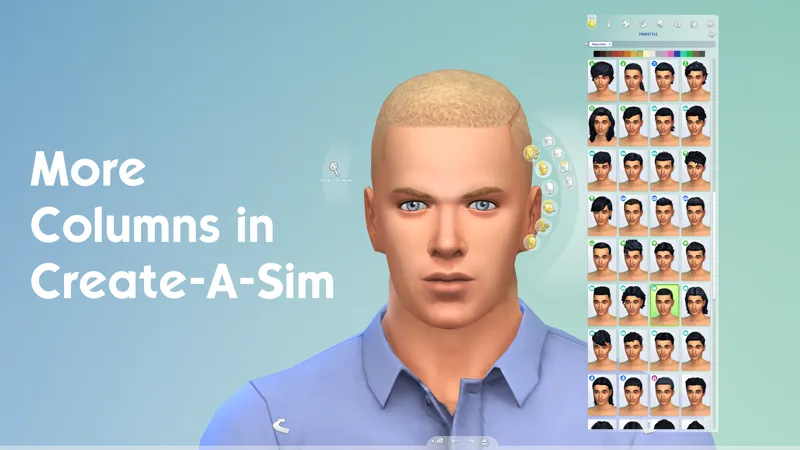
More Columns in CAS v1.38
v1.38 [07/22/2026]
Updated for game version 1.126.58.
v1.37 [03/24/2026]
Updated for game version 1.122.218.
v1.36 [12/02/2025]
Updated for game version 1.120.111.
v1.35 [07/01/2025]
Updated for game version 1.116.202 (Enchanted by Nature patch).
v1.34 [02/26/2025]
Updated for game version 1.113.277 (Businesses & Hobbies patch).
v1.33 [10/22/2024]
Updated for game version 1.110.265 (Life & Death patch).
v1.32 [09/18/2024]
Updated for game version 1.109.185
v1.31 [07/23/2024]
Updated for game version 1.108.318 (Lovestruck patch).
v1.30 [09/05/2023]
Updated for game version 1.100.147. This fixes build/buy kits showing up in CAS kit filter.
v1.29 [07/20/2023]
Updated for game version 1.99.264 (Horse Ranch patch).
v1.28 [05/30/2023]
Updated for game version 1.98.127.
v1.27 [03/14/2023]
Updated for game version 1.96.365 (Growing Together patch).
v1.26 [01/31/2023]
Updated for game version 1.95.207.
v1.25 [09/14/2022]
Updated for game version 1.91.205.
Fixed a misalignment in the Coat Color/Pattern section for werewolves.
Added compatibility with the Color Sliders mod.
v1.24 [07/26/2022]
Updated for game version 1.90.358 (High School Years patch).
v1.23 [06/14/2022]
Updated for game version 1.89.214 (Werewolves patch).
v1.22 [02/15/2022]
Updated for game version 1.84.171 (My Wedding Stories patch).
v1.21 [11/02/2021]
Updated for game version 1.81.72.
v1.20 [09/08/2021]
Updated for game version 1.79.93 (Spa Day Refresh patch). This fixes the camera not zooming in when changing fingernails.
v1.19 [07/20/2021]
Updated for game version 1.77.131 (Cottage Living patch).
v1.18 [06/29/2021]
Updated for game version 1.76.81. This fixes the issue that the old version would block the new CAS fix EA has implemented in the new patch.
v1.17.1 [04/30/2021]
Fixed not being able to click on items when there are too many rows of swatches.
Fixed the "Match Eye Color" checkbox being misaligned when there are too many rows of pet eye swatches.
Fixed that the swatch scroll list always defaults to the beginning of the list. Now it defaults to where the selected swatch is.
v1.17 [04/27/2021]
Updated for game version 1.73.48.
Added a scrollbar when you have more than 10 rows of swatches.
Added the randomization button to more categories.
v1.16 [03/23/2021]
Updated for game version 1.72.28.
v1.15 [02/25/2021]
Updated for game version 1.71.86 (Kits patch).
v1.14.1 [12/07/2020]
Fixed skin tones shifting to the left after using "undo".
v1.14 [12/07/2020]
Updated for game version 1.69.57.
v1.13 [11/10/2020]
Updated for game version 1.68.154 (Snowy Escape patch).
v1.12 [07/23/2020]
Updated for game version 1.65.70 (Nifty Knitting patch).
v1.11 [06/03/2020]
Updated for game version 1.63.133 (Eco Lifestyle patch).
v1.10 [11/12/2019]
Updated for game version 1.58.63 (Discover University patch).
v1.9 [09/05/2019]
Updated for game version 1.55.105 (Realm of Magic patch) .
v1.8 [06/19/2019]
Updated for game version 1.52.100 (Island Living patch).
Added a new 5-column flavor.
Repositioned various UI elements: the catalog title is now correctly centered, the randomization button is now shifted to the rightmost, the filter bar's width is increased to fit the expanded columns, and other Create-A-Pet related changes.
Description
This mod increases the number of columns of the catalog panel in CAS. Three flavors of the mod are available: 3 columns, 4 columns, and 5 columns.
Warning
If your game's resolution is too low, it might not have enough space for all columns to show. The 3 column flavor is not recommended if your resolution is lower than 1280x720. The 4 column flavor is not recommended if your resolution is lower than 1600x900. The 5 column flavor is not recommended if your resolution is lower than 1920x1080.
Please note that if you have Cats & Dogs, an even higher resolution is required for all columns to be shown in Create A Pet.
With the 1.58.63 game update, you can now adjust the UI scale via the options menu. A smaller UI size will allow more columns to be shown at the same resolution.
Compatibility
v1.38 is built with game version 1.126.58 and it will not work for older versions of the game.
If you play Legacy Edition, download the version here.
Comments (648)
I'm sure you're aware but this and the cheats extension broke with the update today. We all know you'll have an update out soon, thank you!
Hi! I've updated the other mod but I'm not seeing an issue with this mod. If you have an issue with it, you'd need to let me know what exact issue it is.
Great job! Thank you :)
Merci pour la mise à jour !!
Thank you :D <3
Yayyyy ty ty so much!!!! 😍😍😍😍
It appears the latest update on 7/21 broke the filters in CAS. I can't open up the filter panel at the moment. It's not a big deal but a little annoying I can't filter through my thousands of items lol. It would be 100 times worse if I didn't have your mod though. Just a little fyi.
Hi, just so you know, the update today (July 21) broke this. It throws a UI error when trying to use the filters in CAS and then they will not load.
Thank you for letting me know! I'm seeing the same issue in my game as well. I'll update it soon.
Thank you
I think the "more columns" has a minor issue. When entering any section in CAS (top, full body, shoes, etc), it doesn't put you right at the item you already have selected and you have to scroll from the very top every single time. It's not a major issue but it's insanely inconvenient and frustrating lol :(((
Hi! This is a new EA bug that occurs in unmodded game as well. They're releasing a new base game update this & I'll check if this mod needs an update after that.
Hi, I've tried everything to get it working again, as it's not showing up in my mods list and I'm still seeing the two columns. Please check if it needs an update.
Hey there. If it does not show up in the list of mods you've installed (this is a package mod and it should show up under Custom Content), then it just means it's not correctly installed.
please update this
Hi! An update is not in the works as this mod still works w/ the latest version of the game and I have not identified any issues with it. If you believe it needs an update, let me know in detail what's wrong with it.
Hi, I was able to consistently reproduce the issue with my setup: certain Gallery items cause the UI to lock, and removing More Columns resolves it immediately with no other changes. It seems less like a general Gallery error and more like a UI interaction issue under specific conditions (possibly related to how certain listings load their detail/comments panels). Each time, it was a specific build that triggered the gallery lock down. However, once the mod was removed, those builds didn't set anything off. I rely on this mod for the visual accessibility enhancement in CAS, so I just wanted to share in case it helps identify specific situations where the UI might run into issues, even if it’s not something that shows up in standard testing.
Hi! Thank you for the detailed report. Unfortunately I was still not able to reproduce the issue. I clicked through hundreds of items in the gallery (households, builds, & rooms), in different tabs (newest, popular now, & most popular). I also tried accessing the gallery in both CAS and build mode. It all just worked fine w/ this mod installed and there weren't exceptions or anything. If you have known items that cause the issue for you, you can let me know the EA ID that uploaded them so I can check them myself. Also let me know if you've bought any Maker packs. I did testing with my account and I own all EA packs but no Maker packs.
im having an issue with this mod, it makes my cas options disappear
I'm having the same issue. And I can't exit of it either I have to restart the game.
seems like it broken either this or ui cheats.
i think theres a compatibility issue or something at the moment due to my more columns mod only breaking when the ui cheats mod is also in my folder :D
hi, so i have both the 5 columns and the ui cheats and anytime im working on the world and using gallery, they crash my game and now i cant open anything in gallery. and the better exceptions report says it's both mods. Any help on what to do?
I dont have ui cheats and is having the same issue so I guess its the columns one
im having to redownload it stupid updates ruined it
IF ITS NOT FITTING THE SCREEN ITS YOUR SCREEN RESOLUTION NOT THE MOD! AND YALL ARE VERY DEMANDING THESE PEOPLE DO HAVE LIVES!
TypeError: Error #1009: Cannot access a property or method of a null object reference. It seems when I try and go to the gallery I get a lastuiexception. It has been flagging this and Better build buy, but I think BBB has been updated. Just a thought. I did take this one out and had no issues. When I put back in, the exception returns.
Hi! Unfortunately this is a generic error and the cause cannot be easily determined. It does not point to anything specific in this mod, and it's certainly one that could be caused by EA bugs (meaning that you could get it even if you don't have any mods). If you got it while using the gallery, this mod should never be cause as it's a strictly CAS UI mod. I also tested browsing the gallery, downloading Sims from the gallery into CAS, saving households to the library/uploading to gallery, and all of them worked perfectly fine with this mod installed, with no exceptions or anything.
needs to be updated please update this. the 6 columns i want on my screen go outside of the screen. please update quickly.
You need to make the UI smaller in-game options accessibility if it's not fitting in your computer monitor/screen!
is broken :(
does it work with ui cheats
yes
hi! When are you going to update it?
He's not going to because he thinks it's working lol.
it lags a looooooot
Hey, i think this needs an update!
hi this needs be updated
hey I updated everything but the columns are going off screen and I can't change occasion outfits
maybe get a smaller row size but if thats not the issue than the scaling and resolution is wrong
hi i believe this needs to be updated has my ui weird and doing green stuff
this has made my ui janky! And when i took it out everything was fixed.
this works great thanks
does it work fine now?
i am having issues wich open de filter box to select cc items, the window simply dont open :(
Hi! The filter box in CAS opens just fine in my game w/ this mod installed. Ensure both the mod and your game itself are up-to-date, and test it again with only this mod in your mods folder.
its showing up in better exceptions. also, I use the 3 columns and the last one goes off the edge of the screen when I try to view things for pets. It also is currently blocking me from adding pets from my gallery into my cas
Hi! This mod showing up in BE does not necessarily mean it's causing the exception. The cause of UI exceptions cannot be easily determined (and you can get UI exceptions even if you don't have any mods). Pets have always need more space for all columns to fit, as explained in this mod's description. I also tested adding from gallery to CAS, and it works perfectly fine with this mod installed.
it is broken for the newest update, showed up in better exceptions
Hi there! Exceptions by themselves cannot be used to determine whether this mod is broken. To report an issue about this mod, you'd still need to describe the in-game issue you experienced and whether you've tested the issue indeed only occurs with this mod installed.
Hi I think this is broken. Usually the 4 columns works for me but then I'm in CAS it goes off the edge of my screen and I can't see the winter outfit category.
Hey! This has always been the case if your resolution is too low or your UI scaling is too high.
Hey, I read most recent comments. I know you aren't seeing the same issues, so I thought I'd just chime in. For me it's only not working when I try to save a build or click something in gallery after using filters looking for a gallery build. I then couldn't click anything in gallery or save a room. The only UI mods I have is this one and the updated UI cheats. I'm about to remove everything and test each alone now.
I have the slight same problem but mine happens with the gallery and when i enter build mode from live mode
hello! i have the mods updated version but my game is now 1.123. when i go into the hats section in cas, nothing shows and then UI exceptions scans it saying the 3 columns mod is outdated, creating the issue. will there be an update for it soon? love your work btw :)
Hi there. The Hats section works fine for me with this mod installed. Keep in mind that this is something that can be caused by a piece of CC you have, and CC is not scanned for UI exceptions. Test it again w/ only this mod in your mods folder.
i keep on getting an exception for this mod, im not sure whats wrong with it but i think it may need another update, this mod is the only one get an exception for and my game stops completely with it, please update it, i adore this mod.
Hi! I'm not sure what you mean by "getting an exception for this mod". If you're getting UI exceptions, the cause cannot be easily determined (you can get UI exceptions even if you don't have any mods). To report an issue about this mod, you would need to describe what in-game issues you experienced and whether these issues indeed only occur when you have this mod installed (I'm unsure what you mean by "my game stops completely with it").
It's broken needs an update to work maybe
Hey! The mod still works and I’m not seeing an issue in CAS with this mod installed. If you experience an issue and have tested that it indeed only occurs with this mod installed, you can let me know what exactly the issue is.
My UI and everything works fine, however for whatever reason this mod seems to completely break the Filter tab button, clicking it just rotates it 180 degrees from <i>, and doesn't open the tab at all. Tried removing all my mods other than this & fresh installing the game, nothing seems to fix it. I also notice someone mentioned this sort of bug with the Marketplace filters, not sure if they're the same thing or not, but felt the need to bump regardless. Hope this gets fixed!</i>
Hey! The filter panel in CAS works fine for me with this mod installed.
More cas is messing up my ui
Mine as well
Hello, is this mod broken? I want to make sure before updating again. :)
does this. need updating im downloading for the first time
Afternoon, just checking if UI cheats or more CAs need an update before I load game
Hi! I think there’s a slight issue with this mod at the moment; it causes the marketplace filter options in CAS to disappear. At first, I thought EA hadn’t included this filter, but I later realised it was caused by this mod. It needs updating.
Thank you for letting me know! I'm seeing the same issue in my game as well, and I'll update this mod soon.
Seems like the marketplace patch broke it, even such little updates keeping destroying mods.
I am having issues with downloading. Tried on 2 different browsers and updated everything and am needing some help - any advice?
Hey! This is my favorite MOD by far :) I’m having an issue I can’t seem to resolve. I was having so many issues with my most recent save that the game was unplayable. So I deleted that save, repaired my game, and reinstalled the 3 mods I use the most. The new game was working great until this morning, UI wasn’t opening the shift+click sim piechart to get to CAS. None of the UI cheats would pop up. The needs-slider still works. I removed all other mods, deleted the caches, restarted the game and am still having the same issue. Everything is up to date as of this morning. What could be causing the CAS and other piechart items to not show up?
Hi! I love this mod & have been using it for a while now. Just wondering if it's compatible with the 2/3/2026 update? Had read on the Forums there was an issue with some colors being off, but it's since been removed from the broken/updated mods list. Thanks for all your hard work :).
Hi! This mod still works for the latest version of the game and I'm not seeing any issues. If you're seeing anything wrong in CAS like colors being off, you can let me know!
Bonjour, je me permets de vous ecrire, car je rencontre un problème avec le mod. Avant il fonctionnait mais entre temps j’ai changé d’ordinateur (MacBook pro 2017) et il ne fonctionne plus. Pourtant j’ai installé la bonne version, j’ai aucun autre mod installé, il reconnaît bien le mod, il safffiche en début de parti. Mais quand je veux l’utiliser rien ne se passe.
hey, is this compatible with Mac?
Hi! Thank you for the mods! Just curious are you still updating the longer parties mod?
i used the 4 columns pkg and it made my sims shiny. i took it out and they are back to normal. just letting you know that
Thanks so much
Thank you so very much for updating this mod :)
Thank You!!
Works great for me, ty so much!!!
hi i download two of your mods in my game but it glitching it showing half of the colunms
Is this mod updated?
This mod still works, no update needed!
do you have time to update "fires on any lot" it throws to world selection and i did test it on its own. its so much fun
Yeah I actually updated that mod a while ago for myself. I just uploaded it to MTS.
Hi Weerbesu and all! First of all thank you for your mods :) Could you please tell me if this mod is compatible with the latest patch from Nov.4th? I'm afraid to update my game before I know if this is compatible or not! :) I'm playing offline for now just to be sure :D Thank you for your reply!!
Yes it is!
Paying just to ask for help or give feedback, that is something. I've downloaded the UI Cheats Extension to the game Sims 4, but it doesn't work as intended. Set other for "Enabling scripted mods", the game stated a high-risk issue to the game. The option of "Enabling scripted mods" keeps auto-disabling after applying & restarting the game. The downloaded UI shows "Custom Content: UI_Cheats_Extension", but the "Script Mods: UI_Cheats_Extension_Scripts" is nowhere to be seen, even though both of the files are in the Documents > EA > The Sims > Mods. Installing game attempt 20+ still in count, applying mods 23+ & using your UI 31+. Can you update on the UI Cheats, cause it is very tedious to just chat with no possibility to show a screenshot of the evidence issue. This is the first time I have to pay just to comment or give feedback. As long as there's no response or update on the UICheats, I suggest others not waste your money for the sake of asking/conversing, because the author is benefiting from getting something while the issue is still at hand with no response. What in god's name are there any other games that you need to pay to comment/provide feedback on the problem/issue of a game?
Hi Weerbesu, as a general wish: it'd be greatly appreciated if you could write a short note after patches to tell if you've tested your mods and if they're still working or need an update. Maybe a pinned post that you update after patch day/new DLCs. Would that be possible?
I cannot get this mod to work with my game right now for some reason. I've tried it with no other mods and it's just not giving me more than 2 columns. :(
hey my game said this mode is broke and ui cheats
Same here
Hi! I downloaded this and I changed the ui as well and when I try to us my cas it’s just a white screen so I’m kinda stuck so if you could help that would be great
Hi! Have you tested it with only this mod installed? CAS works fine for me with this mod, using the latest version of the game.
Everything is working.
is there a link for the new update?
Where can i find the older versions of this mod?
Good Afternoon I love your mods. I got to excited and downloaded the newest version for the update and I won't be updating my game until after enchanted comes out would it be possible to get the link for columns 4 v1.34 please
Thank you :)
Thank you so much!
You are the best!
Thank you so much!
Thank you thank you
Just letting you know that the 3 columns aren't working at the moment because of the new update that came out. When I go to create a sim, it shows that every single piece of clothing or item is highlighted green (like it would show that the sim is wearing the item). And it messed up the way each outfit symbol looks like.
Agreed. and the pets columns are messed up too.
This is what Better Exceptions is telling me under UI Exceptions Mods\Weerbesu More Columns In CAS\More_CAS_Columns_(3_Columns).package 02/28/2025 Mods\Weerbesu UI Cheats V1.48\UI_Cheats_Extension.package 05/28/2025
Hi! If multiple UI mods show up in one UI exception report, it usually just means BE did not identity the cause of the exception and thus listed all UI mods you've installed. UI exceptions are something that can be caused by non-UI mods and EA bugs, so it does not necessarily any of the UI mods listed caused the exception.
Hi, since the new patch 05/27/25 the more columns is not working for me. When I run the BE it says I have to remove it. Please help.
Hey! What do you mean by not working? Are you not getting more than 2 columns in CAS? It still just works fine for me with the latest game update and I'm getting any exceptions from it
bonjour je suis sur mac et les colone ne marche pas
Hi, I have interesting issue with 6 columns if I use face in cas. Winter wear doesn't show in my game and right side columns either. But if I look whole sim, it works perfectly.
Thank you so much!
thank you!
Thank you so much for this timely update!
This could just be a me thing but, uh, I put the updated 3 Columns in the Mods folder, but my game is still showing only 2 columns still...I tried the 4 Columns and the same thing...I'm not sure what I'm doing wrong or if there's an error in the update ... What do yous guys think? Also, I've noticed that the skin colour set up is different...Is that also maybe because of the new 3 columns patch?
Hi! Is having two columns the only issue, or are you also seeing graphical glitches in CAS (such as icons in wrong places)? If there are graphical glitches, you may still have an outdated copy of this mod in your mods. If CAS itself is fine and you just don't have extra columns, then check that this mod indeed shows up in the list of mods you've installed (Game Options -> Other -> View Custom Content).
thanks for the update!
Thank you!
appreciate how fast your updates are<3
Thank you!! You are amazing!! ❤️
Thank you for updating despite your busy schedule.
Definitely broke with this update today. I love this mod cuz I have billions of CC lol. I know it takes time to update, I'll be patiently waiting! 🙂
I think this mod needs updating after today's (2.25.25) update
Not sure if anyone else is experiencing this problem after the recent update (2/25/25) but it has caused some UI issues. I removed the file & loaded the game to see if in fact that was the issue and UI Cheats (it didn't seem to cause any issues in game) and it was. I thought maybe the file was outdated, so I reinstalled it and ran the game again, but the issue was still there.
Hi, I'm not sure if I'm doing something wrong. No matter which flavor of the mod I have downloaded, it always shows six columns, and even after deleting the mod all together, it still shows six columns. Any idea what might be wrong?
Hi there! This is only explained by having another copy of the 6 column version somewhere else in your mods folder, or you have a different UI mod that gives you 6 columns. If you've merged your mod files before, it's also possible that it's merged with other mods/CC.
Just chiming in to say that I uninstalled this mod and reinstalled it and everything was perfectly fine. ¯\_(ツ)_/¯ I don't know if this would help anyone, but make sure you delete the cache files and ensure that absolutely all your mods are up to date AND that they're not incompatible with this one.
Hi, I noticed the other comments talking about missing thumbnails/icons and have removed everything from my mods folder, kept solely the CAS Columns in and I am experiencing the missing icons. When in CAS, there's a few missing icons in the categories and there's a glitched out icon of a paint palette over the swatch options. Removing the mod does bring back the missing icons and removed the paint palette icon. I don't know if this was stated already but hope this helps! xx
Hey! Missing UI icons is a completely different issue from missing item thumbnails, as it would indicate a UI issue. Missing/misplaced/glitched icons are only explained by either having outdated UI mods or UI texture mods in your mods folder, or your game itself is outdated.
Hi!!! While I've seen your reply to others saying that this is not affecting the game, it actually is. Once I removed the column cheat for 3 columns, all of my thumbnails returned to the game. I think it works fine for you as the developer, but many of us have the same issue. Removing your column extension fixes the issue.
Hi! Are you sure you have the same issue? The previous report only said that the new kit items were affected. Do you also have the issue with the new kit items while other EA items and CC items are fine? Have you tested this with only this mod in your mods folder?
Hey, is there a new update for more columns in cas?
Hey. This mod still works with the latest version of the game and no update is needed.
hi! i have been using 4 columns, and noticed that new kit items were showing up as white squares instead of their actual appearance. I tried deleting localthumbcache & repairing, didn't fix it. Once I removed the mod from my folder, all item appearances are back to normal. Any suggestions for a fix? I hate being back to 2 columns :(
Hi! Do you mean the item thumbnails aren't showing up for the new kit items in CAS? This is likely either a kit installation file issue or a thumbnail caching issue. More Columns is a UI mod and it's unable to affect specific items like that (and the new items do show up just fine in my CAS w/ this mod installed).
I am having issues with the daily events, top left corner, those have disappeared. My columns are fine.
Hey. You may have an outdated copy of UI Cheats if you have issues with the event / holiday UI in the top left corner.
Hello, I am also experiencing issues with the mod since the update. I have tried 4 and 5 columns and i cannot get past the loading screen, i end up having to close the game. Once removed it works fine.
Hi there! Do you mean the game would be stuck while loading into the main menu? This is not something I can reproduce in my game w/ this mod installed. Keep in mind that this is purely a CAS UI mod. Any issues outside CAS should not be caused by this mod. I'd test it again with only this mod in your mods folder and see if the game loads.
Hello! I believe this mod is no longer compatible with the new update.. (01/20/25) I specifically use the 6 columns
Hey. What issues did you have? I tested the 6 column version with the latest version of the game. It still works and I'm not seeing anything wrong.
Hi. Mod is compatible with the lastest update?
It was messing my game up, deleted it now game is fine. Better Exceptions flagged it.
Hi, I uploaded this mods but ot doesn't work, I have a little screen so I can't see all the columns 😭 how can I delete it ?
go to your mod folder and search it,then delete it.
will there be an update on this? x
Hey. This mod still works with the latest version of the game. No update is needed
I'm Looking foward for this updating
This mod needs updating, it’s messing with the buffs UI
Hi! This is strictly a CAS UI mod. It’s not possible for it to mess with the buffs UI
faster skills
Before I update to the 31 October patch 1.110.294 can anyone confirm if the current version works or does it need updating? Thanks
Hopefully won't be too long then till it gets updated, until then I'll hold off updating the game I think
Silly question, is there a version available for those of use who haven't updated the game yet?
Thank you so much :)
thanks yeah I grabbed the wrong one by accident.
the new "updated" file as of 9/18 doesn't appear to be coming out correctly? It just says Package 1 upon download.
Hey. I tested this on my end and all 4 versions of the mod can be downloaded from the post just fine. There is a duplicated 5 column version at the start that says 1.package upon downloading. Just ignore that one as I’m unable to remove it from the post. I’ll reach out to Patreon support and see if I can get it removed.
Thanks :)
Your mods are broken in my game and I was wonder when will be the next updated
I used this mod before. recently removed all mods and started from scratch. however the only columns mod that works is for 6 columns. but my screen won't fix 6 of them.
Thank you to adding 6th Columns
Just installed the updated version for the Lovestruck patch, working just fine. Thank you so much!!
Thank you very much for the quick turn-around on the latest patch. I've installed and they're (columns and UI cheats ) working just fine!
will these be getting an update
has this been updated lately..if not is anyone getting exceptions?
Thank you this mod worked for me. I had an issue that my eye shapes disappeared due to all of the eye colors I downloaded...this fixed my problem!!!
Would you ever consider doing 6 columns? As a widescreen user I would LOVE to utilize all the space I have in CAS! Thanks for all you do, could not live without your mods!!!!!
BE giving notification. It said "The following UI Mods may have been responsible for your UI Exception. Make sure they are all updated, or removed if a working update is not available. If the mod is a multi-file mod, be sure to update or remove all files."
Hi! I just downloaded the mod and placed it in my mods folder but when i go into cas i still have 2 columns not the 4 columns. please help!
Hey. This is only explained by either incorrect installation or having a conflicting mod. If this mod indeed shows up in the list of mods you’ve installed, you may need to temporarily remove other mods to see if there is a conflicting mod.
Hi there. Is there a known issue with other mods? It worked fine until yesterday and all I actually did was removing old scaler mods and adding new versions.
Ok, I found out. It is Nando Stone Column. Now I have to find out how to remove the settings, cause only removing the files does not help :( But this is another story ;)
This mod...goes off screen for me..even with the high resolution..that i use
Hi! The new columns are always added to right side of the screen and this mod does not change the position of the columns in any way. If your screen doesn’t have enough space, try lowering the UI size.
hi just checking to see is there an update for columns mod for the for rent ? thank you so much for your amazing work
hi i wanted to see is there a update for the for rent for the more columns mod
Just wondering if this mod is going to be updated anytime soon for the new patch 1.103? Thank you so much for your amazing works!
Hey! This mod still works and an update does not appear to be needed.
THANK YOU SO MUCH
Quick question about your Longer Parties & More Guests and Add Any Sims mod on MTS......will you be updating those for this update as well? People are asking on MTS. Just curious! Thanks! ♥
Thank you for the quick fix! ♥♥♥
hello! I just wanted to see if this was an issue with this mod specifically that's been reported before? In the eyebrows section, all of my eyebrow CC thumbnails look the same (like BG) instead of showing the creator made thumbnails with the names/numbers. I've tried removing other Cas mods but it seems to go back to normal when I remove this, and I dont see this happening with other sections. is there a way I can go back to having the original thumbnails so I know which cc ? This mod is an absolute must have/ staple in my game so thank you!
Hey! This only occurs when you also have the CAS color slider mod, as it adds color sliders to eyebrows and thus it needs to change how eyebrows are displayed. If you only have this columns mod on its own then CC thumbnails would display.
Hi! I just wanted to pop in and report that with More Columns 4, if you're trying to create a horse you can't see all of the columns in case anyone else is having the issue.
Hey. This is normal if your screen resolution is too low or UI size is too big. Pets have always required a higher resolution or smaller UI size.
hi i just downloaded your updated versions of columns and ui cheats and cas is not working at all. the names don't change and none of the cas options are showing up. i can send a picture if you want?
Hey. This had not been reported as an issue of this mod. Not even an outdated copy should cause this issue. If you're certain both the mod and your game itself are up-to-date, you may have other outdated mods that are causing the issues.
Hi :) I downloaded the new version for horse DLC but there is an error...I don't see the mane color options
Hi there. I can confirm that mane color swatches show up just fine in my game w/ this mod installed. You may still have an outdated copy of the mod somewhere in your mods folder, or you have other outdated mods that are causing the issue.
Is this one still broken? I saw some reports that the latest mod update is still messed up with the new pack
better exceptions is showing that its still broken.
Ty ty ty, another favorite mod of mine!!!!!!!!!!!!!!!!
Is it updated for the ranch EP yet?
I just wanted to say thank you and all other modders who work hard for us during busy times like ep release days!
Is it compatible with the last update?
Hi. I'm waiting for Horse Ranch's release to see if it needs to updated for horses in CAS.
Obrigado por este mod perfeito! excelente trabalho
I think there may be a glitch with this mod after the most recent game updates. CAS worked fine but the sliders/ 'x' and check mark are blank
Bless you!
Hello Weerbesu, thank you for your mods
Thank you for the update! We appreciate your hard work so much!! Keep it up!! 🥰
You know the drill 🤗
hi there!! it seems that i'm having an issue with this mod. my game has just updated (not sure if there's a new update out). but when my game had finished updating i opened up my game to see if anything broke and this mod was one of them. will there be an update of this mod soon?
Are you aware of any specific conflicts with this mod? It has stopped working for me, and I cannot figure out what is causing the issue.
Is there going to be an update soon for this and UI Cheats so the new map loads? I miss these two mods
Hey! Both of these work for the latest version of the game and they do not need an update. If your map doesn’t load, you may still have outdated mods.
hi i have an issue where the infant icon in CAS is switched over from the left side to the right side where the elder icon is. if you could fix it that'd be awesome :)
Hey. This is an issue with an outdated version of this mod. Removing the old mod file and redownloading it from here should fix it.
I have the problem of having 4 columns, but can't fully see the right side edge.
Try go to options -accessibility - and scale the ui option down a bit
This and the ui cheats arent loading the new map or the milestones menu for my sister and I, as soon as I took them out the game worked, everything else works with the update though.
tysm for updating <3
You make my game go 'round !!! Love you !!! <3
Thank you love! <3
Thanks for the update!
Thank you for updating!!
thank you for the swift update!!
you rock
Thanks
thank you!!!
Chef's kiss ! We love you sm
Thank you!
THANK YOU! 😘😘😘
Hi! I think the infant update broke the mod. Can you please fix it? I normally use the 5 column option
Yeah I'll work on an update soon.
hi - is it possible to get a link to the v1.25 version of the 4 column mod? having trouble updating my game to current patch but still wanted to use. thanks a ton!!
With only this mod in my game, my CAS UI looks like this: https://ibb.co/kXhdrfv Something has to be wrong with this mod.
Hey. I’m not seeing this issue in my game w/ this mod installed. This mod also does not touch the UI file for that area of the UI (the type of issues this mod can cause are limited to the right hand columns).
thank you!!!
thanks for updating! <3
Hi! I like you a lot! LOL - it needed saying - you have such a good eye for what the game needs! Thank you!
thank you shawty!!
Thank you so much!!
you're the best!!! thank you!!!
Weerbesu corrects, always, very quickly his script, patience, it will not be long:)
update please! <3 (and thank u for everything <3)
HI! Are all of your mods compatible with the new update?
Your mods is broken but I don’t take it out
Hi! This mod still works for the current version of the game.
hello i really love this mod. :( but it's giving me BE error.. Detection Type: ALL UI Mods
Hey. I believe when it says "Detection Type: ALL" it means that it did not identify a cause and thus it just listed all UI mods you have. Do note that UI exceptions can be caused by non-UI mods as well as EA's own bugs. If you repeatedly get the same UI exception, I recommend manually testing if the exception only occurs when you have a certain mod.
Ik denk dat more cas colommen ook gebroken is
Thank you so much for this mod, it's a game changer! I wanted to ask, if it possible to add the randomization button for eye color only? I want to be able to ramdomize eye color without touching the eye shape
Hi weerbesu! I do the Mod Lists for SimsVIP! So I was wondering if it was safe to assume that this mod (as well as your others that didn't receive an update) are compatible for this patch (1.91)? Thank you in advance!
Yeah this mod is fine so are the other few mods on here. I do know I have a few mods on MTS that are outdated and I still need to update them.
Heyy! I think this mod is broken by the newest patch because the likes and dislikes are popping up on where you pick your sims traits. Also, when you hover the trait button, it has a question mark. I'm not sure whether it is UI cheats even though it's been updated.
I don't have this mod, and I'm having the same issue. I think it must be the UI Cheats mod
Hey! I'm having a bit of an odd issue. For some reason when I loaded the game the shift+click option on my sims and on the ground just seems to have stopped working. Every left click works just like it should. I don't know if this relates, but my sims are also ignoring that their autonomy is disabled and they keep doing things on their own that don't have to do with their needs. Do you know if there is anything that could somehow be conflicting that is causing the first problem?
my game is fully up to date and I have repaired it just in case :) Do you mean take out all my mods and only place this in to see if it works? Maybe something would be conflicting? Update: I just tried that, some other script mod is conflicting for me, I will have to do process of elimination. Thank you for the suggestion!
Hello! I have updated this mod & it will not let my game start up, any suggestions? I have updated every other mod I have downloaded and this is the only one causing it not to run.
Hey. Is your game itself up-to-date? Do your game run with only this mod in your mods folder?
Has this mod been updated with the last patch?
Yes! No update was needed for the small emergency fix patch.
Sad to tell you this one isn't working correctly, it won't let you change the color options and when i removed the mod it still shows the multiple columns and the same issues, i rechecked my folders to see if i somehow missed removing something but i found nothing.
Hey! If you removed this mod and you still have more than 2 columns, you likely still have a copy of this mod somewhere in your mods folder.
Ignore the message before I got the mod to work thanks so much for all you do. I LOVE THIS MOD!!
hiiiii, can you please upload the previous version of this + UI cheats? just did a 50/50 cus cas shows up with no UI when i have this installed - and UI cheats messes up my UI. i didn't update my game yet but i updated your mods and they're breaking v_v
he doesn't listen to complaints, his mods work for him, so you must be wrong
Thank you for the update!
thank youuu for the update id be struggling without this
ty!
thank you
thank you so much
Thank you!
TY TY TY, you rock!!! ❤️
Thank you so much 😊
ur the best <3
I downloaded 5? i think a few months ago, im going through my mods right now because of the update. I see that the columns are broken with cc.. i cant find the 5 file in my files ANWHERE
please update the mod its really useful!!!
Thanks you for letting me know! I’ll work on an update soon.
This needs an update
Hi, I just completed the huge update they have in prep for the High School pack and the More CAS Columns is not compatible with any of the mod hairs, skin colors and clothing. :)
I tried downloading the 3 columns update since that's the one I use, but when I try to use CAS on werewolves the columns disappear completely for their human form and I've seen a couple of people on YouTube with the same problem
Hi! Does this issue always occur every time you create a werewolf or it only occurs occasionally?
where is the download button? I subscribed to the tier but I do not see it.
I've just downloaded the updated version for the 4 columns but I can't seem to get it to work in-game, is this compatible for mac too or just windows?
Hi. The mod is compatible for both! If it doesn't work at all, check if it shows up in the list of mods you have installed. Go to Game Options -> View Custom Content and this mod should show up under Custom Content.
Hi I think there is a little problem with Mod CAS Columns. I received this LE-UI (https://pastebin.com/9iPYRfSh) and the columns no longer show up in the CAS when I switch from human to werewolf and vice versa. Thanks
Hi I think there is a little problem with Mod CAS Columns. I received this LE-UI and the columns no longer show up in the CAS when I switch from human to werewolf and vice versa. https://pastebin.com/9iPYRfSh. Thanks
Hi I think there is a malfunction with "CAS columns" I also received a LE UI. https://pastebin.com/ddnbH03t Thanks
I hope a 6 columns, I really need it
Hi! I won’t specifically make a 6-column version, but I’m working on a version that automatically increases the number of column based on your screen resolution/UI size and thus making more than 5 columns possible.
hello im having dificulties finding the download button
Thank you for updating so fast. You are AWESOME!
Hello, i am experiencing the same issue as Muva Simmer when it comes to the 5 columns, it cuts off the summer and winter attire buttons. But I am only having this issue on my Laptop. My desk top PC works fine, but on my laptop, Im getting the same error as Muva Simmer discribed. Could you please check into it. Thanks
When using the 5 Columns option, it cuts off after the forth row. When I try to select the fifth row, the mouse will hover to my second screen. I attempted to use full screen mode as well to see if this fixes it, but I still unable to select the fifth row. I think your mod may be conflicting with some of Arnie (another creators) mods because when I remove his mod, I don't have the issue. This also happens with UI Cheats and his UI dark mode mod. I hope this helps to find a fix for compatibility in the future!
Hi. Are you sure it doesn’t get off simply because your game resolution is too low and/or your UI size is too big? A conflicting mod will likely stop this mod from working altogether, as opposed to causing the cutting off issue.
does this work with the new patch?
Hi! This mod still works for me. If you have any issues with it, please let me know.
Happy Thanksgiving
Hi! Has this been updated for the newest patch yet? Thank you!
Yes!
Should this work with game patch 1.80.69 as well?
Yes!
Thank you so much for always keeping this up to date! I'd go crazy without this mod so it's very much appreciated.
Merci;)
Thank you, thank you, thank you! You are literally the BEST!
Its a little mod but I miss it when it's not in there! Thank you so much!
Thank you so much!
Thanks so much!
Hi! I love this mod, and was just wondering if there is a way, or an update to have 6 columns in game, I like my UI on the smaller side and I could go for 6 columns if I could. Thanks for the great mod!
Hey! I probably won't add a 6-column flavor. However, I'll look into adding a way for users to easily set the number of columns themselves to any number they like.
Hi there, my game is up to date and so is the columns mod but my cas is only showing up in diagonal lines? its a line of clothing and then an empty space the entire way down. Is there any way to fix this?
Hey. That's a known issue from an old version of this mod. You may still have an old version of this mod somewhere in your mods folder.
Hey darlin. I'm wondering... if I try to use three, four, or five columns it cuts off heart the little boxes so I can't see them all. I'm on a PC with a 19 inch monitor... Is there a way I can fix that?
Hey. Have you tried changing UI Scale in the options menu?
Hi, I was wondering if there will ever be a 6 column version or is that not possible?
Yes it's possible. It can be counterproductive to have that many items shown on the screen at once so I've never done it in the past.
Bless your soul ✨
The mod isn't working for me for some reason... My display resolution is 1920x1080 & I tried all versions of your mod but none seem to work. Whenever I open CAS I see a ton of blank spots & some are just blue squares. I've deleted all of them before downloading a different one to test but it still won't budge. I even tried downloading the one on modsthesims (after deleting yours) and it worked better than yours but not perfectly... It showed half green on the clothes but I was still able to somewhat see them. :/ Do you put this in the mods or tray????? Because I've been putting yours in my mods. Really wished it would work because its a need. :'(
Hey. If you experience UI issues from this mod, it means there is a mismatch between the mod version and your game version. There won’t be any issues if both this mod and your game itself are up-to-date.
Mine isn't working with 4 columns and I read EA is not allowing us to do this any longer. Does anyone have any info? As soon as I deleted this mod, it fixed my CAS.
Hey. This mod still works fine. If you experienced issues in CAS, you likely had an outdated version of this mod.
thanks for the fast update I love this MOD
thank you for the fast update!!!
Hello! I really LOVE your more columns mod! I just wanted to let you know that More Columns 5 isn't installing. It is installing as a page vs script
It should be fixed now!
Weerbesu always does what is necessary to troubleshoot fast enough, be patient, that's nice to him.
https://ibb.co/QnqVKrv Latest update (03/23/21) *may* have broken something. Any assistance would be most helpful.
you where right thanks i did need to update my game thank you
I'm sure its something on my end I will do an update and try again.
so when i go into cas i click on sims outfit nothing shows on pop up to change dress shoes the thumbnails that i do get look like a negative photo my game should be up to date and im using your most recent update mod.
yes my cc shows correctly after uninstalling this mod so when i have this in my folder cc's dont show some of them do show but in a negative format
What do you mean by "a negative format"? Are you sure both the mod and your game itself are updated? This mod should only cause issues when there is a mismatch between the mod version and the game version.
hello I have been a fan of your mods for a while, for some reason the columns mod is not working I cant see any ccs in CAS I have tried all the sizes from 3,4 and 5 my game on the high setting but i still cant get it to work . I did the 50/50 to see if i had any other mods that could be conflicting but it seems like the mod is just not working for me is there anything im doing wrong?
Hi! Do you mean your CC items don't appear in CAS when you have this mod installed? Do your CC items show up correctly after uninstalling this mod?
There is a weird triangle icon in the corner of a CAS thumbnail. Is that because of the latest patch?
Yes! The mod was updated for fix that issue.
Thank you for such a quick update!!!
Is the mod still woking ok after the new patch? Have not seen any info about it.
Yes this mod still works.
Can you make this mod for legacy edition because it won't work on legacy edition
Yea im having the same problem
Have a merry merry Christmas!! Stay safe friend.
Im having a problem with the columns mod. It turns a lot of the setting green and just doesn't work
I used the newest release, but it breaks the game. It takes away voice and walk options plus family tree button, it removes the gender pictures and no columns will show at all. I can send pictures if needed, I hope it works soon :(
Hey. The latest release works fine with the latest version of the game. Check if you still have an outdated version of the mod or your game itself is outdated.
Merci;)
how do you get the older version? I want the v12
I get confused too. My game was down for almost 2 weeks. I lost almost all my Sims and just want to make sure this update is from last week or two weeks ago. Thanks! I'm a Patreon. : )
thanksss <3
Can you add more coupons for those of us with ultra wide screens
How can I fix this?
Hey there. If the columns get cut off, it simply means your resolution doesn't have enough space. As explained in the description, pets require more space than Sims.
It works fine for sims cas but not for pets
Can you make one for legacy edition please :(
Does this mod need an update after today's update?
Hey. This mod appears to still work fine after the patch. If you experience any issues you can let me know.
You're a game saver. Thanks.
Please link v1.11 I love this mod and UI extensions - Sims is unplayable without it
these are not working....
I got a question, does the UI settings effect how many columns I can get. I have a PC and I have my setting on fullscreen and on the highest mode and I can still only get 3 columns. I want to get 4 or 5. If I have to change the settings, what settings should I use?
If you want the 4 or 5 column version, you have to download either of those and then adjust. The game setting adjustments don't change the number of columns: they affect how easy it is to fit that many columns inside the game tab and keep it visible. For example, because the Pets CAS table is inherently bigger than the Sim CAS table, I can fit 5 columns but I have to make the UI a lot smaller in order to see all of the columns there than I need to in the Sim CAS.
How do i get v1.11
How do you install it?
thanks you're the best!
Thank you soo much for the fast update! Best regards from Austria and stay safe!
thanks ,
How can i open this , normaly it install with winrar ! but now it says there is no App thayt can open this?
Hi! The download is already a package file, which means you only need to move it to your mods folder.
I tried this in game and it made the CAS grid section glitchy
Hi! This is a UI mod and UI issues can occur when there is a mismatch between your game version and the mod version.
my version is 1.62, it means i cant install this mod?
yes you can, just download v1.10
what should i set my screen on to have 4 columns?
Somewhere between 1600x900 and 1280x720. If your monitor is smaller than that, you can try resizing the UI in the game options and settings, under the accessibility tab.
Thank you!! the game didn't look good before I found your update
thank you so much :D
Can you use this with Legacy Edition?
most likely
Does anyone have the link to the v1.8? I have Sims 4 Legacy Edition and the other new versions do not work with my game!
I need it too :(
Would this work with legacy Edition?
Thanks for the update! Your 5 columns mod has the biggest impact on my QOL in CAS. <3
your columns are glitchy with the new update I have to take them out for now
This doesn't work with my game anymore even when I take out all my others cc or mods. It's glitchy in CAS, not unplayable but glitchy with textures and I don't know what to do since it seems to work for everyone else
alguien tiene v1.8 el de 1.52
I cant find one that works in my game. My game version is 1.63.134.1020 can anyone help me?
Hi! The current version (v1.11) works fine for 1.63.134.
Easily one of the most useful mods available! Thank you! <3
Thank you! 😘
Is this a script mod?
No!
Thank you so much.
Thank you so much! You're amazing <3
thank you so much
Thank you so much for this! I love this Mod so much and I'm thrilled to see you updated it so fast. Can confirm that this works with the new June 03, 2020 Eco Living Patch alongside with the Small June 04, 2020 Update.
Yes this still works fine after the emergency patch.
Has someone have the old version 1.10 to give me? Because I don't have the new updated game version yet and a lost it the file...please! Thank you!!
https://www.mediafire.com/folder/u85mgqf55p9ev/M%C3%81S_COLUMNAS_CAS_v1.10 I found what you were looking for
Ty❤️
Thank you!!!
thanks so much for the quick update!! such a good mod
I downloaded the 4 columns file and the UI cheats, and it's now messing with my Downloads folder? I tried moving the Columns file, but my folders just crash. It doesn't seem like anyone else is having problems so it might just be my computer, but I figured I'd just let you know. I've had both files for around almost a year
Thank you for updating so quickly btw! Can't play without them
<3 Updated in record time! Thank you!
I'm sorry to ask but, Can you gime me de old version of it? i lost it because my computer broke, and i don't have the new version of the game yet. Thank you!!
Thank you for being SO fast!!
Hi, I have a question, with this new update is it necessary to remove the one I had before and download it again? Or is the mod only updated?
Just make sure you overwrite the file that exists there, and you'll be fine.
Thank you for the quick update :)
That was quick! Thanks for the update!
I can't seem to find the older version in my folders? when I look up the mod name nothing shows but I have it
Oh it work ! thx for the update !
d'ont work... I can't download
Thank you!!!
Whoa! Super Fast Update!! Thanks so much! Your work is built to last...6mths btwn updates!!
Thank you soo much for the fast update. This is one of my favorite mods. Stay safe and best regards from Austria
Thank you!!
Thank You!!!🙏🙏🙏
Can you please update this mod for the new patch? This mod is my fav
Just wanted to let you know I was having the same problem as the other commenters with the new June update.
As posted above it looks like the June update causes some UI issues with your CAS column mod.
Hello, your mod is causing green marks on the left sides of the columns but it seems to work without making the game bug (I think) it is one of the must have and I could not resist launching my game with. I took to not corrupt my backup.
hello , i have the 3 columns in my game, and it works fine with clothes but when i get to the pets , its kinda off the screen ... any help?? i want to add 4 but i think its going to cut it off the screen
Just now put in the 5 column and it works good for me.
its working but half of my game is cut off because of it, and i cant see the slider on the right. is this a common thing? my game literally wont get bigger and make that go away.
I keep getting an error that says the file doesnt have an app associated with it. What does this mean?
my game is up to date but the mod does work. in CAS most of my CC is cute off and I can't see most of my clothing options. please update this year.
Thank you !! When I downloaded it from TSR it didn't work, it was all green and glitched. I came here and it did work! Downloading right now the 3 columns because 4 didn't fit my screen. Amazing! Great Job!
funcionou porem as opçoes ficarao verde oque fasso ?
oii kk, assim o meu ficou verde tbm quando eu instalei isso pelo the sims resource, ai eu vim aqui, fiz o download e deu certo. vê se o seu jogo ta atualizado e depois tenta fazer denovo. espero ter ajudado c:
I downloaded the 4 columns first but then it didn’t fit my screen and the clothes thumbnails had this red shadow so I switched to 3 columns and it fit perfectly but the red shadow is still there, what do I do?
Hey. The red shadow issue may have been caused by using an outdated version of the game. Is your game up-to-date?
Ich verwende diesen Mod schon lange doch jetzt haben die Meerjungfrauen keine Gesichter mehr. Woher weiß ich das es der Mod ist? Ich habe ihn entfernt und das Gesicht war wieder da. Ich hoffe jemand könnte mir helfen...
hast du den Tray importer?, füge alle datein die nicht funktionieren auf seinen sim hinzu und alle anderen egal mod oder nicht mod weg, pack diesen sim in deiner galerie und in tray importer wird dir agezeigt ob es ein cc oder mod ist der diesen fehler hervorruft, dieser mod - columns- ist nicht das problem das deine meerjungfrauen kein gesicht mehr haben, ich hoffe ich konnte dir helfen.
I downloaded the 4 columns one and it worked fine and then when i saw there was a 5 one i got that one and deleted the old one but its still showing me 4 columns instead of 5 help?
Hey! You may have multiple versions of this installed at the same time. Try searching your entire mods folder and make sure only one copy of this mod is installed.
So I just installed the 4 column mod and its the only thing new I put in my game, the 4 columns show but I lose all my presets like eye colors and body shapes. I'm removing it for now but thought you should know in case it needed to be updated
Hi! Do you mean EA presets or CC presets?
please update 2020
Hey! This mod still works fine with the latest game update. If you experience item thumbnail turning green, you may have an outdated copy of the mod somewhere in your mods folder, or your game itself is outdated.
I can't see all the columns anymore unless I zoom all the way out. Did the latest patch break this mod?
No! When this happens it's always due to a combination of your screen resolution & UI Scaling in the options menu.
I downloaded the 4 columns one and when I logged into the game the 4 columns were there but I noticed that everything turned green
me too
Hi there! I downloaded this mod and I seem to be having trouble getting it to activate. For some reason, there's still only two columns. I would appreciate the help, thank you!
Side note: the only other mods I have installed are the UI Cheats Extension and MC Command Center, both of which are fully updated.
when I click on a section in cas the white circle that the object is is extends what do I do
I'm having the same issue.
Are you sure this doesn't need updating? all my thumbnails in CAS are blank all of a sudden, and my sims icons are also going invisible, I removed this mod as i remember having this ssue awhile ago and it ended up being due to me having an outdated version of this.. and now they no longer like that..
Yes, this still works fine without a problem.
I downloaded the 3 columns since I was updating all my mods. I got into the game and it didn't work, but it worked before. I then tried the 4 columns (after deleting the 3 one) and that didn't work either so I tried the 3 again, but again still didn't work. It's directly in the mods folder, so is it something I am doing wrong?
Hey. Do your other mods work fine? If this is the only mod that doesn't work, try only having this mod installed with no other mods.
Hello, I'm having a problem. Every time i go into cas my family disappears. I've taken out all of my mods and cc and it goes down to this one. i was using the four columns , should I try and use a different one.
Hey. Do all of the Sims your family disappear? Does CAS work fine otherwise?
I'm having an odd problem. The eye colors vanish if I switch to a different random Sim. It starts off fine, but then they just vanish and don't come back. It's not a major glitch since I can still customize the first Sim that shows up, but I thought I'd give you a heads up.
Hi! You may have a faulty CC eye color that's causing this issue. On my end I can customize the eyes without a problem no matter how many Sims I add in CAS.
it needs to be updated :( when I zoom into the sims face the columns zoom as well
Hey! This is normal and the columns zoom as well even if you don’t have this mod.
This does need to be updated, or atleast the 4 option does. My game wouldnt start properly. it would freeze on a white screen while the buttons where still pressable (but no change to the white screen when you do). i removed every single mod i had and slowly added them back, starting up the game until i was left with 8 that could possibly be the issue. once i put this mod back in, it started the white screen thing. once it was pulled out, it loaded up fine.
Hey. I’m using the 4 column version myself and the game starts without a problem. Are you on Mac or PC? What’s your full game version number shown on the main menu?
mineisnt fitting of my screen aqnd no i dont have it in a folder or anything i made sure of that????(mackbook pro touchpad)
Hey! Macs with retina screen by default scale the UI by 200%. You can try adjusting UI scaling in the options menu.
i think this needs to be updated. i can't click on my sim in cas after the sims update.
i take it back. this issue had nothing to do with this mod
does it work with legacy edition?
what software do you use for your packages? I use winrar but its not working. and also, my sims game version is 1.55 but there isnt any link.
How do I download?
Click on the link
I have the newest mod, only in the mods folder, newest update on the game and I lowered the UI plus have all the specs reccommended but I still have the green patches over hair and clothes.
Hey. Remove this mod entirely from your mods folder and start your game & make sure the issue is gone. Then you can download a brand new copy from here & there shouldn't be an issue.
Hey! I just got a brand new Sims game, no other cc and I cannot see the last 2 columns. :(
Hey. Are you using the 5-column flavor? It simply means you do not have enough screen space for the last two columns.
This is probably a bad idea, but could you make it where it only shows up in the CAS except for CAP/Create-A-Pet (I have to do it for the boomers, you understand...) My brother's been begging me to do it but wtf how do y'all do it?
Hey! Most CAS and CAP panels share the same classes in the UI coding. It's not trivial to make a version that only works for CAS (if that's possible at all) and I have no plans to make such version.
does this still work for the newest patch?
Yes!
hi, this column mod worked perfectly but, I noticed that on every piece of clothing that was not a cc was covered with a weird green thing that wouldnt let me be able to see what piece of clothing it is. do you know how to fix this?
i also realized that the colours for my hairs are blocked out too.
hello there, I'm having massive problems with this mod. originally it wouldn't fit on my screen (admittedly I didn't read the part about the resolutions) but that's fine that's not my main problem. the problem is the fact that I've deleted the file from my computer (MacBook Air 2017 model) and the mod is still in my game and I have tried ALMOST EVERYTHING. please help me!!
Hi! This means you still have a copy of this mod somewhere in your mods folder. All package mods are passively loaded by the game and as soon as you remove them they would no longer have any effects on your game.
Thanks , really really ! I just want a 6 collumns, but i always want more ^^'
update ??
I tried everything, updating, deleting my UI mods, repairing the sims, etc. What I found out was that my game setting on the text setting for the size of the text was too big. I made it smaller, and now I can see everything properly! If you've also tried everything, try to make the text option thing smaller. It helped me.
Oh, thankyou ❤️
My computer screen has enough resolution 1920x1080, why I can’t use CAS 4 and CAS 5 culumn ?
Hey. 1920x1080 should be enough for CAS (it may not be high enough for Create-A-Pet). You can always adjust the UI scale via the options menu if you don't have enough space.
I'm having the same problem as Fallon and I love this mod so much, I don't want to delete it, if you could have a look into it, it would be amazing <3 Also, thank you so much for such a great mod, it helps me a lot and I can actually see all my cc.
Hi! This is already explained in the mod description. Create-A-Pet simply needs more screen space than CAS.
Helllooo, question! Is there no place for older versions regarding the Legacy Edition??
no update??
Hi there. This mod still works fine for the latest game version so there hasn't been an update.
Just a quick question, I use the 5 columns and I noticed that the skin tones for the wizards have disappeared, there are just those of the aliens, I don't know how to change the skin tone and I have to put a skin in troubleshooting. Anyone seen this? It is not from this last patch but from the one before. My game is in order and maintained. The skin tones are by Kijiko, they have been updated, everything worked before the university patch, thanks. PS : For those who have these concerns, the hair too, the EA shade guide appears but not the colors of the downloaded hairstyle, we must wait for the patches from the creators. Kijiko just did it for the skin I use, so the concern is resolved for the empty skin tone panel.
Check any other UI mods. I initially thought it was this mod mucking up but it was a UI cheat mod making my game do stupid things.
And which one? It's nice to specify
To anyone having troubles with the new patch: make sure you're checking allll your mods for updates, and when you do said updates, to delete your localthumbcache!! You can find it under documents -> EA -> The Sims 4 . It's a .package and it stores all your mod info from when you play the game. If you don't delete it every patch and every mod update, it can cause things to break!!
I think it broke for me as well. I will try to play without it now, but it was the same issue last time.
ok I tested it without it and it's still doing it. so it is not this mod!
does not work with 1.59.73????????
Hi! I think your mod broke for the 1/18/2020 patch. I took it out and was able to see my custom skins and such.
Hey. Were you testing it using an occult Sim (e.g. a spellcaster)?
Does this work with new (January) patch?
Yes, it appears it still works fine.
зделайте такой мод в 4 колонки версии 1.59.73.1020
Does anyone else have the issue of this mod crashing your game?
is anyone else having the problem where you cant scroll down?
Need update cause it was causing LE.
Someone can give me a link for the Realm of Magic version please ?
is there a version for 1.51?
just saying, your mods are seriously the best.
Hello. I'm using the 3 columns mod and my resolution is 1366 x 768. For some reason, I cannot see the scroll bar in Create A Pet. That's the only issue I'm having with the mod.
Hi there. It simply means your screen doesn't have enough space, as Create A Pet needs more space than CAS. You can try adjusting the UI scaling in the options menu and see how it goes.
Since the new update from tomorrow the swatches in CAS are messed up. Mod may need a update
Hey. Check if you have any outdated UI texture mods that are causing the issue. The swatches are still fine for me w/ this mod installed.
hi, I have an issue the columns don't fit in cas I have the 4 columns one and 1920x1080 resolution still they don't fit can you help?
Hi. Try adjusting your game's UI scaling in the options menu if they don't fit.
Hello! Love your work and I am so grateful for all the effort you put into keeping it updated and sharing it with us. I was doing some reseach and was looking for your janitor on community lots mod. What happened to it? I haven't been able to find it online.
Hey there. I just didn't think it was that well made so I removed it. Sorry if you were still using that mod!
Hi, Weerbesu! You have 2 mods at MTS that state they are outdated and I see they are being updated here. Are the other mods at MTS compatible with University? If they aren't, do you plan to update them? Just wanted to know whether to keep checking or not. Thanks so much for your wonderful mods!
Hey. The mods are still being updated there. Some of them are already updated for the latest patch. If you're unsure if a particular mod needs an update, you can ask in the comments.
Hi i havent bought yet the new patch and il still on version 1.56.52.1020 can you tell me where to find the older version of this mod?
https://mega.nz/#!EphkBSCb!1-ieoaSLtZpDCUHSETTqfakUKiupq7cN3dWbcu_GRkM
Working on a version 1.56.52.1020 ?
I've looked everywhere so I'm pretty sure this doesn't exist, so I was wondering if you'd be able to make a mod that makes toddlers, kids, and teens gain skills and character values in school and daycare. ive seen the preschool mod but i dont like the way that it works in game.
Kawaiistacie has a mod called better schools mod. I use it all the time..and it just got an update
Would something like this be possible for Buy Mode? Those 2 columns just kill me. So hard to find things sometimes. -_-
Thanks again for the fast update! ♥
hey! i just want to point out that the 5 colums don't fit in cas anymore:) i don't know if i have to change something but i can only see half of the last column.
Hey. With the latest game update you can try reducing the UI scale via the options menu.
Hey! With the new 12-11-2019 update for university they changed UI and it seems to have broken the UI extension (understandably so) as well as the additional columns of CAS. Is there an estimated date of when fixed versions might be coming out? Thanks!
Hey. Both of those mods are already updated
Awesome - I can't be without you mod ;) I would be lost! LOL Thaank you soo freakn much!
Thank you very much for the fast update and best regards from Austria
hi can you update bc my sims version is 1020?
Hi. Does this also includes the colour swatches like those in MTS?
Hey. More color swatches haven't been a separate file for a long time. They are always included as part of the mod.
hi, with the most recent update i think there's a small issue. i redownloaded this yesterday after the update and problems i had before were fixed, but when im editing a sim's hair or face up close, the columns seem to shift to the right a bit now and it cuts off the scrollbar. it's normal once i zoom out but it goes weird once i zoom back in, is this just my resolution or an issue?
Hi. This is normal and the columns have always shifted to the right as you zoom in. Your resolution may have changed a bit if you didn't have the problem of the scrollbar getting cut off before.
Hey, as everyone else has stated, your mod is amazing and a great help/improvement to the game. But simmers have added it to a list of outdated mods. The mod was probably broken from the few new updates EA has given to the game along with the addition of Realm of Magic
Hi there. You were probably looking at an old list of what mods need an update. This mod still works fine with the latest game update without an issue. Check if you have an an outdated version of this mod, as it was last updated in September for the Realm of Magic patch.
Hello! I just downloaded the latest version of this mod today and it is the only mod in my mods folder currently. All of the background for the clothes are red and the muscle and weight sliders have swapped icons. I really like the idea of having 5 columns and I wanted to let you know about the issues. Thank you :)
Hey. You may have an outdated version of the game. Make sure your game is up-to-date before using this mod.
I sorted through my mods folder and this one seems to be the one thats messing with my cas (4 columns). All the clothing is highlighted green as if selected, the muscle and weight sliders have swapped a few icons, the traits and ambitions have white squares in the slots and the 'x' to take off a slothing piece is replaced by something else. I really love this mod and its an essential for me! just letting you know so you can hopefully fix the problems :)
Hey there. You still have outdated mods in your mods that are causing these issue. This mod would not cause any issues if it's up-to-date.
The only weird thing im having issues with. Im using the 5 column. sliders work fine but the indicator icons when hovering over area are all the vertical icon. and what used to be the x's to remove items of clothing acc whatever all seem to be odd little boxes now. but it all works I removed every mod accept this one to deduce this was the one. nothing major. just a minor annoyance.
Hey there. This mod would not cause these issues if it's up-to-date. Check if you have an outdated version of this mod or other outdated mods.
I seem to be having an issue using this with the latest update and another application. Probably nothing for you to do on your end, but I wanted to mention it. If i'm running this with the package that the TSR Manager creates I get a non-stop spinning blue wheel. I tried removing mods/CC one-by-one, and leaving out the folder with the .package files TSR creates seems to solve the issue. Just wanted to leave that for others and mention it in case it was a conflict that could be fixed in this mod.
I think there needs to be a new update or looked over again? Don't quote me on this, but could you just check it out? Thank you :)
I think it does as well
If i want to use 4 columns what's the best resolution to use?
hi, im trying to download the 3 columns package & an error code is coming up saying that the file is in unknown format or damaged. am i doing something wrong?
Hey. Were you trying to open the package file? You don't need to open the file, just download it & move the file to your mods folder.
Hey, I love this mod and everything seems to work great (3 columns) but I have noticed it also gives an extra slot in the outfits part of CAS that I can't seem to get to to dress them?
Thanks for the update! I love cas, and it's only been since I've been using your mod (5 columns!) that I really feel like I have a clear idea of everything available to work with. (Especially since jumping down the rabbit hole that is CC) So, thanks for that. :)
I am all for creators obtaining credit where it is due; however, it is stated in the EULA that creators are not allowed to charge for mods unless there are versions released to the public within 2 weeks. I am a supporter of your content and would not want to see you get in trouble.
Hey there. All mods are always released publicly. There isn’t any kind of patron-only early access.
I'm having major issue with cas and I'm not sure what to do. The backgrounds to thumbnails are green and if I try change the shape width or length of a body part, the slightest move causes a complete deform. When I try to rotate the sim, it just keeps going in circles until I let go. What is causing this and how do I fix it?
Hey there. You likely have one or more outdated mods. I know that an outdated version of this mod could cause the green background issue.
we need new version for 1.55.108, right? i think it has to be updated since the game was just updated a few days ago
Hey there. This mod still appears to work fine with 1.55.108 and no update is needed.
Is version 1.51.77 possible?
i need it too
I'm not sure if this has been asked and answered. My resolution setting is at it's highest, 1920 x 1080. I use the 5 columns, which is perfect however I just noticed that pets cas doesn't show all the columns. I saw the disclaimer that an even high resolution will be needed for it to show the columns properly. So would using a lower column mod work better to allow the pet cas to show properly and if so with my res being at 1920 x 1080 which column mod should I use or am I SOL?
nevermind. I figured it out. lol
Thank you!!!
Hi, I just updated my game and god the new verson of this mod but everything has a green background.. Idk wth I did but how do I fix it?
Hey. There are quite a few outdated UI and UI texture mods that could cause this issue. Test the game w/ only this mod installed to make sure that it’s not causing an issue.
hi, thanks for updating this mod, i love it! i've downloaded the updated version (5 columns) but i'm still having the issue with the green background in the game menus. any suggestions? thanks again! :) *edited to add: my game version is up to date as well*
Hey there. There are other UI or UI texture mods that could cause such issues. I’d test the game with this mod as the only mod installed, just to make sure that it’s not causing the issue.
Is there a patch coming soon? There are a lot of issues with the mod in my game too to where it was almost unplayable until I removed the mod.
Hey there. The mod was already updated for the latest game update.
Hey all my CAS stuff has a green background? Not the default greyish/white background.
Hey there. The mod was updated last week to fix that issue.
hey, the mod is absolutely causing havoc in my game as well.
i also have this issue and mine game ver is 1.55.105.1220
do you have 5 columns for ver 1.54.120.1020? This one gets that red smooth and i suppose its because of the game ver... https://i.imgur.com/iapS2az.png
Awesome, thank youuu
Thank you
Thank u!!!
thank you!
Wow, thank you so much! Love this mod!
Thank you :)
Thanks so much for the quick update!
after this update
mod weird
Hey. Assuming you're using the default 100 UIScale, 1920x1080 should be enough for 4 columns in Create-A-Sims. You need a higher resolution for Create-A-Pet though.
can you help me I can't set my resulation higher than 1366x768
I can't wait until you make 10 columns! scrolling will be so much easier! when you are playing in 4K, CAS just has too much empty space :(
So, i use this mod and its great, but after not playing ts4 for a bit, i opened cas and all non-custom content items had a white box covering them, im not sure if this will fix itself after i update to this version, but its a little bit annoying. I have 1600x900 resolution and use the 4 column.
Hey. If you still have this issue, then you have a very old version of this mod still in your mods folder. This mod was updated in June to fix this issue.
for a while i was trying to figure out why it wasnt working after the sulani update but now that i figured it out you just have to put in a new one, also details on how it looked it blocked out dlc items
i have a problem with my games my resolution is 2560 × 1080 the columns do not work in my games
Hey. What do you mean by it doesn’t work? If it doesn’t work at all (as if it’s not installed), check your installation.
I use the 3 columns mod and it works fine, but when I go into create a pet the scroll bar is just off the screen by a tiny bit. Is there any way to stop this happening or is it just because my screen resolution isn't high enough?
Higher resolution needed.
Hey for some reason this isn't working for me. I double-checked my resolution and varified I only have one installed at a time. I tried the 3 column and the 4 column mods but they keep expanding over the page.
Hey there. What’s your screen resolution? Keep in mind that the resolution recommendations I gave is based on the default UI scale (100) and assuming you’re not using a retina screen (for Macs).
will you update this mod for the game version 1.53?
Hi. I just wanted to let you know that your mod is currently working for me and I just wanr to thank for this mod
hey thanks for posting this cuz the original website ones didn´t really work dont know why tho
Hello, I've been testing your mod for a long time but after this update in July it doesn't work properly, I've already tried it without any mod or with some mod and it's still the same
I get 4 columns in the game but the images are blank on ingame items until I click on the image. CC shows up... any clues? Game is up to date
Hmmmm... updated the mod and now it works! Go figure :}
amazing. thank you
Hello, this mod seems to be broken for me, just like the last patch I have 5 columns installed and it goes to 4 then all the game stuff is a white square. Confused and need some help? I would really appreciate it if you could update the mod.
Hey there. If only 4 columns show up when you installed the 5-column version, it probably means you have multiple versions of this mod in your mods folder.
Приношу свои извинения. Мод отлично работает! Не запускалась игра из-за неразберихи в папках.
Just wanted to check, i was in CAS and for some odd reason selecting a hair colour would pick the wrong colour, not sure if its the mod or a bug in game :D just thought id mention it since if it is the mod you would probably want to know :D
Hiya Jarred, I had the same issue all day yesterday with CC hairs & EA Hair, and I didn't have this mod installed. I had UI Cheats, but that's the only one from here. I think it's an unrelated bug??
Are you considering an update of or at least testing the compatibility of this mod with the July 16th TS4 game update?
I've tested it myself and it appears to work fine. If you encounter any issues, let me know.
New cas options from game patch have maybe effected this mod as well
Just checked - working fine for me! :-)
Hi does the UI cheats mod still work or is it broken?
Hi! I've been using this mod forever, but currently, whenever I use it (I've tested other mods too, and it is only this one), the faces on my female mermaid sims always disappear. I was wondering if you had any fixes.
Hey. I think you most likely has some CC that's causing the issue. This is purely a UI mod and it's not capable of causing an issue like that.
ok thank you !!
Hi! My sims 4 game version is 1.36.102 and I've tried the 1.5 and 1.6 mod version. The 1.6 version used to work for a bit, but now for some reason it has caused my create-a-sim to glitch and become completely unusable. I tried the 1.5 version, but the same problem kept occurring. I have a lot of cc and it's a shame that I have to return back to the original 2 columns :( someone, anyone, please help !!
Hey there. The version for 1.36 is no longer available. I recommend updating your game before using this mod.
I tried the mod and it did not work.
Hey. If it doesn't work at all (as if it's not installed), make sure your other mods/CC work fine first, then try adding this mod to the same mods folder.
Is it possible to separate columns for clothes and hair? For axample, have 4 columns for clothes and 3 columns for hair, makeup, etc.
It might be possible but definitely not easy to do as most catalog panels share the same object class.
I downloaded the updated version but I must still have an old version because the non-CC clothes are still whited out and I only have 3 columns. Was this mod named something else a year or two ago? I've had the mod for a while. Thanks!
The mod has always had the same name. Try searching your entire mods folder.
Thank you 💖
Love the 5 columns. Thank you.
are you gonna update both mods for Island LIving? UI cheats need huge update with new features and careers
Both mods are UI mods so they do not need to be updated for Island Living (packs do not contain any new UI files, only patches do). Any Island Living-related UI changes were already in the patch before-hand.
FIVE COLUMNS YOU'RE AN ANGEL
What resolution needs to be used for 5 to function? I'm currently 1600 x 900
Hello: I downloaded the 3 columns mod and it has not worked at all. I followed the instructions and all. Any suggestions, please? :(
Do your other mods work? Installing this mod is as simple as dropping the package file into your mods folder with your other mods/CC. Also make sure your game is up-to-date.
Thank you for updating the mod. Are you no longer on MTS b/c that is where I've been waiting for the update. Had to do a search to find you here.
thanks !!
The 5-column option is brilliant! Thank you so much. :)
I think the mod broke, all the item of ea boxes turned white for me :c
Hey. It means you still have an outdated version in your mods folder. Remove this mod entirely and redownload it from here.
Heads up since new island living this is not working again! I don't know how to tell the creator of thos other then this way
Hey there this mod still works. Packs do not contain any UI files and they cannot break this mod. Only patches can break this mod.
Wow, I didn't even know I wanted this until I tried it! Thanks!
Thank you!!!
Thank you ... thank you... thank you so much!
Great..thank you very much for the fast update and best regards from Austria
tysm ♥
Thank you <3 I love 5 columms version <3
the 5-column version is unmatched (for a resolution of 1092x1080, as for me, it’s perfect)
Thank you so much!!
thank you
I can’t wait for using 5 columns version! Thank you!
you are an angle!
Thank you Thank YOU!!!!!
Thanks again for your timely update! I love this Mod!
Thank you!