
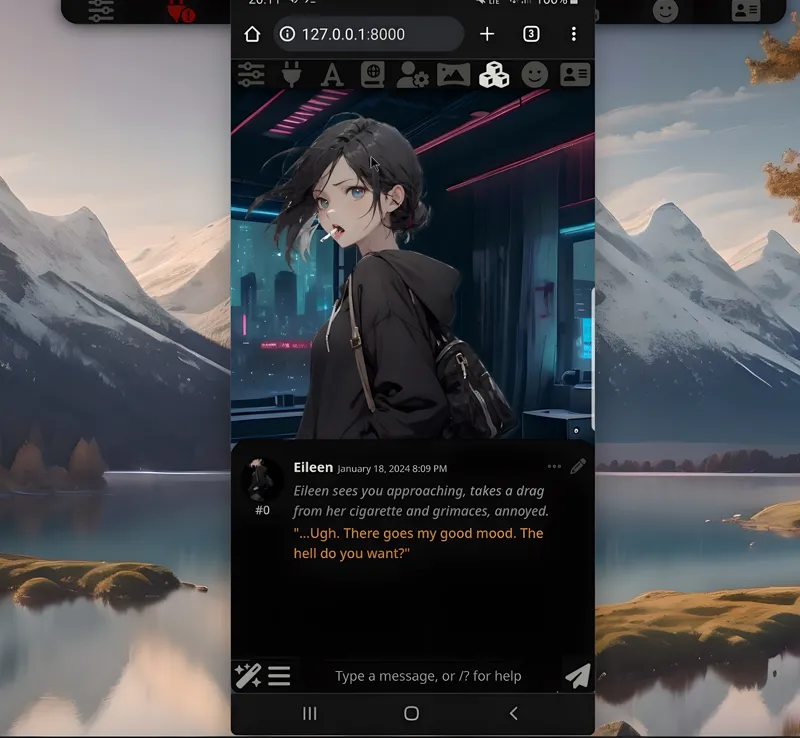
1-Click INSTALL SillyTavern FOR PHONES!
Hey everyone! I've created a 1-click installer for the AMAZING SillyTavern UI for your Phone and Mobile devices. Keep in mind that this was made to work with Termux on Android so IOS users might have to try the manual install since I personally don't have access to any Apple products to try it out myself...sorry about that. In any case, you Absolutely need to try this out!
Watch the video on SillyTavern for Phones: https://youtu.be/kTAKL97FL8g
The installer of course automates the entire install process!
Here's how it works:
1. Download the installer (silly.sh) and the launcher (launchsilly.sh).
2. Create a new folder on your internal storage phone called "AI" and place those 2 files inside
3. Download, install and run Termux
4. Run the following commands:
termux-setup-storage
cd ~/storage/shared/AI
bash silly.sh
5. If it asks for an action just press "y" and then press enter (might ask you multiple times)
6. Wait for everything to be finished
7. Choose the browser to run sillytavern with
8. Use my Google colab doc: https://colab.research.google.com/drive/1DeTTwJPjmZMJNYCzYHX6LfsUay9-s0Kk?usp=sharing
then use the public "OpenAI-compatible Api key" inside sillytavern
9.???
10. Profit 😎
You can also use the extras-APi Google Colab doc to have access to a bunch of other api options and extensions: https://colab.research.google.com/github/SillyTavern/SillyTavern/blob/release/colab/GPU.ipynb?authuser=2
What's great is that you can use those Google colab on your PC or any mobile devices and have pretty incredible conversation speed, so that even if you have a weird gpu or no GPU at all you can enjoy sexy-shmexy roleplay whenever and wherever you are 😉
As always, supporting me on Patreon allows me to keep creating helpful resources like this for the community. Thank you for your support 😉!