
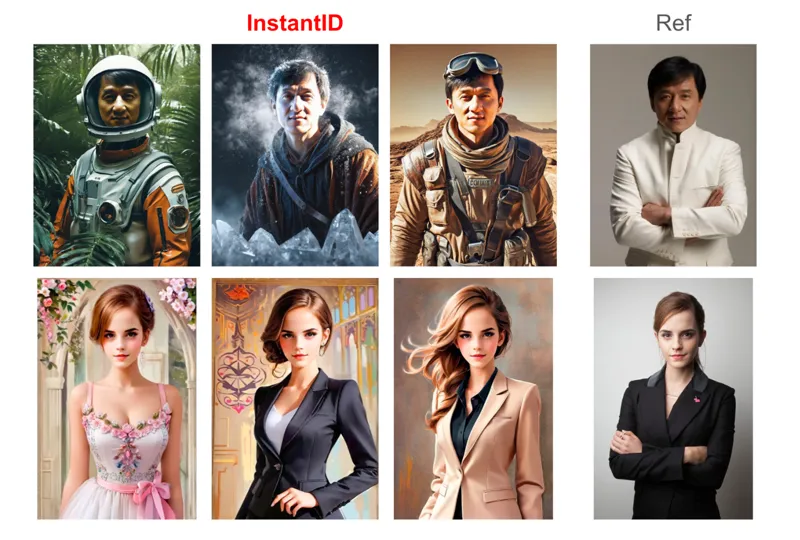
New InstantID Tech Video - Generate Images From A SINGLE Photo IN SECONDS
Hey everyone! I've just released a new video on how to install and run InstantID, an incredible new AI tech that allows you to generate new images of your subject from a single photo in only a few seconds WITHOUT TRAINING! It's absolutely mindblowing tech and you should definitely try it out yourself.
You can check out the video right here: https://youtu.be/jjRFa1JugA0
I also created a 1-click installer for the software for my Patreon supporters, that you can find right here: https://www.patreon.com/posts/1-click-install-97116934
As well as a Google Colab doc to run the software if you don't have a GPU (need Colab pro subscription):
https://colab.research.google.com/drive/1wYdWZFQU0QzZ8cdnsp-I9evrKPCScUET?usp=sharing
This is some groundbreaking tech that will probably soon be implemented everywhere but right now you can use it to generate cool images of your subject or use that to make more images for Lora training, the sky is the limit!
As always, supporting me on Patreon allows me to keep creating helpful resources like this for the community. Thank you for your support - now go have some fun😉!
Comments (8)
1 click Installer worked perfectly on Win 11
After 3+ hours, I finally got this to run on RunPod! lol
Hi! I cannot install it. "Specified path not found" (my pc is in Spanish). The other file just installs python on my pc but then doesn' do anything. I don't have any file to open InstantID so I don't know what to do. I want to start creating but so far it is impossible...
that means your python installation was done incorrectly previously, you need to uninstall python completely then relaunch the installer or install python manually yourself and not forget to check "add to path" in the installer
Thank you very much for the video. If I want to install on Runpod, should I follow the same procedure like the video starting from 2:56 ?
the same procedure wouldn't work on runpod, I need to check but it would probably be closer to using the same commands as for the google colab doc
From the video it seems a clever, though it probably doesn't replace the normal stable diffusion/Loras right now I think. I assume it's a bit limited with only working from one image. I assume it won't be as accurate as a Lora/Dreambooth though will be a lot faster for generating something from 1 source image (or with another for a reference pose). In the video it showed when you run it it gives a public URL. Isn't automatically giving a public URL security risk? Surely for security you might not want it running/accessible from a public URL/server. ie. couldn't people try and break into your pc from the public server URL? Is the identitynet strength for how like the original photo person it will make it? eg. around 5:25 on in the video some of the faces generated from the photo of the woman seemed to have a thinner face than the source woman image. So does that mean the identitynet strength would need to be higher for it to be more accurate to the person?
once it gets implemented inside auto1111 and optimized maybe it well get even better and practical, we'll see, can't speak on that right now, it definitely has its uses. If you don't want the public url you can modify the app.py file (last line and remove share=true) but there is no security concerns. Identitynet is how close it follows the subject reference photo yes, but it also makes it less flexible (kinda like overtraining a lora), you kinda need to play around with it for the best results