
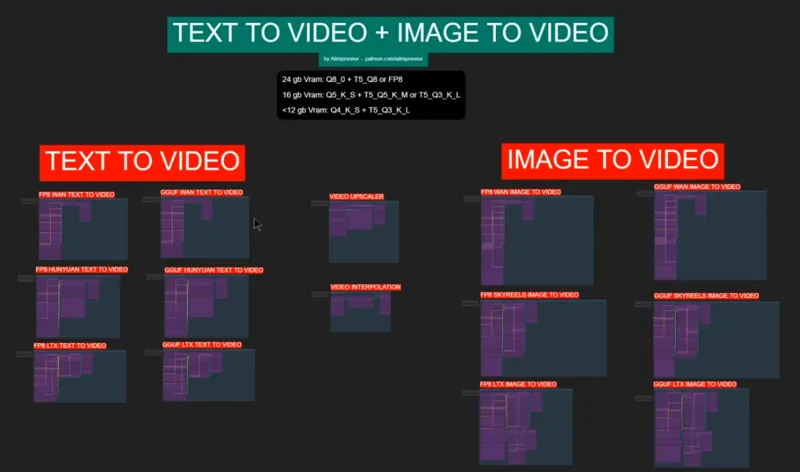
WAN IMAGE-TO-VIDEO & TEXT-TO-VIDEO WORKFLOW!
Hey everyone! I've just released a new video on my "THE NEW OPEN-SOURCE IMAGE TO VIDEO KING! ", called "WAN". Simply THE BEST AND MOST POWERFUL AI VIDEO MODEL TO DATE!!!! It's just amazing!
You can check out the video right here: https://youtu.be/H8Ky0LhRaGs
I also created a 1-click installer for the Webui for my Patreon supporters for Local AND Runpod, that you can find right here: 1-Click INSTALL WAN IMAGE-TO-VIDEO & TEXT-TO-VIDEO ComfyUI WebUI! | Patreon
Here the link to the manual install guide: https://pastebin.com/NNrgKW68
You can also checkout my troubleshooting video if you are not sure what to do: Exclusive Patreon Video: Troubleshooting Flux Workflow Comfyui!
Down below you will also find the IMAGE_TO_VIDEO-TEXT_TO_VIDEO-ALL & WAN_ONLY-TXT+IMG WORKFLOWS for free for you to use!
As always, supporting me on Patreon allows me to keep creating helpful resources like this for the community. Thank you for your support - now go have some fun😉!

Comments (50)
Cannot join private Discord for workflow errors: "You need to verify your account in order to prerform this action" Which Account?
he just doesnt respond
Says youtube video is restricted?
I updated Comfy, did the update of all the nodes, tried to add the missing ones but it doesn't add them, it gives me error and in the FP8 LTX and GGUF tab it still tells me that there are missing modules, I don't understand how to add them. The others, where all the modules are there, work. Please help me
Does anyone find the missing node types error?
As I wrote in the other comment, there is a problem since the FF8 WAN IMAGE TO VIDEO doesn't work, that's because the Load diffusion model only accept safetensors model (t2v) while the i2v are in GGUF format, we need to address it someway. Edit. I figured out that I was using the wrong node for the operation, meaning that using the WAN for the GGUF does the work, but then I don't understand how can the other note be useful since it only load tensors (I've downloaded all the models).
everything is working in each and every workflow shared with just updating all through Comfy manager
when i load this workflow "IMAGE_TO_VIDEO-TEXT_TO_VIDEO-ALL.json" i get Prompt has no outputs, one click installed corectly as other workflows are running except the ones with it - WAN_ONLY-TXT+IMG.json and "IMAGE_TO_VIDEO-TEXT_TO_VIDEO-ALL.json" can someone check if these two workflows in specific are working
I had this kind of problem before, don't know exactly why, I had to re-install everything from scratch 7-8 times (in different hd, folder and so on) before everything worked properly (without changing anything on the process).
Update all again, and put the right models in!
Can someone help me. I am doing runpod instaklation but cannot seem to find the one click installation file / folder.
Hi, need your help. I am getting this error when I try to load the workflow V3-ULTIMATE_FLUX_ALL-IN-ONE-WORKFLOW after following all instructions. I updated to ComfyUI nightly build (the latest stable below this is v0.3.27): Missing Node Types When loading the graph, the following node types were not found workflow>sampler and seed upscaler workflow>Extra nodes upscaler workflow>Florence workflow>Flux Controlnet MiDaS-DepthMapPreprocessor CannyEdgePreprocessor HEDPreprocessor workflow>Image gen sampler workflow>Other Nodes workflow>Param workflow>Other Nodes 2 workflow>Sampler 3 LoadAndResizeImage workflow>Nodes 3 DualCLIPLoaderGGUF UnetLoaderGGUF workflow>sampler img workflow>Negative Prompt workflow>XLabs Sampler workflow>positive prompt guidance workflow>Adetailer workflow>outpaintflor workflow>faceswap2 workflow>faceswap3 workflow>REACTORFACESWAP workflow>pullidpara workflow>pullflo workflow>pulidtxt workflow>pluidlux workflow>fillparam workflow>postiveguid workflow>Diff workflow>outpaintpar workflow>REDUX1 workflow>REDUX2 workflow>REDUX3 workflow>PULIDREDUX workflow>REDUXPARAM workflow>REDUXOTHERPARAM workflow>newcontrolnetparam workflow>shaker workflow>shakercont AIO_Preprocessor workflow>SHAKKERPARAM Upscale by Factor with Model (WLSH) VHS_VideoCombine workflow>Liveparam AdvancedLivePortrait workflow>LIVEPORTRAITIMGPARAM VHS_LoadVideo LivePortraitLoadCropper DownloadAndLoadLivePortraitModels LivePortraitLoadMediaPipeCropper workflow>LIVEPORTRAITVID2VIDPARAM workflow>LTXPARAMTEXTOVIDGGUF workflow>LTXPARAMTXTFP VHS_SelectFilename VHS_LoadVideoPath ImageResizeKJ workflow>LTXIMAGETOV HyVideoVAELoader HyVideoSampler DownloadAndLoadHyVideoTextEncoder HyVideoDecode HyVideoTextEncode HyVideoEncode GetImageSizeAndCount ImageConcatMulti workflow>hynupar workflow>huynyav2vparm HyVideoLoraSelect HyVideoModelLoader Text Multiline
I'm getting this error "KSampler Unrecognized CachingAllocator option: 512" Any suggestions on how to fix it?
Figured it out. There was a PYTORCH_CUDA_ALLOCATOR Env Variable set. I deleted it out and it works fine so far
someone else with problem "ffmpeg is required for video outputs and could not be found." i tried a lot of things, nad doesnt work
same here!
any plans to add teacache and sage attention to the Wan workflow? I've been looking everywhere for info on this! Thanks.
I came here to ask the same thing. I'm too new to this to try and add it myself (yet) but I see a lot of how people 1/2 their generation time while still maintaining decent quality. Was wondering what thought Aitrepeneur has about it.
hi ! what is the best practice interpolation before upscale or upscale before interpolation ? thanks
Anyone got this error ? "UnetLoaderGGUF Unexpected architecture type in GGUF file, expected one of flux, sd1, sdxl, t5encoder but got 'wan'"
í keep getting this error when trying the image 2 video . "The size of tensor a (128) must match the size of tensor b (16) at non-singleton dimension 1 " any idea on how to fix it?
i downloaded both JSON files and "dropped" them in and got blank screen. nothing on the screen. anyone know whats going on?
Same, no errors, everything's updated but it's just empty and not showing any nodes. The V3 Workflow works for me.
It takes me 2500 seconds (40 minutes) to generate one vid on GGUF WAN IMAGE TO VIDEO with the default settings. i'm on a 3080 ti 16gb vram. normal? any tweaks I could try to get better speeds?
Thank you for this. I was up and running very quickly. FWIW, I've had great success generating 720x720 I2V clips at 10fps and interpolating to 30fps. On a 4090, that's 11 minutes to generate a 5 second clip with 49 frames, then 1 minute to interpolate. If you use the 480 model to generate 640x640 and interpolate, it's 6-8 minutes and still pretty good quality. My clips don't have a lot of fast motion, so YMMV.
how do you get 5 second clips? I only get 2s clips
Nice work! I didn't have my normal machine handy, so I installed on an 8 year old laptop with a GTX1050. Everything ran as expected (slow). IT took about an hour to run the samples. So, I grabbed a few year old threadripper with an A6000 and it was a much more enjoyable experience. But, I had to give that one back. I'm now in the process of loading on a couple year old i9 with an a4500 and an a4000 in it. We'll see how that does, since I can use this machine for a while. The only issue I had was one of the models(?) said it was no longer available. Nice script, really simplifies things.
No LORA support for this yet, right? This model seems to be really bad at rendering *certain details*.
Anybody getting "workflow>WANIMAGEPARAM loading error" : 1. Make sure you updated ComfyUI to the latest version (right now 0.3.18) and drag the workflow again. 2. If you updated from Manager and you're still getting the error; MOST LIKELY your update didn't happen and you didn't realize. Go to the "ComfyUI_windows_portable\update" folder and click "update_comfyui.bat" and if it still doesn't work click "update_comfyui_and_python_dependencies.bat" Go to Settings-About and check if the version number is at least 0.3.18
That's very helpful thank you!
How difficult would it be to do a img2vid with 2 inputs, where it generates the animation between the two? Kinda like animate diff does.
Actually there is a way to do that, might add it to a future workflow, unless we get something better soon, seeing at how fast everything is going nowadays
Is it possible to make videos longer than 2 seconds with the Wan 2.1 model?
I crank the Length in the Ksampler to 81. I use the WAN GGUF i2V 480p Q5. It took 1:08:01, 136.05s/it for a 5 sec clip on a RTX 3060 12 GB. Not sure if there's a way to make it run faster but the quality is good.
cant seem to get these fixed - can you point to the nodes git plz for me ! Missing Node Types: workflowskyreelsparam workflowskyreelslogic
i got the same Problem... andy Help? :)
I used your full comfyui + models installer in local Windows 11 and the img2vid workflow runs like a charm. Thank you very much! (I'm using the WAN2.1-480p-Q5 GGUF on a 4090; ~4 min per video)
Weird error. Any ideas? - Missing Node Types When loading the graph, the following node types were not found WanImageToVideo (In group node 'workflow>WANIMAGEPARAM') workflow>WANIMAGEPARAM Int-🔬 (In group node 'workflow>skyreelslogic') workflow>skyreelslogic Compare-🔬 (In group node 'workflow>skyreelslogic') If ANY return A else B-🔬 (In group node 'workflow>skyreelslogic') workflowskyreelslogic workflowWANIMAGEPARAM
Update ComfyUI itself in the Manager, and then try to reimport the workflow.
Can you please help me resolve these error messages?WanImageToVideo (In group node 'workflow>WANIMAGEPARAM') workflow>WANIMAGEPARAM Int-🔬 (In group node 'workflow>skyreelslogic') workflow>skyreelslogic Compare-🔬 (In group node 'workflow>skyreelslogic') If ANY return A else B-🔬 (In group node 'workflow>skyreelslogic') workflowskyreelslogic workflowWANIMAGEPARAM
Wan is missing from drop down in Load Clip
Any idea how to solve 'VAE' object has no attribute 'vae_dtype' I have checked all the models and they are in the right place. Have updated comfy and nodes. Not the first time i've had this error with vid models but can find little about what it means or how to fix
Turns out i had a Wan vae that does not work with your workflow - the ones that didn't work are labelled bf16 and bf32 - only vae that works is the "wan_2.1_vae.safetensors"
Umm what is this BS? Followed everything in your video. Came here and became a subscriber. Setup runpod and can see comfyui. NO workflow there. So I guessed that needed to be uploaded to the /default/workflow folder in Jupiter. OK so did that and refreshed the comfyui..The worfkflow is a mass of red boxes with nodes that cannot be found? What am I doing wrong? EDIT i installed missing nodes..but still have these not found!?? I have terminated my runpod as I am getting charged and it's not working. So once you tell me what is wrong and how to get it working I will try again. LTXAttnOverride (In group node 'workflow>LTXPARAMTEXTOVIDGGUF') workflow>LTXPARAMTEXTOVIDGGUF ModifyLTXModel (In group node 'workflow>LTXPARAMTEXTOVIDGGUF') LTXPerturbedAttention (In group node 'workflow>LTXPARAMTEXTOVIDGGUF') workflow>LTXPARAMTXTFP workflow>LTXIMAGETOV Int-🔬 (In group node 'workflow>skyreelslogic') workflow>skyreelslogic MathExpression|pysssss (In group node 'workflow>skyreelslogic') Compare-🔬 (In group node 'workflow>skyreelslogic') If ANY return A else B-🔬 (In group node 'workflow>skyreelslogic') workflowLTXPARAMTEXTOVIDGGUF workflowLTXPARAMTXTFP workflowLTXIMAGETOV workflowskyreelsparam workflowskyreelslogic
I said in the video (and in the Patreon post installer) that if you don't know what to do, watch the troubleshooting video, I explain everything step by step: https://www.patreon.com/posts/exclusive-video-116007628
What LARA's work with WAN?
Was waiting for this! Let's see if my 4080 + 32gb ddr4 RAM can deliver this baby.
how much vram minimum?
Any chance to fix V3-ULTIMATE_FLUX-COMFYUI-MANAGER ? That one installs but there is no option to update missing nodes because the node manager does not start :(
Absolutely, I'll update it asap