

FLUX LORA TRAINING + LORA TESTING WORKFLOW
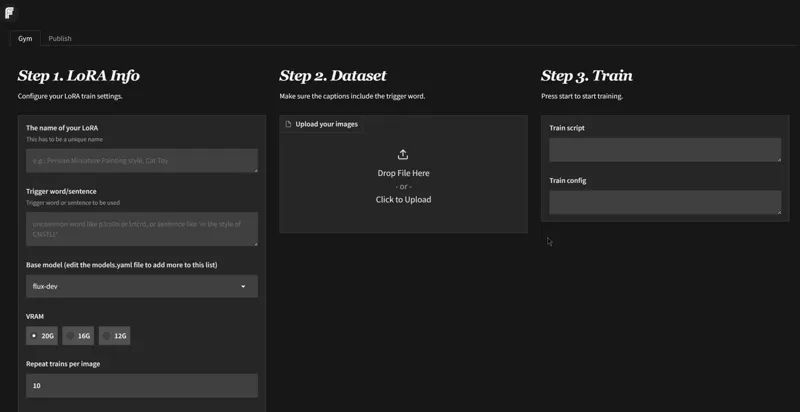
Hey everyone! I've just released a new video on FLUX LORA TRAINING WITH FLUXGYM! The BEST and EASIEST webui for Training a LORA I have EVER SEEN!!!! It's just amazing!
You can check out the video right here: https://youtu.be/LILai5jIW1w
I also created a 1-click installer for the Webui for my Patreon supporters for Local AND Runpod, that you can find right here:
1-Click INSTALL FLUXGYM - EASY FLUX LORA TRAINING! | Patreon
Here the link to the manual install guide: https://pastebin.com/hnRHPYjM
Down below you will also find 3 WORKFLOW for Comfyui for free for you to use.
-FLUX_SIMPLE_REDUX.json
-FLUX_XY-PLOT_LORA_TESTING.json
-V3_1-ULTIMATE_FLUX_ALL-IN-ONE-WORKFLOW.json
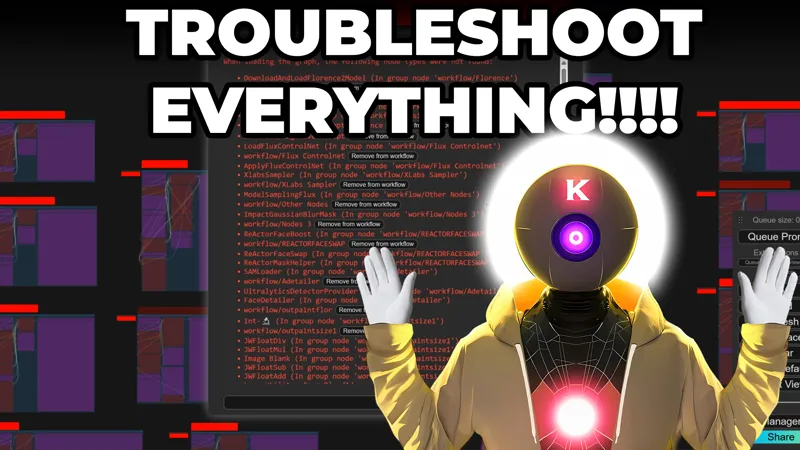
You can also checkout my troubleshooting video for comfyui if you are not sure what to do when loading a workflow:
Exclusive Patreon Video: Troubleshooting Flux Workflow Comfyui!
As always, supporting me on Patreon allows me to keep creating helpful resources like this for the community. Thank you for your support - now go have some fun😉!
Comments (28)
Hi, this workflow used to run perfectly. 2 days ago a I did a Comfy Update and now I get erros like "width missing", "heighth missing" and I always have to go back to the last stable comfy version... Anyone used this workflow after Comfy Update ?
Hi, Thanks so much for your Flux Gym tutorial, it helped me successfully train my own LoRa! I'm now having trouble with the FLUX_XY-PLOT_LORA_TESTING.json workflow. When I loaded it into ComfyUI, I installed the prompted missing nodes, and then rgthree via ComfyUI Manager. Even with everything seemingly installed, I'm seeing two issues. First, some nodes are light purple and not clearly visible like in your video. Second, and this is the main problem, after setting parameters and running the workflow, I get the error: "Prompt execution failed Prompt has no outputs:" Could you please offer some guidance?
as with all my workflow you need to activate them using the little button the left, watch my video on the subject I explain how to use the workflow
Hi I Recently Upgraded to a 3090ti Card and all seems to work well but qhile doing the image to prompt I get this error message! Prompt outputs failed validation: Florence2Run: - Failed to convert an input value to a INT value: seed, randomize, invalid literal for int() with base 10: 'randomize' - Value not in list: task: 'True' not in ['region_caption', 'dense_region_caption', 'region_proposal', 'caption', 'detailed_caption', 'more_detailed_caption', 'caption_to_phrase_grounding', 'referring_expression_segmentation', 'ocr', 'ocr_with_region', 'docvqa', 'prompt_gen_tags', 'prompt_gen_mixed_caption', 'prompt_gen_analyze', 'prompt_gen_mixed_caption_plus']
has anlyone else been able to get the workflow to test the Lora working? When I load the json, I set the advPlot Combo node to lora_name and "select" however when I try to select it just says "select widget for options"
Hi K, back in one of your older videos on LORA training an item of clothing on SDXL you had to create a black censored square over faces. Should you do the same with Flux Gym?
Oh and likewise from your earlier video, removing backgrounds etc to make them transparent. Do you still do this for training clothing or an object if you don't want the background as part of the training data? Thanks @Aitrepreneur and the community (if they know!)
in the FLUX_XY-PLOT_LORA_TESTING.json workflow, on the first Load LoRa (the purple one, under DualCLIPLoader), what should be put?
the XY plot comfyui workflow just hangs on "Requested to load flux". the Gpu is running on 100% but it seems stuck? or just slow? (4060ti)
tell me how to download WORKFLOW FLUX_SIMPLE_REDUX.json I did not find the link
I installed this following your Pastebin procedure. Everything went well until I tried to start the training and have no "Start" button showing. How do I start the training by command line?
The maximum image count is 150. More than 150 images causes the "Start" button to disappear.
The trained Loras don't work well with GGUF models. Only works with the safetensor versions. T_T
Idk if it is updated or, I am using lora i drained with Flux dew with Flux dec Q8, works as a charm didnt actually expect such a big difference from no lora and lora model to have.
My inpainting is working fine, but my outpainting, expands the picture but only fills that expanded space with an empty gray
The process seems to hang at 'caching latents...' I've significantly reduced the batch files as a test, and it has hung at this point using a sizeable 24 gigs of RAM, neither the CPU or GPU are being utilized in resource monitor. I've let it sit for 8 hours. 4070 Super, 64 gigs of Ram, AMD CPU. [2025-02-22 14:08:41] [INFO] 2025-02-22 14:08:41 INFO Loaded AE: [2025-02-22 14:08:41] [INFO] import network module: networks.lora_flux [2025-02-22 14:08:41] [INFO] INFO [Dataset 0] train_util.py:2598 [2025-02-22 14:08:41] [INFO] INFO caching latents with caching train_util.py:1104 [2025-02-22 14:08:41] [INFO] strategy. [2025-02-22 14:08:41] [INFO] INFO caching latents... train_util.py:1153 I have attempted both the automatic and manual install and still get stuck at the same place. Any assistance would be appreciated. I've also attempted the 'Skip_cach_check' in advanced options.
Attempted another install after a fresh restart of computer. Seems to be working for now.
I feel like you made the Flux XY workflow just for me because I was asking you for it. Yes, I know that others must have been, too, but still, it's great to have this tool. Thank you!
After using every setup steps you suggested and starting the train i get this message and does not continoue the process, i waited 4 hours as you mentioned it may seem it doesnt doing anything, however i doubt that with my RTX 3060 12gb i am too impatient :D, what should i do? license_str = license: other license_name: flux-1-dev-non-commercial-license license_link: https://huggingface.co/black-forest-labs/FLUX.1-dev/blob/main/LICENSE.md no samples
go here: https://huggingface.co/black-forest-labs/FLUX.1-dev and accept the license
Anyone had success using flux models from civitai for lora training? Aitrepreneur mentioned editing the yaml file but I haven't had any luck. Let's say for example if I wanted to use Copax TimeLess rather than dev or schnell, how would I go about getting the copax checkpoint to appear in the dropdown and work for training? Would appreciate any advice.
it's only from a model present on huggigface, not civitai. You can however dl the model from civitai and upload it onto your own free huggingface model space and use those data for the model download
joined your patreon for the SDXL training, but then I jumped on Flux and was surprised at first to see you didn't have a video out for Flux Lora training yet. Anyway, used some of the same arguments from the SDXL Low-VRAM training while training in Flux, but I'm not sure if they have any actual effect and maybe you can answer after some more testing (like no-half-vae, cache-latents, fused-backward-pass). I might retrain some of my LORAs with the new parameters you mention in this video (mainly the multi aspect ratio), but so far Flux Loras look soooo much better even at 512x512 than 1024x1024 SDXL loras. also if anyone out there is like me running these on a 10GB VRAM and running FluxGym through Pinokio, you can simply download the fp8 version of Flux Dev and place that in FluxGym's checkpoints folder with the same name (flux1-dev) and same format (.sft)
Official free one click installer right on the fluxgym github page. https://github.com/cocktailpeanut/fluxgym?tab=readme-ov-file#install
Very cool thanks! Hunyuan lora training when???
I tried Fluxgym and... well... it's easy, yes. It's for when you just want to try something out quickly. And you come pretty far with it. BUT at the time writing this, it does not have the option to save or load the configuration for your training. You want to try some small changes on what you did a day earlier? Have fun loading up the pictures again (and maybe caption it if you wanted) and make all the small changes to the configuration again and again. Hit F5 in the browser? Then your current training will continue in the background but you also have to prepare everything again for the next run. So Fluxgym has it's drawbacks but when you try heavy lifting on some cloud providers, Fluxgym is simply not an option. When going into the cloud, you strive for efficiency (preparing everything around the dataset and the configuration of the training) and you want to upload everything and start right away. That's what Fluxgym can't do, at least not at the moment.
if i want to train a character for NSFW, would you recommend to use a NSFW flux model instead of the flux1.dev model? if yes, which flux model is currently the best for uncensored NSFW?
Finally, can't wait to try this out! Sadly you got me with that on my last day before I will be away for a few weeks XD. But it's ok when I am back I will get a 5090 and try this.