
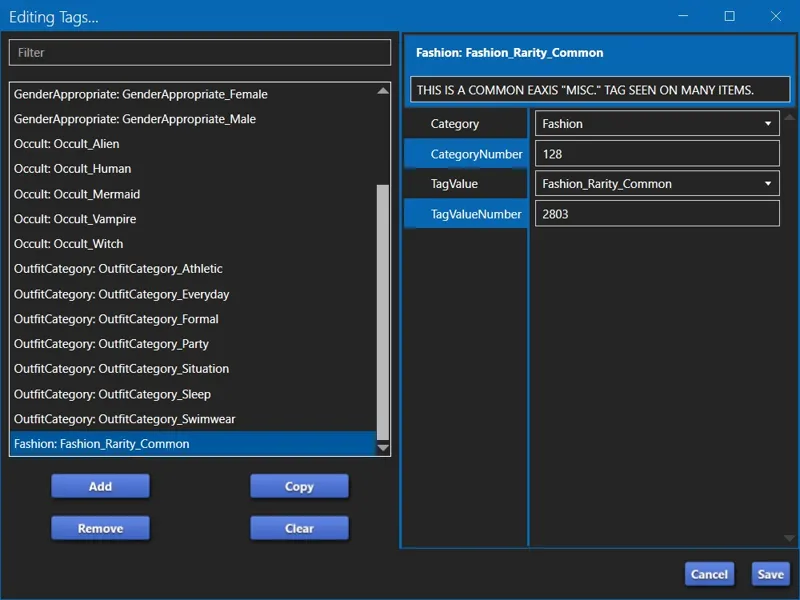

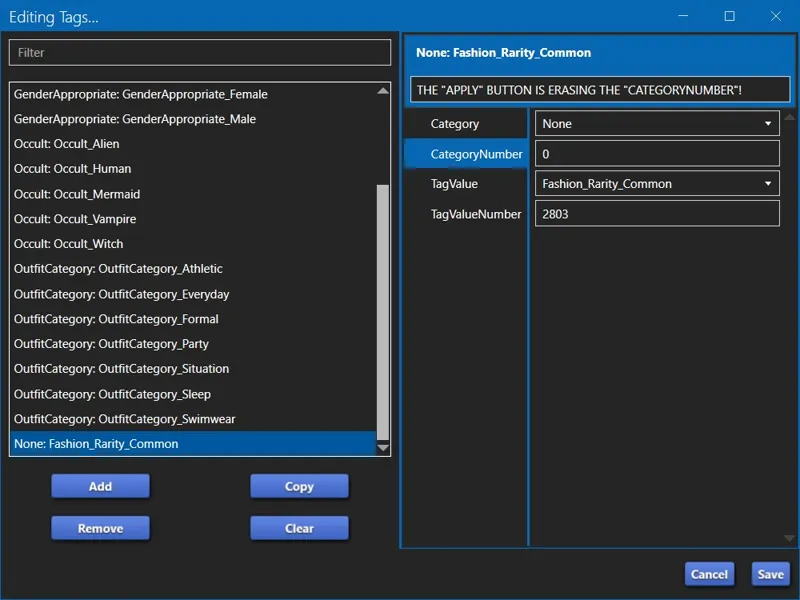
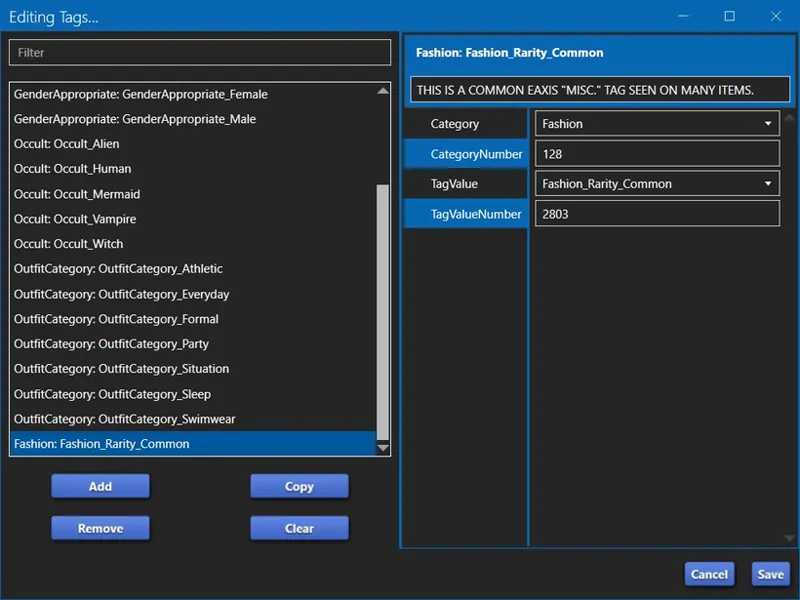
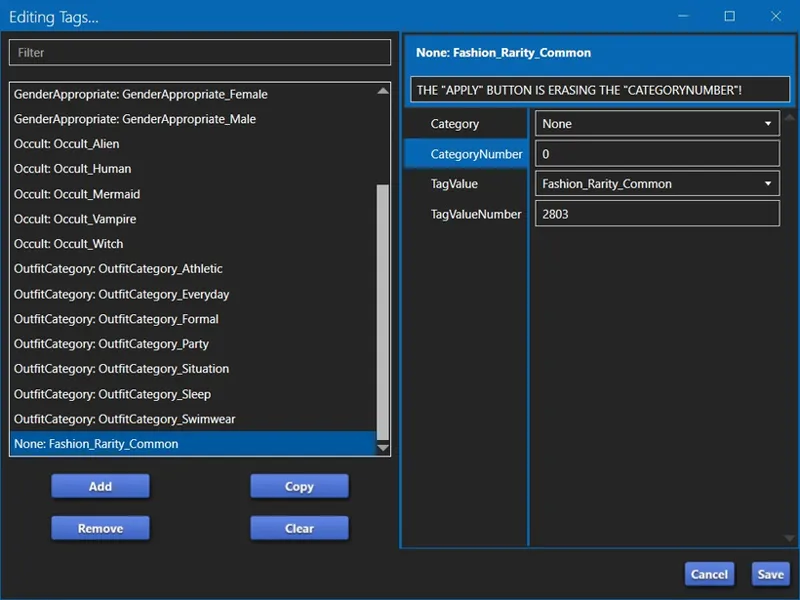
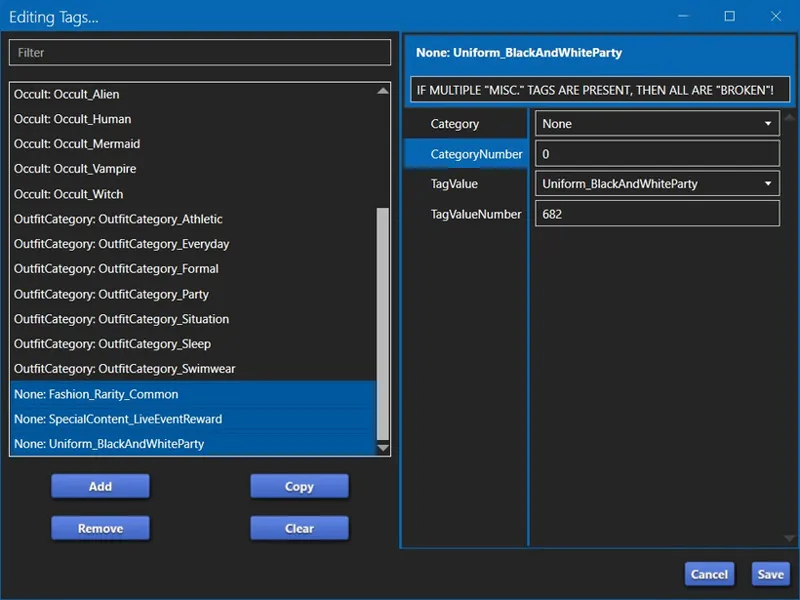
🦋 [S4S] "Apply To All Swatches" in "Miscellaneous" been busted for a while! -- [7/31] v3.2.4.6 and v1.4.4.3 fixes the button and the issues with "CategoryNumber"!
I was mistaken. The button didn't break when the drop-down list was added.
This has been broken since as far back as version 3.2.3.2 (Star), which was released on 12/17/2024. 3.2.3.2 (Star) was released before the drop-down list was added.
Is a good thing I intend to re-release everything I've shared, because I need to double-check all of the content that I have released for CAS. (╯'□')╯︵ ┻━┻
If you have added "Miscellaneous" TAGS to your content and used the "Apply To All Swatches" button in the last few months, then you need to double-check that your "Miscellaneous" TAGS aren't broken (missing their CategoryNumber) on all Swatches other than the one you used the "Apply" button on.
BE ADVISED! This is only an issue for "Miscellaneous" TAGS if - IF - you used the "Apply To All Swatches" button in STUDIO » CATEGORIES » "Miscellaneous".
If you are a creator and you add "Miscellaneous" TAGS to your first Swatch then use the "Add Swatch" button to create new Swatches or the TOOLS » COLOR PALETTE » "Apply Palette to Package" button, then your "Miscellaneous" TAGS are fine. You can double-check to verify, but they are fine.
⋆ ── ─ ─ ─ ─ ─ ─ ─ ─ ─ ─ ⋆ \\🐞// ⋆ ─ ─ ─ ─ ─ ─ ─ ─ ─ ─ ── ⋆
🐞// ⋆ THE PROBLEM (FOR CAS CONTENT):
CAS TAGS have two parts, and they do not work unless both are present:
Category / CategoryNumber
TagValue / TagValueNumber
The "Apply To All Swatches" button seen in STUDIO » CATEGORIES » "Miscellaneous" is erasing the "CategoryNumber" in all "Miscellaneous" TAGS in all other Swatches when used, effectively breaking every one of those TAGS in all other Swatches.
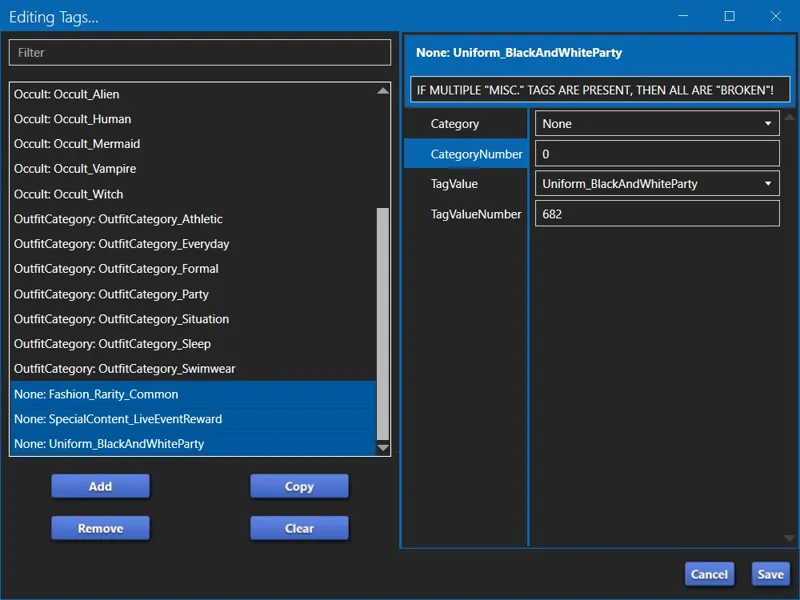
If multiple "Miscellaneous" TAGS are present on the Swatch, then the "CategoryNumber" is erased from all of them in all other Swatches. They're all ded, Jim!
🐞// ⋆ THE OTHER (LESS PROBLEM-Y) PROBLEM:
TAGS added from the drop-down list in STUDIO » CATEGORIES » "Miscellaneous" do not have a "CategoryNumber", which means they don't work unless you fix them in WAREHOUSE.
CAS TAGS have two parts, and they do not work unless both are present:
This isn't a big issue because this can be done easily, but adding the missing "CategoryNumber" to every TAG, in every Swatch, in every item, manually, because the "Apply To All Swatches" button is busted, is a serious problem.
⋆ ── ─ ─ ─ ─ ─ ─ ─ ─ ─ ─ ⋆ \\🛠️// ⋆ ─ ─ ─ ─ ─ ─ ─ ─ ─ ─ ── ⋆
🛠️// ⋆ THE WORKAROUND FOR EXISTING CONTENT:
If you require visual aid, then see my "CAS Filters" instructional video. It covers these instructions when adding my "filter TAGS". -- https://youtu.be/DxL55_bi1r0
If your item has no pre-existing "Miscellaneous" TAGS that are properly configured with "CategoryNumbers" and you're adding new "Miscellaneous" TAGS, then you can do the following:
1️⃣ Add you new "Miscellaneous" TAGS to the first Swatch in STUDIO
2️⃣ Use the "Apply To All Swatches" button to quickly copy your "Miscellaneous" TAGS to all Swatches.
3️⃣ Navigate to WAREHOUSE and fix every "Miscellaneous" TAG in every "CAS Part".
If your item has pre-existing "Miscellaneous" TAGS that are properly configured with "CategoryNumbers" and you want to add new "Miscellaneous" TAGS, then you need to do the following:
1️⃣ Add you new "Miscellaneous" TAGS to the first Swatch in STUDIO.
2️⃣ Click through the other Swatches in the Swatch list and enable your new "Miscellaneous" TAGS on every Swatch manually.
3️⃣ Navigate to WAREHOUSE and fix every "Miscellaneous" TAG in every "CAS Part".
DO NOT ACCIDENTALLY CLICK ON THE "APPLY TO ALL SWATCHES" BUTTON!
🛠️// ⋆ THE WORKAROUND FOR NEW CONTENT:
When creating new content, you should always configure your first solitary Swatch with all PartFlags and TAGS and other settings that you want on all of your Swatches, including any "Miscellaneous" TAGS that you want.
This is because all PartFlags and TAGS and other settings are properly copied to new Swatches when you click on the "Add Swatch" button in STUDIO or use the TOOLS » COLOR PALETTE » "Apply Palette to Package" button. This includes any "Miscellaneous" TAGS. They are all copied properly.
⋆ ── ─ ─ ─ ─ ─ ─ ─ ─ ─ ─ ⋆ \\☢️// ⋆ ─ ─ ─ ─ ─ ─ ─ ─ ─ ─ ── ⋆
☢️// ⋆ HOPEFULLY THIS GETS FIXED SOON:
Y'know, when I brought this up in [X], the initial response I got amounted to "well, it only affects CAS TAGS, and not many creators use those TAGS anyway" as though that's the appropriate response to being made aware of a "bug" that no one apparently knew was a thing, that would affect simmers and creators who use the broken feature without them even realizing that it's broken or understanding how it's affecting their work, because no one apparently knew this was a thing before I pointed it out. <HUFFS> QUE?! U WOT M8?!
I know I repeated myself there on a few points. It's... <INHALES SHARPLY> frustration over this issue, sorry.
Despite the fact that I have used other "Miscellaneous" TAGS in the past, I only discovered this because of "CAS Filters", which is why I need to double-check my work, especially now that I've realized it's been broken far longer than I thought it was! <GRINDS TEETH> 😹👹
Cheers and Happy Modding!
May the bug fixes be ever in your favor! 🍰🕹️💀
Comments (2)
Silly question ... I know you know A LOT about the different tags and categories, the main ones are fairly self explanatory. But for the miscellaneous ones, is there a master list somewhere that actually has more info or explanations for all the different groupings? Like 'Uniform_', or 'costume_' ?
Catdammit! I accidentally clicked out of the notification and Patreon ate my reply! What was I saying... Ah, right! To answer the question - not that I know of. When I finally get back to my PARTFLAGS and TAGS posts, we're gonna be spending a lot of time on the Miscellaneous section, because it's not as straightforward as I initially implied. Off the top of my head... Both of these TAGS are used to define outfits for Sims in specific situations. Generally Uniform is used for job uniforms and Costume is used for holiday costumes and Costume Box costumes. These TAGS are used by Tuning resources that define those outfits - instead of the Tuning resource defining each item to use, it defines the TAG to use, which is why the improper use of these TAGS is... very bad. If you'd like to see this in practice, open S4S » Tools » Extract Tuning... » and search for "outfit_uniform" » toss "outfit_Uniform_Athletic_Lifter" into a new package » scroll to the end and you'll see the following: [L n="tags"] [E]Uniform_AthleticLifter[/E] [/L] I had to change the code brackets because Patreon's comments don't like them. These are the items TAGGED with Uniform_AthleticLifter: [FEMALE] yfBody_EF01AthleticLifter_BlackPink yfBody_EF01AthleticLifter_BlueYellow yfBody_EF01AthleticLifter_GreenYellow yfBody_EF01AthleticLifter_GreyBlack yfBody_EF01AthleticLifter_OrangeTurq yfBody_EF01AthleticLifter_RedBlack yfBody_EF01AthleticLifter_YellowPurple yfShoes_CrossTrainers_Green yfShoes_CrossTrainers_Magenta yfShoes_CrossTrainers_Red yfShoes_CrossTrainers_Yellow [MALE] ymBody_EF01AthleticLifter_BlackWhite ymBody_EF01AthleticLifter_BlackYellow ymBody_EF01AthleticLifter_BlueWhite ymBody_EF01AthleticLifter_GrayBlue ymBody_EF01AthleticLifter_OrangeBlack ymBody_EF01AthleticLifter_WhiteBlack ymShoes_AnkleHightops_Black ymShoes_AnkleHightops_GrayDark ymShoes_AnkleHightops_GrayGreen ymShoes_AnkleHightops_GrayWhite ymShoes_AnkleHightops_Lime ymShoes_AnkleHightops_Red ymShoes_AnkleHightops_Teal ymShoes_AnkleHightops_White The game will randomly pull one "Body" item and one "Shoes" item to use for the Sim. The only way to specify which color to use in this TAG + Tuning setup would be to create a new Uniform TAG for the color combination you want. Also, you could add items to this uniform by just adding the "Uniform_AthleticLifter" TAG to an item, say... custom content unisex cat-ear headphones or whatever, or just override some EAxis socks and the TAG. Now for the Sim themselves, the outfit that is applied to them is determined by the Tuning coding (whether it's improperly coded to dress the Sim in clothes that match their "Gender", or properly coded to dress them in clothes that match their "Clothing Preference" - this is how I code my mods and how I intend to BUGFIX EAxis' nonsense because this is how we make clothes inclusive for everyone in this game) and the Restrict Opposite PARTFLAGS on the CAS items themselves, which is why the improper use of "RO" PARTFLAGS is a plague upon all that is good in the pixel world. Did all of that make sense? My mind is kinda Elsweyr. Is probably more information than you wanted, but figuring out how this works and then how to apply it to something custom was very exciting. 😹