

🎓 Windows D.I.Y. BATCH file to delete your LocalThumbCache.package -- 🚧 [7/31] Post overhaul required, and I hear y'all gotta pay for this kinda thing in some places. Bruh! What?!
THIS IS WINDOWS-ONLY FOR THE MOMENT AS I DO NOT KNOW A MAC ALTERNATIVE.
IF YOU DOWNLOAD MY BATCH FILE, right-click on it and choose EDIT from the Windows right-click context menu. EDIT will open the BATCH file in Notepad where you can see the code. If the code don't match the code seen in my screenshots, DELETE IT.
Did you know you really ought to delete your localthumbcache.package after the game updates or after making any changes to your Mods folder?
I've been meaning to share this for ages. I have been using BATCH files for about 10 years.
Mine is located in my Electronic Arts folder - but you can toss it anywhere - and I copypaste a shortcut into each and every folder inside my Mods folder, and one in the main The Sims 4 USER FOLDER as well. This way, whenever I modify my Mods folder, I just double-LClick the shortcut to run my BATCH script and my localthumbcache.package file gets nuked from orbit no matter where I am.
I'm giving you my BATCH file and I'm D.I.Y.-ing this for you, because you should not download BATCH files all willy-nilly from folks you don't know. In case you weren't aware, a little BATCH file was utilized in the JAN-FEB 2024 Malware Incident. It was coded to be malicious, just like the PYTHON scripts in our TS4SCRIPT mods can be coded to be malicious.
⋆⋅ SHORTCUTS:
If you downloaded my BATCH file, you can jump right in.
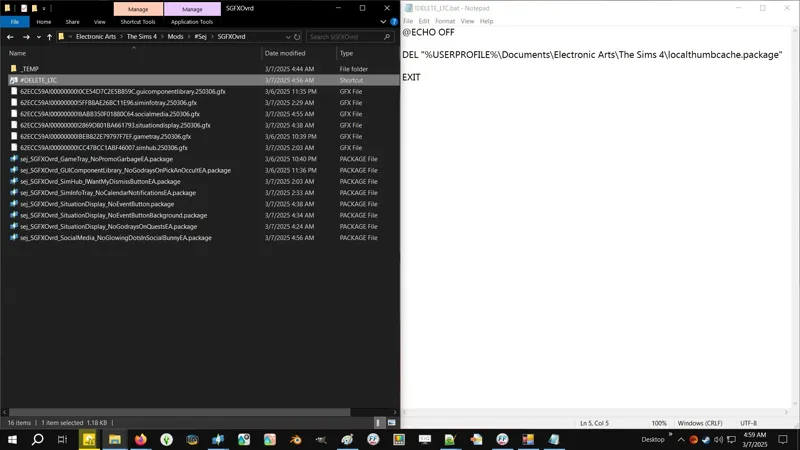
My BATCH file is named "!DELETE_LTC.bat". The ! exclamation mark is there to keep it above all other files that might end up in my Electronic Arts folder.
As stated, you can put the BATCH file anywhere you want because the internal code does not rely on the location of the BATCH file.
Now right-click on it and select CREATE SHORTCUT from the Windows right-click context menu and voila, you've got a shortcut.
Now copypaste that shortcut wherever you want it, to your heart's content.
I have about two dozen eggie- uh, two dozen or more of these shortcuts in my Mods folder - in the Mods folder itself, in all of my personal me sub-folders, and in every sub-folder where I put third-party mods or custom content.
I NEVER FORGET TO DELETE MY LOCALTHUMBCACHE.PACKAGE FILE! 😹
I'm my silly self again.
⋆⋅ I'VE NEVER HAD TO EXPLAIN WHAT A BATCH FILE IS:
A batch file is a script file in DOS, OS/2 and Microsoft Windows. It consists of a series of commands to be executed by the command-line interpreter, stored in a plain text file. A batch file may contain any command the interpreter accepts interactively and use constructs that enable conditional branching and looping within the batch file, such as IF, FOR, and GOTO labels. The term "batch" is from batch processing, meaning "non-interactive execution" [...]
-- Wikipedia - https://en.wikipedia.org/wiki/Batch_file
In layman's terms, a BATCH file is simple little TXT file renamed as a BAT file that contains batch processing code / script in it. When executed, it executes that code / script in a COMMAND PROMPT (cmd.exe) window.
BATCH files can contain multiple lines of complex code in order to do complex tasks.
If you'd like to learn more, I found two articles:
Basics of Batch Scripting - https://www.geeksforgeeks.org/basics-of-batch-scripting/
What Is a BAT File, and How Do You Open One? - https://www.howtogeek.com/what-is-a-bat-file/
⋆⋅ MY BATCH FILE FOR THIS IS VERY SIMPLE:
@ECHO OFF
DEL "%USERPROFILE%\Documents\Electronic Arts\The Sims 4\localthumbcache.package"
EXIT
You can copypaste the above lines of code into a regular Notepad document, adjust the PATH to your localthumbcache.package file, then do the following:
FILE » SAVE AS
File name: YOURFILENAMEHERE.bat
Save as type: All Files (*.*)
SAVE
When executed, it does what it says on the tin. I use line breaks between my lines of code for readability and grouping commands, but it's not necessary.
@ECHO OFF - it's 5:35 AM and I can't properly explain this one to you, but there are three parts to this - @, ECHO, and OFF. The Basics of Batch Scripting article linked above has a short explanation on ECHO and @ECHO OFF.
DEL - is the DELETE command.
"%USERPROFILE%\Documents\Electronic Arts\The Sims 4\localthumbcache.package" - is the PATH that tells DEL where to look and what to delete. If your PATH contains a SPACE then it must be contained in "" quotation marks. To cover your arse, always put your entire path in quotations.
%USERPROFILE% - is a "shortcut" to the current Windows USER PROFILE located at C:\Users\[USERNAME]\... and it avoids having to type all of that. It's a Windows whatchamacallit - in layman's terms, it's an internal shortcut defined by Windows. I forgot what it's called.
"...\localthumbcache.package" - tells DEL I want to delete THIS SPECIFIC FILE only. Yes, we can delete multiple files with multiple lines of DEL code or with * asterisk wildcards. In fact, we can delete everything in your TS4 USER FOLDER, or any other folder, or all folders, everywhere!
EXIT - automatically closes the COMMAND PROMPT window after DEL does the deed.
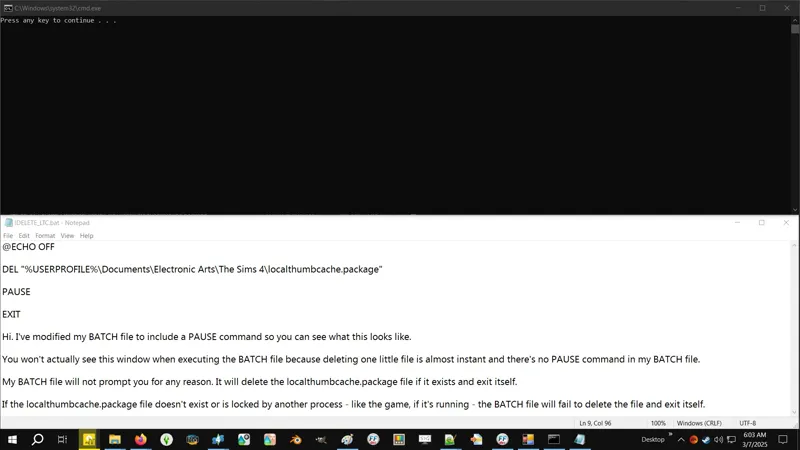
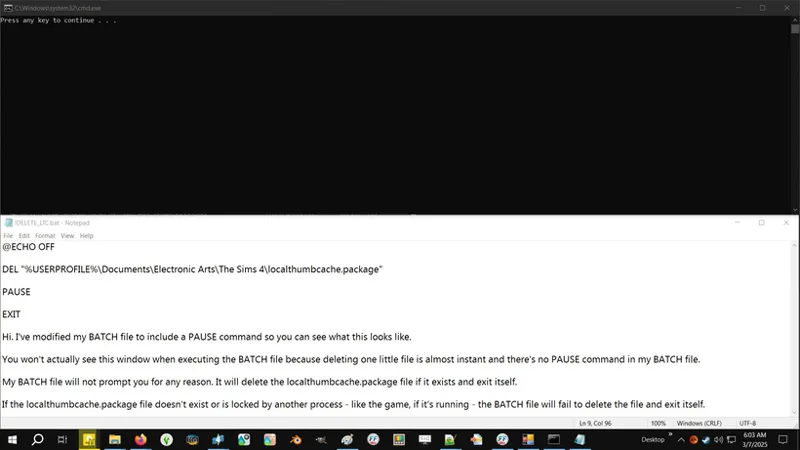
Because this is a very simple BATCH file and it contains no PAUSE command, the only thing you might see is a COMMAND PROMPT icon pop up in your Task Bar for a hot second. You might not even see the COMMAND PROMPT window itself.
⋆⋅ ALTERNATIVE PATHS FORWARD:
This is the default PATH to your The Sims 4 USER FOLDER:
DEL "%USERPROFILE%\Documents\Electronic Arts\The Sims 4\localthumbcache.package"
This one can be used if OneDrive is active on your device and managing your Documents folder:
DEL "%USERPROFILE%\OneDrive\Documents\Electronic Arts\The Sims 4\localthumbcache.package"
Once upon a time, a simmer I was helping troubleshoot told me their TS4 USER FOLDER ended up in Public:
DEL "%PUBLIC%\Documents\Electronic Arts\The Sims 4\localthumbcache.package"
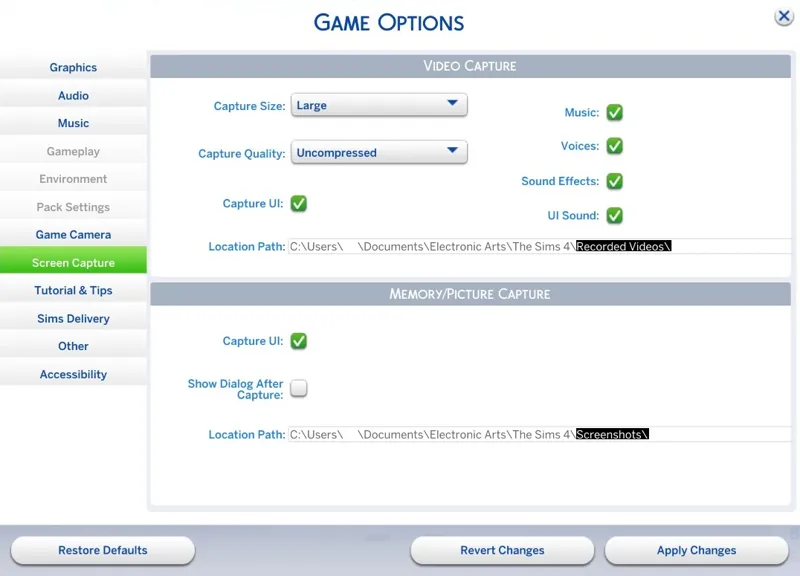
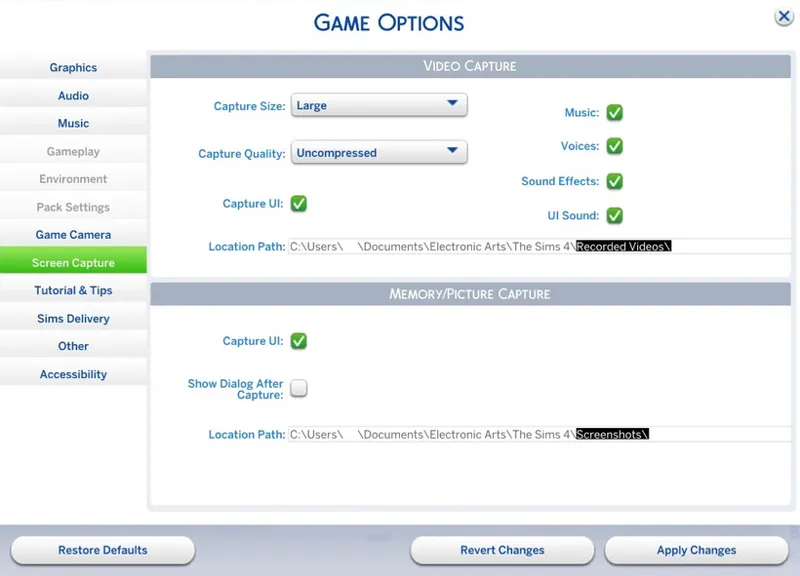
If your Windows USER PROFILE is not in the default path, you might need to customize the PATH to match whatever you see here - you can select and copypaste those LOCATION PATHS, just remember to delete the bit highlighted in black in my screenshot:
⋆⋅ CHEERS, WE'RE DONE:
I totes didn't delay releasing the SGFX Overrides updates to type this... 😸
Comments (2)
It's a recommended practice to move from .bat to a more modern .cmd. Also, exit is not needed to auto-close the window. Instead, pause is needed to have the window remain open if the user wishes so. So Exit is not necessary.
If I were to expand this script to do more, then I'd bother with .CMD and coding it differently. Right now, all it's meant to do is delete the cache and disappear. It's simple enough that anyone can replicate it and have it do exactly what it's meant to do without even having to download the provided file, and the code is also so simple that it's not going to confuse anyone as to what the purpose of it is. I'll read up on the shift from .BAT to .CMD when I get chance. I wasn't aware that there was a push to move us away from .BAT. I thought the push was to move us to PowerShell. As for the EXIT line of code, yeah I could probably remove it. I've just always included it. 😹