
EmuDeck WE 2.1.15 - Small fixes
Hello! A small update with some small fixes
Drive Selector
We've mitigated the random "directory Mode LastWriteTime..." message when selecting a drive, we've added a warning message too in case this happens.
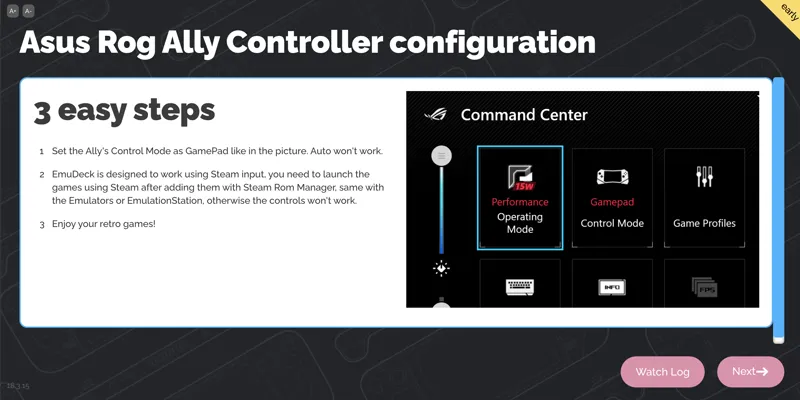
Ally config screen
We've made clear what Ally users need to do to get the EmuDeck plug & play experience ( Steam + Gamepad mode )
SRM Launch Fix
The Javascript error when launching SRM should be gone, please report if you still get it.
EmulationStation DE parser
Fixed the ESDE parser. Open Manage emulators -> Steam Rom Manager -> Update configuration to get this fix
RetroArch
Fixed issue on some systems playing at 2x speed. Open Manage emulators -> RetroArch -> Update configuration to get this fix
Comments (47)
Keep it up!! 👍💯
Would you mind guide me how to download version 2.1.15 please? Many Thanks.
They are on a pinned post on the homepage
love your updates whats driving me crazy is i haven’t received my ally which I preordered since first of July …
Can you help me set it up? Im confuse of how cloud save works. I have set up with drop box im playing on my pc but when i get on my ally theres no save date for the game
are you launching the games using Steam? you need to use our launchers, not the emus directly
Can you help me set sync save using one drive. I have it set in both my window pc n rog ally
There’s a bug on OneDrive, we will fix it asap
Yuzu controls on the Asus Rog Ally are not working, other emulators works fine
Follow the guide, they do work. Reset your configuration for yuzu too just in case
Hi! for the YuZU app, how do I create a mii for Mario Kart 8?I am using ROG Ally. Thank you
You need to already have a Mii on the firmware, can’t add it on Yuzu
hi, thanks for the emudeck im now a patron now Im trying to use the new “sync emudeck” on my steam deck to next sync my saves to my rog ally. Its not working in the SD because after I choose dropbox or google drive it shows a notfication of copy one file, i click the file and its a loggin screen from dropbox or google drive.. but after click on loggin it does not work… what im doing wrong?? thanks !!
Install chrome from the Discover store. Firefox fails when launching the login
Why does not start+select work on rog ally to close games?
It's a long press for some emulators. just hold it until the game closes
Just a heads up for anyone wondering, if you can’t get srm to come up try installing it to the c drive that worked for me , what’s happening is it just wasn’t installing onto the sd for some reason
Hey there, I can't make citra work at all. No controls work. I've tried to reset config but it still doesn't work. Any ideas?
Make sure you have all like this : https://github.com/EmuDeck/emudeck-we/wiki/Prerequisites
Make sure the controls are in gamepad mode in the command center.
Hi. Ive been trying for a while now. followed the advice, but I can not get the controls to work on my ROG Ally. What am I doing wrong?
Are you doing all the steps? Maybe you edited some emulator? Go to manage emulators and reset the config of the emulator that’s giving you trouble
Same issue
Wii U trouble next on my list. says path is bad to launch game in cemu.
Downloaded everything but steam rom manager will not install, when I try it gives a Java script error, this is on the ally
try the desktop shorcut
Well yal did something to fix it because ps2 is now launching for me this morning.
On the ROG Ally, whenever I open the Steam ROM Manager I get a message saying “Error encountered while reading user configurations!” I also don’t have any systems I can toggle off/on in Parsers. Any suggestions? I’m new to this.
Go to Manage Emulators and click on reset configuration
I also have an issue with rcps3. It doesn't open a game when I load through emulation station and when I launch individually to install firmware nothing happens, it doesn't open.
Really enjoying emu deck on the ally. One thing I've noticed is that the hotkeys aren't working on yuzu. Would be awesome if you could take a look. Cheers
All hotkeys are long press on yuzu, just press it a few seconds
This is going to sound like a silly question but how do I create a save state in Emulation Station on the ASUS Rog Ally. Not sure what the right button combo is nor how to look it up
SELECT + R1 to save, SELECT + L1 to load
Retro arch performance is terrible, is it something to do with vsync
What game are you shaving issues with?
I have one folder that I'm using for roms I prefer to run in yuzu and a second folder for roms I prefer to run in ryujinx. Yuzu tiles made by srm work fine. SRM finds my ryujinx roms and creates tiles for them, but when I use them, it puts me to the ryujinx window (which shows all my roms and I can double click to load the one I want) rather than loading the rom I picked. What should I be looking at to fix this?
Seems to be a combination of a few things. -g in the arguments, not sure what that does but getting rid of it along with the quotes around the rom path and any spaces in the filename did the trick.... Except for Mario and rabbids. Maybe it's the + in the filename
Thanks, I'll try
I'm getting a issue with srm still, when choosing Ps3 games through steam, it gives me a error through rspc3 saying it's trying to load through a system folder
Thank you so much for the Ally config screen option. It was driving me nuts last night when I tried to play a game and the B button wouldn't work, sending me back to the menu if you double pressed it.
Also every time I exit a game steam os crashes on the Ally
Controls don't work at all for me on the Ally I've switched to gamepad all that jazz. The only way I've gotten the controls to work is to change them in yuzu and launch directly through yuzu.
If you reset Yuzu config + Launch from Steam + Gamepad Mode they should work out of the box. They do on our Ally test machine.
I like these little touches. As a power user I don’t even think twice switching over but I see the value. One issue I recently noticed, I have all my files stored on an SD card. I started on the the GPD Win 4. Transferring the card the the Ally. The emulator the install stalled at the end and it didn’t add the shortcuts to the emulator folder. Also Yuzu doesn’t allow updates unless you install it where they specify so the app is outdated and doesn’t update via Emudeck.
Hi, we are working on an Emulator updater, but that's still far from complete. If you reinstall from Manage Emulators it will pickup the latest version
The parse thing not working right was confounding me so thank you for fixing that.