
EmuDeck WE - Latest round of fixes
Hello everybody! A small batch of fixes.
Switch / Ryujinx
Fixed an issue that prevented to have both Ryujinx and Yuzu entries on Steam
PS3 / RPCS3
Fixed SRM parser for PS3 games not launching
To apply both fixes go to Manage Emulators and update all pending updates, open Steam Rom Manager and parse those systems again.
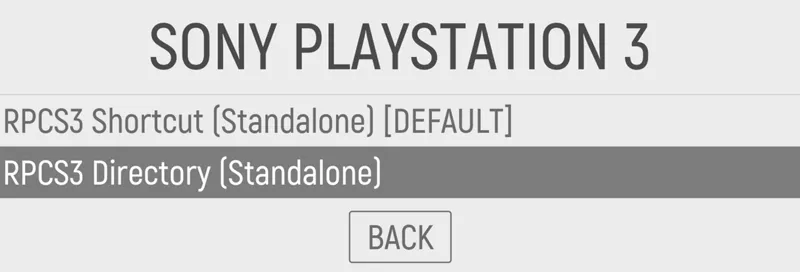
PS: If you want to run PS3 games using Emulation Station make sure you rename the game folder by adding .ps3 at the end. For example, /roms/ps3/Killzone 3/ should be renamed to /roms/ps3/Killzone 3.ps3/ , then go to Main Menu, Other Settings, Alternative Emulators and chose RPCS3 Directory:
Sadly this is just the way EmulationStation works with PS3 games, we are working on a way to automate this so you dont have to set this up manually.
See you on our next update next week!
Comments (78)
Says windows cannot find k start?
Did you remove the games and parsed them again?
My citra now locks me out on ROG ally can't go back can't open anything have to force restart to get out of a game... Hot keys don't work... Idk what I'm doing wrong, it worked before the update
Select + start don’t work?
What file extension for the RPCS3 are inside this folder then? ISO or PKG and RAP?
Right now extracted isos. PKG will come in a later moment
Hi everyone, I just started to use emudeck on the Ally and I'm having trouble with detecting my roms. I have them on a Sd card, with emudeck installed on root. Is this the problem? Thanks
did you chose to install emudeck on the SD Card?
Cloud saves via Google drive don’t seem to work. The button to sync on the cloud sync page does nothing. I log into my account I get the message about how it will upload when I save. On my PC I have my new save and on my Ally I have the old save. Is their something I am missing?
Are you trying to sync 2 windows devices?
Is there a way to turn of CMD console when the game/emulator is starting?
Nop, we need to use launchers so we can enable cloud sync, but on the next release they won’t be as noticiable as they are now
Why don't I see Xbox emulator to install but Retro Game Corps has it in his guide for EmuDeck Windows?
There’s no Xbox emu yet, what you saw is just an icon. But it will come soon
I had to actually force steam input off in emulation station to get it to work on my Ally. Now it works for every system except 3DS
Yuzu, Citra, Ryujinx and Dolphin need Steam input to work
I'll stick to just using the emulators separately for now. Seems Emudeck is just broken on my Ally at the moment.
It’s supposed to be a plug and play installation. There’s probably something wrong with your system. Send me a video showing how you do all the steps and I’ll try to find what’s missing
Did all of that! Quick reset, gamepad mode on opened steam. Ran the game. Nada. No controls work not sure if I'm just incompetent.
Still can't get a single control to work on the ROG Ally running through steam. I've tried everything, adjusting configs, resetting steam settings, gamepad mode. Nothing works.
Don’t adjust settings, that could just broke the setup. Follow this steps in this order: Make sure you have game pad mode, not auto. Then open EmuDeck, do a quick reset, open Steam, run any rom from Steam and report back
I made all the changes for ES but when i try to boot the game from ES an error appear ["roms/ps3/InFamous.ps3" nothing to boot]. How can I solve?
Did you change the emulator to RPCSX3 Directory? And did you install the firmware on the emulator?
Awesome 😎
Thanks 👍 Any help that a future update can provide would be great! Only EmulationStation has issues updating. All other Emulators seems to be fine.
An updater is in the pipeline. First we'll smash all the bugs we have, and then we'll resume adding more features
Thanks. Been trying that for months. I just tried it again with no luck. When I check the EmulationStation launcher in the Emulation\tools\EmulationStation-DE folder, the date modified says "3/11/2023" which was the original date of the first install. I just can't seem to ever update EmulationStation. Any other ideas?
It might be a bug on our end, let me add it to the bug list. In the meantime if you want you cans download manually and copy the files in your USERFOLDER/EmuDeck/EmulationStation-DE
Is there a way to properly update EmulationStation to the latest version through Emudeck? Everytime I try, and then launch EmulationStation, I get a popup saying...."New Release Available! 2.01 [2023-04-23] Can now be downloaded from https://es-de.org/" I'm on Ayaneo 2 btw. How can I update this through Emudeck?
Update from Manage Emulators, pick reinstall/update
why wont the Xbox and Xbox360 emulators work on the Asus Ally work? they dont show up when setting up and thus wont install.
They are not available at the moment , ext emulator we add will be Xenia
is PSVita not in here? Along with Xenia ?
Not yet. Soon
Having a really strange issue, whenever I go through the process of installing, the installer starts, prompts me to install 7 zip, which is already installed, at which point the command line closes and just displays that neither 7 zip or steam are installed and I cannot continue the installation process
the same thing happened to me on our AOKZOE test machine, never happened before on any other device. open powershell and run this commands: winget install -e --id Git.Git --accept-package-agreements --accept-source-agreements winget install -e --id 7zip.7zip --accept-package-agreements --accept-source-agreements
How do I download for rog ally ????
check the pinned post
I am having issues and I can't seem to find my answer, should I go to discord and try there? I am still getting the "Encryption keys are missing" but I have just dumped and dropped all of the new ones with the newest firmware as well. The games launch but I hate to have to minimize to click "ok" and move on. Thanks for y'alls help!
Seems like an issue on a new Yuzu release, we are gonna have to wait for them to fix it and release a new one
Do we know when Xenia is coming? Really looking forward to testing the original Crackdown on my Ally
We are focusing on fixing bugs right now before adding new features that will probably add more bugs. So we are doing a bit of a quality review
I installed it on thePc, and I get a Emudeck Steam Rom manager icon. I dont get this on the ROG Ally. 2nd. How do I start any program? i dont see it in the Steam manager, like the Emustation 2.0 ? only the gaming consoles.
Hi we don't have an official guide for Windows but you can follow this guide for SteamOS, works almost the same as on Windows
How do I fully uninstall Emudeck and remove all directories, folders, files it creates? I installed for the ROG Ally and I am having this weird issue during the initial setup where you select a drive and then it keeps bringing me back to the beginning where I select Custom setup and would to start from fresh install again.
"Armoury crate links won't work." Will this get fixed, or will it never work?
unknown at the moment, we need to get fixed other stuff before trying to add this functionality. Technically if you go steam and create a desktop shorcut and then add that shortcut to armoury create...that should work but haven't tested it yet
hi, thanks for the emudeck im now a patron now Im trying to use the new “sync emudeck” on my steam deck to next sync my saves to my rog ally. Its not working in the SD because after I choose dropbox or google drive it shows a notfication of copy one file, i click the file and its a loggin screen from dropbox or google drive.. but after click on loggin it does not work… what im doing wrong?? thanks !!
I am getting a weird issue. I previously had yuzu installed on my ally. Then I downloaded the emudeck for windows and it installed it again (I chose my micro SD as the main folder). The emulators themselves get installed on the C drive it seems. Whenever I open the yuzu emulator that was installed with emudeck I seem to loose about 5-10 fps compared to the one I had previously installed. Is this a common issue?
It also seems that the power profiles don't work great with it either. Not sure if it's because I had already installed yuzu before? Maybe that's affecting it? I haven't checked with any other emulators to see if that's only an issue with yuzu
Anyone help me with sd formtting? Emudeck cant find my sd card?
The SD card appears as a regular drive, maybe it’s D:, please check windows file explorer to see the name of the drive that windows assigned to the SD card
Is there any way to keep emulators from opening in full-screen mode? Every time I run an emulator, my monitor's brightness lowers, and I have to turn my monitor off and on to fix it.
there's not. all the emus should have hotkeys to exit full screen, will that work?
When i try to run yuzu games via steam big picture (added with SRM) yuzu just opens and i get this error: Error while loading ROM! (007-0034) The NSP file is missing a Program-type NCA. Since yuzu opened, i can open the game and it plays normally. But its weird that i get this error and the game doesnt open itself like with other emulators
that error tell you that the game is somehow corrupted. You might need to rip it again
I'm not seeing a Vita emulator (Vita3K) on Steam ROM manager. Can/Will this be added?
on a future release, we are focusing right now on bug fixing
furthermore, I have problems controller input on Yuzu. Not a single button works. I launched jt through steam and emulation station while on gamepad but still no controls.
can you try resetting Yuzu's config from manage emulators?
I have an issue on my Ally since today. When I startup it gets “stuck” on checking for updates. The bar just keeps going.
Small bug, the PS2 parser is not enabled automatically in SRM even though I have PCSX2 installed through Emudeck
Thanks, will take a look into it!
Hi guys- cannot for the life of me figure out this issue I’m having with EmuDeck and Emulation Station. My games are imported into ES and showing up, but it can’t find the PS2 rom that I installed through Emudeck. Any suggestions?
what format is the PS2? check the ps2 rom folder, there's a txt file where you can see all the compatible formats
Yuzu working fine with steam input. Ryujinx isn't for me. Have to keep switching between internal ally controller and Bluetooth controller in Ryu settings.
are you using the Ally connected to a TV using Bluetooth controllers?
Sorry for the late response. So if Im Playing raging blast 2. To ascend In the air is to long press the L bumper. If I long press it it registers as if I just tapped it for a jump animation.
HI, we are overhauling our Steam Input profiles to fix this kind of issues, we should release them tomorrow after more testing :)
Hey the L bumper and R bumper won't work on the ally on the games. When loading games on estation. Any comments.
Are you doing a long press?
So the RPCS3/EmulationStation fix now makes them actually appear in ES, but they won’t run, since it tries to run the entire folder and not the individual files. As it stands, shortcuts are still the only way to make them both appear and run from ES.
how do I get it to work? How do I create these shortcuts
Oh wait is that why they won't run when i extract them (PS3 games?) They're JB files. So confusing!
When I attempted to install the newest version of Emudeck, Windows Defender is saying there is a virus. I don't know if this is a false positive. The trojan it's detecting is Wacatac.B!ml. Is this normal?
Same issue and it won’t update!
Thanks for the update! I can now see my ps3 games on emulationstation but when I try to run them they don’t boot which is strange as they do when I launch them from rpcs3 so not sure why they don’t on ES :/
same thing. it doesn't boot up