




Zelda: Twilight Princess 4K Texture Pack 2.1 Update
Patch Notice #2 (2025-11-02): A small patch, version 2.1.0a, has been released for the mobile version of the pack to fix performance and pop-in issues on Android.
Patch Notice #1 (2025-05-15): A small patch, version 2.1.0a, has been released which fixes various issues from prior versions. This includes a fix for "flickering" which sometimes would occur when using the post processing edition, as well as a fix for some textures not always loading correctly.
Happy New Year! 🎆
I'm really excited to finally announce the next major update to the Zelda: Twilight Princess 4K texture pack! This version includes a huge amount of new textures, hundreds of changes, fixes and other improvements. Changes include new environment textures for several areas in the game, new character textures, new enemy and creature textures, remade UI, new material maps, performance optimizations and bug fixes. There's a lot to cover so here's the more detailed changelog:
New environment textures!
Several areas have been overhauled this update with new textures. Over 100+ new environment textures have been added, with nearly all of them receiving newly created material maps for them as well (*for the post-processing edition only).
Like in prior updates, the environment textures have been overhauled in many areas of the game! The new textures cover these regions;
Ordon Village
Ordon Spring
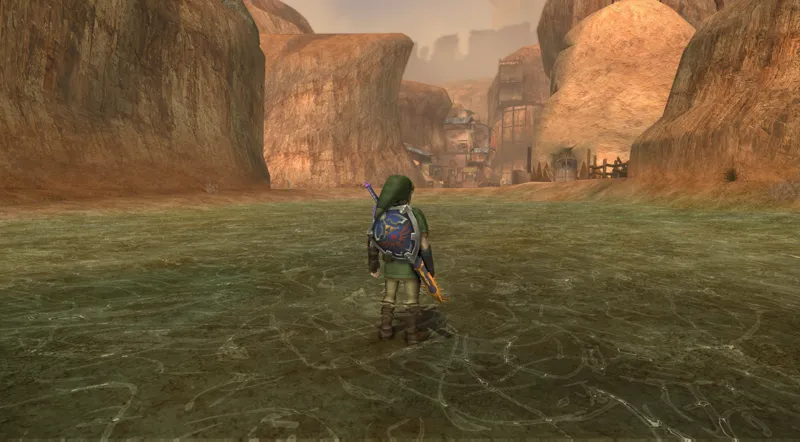
Zora River
Kakariko Village
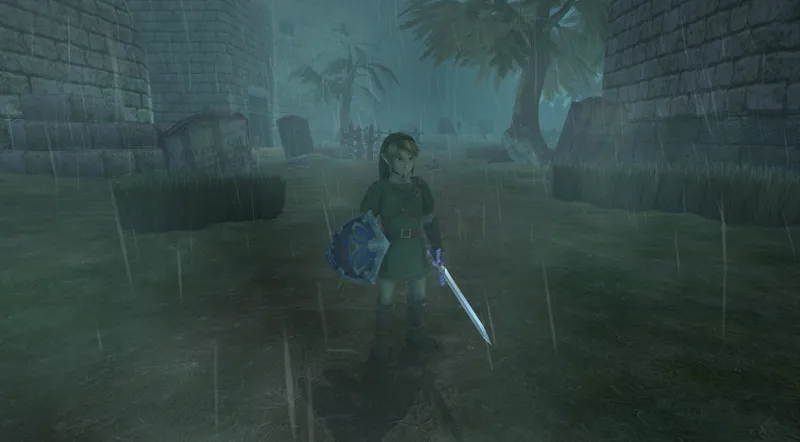
Kakariko Graveyard
The Sacred Grove
East of Castle Town
South of Castle Town
Lanayru Hyrule Field
Eldin Hyrule Field
Gerudo Desert
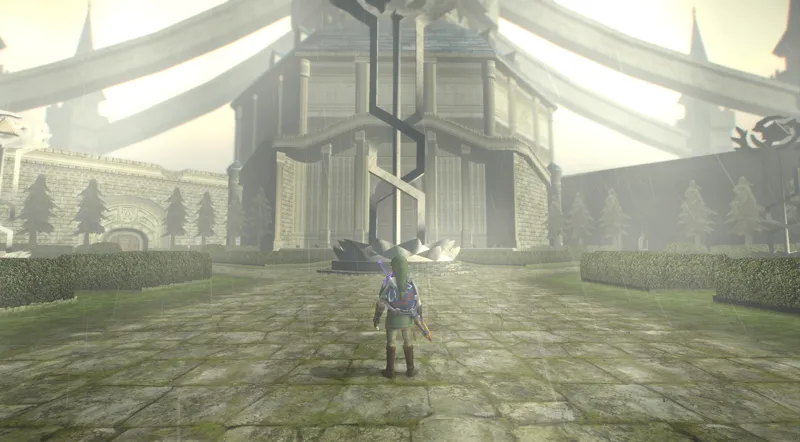
Hyrule Castle Courtyard
Hyrule Castle Graveyard
Castle Town
Faron Woods
Lake Hylia
Several dungeons (including the City in the Sky, Temple of Time and Hyrule Castle)
Since this update is so large, no single area has been the primary focus of this update, but you can rest assured that the vast majority of them have been touched up in one way or another! The two areas with the most new textures this update is the City in the Sky (now 90%+ covered) and the Hyrule Castle outside sections (the graveyard, courtyards etc, these previously had barely any new textures in them. Now they're pretty much completely covered!)
Tweaked Link textures!
Last update, fellow artist Skilar very generously contributed their own hand-crafted textures to this project, specifically most of Link's textures! They are incredibly high quality and fit perfectly, I think. They have also helped me out with several other things, including helping me improve my own art for my own textures and giving me great advice in various ways. This update however, I decided to again comb through the most important textures (Like Link's textures) and have made some slight changes to slightly improve the overall aesthetic. One example is the Hylian Shield which is now bluer and more contrasty than in 2.0, as well as Link's nose being just barely rounder than before, to closer mimic the look of the original textures. It's small details like this which can really make or break the look, especially if they're prevalent. I think you'll like it!
New shaders and visual tweaks!
The four custom shader presets from my Wind Waker HD texture pack project have been added to the pack! Of course, in Twilight Princess, this will result in a quite different look than the original, but I was surprised when I tried it myself- it actually looks pretty great with these shaders, but in a different way! You're by no means forced to play using these shaders, but I think you should definitely give them a try, you might really like them!
And like always, you can of course configure the shaders however you like, or disable them all together in the Dolphin Graphics Settings > Post-Processing tab. Go wild!
Increased consistency and improved quality all around!
As part of my overarching goal to improve quality and consistency in all my texture packs, I U have continued my work this update to remake many of the in-game textures from scratch to look cleaner and more consistent with the original art style. Lots of work has been done this update to revisit and remake many of the old HD textures to be higher quality, and to be more faithful to the original artstyle. The game should now feel even more like the original GameCube/Wii versions when played with these textures, and a lot fewer should look out of place and blend in better with their surroundings.
Repeat notice about two new Dolphin Emulator features which can improve your experience further (optional):
The bundled Dolphin Emulator that comes with the pack (the "Standard Edition" only) has been updated to a more recent version and now supports several new features and improvements. Most notably for our usecase is the new "VBI Skip" feature, which can be toggled on within the Dolphin Graphics Settings > Hacks tab > VBI Skip. This feature most notably is capapble of preventing stuttering audio whenever the game lags or drops frames for whatever reason, which can really break immersion. However- this feature is still in beta and can cause other issues, so use it with care and save frequently if you do!
The next feature directly affectes Twilight Princess directly, and is called "Cull Vertices on the CPU", and can be toggled on within the Dolphin Graphics Settings > Advanced tab. This setting lets the emulator cull (or not display) things which aren't visible on the screen, resulting in potentially large performance gains, even with the "Hyrule Field Speed Hack" toggled off in the Game Properties > Patches tab! With the Speed Hack disabled, several visual effects will now display correctly in-game, such as the mini map which has been visually downgraded from playing on original hardware since Dolphin's inception. If you have a modern CPU and GPU in your system, I highly recommend that you toggle this new feature on inside of Dolphin and disable the Hyrule Field Speed Hack, since this should now provide the ideal experience overall moving forward! (Note: Disabling the hyrule field speed hack will reduce performance by a fair margin, so only do this if you have plenty of headroom to spare in terms of performance)
Easy version selection!
Starting from version 1.3 onward, the post-processing edition and standard editions have been partially merged. Both versions now share the same folder and Dolphin settings will transfer between them, and they both load textures from the same location. This means the file size of the texture pack has been halved as a result (since duplicate textures are no longer included) and it also makes it possible to switch between the versions as you please, provided you're saving the game normally using in-game saving and not save states (save states are not compatible between versions).
What are the differences between the "Post-Processing Edition" and the "Standard Edition"?
There are two versions of the texture pack you get to select once you've downloaded it. One is the "Post Processing Edition", which includes all the post processing effects showcased in the trailer like ambient occlusion, tone mapping, bloom and more. The other version is the "Standard Edition" which doesn't include these features but has some other benefits instead.
The Post Processing Edition utilizes Ishiiruka Dolphin to achieve these features, and has some graphical features implemented not available in regular Dolphin at all. It also requires Windows 7 or higher (not compatible with MacOS or Linux) and a dedicated graphics card. Both editions include a controller preset for common gamepads like Xbox One, PS4/PS5, GameCube etc. The standard edition version alleviates some bugs present in Ishiiruka Dolphin (increased stability, for example) and supports MacOS & Linux, too! But does not support any of the additional graphical features listed above, like material maps, custom tone mapping, HD bloom, depth of field or ambient occlusion. Both versions look stunning so if you're uncertain I recommend you play the standard version- or try out both and see which one you prefer! The screenshots above have been taken using the post-processing edition.
That's mostly it for this update. Enjoy!
There are two versions available for download: The 4K version and the 1080p version. Both are indentical except for the textures resolution being halved in the 1080p version compared to 4K!
Note: The 4K version will look better than the 1080p version, even if you don't have a 4K display. This is because the textures are physically larger and contain more detail in the 4K version, no matter what resolution display you're using!
(Only available for the Dolphin Emulator, the texture pack does not work on real Gamecube/Wii/Wii U consoles).
Read more information about the texture pack on my website!
Updating from an older version is super simple:
Just copy & paste the "GC" and "Wii" folders inside the "User" folder in the texture pack directory over to the new version's User folder and it should work straight away!
You can find the download link and more information on this page here
I am only able to make things like this thanks to your support, so from the bottom of my heart, thank you for helping me do what I love!
❤️
Comments (90)
It just sends me to your website which is where I came from. And neither of the download links on there work, they both send me to google drive7
Gracias por el Gran trabajo y arte Que haces hermano Bendiciones
Dove devo cliccare per scaricare il paccheto?
It says download quota has been reached what do I do?
Please try again now and see if it works!
idk if its just me but the lighting seems broken in this update even without the shaders on, everything is too bright and the sky looks and trees look washed out to the point theyre essentially white
ok nvm I think it was just cause I had per pixel lighting checked
I cannot for the life of me get this to work on dolphin on android. Installed it and threw in all the files, but it just wont load any custom textures. It always just say it does not find any textures. Anyone else encountered this?
Did you install the mobile / android version of the pack, or the desktop version?
It seems that the download quota has been reached :/ does that mean it is unavailable for download?
Try again now!
hey Henriko! everytime i try to download the texture pack..says too many people have downloaded and that i am unable too?
Try again now and see if it works!
Thank you for your hard work. It looks awesome. I am getting some odd textures mainly around water. The sides look odd with horizontal lines and duplicate or characters cut in half characters in or around water or odd reflections. Am I doing something wrong or is there a fix to this? Again great job.
Thank you for this! I have been wanting to play through TP for a long time but had been holding off for the right setup. I only played through it once when it was first released on the Wii, but hated the controls. I never had a GC, and now, playing this 4k version with the GC controller is putting this game in my top tier favorites! Setup was a breeze and it works great. 10 hours in, and I have only noticed a couple stutters total, which didn't effect gameplay.
brother, first of all, your guide is completely wrong as there is no ZTP4K dolphin version and nothing works out of the box when downloading this file. on top of that, the older v2.0 version is no longer downloadable, so i can also not use those versions. how am i supposed to play this texture pack when everything you describe in the guide is not even there?
The pack includes all of the necessary files described in the instructions. ZTP4K Dolphin has been renamed to just "Dolphin (Standard Edition).exe" and "Dolphin (Post-Processing Edition).exe" in 2.0a, but other than that everything else should be the same.
Oddly, Ishiiruka Dolphin does not see my .rvz TP rom. But standard does. I didn't see anything online about Ishiiruka dolphin not supporting rvz; But evidently it does not.
Ishiiruka does not support .RVZ sadly. It only really supports roms in .ISO format, which you can convert to inside of regular Dolphin by right clicking the game in the games list > Convert to file > .ISO.
Yeah.... I'm not able to download anything. I'm a member, and all i get when clicking TP DDS link is a pop up to select my email, then it shows the 4k and 1080p files....but no progress beyond that. What happened to the simple days of "download click here" and a file starts and is then on your device. Breaking what didn't need fixed, smh
Double click on either the 1080p or 4K files on Google Drive and it will display a blue "Download" button. Click that and it should start downloading.
how do you install the shaders
does this work with the modded multiplayer version, namely the EU version of the game?
Probably, but I haven't tested it
Henriko, I love what you do to the games, especially my childhood ones too. Henriko you are amazing. Seriously. If I could give you more money for Patron for more member benefits I would if I could afford it. :( Love your work. :3 If you can make 4k texture packs for the Super Mario Galaxy games too in 4k, that would be flipping neat! ^_^ Love your work. :3 Sincere. :) Hope you have a great year! :3
Long-playing this tonight, you're amazing man
Yes, everything looks better now, but how can I change the game language? Previously, the same ROM ran in German on PC, and now there's only the English version. Which I find really unfortunate.
You change the settings inside of the emulator settings, it should work on all language versions.
Dude, just know that I’m not trying to be rude, and I’m very sorry if I come off that way. You’re using too many mip map files. My Steam Deck literally couldn’t handle either version without randomly crashing until I removed all of them after realizing that they’re just extra of the same textures. I understand they’re supposed to help with shimmering and stuff, but 10,000 mip map files is too much. Please take this into consideration with the next update. You don’t have to remove them all, but a large amount of them need to go if you want it to be compatible with Steam Deck continuing forward. If you don’t want to completely commit, you can just add something in the texture pack page telling people to remove the mip map files if their game crashes because of too many texture files and not performance issues.
Would it be possible for me to use the texture pack with my preexisting install of dolphin?
You can! Just follow the instructions for Linux / SteamDeck which are mostly the same
The android doesn't give the full version. Only renders environment and character. No title screen or any thing else
The android version should include all the textures from the desktop 1080p version. Please send me a message so I can look into this problem further!
hi download link
so for the post process edition, it doesnt support retroachievements which is a little sad im guessing Ishiiruka is based off an older version? Either way its awesome to see the flickering issue fixed.
It does not, sadly!
Hi! They work on Android. It's just that they load very slowly. You have to wait like 15 mins to have The textures completely loaded. It is a Dolphin issue om Android.
Love this pack, but had one question. My big chests have a weird plain texture instead of the blue with gold accents, is that normal?
I would like to use it for GC on my Dolphin emulator on android. When I start the game, it says, that it found the custom textures. But the game doesn' look different. I don't know what I'm doing wrong. I just do exact the same thing as it's shown in all the tutorials. Paste the extracted folder in the load --> textures folder of dolphin and rename it. I activated the loading of textures in the settings. What am I doing wrong?
I'm having the same issue and don't know what to do.
Thank you, this is soooo awesome. Twilight princess was actually my first Zelda game everrrrrr and im so glad I finally have a PC and that can run it. I do have a quick question and that is that there is sometime a stuttering of the audio. Why is that?
Thank you for this! Quick question - I downloaded the 2.1 4K texture pack (only, not sure if anything else to download here in terms of TP, besides the new update?). in terms of post processing in the Ishiiruka Dolphin graphic settings, do you recommend the HenrikoMagnigico_ultra_v2, and/or the "balanced" option for these 4K textures? If I am missing anything from the instructions, do I need to move the extracted textures into another file directory (like with the ROM) outside of the original folder that has the included textures and Ishiiruka Dolphin already located? I've been playing it with "balanced" with no issues so far, so looking to ramp up the quality a bit to get the most out.
I am so happy with this... I put back my Wii to life, but playing on modern TVs sorta suck... I am very happy with this 4k texture, it is amazing!
Like I said before, I'd rather pay you than taxes
Hello Henriko, awesome Textures Packs I'm able to download and use all of these packs with no issues expect the recent 1080p Twilight Princess & Luigi's Mansion, I'm unable to download those. I keep getting an network issue both wireless and hard wired. Is this a known issue with these?
dose this work on cemu
wondering the same
Hiiii ..... I download the android version of this texture pack.... And is came with config and textures and with more files ... Then copied them and pasted them in android data dolphin folder... The texture are working but man the performance hit is very major... Tried switching bunch of settings and the api is on vulkan am using regular dolphin 2305 build (latest version). On my android with snapdragon 8 + gen 1... Should i be using ishiruka dolphin??? Will that fix the performance problem??.. i really like this game and this is my first zelda game so please help...
How did you make it work ? I pasted all the files and the textures dont load
Hello, 4k pack its compatible with 1440p in Twilight Princess and Wind Waker?
Hey, while using the henrymagnifico ultra shader the colors change from an orange tint when looking towards the ground then to a blue tint when look towards the sky. But when i start moving around it starts changing between the two tints very frequently. Is there any fix to this.
what would be better to use? the Wii version of TP or the GC version?
Actually I was able to find an old 2.0 texture pack and that one works perfectly fine. So yes, I believe there is an issue with this new version on android
Post-Processing Edition (Ishiiruka Dolphin) boots a white window with no menu bar or visible Dolphin menu on my Windows 10 machine, Standard Edition (Dolphin Emulator) boots normally compared to my separate install of the current release of Vanilla Dolphin, and a separate install of Vanilla Ishiiruka also boots normally. moving the .exe for Post-Processing Edition to the root of any other Dolphin install allows it to boot to the normal Dolphin menu, but merging all of them while retaining functionality seems like a real pain. any kind of guidance would be super appreciated. thanks for your hard work on this project.
Hi! Ishiiruka Dolphin is based on a very old build of Dolphin, so chances are high that modern Dolphin isn't fully compatible with the same settings as Ishiiruka unfortunately. I recommend that you keep Ishiiruka Dolphin separated to ensure nothing breaks. Regarding your issue, I can't really say what the exact problem is since it could be several factors at play, but I recommend that you first download and install the latest version of 64-bit C++ Redistributable for Visual Studio 2022 from Microsoft if you haven't already, since its a requirement for Ishiiruka Dolphin and development versions of Dolphin to work properly; https://support.microsoft.com/en-us/help/2977003/the-latest-supported-visual-c-downloads
Hello, I was in Lake Hylia today and noticed that the grass was extremely shiny and the polygons on the islands were all outlined in shadow (from my own 3D art experience, this looks like a issue related to normals or binormals or something). Does anyone know a way to fix this? EDIT: This affect is also more or less visible on Link's hat. Also switching to the ultra (v2) graphics seems to have helped a bit.
Hi! I can't seem to get this new version working on android. I never had an issue with the previous versions..it says it's loading the textures but doesn't change anything or actually loads them. Also the mobile version makes dolphin crash. Is there a way I could get the 2.0 version to test and confirm ? Edit: Actually I was able to find an old 2.0 texture pack and that one works perfectly fine. So yes, I believe there is an issue with this new version on android
Any thoughts on this?
Where is this so called 1080 version? I have looked everywhere and can only find the 4k download.
The desktop download link should take you to both the 4K and 1080p versions!
these textures pop in alot on android
Love this! I do only wish I could invert the Y-axis when looking around or using an item like the sling shot. I am not finding it in options either. Help!
Nevermind, I figured it out! 'Uninvert camera' was checked in AR codes. Unchecked it and... VIOLA! Hope this is helpful to anyone else. =)
Thanks Henrico you are the best
Ok chat Im so confused on how to actually get the texture pack into my dolphin, im on windows
You can find the setup instructions on the info page here; https://www.henrikomagnifico.com/zelda-twilight-princess-4k
I must say, i am very new to adding Texture patches ever using emulators, and you went above and beyond to make everthing clear and easy. literally served on a silver platter with it bundled with the emulator itself. thank you so much!
Its still a stuttering mess for me.
That would either be your hardware or settings. Works fine for me after adjusting my shader compilation settings.
Is this set of improvements compatible with the Wii U version of the game? With The Legend of Zelda: Twilight Princess HD? And which files need to be replaced in order to use Dolphin latest version? Just copy them to an unzipped folder? Or just run Updater?
The Twilight sections have an extremely distracting amount of bloom. Is there anything that I can edit in the settings to help with that?
Can we use the Texture pack with the latest vanilla Dolphin or are we missing out on some features with the bundled emulators?
Theres flickering in the post processing version, idk what I did wrong or if its just the recent update...
I'm from Mexico, and here I translate on Google XD to give you the power to tell you that thank you for making me happy, I hope you have a nice day
Hello, I've been playing Zelda with your Texture Packs, and I love them, but Twilight is my favorite, and that you dedicate time to my favorite game makes me very happy
anyone else experiencing some freezing? for example, after getting the 2nd sword technique, the screen goes grey as if it is going back to the rest of the game but stays grey. have to reset and try again (and it freezes again). Edit - no one else, just me?? i'll try to reinstall i guess.
Is the CPU culling option missing? I can't see it
Is there any way you can replace the character models with higher polygon ones to get the most out of the Ambient Occlusion shader?
Technically it's possible but there is no mod for that yet to my knowledge
I am struggling to get this to work on my Mac, any help would be appreciated.
Do you know how I can achieve 60 FPS?
60 fps is not natively achievable yet, but you can using an app such as Lossless Scaling to get 60 fps
Does this work with the WII U version? :)
The pack only works with the GCN / Wii versions currently
cant get my switch pro controller to work
Try using BetterJoy to make your controller recognizable as a regular gamepad; https://github.com/Davidobot/BetterJoy/releases/tag/v7.1
How do i get proper widescreen?
You can use the included widescreen cheats, or the widescreen patch located inside of the "!Patch in Widescreen Support" folder in the texture pack directory to get widescreen (the patch will only work with the north american / NTSC version of the game however, there are instructions on how to apply it included as well.)
Henriko delivers once again! This looks awesome, but I've got a ton on my plate already, so it'll be a while before I can get back to your texture packs.
Nice