

Release 5 download
This is the download and installation post, go here for the changelog/contents
Latest update on 23/08/2026: Compatibility of atmospheric scattering with Mirage scaled and bugfixes. The drive download link is the same but the contents have been updated, so if you received the download link via email or DM it will still work and contains the fixed version.
Download and installation instructions
Go here if you prefer a video guide (by Goddchen on youtube, covers recommended mods + volumetrics, although skip Planetshine since it's obsolete with Deferred), otherwise follow my instructions:
Download and install Release 5
[Patreon download link] [Drive link]
To install remove any existing config packs for EVE (BoulderCo, AVP, SVE, Spectra, 64k clouds, KSRSSVE, etc), remove any existing versions of Scatterer and EnvironmentalVisualEnhancements, then merge your GameData folder with the one included in the zip (drag and drop the included GameData in your KSP directory and they will get merged, do not put GameData inside GameData).
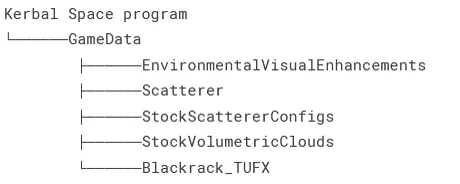
When done you should see the following folder structure:Do not reinstall Scatterer or EVE via CKAN.
To stop CKAN from overwriting Scatterer and EVE, open CKAN, locate Scatterer and EnvironmentalVisualEnhancements Redux, then right click -> labels -> held, this will stop CKAN from overwriting them.
If you start the game and the screen is pink that means you mixed files from different versions of Scatterer and EVE.Download and install deferred
Needed for puddles, screen-space reflections, and generally better lighting. Get CKAN and use it to install Deferred. CKAN is recommended because it automatically handles dependencies and mod conflicts. If you want to install it manually go here and follow the instructions.
(Optional) Install TUFX
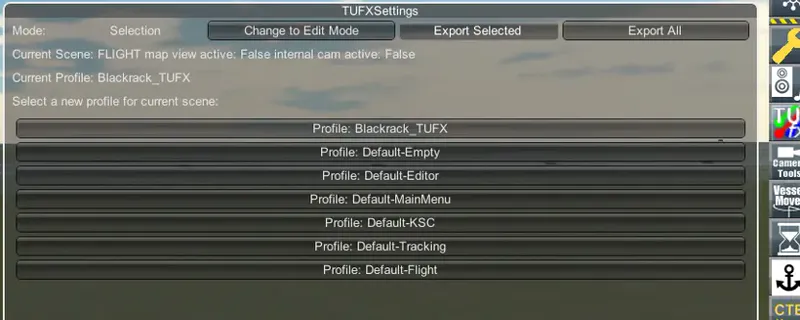
Optional but the ambient occlusion added by TUFX works well with Deferred and is important for good lighting. Use my TUFX profile or your profile of choice with ambient occlusion enabled. If you want to use my you can select it in-game from TUFX menu (see image)
(Optional) Install Parallax-Continued
Parallax-Continued uses detailed PBR textures to make the terrain look amazing and adds dense vegetation and grass as well as improving how the planet surfaces look from orbit. Highly recommended.
(Optional) Configs for RSS and OPM/MPE/JNSQ planet packs
I only make and provide configs for the stock system, if you play with other planet packs you need an appropriate volumetric config.RSS: Sol by BallisticFox is recommended
CKAN Install instructions by BallisticFox and Hayden copied from BallisticFox's discord:
Open CKAN, go to Settings → CKAN Settings. Under "Metadata Repositories", click "New". At the bottom of the "Add Repository" list, select "Sol". Click "Add". Close the CKAN settings window.
Select Sol-Configs, hit apply, it should guide you through everything! If you're using RP-1, select the express install and on the Graphics selection page, select Sol Core
OPM/MPE, you can choose between:
Outer Planets Mod Volumetrics by ArgentGamer
OPM/MPE Volumetric V5 configs by VIJ2
Documentation
You can read the wiki here, it covers everything about how the volumetrics work, how to configure them and what the different textures do.
Reporting issues
To report an issue please add screenshots of the issue, reproduction steps and your KSP.log file, you can then share these files via filebin or google drive, these elements help the issue be properly diagnosed and fixed.
Updates since initial release
23/08/2026
Fix issue with TAA flickering on vessels in orbit introduced on 15/08/2026
17/08/2026
Fix stock ocean sometimes appearing through clouds if a craft is loaded directly from a save game in a high orbit
16/08/2026
Make the map-view cloud parting effect less distracting: Change the localized cloud parting on mouse-over to a global cloud fade on camera proximity, this makes the intent behing cloud fading to provide visibility more clear and the visual effect less distracting
Add a "mapViewCloudFade" setting in the cloudsQualityManager GUI to disable the map view fading effect
15/08/2026
Make scaled space scattering shaders depth-buffer based to fix compatibility with Mirage and Parallax scaled
Fix cases of TAA smearing on Parallax trees and Parallax/Mirage scaled planets
Fix EVE puddles shifting periodically when the craft is in movement
Fix scatterer ocean and stock ocean displaying on top of each other in some cases, causing a "marbled" ocean look
Small cloud and scattering performance improvements
Add an interactive curve editor in EVE gui for editing the coverage and density float curves, curve edits apply to clouds in real time.
Make clouds part in map view on mouse over or camera proximity to reveal terrain, to help navigation/landings
Fix EVE GUI tanking performance when open
Add collapsible GUI lists and collapse cloud types, painter tiles, and masks by default.
Add global EVE ambient/lightning sound volume controls and respect KSP volume settings
Fix empty lists in EVE affecting GUI layout
Fix issue with legacy cloud particles appearing through terrain with deferred
14/03/2026
Fixed pixelated puddles after a long time in-game
03/01/2026
Improved cloud upscaling:
Fix pixelation in motion when thin clouds/fog passes in front of thicker clouds, this was especially bad when very thin fog passes in front of farther away clouds and causes them to pixelate.
Fix smearing on overlapped cloud layers at long distances
Reduce trailing artifacts on clouds on fast camera movements
Add ability to set cloud layer linear speed relative to the planet's radius, or as angular speed instead of defaulting to linear speed at layer's altitude. Makes it easier to sync layers to each other and avoids them desyncing when rescaling the planet's radius (eg planet rescales that don't modify the cloud configs). Default to existing behaviour (linear at layer altitude) for compatibility
Fix singularities in cloud flowmaps causing visible discontinuities/artifacts on Jool
Improve Jool 2d (orbit view) flowmap
Fix puddles shifting/moving around in some cases
Improve ocean generation and scene switch times by generating ocean spectrum and variance on the GPU. Thanks to @Phantomical/steamroller for the tip and initial parallelized CPU version.
Small performance improvements in ocean FFT shader
Fix square artifacts on ocean surface on NVidia 50 series GPUs
Fix some case sensitive cloud texture paths for Linux. Thanks to @pipai for the tip
12/10/2025
Scatterer
Fix scatterer causing darker ground ambient/reflection in reflection probes
VR fixes by JonnyOthan
Fix duplicate instance message when switching scenes in editors
Deferred (download separately)
Fix nested reflections in reflection probe causing overbright reflections on minmus flats
30/09/2025
Fix Scatterer causing parts in the VAB to become dark.
Deferred fixes (download/update separately)
Fix Deferred SSR getting "phantom" bright white reflections on Minmus when there is nothing to reflect
Fix some issues with SSR becoming black
Force-enable reflection probes to fix some users getting no ambient lighting because they disabled it
29/09/2025:
Fixed a serious issue causing kraken attack when switching to map view.
Comments (536)
Thanks a ton for your effort! With a nice Claude AI subscription, i have seen no limits to where this mod can be adapted, literally anything anywhere and in any combination. it just makes it work and hunts for bugs and compatibility issues and there you have it... it just works.
It works well, and it's glorious!
On my compuer the game takes less than a minute to load. Does your game not load at all or is it just slow? Can you send your KSP.log file?
When using Vol 5 I noticed I get alot of ghosting on and around the ships. Typically when there is clouds in the background, I've tried turning off TAA in both Scatterer, TUFX, and In base game (along with trying one of each on its own) I'm using playing a AMD 9070 So not sure if its just an issue with AMD or if i messed something up during install.
That's the upscaling on the clouds, you can reduce it to fix this (eg reduce from default to 9x to 4x or 3-2x if your GPU can handle it) at the cost of performance. See here how to do it: https://github.com/LGhassen/EnvironmentalVisualEnhancements/wiki/Temporal-upscaling-and-noise-detiling
I've got a 4070 Ti and installing this mod absolutely murders my gpu (100% at KSC). Is there something I can do to calm it down? Base layer clouds are the main culprit.
100% usage is normal and why you paid for the GPU in the first place. The usage by itself doesn't mean much. Add more information about your fps and resolution.
Hi i was wondering if there was any way to download older version of release 5, as i think the newer one has a problem with rescale and opm. I'm not sure about that anyway i posted the problem in detail on the other post if you want to see it. Thanks
Which version do you want specifically? I'll send it to you. I doubt the issue you're seeing is related to the new version though
Will it work ok if we install via CKAN with "import downloaded mods" rather than manually merging game folders? I'd rather have it package managed
worth every penny
Hi! I have a question/problem. I have all of your visual mods + some extra, and they work great. Although, when I look at other people's screenshots (or even yours) I feel like everything is just lower quality. The detail, the lightning and cloud resolution. I installed everything step by step 1:1, play on 1440p resolution with a beefy PC. I would love to get some tips how to make everything just straight up better, the menu confuses me, there is too much options and most of which I don't understand. Love the mods!!!!
My screenshots are just with my mods but usually taken closer to sunset or sunrise. When people say this I found that they generally are looking at noon where the lighting is not as interesting
Where is the link for the V5 download/
Because I can only find the Early Access version on this page.
runs like a charm on my setup :] thank you for vol clouds
Idk if this is a bug but in the tracking station if i zoom in the clouds dissapear and when im far they stay
It's on purpose to let you see the surface for landings etc
Just a question before I grab all I need to show you when I get 2 mins. but is it normal to have a slight blur on the vessel when moving camera and when looking at the vessel with some cloud types behind it you can see white artifacts around the edges. i've reinstalled ksp and you new updated mod and all thats needed for it to see if that would correct it, but sadly its the same. here is a screen shot its seems to happen more with lighter coloured parts. you can see them in the parachute cables. its very flickery so I may need to find away to record a video for you. https://drive.google.com/file/d/1bxn0Ztix87JNH_lWVLeUJAqUYK9m4Khe/view?usp=sharing impressive mod by the way!
high thought id include this im hoping this isnt an AMD card issue with TAA but then again ive tried disabling it in scatterer and eve best i can and still this happens so im not sure its TAA https://drive.google.com/file/d/1mScEsV1gDDlvPB3UJ4oRaJRUoxg--l_K/view?usp=sharing its quite noticeable when moving the camera like ghosting artifacts on the edges and only with the clouds behind the craft. anyother object its sharp line on the edges of the fairing
how do i get this to work on linux using proton?
I don't use linux so I can't give you step by step instructions. I've been told you just install the mod as usual and launch the game like any other one with proton.
Hey I downloaded your v3 version then I got cosmic serenity mod and had to try it out. Nice work! Also you're getting free advertisement via Sav on youtube. Hes just strait promoting you with the visuals lmao!
Thank you! Sav's youtube channel is high-quality for sure, I'm waiting for him to blow up
Having an issue where clouds disappear when zooming into a planet from either the tracking station or orbital view https://filebin.net/8viia0k9otda0u0n
Read the changelog
I'm not sure why, but when I look at the Earth from space, the cloud layers look especially strange. https://drive.google.com/file/d/11ivJjnQcSVIGZwzthK7QEkNyY6ItiXZt/view?usp=sharing https://drive.google.com/file/d/17xncrFQDBQXkkgWLdmlSKQUbyxmcNAgg/view?usp=sharing KSP.Log https://drive.google.com/file/d/1CnrS5HOYl7FN0ffUXtMMnxt-jT8mTouN/view?usp=sharing
The clouds disappearing in map view is a feature for landings to let you see land. Don't know about the rest but it looks like scatterer is not working, you probably need to check the scatterer configs/install since this looks like an RSS install.
So I've been having issues lately with the 17/08/2026 release, with the edges of parts and their lighting noticeably flickering while in orbit, only while they remain completely still. If you rotate the craft, the flicker goes away for as long as the craft remains in motion, but quickly returns once SAS halts all motion. Did a complete wipe and reinstall of the game, tested out the visuals with a craft I had cheated into orbit. In both stock, and with a version of Volumetrics containing only the files provided in their folders. Stock version of the game shows none of that visible flicker, and works fine. https://drive.google.com/file/d/1_PrLoAPIY1prAg0g3f7rM8Ugkx08EnOm/view?usp=sharing - Video Meanwhile the modded install demonstrates the flicker, which is especially apparent with the struts attached to the probe cores. https://drive.google.com/file/d/1oedIiZat-9dQseSy-tVSc2CSzQNj1OsO/view?usp=sharing (Video of bug) https://drive.google.com/file/d/1NSdlD7tKao1t_dLrkpRhfnwbGsPuAfIS/view?usp=sharing (Player.log for that session) The issue drastically worsens with Deferred and other shader mods installed, where the reflections on parts experiencing the flicker gets especially bad. Though I believe that's only a side effect? Skybox also flashes like crazy, though I don't have any visual examples of that. Noticed a few other people in the KSP Reddit's server experiencing the same problem on their installs, and PlayerVX534's comment seems to be under the same bug.
I would need to see a video of the flickering, if possible upload to filebin or google drive and send the link here, plus your KSP.log file
i think there is a problem with the latest release of V5 with kcalbeloh mod, when i updated to the august release of the mod my ksp skybox and my vessel was flickering a lot, i downgraded back to an older version of V5 and it works fine now
I will check it on my side, but if possible could you upload a video of the flickering? To either filebin or google drive
are there any additional settings required to get the game to look like the videos and screenshots? I'm seeing an improvement after following all of the instructions, but it still doesn't necessarily look like the examples im seeing.
All the screenshots and videos are stock, you're probably launching/flying at noon, lighting is best closer to sunset/sunrise
Hey! I've used your Mod successfully for a little while now. Suddenly, with release 5 installed it slows KSP down to unplayable speeds. I have confirmed it's this specific mod. Any idea why it isn't working right? Is there anything more I can do?
Release 5 is barely more performance intensive than release 4, which release are you updating from? Are you using any mods like SPVE or RSS? Can you check your CPU and GPU usage in-game to confirm what's bottlenecking you?
I tried googling but can't find a fix... Using the newest version and having "useEclipse" enabled but the light just shines through the planet and the moon or whatever body just appears perfectly bright. Before using the volumetric clouds I did not have this issue.
Hi, if you can share screenshots of what you're seeing and your KSP.log file I can help, you can send them both using filebin
My guy who carries the ksp community
do you ever plan on releasing the source? interested in making it play more friendly w/ linux ksp
The linux version is limited by the old OpenGL version and necessitating a two camera system, you won't be able to do much about it. If you just run the game through Proton it will run the directx version and that will fix most linux issues.
So do I NEED Redux or does normal EVE work as well?
Follow the install instructions and only use the version of EVE included here
blackrack I have a suggestion, add hurricanes and tornadoes
when is volumetrics v6?
When it's ready
Hi! I'm not sure if this is the right place to report an issue but I noticed some strange interaction between your mod and Parallax Continued in Laythe orbit. A circle centred on the active vessel appears (low orbit) with a slightly smaller radius than the horizon. This issue only occurs when both mods are installed. Zooming out causes the circle to disappear. I created a fresh copy of ksp without mods and followed the steps here until step 4. Here are screenshots and logs: https://filebin.net/6auy70op15ecnfvg Edit: Never mind the circle also makes an appearance when the only installed mod is True volumetric clouds V5 although only when the camera is at a higher altitude (110km-150km above Laythe) than when parallax continued is installed. Is this something you are able to reproduce and if so, are you able to fix it?
I'm aware of this and will fix it, not related to parallax continued
How do I install the OPM Configs? Where do the file go?
Awesome clouds, worth the $6.50!!!
I love this mod, I just bought it and I followed all the download instructions but the issue is when I start the game, I don't have any cloud in sky. Is there anyone who can help me ?
If you send screenshots and your KSP.log file I can check what's wrong, you can send them via filebin or google drive.
Any chance of getting access to the original Sept 28 download file? Kerbal-VR is only up to date for that version, doesn't work with this March 2026 version (atmosphere 3.1.2.0 unsupported).
Here's a modified version of KerbalVR-Install check you can use https://drive.google.com/file/d/1uqayqfOIE9SuooDsHm_mvEu2aBm7tpQt/view Replace "GameData\KerbalVR\Plugins\KerbalVR-InstallCheck.dll" with this one. I've submitted this change to KerbalVR's repo since a while back but it hasn't been merged yet, I'll start putting temporary versions on my fork if needed
this is beautiful
This is a game changer! Literally! Thanks Blackrack! Been trying to figure out if there's a way to enable city lights with this setup. I know of a couple options through CKAN (AVP, KSPRC City Lights) and have read other comments about copying config files to the \GameData folder. But just not sure which of these work with, mess up, or undo the VC5 settings. Any suggestions?
You can just install BoulderCo configs and then manually delete all its configs apart from the cityLights configs
Staying tuned for V6!
blackrack i installed volumetric clouds and whenever i launch the game i see like flickering stripes in the ocean i have been trying to fix this bug for more than 15 hours in 2 days nothing seems to work? i really need ur help
Can you send screenshots/video and your KSP.log file? You can share both via filebin or googleDrive
Is there a good skybox mod you pair with the mod?
"Pood's Milky Way Skybox" or "Pood's Calm Nebula Skybox"
Hey BR! I'm sure you're aware of the challenges of using VCv5 with Sol, wondering if you have any pointers to fix it. Already used ThunderChild patch (found it @ Ballistic's discord) but still... far from achieving the epic stock VC experience.
Hi, I think you mean clouds with Sol not looking exactly like my clouds with the vertical formations and all? No easy way to do it because those are hand-painted by me and need a lot of manual work to look good
The greatest thing that has happened to kerbal since it's creation.
Do i need any of the DLCs for the game? When i try to install Deferred 1.3.5.0, i get "Deferred 1.3.5.0 conflicts with an unmanaged DLL or DLC (Requested by user)", and cannot install it.
That should mean you're trying to use an old version of a mod that is incompatible with Deferred (that could be an old version of Parallax, TexturesUnlitmited, or something else)
It was expensive but worth it. Thank you so much.
This is a great mod, however I lost the files and it was not working, so I had to cough up another $6.50 for this mod. No hate though, I love this mod.
Just refunded you the second subscription. Keep in mind that when you subscribed you have received an email with a permanent download link
I followed the steps, but CKAN doesn't show EVE so I can label it "held" (Scatterer did appear and I could label it). Despite this, EVE and all other mods appear to have been installed correctly :) Should I do something about it?
I've bought and played I think every version since V2, this mod defines modern Kerbal Space Program. I couldn't imagine being into the game without it, and its not just the beauty of the clouds and atmospheric effects, it adds so much to every celestial body that it makes me fall in love with everything the game has to offer, and is how I got into other mods like Stockalikes, planet packs, you name it (except Dres, Dres is and always will be Dres). Kerbal Space Program would be nothing without you by this point, KSA & KSP2's playercounts would be significantly higher as well. Glazing aside, I do have one query, as amazing this mod + Spacepotato's volumetric enhancements are, I still have a bit of a gripe with Eve, its clouds look amazing, and whilst they have many layers, I don't get the feeling I'm descending into hell like with Venus. Of course Eve's ATM reflects the clouds characteristics, but I want it to look more complex than that. In short, I'm asking if you know where I can find/figure out how to tinker with the Volumetric configs, and learn how everything works. I've searched everywhere and I can't find any tutorials/guides. Thanks. Also I'd also like to mention that even though it seems that you're busy quite often, you still reply regularly to our questions and comments and I really appreciate that.
Hi, thank you, if you look into the documentation or readme files that come with the mod you should find a link to the wiki which explains how everything works.
I followed the instructions after installing a clean ksp, then installing deferred from ckan, but every time i launch ksp and open eve config editor, im met with "No config! Please add a config with the content of "EVE_CLOUDS{}" to populate." for clouds manager, and the same general message for the other managers in the config editor, how do i fix this? The log is: https://filebin.net/8irds6ha3ae5qico
I can't see what is causing the issue in your logs, but likely an install issue or corrupted files. Do you see any clouds in game or not? If you used the patreon download link, try the drive download link or vice versa, I suspect your downlaod might have gotten corrupted
Blackrack, for years you've been such a major contributor to KSP1, and have objectively ensured its incredible longevity. The game as it is today would not be in the state it's in without all of your work. Now after the successful NASA Artemis 2 crewed mission to the moon, the game is seeing a major boost in interest again. It's never been in a better state to inspire the next generation to get into aerospace and aeronautical science - with a lot of thanks to you (and of course other KSP mod developers). Thank you for your work, and most of all, your time. The Kerbin system has never looked so realistic and "lived-in".
Thank you! I appreciate it
Why are my clouds only 2d I did everything that it said to do in the guide, yet they are just 2d and I don't see any 3d clouds
Hi, can you send your KSP.log file so I can check what's wrong? You can send it using filebin or google drive
I think one of the downloads you posted (I cant remember since I spent an hour troubleshooting) is corrupted. I got it to work, but it just straight up doesnt work on one of them even on a clean install
What do you mean you got it to work but it doesn't work? Are you sure this wasn't an install issue?
Hi, I just downloaded and installed the mod. The only thing that seems to not be working is that I'm not getting any clouds in my planet at all, but all the other visual improvements seem to work. I also didn't quite understand if we should leave Scattered uninstalled after merging the data folders or if we should reinstall it with the specifications you instructed. Update: I fixed it. Don't know what caused it, but I just uninstalled and cleaned all the mods in my game data folder, installed your mod first and reinstalled my things after.
Hi, please send your KSP.log file and I'll check what's wrong, you can send it using filebin or google drive
First time I ever bought anything online, and so worth it. Thanks, Blackrack! Keep your hard work with KSA. I believe in ya!
somewhat new to ksp, finally decided to get this mod and just WOW, zero regrets worth every single penny ∞/10
Is there an FAQ, forum, or Discord server for troubleshooting visual mods in KSP? I'm pretty new to modding, and I'm running into an issue with my visual setup. Whenever I fly beneath clouds or storms, the terrain below becomes almost completely pitch-black, as well as my craft, even during midday. Areas not covered by clouds look normal. I'm not sure if this is intended behavior, a TUFX/post-processing issue, or a configuration problem with volumetric clouds/shadows.
Go the game settings in main menu, set reflection probe refresh to off, apply settings and close the game, start the game again then set reflection probe resolution to 256 and update to low, that will fix it.
I'm LOVING this mod, never in a million years could I think that ksp1 would be able to surpass it's failed successor in the only feature it's good at, graphics. you did one heck of a job developing this mod
Thanks for all the work since the beginning of Scatter. Keep up the good work, you are keeping this game alive for many people!
Im trying to use it with sol and when I load in everything is bright pink and the earth from the tracking center doesn't have any clouds and looks very white, how do i fix?
That usually means you mixed files from different versions of Scatterer and EVE or installed the public version of one. If you want send your KSP.log file and I can check what's wrong, you can upload it to filebin and send the link here
I've never done a patreon subscription, but honestly, I love your work, and I really want to support! Thank you for everything you do Blackrack, as a player of 9 years, I truly can't express how much you've impacted my gameplay. Much love and wishing you well!
Thank you so much, I really appreciate it!
Is it possible for volumetric v3 to be added to ckan? Is it a technical limitation because volumetric clouds don't work well with the ckan versions of scatterer?
I will add it in the future
Hello, i finally decided to support and get V5 after playing around with v3, and i cannot play KSP without it, its amazing, however i seem to have a problem. I deleted EVE, scatterer, and dropped from the v5 folder as per instructions, just like v3, when loading into the game, everything works fine, after playing in a save then leaving, the MM recaches things, and after loading back into a save the console and logs are getting spammed with "[ERR] Material doesn't have a float or range property 'godraysStepCount'" when in a scene thats not interior. i tried reinstalling and changing settings and it still happens, im not sure if this is safe to ignore or if its hurting performance.
Hi, at the moment that's an error that happens if godrays are disabled, it shouldn't impact performance that much and should go away if you re-enabled godrays. I wwill try to fix it soon
Man I don't know what I'm doing wrong. Followed the guide but I just cannot get any clouds whatsoever to show up. Pure clean skies https://drive.google.com/file/d/1NoHj0z-mfIfkj8yiZmG-USB2yTVbuzhn/view?usp=drive_link
Ah never mind. Seems like once everything is done, dragging these files over again into gamedata folder again finally got clouds to show up. Leaving here since this idea came from a previous comment, so future players don't have to scroll as far
After installing, all planets and moons become invisible while getting further away.
Include screenshots / video of what you see and your KSP.log file, you can send everything via filebin
I've installed everything but the clouds seem to not be just liek the base game. I've included my log if you can help in any way. Thank you. https://filebin.net/9uf21ujziqp1cv1s
It sems like you're using Sol, I can't advise on Sol specifics but you likely didn't install it correctly, the insatalled Scatterer and EVE versions look correct so it has to be the Sol cloud configs
my screen is pink whenm i load up the game, why is this?
That happens when you mix files from different versions, follow the install intructions correctly. If you're still stuck send your KSP.log file using filebin
Hi, I'm new. I tried downloading the mod following both the vid and written directions, but when I load up ksp its just a pink screen. What did I do wrong, and how can I fix this?
That happens when you mix files from different versions, follow the install intructions correctly. If you're still stuck send your KSP.log file using filebin
Gracias. Haces un increíble trabajo. Gracias a todos los que como tu aportan para mejorar el juego. Saludos.
I am having issues with afterimages. I have previously asked about this, and it was Temporal Anti Aliasing. But now they have reappeared, and the setting is off. I assume it is probably a settings issue, but i have included the KSP.log file. https://drive.google.com/drive/folders/1JUOURE4WxVFQCvH-QE4ecxNbE4_X2X5k?usp=sharing
This is a different issue as this is on the clouds only, in this case it's the cloud upscaling as it builds a full frame over multiple frames, you can reduce it to reduce those but it will hit performance hard https://github.com/LGhassen/EnvironmentalVisualEnhancements/wiki/Temporal-upscaling-and-noise-detiling
awesome mod, totally worth <3
Hey, thanks for the fantastic mod. I installed version 5 of Volumetric Clouds but I'm having a problem with the rain; the particles aren't showing up, I don't know how to fix it. I've already reinstalled it
Make sure your in-game texture resolution settings are set to highest
Please help, this thunder and ambience sound is terribly loud in relation to the sounds in the game.
Did you by any chance reduce the game's sound volume setting but this didn't apply to thunder? If so can you just restore them and reduce the game's total volume via window's volume mixer?
Did i accidentally download the config for really high graphics cards? this really tahnks my fps even on 32x upscaling and im on a 4060
If you did then just delete it, a 4060 should get 50-70 fps at 1440p on default settings
Hey there, I'm not the sure the right place to ask this but I just started installing mods a bit ago and everything seems to be working pretty well, I just installed your volumetric clouds correctly but I'm still having an issue with parallax. The only hint I have as to why it's not currently working and adding the proper ground scatter and vegetation is an error code on the games start up, it says there an error in the Kopernicus solar panel config section, and I read somewhere that the Kopernicus mod is needed for parallax to operate, I've turned my graphical settings up as far as I can and I still can't get the GUI to pull up. For reference I have a Windows keyboard and I believe the ALT key is replaced by the "Option" key, so I've tried pressing Option+P to pull up the menu and nothing happens. I'd rely appreciated it if you'd let me know if I need to fix the Koerpnicus issue (and how) or if I'm just simply doing the GUI operation improperly or if I need some other form of solution. I'm a complete beginner to modding this game/any game that isn't Skyrim on xbox lol.
Follow the install instructions for Parallax, Kopernicus is a dependency, you're better off using CKAN so it handles dependencies for you
Running on Bazzite under Proton 11, after some time of the game running I consistently get graphical artifacts stretching across the screen. They are not visible when working in any of the facilities but are visible when navigating the world with a kerbal/vessel and also in the menu screen. I'm not sure what is causing it but it consistently happens after an hour or so of KSP running. Haven't installed any mods besides the ones recommended here (Parallax, TUFX, Deferred) Link to log file: https://filesto.re/download/snshrzXG_os Link to screenshot of the main menu: https://filesto.re/download/H_SDACx8nDw
I've not seen this before so I can't say, may just be a proton issue
is there a mod that adds weather to the clouds?
There is already weather
is the supscription cancellable? just wondering
Yep, you sure can, subscribe, download, and unsub' after. Keep an eye out for updates and resub' to update if you want to. I'm using v5 atm and it is absolutely amazing, well worth the $10 aud. Happy travels mate.
Hi, loving the mod but I am trying to get VR to work and i need the :v5-NEW - October 12, 2025" version for comparability but i can only see the latest version <3
Here's a modified version of KerbalVR-Install check you can use https://drive.google.com/file/d/1uqayqfOIE9SuooDsHm_mvEu2aBm7tpQt/view Replace "GameData\KerbalVR\Plugins\KerbalVR-InstallCheck.dll" with this one. I've submitted this change to KerbalVR's repo since a while back but it hasn't been merged yet, I'll start putting temporary versions on my fork if needed
Never really sub monthly to anything but this is really good, great work 👍
thank you so much. it's beautiful
I've noticed an issue with how OpenGL/Unity on Linux handles TAA. Is there any way that can be fixed?
On Linux it's recommended to use Proton, that will avoid the awful OpenGL version
Hi Blackrack, I hope you're doing well. I downloaded the latest archive from Patreon, but it seems the package does not include the VolumetricClouds folder (the main plugin). The .rar only contains: EnvironmentalVisualEnhancements Scatterer StockScattererConfigs StockVolumetricClouds Since the VolumetricClouds folder is missing, the Cloud Manager does not appear in-game, and it's not possible to edit or customize the volumetric clouds. Could you please confirm if the VolumetricClouds folder should be included in this download, or if it must be obtained separately?
Hi, there is no VolumetricClouds folder, the folders you listed are correct (and it it's a .zip not a .rar). Do the clouds themselves work or not? Or you're just having trouble accessing the editor? Add more information about the issues you're having
Seems is not supporting Parallax-Continued. I installed in CKAN - have an error. "Kopernicus was not able to load the custom planetary system due to an exception in the loading process." I dont have any custom planetary systems, just made clean install your mod first and parallax continued. Any ideas? Pice of log: LOG 00:11:07.332] [Scatterer][Debug] Layer2d not found for layer on planet: Kerbin [LOG 00:11:07.350] [EVE CloudsManager]: Clouds2D is now MACRO [LOG 00:11:07.350] [EVE CloudsManager]: Clouds2D is now SCALED [LOG 00:11:07.350] [EVE CloudsManager]: Clouds2D is now MACRO [LOG 00:11:07.351] [EVE CloudsManager]: Clouds2D is now SCALED [LOG 00:11:07.351] [Scatterer][Debug] Layer2d not found for layer on planet: Kerbin [LOG 00:11:07.351] [Scatterer][Debug] Layer2d not found for layer on planet: Kerbin [LOG 00:11:07.351] [Scatterer][Debug] Layer2d not found for layer on planet: Kerbin [LOG 00:11:07.351] [Scatterer][Debug] Layer2d not found for layer on planet: Kerbin [EXC 00:11:07.366] NullReferenceException: Object reference not set to an instance of an object Kopernicus.Components.KopernicusStar.LateUpdate () (at :0) UnityEngine.DebugLogHandler:LogException(Exception, Object) ModuleManager.UnityLogHandle.InterceptLogHandler:LogException(Exception, Object) UnityEngine.Debug:CallOverridenDebugHandler(Exception, Object) [EXC 00:11:07.393] NullReferenceException: Object reference not set to an instance of an object Kopernicus.Components.KopernicusStar.LateUpdate () (at :0) UnityEngine.DebugLogHandler:LogException(Exception, Object) ModuleManager.UnityLogHandle.InterceptLogHandler:LogException(Exception, Object) UnityEngine.Debug:CallOverridenDebugHandler(Exception, Object) [EXC 00:11:07.415] NullReferenceException: Object reference not set to an instance of an object Kopernicus.Components.KopernicusStar.LateUpdate () (at :0) UnityEngine.DebugLogHandler:LogException(Exception, Object) ModuleManager.UnityLogHandle.InterceptLogHandler:LogException(Exception, Object) UnityEngine.Debug:CallOverridenDebugHandler(Exception, Object) [EXC 00:11:07.440] NullReferenceException: Object reference not set to an instance of an object Kopernicus.Components.KopernicusStar.LateUpdate () (at :0) UnityEngine.DebugLogHandler:LogException(Exception, Object) ModuleManager.UnityLogHandle.InterceptLogHandler:LogException(Exception, Object) UnityEngine.Debug:CallOverridenDebugHandler(Exception, Object) [EXC 00:11:07.444] NullReferenceException: Object reference not set to an instance of an object Kopernicus.Components.KopernicusStar.LateUpdate () (at :0) UnityEngine.DebugLogHandler:LogException(Exception, Object) ModuleManager.UnityLogHandle.InterceptLogHandler:LogException(Exception, Object) UnityEngine.Debug:CallOverridenDebugHandler(Exception, Object) [EXC 00:11:07.449] NullReferenceException: Object reference not set to an instance of an object Kopernicus.Components.KopernicusStar.LateUpdate () (at :0) UnityEngine.DebugLogHandler:LogException(Exception, Object) ModuleManager.UnityLogHandle.InterceptLogHandler:LogException(Exception, Object) UnityEngine.Debug:CallOverridenDebugHandler(Exception, Object)
This sounds like an issue with Kopernicus or Parallax, I don't know what's going but it could be an install issue, or maybe an issue with the latest Kopernicus, try downgrading it or reinstalling
I have a glitch where the skybox doesn't load, I'm not sure whether it's related to volumetric clouds though.
Send screenshots of what you see and your KSP.log file, you can send both using filebin
I dont know why but my game turned purple since i installed it. With V3 everything worked perfectly fine, any tipps?
I fixed it by removing a duplicate Scatterer folder. Mine was in BOTPP
I keep getting an error when trying to download Sol config, says could not satisfy ParallaxContinued-KTL
I'm not sure as I'm not an expert on Sol, but it sounds like ParallaxContinued might be conflicting with another mod you have installed?
Alright, this might be a really stupid question but is Eve supposed to be completely white? I'm fairly certain that I did something wrong with one of my mods and it seems like the atmospheric colour is completely missing. I've attached a link to what I am seeing, and apologies if your mod is not the one that is causing this and I've just bugged you for no reason https://steamcommunity.com/sharedfiles/filedetails/?id=3715022724
You likely didn't delete other visual mods like AVP, SVE etc
How do I get the planets surface shinny like the pictutres?
What?
Question: can we run JNSQ (a popular planet pack) without issues? Is it "supported" by Volumetric Clouds, or does JNSQ overwrite VC's assets somehow? Or, is something more needed for the two to co-exist? Thanks
JNSQ needs its own volumetric configs, there is a mod which adds them, see JNSQ Volumetrics continued in the optional downloads above
Cool work. Cant wait to play it. But i cant find the recommended SSR (Sol) an CKAN. Anybody can help?
Here are the instructions from BallisticFox's discord "Sol installation via CKAN thanks to @hayden 💕: Open CKAN, go to Settings → CKAN Settings. Under "Metadata Repositories", click "New". At the bottom of the "Add Repository" list, select "Sol". Click "Add". Close the CKAN settings window. Select Sol-Configs, hit apply, it should guide you through everything! If you're using RP-1, select the express install and on the Graphics selection page, select Sol Core"
Hey! When i open the EVE config editor to try and select the volumetric clouds, there is a bunch of red text for the different cloud textures, i'm assuming that's a problem bc your (presumably) wonderful mod doesn't work :{ https://steamcommunity.com/profiles/76561198058706532/screenshot/%p1%/
Screenshot doesn't load, can you send the screenshot and your KSP.log file via filebin?
I dont see "Environmental Visual Enhancements" in CKAN with the AD, I see the Scatterer one but the only EVE i see is EVE redux and it says its uninstalled
Yes I just noticed you are right, it doesn't detect my version of EVE, but you can still put "Environmental Visual Enhancements Redux" as held
I'm seeing AD beside the Sactterer but not seeing EVE on CKAN
Look for "Environmental Visual Enhancements"
My CKAN notified me of an update available for Scatterer, even if it dated back to 2024 (version 3:v0.0878, and it seemed to conflict with my already installed version showing the same number); then, while "updating" it, it prompted me to overwrite various files and pick a Sunflare version from a long list (I went for the one at the top, "Scatterer's default sunflare"). I let it overwrite everything, and now once ingame all I see is a fuchsia screen. Am I supposed to repeat the installation procedure here? Here's my log: https://drive.google.com/file/d/1g6vY2VIOIs7eij7tnRXrhybQF9itPgGA/view?usp=drive_link This is all that I have installed about EVE, am I supposed to remove both of these? https://i.imgur.com/lMH6VX7.png
Like the install instructions say you're not supposed to use CKAN versions of scatterer. Delete it, use the versions included in this download, then in CKAN right click on Scatterer and EVE -> labels -> held, that will stop CKAN from overwriting them again
probably a stupid question but how do you turn down the sound for the storms its making me deaf
There's no dedicated setting for that (was never an issue) so just use the windows volume mixer to reduce the KSP volume
Hi, i've been trying to install it, I have already delete EVE and scatterer and after that I copied the files, but when I open a save or make a new game, my whole screen turns pink, except the HUD. Can someone help? https://filebin.net/o5d8ym8mkhv919b5
You're using old versions of the mod so you didn't install it correctly. Looking at your log, there is a GameData inside GameData, remove that, then remove the old versions, then follow the install instructions to the letter, do not put GameData in GameData, instead put scatterer and the other mods in GameData
Thank you for the great work!! im trying to troubleshoot dunas clouds, the shadows are casted, the sounds are playing, but i dont see any clouds... Could be a shader cache issue, but still, this is a great mod, very compatible, and very optimised!!
fixed it, was an OPM issue. thank you again for the mod :D
Hey! super exited to get this working, but I am stuck on "loading part upgrades" in the loading screen. I have a clean install, and dragged the game data folder into ksp folder and it has correctly merged into the gamedatafolder. you know how to fix?
Send your KSP.log file and I can check what's wrong, you can send it via filebin
do i completely remove EVE redux from ckan or just any plugins or dependencies for it?
Both
I have parallax continued and the clouds arent loading, is this normal?
Send KSP.log file, you can upload it to filebin
Greetings, new to KSP here, and astounding work with this mod btw! My question is, what mods does this release of yours make unneeded/obsolete? That is, does this mod also affect other planets than Kerbin? Am I supposed to install other EVE mods (I'm talking about older ones than this release of yours specifically)? I'm a bit lost with all there is to the mod scene for this game lol E.g. I'd like to install Spectra mods, but I'm not sure if/how they interact with Scatterer Thanks! =)
Like the instructions say don't install any other EVE or Scatterer related mods, unless you use planet packs like OPM or RSS then get the configs for them.
Been up a couple hours reinstalling and following the instructions back but cant get it to work. when the clouds do show up they're in a grid pattern. I've had mods before but im using fresh installs (wiped mods in game data + ckan and reinstalled ksp) except for deferred from ckan. ive copied the gamedata from the download into ksp so it merges correctly. if im missing something at this point im just not sure what it is, Help me beloved mod man youre my only hope https://filebin.net/480uymlmk9ud6h1c
Looking at your log file you seem to be using a really old version, like version 1 or 2. Start over, delete those files, download the .zip from the release 5 link above and install it using the instructions. After you get in-game if you still see issues send the new log file and screenshots of the issues you see.
Hey, is there any way to use your mod with the Real Solar System? These clouds are awesome dude
Hi, yeah you can download Sol by BallisticFox which includes volumetric configs for RSS
Hello guys. I try to install Sol by BallisticFox but i didnt found the mod. I try to use CKAN to install it, but CKAN send me a error "unable to download" i try to install it without CKAN but the mod give me so much problems. ¿it recomend to install Sistema Solar Real or something like that? ¿any tips for that?
Same here. It is possible that they are still developing the 1.0 version or something and it has not been released yet to CKAN.
banger
Ayyee this is SO awesome!
thank you for your work!
Will installing sunflare through ckan cause any issues with the special version of eve included in the zip file?
I don't know about sunflare mods specifically as most of them are outdated, but you should be able to use sunflare configs from CKAN as long as you still use my scatterer and EVE versions, eg if installing a sunflare config from CKAN and and it replaces scatterer and EVE, you have to delete those and use the versions provided here after
I can't find an installation guide for the OPM/MPE Volumetric V5 configs. Looking at the file structure of that download, it doesn't seem like a GameData folder copy/paste like other mods, instead it appears to be a handful of cfg files as well a clouds and scatters folder. How do I install those? This is my first time modding KSP (or any game in general) so I am unfamiliar with this whole process.
I can install this mode fine, my question was around installing the Outer Planets Mod configurations for this mod (as it has a different folder structure than what I’ve seen). These are the configurations I am referencing: https://spacedock.info/mod/4060/OPM%20Volumetric%20V5%20configs
Hello! I’ve been a subscriber since 2023. it’s really cool to see how this mod has improved. I do have one issue, though. Whenever a thick cloud passes over me, the whole area turns pitch black. Is there any way to fix this? I’m using it together with the Sol mod.
Nvm it fixed itself lol. (I just needed to change Sol size from Real scale to Quarter)
Hey, tried installing mod but I can't see any clouds now in my game. Do you want me to provide log file?
I fixed it, I had forgotten to move some files. Thanks anyways :)
Is it fine that the "Stock volumetrics clouds mod is not listen on installed mods on CKAN? All the mods from the file are clearly there but I guess CKAN cant detect any of them other than scatterer.
Yes
Hi! First of all, stunning mod. Just a quick query; I'd like to get puddles / wetness to appear pretty much as soon as it starts raining, but I'm having trouble getting puddles to show up at all. I've bumped all the wetnessAccumulationSpeed and puddleAccumulationSpeed settings in EVE Config's WetSurfacesManager tab up to 1, but still can't get any puddles to appear when I sit in the rain at KSC. I do have Deferred installed. Any tips? Thank you! :)
That's all you have to do normally, have you managed to see puddles at least once or never? It could be that deferred isn't working, can you send your KSP.log file? You can share it via filebin.
do i delete Astronomer's Visual Pack
Yes, it's the "AVP" mentioned in the instructions
I'm having trouble upgrading from release 4 to 5- i followed the instructions and merged the gamedata folder but now I get a pink screen whenever I load a save. I've reverted back to release 4 and it works great. Any ideas? https://filebin.net/ai8a0lem4fs1mppl
You have an old version of Scatterer installed, just remove that and EVE and install the new ones. You also have GameData inside GameData, remove that, exactly as said in the instructions above.
I've followed your installation guide very carefully and I end up with flat clouds. I've uninstalled EVE and Scatterer from CKAN and dropped the EVE and Scatterer from your drive link into GameData and the first time I did that I had a pink screen. Second installation flat clouds.
Send your KSP.log file, you can share it via filebin. Usually pink screen means you mixed files from different versions
When i download parrallax cont. via ckan - it makes me download scatterer textures, is this ok?
That's not "scatterer" textures, that's "scatter" textures which refers to ground objects scattered around and is ok
I have a question. beautiful mod but why do the cloud shadows disappear from orbital height? I have an example image I took in RSS sol and I can tell you that it is something REALLY important for orbital looks. I mean is there a setting I can change to see the shadows? https://drive.google.com/drive/folders/1Pc5RHSw3hqD16DiwDVR1iI6fqwTYWmOQ?usp=sharing
You should check that with BallisticFox who makes Sol, this functionality exists in my stock configs and shadows don't disappear
Hello, i keep encountering crash with this mod. The first crash happened when i reentered the atmosphere (i removed tufx afterwards), the second time it crashed while i was in orbit (i removed realplume and waterfall afterwards, and was left only with the mods that were specifically recommended here), then the third crash happened shortly after takeoff. Worth noting is that the first crash utterly bricked my PC and i had to use the power button. Any help is appreciated. Here are the logs: https://filebin.net/athjlnsy2butk5hc
Can you get the crash logs? See here https://gist.github.com/JonnyOThan/04c2074b56f78e56d115621effee30f9#crashes---playerlog-and-errorlog
i Don't see the Blackrack_TUFX file, but just a TUFX file
What do you mean? It's in the zip file
First of all, absolutely stunning mod, it's amazing what you've done.I'm struggling to get it running as I run out of memory exponentially when I turn up the texture quality (I only have 16GB to work with for now). Is there anyway to increase the quality of regular KSP textures without this mod eating up all of my memory? (I think that's what's happening at least)
Hmm the mod itself doesn't eat a lot of memory as things are only loaded when needed and the resolution of textures used is not very high. 16 GB should absolutely be fine so not sure what to recommend you.
Hello, I downloaded volumetric clouds, but I can't seem to get them to work(modded), and the option for clouds doesn't appear in the eve configuration editor. Aerodynamic FX Quality keeps resetting back to minimal after every game restart, and even sometimes when I just open settings again, but I can't figure out why. Tried reinstalling following the video guide, but it didn't help. Any help would be greatly appreciated. https://filebin.net/75fa21aiuccynqjc
There are some files missing from "GameData\EnvironmentalVisualEnhancements\Plugins" notably atmosphere.dll, I recommend you redo the installation, it seems like you don't have all the files somehow. I can't comment on the Aerodynamic FX Quality resetting however
hello, i downloaded volumetrics clouds on a stock instalation and it worked great, now i downloaded upscale (3x) and the volumetric clouds arent showing at all, help? edit: seems like the height of the clouds arent in proportion is there a way to fix this manualy?
There's no good way to do a rescale without redoing the maps. If you just scale the clouds up 3x you'll get 30km high clouds which is ridiculous. You can still try to do that if you want though, see here the minAltitude and maxAltitude section, you have to do it for all cloud types https://github.com/LGhassen/EnvironmentalVisualEnhancements/wiki/Raymarched-cloud-configuration#cloudtypes
I downloaded it but the cloud layer is being rendered on top of the rocket
This happens on some linux distros, run the game through proton and it will fix it
Heya! Just checking but if i have eve and scatterer installed through CKAN, would it be easier to fully uninstall them an just merge the mods from your folder into my gamedata, or keep the eve files and manually remove just the configs? Cheers
Yes, it's better to remove them first, like said in the install instruction
So, I'm hoping to get a quick clarification here. does this pack include it's own version of EVE and scatterer? Is that why I shouldn't have them installed?
Yes
i am sorry but i have been using CKAN wile downloading this and i cant get it to work i have followed every step that you said and i have been modding for a little wile now. i dont know if i need to press something in the game to get it to work or i have messed up in the dowload.
Send your KSP.log file via filebin and I'll check what's wrong
how do i get the mod working for the outer planets mod ?
You need a volumetric config for OPM, try https://spacedock.info/mod/4060/OPM%20Volumetric%20V5%20configs
I'm a beginner in terms of modding, yet the way you explained how to install it? *Chefs kiss* I got it working no problem. Helps that you added in EVE to the pack, super appreciate it! You're the boss.
Update. Had a huge scare! Whole screen went pink, thought I'd messed up big time! Turns out I had scatterer installed through CKAN by accident. Keep an eye on your CKAN installs, people.
i like the way clouds turned into the kinda flat verisons when you got into orbit. it made the planets feel bigger and i think it helped with my performance. any way to bring it back?
Open Kerbal Space Program\GameData\StockVolumetricClouds\Clouds\clouds.cfg, ctrl+f search for "scaledFadeStartAltitude" and "scaledFadeEndAltitude", these control the transition altitude, change their values to what you want. You have to change the values for all cloud layers in Kerbin, there are a few.
SO I downloaded it, went to game data, deleted scatterer and EVE, then merged the files, went on CKAN, downloaded deferred. Hit apply. I have RP-1 loaded as well But when i enter the game, it looks like default KSP, what did i do wrong?
I just reinstalled RP-1 with SOL instead of RSS incase anyone has the same issue!
I am using Arch with Hyprland to run KSP. The distro was CachyOS so I am using proton to run and CKAN to load mods. However I cannot for the life of me get v4 or v5 to work in side KSP. I am using a blank install with only the mods required for the clouds to run. It seems like none of the mods packaged with volumetric clouds are even initializing. Do you have any ideas or recommendations?
Can you send your KSP.log file? You can share it via filebin
Does this work with RSS/RP-1?
Yes but you need to use an RSS config, the best one is Sol by BallisticFox
Is there a way to get this to work with Astronomer's Visual Pack? When I unistalled EVE from CKAN it removed it.
There's no point, AVP's atmosphere configs and colors will make the clouds look odd
Is there a way to turn off 2d clouds?
What do you mean? Are you getting them at the same time as the volumetrics?
would parts, at least all the ones ive used so far being translucent have anything to do with this mod and its dependencies or is it a setting im missing?
Usually that's an outdated version of TUFX, or part mods/shaders that are incompatible with deferred, see the deferred github readme for a list of compatible mods, or just proceed by elimination
Amazing mod. Just putting this here for anyone else who has the issue with no water textures/shaders on Linux. Switching from the Native Linux Runtime to Proton Experimental in Steams compatibility settings fixed it for me.
It seems like the newest version of this doesnt play well with kerbal vr. is there a way to download 12_10_25 somewhere?
Here's a modified version of KerbalVR-Install check you can use https://drive.google.com/file/d/1uqayqfOIE9SuooDsHm_mvEu2aBm7tpQt/view Replace "GameData\KerbalVR\Plugins\KerbalVR-InstallCheck.dll" with this one then it will work with the latest version. I've submitted this change to KerbalVR's repo but it hasn't been merged yet.
I have an issue with afterimages when i move the camera, and lots of blur during timewarp. Is this an issue on my end? https://drive.google.com/drive/folders/1nibdHhjWB6XyUqIR7wIKkBLEY3pY7qUL?usp=drive_link
You can disable TAA (temporalAntiAliasing) in both TUFX and scatterer settings (from blue orb icon in KSC screen then customize settings)
i have a question is it me or the clouds reflect kerbol sunlight ?
I have no idea what you mean
i did everything and the screen purple
Send your KSP.log file (via filebin or other file sharing service) and I'll check what's wrong
I want to paint the clouds but i dont know how
Read the wiki and make sure you understand how the clouds work then just experiment with the paibter
As a former french habitant this is the greatest mod you must know that its french aproved
Hi, thanks for deving such an amazing mod. However, the clouds I see from the orbital view looks different from yours (coarse/square textures). I wonder if that’s because I installed some of the parallax textures? My computer has high specs
Please send screenshots using filebin or another file hosting service
This is fucking amazing, the best graphic mod that i've ever seen, this litteraly transforms the game into a literal irl representation the clouds are so detailed. It's even better than DCS clouds.
Hell yeah
Can someone send me a mod pack with the heavy and most beautiful mods ? I'm a bit of a layman in the mod community
Try starting here https://www.youtube.com/watch?v=9S4ZZ09W7W4
haai, okay so are the weather effects built into the install? ive been playing with v5 for a bit and i havent seen anything, though maybe im missing smth? amazing work btw, this mod gives the game so much life
Hi, yes they are. Did you let some time pass? If you keep reverting a launch to the same time then weather won't change.
I wonder what Volumetric clouds release 7/8 will be on this path
Hopefully indistinguishable from real life
Does this work with Realistic Solar System?
Yes, but you need to install an RSS config, look for "Sol" by BallisticFox
Just bought it, first time trying! Impressive work.
so hyped to play with this!!
When using this mod my fps drops from 70 to 40, is this normal? Is there any way to increase FPS while using it?
What are your specs and screen resolution? That sounds normal for most systems, just keep in mind this only taxes the GPU so wouldn't affect part counts. If you want better performance you can increase temporal upscaling which will make the quality worse https://github.com/LGhassen/EnvironmentalVisualEnhancements/wiki/Temporal-upscaling-and-noise-detiling
Maybe everyone gonna hate me after this but this work definitely worth more than 6.15 euros)
I LOVE THIS MOD SO MUCH❤️❤️
Thanks for the great mod, I've been using various versions of it now, but I'm now starting a new run with the Promised Worlds mod. My humble tweak to your TUFX settings would be to add this discreet vignette for more depth: EFFECT { name = Vignette Mode = Classic Intensity = 0.402201355 Smoothness = 1 Roundness = 0.773584902 As well as some contrast to the ColorGrading effect: Contrast = 6
Amazing mod so so good
so worth it
Leave this as proof of purchase
I can see your history, you don't need to do this
Leaving this here as proof of purchase.
You don't have to do this, I can always see your history
Leaving this here as proof of purchase.
You don't have to do this, I can always see your history
i get this visual that my clouds are fizzy and some kind of low resolution, also get some ghosting in the movement. what did i do wrong in the installation
here is the link of the video of my problem https://youtu.be/3WREb7XOXgs i think its not that visible but the clouds are not good in quality they look like cotton and noisy
@Blackrack, can you assist me with an issue I'm having? I have been trying to make a flowmap for a storm for the clouds I added to another planet mod, but the clouds don't move in real-space, only in scaled space.
Here is the link to the video i took of the issue: https://medal.tv/games/kerbal-space/clips/m93vsZlCfuBqZUqwZ?invite=cr-MSxuV1UsNTQ4MDM5OTM3
I can't get it to work. I first tried installing alongside the mods I already had, and the game worked fine, just no clouds. I then tried to do a clean install, following your steps, but that resulted in a black screen and the menu not loading. Given the situation with mods works better I'll share the relevant bit of log. [LOG 11:34:23.948] [EVE CloudsManager]: Cleaning Clouds! [LOG 11:34:23.949] [EVE CloudsManager]: Unable to parse config node: OBJECT (then it shows a big json config for various cloud types, followed by:) [LOG 11:34:23.949] EVEManager: Issue loading CloudsManager! Error: UnityEngine.UnityException: Unable to apply node! ---> UnityEngine.UnityException: Unable to parse "settings" in "OBJECT"! ---> UnityEngine.UnityException: Unable to parse "_MainTex" in "settings"! at Utils.ConfigHelper.LoadObjectFromConfig (System.Object obj, ConfigNode node) [0x000f1] in <373b714ed14849eca17d47bee4ea9015>:0 at Utils.ConfigHelper.Parse (System.Reflection.FieldInfo field, System.Object& obj, System.String[] value, ConfigNode node) [0x004ca] in <373b714ed14849eca17d47bee4ea9015>:0 at Utils.ConfigHelper.LoadObjectFromConfig (System.Object obj, ConfigNode node) [0x00062] in <373b714ed14849eca17d47bee4ea9015>:0 Mods I have: 000_ClickThroughBlocker, 000_Harmony, 000_KSPBurst, 000_NiakoUtils, 001_ToolbarControl, 4KSP, CTTP, EnviromentalVisualEnhancements, Firefly, FireflyAPI, Kopernicus, ModularFlightIntegrator, Nibrek, NibrekVolumetrics, Parallax_lifeLessEvePatch, Parallax_StockPlanetTextures, Parallax_StockScatterTextures, Parallax_StockTerrainTextures, ParallaxContinued, ReStock, ReStockWaterfallExpansion, Scatterer, ScattererAtmosphericCache, Shabby, Squad, SquadExpansion, StockScattererConfigs, StockVolumetricClouds, StockWaterfallEffects, VaporCones, Waterfall, WaterfallRestock, zzz_Deferred, Blackrack_TUFX.cfg, ModuleManager.4.2.3.dll, ModuleManager.ConfigCache, ModuleManager.configSHA, ModuleManager.Physics, ModuleManager.TechTree Any clue what I could be doing wrong?
Hi, send your full KSP.log file via filebin or google drive and I'll check what's wrong
Sometimes after the rain comes, the textures of the water puddles are bug, like there were squares, how can I fix that?
I've seen another person report this but I've not been able to reproduce it so far, I'll be able to fix it if I can reproduce it reliably. Also make sure you have downloaded the 3 january version if you haven't already
I just wanted to say what an amazing job you've done! Your work is awe inspiring! You are a true artist. I wish you guys the best with KSA and I can't wait to see your work in that game as well.
my pc so buns bro i cant run it
i followed the guides and it looks exactly like the example but when i run the game there are no changes
Send your KSP.log file and screenshots of what you see and I can check what's wrong, you can upload both to filebin or to google drive and send the link
So I've followed the youtube video, downloaded my own mods (ensuring none of the incompatible mods are downloaded) but I just get a pink screen and occasionally a pitch black screen. Anyone else had this issue? if so I would love a solution.
Usually that happens when mixing files from different versions, try to start over and follow the instructions, otherwise send your KSP.log file and screenshots of what you see and I can check what's wrong, you can upload both to filebin or to google drive and send the link
i have no environmental visual enhancement .cfg file for all the weather so i could not get any rain or thunder and i tried on every planet and i cant find the file anywhere when i install
You don't need any files apart from the ones included in the download. If you followed the instructions exactly and it still doesn't work, send your KSP.log file and screenshots of what you see and I can check what's wrong, you can upload both to filebin or to google drive and send the link
I know my question would make it more unrealistic, but is there a setting to adjust the brightness/exposure of the dark side of the planets, so they aren't completely pitch-black?
I too had a similar Problem, which I fixed by going into settings IN GAME, NOT IN MAIN MENU SETTINGS, and then scroll down till you find the ambient Brightness setting, and increase it upto 60%!
I did a clean install (deleted the entire steam KSP folder) as instructed and in the video and the game looks amazing. However, during the mun landing mission I noticed that the lunar eclipse does not render in the orbital map or in the tracking station view, the shadow is only visible in flight mode and when zoomed out it stops rendering again. Before that I had EVE redux with AVP config and it rendered fine. Does anyone know how to fix it?
I downloaded this when it first came out when I had a "lesser" capable PC and I was a bit disappointed since my pc couldn't run it well. I also had the same issue that VAOS has with parts shining through crafts (which I think was an issue with deferred, but I could be wrong). I re-downloaded this today on a much more beefy PC and I gotta say the updates you made plus my new hardware has left me very very happy. Very good work Blackrack.
Thank you! For the transparent parts that's typically an old version of tufx, turd or texturesUnlimited which isn't compatible with deferred. As long as you use updated mods and check the compatibility list for deferred you won't have this issue.
Idea: Hurricane and Major Hurricanes with custom names would be awesome in this mod in true volumetric clouds 6 if your planning to make it
can you install Eve again after downloading this mod? i saw in matt lownes list he is running both Eve and Volumentric clouds
Volumetric clouds includes a better version of EVE so you don't need to install it separately
Working flawlessly and its beautiful ! Thanks a lot for the mods folder
Apologies as I'm newb to mods: Do I just replace the files?
I barely got it loaded for the first time :D
Most of my textures are missing on the main menu and in game when using Parallax Continued 1.0.2 Looks great without Parallax. Both worked fined before updating Raymarched and Parallax Continued. https://filebin.net/pfb2vhbzwewwsdbd/Screenshot%202026-01-10%20191712.png https://filebin.net/pfb2vhbzwewwsdbd/Screenshot%202026-01-10%20192027.png https://filebin.net/pfb2vhbzwewwsdbd/KSP.log
I wouldn't know sorry, try reporting the issue to Parallax author or downgrading Kopernicus a few versions? Not sure what else would have changed
All the textures are missing. The clouds are all fog. Why does this happen?
Post screenshots and KSP.log file, you can send both via filebin or google drive
I'm having an issue where the clouds appear in front of the vehicle in flight. FYI, I am running on linux, launching from CKAN. I've removed TUFCS and it still does it.
Run the game through Proton and it will fix it and give you better performance
I'm experiencing a bug where the vessel I am flying gets jolted causing it to spin, or in more extreme cases breaks off parts or even just destroys the whole craft. I'm playing a install with quite a lot of other mods, but the only mods I updated were Kss2, blackrock volumetric clouds, Cosmic Serenity, and a mod to give v5 volumetric support to OPM. On my copy of the install I'm playing before the update the bug doesn't occur. Does anyone else experience it?
The initial version I released on 28 september had that issue, redownload from the link above and install the latest version to fix it.
can you make a tutorial on how to make configs and textures?
See the wiki https://github.com/LGhassen/EnvironmentalVisualEnhancements/wiki there's no "proper" tutorial but everything is explained there and you can use the stock configs as reference
best update in 2026 ☁️🚀♥️
a tutorial for making this work with rp1 would be great, its fine on the first launch but once i close and open up the game again the clouds stop working :(
Have you tried following BallisticFox's Sol instal instructions?
i can not find the blackrack_Tufx data
What do you mean? It's inside the download
Hello, I'm using this with RSS and Sol from ballisticfox. My only problem is, that when I am under a cloud everything is pitch black, like a very strong shadow. The same applies to the side of the vessel, which faces away from the sun. It happens in a large radius around the camera. How can I fix/ change it?
Do you have the latest version of Deferred? If so make sure reflection probes are not disabled in the game's settings (but you can set them to the lowest quality)
Will this work with the Express RP-1 Pack from CKAN? If so, is the installation process the same as what you've already described?
Not out of the box, you need to use RSS configs for volumetrics like ballisticfox's sol
i just subscribed and after getting release 3, im not to sure on how i install release 5. do i have to uninstall release 3 and just replace it with release 5 or can i just replace the files? (btw im very impressed, you make ksp2 look bad)
Yes, remove old files before installing the new version
Is there very detailed documentation for the syntax of configs? I am making a config for Kcalbeloh System. The EVE Github wiki is outdated.
Outdated?
Hello again! Regarding Laythe's Atmospheric Graphics Bug, do you want me to send the images to you? ( through the KSP subreddit server )
I just updated to the new Version 5. Something looks off. The clouds appear to be very low resolution/soft looking. I followed your steps outlined here. I have all my settings on high or as far as they go. It almost seems like it’s loading low quality clouds. Everything was looking great in the previous version. Im not sure what to do or what happened. I removed the previous files as instructed, then added the new Version 5 files. Here’s a couple photos https://imgur.com/a/MOriqmr EDIT: So i removed all the files from the new version 5. and then put back in the version 4 files and everything looks great like it was before.... So for some reason the version 5 is having an issue when i try to use those files. I even tried redownloading the files in case they got corrupted. Issue still persists. Heres my Log file. https://drive.google.com/file/d/1YJ1av_hOBid2ZZsUIyhRNq3Qbr9Ge1Ay/view?usp=sharing
Hi, I've not seen this before and don't see any relevant errors in the log file. Try a clean install of KSP and using just my mods, if it doesn't fix it I can refund you.
Any updates on the AMD bugs?
When there is an update I will publish it
Hey there! I've been a member for a year and I need to unsubscribe to your membership due to some personal stuff and before my subscription ends next december 12th, I just wanted to ask if it's necessary for me to re-subscribe to your membership to get the latest access to you amazing mod or if there is another way to get access. Will saving the google drive link work or is it different for the new versions you upload? And is the 'blackrack tufx' the TUFX that you wanted us to add in step tree or is that something else? If it is something else could you please provide the link for me to download it?
Hi, you can save the google drive link and I'll update it with any future bugfixes for version 5. The tufx profile is the one included in the download. If you want to access to future major versions you'll need to resubscribe, although depending on how long you've been subscribed I can send them to you.
Hello! Should i continue to update Scatterer through CKAN? or maintain it outdated with the version included on the Volumetrics Download?
Hi, you have to use the version included here.
Hey, enjoying the mod so far but I seem to be having an issue where the clouds are super pixelated for some reason and has this weird image noise even when the game is paused. I've installed as per instructions, so I'm not sure why this is happening.
Hi, that's due to temporal upscaling, depending on your screen resolution and framerate you may notice it more. You can reduce it to fix that but at the cist of performance. See here how to reduce it https://github.com/LGhassen/EnvironmentalVisualEnhancements/wiki/Temporal-upscaling-and-noise-detiling
Hello ! just noticed after downloading this beautiful work of yours, that RSS-Reborn by ballisticfox is incompatible with release 5. any idea why and if it's fixable ?
RSS Reborn is deprecated, try the Sol mod. It is designed for modern visual mods, and is made by ballisticfox as a successor.
Hi! Thx for awesome mod! But I faced with an issue on RSS RP-1 version. Followed by manual but no clouds so far ( Any ideas? Thx!
RSS is deprecated, so is RSS Reborn. Try the Sol mod by ballistic fox. Link here: https://docs.google.com/document/d/1GyQlvDE8JD81fL8GPenKOA3Do4GqlDSx0tWsKy_p208/edit?tab=t.0
FYI Imgur is blocked in the UK, so the images don't show. Could you use another host for images in future posts?
Which images? I already switched away from imgur a month ago
I am having an issue where everything seems perfectly normal, but when I launch a rocket from the VAB it fully loads and seems fine for a few seconds before freezing and crashing. After reopening the game the craft is on the pad and I can click to fly it normally. This issue does not occur when launching from the launch pad through the saved crafts.
I'd recommend first trying to increase your page file size, usually that's the main cause of crashes. If that doesn't help send me your crash logs and I can check what's wrong. See how to find them here https://gist.github.com/JonnyOThan/04c2074b56f78e56d115621effee30f9#crashes---playerlog-and-errorlog you can send them via filebin
Blackrack, in my opinion, your artwork may have extended KSP for years! What you did breathed new life into the game! Sometimes I find myself floating among the clouds after a successful mission, just admiring it! It's incredible how, even with so many details, the game remains so fluid and responsive!
Thank you! I appreciate it
Blackrack you just keep on giving and keep this community and visual alive. Thank you Sir :)
Thank you! I appreciate it
I'm having an issue where textures seem to be overblown and not rendered correctly. Where can I send screenshots?
imgbox.com or imgur.com or filebin.com and send link here
Hi Blackrack - the clouds look amazing! Definitely unreal to have KSP so pretty after so many years. I have one question regarding mod support - I saw that your mod only supports the stock system (which is perfectly fine). However, is there any way to add scatterer and eve configs to planets from Outer Planets mod (while keeping the volumetric clouds for the base planets)? I could try copying the configs from a different visual mod pack for just the new planets, but I don't know if the custom versions from your download will work with these configs. (edit) I am fine with having standard "flat" clouds on the new planets, it's just that without scatterer they don't look great.
Hi, old "flat" configs and new ones can co-exist on different planets, you can install OPM configs for EVE and Scatterer, as long as you don't revert EVE and Scatterer (the plugins themselves) to an old version they'll work.
Love the mod and looks AMAZING!!! Only issue, and I am not sure if it is related or not to this mod, but it's the first time I have seen it happen. I am on a trajectory to Jool, and each time I zoom into Jool or set the target to Laythe, my game crashes. Any help would be extremely appreciated!
Try increasing your pagefile size, if that doesn't work send me the KSP.log file after you get a crash
Wow, it's like a brand new game. Even MSFS2024's clouds don't look this good. Interestingly, though, I am seeing a sort of pixelation effect from orbit that I also in in MSFS. It's hard to describe, but I do have a screenshot of it. Certain clouds just don't look smooth. Any thoughts? I can't post the screenshot here.
That's just the upscaling, you can reduce it to fix that but it will hit performance, see here how to do it https://github.com/LGhassen/EnvironmentalVisualEnhancements/wiki/Temporal-upscaling-and-noise-detiling
do the volumetric volcanos come with the true volumetric clouds mod?
Yes, on Laythe
First off, I love the mod... Your amazing for this stuff....Someone may have already asked this and I'm sorry if they have, but I can't seem to find an answer anywhere... Since RSS-Reborn was compatible with v4 of the Volumetric cloud mod does it also work with the new v5? Or are we waiting on another modder to create something to allow that mod to be added to it? I am also curious if other planet pack mods like Kclabeloh or OPM would conflict with the V5. I do not mind if there are no clouds on them but I do not want these other mods to cancel out the clouds you created?... Thank you again.
BallisticFox has a patch for his mod Sol (the sequel to RSS-Reborn I guess) which works with v5. It's early days though so these configs aren't on the same level as mine. I think volumetric clouds mods for OPM and Kcalbeloh only have configs for v4 currently, otherwise you can still use the base configs (2d clouds) for those with v5.
What are your recommended settings in the graphics section of the main menu? To max out every parameter when possible, or keep some of them on low on purpose?
Put everything on max except reflection probe refresh rate and resolution which you can keep at low and 256. Anti-aliasing doesn't matter because the default method is obsolete and disabled/overridden by Scatterer
Hi! This mod is incredible! I’m having a few issues though when it rains, it looks more like fog and there’s no rain sound. I tried reinstalling the mod and made sure my texture quality is set to max. I’m also not seeing any clouds on Jool just the new model in the tracking station and map. I don’t remember if you added thunder or lightning, but there isn’t any in my game (though I did see a flash in Eve’s clouds if that helps). Thanks for the awesome work!
Send your KSP.log file, you can share it via filebin or google drive
looks incredible from the screenshots and videos! I'm having some trouble as the clouds don't show up in my game. I did the following to install, could you let me know if im missing something obvious? -Clean install of ksp via steam, deleted CKAN folder and all contents of GameData except Squad and SquadExpansion -Downloaded zip file for release 5 and extracted it in my downloads folder -Drag & dropped the newly extracted "GameData" folder into the ksp directory, and it looks how it should with the proper files -Install CKAN again and download Deferred -Launch game (no clouds. In the EVE cloud manager window, links appear as red: StockVolumetricClouds/Clouds/Textures/PluginData/Kerbin/top/scaled.) When I look in the folder for these files, they seem to be in the correct location in the folder. Is there something I'm missing or a mistake I made? What can I do to see them? I'm really excited to try it
I DM'd a drive link with my KSP.log file and a couple screenshots. Can you let me know what i'm missing?
Bonjour! Thank you for your truly impressive work! I think the whole community is already looking forward to the magic of KSA! But I have a problem: I installed your mod (following the instructions), but unfortunately, no clouds appear. I thought maybe it was something wrong with other mods. So I deleted the entire game (from Steam and all the leftover files in the folders), reinstalled, and installed only your mod. Unfortunately, the same problem: Not a single cloud to be seen. On not a single planet. I really don't know what to do. :(
Send your KSP.log file, you can send it via filebin or google drive
does this work on rss?
Yes but you need an RSS config, there is one available on BallisticFox's discord but still in beta
Hi, wanted to drop by and thank you for this creation! Very glad that you also started to help with KSA, how is the work going by the way?
Hi thank you, it's going well, you can follow development on KSA's discord :)
I want to play KSP with your clouds (with its optional recommendations) AND with 'Through The Eyes of a Kerbal' mod. But altogether they cause graphics glitches while FPV during EVA and watching the sun (and, maybe some other objects on a craft or Kerbin). I did a lot of work to determine the minimal GameData content to reproduce the glitches. Here it is (Squad folders not related to the issue, I think): 000_Harmony\ EnvironmentalVisualEnhancements\ Scatterer\ ScattererAtmosphereCache\ Shabby\ Squad\ SquadExpansion\ StockScattererConfigs\ StockVolumetricClouds\ ThroughTheEyes\ zzz_Deferred\ I can avoid the glitches if I remove ONE of these folders: 000_Harmony\ or Shabby\ or zzz_Deferred\ or if I remove all 4 folders of your clouds mod, the glitches also go away. I repeat: the graphics glitches ONLY appear during EVA and (very important) "through the eyes" (first person POV using 'Through The Eyes of a Kerbal' mod) and looking at certain objects (the sun for sure). A least in orbit (not sure about EVA on Kerbin's surface).
JonnyOThan is working on those and I helped him fix the EVA issue yesterday so he probably hasn't released the fixes yet. Check with him for progress.
btw, drive link still points to 28.09. version
"The download links and filename are the same but the contents have changed"
do you know whats wrong with my clouds, they look super pixilated around the edges
That's just how the upscaling works, especially if you get low fps or play at low resolution. You can reduce it to fix that but it will be more performance intensive. See here how to do it: https://github.com/LGhassen/EnvironmentalVisualEnhancements/wiki/Temporal-upscaling-and-noise-detiling
I've got 2 questions: 1. Is it possible to make Scatterer/Deferred handle munlight on Kerbin. Nights are equally pitch black regardless of Mün phase, it seems no light reflected from it is handled like it is for Jool when on Laythe. 2. Why is the map ambient light disabled completely with Scatterer/Deferred, while flight ambient light is not? From gameplay perspective it would be useful to boost ambient light (or even hide clouds) while in map view, while keeping ambient light off and clouds on in flight scene.
1. It's a planned feature
My rain looks the same as fog. How can I fix this?
Send your KSP.log file and some screenshots of what you're seeing
Why I can't install SCATTERER trough CKAN after pasting/replacing this new volumetric files? where can i download it besides CKAN?
It's included in the download and you need this version
Does the new one work with RSS? I installed it and now I dont have volumetric clouds in RSS, which I did with v4
You need a new config for RSS, there are some on ballisticfox's discord.
*nvm it worked all i had to do was just take out the mod's gamedata and put it all in gamedata ksp*
Hi. The new version of Deferred downloaded from this link (https://github.com/LGhassen/Deferred/releases/download/1.3.3.0/Deferred_1.3.3.0.zip) is detected as a Trojan:Script/Wacatac.C!ml virus. I'm on Windows 11 25H2.
Hi, I just ran the .dll and shader files through virustotal and they come out clean, you can check the hashes or reupload the files yourself. https://www.virustotal.com/gui/file/2f870bebde3b88ff0d051b816ad0b79c20b474acb96c28daa39e26e9edeed313?nocache=1 https://www.virustotal.com/gui/file/3ee3d5d368cb09832ba9f5932983166e35d41bc9503bbcb8df60f4b7d6835b7c?nocache=1 https://www.virustotal.com/gui/file/a85e2a650112aa406d87b749f5f36cbcde932c6d65dab23e0cd062213d552bbd Besides that Deferred is completely open-source and you can decompile/recompile it and check that the files and hashes match, and inspect the commits, the source is updated with today's changes https://github.com/LGhassen/Deferred I don't use windows's defender/antivirus so no idea what it's doing
I'm also seeing the black flickering in the planetary view. Also fairly frequent crashing when looking around or changing scenes. On Linux with an AMD GPU. V4 also seems to have the artifacts. Screenshot and log: https://drive.google.com/file/d/1UHI95g5WkvTsRq6Sgid0qcW3YO6nCysB/view?usp=drive_link
Seems like in both cases, removing Parallax Continued eliminates the artifacts. Normal Parallax installs fine and doesn't seem to have the same artifacting.
on ckan it says i need to update scatterer but it said it will change some configs and i dont know if i should update it or not.
You better not do this, because it will break existing configurations.
hope my pc can handle this *PC implodes into a black hole*
Hello, I have a serious issue with the mod, when I install VC5 it turns everything (ground, oceans, and even buildings) on kerbin in game to turn entirely pink, like the textures won't load while the sky turns into a static mess, the places where it doesn't happen is in map view and the main menu, and even there it has issues. In Map view Scatterer doesn't work at all, while in the main menu the shadows are rendering weird and there's no terminator line on kerbin showing up. However when I uninstall VC5 the game looks normal, just without the clouds. I tried uninstalling and reinstalling it, and even tried downloading it from here again but to no avail. :(
That's usually if you didn't install correctly, try to start over and follow the instructions carefully, do not put gamedata in gamedata, if you don't figure it out, send your KSP.log file via filebin or google drive
worth the 7 dollars
Hi! I have laptop with params: Razen 5 5500, RAM 32gb DDR4 and GTX 1650TI. This is enough for this mod + deferred? Also I have Outer Planet Pack and Kcalbelog system. Thank u for answer
I've heard that a 1650 can run volumetrics + parallax decently so you should be fine with a TI. Let me know how it goes
The clouds are beautiful, and everything works just fine! However, I was wondering if there was a way around selecting your TUFX profile every time I change locations, like going from the VAB to the launch pad.
You only have to select it once for every scene, then it should be saved
Hi blackrack, thank you so much for this mod ! I have never seen such realistic and beautiful clouds in a game ! I have a question regarding the rain itself on Kerbin. In release 4, I was able to see the rain very clearly during thunderstorm. With release 5, I can still hear the rain during such storms, I can see the effects on the ground but I cannot see the rain itself (no droplets whatsoever). Is this supposed to look like this with this release ?
Can you send screenshots or a video of what you're seeing and your KSP.log file? You can send them via filebin or google drive
I just did a fresh install, and with only release 5 and deferred i keep getting black flickering. I'd gladly send logs or videos or anything else to help.
I've also tried these config changes: SHADOWS_FLIGHT_PROJECTION = 1 SHADOWS_KSC_PROJECTION = 1 SHADOWS_TRACKING_PROJECTION = 1 SHADOWS_EDITORS_PROJECTION = 1 SHADOWS_MAIN_PROJECTION = 1 SHADOWS_DEFAULT_PROJECTION = 1 As well as disabling "celestial bodies cast self-shadows" on top of (and separately) forcing dx11, all to no avail
Thank you!
Thanks so much for the mod, it's a delight. I just installed RSS and I no longer have volumetric clouds. How do I fix it? I've already seen the answer, thanks. Do you know if with KSRSS your V5 also needs specific configurations?
Hi, yes it also does, although you could also try to change the "body = Kerbin" field to "body = Earth" (in multiple files), mightwork well if they have the same radius.
cheers mate!
You are a treasure. Thank you.
is there anything special i need to do if my system is at 2.5x scale?
My configs are for the stock system and won't work well or look right at 2.5x scale. You can use them but they won't look as good. Alternatively you need to make or wait for someone to make the right configs for that scale, which is unfotunately not an easy task as the maps aren't easy to author.
Thank you so much for your work, what a wonderful mod. Flying inbetween the clouds is such a unique joy
Is it actually possible to make it work with RP-1, RSS, RO right now? I also have 2D clouds, yet I managed to make it work with the previous release 4 of volumetric clouds. Yes, I made a clean install. Down is a link of a screenshot and ksp.log. https://imgur.com/a/yjZEuxs https://filebin.net/phhwojy9l5axl5bh
You need a config for RSS, BallisticFox has one you can find on his patreon/discord (his patreon is fully public and free, but the RSS config for V5 may be in a preview state on his discord)
I can't wait to use this mod! I've heard so much. (And seen on YouTube)
Amazing work! But I need some help, please! I tried so many times, and I'm not sure what is wrong, there is clouds, but they are 2D clouds lol. If you could help, I would be sincerely grateful! https://filebin.net/ouuidr11wweghcy0
The files you shared aren't very useful, better to send your KSP.log file and screenshots. In any case, usually this is a mistake in installation, or you're trying to use volumetric configs that haven't been updated yet such as OPM volumetrics.
I'm having the issue where everything is pink. I've removed all previous versions of EVE, Scatterer, AVP, and I've also updated to the latest version of Deferred. In the tracking station view, it seems like Kerbin doesn't have an atmosphere because it looks dark and dull.
That would happen if you didn't install correctly and mixed files from two versions, start over and follow the instructions carefully, do not put GameData inside GameData such that one is nested inside the other.
Why skip planetshine?
It's mostly obsolete if you have deferred
Kerbal is my favorite game, this mod is the most beautiful
I didn't think a Ryzen 5 5500 and RX 570 4GB could handle Volumetric Clouds, TUFX and PARALLAX. Although I think the 32GB of RAM makes up for it, since the game uses 20GB sometimes, runs perfectly at 30fps, and it's best to use "Lossless Scaling."
Absolutely amazing work! Can't believe how beautiful this game can look compared to when I first played nearly a decade ago. The clouds from orbit compared to V4 in particular are a favorite of mine.
it looks really good, but the ground at the launch pad is very dark and i cant really see the detail of my ship because it is so dark. like the sky is bright a blue but the ground almost looks like nighttime
Go to the game's settings and set reflection probe refresh rate to low or medium
So I did a clean KSP install, only this and parallax + dependencies and I'm getting this: https://filebin.net/i5h4j3c78r0enmdr
https://filebin.net/2ctf373b01op41fy - for my KSP.log file. I checked install order and think I had it right, but in the mean time I will try one more fresh install and see what I come up with.
i downloaded the mod and everything is great except the puddles look really bad when you zoom out https://drive.google.com/file/d/1BNsm4cRpl2lUZFbtLH3T6vEBfLtV5XhW/view?usp=sharing
That's normal for now that's how they look
For me the clouds are very pixelated and flat, completely different to everyone else. It's a shame because I was really excited to try it out, but it seems I will need to do a bit more troubleshooting before I can enjoy it to its fullest:)
I'll help you with that if you send screenshots of what you're seeing and yout KSP.log file, you can share both via filebin or google drive
My SPH is super bright. It is a completely clean install, everything else works, but I am blinded by the SPH lights reflecting off the parts I place. The only other mods I have is Firefly and Oinkers skybox with Texture Replacer.
Check the TUFX profile used in the SPH screen, find the TUFX button in that screen and try disabling it by using the empty profile. If this doesn't help please send screenshots of what you see and your KSP.log file, you can send them via filebin or google drive.
something makes everything pink...
You didn't install correctly and mixed files from two versions, start over and follow the instructions, do not put GameData inside GameData
Do I have to do a clean install or can I just override the old volumetric clouds in my mod list?
Clean install
(Update: On a relatively clean install, it doesn't flicker. Must be another mod but no idea which one since these are the only visual enhancement mods I got installed. Wonder if it's another setting.) [Update 2: I think it's per vessel so must be some texture on a modded part.] When upgrading from the previous version I get the Star Skybox flickering while in flight. It will go dark then come back, then dark again, and then back fairly rapidly, but then it stops for a bit. Then starts up again after a while or if switching vessels. The darkening is like the camera is moving and it refreshes the texture or something. Everything looks the same and all I did was upgrade the items in the pack and had TUFX use the new config file. I went ahead and reverted to the previous version but keeping the new version of Deferred installed and the flicker goes away. Not sure if it's another mod causing issues but something new in this update seems to be causing it or conflicting with it.
Hi, could you maybe share a video of that you're seeing and your KSP.log file? Otherwise I wouldn't have much to go on since I don't get this issue
Im confused with your instructions. You say "remove any existing versions of Scatterer and EnvironmentalVisualEnhancements" btu then in the directory structure, you show both of those mods in the structure? So are they supposed to be there or not? With your mod, we cant use these mods at all?
The versions that make this work are included here, therefore if you follow the instructions you end up with the new versions and delete the old ones
Getting this message below, can't download (Sorry, you currently cannot view or download this file. Too many users have recently viewed or downloaded this file. Please try accessing this file again later. If the file you're trying to access is particularly large or has been shared with many people, you may need to wait up to 24 hours to view or download it. If you still cannot access the file after 24 hours, please contact your domain administrator.)
Go to the bottom of the post where you can download the attachment, or use the [mirror link]
Great visuals, but new update a bit laggy for my pc :(
Install CommunityBugFixes, this will make the game a lot more optimized and run way more smoothly.
Thanks for this mod. It helps keep the flame burning while we wait patiently for KSA. Meanwhile we can entertain ourselves even more with KSP 1 on steroids with this unbelievable mod. honestly when I first played KSP I allways wanted these kind of clouds. I mean I couldn't even believe this would be possible but something nicer than what we originally had, which were some 2D textures floating near your ship lol.. And now we have something so realistic is unreal. So thanks for this. I can only support for 1 month but I really want to say thank you very much for your amazing work for this community of a wonderful loving "peaceful" game. :D
Hi Blackrack, Thank you for the great mod ! I was wondering if it was compatible with the RP-1 Mods bundle (or installation steps a different) ? Following your instructions, with the stock installation show great results however with the RP-1 it is not that impactful as with stock installation. Also in addition in the start menu the Earth doesn't have any clouds (stock installation do).
Hi, you'll need a volumetric RSS config, most of them haven't been updated, but BallisticFox made a quick patch for his config, I don't have a link, butif you got to his patreon (fully public and free) or his discord then you ahould be able to find it . Just keep in mind the quality won't be as good as stock for now as he did a quick update, but if need be you can use his config for V4.
I just wanted to say thank you for the incredible work you put into your mods. They’ve completely transformed how I experience the game. The visuals are breathtaking, and every update shows how much passion and effort you invest. Your work makes the game feel alive in a way I never imagined possible. Keep up the amazing work you’re truly lifting KSP to the next level. Thanks for the countless hours of joy you’ve given me. Also looking forward to the kittens :P
Thank you, very much I appreciate it.
Thanks for the update! Under point 1, the image lacks the "file extension" for the tufx file.
If I'm honest most users don't have file extensions displayed in windows so that would confuse them more, and users who display them and are aware of them don't need this info in the image
How do I convert configuration?
There is not an easy way and "quick conversions" are not going to be high-quality, for mods that haven't updated yet it's better to stay on the previous version and use that until they are updated.
I wish i could even learn modding. Modders has brains wired differently.
I knew waiting would be worth
U are amazing tysm
Blackrack you are the best, thanks for this beautiful Mod dude 😭❤️🩹
hello! very good work, thanks! just a little bug, shores appear red through the clouds (https://ibb.co/fGC30j7t , https://ibb.co/KcNFc6Yg) , but it's nice :)
Hi, I'm aware of this but ironically it's a little difficult to work around because of the outdated engine. Thanks for reporting it
Hey, any reason why the images in this post are not visible in the UK?
Never mind - found the reason - not your fault. My stupid government's ... https://www.resetera.com/threads/imgur-now-appears-to-be-blocked-in-the-uk.1311961/ for anyone else wondering ...
Thanks! It's working great! Do you know what's the best way to fix the dark shadows? I can't see my craft even at noon (https://imgur.com/a/GmIViua)
It appears that the ambient occlusion setting in your TUFX editor is set too high. It could also be your ambient light setting in the game. If you pause and go to settings, there are three selections for the ambient light. The first one you should set at around 25%.
Amazing! Looks very good and has very little impact on performance. Thank you.
I am so sorry I am sure you are busy but I did the express install of rss and i did the express for your clouds as well and they are not showing up in game
RSS volumetric configs have not updated yet so you'll have to wait, FOX is working on updating his volumetric configs right now
sorry, also missing mod 03_Earth from gamedata
and on TUFX version
hey i keep getting extraction errors on the kerbin 64x
If you're using configs made by other people they probably haven't been updated yet for v5
Hey Blackrack!, I know you're busy, but just a quick question: do the volcano features and weather events of this version support KSS2? (And also... Will volumetric clouds be compatible with the Kcableloh system mod in the future?)
Yes. Well, given how good the devs of KSS2 are, they will probably make their mod comaptible in a week or so, though they will have to rework all of their configs, which will take quite a while to make as good as they were.
kerbin ground is glitched for me randomly flickering to pink https://filebin.net/aqc8b71ng3hp1e4a
Also having this issue! No idea how to fix it, but it wasn't happening on version 4
Can I redownload EVE and Scatterer after installing this? You mention to not use CKAN, but can I download from somewhere else?
They are included here so only use the versions i cluded here
i removed AVP and no i have no clouds at all... i noticed in the EVE UI in game that the file textures had red text, but I cant figure out why this isnt working anymore
did a redownload and everything works now
DL link says too many users have downloaded :(
I'll add a mirror now
omg i’ve loved ur visuals forever and so hype for this new update. i’m having issues with the screen space reflections, they aren’t showing up like they are in the pictures. i have deferred installed along with its dependencies. is there a specific setting i should tweak? and i have an issue with eve and jool where the planets just show up as either black or very dark from orbit. i’m stumped as to what the issue is with that? i have graphic settings set to high as well. i’m sure you’re busy as hell but would appreciate any help!
Can you upload screenshots of what you're seeing and send your KSP.log file? You can send both via filebin. Also if you haven't already, go in the game settings and see if "reflection probe refresh rate" is set to off and try setting it to low or medium.
I recently updated my mods, and I noticed the kraken attack with the map. Never would've guessed it to be this mod, I was thinking something like KJR or the likes. Thanks for the quick fix!
Its been fixed, redownload this release.
Truly amazing.
Fantastic mod, but seems that I need to get a better computer
I think KSP 1 is better looking than KSP 2 in most respects with Parallax, Volumetric clouds, and Deferred. I have not played in 5 years or so and I am hooked again like its my first time.
in addition to reported problems of: - vab parts not being lit properly - spaceship destruction/physics overload returning to flight view from map view i am also experiencing a complete lack of ambient lighting in dawn/dusk conditions on my craft and the ground - when the sun is overhead it's a bit better. Also reflections are not drawing properly. https://media.discordapp.net/attachments/983893641607127092/1422199913814556786/screenshot5.png?ex=68dbce62&is=68da7ce2&hm=cb2f5f4c13e7746e113e638f46cf331b915c40072f1b79b226e7b7f9d333651d&=&format=webp&quality=lossless&width=550&height=309 https://media.discordapp.net/attachments/983893641607127092/1422199986669621338/screenshot7.png?ex=68dbce74&is=68da7cf4&hm=17a573bc36676778a85ff4bad80aee794cc1a6ee19a62e9a74f2f88233cc3c23&=&format=webp&quality=lossless&width=550&height=309 https://media.discordapp.net/attachments/983893641607127092/1422200063018668102/screenshot8.png?ex=68dbce86&is=68da7d06&hm=683cb8ec40b649ea4dd008acb9cbb9e8a53cf7c98b294d45aca1ac98ab9f10ea&=&format=webp&quality=lossless&width=550&height=309
Go to main menu settings, set reflection probe refresh rate to the lowest non-off setting and the ambient lighting will work. The destruction issue will be fixed tonight (I will upload a new build and push a notification). The VAB part lighting issue is less urgent but I expect to fix it sometime this week.
Hi not sure if its just me but there is a bug when I open and close the map view where the craft will start to flip for no reason. Somebody else also mentioned this but I forgot where they did.
Hey, I have also just been experiencing this same issue. Never occurred until today when I installed Release 5. Even large structures suffer the same issue.
Hi Blackrack, I really like your volumetric clouds release. Are there any tips or options to reduce the quality of the clouds to a lower setting to gain some FPS performance?
Actually I was about to ask how to increase the resolution.
Hi, fantastic release! This mod is the coolest mod to ever come to this game. Though I am experiencing an issue with VAB/SPH editor parts on the part picker to be very dark, with non-purchased parts being fully black. This only occurred when updating to release 5. I'm unsure how to fix it but it could be a potential bug. Thanks for your hard work!
Thanks for reporting this, I'm looking into this with the goal of having a fixed version out soon
it says deferred is auto detected and when i check the 'update' box it conflicts with unmanaged DLL or DLC
i downloaded this and it works great, clouds on kerbin on fine but seem slightly pixelated, but i noticed that kerbin is the ONLY place with the clouds, everywhere else is barren, any ideas why? i have like AVP downloaded and i wonder if its that
The first install step says to remove AVP
Does the old performance heavy config file from v4 work with v5?
It should yeah, though I was planning to make a more optimized version
I just downloaded this mod a few days before this update. I followed the install instructions, but I do not know how to install this update. I am in the game files, so do I remove the previous version of the clouds and scatter? Like what files exactely? Because I have some files in there like StockScatterConfigs. And then just merge the new file with the game data?
Delete Scatterer, StockScattererConfigs, EnvironmentalVisualEnhanfements, StockVolumetricClouds, copy the new ones in their location (to GameData)
This is incredible. I can't really say anything more without rambling about how much I love it. Thank you so much for your hard work!
Is there any Mirror? I waited 2hrs of downloading only to fail just before finishing. Now i have to wait 2hrs again...
check your internet connection.. literally downloaded it in 2 mins
It is beautiful. Thanks for your effort. I am in awe.
Is it normal for the clouds to look very noisy/ pixelated? currently occuring with mine. Otherwise this looks amazing! You do some amazing work work Blackrack!
To a certain extent, you can reduce that by lowering upscaling but it will get more performance intensive. See here how to do it https://github.com/LGhassen/EnvironmentalVisualEnhancements/wiki/Temporal-upscaling-and-noise-detiling
I'm just trying out RO/RSS for the first time. I have clouds working in the stock system, but not on RO/RSS....are there any tricks to getting clouds to show up for scaled up home planets/earth instead of kerbin?
You'll need dedicated configs for those and existing RSS configs (ie RSS-Reborn or Sol) haven't been updated yet. My configs are made for stock scale and won't look good if you try to rescale and use them at RSS scale.
So I've loaded up the mod and for some reason it looks like this can you tell me how to fix it plz
my bad the screenshot didn't load
your mod is absolutely worth the payment, and im happy to contribute for it! Hands down the best visual improvement mod to ksp and is doing some heavy lifting in keeping KSP alive
Thank you I appreciate it!
I have a bunch of configs for Volumetric EVE from mods like Kcalbeloh, OPM, etc. Are those compatible with the new update, and do i have to uninstall those for this to work?
Those aren't compatible, you can remove them and wait for mod makers to update them, or stay on the previous release until then.
lets goooo!
I'm so happy this mod is alive and my god, it looks like real life
Good job and thanks for maintaining KSP1 <3
Blackrack is a legend , if he calls by email , i will answer ❤
This looks so frickin cool, gonna try this one out immediately!
https://pasteboard.co/bLCEvlGnFMP7.png Got this going on with the textures on the ground around KSC. I didn't see any instructions on how to report issues, so I am doing it here. I followed the instructions and do not have any other
Hi, those are puddles, just zoom in and you'll see them look normal
Downloading now! Can't wait for fluffier clouds!
i am so fucking stupid for spending money on this :sob:
Finally
h o l y s h i t
Thank you so much for your amazing work. You make KSP look like what KSP2 could have looked like.
Every update you do so much work its completely justified spending another 5$. Thanks for all you do and damn you for bein so good
Time to reinstall Kerbal!
I’m always amazed you still keep this up to date and are working on KSA. Thanks for all the hard work you put into these space games ❤️