

AGLS v1.9.2 for UNREAL ENGINE 5.8 Info (UPDATED)
[UPDATE 26.07.2026] I managed to improve the necessary assets related to HumansAI, mainly in the context of StateTree. The solution was to declare the Enums in C++ instead of Blueprint. Starting with UE5.8, Blueprint-defined Enums are no longer supported as StateTree parameter types. As a result, I had to recreate them in C++ and then replace all existing references, of which there were quite a few.
After making these changes, along with several smaller fixes, HumanAI should now function correctly again, and the project should also package successfully. I was able to package AGLS v1.9.2 in UE5.8.1 using the Shipping configuration.
The required files are available in the same Patreon post as the download link for AGLS v1.9.2.
To open the project in UE5.8.1:
Download the appropriate AGLS version for UE5.7.
Launch the UE5.8.1 editor and select the correct .uproject file.
The engine will ask whether you want to create a copy of the project or convert it in place. Choose whichever option you prefer.
Once the conversion process is complete, Unreal Engine should display a message indicating that the required C++ binary files are missing. You dont need attempt to compile the project automatically. Instead, close the dialog and exit the editor.
Download the required UE5.8.1 content.
After downloading, open your AGLS UE5.8.1 project folder and replace its contents with those from the 'AGLS v1.9.2 UE5.8 Required Content' package.
Launch Unreal Engine again and select the AGLS project in the Project Browser. The engine should now begin loading the project normally.
If you're experiencing any compilation issues, it's worth first deleting the contents of the folders named Intermediate. This applies both to the project files and to individual plugins.
[Old message]
Hi.
I've managed to prepare the C++ code for Unreal Engine 5.8.0. Replacing the plugins content allows the project to open successfully in the engine. However, AGLS currently has several major issues related to UE5.8 that I'd like to point out.
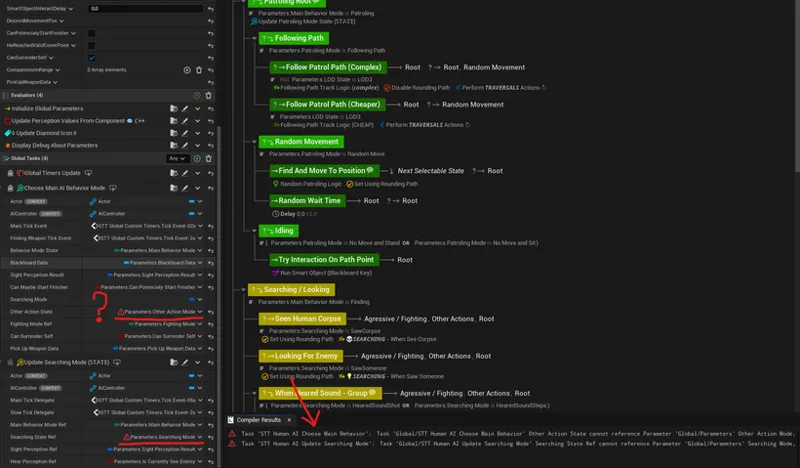
The biggest surprise so far has been the problems with compiling StateTree assets in the latest engine version. At this point, I believe this is an issue on Epic Games' side, and attempting to manually work around the compilation errors does seem pointless. The problem appears to be related to StateTreePropertyReferences, where the engine is currently unable to correctly bind parameters to StateTree Tasks or StateTree Evaluators.
As a result, HumanAI is currently unavailable in UE5.8, and the compilation errors also prevent the project from being packaged ❗
I also haven't performed extensive stability testing yet, so for now AGLS on UE5.8.0 should be considered experimental and intended for testing purposes only.
If the current problems are indeed Epic Games' fault, there will likely be a fix for UE5.8. Currently, I don't know what's causing the ST issues.
Plugin files are available for download in the AGLS v1.9.2 post
Comments (28)
I was wondering does the player have crouch or prone..?
Hey man i have i question if Upgrade my Membership and Download a version of the AGLS do i lose acess to this project after my Payment is over? Sorry for my bad english Bro I Really Love your Project its everyrhing i ever tried !
Hi Jakub, I'm testing AGLS v1.9.2 on UE 5.8.1 with the required 5.8 content installed. Dynamic interaction sequences partially work: interaction prompt appears, camera switches correctly, character moves to the target position, but after entering the interaction the E prompt becomes greyed out and further interaction input is not detected. All four BP_SWP_ blueprints don't work in my UE5.8 Have you seen similar issues on UE 5.8.1, or is there any additional migration step required beyond replacing the 5.8 required content? Thanks.
Hi. You have right. In UE5.8 this interactions have some problems. I think the issue with these interactions is very easy to fix, because the problem with continuing the interaction is not in the Blueprint, but in the input configuration. In UE 5.8, the Pressed trigger type is activated only when ActionValue = True. This is a problem because we also need information about when the player releases a previously pressed key. In the screenshot, I showed what needs to be changed to fix this. Simply open IMC_DynamicSequenceMapping and leave the default values for IA_DynamicSeqInteraction by removing the list of triggers. https://snipboard.io/EDoHP9.jpg
Hi Jakub — really enjoying AGLS, thanks for all the work on it. Two things from a clean v1.9.2 install on UE 5.8.1, both easy to reproduce. 1. Missing Pose Search notifies and two walk databases There are no AN_PoseSearch* assets in the project at all — 32 assets reference them. The one that shows up first is: ▎ a dependent package /Game/AdvancedLocomotionV4/Blueprints/AnimNotifys/AN_PoseSearch_TurnsContinueBias was not available It hits every MM_Neutral_Walk_Turn_* clip (L/R, 045 through 180, both foot phases), so the walk turn set doesn't come up. Two databases look to be missing on the same footing: PSD_Dense_Stand_Walk_Loops_All and PSD_Dense_Stand_Walk_Loops_All_F. I checked these aren't part of the RamsterZ packs you list as not included — those are finisher and traversal sequences, and this is core locomotion. 2. Plugins\*\Intermediate\ ships with absolute paths baked in Following your install steps, the "replace contents" step copies your Intermediate\ folders across, and the .rsp files inside still point at your machine: ▎ D:/Unreal Projects/UE5.8/AGLS_ProgramingCpp 5.8/... That broke the build for me — 11 affected files each in GraphDebbuger and JakubCableComponent, which were exactly the two plugins that failed. Deleting Plugins\*\Intermediate\ while keeping Binaries\ fixed it, and the rebuild succeeded. So the sequence that worked here was: convert → decline auto-compile → replace Content + Plugins → delete Plugins\*\Intermediate\ → build. Might be worth excluding Intermediate\ from the next drop. Otherwise it converted and ran well on 5.8.1 — clean build, no MetaSound issues on my end. Cheers
Bonjour, où puis-je télécharger le projet, s'il vous plaît ?
I'm running unreal 5.8.1 from source and followed the instructions (replacing all the plugins and content), and I'm still getting an error on startup saying "The following modules are missing or built with a different engine version". Do these updates only apply to unreal 5.8 and NOT 5.8.1?
Probably not. UE 5.8.0 and 5.8.1 use the same binary files. The issue may be related to using an engine build compiled from source. I know that this distribution of UE can sometimes cause problems when launching AGLS. Personally, I don't use a source build of Unreal Engine, so I don't have much experience with it. I'm also unable to verify whether the same issues would occur on my side. All compilation errors for UE 5.8 have been fixed, and I haven't encountered any problems when packaging the project. During compilation, I only get a few warnings related to the use of deprecated functions, but I'm not sure whether this could have a greater impact when using a source build of UE. Do you have any compilation logs or other more detailed information about what might be causing the issue?
Hi, Jakub. You’ve done a great job from IWALS to AGLS to this point! Can you share with us your plans about AGLS 2.0? Since it will be quite an anniversary of your project I’m thinking of a quite a big step. Have you considered doing a grand migration of UE4 skeleton to UE5 skeleton? I’m aware that this a very big amount of manual work, with all that curves you used in sequences, but you can see now the drawbacks yourself. Epic’s motion matching is not suitable for every skeleton, and I don’t think it will be better until UE6. And I guess you won’t migrate to a new engine for a very long time, since there is no reason. And when you will, I guess UE4 skeleton will be even more deprecated than it is now. So I think AGLS 2.0 is a perfect point to make it. Thanks for your work, I’ve learned a lot from it!
Hi. I think I'll be publishing a longer post at the beginning of August discussing AGLS v2.0 and my future plans for my work with Unreal Engine. For now, though, I can share a few key details. Work on AGLS 2.0 is already underway, and the area that has changed the most so far is the weapon system. I've added many new animations along with several additional features related to weapons. I'll probably be sharing short preview videos showcasing some of this work in the near future. Of course, I also have many other improvements and new features planned. Most likely, 2.0 will be the final version of the AGLS project. As you mentioned, the UE4 Skeleton is now simply too outdated, and it introduces a number of limitations and technical issues. Because of that, I plan to move to a newest skeleton hierarchy, either UE5 Manny or UEFN. This would also mean that the core of the new project would be GASP. If I ultimately decide to go in that direction, the new project may also focus on a somewhat different style of gameplay than AGLS has so far. I'm considering placing a greater emphasis on melee combat rather than firearms, more stronger survival atmosphere, very cinematic movement, e.t.c. I would also likely redesign many of the systems that already exist in AGLS, rebuilding them almost from scratch in order to improve their overall design and quality. In general, the project's architecture would undergo major changes. It might even be possible to preserve full multiplayer replication, which would be a significant improvement. These are all ideas that still need careful consideration, but overall, after the release of AGLS 2.0, I expect some very substantial changes.
I'd like to adjust the fall damage. Could you tell me where I can configure it?
Hi. You can approach this in two different ways. The first option is to change the Fall Damage activation threshold based on the character's Z-axis velocity. The second option is to leave the threshold as it is and simply adjust the amount of damage that is applied. I've highlighted the locations where these changes should be made in the screenshots below: https://snipboard.io/lhPr2f.jpg https://snipboard.io/LVCa1R.jpg To change the amount of health removed, you'll need to modify the HealthPoints parameter passed to the function. For HighFall, the default value is 0.25, which corresponds to 25 points of damage. By default, the player has 100 Health Points.
hiya mate where can i download 5.8 project ?
hola queria comentarte que encontre una dificultad al cambiar los personajes primero los enemigos no lo detectan al personaje nuevo aunque le pongas en el tag el nombre del nuevo jugador despues no logro que queden bien los nuevos personajes en humanAi hice de todo y no lo logro con la version 1.9.0 lo hace fenomeno sin problemas con la nueva actualizacion ya no lo logro hacer o capaz hay otra manera no la descubro podrias darme una reseña de como hacerlo capaz soy yo el problema
do you plan to merge/convert to c++/verse with blueprints being deprecated in Unreal Engine 6?
Unreal Engine 6 is still a long way off. I'll start looking into it once the first releases become available. For now, I'm sticking with C++ and Blueprint. The same approach applies in the context Unreal Animation Framework (UAF).
Bro can it be packaged to android............
hi
Hi, Will this project eventually be fully customizable via Blueprint? Given that it was developed in C++.
Hi. AGLS was not originally created in C++. In fact, quite the opposite - it initially programmed using only Blueprint, and over time C++ gradually took on a larger role. Many features/functions/systems can still be modified exclusively through Blueprint, without requiring any knowledge of C++. That said, it's worth making your changes in a way that will make it easier to update the default AGLS files in the future. Of course, that's only relevant if you plan to continue using future updates and improvements that I make to the project - https://youtu.be/COfj99BenO8?si=y2RJYdiAoYED02rL
Someone in Discord sent this message with a fix, can you check if it works? I tried to but when i generate C++ files in the recent 1.9.2 project, but it gaves me plugin errors again. Hey @JakubW @Minty , I saw your recent post about trying to get AGLS working on 5.8. I've actually been working on that exact same thing for the last two weeks. The good news is the fix for the error you're getting is pretty simple. It isn't actually an Epic Games bug, they are just focusing on optimizing the State Tree for the new engine version, so this is an adjustment we have to make on our end. I managed to get AGLS 1.9.1 running stably on UE 5.8, including a flawless PS5 build on my custom source engine (though this fix works perfectly on the standard Epic Games Launcher version too). The Solution: The error is tied to three Blueprint Enums: E_HumanAI_OtherActionState E_HumanAI_SearchingState E_HumanAI_TraversalActionState How to fix it: Declare those three Enums in C++ (you can just add them to ALS_StructuresAndEnumsCpp.h). Delete the original Blueprint Enums from your Content Browser. Replace every reference to them in your Blueprints with the new C++ versions. Hope this helps! Let me know if you run into any issues.
I can confirm that this solution does work, I fixed this issue the same way.
Recently discovered your project, i'm looking forward to working 5.8 update, i hope you can solve problems soon, good luck! :) i'm so excited, this project looks amazing and thanks for affordable price.
It could sound stupid but have you tried deleting and replacing this variable with the new name? I had sometimes issues with cached broken references
I already tried that 😅, but it didn't help. I thought that UE5.8 might have an issue resolving the paths to enum declarations, but even the engine's built-in enums (such as EMovementMode) fail to bind correctly. Even if that solved the problem, I'm not sure it would be worth redeclaring that many parameters and then manually reconnecting all of them to the StateTree Tasks. Perhaps this is an intentional change by Epic Games, and StateTreePropertyRef is no longer meant to support enums. If that's the case, though, it would be a major step backward in my opinion. For me, it would be a pretty disastrous change.
We are eagerly awaiting this update for 5.8; I’ve already tested the improvements UE 5.8 brings and want to apply them alongside your system. I hope you finish it soon good luck!
Does this partial support include any code fixes for the plugins on Mac? Before v1.9.2 I had also tested it on UE5.8 and same result: only HumanAI seemed not to work. If necessary, I can help with testing on Mac.
Hi. Regarding macOS compatibility, I have tried to implement the necessary changes in the code. However, I'm still not convinced that I've covered everything required to successfully compile AGLS on mac. You previously mentioned that you might be able to test my changes on your hardware. If that offer is still valid, I'd be happy to take you up on it. My main priority is to get AGLS working with UE5.7 on macOS. I know you managed to compile it with UE5.8, but at the moment I'm primarily interested in supporting UE5.7. I've sent you a private message containing a link to the plugin files.