
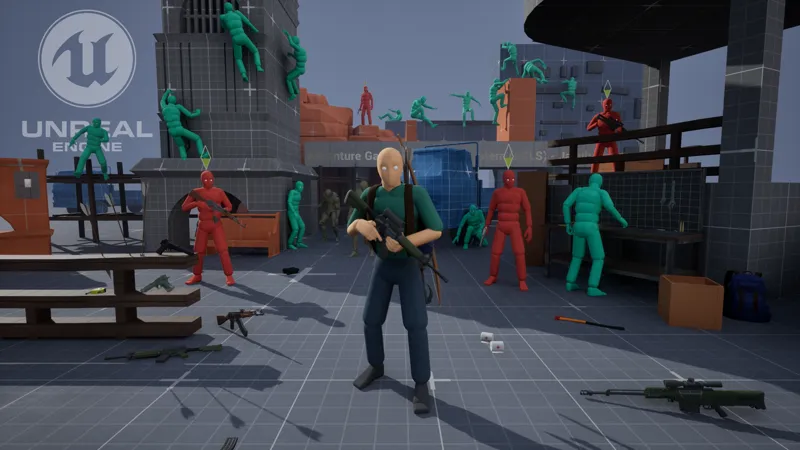


AGLS v1.4.2 Packaged Demo Projects (Windows)
Download Main Player Character Demonstration (Windows System)
Download packaged Zombies demonstration scene (Windows System)
Comments (23)
hey if i have a visa gift card and am unable to pay on patreon would there be a way to do it somewhere else?
Hey jakub how do you set up the project
Give me the project file through email
I just purchase AdventureGameLocomotionSystem V1.5.0 but i didn't get the project file
The link to v1.5.0 is in another post: https://www.patreon.com/posts/ue-5-5-5-6-v1-5-135800414?utm_medium=clipboard_copy&utm_source=copyLink&utm_campaign=postshare_creator&utm_content=join_link
I was previously a patron and had access to AGLS, but I lost my files due to a hardware issue. I no longer have proof of membership (like a receipt), but I still have screenshots of the AGLS folder structure and files on my PC before they were deleted. Could you please help me recover the files? I’d really appreciate your understanding.
Hi jakub, i use agls 1.1 on UE5.5 and i heavily modified it ( without making chlids... ). I wondered if you could update these plugins to agls 1.1 so i can use the new features that UE5.6 offers!!
Hi Jacub. Thanks again for your project, very huge deal! I’d like to ask whether you already tried ALGS 1.3 or 1.4 in UE 5.6? I know sometimes Epic removes some nodes and other features from their current logic. So want to ask whether it is working in new engine version?
Today I downloaded UE5.6. I’ll try to compile the C++ code for this engine version within the next 4–5 days, so that project it can be opened. However, this will only involve rebuilding the plugins, which means you should keep in mind that some issues may still occur in version 5.6. For full compatibility with UE5.6, I’ll need more information on whether it contains any bugs — as freshly released engine versions often do.
Hello Jakub, I am currently using your amazing project, But i also have a question. How to start music on Ai sight detection UE5?? like when the AI enemy sees you the combat music start playing?? if you could help me with this or send a tutorial for Unreal Engine 5 i would be very happy thank you :-).
Hi. Generally, it is not difficult to do when, for example, the 'BP_SimpleHumanAI_Spawn' class is used. Below I have presented an example script that activates music when one of the AIs goes into aggression mode. After killing all summoned AI instances, the music will be turned off. However, it should be remembered that this is just an example. BP Script Screenshots: https://snipboard.io/GvCA4Q.jpg https://snipboard.io/lm94Qv.jpg https://snipboard.io/tw76MX.jpg https://snipboard.io/cwrNq5.jpg
Hello, Jakub was wondering if you was planning on or if it could be added to dual wield pistols. So that we could do dbl damage as well?
No, I have no plans to implement anything in this regard at the moment
hello mr jakub i have something for you that you wont Disappointed please talk with me in my PV thanks.
Hello Jakub, thanks for providing this awesome project to the community! I have a question, I am using CC4 (Character Creator 4) characters in my game and I am experimenting with your locomotion system. I wonder do you have a recommended way of integrating CC4 characters with your system? CC4 characters use UE4 Mannequin skeleton, and I managed to make it work out of the box, although I have two problems. 1. When I imported both mesh and skeleton (prepared for UE from CC4), and then used retarget from mesh, I got some stretching in my character, but it is working. 2. Then I realized you use UE4 skeleton and I can try directly importing my character and selecting your mesh, and it worked. It looks awesome, but some proportions (legs in particular), are shorter. So now my character is floating above the ground while running around the level. I see that proportions of this particular character (female), are shorted. And that all bones match, but there are some extra bones (breast), but that is not even the biggest problem. Right now the motion matching or some capsule logic is messing up so the character ends up in wrong positions - too high, to low, going through objects and so on. What do you suggest? I thought I will need to retarget animations and re-make everything, but then I realized the skeleton is the same, but somehow it's not the same. What are your thoughts on this?
Well, it’s hard for me to point to a specific solution regarding the import of a CC4 Character (im never used this program), but I think I can offer a few tips. First of all, the stretching issue most likely results from incorrect proportions between your character and the default UE4 Mannequin. Even if the bone hierarchy is the same, that doesn’t mean the distances between the bones are identical. For example, in the case of female characters, this proportion is often not preserved. Because of this, using a retarget method like Set Master Pose can cause the character to stretch or lead to other visual issues. One way to improve the retargeting process is to use IK Retargeting. There’s an example of this in the project for the UE5 Manny skeleton. In general, the bone structure of 'Manny' is more "human-like," meaning it fits better with most characters - such as Metahumans. You can try creating a retarget setup for your character, but keep in mind that this is a more complex process and requires considerable knowledge in this area. A potentially better solution might be to change your character's bone structure to match the UE5 Skeleton. Check whether this is possible. If it is, then after preparing your character with the new bone structure, you should be able to use the class ALS_Manny_CharacterBP.
How do I do the zombie attack on Metahuman? whenever the zombie will attack from the finish
how can I use the character? is there a pdf files for controls on how to shoot etc? also when I added the zombie AI is not moving
try to use State Tree,instaed of behaviourTree,i think it would be so much easier to integrate.
Hello, please tell me by increasing the level on the site, will I be able to download the PROJECT to try to adapt it to my project? Or can I buy it somewhere else? For example, on FAB
I'm also interested in this question. Also, what is distribution method? I mean, if i subscribe, i can only download project while subscribed, not "for life" support? Yes, 18$ is basically nothing, i agree, but my country has quite weak currency right now. For 18$ i can pay for mobile internet for 2 months (around 60Gb). But this is not main problem. The thing is there is a problems with international transactions, so i need to ask my friends in other countries to pay every time, cuz I can't myself, and do something for them to compensate it.
Tried out the demo, looks pretty good but few things to mention. When the player walks up stairs or climb up the ladder, can't use shift to speed up. And when you walk up stairs while crouching down, there is no walking animation. For the zombie, is there a way to adjust the hit reaction? When you shoot them with hardhitting guns like Desert Eagle, I would want to see more jerk reaction from the zombies. I think hit reaction for the player character would be good too. Melee attack with the knife would be a good as well. The items on the ground are not easy to pick up, the interaction E button icon doesn't appear easily. I'm curious what would be your next update for the asset.
I think what you're talking about is a matter of details and personal preferences. For example, in the case of not sprinting while walking on stairs, it was intentionally disabled (it was hard for me to imagine walk up the stairs at such a speed, so it would even make it harder to create animations). The greater hits reaction of Zombies to being hit is also a personal preference. I don't know if you would care more about the reaction in a physics simulation way, or if it's a matter of animation. Some elements in the project are also examples or even outdated, e.g. Melee Fight, although I don't know if I'll make changes to it. I agree that picking up items is not always intuitive. The interaction icon refreshes with a fixed time interval (if im remember default value is 0.4s), and you can also influence the begin animation or the conditions for the widget to appear.