

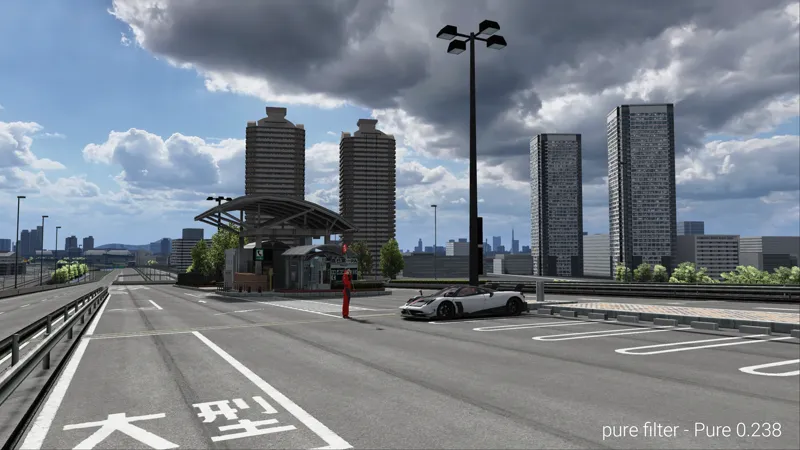









Pure 0.238 development update / bugfixes
Pure 0.238 is a complete package. You don't need 0.234 for it!
If you want to know all about the new feature of Pure 0.234 please have a look at its update post: https://www.patreon.com/posts/pure-0-234-95492343
Pure 0.238 has the same install procedure like Pure 0.222!
So please follow the 0.222 video and use the newer versions of CSP and Pure!
Install video:
https://www.youtube.com/watch?v=uXcwlAqhItc
Pure Planner
Pure Planner will use the time multiplier from CM as initial value
fixed a bug if the option "Set midsummer date, if no date is set...." is set. Fixed the wrong time shift. NOTE! For Track locations with a DST (Daylight Saving Time), the time will always be shifted by 1 hour, if you are currently in normal time !!!
Pure weather style
lowest ambient light (in Pure Config - Night settings) is now equal to ambient light V1
fixed a bug in Uchimura tonemapping
Files
fixed some syntax errors in the installer and uninstaller
Pure Planner
added plan play, pause and stop to Extended Controls app
Pure weather style
added parameters to control the different parts of ambient light V2
sunblinding, added a new option "VR_tweak". With this option active, the analyzing is running more evenly, which causes less frame time fluctuations
"pure" PPfilter
better uchimura settings, removed bland low tones, better contrast
added "Uchimura-AgX" custom tonemapping
Download no more available!
Please use later versions of Pure!
As always, you need a CSP preview version to get rain!!!
https://www.patreon.com/x4fab/posts

Comments (213)
what glare setting do you recommend to use in VR with purevr pp filter? i have a 1070ti and struggle with fps
For the latest pure installation, i cant find the installation file. When i enter pure 1.19+LCS 1.16 file in pure 2.16 highres, all i see is uninstall pure and uninstall sol. No file is "installpure_bat". Plz help...
have u fiqured it out? bc i have the same problem
has anybody got the link for the files, Its not on here for some reason
Like it says, please use a never version of Pure! There were many changes and Bugfixes!
Hey would you release this version again? the pp filter i use need this version of pure
Not really, what happens if you use a never version?
where is the pure link....
Just read the post! Also maybe use the newest version of Pure - 1.40
how to install
Please use the newest version and watch the install video! https://www.patreon.com/posts/107223841?utm_campaign=postshare_creator&utm_content=android_share&utm_source=copyLink
unless its gives better performance
well pure is too laggy for me so i cant even get the latest version
It is laggy because of the not properly done install. If there is an error it will slow down the system! You need to do all the steps from the video!
hi i downloaded pure not knowing my pc can handle it and now im on 14 fps cant play and there is some sort of 'lua' bug or something pls can i have help
there is an error on weather fx impl. and i need help
i cant download bro
patreon.com/posts/pure-0-254-99296268 Please download the newest version.
I am getting this when clicking on the DL link - This site can’t be reachedThe web page at https://www.mediafire.com/file_premium/q1rgqtv91cpb33j/Pure_0.238_Highres.7z/file might be temporarily down or it may have moved permanently to a new web address. ERR_ADDRESS_INVALID
Please use the links in the Patreon update posts and not from the email.
I have an issue, I cannot see it on Weather FX. I am in 0.2.2. Thanks a lot in advance to help me.
Hi Peter, I’m wondering if the performance option ‘use compatible sky shader’ has any impact on your 16k skydome? I’m tempted to enable the option because of a FPS gain, but not when it disables pure related things. Thanks in advance!
I've installed and reinstalled following the steps to a T, but for some reason, rain doesn't show up. Does anyone know why?
Please read the disclaimer at the end of the post. It tells you that Pure does not bring the rain. It is part of CSP preview versions.
OMGEE Dutch added as language option? I love u man :) None of the games i have ever played had that as an option. I can't thank you enough!!!
Thanks to 2 dutch guys in the community!!!
direk bunu indirsek olurmu
Don't you see the BIG "Download Links" sign? Also watch the install video! It will show you everything...
Hi, can someone tell me how to fix this. 29 Skydome textures are missing
Install Pure properly. Watch the install video and follow the steps exactly.
Amazing stuff, love your work!
Im having issues installing the latest update, when I click on install BAT file its installing but saying its failed, and it doesnt show in settings as a filter, what am i doing wrong? Ive selected the AC root folder
Did you extract the Pure 0.238 folder to Desktop before you run the installer inside this folder, like shown on the install video?
when i open install pure and it tells me to press a key when i do it just diappeares
Maybe just try to install it manually. Open the pure 7z file with 7zip app, go into the Pure 0.238 folder and extract the 4 folders apps, content, extension and system to AC root folder.
When ever I try to open the pure app in game it doesn't work and it just like flashes and it wont let me click anything
This indicates wrong install. Please watch the install video and follow the steps exactly.
why isnt there a download link for this
Are you serious? What about the links below the BIG "Download Links" sign???
pure isnt popping up in weatherfx :(
Please watch the install video! Follow the steps exactly. If it's still not working. Open the Pure 7z file with 7zip app, go into the folder Pure 0.238 and extract the folders apps, content, extension and system to AC root folder.
Why looks so dark now? I installed last night and i givi it a try but now everything looks super dark even set mid day clear sky and still very dark 😮💨
Open Lua debug app in-game, is there a red dot?
yooo?
sorry to bother anyone but does anyone have a fix for being not able to see pure in the weather configs
Please watch the install video and follow the steps exactly.
installed over sol using the recommended .bat and looks amazing! thank you for your work!
Is galaxy sky still a thing in this Pure version? I cant seem to find it
In Pure Config app switch to "night" tab and deactivate adapt stars brightness
I cant install pure. Well I do but when ever I go to whether Fx pure wont show up and when I check PP filters Pure isn't there. When I load up a track Pure isn't there either. What do I do?
Please watch the install video and follow the steps exactly.
when i run night races in AC, i get a 50% frame drop, any settings i should be aware of?
disable dynamic shadows in lightingFX if it is set on. and disable "real mirrors" in smart mirrors. You can also limit the amount of cars that cast light in the lightingFX settings.
Quick question. How do I make the evening sky look purple like in the previous versions of pure? Thanks
Goto sunset and use broken clouds weather.
wondering if I can get a little help here, for some reason when I start Assetto Corsa with the rain i get nothing. i can hear it but theres no rain or water. Is there someting wrong ?
Just read the post and scroll down to the end. There you see the disclaimer about rain.
After ficrossing the finishing line in a race the PLANNER resets itself. ( Ie: If its midnight as soon as i cross the finish line is dayligh again ). Is this a setting somewhere? Or a bug?
-> We discussed it in Pure Discord. Will be fixed with the next version...
for some reason the folder doesnt want to extract
Please do it exactly like shown in the video. Use 7zip app
Can someone help me with rain not working on multiplayer? i have pure, sol, and paid csp
Did you install the CSP preview manually by extracting the folders app, content, extension and system from the zip to AC root folder.
Please make it easier to actually see where we download the content! thanks.
Just read the update post. Everything is described there. Also there is a big pictures with "Download Pure"
Hello! Whats the latest pure version I can use without problems on csp 0.1.79?
Should be Pure 0.190. what's the problem with newer versions? There are so many Bugfixes in CSP 0.2!
Heyo, Once installed using the vid, I got up to the part to select the weather in the drive menu and Pure doesn't show in the list, any ideas?
Scratch that, figured it out, For some reason the filter was set back to Sol, I selected Pure again and boom, now in the drive menu.
Can someone help, please? The sky (especially at night) is stripey and moves around in what looks like a low resolution. I've tried everything and no matter what, the stripey movable sky still exists. A good example is Brands Hatch at night, in fog (not something you'd choose to do). The floodlights have a stripey glow and the sky / light moves considerably. Any ideas how I can mend this, please? Thank you. PS. This is in VR with Oculus 2
In VR, can somebody try out Brands Hatch, with fog, at night, please? I’m unsure if my settings are messed up or if this is an issue with Pure. The floodlights give off a funny glow that makes the sky move about. Other tracks I’ve tried seem ok, but they have less floodlights than Brands. Thank you.
your work is awesome youre creating assetto realistic
Installing this version sets all my drive weather options to Sol. (I dont even have sol downloaded) and there is no option for Pure. Ive even completely reinstalled ac, cm, csp, and made sure everything was deleted. Previous versions worked. I have the paid cm and csp.
Those are just names! Just ignore this. I leave them in the pack for compatibility reasons. It does not matter if they are called Sol or Pure. Those presets just hold a number which represents a weather type. But those names are important for careers, championships, online weather and replays. They were always called (Sol).
my game stutters every 2 seconds since this update
Sounds like it is not properly installed or Microsoft OneDrive could be the reason for it.
before installing a new version i have to unistall the old version and do a clean reinstall of pure or i can install it right away?
No, just use the installer. It will keep your settings. Uninstaller is only for completely removing Pure settings included.
Are the Vao patches there? they arent in my download folder.
There are no VAO patches anymore. The are distributed in CM or with the track itself...
anyone knows why the pure app flickers in game, and nothing saves due to this.
Open Lua Debug app and look if there is a red dot!
I'm missing pure config it is here but it is blank I downloaded everything and watch your install video?
Did you install CSP 0.2 or later
i dont have any pure ppfilters?
Please install it like shown in the install video. Follow the steps exactly!
Is it normal that in online mode everything is grey except for cars and some buildings?
Switch "Season" to "Never, use actual sun trajectory" in CSP track adjustments. It's wintertime now.
Can anyone explain me how i get a wet street even when its sunny? :/ i dont find the setting to add wetness and puddles :( only using pure with the latest CSP preview, no SOL and no other apps
Just open Pure Planner and click on a slot there. The slot editor opens and there in the "data" tab you can set all weather parameters.
Please ignore above sorry, if running AMD super res, turn off temporal anti aliasing in extra effects. Everything else is fine for incar view. Sorry for the messages
Hey Peter, I have latest pure an csp, getting weird lighting flickering in distance. Any ideas how to fix. Running 32inch triples, amd gfx card
Just open Pure Config app. You should see a warning there. Press the "Try to solve problems" button.
I installed CSP manually and followed every step of the installation guide, but i cant get the rain to work.. It just does not show any rain but i hear it
Okay i just got it working installing csp 0.2.3 preview. thx
Help je n'ai plus la pluie depuis la mise à jour , juste le son quelqu'un peut m'aider SVP
Reinstall your CSP preview version manually like shown in the install video!
Great work Boss. Love it!!
do you have a version of pure that works with 0.1.79?
0.190 should work with 0.1.79
Hey, my Neck FX completely stopped working for some weird reason after I installed new pure and csp even tho I havent done anything to the settings.. Do you know what could possibly cause this problem?
Unselect "use custom script" or select the default script....
I have installed pure and CSP preview version. But no puddles generating after rain on track. Does it need to be combined with SOL? Thanks
No!! Install CSP preview manually like shown in the install video!
I downloaded Pure and did it as in the YouTube video. CSP 0.1.80-preview 346. When I use it, the sky becomes black. When I use CSP 0.2.2, 0.2.1, 0.2.0, it does not rain. https://www.patreon.com/x4fab/posts. I can't find CSP when I click, can you please help me, best regards
Please just download the newest CSP preview from Ilja Patreon. Have a lovely ok at the video. I show it there...
Hi, i installed Pure and Pure config works fine but Pure Planner Ui is blank. I selected it in Weather Fx settings and in drive tab but it's still blank. How can i make it work?
There might be an error. Open the ingame Lua Debug app and switch to the tab with the red dot. Could you please post the error...
I have a problem when i chose pure in csp i can't chose weather before start a track, i dont no how i can activate this option. Is like waether is set automaticaly ?
Please watch the install video until the end. There you see how to select the weather controller and a weather in CM Drive menu. Btw you can't change the weather in online sessions. Also you can just open Pure Planner in-game and change the weather within the game...
I was having an issue with my sun cycle being off by a substantial amount, with sun rises being around 12 PM no matter the date or season. I tried messing with the setting that determines if the season is being considered for sun placement but I had no change. Reinstalling 0.238 didn't do anything but after downgrading back to 0.235 the problem is gone again. Mostly here just to report, cheers!
It is with a certain track or with all tracks?
i am having an issue, i cant seem to load tracks in any condition except snow. the weather is only set to partly cloudy, but no matter what i change in the settings i always have snow (on the ground, not falling from the sky). could you help provide some direction?
i did a fresh install of AC, content manager, CSP, and then PURE, following the video directions, so its a totally fresh install, for more context
is it possible to have real historic weather?
No, its not integrated yet. You will also need an own account at openweathermap, if it will ever be implemented and this is not cheap.
Downloaded everything according to video. Everything looks great all is green but I'm not seeing any rain. I can hear it but there is no actual rain.
Please have a look in the Pure development post again. Pure does not bring rain. You need a CSP preview version. It is linked in the post...
This download did not work at first, I think it has to do with CSP I followed this guide https://www.youtube.com/watch?v=fEwEWwoxBW4&pp=ygUjcmFpbiBub3Qgd29ya2luZyBhc3NldHRvIGNvcnNhIHB1cmU%3D and now it works great. Beautiful weather planner!!!
Always follow the install guide I provide here in the Pure update posts. It will work then....
hello, when I drag the pure highres 0.238 folder into the assetto root, it tells me that it takes one day to copy it, is this normal?
Why don't you use the installer? Just follow the install video...
Ah thanks for the reply I have solved the issue now, turns out most of the cars I was using don't have the ability for the automatic wipers or any wipers at all. thanks for your help
Hi I am having issues with getting my wipers working if anyone can help, I have rain working and on my windscreen but I don't know how to use the wipers i've tried adding binds but nothing is working.
If you still have Sol installed, please deactivate the Sol Planner app or deactivate it's wiper control, set it to -2. In CM settings CSP weatherFX you must activate automatic wipers.
Hi peter everythng seems to be working but when i start the game there is no controller in the ac apps or python apps please help
Pure has no python apps! Please install everything like shown in the video (CM + CSP + Pure). Also in the video you will see how you select the weather controller...
Hey, Peter. Ive been having some issues with CSP 0.2.2 and this pure build. It leads to big stutters occasionally ingame but most importantly every time I quit the game, to go back to content manager, I get an Error and my hole pc bugs out so I have to restart. Is this a known issue and have you got any ideas on how to fix it? Thanks
Never heard of this. The one big problem causer is Microsoft Onedrive. CSP will reset weatherFX ingame, if files are changed in your AC root folder or Documents/Assetto Corsa/cfg/extension folder. Onedrive does this out of no reason. So if you don't use Onedrive, uninstall it. Otherwise deactivate it for your Documents/Assetto Corsa folder.
Hi Peter and congratulations again for your splendid work! A question; By installing Sol 2.2.9 (latest version), could I have conflict problems with Pure? Frankly, I don't remember exactly whether the two applications could conflict. I wanted to try installing Sol, because in the LowFuelMotorsport portal, the Sol app is allowed but not Pure. Thanks for your reply and congratulations again!
Pure has no wiper control. So if you have Sol installed, but you use Pure and Pure Planner, please deactivate the wiper controls of Sol Planner and Sol weather app or the apps in general.
Speaking of bugs...can we get bugs hitting windshields? A lot of in car video has bug splats on windshields. 😄
That would be a funny feature to have, would drive my ocd nuts but would give it a different feel for sure :)
CSP Version 0.2.3 + Pure Version 0.238 = Game Stopped Stopped at "Initializing AI spline.." What should I have to do
No. maybe better you come to Discord and there you can report it and please do a screenshot of the opened Pure Config app and the Lua Debug app ingame!
Hello, some of cars that are encrypted appaears covered by polygons in game, do you know how to fix that ?
I am guessing here but that does not sound like a Pure issue more like a CSP or perhaps corrupt downloaded car? idk just a thought cheers
Switched from Sol 2.2 and had to look for my jaws for a few minutes. My main reason to keep Sol was that Pure looked too much for my 1050 based on the videos I've seen. I thought that its going to look like that sort of trend setting I used to see on YT. But it was not and I was absolutely surprised and happy. Another thing is that on some mods I had a weird visual bug with tyres being overly shiny and black. Those are gone with Pure.
Hey I updated it like normal and now I cant select pure as the weather style or the main 'weather' at the drive section in CM?
I don't know what you mean! Did you install it like shown in the install video?
Does anyone know what " cpu split" means in the pure config app?
It will reduce CPU load by spitting computation across multiple frames. I described it in the Pure 0.234 new features video.
why can’t i change the weather, time of the day and temperature??
if you are online you can't change time and date. Or are you offline and you can't do this. I need more context to answer this question!
install_pure.bat fails to find many files for a successful install. Just extracting the folders into the AC root folder works though.
Yes, you need to extract the Pure folder to Desktop before running the bat inside this folder! You can't just run the bat inside the 7zip app! The installer is sometimes needed to remove obsolete files...
i have to buy again?
?
I have a green track with the last pure and csp update when it rains... can someone help me?
I think you activated the race line debug in rainFX settings
then how do i get rain bc its not working?
Please read the Pure development update post and scroll all the way down. There you see the disclaimer about rain and you also find the link to the CSP preview versions.
Is the download supposed to be taking really long it says 1 hour left but its been downloading for way more than that already
The High-res pack is 2.5 GBytes.
Good evening Peter; thank you for all your work, the last update, in reply my car flickers.
Pure can't do such things. Please first have a look in Pure Config up if there are some CSP settings that are not working together with Pure.
took me awhile to get it working but was very much worth it. Thank you Peter. Keep up the good work
HELLO THERE IS A BUG, SOMETIMES RAIN WITH THE SUN AND THE ROAD IS VERY DARK.
RESET THE WEATHER DEFAULTS IN PURE PLANNER: https://www.screenpresso.com/=d6ZZf
Thanks Peter.
Hi peter, when will lightning be added? Im still waiting for that
I'm working on it. It should be in the next version late February or early march. https://www.screenpresso.com/=9Tjsg
Hi Peter, wenn ich eine Track starte ist alles perfect und sobald ich einfach nur 30sek drin bleibe, verschwinden alle Wolken plötzlich und kommen auch nicht mehr wieder´, egal welche Tageszeit man einstellt. Was kann ich dagegen tun?
Ich müsste erstmal sehen was da passiert! Kannst du das nicht im Pure Discord zeigen?
Hi Peter. Can you please tell me where the control is for the wipers as I can’t find it in the new Pure. Many thanks.
Pure has no control of car wipers. You use the weatherFX automatic control or you bind keys to control it manually.
Stunning. Just stunning. Impressive to me, to what extend your 'weather machine' is lifting the AC to another level. Many many thanks!!
mega link in patreon won't work either. Any solution?
Please try again!
why is 16k link not available
Please use the links in the Patreon post and not from the mail. I need to change those links because of pirates....
noice work, i like it
light reflections flickering? how to fix
Did you already open Pure Config app. It will tell you wrong CSP settings on its Main page.
bonjour le sol est il obliger pour l installation de pure ou pui-je le désinstaller merci ?
I recommend to uninstall Sol, if you don't use it anymore. You just use the uninstal_Sol_install_Pure.bat then.
Hi, how do I actually get all this up and working in content manager, I’m not very computer savvy although I am getting better, learning how to drag and drop files and also have now managed to get some new cars into assetto corsa with content manager. But this seems a minefield to get my head around! I have been paying £1.50p and month to you to help with all this amazing work you do. Hope you can help me. Thankyou. Mark.
Just watch the install video. It will show you how to install CM, CSP and Pure. If you follow it step by step, everything will work...
Everything turns pitch black when the night falls.
Night is dark! If there is light from the moon, then night can be brighter. You can also use the settings in the Pure Config "Night" tab to use a fake ambient light. But actually with normal monitor settings it should be like in a real night....
black sky for me? what have i done wrong :)
Sounds like the installation is not properly done. Please install it exactly like it is shown on the install video....
Peter, i am curious - when will lightning and thunder make its way back into the game? is this a question for Ilja?
I'm working on it. It will be a part of Pure.
Is a folder replacment enough for installation
If you like, you could extract the 4 folders apps, content, extension and system to AC root folder with 7zip app....
Appreciate you Fam
epic work - running it in pimax 8k and amazing visuals and performance fantastic!
😍Everything is peachy, thanks again Peter! I recommend everyone to "reinstall the current CSP version" after each PURE update! I noticed that some problems are solved this way! (now it solved the shaking of the steering wheel when I stopped the car after driving for a few minutes)
There has to be a better way to download these ?
Something wrong with the links?
Hi. I love your work. Thank you! One issue for me is the lighting of the trees and grass affected by the sun/speculars. They turn yellow. Trees are a nice green with reduced light. Can we implement a heavily reduced lighting for this or a way to bypass tree and grass?
It depends on the tracks material settings. There was no change in pure. Speculars are directly set by the sun light. So you could reduce the sun light saturation.
I checked that and all was green, no obvious issues. Reset too and no change. If I select pure PP for example everything just goes really bright and the sky looks white, the only way I can get it to look a bit better is by reducing the sun brightness level. I'll have another mess about with it later and see if I can work it out
Would be interesting if its only the pure ppfilter...
Has this version been optimised for HDR screens or something? With HDR off on my monitor it's too bright in every PP besides PureLinear, the sky just looks awful in anything else
Open Pure Config app. It will tell you which CSP setting is wrong...
I've downloaded this, used the VR PP and the screen it almost completely white. I've deleted AC, reinstalled it and Pure and have the latest CM and 2.0 CSP. Any thoughts?
Open Pure Config app. It will tell you which CSP setting is wrong...
Hallo! I've been having a strange problem recently. I play in VR on an Oculus Quest 3 and since installing a Radeon 7900 XTX my frames are limited to 45. It looks like the AWS function with 45 FPS, but this option is switched off via the Oculus Debug Tool. I've tried everything but AC limits the FPS straight to 45 and my graphics card runs at 60-75%, so there's still room for improvement. I previously had a Radeon 6950 XT and no problems. Does anyone have an idea what this could be and how it can possibly be solved? Thx Christoph
Just have a look in CM - settings - AC - video. Is there an fps limiter? or maybe in your graphics driver settings...
I only just noticed your profile pic... Is that Sid James? lol
Yes. The carry on movies were my childhood.
Danke! Was muss ich denn ungefähr umstellen, um mit PURE pp den gleichen Effekt wie mit SKY pp zu erzielen? Die hellen Reflektionen vom Asphalt wenn man gegen die Sonne fährt. Mit Sunblinding hatte ich nicht den gewünschten Effekt. Danke
Du kannst einfach im pure script: \assettocorsa\system\cfg\ppfilters\pure_scripts\pure.lua Den boost in den speculars erhöhen: Zeile 628: pure.config.set("light.sun.speculars", 1+2.5*cam_sun_face, true) Das erhöht die specular wenn du in die sonne guckst. Aber das kann auch einfach nur nerven....
Nice, while waiting for the lightning that comes with the storms, do you think you can incorporate the snow?
Snow would be a part of CSP like rain...
Amazing support... Now I'm just waiting for the thunder and lightning to come! <3
top, thanks
Does this fix the cpu issue I had with the last version?
I don't know what CPU issue you had! You could try the new "VR_tweak" option in the sunblinding shader, if this will help you...
Weathet fx is on pure I have it installed and files deleted and reinstalled csp but its still telling me pure not active! Please help
Please open the in-game Lua Debug app, switch to the tab with the red dot, expand the error and make a screenshot. For better help, you could go to Pure Discord Server. Make a new post in the pure-support-help channel.