






Pure 3.10
INSTALL VIDEO (Windows):
Youtube | Vimeo
Install AC + CM + CSP + Pure on Linux Bazzite:
Youtube
NEW FEATURES
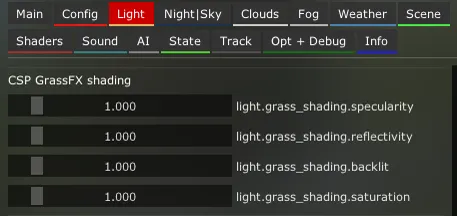
CSP grassFX adjustments
Skydome wind oscillation
FIXES 3.10
reflections: some tweaks on the cubemap booster of the sunblinding shader
UI: fixed a bug with radio buttons (can have the same option names now)
Pure LCS: gained Glare in HDR mode (YEBIS replacement)
Highres - 3.3 GByte
mega: Pure 3.10
mediafire: Pure 3.10
(right-click the blue download button and select "save link as". You will bypass the ads then and it directly downloads the file!)
If you want to install the Lowres packages, please go to Pure's Discord.
Link your Discord account in Patreon settings - More - Connected apps. You will be automatically connected and you get a role to access the Pure content.
As always, you need a CSP preview version to get rain and snow !!!
Like the most recent one (0.3p140)
https://www.patreon.com/posts/quick-fix-for-142367147
CSP is the work of Ilja Jusupov. I'm Peter Boese the creator of Pure (the weather and graphics mod for CSP). Pure also works with the free public version of CSP. If you want rain, you also need to be subscribed to Ilja Jusupov!

Comments (449)
love your work
there are no download link
At Patreon you must click on the post title or the "show more" link to read a post! Please read the post and watch the install video! You will see the links if you scroll down the post…
Hey Peter , ever since i bought and changed my game to pure my game is black and white .I even reinstalled it and its stil the same . But its got to be something wrong in the game settings becouse at the bottom the bar where you can see youre kph and youre gear the game logo and some other small thinbgs still has the red so its not my whole screen . I checked anywhere but i couldnt find something wrong . And yes everything is set to pure for exammple in fx weather and this processing thing its also turned pure . It would be great if you could help me fix it becouse nobody in nohesi discord could help . Bye
You must select the "pure" ppfilter in AC video settings
hey mate i had it working fine on my new freshly built upgraged pc, I had everthing working great again but then it updated CPS and has reverted back to 2. something non preview, i've deleted patch and done many different reinstall methords but nonthing will bring back 3.10 into CM, have you got any suggestions? cheers
Sorry, I don’t understand what you mean! Do you mean you don’t get Pure 3.10 into CM? Actually Pure will work with CSP down to CSP 0.2.3. Maybe just reinstall Pure: You must use 7zip app and you must use the "Extract" button to extract the 4 folders to your used AC root folder. Also check your used AC root folder in CM - settings - Content Manager - general!
why make it so hard to get the thing i pay for like make it simple to download this is dumb
What is hard to download a zip and just use 7zip to extract it??? It’s the easiest and safest way to install a mod properly to AC. What is hard to just click a download link and just download it? Btw, the reason you must use 7zip app is Windows and its stupid security tools, which are hyper allergic. No other antivirus tool has a problem with code files…
should i use mediafire or mega to download? i heard mega is better but mega is taking ages to download!
Why don’t you just try it?
After installing the latest versions of PURE and CSP, I now have no audio in the game. Does anyone know what happened?
Has nothing to do with Pure. Maybe try this: Reset CSP settings completely! Goto /Documents/Assetto Corsa/cfg/ rename the "extension" folder to something different. Restart CM. It will create a new "extension" folder. You can restore it later. Select Pure as weather style again in CSP weatherFX settings.
Amazing mod
Hi! I get a "CRC failed" error when trying to extract pure 3.10: "CRC fallida : Pure 3.10\extension\config-ext\Pure\Skydome_sets\default_16k\textures\encrypted\159678490.dds " Freshly installed assetto corsa, content manager, and CSP (latest public version). I´ve tried both MEGA and mediafire downloads with no luck... Haven´t tried the game yet but just to let you know!
Please download it again, maybe with another browser
Everything looks good . However my rain looks like sleet/ snow for some reason?(Fixed)
how did you fix it? Im running into the same issue EDIT: You are not telling me that it was because i launched the track in cold conditions from the content manager, right? haha
no matter what i do i get the sunglasses effect i cant get normal lightning no matter what pp filter i am using
It is not installed properly then! Please be sure you install Pure exactly like shown in the install video! You must use 7zip app and you must use the "Extract" button to extract the 4 folders to your used AC root folder. Also check your used AC root folder in CM - settings - Content Manager - general!
idk what happened, but i downlaoded everythin right, i double checked, and when i go into the ame, everything looks weird, and also the sun is black, how do i fix this?
No, Sun should not be black! Could be caused by your used CSP version and a certain AA method or an custom PPfilter and its shaders...
idk what i did wrong but i did what the vid says and my screen is blury?
Maybe you activated extraFX in CSP settings and it’s TAA is doing that?!
Hi I'm having some issues with my FPS. I am running on 3050ti with only 14fps on benchmark, currently unplayable. Will the lowres version help me get a better FPS. Thank you for all your hard work.
It is not installed properly then! Please be sure you install Pure exactly like shown in the install video! You must use 7zip app and you must use the "Extract" button to extract the 4 folders to your used AC root folder. Also check your used AC root folder in CM - settings - Content Manager - general!
When you set the wind speed and direction in Pure Planner, does this impact the car's physics, aerodynamics and handling? And if so, is there any way to have the wind up without the trackside trees swaying? The latter seems to impact my FPS and it also looks artificial and distracting as a whole tree sways as one object. TIA.
Sorry, idk if wind is really affecting the car's physics. Wind should have no influence to the fps in terms of the trees, the geometry is calculated anyway if there is wind or not. And i guess there is no setting to switch off wind movement, so you have to set wind speed to 0 to avoid it...
Hi, can I use this version with csp 0.2.12? I'm very happy with it. I installed 0.3p140 but had to go back to 0.2.12.
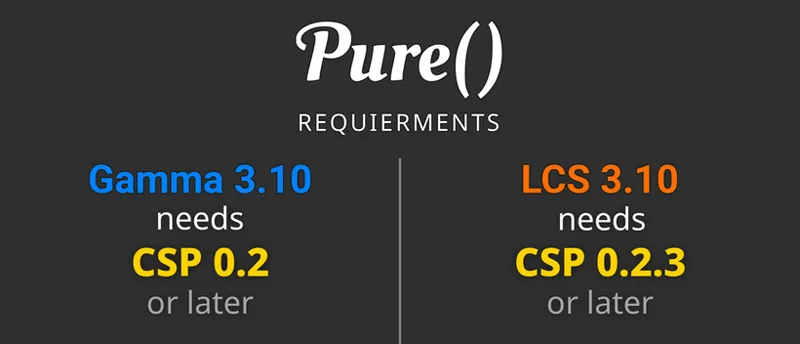
Sure, in the post you see, Pure is compatible down to CSP 0.2.3!
Does 3.10 require light patch anymore?
Sure, Pure is a weatherFX script + apps. WeatherFX is a module of CSP (light patch). But Pure works with the free public CSP and the paid CSP preview. So you can just use the free public version too...
there should be more option on Pure PP > spice no? i only got 6 options in there
With Pure you have 3 HDR and 3 LDR effects in there. But there are some PPfilter creators like Garry who add there own effects there. Pure provides an interface so people can add their own shaders and effects to Pure...
Why is everything green now ingame does anyone know how to fix that https://imgur.com/a/eyEygSj
What PPfilter do you use? Also reset to defaults in Pure Config Main tab and Pure PP app.
i don't know why i dont have pure app in game i did everything from tutorial
It is not installed properly then! Please be sure you install Pure exactly like shown in the install video! You must use 7zip app and you must use the "Extract" button to extract the 4 folders to your used AC root folder. Also check your used AC root folder in CM - settings - Content Manager - general!
Anybody know what's going on with these flashing red/green lights or how to fix? https://www.youtube.com/watch?v=h7oJPnSwKSQ
Do you use Pure Gamma? There are such bugs in the CSP Gamma shaders in certain AA methods...
Hey Peter is the youtube video about installing pure still valid for windows? was watching the bazzite install and someone asked about windows and a link was given so i watched that and just wanted to make sure it was still the proper way to install pure for windows
https://www.screenpresso.com/=ujq2TJSky04i
Hey! I recently updated content manager and CSP, but Rain no longer works, do I have to reinstall CSP?
You always need a CSP preview version for rain! If you installed the public CSP inside CM, sure you have no rain anymore! If you have a preview version of CSP, better install it manually: Delete the dwrite.dll in AC root folder. Open the CSP preview zip file and EXTRACT the "dwrite.dll" and the "extension" folder to your AC root folder (Steam install folder of AC "common\assettocorsa").
I followed the installation video, but when I reached the step where you extract the files into the Assetto Corsa root folder, it wouldn’t let me. It kept saying I needed to select one or more files, even though I had. In your video, the files you extracted all had a file size, but mine show up with no size at all.
Then something might not be right. Please download it again…
Why is the sky always dark/black
Did you watch the official install video? It is the first thing that is linked in the post...
Everything is working as it should except instead of rain its giving me snow is there a way to fix or should I reinstall pure?
Rain is fading to snow with ambient temperatures below 3 degrees Celsius. Gain the ambient temperature or switch off snow in Pure Config app Weather tab. Deactivate the weather particles…
was having trouble extracting folders on 7zip. if anyone is having trouble, select the folders then select COPY instead of extract and over to ac main folder.
What was the problem with using the Extract button?
Good day sir. So sorry to bother you. I am just not sure how to solve this? It looked like yesterday following your directions I did finally get it installed. The sounds, the sky, and the wind are all pretty amazing! All seem to work. For some reason there is no Rain/Water. I guessing I did something wrong during installation? Any clues as to what where to figure out the issue? Thank you in advance.
You always need a CSP preview version for RainFX! Please notice the rain disclaimer in the bottom of the Pure development update posts.
appreciate the dope graphics for low price!! 🙌🏽question whats the difference from gamma and LCS under weather fx?
Pure Gamma uses the old CSP/AC shaders. Those shaders use an older technic to render lighting and this was needed to support certain features, but they are causing problems to render colors correctly. The newer CSP LCS shaders which Pure LCS uses, support a linear color rendering which results in precise colors and it will fix many problems of the Gamma shaders. Also Pure LCS is the newest development of Pure and it feature many more optimizations to get the best performance out of Pure...
Hello peter so i have followed the tutorial steps before when i use older version of pure and CSP Preview i would get a bugged Weather and Pure wouldnt work properly now i reinstalled the game cleaned all leftover files and when i try to use your and 4xab Version when i launch the race im Ok but the moment i press on the wheel to go it crashes any ideas ?
Sorry, I don’t know. I guess it has nothing to do with Pure. If you switch to default weather style in weatherFX settings it still happens?
reinstalled game, light patch, pure doesnt show up on pp filter or weather fx and when i open track it just fucking crashes
It is not installed properly then! Please be sure you install Pure exactly like shown in the install video! You must use 7zip app and you must use the "Extract" button to extract the 4 folders to your used AC root folder. Also check your used AC root folder in CM - settings - Content Manager - general!
i love you creator
Hi i just installed but im not getting the install pure file once i use 7zip ive re installed a couple times and nothing is working
You must use the Extract button in 7zip app! Please use the community chat to post screenshots!
why is my sky black, i did everything right like the video
It is not installed properly then! Please be sure you install Pure exactly like shown in the install video! You must use 7zip app and you must use the "Extract" button to extract the 4 folders to your used AC root folder. Also check your used AC root folder in CM - settings - Content Manager - general!
Good evening. The game is just crashing when clicking drive. I have both the latest Pure and CSP preview from Ilja. Any ideas how i can fix it? I followed the video guide to download
Not related to Pure! I answered you in the community chat…
Everything looks great, but I cant change the weather because it wont allow me to change it in the quick drive menu, I have the preview version of CM as well
Don’t active real or ideal condition there! This will block the weather menu!
bonjour avec une 4070 et un i9 10400k je mes le pure gamma ou le pure LCS ? merci
You install both anyway if you do the Pure installation. Also which one you use is not related to your hardware. There are still things right now that people prefer Gamma over LCS. But maybe just try both and use the one you like better...
Hey, im using it and everything works perfectly but the LUA PP script crashing my game..
What do you mean, please show a screenshot in the community chat!
hi i just installed and i dont see rain, i change the weather to heavy rain and i see nothing xan you help me? i do wxactly what you do on video
You always need a CSP Preview version for Rain! Please notice the rain disclaimer in the Pure update posts! If you have a preview version of CSP, better install it manually: Delete the dwrite.dll in AC root folder. Open the CSP preview zip file and EXTRACT the "dwrite.dll" and the "extension" folder to your AC root folder (Steam install folder of AC "common\assettocorsa").
i instaled everythung and mine pure config doesnt work and my sky is blue withoyt anytging
It is not installed properly then! Please be sure you install Pure exactly like shown in the install video! You must use 7zip app and you must use the "Extract" button to extract the 4 folders to your used AC root folder. Also check your used AC root folder in CM - settings - Content Manager - general!
Hi, is there a possibility to set up speed-dependent or dynamic DoF? I’ve checked all the settings in Pure and the PP-filter scripts (I`m on the latest versions) , but I can't find the option for it. Could you point me in the right direction?
The only speed-dependent post processing effect is in Pure PP app Spice tab. There you can activate the speed tunnel effect.
hey good day, night or afternoon, i donwload this shader and the shader have fewer fps,i don't know how to recover fps with Pure enabled
It is not installed properly then! Please be sure you install Pure exactly like shown in the install video! You must use 7zip app and you must use the "Extract" button to extract the 4 folders to your used AC root folder. Also check your used AC root folder in CM - settings - Content Manager - general!
Hello, I'm new to pure and the preview buids for csp. I've been having an issue where the track pretty much won't get wet. The rain works which is great, but the tarmac looks dry. I've also gone into the weather debug and experimented with the values, but there is no change. Would you happen to know why this is? Thank you for your work by the way.
maybe it is related to the track?! Did you try the default tracks from Kunos?
How do i change the weather controls in multiplayer?
Online there is a natural limitation. You can't change time, date or rain there. With Pure Planner you can change the weather look with the online override mode.
hey Peter i downloaded pure and extracted the 4 files but when i open content manager and go on weather effects and press weather style the pure thing does not pop up and im on the newest version.
nvm i wasnt extracting the 4 folders into ac root folder😂
where do i buy the pure for skybox
Its actually here! YOu need to subscribe and then you see the download links here in this update post. At Patreon you must click on the post title or the "Show more" link to open a post!
everything perfect!
hez i downloaded the rain thing and then when i played the game i alwazs looked to the right could it be possible to fix this problem
Sorry but I don’t understand what you even mean! Please use the community chat to post screenshots!
hi peter i can not change my pure planner settings the rain wetness and water does not work how can i fix that?
The weather presets are not the way how weather is changed. Those presets are just used to define the default properties of the different weather types. Please watch the last chapter of the install video. There you see how you actually change the weather! Also I’m online sessions you can’t set custom rain…
i cant find pure on weather fx
nevermind, i forgot to extract the 4 files, instead i extracted the whole Pure file. mb
hi peter. i cant use the controller mode on pure planner
This is not a mode you can select freely. The mode there just shows you in which mode Pure Planner is. Like the controller mode is only available while you are in an offline session, where weather controllers work. Or if you are in a replay, you can use the replay mode then and Pure Planner will make it possible to change weather and time in replays. And if you are in online sessions you could use the direct mode, which is a direct link to Pure weatherFX to change the weather look in online sessions where weather controllers don’t work. But you can’t set this freely, it depends on which game mode you actually are…
CSP settings in Content Manager, I select & install 0.3.0-preview 212 and all my engine sounds disappear. I revert back to 2.11 and everything is fine. Any suggestions here? Thanks!
my pure wont activate nd glitches
It is not installed properly then! Please be sure you install Pure exactly like shown in the install video! You must use 7zip app and you must use the "Extract" button to extract the 4 folders to your used AC root folder. Also check your used AC root folder in CM - settings - Content Manager - general!
I'm having a problem saving the replay interface with the helmet mod from breackfx 1.1. The TV camera 1 glitches and doesn't show anything. It only happens with the saved replay.
Sorry, but this has nothing to do with Pure!
unable to join the discord to install lowres. quick link under profile doesn't follow, and using the connected apps within patreon doesn't automatically join server when leave and rejoin
Btw, the low res package gives NO performance gain or any other advantage. Just use the highres package.
I am on the newest pure version and newest CSP preview. In rain my windshield starts fogging and the wipers smear it on the windscreen and I have 0 vision. I can't see anything at all until I turn off rain. How do I fix this? This was not happening on older pure and CSP preview versions.
Sorry, this is not Pure related! Maybe try to deactivate the WindshieldFX in CSP...
Hi Peter. I don't see the "PP" tab on the Pure Config. Is it possible for me to get help with that?
There is a dedicated app since Pure 2.35: https://youtu.be/RARnFFL4Pd8?si=c7B9MtRvqEc3E7h5&t=94 Pure PP app...
when i load up the game after installing it seems to be lowering my screen rez any ideas
Maybe you activated something in Pure PP app?! Please use the community chat to post a screenshot of Pure PP app Spice tab!
Am i the only person thats crashing with CPU load 99%???
Reset CSP settings completely! Goto /Documents/Assetto Corsa/cfg/ rename the "extension" folder to something different. Restart CM. It will create a new "extension" folder. You can restore it later. Select Pure as weather style again in CSP weatherFX settings. Maybe try to downgrade CSP
Hi Peter. Pure Config appears blank on me, i have previous pure version, and updated mine with the current. I followed the instruction video.
It is not installed properly then! Please be sure you install Pure exactly like shown in the install video! You must use 7zip app and you must use the "Extract" button to extract the 4 folders to your used AC root folder. Also check your used AC root folder in CM - settings - Content Manager - general!
why the 16k skydomes arent working
It is not installed properly then! Please be sure you install Pure exactly like shown in the install video! You must use 7zip app and you must use the "Extract" button to extract the 4 folders to your used AC root folder. Also check your used AC root folder in CM - settings - Content Manager - general!
hello, i have the pure weather modd and my sky looks pretty good but i feel like thats the only thing tha changed. i downloaded the pp filters and have downloaded mega everything i need yet my game still looks very similar to how it did before. i have to be doing something wrong
Please use the community chat and post screenshots of Pure Config app and Pure PP app ingame. Did you watch the install video? Please follow the steps exactly and at the last chapter of the video you see how you check everything and how you change weather and such things.
Hi Peter! I havent been playing ac for a while recently started playing again and i installed the new pure. with the old one i could change the weather through the pkanner now i cant seem to find it. whys this?
The weather presets are not the way how weather is changed. Those presets are just used to define the default properties of the different weather types. Please watch the last chapter of the install video. There you see how you actually change the weather! https://www.youtube.com/watch?v=SX25fVdnI_A&t=452s You can set all weather properties the weather slot editor. You actually change the weather in the weather slots, there you have a "Weather" tab to select the weather type and a "Data" tab to edit the single weather parameters like rain, fog, temperatures and wind.
Hello, can someone tell me why trees and gras appear grey after installing pure?
It’s currently winter at the track‘s location! Set a date in summer or deactivate the seasonal adjustments in CM settings CSP track adjustments. Set it to „Never, use actual sun trajectory“
the weather dropdown in "DRIVE" doesnt work for me which means i cant select pure. any help?
It is not installed properly then! Please be sure you install Pure exactly like shown in the install video! You must use 7zip app and you must use the "Extract" button to extract the 4 folders to your used AC root folder. Also check your used AC root folder in CM - settings - Content Manager - general! For further help please use the community chat and post screenshots...
how do i download it bro
At Patreon you must click on the post title or the "show more" link to read a post! Please read the post and watch the install video! And if you want to know what is new in this Pure update, please watch the new features video...
Hello my friend, I keep getting errors when I extract your zip...
Maybe try to download it again. You must use 7zip app and you must use the "Extract" button to extract the 4 folders to your used AC root folder.
hey peter ive been having problems with the newer versions of pure where the actual weather presets work perfectly but when i want to fine tune for example/ rain wetness, change the clouds, humidity ect, nothing happens idk if anybody else is having this problem but do u have any work around to that, the latest i found so far where you can fine une the weather settings is 0.271 but other than fine tuning settings not working the weather presets are beautiful
The weather presets are not the way how weather is changed. Those presets are just used to define the default properties of the different weather types. Please watch the last chapter of the install video. There you see how you actually change the weather! https://www.youtube.com/watch?v=SX25fVdnI_A&t=452s You can set all weather properties in the "data" tab of the weather slot editor... You actually change the weather in the weather slots, there you have a "Weather" tab to select the weather type and a "Data" tab to edit the single weather parameters like rain, fog, temperatures and wind.
Hi Peter, what's the difference between high and low res versions? What do you suggest for VR? tks
The pure low res just have very low res skydomes. Otherwise there is no difference! Also the low res package makes no more sense anymore. There is no difference in fps between low and highres even in VR. So just forget about the lowres and only use the highres version. There is a reason why I removed the lowres completely…
No matter I do pure does not work man wth I done the instructions the pure ingame said to I just cannot understand whats wrong
It is not installed properly then! Please be sure you install Pure exactly like shown in the install video! You must use 7zip app and you must use the "Extract" button to extract the 4 folders to your used AC root folder. Also check your used AC root folder in CM - settings - Content Manager - general!
Hi Peter. I wanted to ask you if the rain is still possible with the latest version or do I have to go back to the previous version?
Rain has nothing to do with Pure! You only get rain with CSP preview versions. And it does not matter what Pure version you are using. For Pure you need CSP 0.2.3 or higher, so for rain and Pure you will need CSP 0.2.4p1 or higher then…
I don't understand, it's not for Windows ?
It is for Windows! But it is also tested for the use in Linux...
I downloaded and installed Pure 3.10 but after installing under weather fx its still version 2.51 is that how its supposed to be?
It is not installed properly then! Please be sure you install Pure exactly like shown in the install video! You must use 7zip app and you must use the "Extract" button to extract the 4 folders to your used AC root folder. Also check your used AC root folder in CM - settings - Content Manager - general!
hello! i have installed pure using the exact methods in the video, but it wont show up in weatherfx. any help is very appreaciated
It is not installed properly then! Please be sure you install Pure exactly like shown in the install video! You must use 7zip app and you must use the "Extract" button to extract the 4 folders to your used AC root folder. Also check your used AC root folder in CM - settings - Content Manager - general!
How do I completely uninstall everything? This ruined my game. Everything has glare and the Pure config won't let me activate it.
It is not installed properly then! Please be sure you install Pure exactly like shown in the install video! You must use 7zip app and you must use the "Extract" button to extract the 4 folders to your used AC root folder. Also check your used AC root folder in CM - settings - Content Manager - general!
why is the apps not popping up
It is not installed properly then! Please be sure you install Pure exactly like shown in the install video! You must use 7zip app and you must use the "Extract" button to extract the 4 folders to your used AC root folder. Also check your used AC root folder in CM - settings - Content Manager - general!
do i just wait for mega to decrypte the file or do i gotr bug its taking longer then any other mod
Sorry i don't know what you mean! If you have problems when downloading it via mega, please try the mediafire link!
Can someone help me? I installed the latest version of Pure but when I set the clouds in Pure Planner, they don't change or display.
The weather presets are not the way how weather is changed. Those presets are just used to define the default properties of the different weather types. Please watch the last chapter of the install video. There you see how you actually change the weather!
Has anyone else had a hard time getting this to overwrite your previous Pure version? I’ve even tried deleting the old Pure version but it’s almost like CM won’t let me load 3.10 and I’m doing it manually.
But do you use 7zip app and its Extract button to extract the 4 folders to AC root folder? Maybe also close CM before you are doing that...
HOW do i do literally ANYHTHING with this weather modd. as soon as i try to join a cut up map and use it it says AC is in online mode and doesnt let me change a thing
Sorry, I don’t understand what you mean. Please use the community chat to post screenshots.
Hello, the grass is greyed out for me disabling Weather FX fixes the issue any idea why?
It’s currently winter at the track‘s location! Set a date in summer or deactivate the seasonal adjustments in CM settings CSP track adjustments. Set it to „Never, use actual sun trajectory“
i dont see the pure setting in the weather control
Please use the community chat to post screenshots...
i did everything by tut, but the weather style still has only 1 default option. no pure in sight, what should i do?
watched the vid, checked if the AC folder is right in CM, extracted 4 files to root, but by an ext rar app and by deafault windows option, cuz it works just the same. i mean ill try 7zip now, but answer please if there is other possible solving options
For some reason, i am now missing my roads
Sorry, but this is NOT Pure related! Reset CSP settings completely! Goto /Documents/Assetto Corsa/cfg/ rename the "extension" folder to something different. Restart CM. It will create a new "extension" folder. You can restore it later. Select Pure as weather style again in CSP weatherFX settings.
Hello, whenever i launch my game, its very dark and the skybox is strange(dark and low contrast) i have the correct weather fx settings and i set almost everything to default , also i have the paid CSP version, what do you think could be the cause of this ?
nevermind, i had a corrupted pp filter since it extracted incorrectly, now it works correctly
Maybe I'm dumb, I installed pure + csp for the first time, I can't open the pure settings menu in the game, I usually use VR via Oculus, but when I select the single monitor renderer, the settings window also doesn't open, what could be the problem?
It is not installed properly then! Please be sure you install Pure exactly like shown in the install video! You must use 7zip app and you must use the "Extract" button to extract the 4 folders to your used AC root folder. Also check your used AC root folder in CM - settings - Content Manager - general!
Hello my game does not give me the pop out window on top right corner that give me options to edit settings for video, also my game come completely bright after installing pure and follow all the steps as the video said
It is not installed properly then! Please be sure you install Pure exactly like shown in the install video! You must use 7zip app and you must use the "Extract" button to extract the 4 folders to your used AC root folder. Also check your used AC root folder in CM - settings - Content Manager - general!
Installed per instructions with no issue. However, my triple screen setup no longer works after the install of both the lights patch and Pure as instructed. It either tries to force the entire 7680 x 1440 custom resolution on 1 screen, and if i set it to single screen i can no longer see the apps menu on the right in full screen. So in order to see the apps menu (to get to Pure, I have to put it in windowed mode). Also when trying to launch AC w/o Content manager to reset things, there are still all the same issues. Even worse my "big gun", an app called Resize racoon no longer works on AC with whatever files this replaced. Are you able to tell me how to fix this? If i am unable to fix i will have to undo it all as i value triple screens over the added effects. Thanks you very much!
Sorry, this is not related to Pure. It is CSP then. Maybe downgrade to a version which worked for you. IDK resize raccon, but what does not work with it? Also with the new CSP, maybe try to use the compatibility options in CM -> settings -> CSP -> DXGI You can use the community chat in my Patreon to post screenshots, or use the Pure Discord Server: Link your Discord account in Patreon settings - More - Connected apps. You will be automatically linked with Pure Discord Server and get a role to view the Pure channels.
HI Peter Excuse my ignorance, I want to download 3.10 but not sure whether to use Gamma or LCS? I have windows 11 Pro, Radeon RX9060XT graphics card and 1080p monitor. AC v1.16.4. CM v0.8.2790 CSP v0.2.11 I am currently using Sol v2.2.9 beta 1. Should I remove Sol before installing Pure?
Sorry Peter, I've now scrolled down and noticed your reply to a similar query a couple of days ago. I'll read through your reply which hopefully should tell me everything I need to know. Still not 100% clear, considering that my monitor is not HDR capable.
so ive got a 5080 and i optimised all my settings my gpu load says 60 percent but pure gives me average 30 fps and when i use sol its 400 any tips
It is not installed properly then! Please be sure you install Pure exactly like shown in the install video! You must use 7zip app and you must use the "Extract" button to extract the 4 folders to your used AC root folder. Also check your used AC root folder in CM - settings - Content Manager - general!
Hi, how can i get "pure lowres" edition? thanks
Link your Discord account in Patreon settings - More - Connected apps. You will be automatically linked with Pure Discord Server and get a role to view the Pure channels. There you find a pure-downloads channel and the lowres download. Btw there is no difference in terms of fps with the lowres package! So it might not have an advantage to install it, you have just the disadvantage of low res skydomes then.
inside the folder i have no install ?
Yes, please notice the BIG first hint that there is no install_pure.bat anymore! Please watch the install video and follow the steps exactly!!!
my game keeps crashing ever since installing this version
Sorry but Pure does not crash AC. Did you also update CSP? Maybe check the install of Pure again. You must use 7zip app and you must use the "Extract" button to extract the 4 folders to your used AC root folder. Reset CSP settings completely! Goto /Documents/Assetto Corsa/cfg/ rename the "extension" folder to something different. Restart CM. It will create a new "extension" folder. You can restore it later. Select Pure as weather style again in CSP weatherFX settings.
So previously I had a rather older version of the V0.271 pure from like 2024 or something, in my test conditions my GPU was loaded around 75%. I've upgraded now to the latest version and in those same conditions, and Pure Gamma, my GPU is now loaded around 90%. Is this normal? Like as in is it normal that gamma is way more GPU heavy? I tried LCS aswell and it sat around 75% again, however i don't know if that's the right version to use... Leading to my final question: What are the differences betwen LCS and GAMMA, and what should I use/change if I want to have the same performance/ looks I had from that V0.271 version before?
Gamma Color space is used in older games and also in Vanilla Assetto Corsa. In video games, you calculate the lighting with a much higher dynamic, than you can output on the Monitor. A monitor usually only has 8bit color resolution per channel (RGB). But this is very rough to calculate light. You would see many quantification then. So internally you use a much higher range, but then you must compress it, to display it on monitors. That is what tonemapping does. But tonemapping is an additional render pass. In Gamma Color space, the light calculation uses a higher dynamic, but it is already compressed in the calculation. A "gamma" curve is used to shrink high tone values to lower ones. Therefore it is still possible to output the result of that calculations without tonemapping. That is what AC uses, if you deactivate PP on the video settings. Those calculations are done in different "shaders". They calculate the sun, ambient and many other lights on the materials. So AC uses Gamma shaders and CSP also do to be compatible. But this Gamma calculations bring many errors into the calculation. The lighting is already compressed and high tone values are wrongly mixed. Kunos prevents this by keeping the sunlight (which has the highest value) low. That works for most cases, but the result always feels dull and you always have the feel of missing sunlight. But it can work without Postprocessing and tonemapping. In Postprocessing you have the same functions to handle dynamics. Gamma is a function there too, but PP is already at the end of the render path and it has no meaning for the shaders. That's why it is called POST processing . . So now comes a new part of CSP, to improve lighting. Ilja added new shaders to calculate the lighting linear, like in every modern game. The tone values are no more compressed within the color mixing and light calculation. So you have a very natural processing of the light. But now you really need tonemapping to compress the resulting tones to displayable tones on the monitor. The new shaders are called LCS shaders. Linear color space shaders. To work with them it was needed to rewrite the weather style and therefore there are now 2 versions of Pure. Pure Gamma is the Pure which works with the older gamma shaders. And it represents my 3 year long work to create a very natural light in Gamma space. Pure LCS is a new weather style which exclusively uses LCS shaders and it is completely different to Pure Gamma. In Pure LCS I introduced a lot more methods to make the weather style efficient to save fps and keep the frame flow steady and equal. So Pure LCS is the newest invention in terms of a weather style and it will give you great performance. But Pure LCS is no more usable with Postprocessing deactivated. But it has a way better color presentation and better ways to create real life like graphics.
can you help me my rain isnt working and im using x4fabs light patch aswell as pure
If you have a preview version of CSP, better install it manually: Delete the dwrite.dll in AC root folder. Open the CSP preview zip file and EXTRACT the "dwrite.dll" and the "extension" folder to your AC root folder (Steam install folder of AC "common\assettocorsa").
I have problem with the last 3.10 The game freezes, like 10-15sec and then everything is fine. Meybe 2-3 times in 1 hour sesion.
Sorry, but Pure does not freeze AC. Please try to use the "default" weather style in weatherFX settings and try again. This will use the default weather integration of CSP and do not use Pure at all. Does it still freeze then?
Why does gamma no longer work after a fresh download. Had assetto for like 6 years now combined sol with pure, i reinstalled everything fresh for a new build but no chance to get pure gamme to work from 2.57 to 3.1 lcs works fine though.
It is not installed properly then! Please be sure you install Pure exactly like shown in the install video! You must use 7zip app and you must use the "Extract" button to extract the 4 folders to your used AC root folder. Also check your used AC root folder in CM - settings - Content Manager - general!
hey, i followed the videos instructions but my graphics are kind of weird, for example i cant see the sun, only its reflections so i looks weird would someone help me ?
Did you check Pure Config app like in the last chapter of the install video? If you can’t activate the lightning there: It is not installed properly then! Please be sure you install Pure exactly like shown in the install video! You must use 7zip app and you must use the "Extract" button to extract the 4 folders to your used AC root folder. Also check your used AC root folder in CM - settings - Content Manager - general!
i got pure and its terrible, i try go on single player to test it but it wont even activate the pure thingy. and i dont know thats a right settings
It is not installed properly then! Please be sure you install Pure exactly like shown in the install video! You must use 7zip app and you must use the "Extract" button to extract the 4 folders to your used AC root folder. Also check your used AC root folder in CM - settings - Content Manager - general!
Hey, just followed the video through to install everything but when i start up CM I can only see SOL in the weather fx list, what am i doing wrong possibly please?
It is not installed properly then! Please be sure you install Pure exactly like shown in the install video! You must use 7zip app and you must use the "Extract" button to extract the 4 folders to your used AC root folder. Also check your used AC root folder in CM - settings - Content Manager - general!
L O V E I TTTTTTTTTTTTTTTTTTT
bazzite etc and non-cm installation advice is for linux systems? for windows normal via cm? i dont get it.. i am confused with this usb stick topic and bazzite.. maybe i have overseen smth
For window please watch the normal install video! The first one. If you use Bazzite, please use the Bazzite install video. Never ever use CM to install it, thats why there is this big "Don't use CM to install Pure". Bazzite is a Linux distribution. If you have Window, just ignore the Linux/Bazzite tutorial and just use the normal install video: https://www.youtube.com/watch?v=SX25fVdnI_A
it's crashing, not working, and I did exactly what you show in the video....so please don't answer by sayin" that i didn't install it correctly...i want to stop the subscription now!
Sorry that it crashes on your side, but actually Pure will not crash AC! So it might be related to an update of CSP or any content + new CSP! Try to test with standard Kunos content (car + track) in an offline hotlap session. If it still crashes, try this: Reset CSP settings completely! Goto /Documents/Assetto Corsa/cfg/ rename the "extension" folder to something different. Restart CM. It will create a new "extension" folder. You can restore it later. Select Pure as weather style again in CSP weatherFX settings. If you have a preview version of CSP, better install it manually: Delete the dwrite.dll in AC root folder. Open the CSP preview zip file and EXTRACT the "dwrite.dll" and the "extension" folder to your AC root folder (Steam install folder of AC "common\assettocorsa").
do i need lighters patch aswell? cant seem to find it? cheers
Please read the post and watch the install video! You ned CSP public or preview to run Pure! CSP = Custom Shaders Patch = Light Patch
why my rain is always snow?
Rain becomes snow with ambient temperatures below 3 degrees Celsius. Set the ambient temperature higher or deactivate the weather particles in Pure Config app Weather tab…
Just curious how to i fix the lights being super bright and why does pure gamma tank my whole fps?
It is not installed properly then! Please be sure you install Pure exactly like shown in the install video! You must use 7zip app and you must use the "Extract" button to extract the 4 folders to your used AC root folder. Also check your used AC root folder in CM - settings - Content Manager - general!
Ur the goat i was looking for how to install the shit on bazzite used tons of hours on it asking ai thanks boss for the bazzite tutorial appreciate you
it says access blocked for me any way to fix this?
Where does it say this. If you want to get support or help, you need to describe it better!
my sky is dark blue and i cant fix it i have got an error with skydome i think
It is not installed properly then! Please be sure you install Pure exactly like shown in the install video! You must use 7zip app and you must use the "Extract" button to extract the 4 folders to your used AC root folder. Also check your used AC root folder in CM - settings - Content Manager - general!
Basic Checklist: Incorrect adaptation levels or settings have been set. You need correct adaptation levels! > Tap "Try to fix incorrect settings!" Try to fix incorrect settings Help me
Could you please post a screenshot please, maybe use the community chat! Idk what you mean with incorrect adaption levels. Do you mean "Adaptive clip planes"? If so: Please go to CM -> settings -> CSP -> graphics adjustments and reset all of your farplane settings there. Right-click on a field and select "reset"
Good day, I keep getting Error: 0x80004005 - when extracting... any fix?
please download again and please use 7zip app...
Hello , i have full version of content menager , i added a 0.3.0 preview csp from Ilja and in weather fx i dont have any pure. How to fix that problem????
It is not installed properly then! Please be sure you install Pure exactly like shown in the install video! You must use 7zip app and you must use the "Extract" button to extract the 4 folders to your used AC root folder. Also check your used AC root folder in CM - settings - Content Manager - general!
I dont have the option to download the lights-patch-v0.3.0-preview140-full.zip what can i do pls?
You need a subscription of Ilja Jusupovs Patreon! You have multiple posts there to download all the updates that came over time. The current one is 0.3.212, but you will also see the older ones like 140 there…
Integrity Failure: Please report to X4FAB:21002 is on the top of my screen. any ideas?
My assetto corsa has no FFB after installing this
when i click on lights-patch-v0.3.0-preview140-full.zip there is no option to download it
Sorry, but this is not my content. If you mean you are on Ilja Jusupovs Patreon account, it should download then if you click on it. Maybe something blocks this. Sorry I can’t help you with that…
where can i find the rain and snow mod?
Please notice the link under the rain disclaimer at the bottom of the Pure update post.
where on discord can I find the link to Lowres packages
i just fined
aye man how do i download the light patch to get pure 3.04 im so lost
Maybe its better you watch the install video to understand how it works! You don't use CSP to get Pure!
does Pure effect tire smoke at all? I lowered all my smoke settings but I dont even think it did anything and there is still a large amount of tire smoke.
No, Pure has no effect on it. Maybe try to add extra heating in CSP settings particlesFX
pure is working but im not getting any rain and i cant see rain fx
Please notice the rain disclaimer at the bottom of every Pure update post. You need a CSP preview version, which you will get at Ilja Jusupovs Patreon…
Help my game is black and white no color
did you select a ppfilter like "pure" in AC video settings? Also it is winter now, maybe you mean that the seasonal adjustments are active and CSP is showing the track in "snow" You can deactivate this by selecting a date in CM Drive - 3 dots next to the time slider, or you deactivate the seasonal changes in CSP settings - track adjustments. Set them to "Never - use actual sun trajectory"
I just wanted to thank for all the work you do for the assetto corsa community
Hola tengo un problema con la lluvia, cuando la pongo y los limpia parabrisas se encienden se me ponen los cristales empañados y no se ve nada
Sorry, but that is a CSP feature, it is not Pure. Maybe deactivate the windscreenFX then, but idk...
i downloaded it and everything, went into the pure file and theres no "install pure" how do i fix this?
Please notice the first big advice!
Hi, I installed AC from scratch, with Pure version 3.10 and CSP 0.3.0. Do I need any more graphics adjustments? It looks strange, but the weather and everything else looks fine. Thanks for any help (I'm using Google Translate, I hope it's understandable).
Please use the community chat to post a screenshot
it doesn't work for me, I can't turn on the effects
i change the version and work
hello ineed help please. i just downloaded the Pure_3.10 Highres file (3GB) but i cannot find the install_pure.bat setup file in it
Really? You are trolling?
Hey man, I know this is a random question because it doesn’t have anything do to on your end but the guy that makes the CSP Preview doesn’t respond on patreon. I downloaded his latest CSP preview and i’m not getting snow but everything else is working, I just can’t see the snow falling but I can see it when I crash, little specs fall off of the car. Any idea how to fix it?
For Snow the weather particles in Pure Config app Weather tab must be active. Then set Snow weather or for all other weather lower the ambient temperature below 3°C. If you have a preview version of CSP, better install it manually: Delete the dwrite.dll in AC root folder. Open the CSP preview zip file and EXTRACT the "dwrite.dll" and the "extension" folder to your AC root folder (Steam install folder of AC "common\assettocorsa").
This is probably common knowledge but I'm new to pure and I've spend yesterday and all of today trying to figure this out. What I want is for the time to be honored that I set in CM but I would like Pure to load a specific date. When I go into Pure Planner, set the date and weather modifiers under the Day tab, I save it. Then quit, go to CM, set Weather to Pure, under plan I set Daycycle/"NAME_OF_PLAN". When I load it back up, the track date is changed to today's date. How do I prevent that? It's winter. I have no interest racing in winter on default. I've tried the other tabs like Live and Stamp but they don't really do what I'm trying to do and none of them honor set time in CM. Thanks
Please set your date in CM Drive, the 3 dots next to the time slider. Or use the Stamp plan to save an exact date and time
Is there no low-res version anymore, I was looking around before joining here and saw a bunch of references to a low and a high? I saw a comment elsewhere that the high-res version uses more video memory with little to no visual difference, so obviously if there's a low-res one still available I would use that. I only have 6gb and run in 1440p TY
The Pure Highres just uses 130 MB of VRAM for the skydomes compared to 30 MB to the lowres version. So it’s not a very big difference for a much much better resolution of the skydomes. If you still want the lowres version, just get it on Pure Discord Server: Link your Discord account in Patreon settings - More - Connected apps. You will be automatically linked with Pure Discord Server and get a role to view the Pure channels.
I can't change pure preset in game app. The screen flashes but then it gets stuck on medium preset. Solutions?
Could you please use the community chat and post a screenshot of this: Open Lua Debug app ingame and switch to the "weatherFX impl." tab. Then if you switch the preset, is there an error? If so, expand the error and make a screenshot
the lights patch didnt download to a 7z file, if i compress it to a 7z file is does that work the same?
nvm it was a zipped folder by default
It dosent work for me i watched a f tone of videos and thers a install button in the folder after extractingit well for me ther is none
Please only watch the official video that is linked here! You must use 7zip app and you must use the "Extract" button to extract the 4 folders to your used AC root folder.
it doesnt show up in my csp weatherfx ? It only showes up if i download it thru cm
It is not installed properly then! Please be sure you install Pure exactly like shown in the install video! You must use 7zip app and you must use the "Extract" button to extract the 4 folders to your used AC root folder. Also check your used AC root folder in CM - settings - Content Manager - general!
i cant download it when i press on the link it bring me to setting and says that i need to buy another membership even if i bought your member ship please help
Maybe you mean the link under the rain disclaimer? This is the link to CSP preview by Ilja Jusupov. You only need that if you want rain in the game! But Pure works with the free version of CSP (which you can install directly in Content Manager) and with the payed CSP preview. So you don't need to pay for CSP preview. Just test Pure with the free version and maybe later decide to use CSP preview. For the Pure downloads, just click on 1 of the 2 Pure Highres links under the big "Downloads" sign...
it wont let me change the time or the date on pure planner, can anyone help me with this problem?
You can’t change date, time or rain in online sessions. That’s a natural limitation of CSP.
I get an HDR error and my game looks very dark, what should I do?
Do you have an HDR monitor? Did you read the HDR tutorial.pdf already? You’ll find it in the Pure.zip
The LUA scriptable filters bridge is causing problems for me, but I need it to get triple curved screen correction. If I have everything enabled and properly adjusted for my screens, two things happen when I start a new race session: (1) the option to immediate start the race doesn't work; and (2) things don't look good at first (ugly sparks are the easiest giveaway). If I restart weather FX from that session, then everything is good to go and looks beautiful again. But I have to do that every time I start a new session. If I disable the LUA scriptable filters in Pure PP -> Spice, then everything works properly (but I lose the curved screen correction). Is this a known issue? Any workarounds?
You can also deactivate the spice LDR effects in Pure PP app and then just set the curved screen effect in the scriptable filters. Is it ok then?
To manually adjust the wiper speed and keep it constant, where do I go in the settings menu?
If you have still SOL installed, please uninstall it or deactivate all Sol apps to n CM settings Assetto Corsa - python apps.
Anyone know what do do about this? d:\dev\csp\csp.cpp (1): [13PaN1avdBo] d:\dev\csp\csp.cpp (1): d:\dev\csp\csp.cpp (1): [IzG4kB0Qh/g] d:\dev\csp\csp.cpp (1): [PP6nHW5ax/M] d:\dev\csp\csp.cpp (1): [23qH9P8zwzw] d:\dev\csp\csp.cpp (1): [KDVj5keS8Hw] 00007FFDACA462FF (ntdll): (filename not available): _chkstk 00007FFDAC8F2327 (ntdll): (filename not available): RtlLocateExtendedFeature 00007FFDAC8EA961 (ntdll): (filename not available): RtlRaiseException 00007FFDAA10A80A (kernelbase): (filename not available): RaiseException d:\dev\csp\csp.cpp (1): [0xoH9bfxQD8] d:\dev\csp\csp.cpp (1): [2tLctiS863c] d:\dev\csp\csp.cpp (1): [yIgk7zPqfx8] d:\dev\csp\csp.cpp (1): [jGbTl2jYwS4] d:\dev\csp\csp.cpp (1): [snJ9eJ1RKms] d:\dev\csp\csp.cpp (1): [D17bnvHKNfI] d:\dev\csp\csp.cpp (1): [aoG7UHWFluc]
Try: Reset CSP settings completely! Goto /Documents/Assetto Corsa/cfg/ rename the "extension" folder to something different. Restart CM. It will create a new "extension" folder. You can restore it later. Select Pure as weather style again in CSP weatherFX settings. Could be caused be many things actually: Hardware, CSP settings and such things. But its not caused by Pure, If something is wrong with Pure it would not crash AC, it would just hold the LUA system and you would have low fps...
Can someone hop on a discord call with me, i have a persisting issue. No matter what settings i change, i see like a double blue and purple-ish reflection of my car and liitle bit of the track. I tried everything and it cant seem to go away. And also only pure gamma works for me, the lcs doesnt. Thanks
It is not installed properly then! Please be sure you install Pure exactly like shown in the install video! You must use 7zip app and you must use the "Extract" button to extract the 4 folders to your used AC root folder. Also check your used AC root folder in CM - settings - Content Manager - general!
Help? I tried a few times but i did not extract rain and pure correct. Now i am extracting correct and doing everything exactly like in the video. First when extracting the rain csp and checking CM it does not show up any preview CSP, only 0.2.11. Then i extract Pure 3.10 - weather FX is Pure LCS and video Pure filter. Starting the game and the sky is dark and nothing works. Pure config says Pure weather script is not running. I tried to delete files from the first attempted fails at doing this before getting it correctly.
You must use 7zip app and you must use the "Extract" button to extract. Do not drag'n'drop files out of 7zip into Windows Explorer!
I followed the instructions and used 7zip to put it into the AC, and it showing up in the weatherFX, but it won't load, and when i just game and try to click activate pure, it will do it for a second then unload it and it looks the same.
It is not installed properly then! Please be sure you install Pure exactly like shown in the install video! You must open the Pure Highres zip with 7zip app and you must use the "Extract" button to extract the 4 folders to your used AC root folder. Also check your used AC root folder in CM - settings - Content Manager - general! If you still struggle, please use the community chat and post screenshots of how you install Pure...
I just paid the 1 euro but I don't have an install.bat file, is that normal?
What about the BIG first advice "Watch the install video. There is no pure_install.bat anymore"? To install Pure, you must use 7zip app and you must use the "Extract" button to extract the 4 folders to your used AC root folder. Also check your used AC root folder in CM - settings - Content Manager - general!
Is there written instructions for people who can't follow a video? Why's this so difficult?
Its actually pretty easy. Even the tutorial video is absolutelly simple. But i don't know why people today can't follow simple things. To install Pure, you must use 7zip app and you must use the "Extract" button to extract the 4 folders to your used AC root folder.
Help I had pure 3.0 running great, now when i installed 3.1 I cant get content manager to find it. Its not available as option in weatherfx. I keep reinstalling as you do in the video.
It is not installed properly then! Please be sure you install Pure exactly like shown in the install video! You must use 7zip app and you must use the "Extract" button to extract the 4 folders to your used AC root folder. Also check your used AC root folder in CM - settings - Content Manager - general!
In which channel of the Discord can I find the lowres download links ? Thanks!
In the "pure-download" channel. Check if you have "show all channels" checked, if you right-click the Pure Server icon. Actually you will have no differences in fps with the lowres package! This package is only for gpus with very low VRAM size...
I would just like to ask 1 question, As I update PURE regularly, and CSP preview. Question is , when I set weather in csp, it stays at vesion 3.04. Is this normal please?
Never mind Peter, I solved it now. Cheers.
Not sure if this is a pure, when I use HDR, pure LCS or GAMMA, I get a lot of flickering on the trees and building windows. Any clue on what I could do to fix this?
Which CSP version are you using?
I had an older version of pure installed, followed the install guide and replaced the old files however nothing works apart from changing the time, the broken clouds feature doesnt work. There is no rain or wetness of the ground i also have the csp preview. Just none of the weather is working for me please help me. EDIT: I am a numpty that was trying to use the old ui on the planner. Thankyou Peter for making such an amazing mod! :)
So it works now?
thank you very much :)
Greatly appreciate the Linux testing
awesome work!
after downloaded as shown i drive around for awhile then randomly crashes
Not a Pure related issue! If you drive online, it might be related to the server, track or content. Maybe try to downgrade CSP. If you try offline with default tracks and cars by Kunos and it does not happen, it is always related to the server and your used mod content.
buenas como me uno a su canal de discord?
Link your Discord account in Patreon settings - More - Connected apps. You will be automatically linked with Pure Discord Server and get a role to view the Pure channels.
Hey man, I can't download 7zip for whatever reason it doesn't work downloading it, so I used Content Managers installation feature and at first it seemed to work but when I load it up it says its not activated. I know that this is probably because of how I installed it but I can't get 7zip. I followed the instructions on the config app and it didn't so I will try to figure it out with a different extractor but you should probably update your video every-so-often to catch things like this.
I'm stupid... downloaded winrar and installed it properly and it works now. I also had SOL a while back so I changed the controller to Pure static but i dont think it does anything for my problem
Hey Peter, do you know if the install script works on Fedora? I'd suppose it does, since Bazzite is based on Fedora Silverblue, but it'd be nice to have some confirmation beforehand
You must install Steam and protontricks yourself then…
I installed it my way and I have everything working. I tried it your way and it failed 3x. I have been around since early days of PURE/SOL. This Video you created, following every step does not work. I got errors missing Dome and a few others. But thanks to Debug I was able to see which file was not installed. Fix was Extract all and manually installing files not extracting into Root Folder. Runs great but will say your latest CM previews are causing errors. Hope will get fixed soon so I can run RAIN.
You must use 7zip app and you must use the "Extract" button to extract the 4 folders to your used AC root folder. Also check your used AC root folder in CM - settings - Content Manager - general!
I am in the process of instailing Pure3.10 using 7 Zip as shown in the video and i am getting an error CRC failed : Pure3.10\extension\config-ext\Pure\Skydome_sets\default_16k\textures\encrypted\196200739.dds Any idea on how to resolve this?
Maybe try download it again and maybe use the other link.
Hi Peter, first of all, thank you for your amazing work on Pure — it really elevates Assetto Corsa. I’m currently struggling with a severe performance issue in VR. Whenever I enable Pure Gamma under the Weather Style settings, my framerate drops instantly from 90 FPS down to around 20 FPS. My setup: - Meta Quest 3 - RTX 5070 Ti - AMD Ryzen 7 7800X3D I’ve already tried every fix I could find online, but unfortunately no YouTube video so far has helped. Do you have any idea what might cause this or how I could troubleshoot it? Thanks in advance for your help! Greetings from Austria Marc
It is not installed properly then! Please be sure you install Pure exactly like shown in the install video! You must use 7zip app and you must use the "Extract" button to extract the 4 folders to your used AC root folder. Also check your used AC root folder in CM - settings - Content Manager - general!
Bonjour, j’ai un problème avec la dernière mise à jour, je joue principalement en VR et ça ne fonctionne pas avec openXR
Sorry but this has nothing to do with Pure! Maybe revert to the CSP version you used before or reset your CSP settings: Goto /Documents/Assetto Corsa/cfg/ rename the "extension" folder to something different. Restart CM. It will create a new "extension" folder. You can restore it later. Select Pure as weather style again in CSP weatherFX settings.
Got the same problem as everyone "The black Sky" and it's not getting away even after a fresh reinstall, I wonder what I did wrong as I just followed the tutorial as shown in the video.
How did you install Pure??? Did you use 7zip app and its Extract button???
Nice work im loving it
it says pure weather script is not running and when i click activate it does nothing
It is not installed properly then! Please be sure you install Pure exactly like shown in the install video! You must use 7zip app and you must use the "Extract" button to extract the 4 folders to your used AC root folder. Also check your used AC root folder in CM - settings - Content Manager - general!
The sky is all black for me, how can i fix this
It is not installed properly then! Please be sure you install Pure exactly like shown in the install video! You must use 7zip app and you must use the "Extract" button to extract the 4 folders to your used AC root folder. Also check your used AC root folder in CM - settings - Content Manager - general!
First time downloading this but I'm unable to find the install.bat in the folder for 3.10 any suggestions?
What about the big message „Please watch the install video. There is no install_pure.bat anymore!“ So please watch the install video and follow the steps. You must use 7zip app and you must use the "Extract" button to extract the 4 folders to your used AC root folder.
pure 3.10 no install bat, only unninstall help!!
What about the big message „Please watch the install video. There is no install_pure.bat anymore!“ So please watch the install video and follow the steps. You must use 7zip app and you must use the "Extract" button to extract the 4 folders to your used AC root folder.
no sorry 3.0
???
why does my 3.10 not unavailable to install
???
Hello Bose, I upgraded from 2.57 to 3.10 and encountered an issue with the rear camera screen appearing washed out and overexposed. I ran all the tests, changing the CSP version and modifying the filters, but the conclusion is that everything works fine until I install version 3.04 or 10. I also tried resetting the settings... Thanks
Do you mean the Virtual Mirror? Pure does not have an influence on that. Do you use Pure LCS or Pure Gamma? Please use the community chat to post a screenshot. Or better please use the Pure Discord Server... Link your Discord account in Patreon settings - More - Connected apps. You will be automatically linked with Pure Discord Server and get a role to view the Pure channels.
helo do you know how to fix dark/black clouds?
Please use the community chat to post a screenshot…
hello i reset pc a while ago i used to have pure 2.6 or something like that how does this work now? i lost all files, also where do i find lights patch, maybe for free i alredy spent it on this patreon. thanks
Just watch the install video and you will know everything !
Hello, I'm experiencing an FPS drop in VR, around 10-15, only with LCS and the latest version of Pure. I reverted to Pure 3.04 and my FPS returned. Do you know what the problem might be ?
Yebis works again in VR so I activated it per default for VR. If you don’t want this, activate the alternative post processing in weatherFX settings. That could bring back some fps…
i need help for me it states i need to select pure in drive menu weather selection but i cant seem to find it i have 0.3.0 preview 212 csp cm lite and i have weather fx and pure can someone help me to fix my pure planner i have searched everywhere
Please use the community chat! There you can post a screenshot of your CM Drive menu - weather menu.
why pure planner is blank
I fix but why when i press alt 5 the free cam becomes so dark using pure gamma
hey peter, i have got a decent gaming laptop, i5, rtx 4050, will the base pure mod be good without the lights patch? i want a slight graphical improvement but i dont want anything to crazy that will tank performance, which i would assume the rain mod will.
You can’t use Pure without CSP! But you can use Pure also with the free CSP without rain…
installed pure and extracted the 4 folders to AC. nothing showing in weather fx when trying to change, any ideas?
It is not installed properly then! Please be sure you install Pure exactly like shown in the install video! You must use 7zip app and you must use the "Extract" button to extract the 4 folders to your used AC root folder. Also check your used AC root folder in CM - settings - Content Manager - general! When you choose the folder in 7zip after pressing the Extract button, you must click in the folder! Check if you really selected it...
is pure supposed to work online? whenever i try its 90% features dont work i cant change anything
but offline i have no problems
No wind oscillation after installing latest CSP unfortunately. Will also inform Ilja.
What has Ilja to do with that??? This is a feature of the new Pure. What is not working? Btw, Pure‘s wind oscillation is a small movement of the skydomes, so it looks like the clouds are moving. And it is a sin function which moves it so you have phases where the skydome is not moving and after this it is moving in the opposite direction.
Looks great! Thanks bro
Thank you sooooo much!!!! This was so much of an upgrade lol. I had Sol but it was out dated so I never used it. It had gotten to the point that my sky was just black all the time. lol. I just wanted to thank you for such an awesome update and I am already enjoying it!! I will say this, You need to follow the video step by step and if you do it just like he does in the video it will work immediately!!! I messed up the first time. I almost gave up but I rewatched the video about 5 times and then realized what I was doing wrong. Just follow step by step and you can thank him later for his update like I am. lmao
the mega download seems failed, always stuck around 90%
Sorry, maybe your disk is full?! Just check your c drive!
its not working please help
Please use the community chat to post screenshots and please describe it more precise. Otherwise I can’t help you!
where can i download low res pure
Link your Discord account in Patreon settings - More - Connected apps. You will be automatically linked with Pure Discord Server and get a role to view the Pure channels.
appreciate the help its working fine, just one thing when i put pure on the menu within the game itself as in the setup screen has chnaged to some new funky menu - is there nay way to put that back to the original?
This has nothing to do with Pure. This is the new CSP! Maybe have a look in the CSP UI settings. Maybe you find it there…
hey sorry to ask, i already have SOL on can I just install Pure and the Light Patch and then set the default weather to Pure LCS or do I have to remove SOL first (which I have no idea how to do)
Please deactivate all Sol apps in CM settings AC python apps. Otherwise the Sol apps will block the wipers with Pure…
anyone lose clouds or any thoughts how to get them back?
Please use the community chat and post a screenshot of the Pure Config app clouds tab.
whenever i try turning on rain it doesnt seem to appear in game, even though i have it enabled in CSP settings, is there a way to fix it?
Do you try this online? If not: If you have a preview version of CSP, better install it manually: Delete the dwrite.dll in AC root folder. Open the CSP preview zip file and EXTRACT the "dwrite.dll" and the "extension" folder to your AC root folder (Steam install folder of AC "common\assettocorsa").
it only says uninstall pure , i cant run it
Yes, please read the post! There is a big disclaimer that there is no install_pure script anymore. Please watch the install video and follow the steps exactly…
Happy holidays, I've been having a problem with auto exposure for a while now and i just updated to Pure 3.10 but its still happening. Any time i use the cockpit camera no matter the PP filter, the exposure increases a lot and makes the sky very bright. The only fix I've found is switched to LCS instead of Gamma. Is there any other fix for this?
Please set your exposure multiplier to 100%. PageUP/DOWN keys
Hi somehow car lights dont automatically activate when dark in replays. Worked before. Cant find the settings under pp config tab
How is your setting in Pure Config app AI tab?
Hello, sorry if the question is stupid, has anyone have problem with live weather. Each time i choose this settings, Pure tell me who is unable to get live weather data. edit, i check my firewall which is blocking acs.exe, maybe it's that which prevent pure live weather to works.
Yes. The firewall must allow requests from the acs.exe
Insane realism! is there a way for this to work with the shutoko revival track? There is sound but no rain. Edit: nevermind, made it work. Thanks!
when i download pure i justy have uninstal pure in the folder what do i do
Please read the post and watch the install video! There is a big disclaimer that there is no install script anymore and you must watch the video!
Thanks for this! As a Linux user I wonder if it would be possible for you to flatten the zip archive so that it could be extracted directly like the lightspatch one rather than opening a sub directory and only extracting content,apps,system,extension. As it stands I can just run `unzip lights-patch-v0.3.0-preview140-full.zip` from inside the assettocorsa game directory and everything is fine, but for pure I have to either extract to an intermediate directory and then rsync, or use the GUI.
No, it would be always in this format, because there are other files in the zip like tutorials and such, also people can still use it as a mod in the jsmge format for the "MOD" functionality. So this package can be used for both Windows and Linux and all install tutorials are already showing it this way...
Hiiii all, Merry Chrstmas. Sorry but i had a problem where my Content Manager would not let me choose for a Weather input in the Drive page. By not letting me touch the dropdown i couldn't change it to Pure and it stayed random. In game i had the visual working fine but i couldn't change the weather. Does anyone have a fix or do i have to pray? thx in advanceeeee
Don't select "ideal" or "real" condition there! This will block the weather menu...
Merry Christmas. Thanks for all the work you put in and the hot fixes. Great communication with us all also. Thanks.
Hey man. After I updated Pure and CSP, my monitors stopped working. I use three monitors, and now that I've updated, it only opens on one monitor, the third one. What happened?
Sorry, but Pure has no influence on that…
Hello Thank you for your work is a happy holiday I have a problem with shadows moving strangely, for example along the spa fence or on the car counter
Can somebody point me to the download button for PURE. I'm sorry but the only link on this page that I can find is for the rain fix. Thanks.
The links are directly under the Download sign. You have 2 Hosters (Mega and Mediafire) were you can download it from.
is there a setting to remove the greasy wipers? I cant see anything when its raining.
I already have an older version, how can I replace?
You must use 7zip app and you must use the "Extract" button to extract the 4 folders to your used AC root folder.
I've just recently subscribed... If I already have version 3.04, I just have to drag, drop and overwrite old files? Everything else will stay in place right, like selections in content manager?
Yes, but please use 7zip app and its Extract button to extract it into AC root folder…
My grass is black HELP
will my rtx 4050 handle it? cuz im kind of scared it will not
Sure it will. If it can run AC it will run CSP and Pure
Thank you! Since I updated to 3.10, the front brakes glowing through the tyres on the other cars, not the actually driven.
But Pure has no influence on this! It’s maybe the CSP version you use?! You can always check without Pure if you select the default weather style in weatherFX settings.
Greeting from PH. Nice work. Happy Holidays. :)
thanx Peter for your job ;)
Thank you Peter for all the great work! Merry Christmas and happy 2026!!
Thank You! Have a nice time!
Thanks! Happy Holidays to you and yours!
Thanks, have a nice time too!
Thank you so much - Your hardwork is VERY appreciated!!!! Merry xmas & Happy 2026
Merry Christmas and a happy 2026 to you too!!!
Thank you! Merry Christmas!
Merry Christmas!
Thanks, Peter. One question, please: Does Pure Planner work offline for both the visual aspects and the water physics; but online (Server) only work for the visual aspects, but not work the water physics?
Online nothing on the client side can change the weather parameters. Only the server can do this. But for Pure Planner I created a direct mode so you can change the weather look if you are online. In offline mode Pure Planner can change everything. Btw, if you want to disable the rain effects, you can use the weatherFX debug app and there you can reduce the rain thickness.
In VR, I can see two circles that are glassy with pixel edges. They are faint, but very off putting. They weren’t there before. It’s like they are mimicking the VR lenses.
Something similar happened to me. It was Nvidia VRS, in CSP/SETTINGS/DISPLAYMODE/VR. Disable it.
Hi Peter, I've been having an issue since I started using Pure LCS. It has to do with the "final exposure" in certain weather conditions. I'm using "AE-CBE" as an exposure method, and it gives me good results in almost all day time and weather conditions, but when I select "Broken Clouds" in Pure Plan, the auto-exposure doesn't perform very well. There are situations where the "final exposure" jumps from, say, 0.040 to almost 0.070, resulting in a blown-out image, and the beautiful broken clouds turn into a blown-out white sky. This happens in every track I have tried and the same way if I select the "Hybrid" exposure method. I've been playing with the "Target" and "Mix" sliders from the Pure PP exposure tab, but I have to make compromises, and it doesn't completely solve the problem. None of this happens when I use Pure Gamma.
Did you try the „pureLinear“ ppfilter already. It uses this exposure method in it is pretty stable. Also I reduce the influence of the cloud shadows with the 3.10 release. So maybe install it and if you already did, maybe the install is not properly done: You must use 7zip app and you must use the "Extract" button to extract the 4 folders to your used AC root folder.
Hi Peter. After installing over my old 3.04 install, if I start a race, it loads and the interface elements are all there, but everything that should render is pitch black.
Seems like maybe the problem after the upgrade is with C13, so not really your problem to solve.
hola tendras algun video de configuracion en los parametros del pure para que se vea mejor?
bruh such a pointless update im NOT installing anything else
Why is it pointless? Finally the grassFX color is fixed and btw. I don’t list every little bugfix I made. There are always little fixes from report I get from the people. So every update has bugfixes that will be important for the future, like things from the ppfilter creators. We have an active group where ppfilters are developed and if they found problems in Pure I fix them and with the updates you have those fixes too…
Hi Peter, sorry if this is a stupid question, but I just got pure for the first time and followed the install video. However, I also have Sol 2.2.9 installed. Is that okay?
Yes, but please deactivate all Sol apps then in CM settings AC python apps…
Ok, first time i have extract the zip file in an empty folder, and then copy the 4 folder in my AC folder, like i have made for 3.04 which is working with this method. i have followed your message and just extract with 7zip the 4 folder in the AC main folder. and this all is working thanks for your help.
Hi got a question, my game looks blurry with pure and when i take a screenshot it looks all sharp i dont know whats wrong with my settings
Sorry but Pure does not make the picture blurry. Maybe you use TAA in extraFX?!
Sorry maybe a dumb question , i installed 3.10 over the 3.04, but each time i start a drive, i must go to pure config and restart the weather system, for having the cloud displayed on screen. Even if i choose before in the CM weather settings a pure weather with clouds.
It is not installed properly then! Please be sure you install Pure exactly like shown in the install video! You must use 7zip app and you must use the "Extract" button to extract the 4 folders to your used AC root folder. Also check your used AC root folder in CM - settings - Content Manager - general!
how do i install it? do i just drag it into content manage
Please read the post, please watch the install video!
Do we have to unistal the previous pure version or just replace?
No, just extract it over the old one...
Happy Christmas All!
Merci !
I can not tell the difference in grass, also who sees grass at 150mph? Lol
The fix has the most difference in Pure LCS, there the grass was 4x the normal saturation and you will see this. It just looked like neon green then and you see this even at 300mph
Hi, Do i need to uninstall the other version?
No, just extract it over the old one...
Hello Peter and many thanks for this great Christmas gift !!!! Happy holiday from France :)
Hi Peter, thank you so much for your work!🥰🫶
Thank you Peter. What does “Skydome wind oscillation” do?
It rotates the skydomes a bit with a sin curve in dependency of the wind speed, so you have the feel the clouds are moving and actually it will therefore change the sun cloud coverage.
New Pure updates coming so fast Peter is working overtime, thank you!
Sorry - there was a problem with the upload, but now everything should be fixed. Have fun and a wonderful christmas time to you all!
thank you peter
Thanks for testing these installs on Linux!
how does one actually get tornadoes and other interesting weather phenomena is it location based? genuinely curious
Awesome update. Loving the HotFixes as well. Thank you Peter! 🙏🏻
Hello Peter,
I was looking foward to this. Thanks so mutch!
I just downloaded the prior version lol. Nice!
Looks good to me
Absolute cinema
Danke
Yipeee 🥳🥳
Wwww