





Pure 2.57 development update
A lot of bugfixes and new features.
INSTALL VIDEO:
Youtube | Vimeo
NEW FEATURES
much clearer and more distance visuals with lowest track smog values
new "mountain" shader, improves skydomes look in foggy sceneries (Pure LCS only)
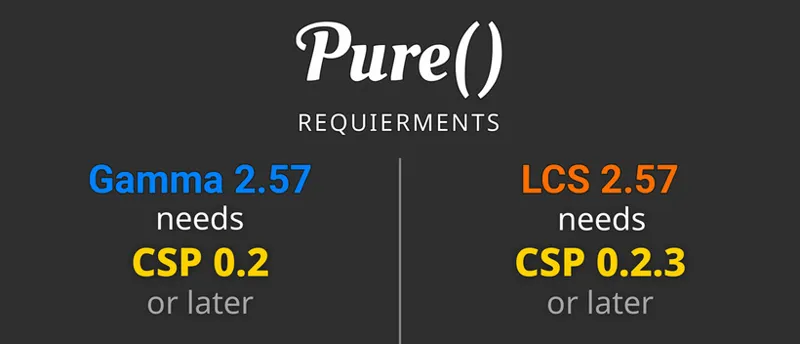
CSP 0.2.7 or 0.2.8p1 needednew exposure control in "pureLinear" (camera like exposure uplift)
FIXES
fixed a bug with too much glare in "pure" PPfilter in VR and HDR
fixed an error with missing weather values
fixed an error with missing shader color conversions code
fixed a bug with too high exposure in tunnels or indoor tracks
fixed Pure Planner plan AutoStart in non race events
fixed a bug in LCS sunblinding shader, where a flash happend after the sun disappeared
Highres - 3.3 GByte
mega: Pure 2.57 - Highres
mediafire: Pure 2.57 - Highres
If you want to install the Lowres packages, please go to Pure's Discord.
Link your Discord account in Patreon settings - More - Connected apps. You will be automatically connected and you get a role to access the Pure content.
As always, you need a CSP preview version to get rain and snow !!!
Like the most recent one (0.3p140)
https://www.patreon.com/posts/quick-fix-for-142367147
CSP is the work of Ilja Jusupov. I'm Peter Boese the creator of Pure (the weather and graphics mod for CSP). Pure also works with the free public version of CSP. If you want rain, you also need to be subscribed to Ilja Jusupov!

Comments (906)
I downloaded and install pure but its not showing in weather FX is there a fix for this?
awesome work peter
how to uninstall this version and reinstall a newwer version
SOS! I istalled everything but im getting rain with a gray sky, and unable to get clouds but water and stuff works. The sky is grayish blue
It is not installed properly then! Please be sure you install Pure exactly like shown in the install video! You must use 7zip app and you must use the "Extract" button to extract the 4 folders to your used AC root folder. Also check your used AC root folder in CM - settings - Content Manager - general!
Hello, the work you do is truly incredible, but I have a question: in the Content Manager Drive menu, I have several settings. Which one is correct? Thank you for your reply and happy holidays
hello , is there anyway to adjust the headlights , my headlights are way to bright , unrealistic there was once a setting in the lighting fx but not there anymore
Should this version work with 0.2.12preview1 CSP? Somehow I can't get it work correctly after losing my CSP due to a tech troubles. I keep getting overexposed GUI, overbloomed CSP lights (like pitstop marker), overexposed sky, unnatural headlights (like their lowbeam light is visible at the middle of the day) etc.Everything was perfectly fine before I reinstalled CSP. I use VR. Tried clean CSP installation and removing the Pure() completely.
Sorry, idk, maybe post a screenshot in the community chat or use the Pure Discord Server. Help is much easier there. Could be it does not work at all...
please tell me the settings — how to get an artistic sky with beautiful clouds and a night with a beautiful moon
What are artistic skies??? The moon is the real moon! So just use Pure Planner to set date and time to set it to its real position for the day, time at the track location…
Thanks for the linux work, you deserve my subcription <3
I enabled the Pure weather controller and it made the weather dark even though I set my time to 12:00 noon. I disabled the controller and it fixed the time. This is in VR. Is this a bug?
It is not installed properly then! Please be sure you install Pure exactly like shown in the install video! You must use 7zip app and you must use the "Extract" button to extract the 4 folders to your used AC root folder. Also check your used AC root folder in CM - settings - Content Manager - general!
Hi! How do I open the PURE config in game, if I'm using quest 3 VR?
Via the side menu (right screen border)
With 2500-1600 resolution you can see black borders on the sides, which wasn't the case with previous CSPs. How can I fix this?
This is the Pure Patreon! I‘m not the creator of CSP!
Hi. Where is the .bat installer? The folder only contains files for uninstalling.
Please just notice the big first message!
Is there still work being done on this mod? Aren't you making like 50k a month? What exactly are you doing? You won the lottery with this project. It is crazy to me.
Sure, but maybe you don't see the support work i'm doing in the background and that i'm doing also developments in the background which then has an effect of AC in the future, like i'm investigating to run it properly and CSP on Linux and such things. So Patreon is just the tip of the iceberg what you see here.
i cant find the install pure thing when i go in the file
You must use 7zip app and you must use the "Extract" button to extract the 4 folders to your used AC root folder. Also check your used AC root folder in CM - settings - Content Manager - general! What about the first big message that there is no install bat anymore?
Is there any way to make the trees, signs, and guardrails flicker on curves when you turn the steering wheel or make sharp turns? I have G-Sync and everything runs smoothly, but that bothers me. Thanks.
hey peter i got the pure 2.57 but under clouds i dont have skydomes that i have bought like "maiven"
Ask maiven! It is his content!
I downloaded CSP 0.2.11 preview 1 and the latest version of pure. When i try to download multiple versions of ReShade the game keeps crashing. Why's this?
Sorry, but i'm not responsible for Reshade or CSP! I'm the creator of Pure!
Hi Peter, at night I see some purple highlights on clouds and black black textures is there a fix for this please?
Please use the chat to post screenshots or better use the Pure Discord Server for such reports. Always test with the "pure" ppfilter! Link your Discord account in Patreon settings - More - Connected apps. You will be automatically linked with Pure Discord Server and get a role to view the Pure channels.
why did rain puddles suddenly stop appearing? when i first installed everything was good and the rain/reflections looked amazing. but all of a sudden i start my game up and the puddles are gone, my car is still being affected by the rain, but the ground is stuck at default. i've tried everything i even completely reinstalled CM and Asetto Corsa.
Maybe you updated CSP in Content Manager settings CSP about&update to a public version like 0.2.11??? You always need a CSP preview version to have rainFX. If you install a public version rainFX is no more active!
Just installed pure. It's looking amazing although night in my case is way too dark. Even high beams barely lighten up the road in fornt of me. What setting should I change to brighten it up. If I touch exposure I will make day time and sunny weather too exposed.
This could have many reasons. Maybe your monitor is not set right or you use a ppfilter with too low blacks. Please first try with the "pure" ppfilter! In the Pure PP app Spice - LDR - Calibration settings, you could check if your monitore just cannot show the lowest tones. Activate the spice.Calibration.active option and set it to the blackbars. You can even adjust the minimum black level there. If you find a settings, hit SAVE to save it for your current used ppfilter. OR. You could also gain the minimum ambient light at night if you don't want to change something in the ppfilter: Have a look in the Pure Config app Night tab and gain Lowest Ambient Light.
its like when i chose a weather style in the settings tab it dosent change but when i just do it in the pure pllaner it chages why does thar happen?
The weather presets are not the way how weather is changed. Those presets are just used to define the default properties of the different weather types. Please watch the last chapter of the install video. There you see how you actually change the weather!
i installed pure the same way u did in the video and checked if my content manager was connected correctly and veerything checks out but i still dont get the option to use pure and i can only use sol. Also how do i uninstall sol?
It is not installed properly then! Please be sure you install Pure exactly like shown in the install video! You must use 7zip app and you must use the "Extract" button to extract the 4 folders to your used AC root folder. Also check your used AC root folder in CM - settings - Content Manager - general!
rain isn't working for some reason every time I load in and I use the slider for rain or use the buttons for clouds nothing happens. I have installed the latest CSP version but none of the weather effects work but the time slider which changes what time it is.
The weather presets are not the way how weather is changed. Those presets are just used to define the default properties of the different weather types. Please watch the last chapter of the install video. There you see how you actually change the weather!
hello i have followed the guide ,multiple times and i cant get it too work properly . its always dark never day time and not crisp grapphics
Please use the chat and post a screenshot of the Pure Config app Main tab! Did you check if Pure even runs?
Sorry Peter, just joined the patreon and for some reason downloaded 2.51. No issue with the install, working perfectly. I've since seen 2.57 is available. I'm wondering do I just follow the YT video and copy over existing files etc? do I need to change anything in Content manager first or perform an uninstall of 2.51? Thanks for your time, really enjoying AC since the download.
Just download it and use 7zip and its Extract button to extract the 4 folders app, content, extension and system to AC root folder. Nothing more...
If I use the planner and set a time transition from dry conditions to wet, there is always a skid sound and short delay when the rain starts. Is this normal? Also, is there a way to change the transparency level of the pure app windows in VR? Thanks.
I do not have the answer but how do you set the conditions from dry to wet is it because that i only have pure and not the other mod?
whenever i try to enable wet roads nothing happens
You always need a CSP preview version for RainFX! Please notice the rain disclaimer in the bottom of the Pure development update posts.
Whenever I try to use Pure on a server, I get snow, no matter what I select. How would I fix that?
Then the air temperature is set below from the server! Deactivate the weather particles in Pure Config - Weather tab...
I installed pure with the link you got here, downloaded everything and set it up like people saying on youtube. now in game pure works for like 1/2seconds and after that is get back to the normal look.
please always watch the official install video here from the posts! Also please use the chat to post screenshots of your issue! Maybe first install it the proper way: ou must use 7zip app and you must use the "Extract" button to extract the 4 folders to your used AC root folder. Also check your used AC root folder in CM - settings - Content Manager - general!
I installed Pure with the link you used following the steps in the video. I got to apply the filter but it said SOL. No Pure in sight. Help would be appreciated
It is not installed properly then! Please be sure you install Pure exactly like shown in the install video! You must use 7zip app and you must use the "Extract" button to extract the 4 folders to your used AC root folder. Also check your used AC root folder in CM - settings - Content Manager - general!
Is there work being done on improving the puree for the next update?
Do you have some issues with Pure?
Is there anything I can do to get my time to match up with other players in multiplayer? Seems I’m about an hour or so behind
i having issue on fps. after i installed pure my fps decreased 200 to 20. what should i do? i have 4050 laptop gpu btw
It is not installed properly then! Please be sure you install Pure exactly like shown in the install video! You must use 7zip app and you must use the "Extract" button to extract the 4 folders to your used AC root folder. Also check your used AC root folder in CM - settings - Content Manager - general!
Hi Peter. Works great! Even just regular sunlight looks beautiful! I’m particularly loving the magic bloom in the spice settings :) Question, how can I find the discord?
Disregard- I just saw in the Q&A chat!
Bonjour sur discord, dans le canal hotfix, il n'y a que le hotfix 2.65. Mais où se trouve la version pure 2.65 ? Merci
There is no full 2.65 versions for now, i'm just waiting for CSP to release the 0.3 version and then i'm releasing Pure 3.0 with all those little changes, bugfixes and som little new features...
Bonsoir je n'est pas le fichier d'installation, uniquement les fichiers pour désinstaller merci
Please read the big first message in the update post! Watch the install video! There is no pure_install.bat anymore!
Hey Boese, everything is working for me. The issue though is that my Pure turns on and off. I read the 3 steps in the PP and Config that said it would remove it and I did it. I still get this issue. Any thoughts on what it could be?
It is not installed properly then! Please be sure you install Pure exactly like shown in the install video! You must use 7zip app and you must use the "Extract" button to extract the 4 folders to your used AC root folder. Also check your used AC root folder in CM - settings - Content Manager - general!
there arent any more vao patches ?
VAO patches are downloaded by CM automatically
eny fix for pure not showing up on content manager?
It is not installed properly then! Please be sure you install Pure exactly like shown in the install video! You must use 7zip app and you must use the "Extract" button to extract the 4 folders to your used AC root folder. Also check your used AC root folder in CM - settings - Content Manager - general!
downloaded this was working fine for about 2 days now my fps had significantly dropped ive stayed on the same settings I havent touched anyhting but fps has dropped i never had this issue on sol so i dont get why its happening on pure
If you did not change anything it can’t magically change itself! Maybe you use different contents or maybe it is due to an online session. Or you changed CSP settings or something else?! You can always check the ingame Lua Debug app. You will see a red dot if some error appears. Switch to the tab with the red dot and expand the error. Please use the chat in my Patreon to post a screenshot of this error…
Is there any recomendation of settings to import, Somehow I am getting very bad picture :( and Somehow I could not find any video to step by step install :(((
I found the video XD
I keep getting this error "FAILED initializing g_pPfxContext"
This has nothing to do with Pure! Maybe there is some issue with a track or car mod you use!
I've manged to download the mod and I got to the final chapter with the the config menu but the pure config isn't appearing the in the apps bar I don't use the content manager one as it doesn't work for me did I just install pure wrong or something else.
It is not installed properly then! Please be sure you install Pure exactly like shown in the install video! You must use 7zip app and you must use the "Extract" button to extract the 4 folders to your used AC root folder. Also check your used AC root folder in CM - settings - Content Manager - general!
my weather isnt working, i tried reinstalling and nothing changed. time works but weather presets dont
The weather presets are not the way how weather is changed. Those presets are just used to define the default properties of the different weather types. Please watch the last chapter of the install video. There you see how you actually change the weather!
Maybe stupid question but which one should I download for high resolution. mega: Pure 2.57 - Highres mediafire: Pure 2.57 - Highres
It is the same package but different file hosters...
Im missing pp filter on my pure config is there a way to fix that? pls lmk ty i tried reinstalling it
There is a dedicated app now: Pure PP https://youtu.be/RARnFFL4Pd8?si=r621EHsuEEXuIP4z&t=93
Hey, sorry iam new here. But can you tell me how to open pure config app while in the game. I mean it should be on the left but in mine it's default ac menu.
Maybe you did not install CSP! Please watch the install video and follow the steps exactly. If you don't want to pay for the CSP preview version (which you only need for rain) then jump over the CSP preview install! If you have a preview version of CSP, better install it manually: Delete the dwrite.dll in AC root folder. Open the CSP preview zip file and EXTRACT the "dwrite.dll" and the "extension" folder to your AC root folder (Steam install folder of AC "common\assettocorsa").
hey peter i did everything put my pure install for some reason isnt popping up on my weather fx
It is not installed properly then! Please be sure you install Pure exactly like shown in the install video! You must use 7zip app and you must use the "Extract" button to extract the 4 folders to your used AC root folder. Also check your used AC root folder in CM - settings - Content Manager - general!
hey peter can you help me with how to turn the rain drops on the screen it makes hard to drive the car also the weather and rain i want to chose and want it to stay does not stay there it automatically changes when i select it after a while Also in the rain weather my car slips alot its so hard to drive even when i turn my steering the car doesn't turn
Sorry I don’t know what you mean. Rain is actually part of CSP and Pure Planner just controls it. For the driving, be sure you activate extended physics in the drive menu of CM ! Otherwise I can’t really do something there. If it is still too slippery for you, reduce the wetness in Pure Planner or use the CSP weatherFX debug ingame and reduce the rain thickness in the rain group….
do i have to subscribe to another patreon
Only if you want rain you must subscribe to Ilja Jusupovs Patreon to get a CSP preview verion. Pure needs CSP to run, but it is also working with the free public CSP. But if you want rain, you need a CSP preview version, which you get at Ilja's Patreon...
does this work with online servers? or just single player?
Pure is just working on the client side. So it has nothing to do with servers. It will work anyway, no matter which session type you use. But in online sessions you can’t control date, time or rain. But this is a CSP limitation…
Hi Peter. Hope you’re all good. Will there be a version of Pure where the clouds cross each other like in real life.Many thanks.
why is my sky blank white? how do i fix this
Don’t activate HDR in CM settings CSP DXGI, if you don’t have an HDR monitor. If you have an HDR monitor, please read the HDR tutorial.pdf in the Pure zip. Also if you have further problems, always try with the „pure“ ppfilters!
Would anyone else have issues with the engine sound cutting out/ not playing correctly when shifting up or down? Edit: I just realized it might be a CSP thing more than a Pure thing. I'll update if that's the case. Edit 2: I have no clue what the issue is, sorry.
I have the same problem the engine sounds cuts out when i hit the gas i cant seem to figure it out
Everything works perfectly, I only have one small problem: the thunder sound is gone. I use csp 0.2.12p1.
Do you see the lightning? What is set in Pure Config app Sound tab?
Bonjour, où se trouve la dernière version de pure. Je ne vois que la version 2.57 à télécharger... Merci
Please have a look into the community chat -> Hotfix channel or at Pure Discord Server in the Pure Hotfixes channel. For Discord: Link your Discord account in Patreon settings - More - Connected apps. You will be automatically linked with Pure Discord Server and get a role to view the Pure channels.
Not sure what is causing my issues, I had it working beautifully and then I changed the weather setting before starting up the game and nothing works. It attempts to launch the game but crashes immediately.
It appears the issue is the paid version of CSP. I went back to version 2.7 and it works!
When i turn on the rain the cloud change and the sound is on but there is no rain on my windshield
You always need a CSP preview version for RainFX! Please notice the rain disclaimer in the bottom of the Pure development update posts.
When i open Pure it says use correct adaptive clip
Reset your settings in Content Manager - settings - CSP - graphics adjustments - clip planes! If you right click any parameter, you can reset it…
Any updates previous ? it's long time.
No sorry. I‘m working on a new update which supports the upcoming CSP 0.3. this is still in heavy development, so I will wait until it is nearly ready to release and then I will release a new update…
Hi Need help, currently at the last step, however My CPU and GPU usage gets maxed out and the game crashes after 30 seconds, this does not occur during benchmarking. 9800X3D CPU RTX 5070 TI GPU specs just for additional info
It is not installed properly then! Please be sure you install Pure exactly like shown in the install video! You must use 7zip app and you must use the "Extract" button to extract the 4 folders to your used AC root folder. Also check your used AC root folder in CM - settings - Content Manager - general!
Keep up the good work this just changes the game completely you are a legend 💯
i need help my pure dont work i watched the vid and did every step and still
It is not installed properly then! Please be sure you install Pure exactly like shown in the install video! You must use 7zip app and you must use the "Extract" button to extract the 4 folders to your used AC root folder. Also check your used AC root folder in CM - settings - Content Manager - general!
hi Peter Boese, im having red glow blink repeatedly in the horizon from under the map. It becomes very apparent when its night time. I suspect that its a map debug setting for finding geometric gaps in the map, but it would be appreciated if you know anything that could disable this setting. im not sure if this is exactly pure related but it would be great help if you could lead me to general direction.
Didn’t you see the message at the top? Your CSP version is not compatible! Please use a compatible version. You see the needed CSP versions in the Pure update posts!
On discord?
You can also get them on Discord: Link your Discord account in Patreon settings - More - Connected apps. You will be automatically linked with Pure Discord Server and get a role to view the Pure channels. Then you will see the Pure hotfix channels there. Be sure you have the option "show all channels" active in the Pure Server settings! Right-click on the Pure|Sol Server icon...
is this the newer verison
There is a hotfix to Pure 2.65 in the community chat - hotfixes channel
hey how do i disable this dynamic thing i want it to be static, in the very first lap my graphics is so good but in the second or third lap my graphics suddenly starting to get darker and not bright anymore (i set the pure planner to scattered clouds)
Which ppfilter do you use? Maybe you mean the cloud shadows? In Pure Config app Clouds tab you can customize the cloud shadows behavior...
second time purchasing.. but still cant get the pure config to show on my app window... i followed exactly what the video says.. still nth
It is not installed properly then! Please be sure you install Pure exactly like shown in the install video! You must use 7zip app and you must use the "Extract" button to extract the 4 folders to your used AC root folder. Also check your used AC root folder in CM - settings - Content Manager - general!
how do i download pure
You just click one the download links!!! Watch the install video and you see how everything must be installed…
so if i want pure i subscribe to this patreon but if i want to add rain i have to subscribe to another patreon?
yes
https://www.patreon.com/posts/red-green-and-131249482 when i enter this link it takes me to patreon settings i cannot download the csp
You must be a Patreon of Ilja Jusupov to be able to download a CSP Preview version! You DON't need to to actually run Pure! You only need this if you want rain in AC!
why wont pure show up in weather fx
nevermind figured it out it wasnt working when i was extracting files so i just dragged and dropped them into ac root folder and that fixed it
Got as far as setting weather and got a crash. I did not deviate from the video in any way I can tell as I did everything 1 for 1. Restarted the Drive and it worked flawlessly. The video is great. Thank you for all of your hard work sir.
my whole game is just so much lower quality and i cant use any weather effects, i havent changed any settings either
It is not installed properly then! Please be sure you install Pure exactly like shown in the install video! You must use 7zip app and you must use the "Extract" button to extract the 4 folders to your used AC root folder. Also check your used AC root folder in CM - settings - Content Manager - general!
please select pure in drive menu when i try open pure planner
Please watch the official install video and follow the steps exactly!
Why does my weather preset not work? Im using Pure 2.57 with CSP 0.2.12 preview. I cant get the clouds or the wetness on the floor.
Same, can you update if you find a fix
I installed the new csp and this version of pure and now no matter what my sky is dimmed and I cant fix it
Its also super laggy now I could run at 60 to 80fps before but im only gettign 15-16
Ive had pure before but i deleted it and assetto corsa. Im trying to redownload it and i extracted the 4 folders to the root folder but when i go to content manager it doesnt show anything about pure. it is not in weather fx or pp filters. What am I doing wrong?
It is not installed properly then! Please be sure you install Pure exactly like shown in the install video! You must use 7zip app and you must use the "Extract" button to extract the 4 folders to your used AC root folder. Also check your used AC root folder in CM - settings - Content Manager - general!
I do not have the option in cm for auroras. I am missing quite a few options that were shown in the video. It works tho.
Auroras are not part of Pure. The default wfx has different options, because i removed some of the not necessary ones. You can add Auroras with this 3rd party addon btw: https://www.overtake.gg/downloads/auroras-northern-lights-for-pure.63431/
what’s the difference between the two pure downloads?
Those 2 links are just 2 different file hosters. So it is the same file but one is hosted at MEGA and on is hosted at MEDIAFIRE.
how do i uninstall sol if its alr inside a lot of my files?
You can use the uninstall_sol.bat in the Pure zip
when i try to import it just doesent do anything and it tells me ''pure weather script is not running''and i did all the stuff that is telling me to do and is not working
It is not installed properly then! Please be sure you install Pure exactly like shown in the install video! You must use 7zip app and you must use the "Extract" button to extract the 4 folders to your used AC root folder. Also check your used AC root folder in CM - settings - Content Manager - general!
Hello i dont have rain in day weather planner but when i change for a timed weather planer i have got rain how can i fix it?
Did you try to set the weather in the weather presets in the Pure Planner settings? If so: The weather presets are not the way how weather is changed. Those presets are just used to define the default properties of the different weather types. Please watch the last chapter of the install video. There you see how you actually change the weather!
je ne vois pas le lien pour télécharger Pure 2.57 sana passer par mega ou media
I don't know what you mean. Just click on the links! And please use English here...
hey idk if someone can help but my Pure Planner has FIX Weather Presets like nothing changes when i am in weather presets idk know to do i just got it'
The weather presets are not the way how weather is changed. Those presets are just used to define the default properties of the different weather types. Please watch the last chapter of the install video. There you see how you actually change the weather!
does anyone have any good presets i installed pure and the light patch but my game still just looks so fake
and its also super blurry
i bought this and csp preview, followed the tutorial you posted and now whenever i start a race my whole sky is black and i cant drive car it goes about 1 kmh in first gear. please help dude i just want to race :(
It is not installed properly then! Please be sure you install Pure exactly like shown in the install video! You must use 7zip app and you must use the "Extract" button to extract the 4 folders to your used AC root folder. Also check your used AC root folder in CM - settings - Content Manager - general!
I installed pure for the first time last night and I was absolutely blown away by the results!! Absolutely beautiful!! What fantastic work Peter! 👏🏽👏🏽 Thanks for doing your work and letting us all benefit from your efforts! 🙏🏽
Hi Peter! I followed the tutorial video. I have a problem, when i load the hotlap or any race, first seconds looks like the video, but 3 or 4 seconds later the game lows the light, clouds disappear and looks darker (also happens the same when i click ''Day'' in the Pure Planner). I don't have any other filter or post processing, just like the video, ''pure'' post processing
It is not installed properly then! Please be sure you install Pure exactly like shown in the install video! You must use 7zip app and you must use the "Extract" button to extract the 4 folders to your used AC root folder. Also check your used AC root folder in CM - settings - Content Manager - general!
Just checking if this is normal. With Sol, I am at 400fps, P. LCS is 180fps, and P Gamma is stuck at 30fps with super high gpu wait (so CPU bottleneck). Or is there a fix?
It is not installed properly then! Please be sure you install Pure exactly like shown in the install video! You must use 7zip app and you must use the "Extract" button to extract the 4 folders to your used AC root folder. Also check your used AC root folder in CM - settings - Content Manager - general!
Hi can someone help me? I installed the pure from all steps on the video but rain isn't working
You always need a CSP preview version for RainFX! Please notice the rain disclaimer in the bottom of the Pure development update posts. If you have a preview version of CSP, better install it manually: Delete the dwrite.dll in AC root folder. Open the CSP preview zip file and EXTRACT the "dwrite.dll" and the "extension" folder to your AC root folder (Steam install folder of AC "common\assettocorsa").
rain isnt working i followed all steps can someone help me
You always need a CSP preview version for RainFX! Please notice the rain disclaimer in the bottom of the Pure development update posts. If you have a preview version of CSP, better install it manually: Delete the dwrite.dll in AC root folder. Open the CSP preview zip file and EXTRACT the "dwrite.dll" and the "extension" folder to your AC root folder (Steam install folder of AC "common\assettocorsa").
With csp 0.2.12-preview 1 and pure lcs v2.57 i have no sun or clouds no matter time or weather??
It is not installed properly then! Please be sure you install Pure exactly like shown in the install video! You must use 7zip app and you must use the "Extract" button to extract the 4 folders to your used AC root folder. Also check your used AC root folder in CM - settings - Content Manager - general!
hey peter, I have a really weird issue that started out of no where, using the IV pure cs 2.0 all of a sudden the glare at night is really bright, like annoyingly bright, I have found when i switch to off the for glare quality the issue goes away. I have tried changing pure settings and changing everything to defaults but it still persists, and only with the IV pp filter, the Pure VR one works find. edit: example is the dash is overly bright and distorted, same with menus and any thing that light reflects off of edit 2: wanted to add i also used this exact same ppfilter and presets with no issues in the past, it seemed to randomly occure any suggestions?
Why don’t you contact the creator of this filter then? The pure PPfilters working fine?
i get into a race or i go into a server and after i installed pure its like constantly flashing every second or 2 before i bought it i didnt have this problem any fix?
It is not installed properly then! Please be sure you install Pure exactly like shown in the install video! You must use 7zip app and you must use the "Extract" button to extract the 4 folders to your used AC root folder. Also check your used AC root folder in CM - settings - Content Manager - general!
hi i cant just start race like in vide it says there is error (0xc000007b)
Not a Pure problem! Reset CSP settings completely! Goto /Documents/Assetto Corsa/cfg/ rename the "extension" folder to something different. Restart CM. It will create a new "extension" folder. You can restore it later. Select Pure as weather style again in CSP weatherFX settings.
i got the pure filters on and stuff but my map still has the same graphics and cars , it looks better but i want better quaility from my cars and ground and walls how to get that
I don’t know what you mean. Pure is all about weather and lighting. It does not change car or track graphics! Do you check if Pure runs properly like in the install video?
can someone help me my pure gamma is really laggy and when i oipen pure config in game it does not let me select any of the 3 options
It is not installed properly then! Please be sure you install Pure exactly like shown in the install video! You must use 7zip app and you must use the "Extract" button to extract the 4 folders to your used AC root folder. Also check your used AC root folder in CM - settings - Content Manager - general!
I did it as you said, it didn't work, it might be a problem because in the updated version 0.2.11 previev1
If you have a preview version of CSP, better install it manually: Delete the dwrite.dll in AC root folder. Open the CSP preview zip file and EXTRACT the "dwrite.dll" and the "extension" folder to your AC root folder (Steam install folder of AC "common\assettocorsa").
I did everything as in the video, but for some reason an error occurs when starting the game
It might not be caused by Pure. Try this: Reset CSP settings completely! Goto /Documents/Assetto Corsa/cfg/ rename the "extension" folder to something different. Restart CM. It will create a new "extension" folder. You can restore it later. Select Pure as weather style again in CSP weatherFX settings.
my clouds are not appearing do you know?
Which render mode do you use? Which Pure do you use? LCS or Gamma? Did you maybe activate the "Economic" mode in weatherFX settings? Please use the community chat and post a screenshot of Pure Config app Main tab and Clouds tab.
where is the discrod link?
Link your Discord account in Patreon settings - More - Connected apps. You will be automatically linked with Pure Discord Server and get a role to view the Pure channels.
i just want to ask due to performance issues when i use pure lcs my fps is so high but when i use pure gamma it is so laggy then the difference of graphics is so noticable what can i do to make the gamma more usable
It is not installed properly then! Please be sure you install Pure exactly like shown in the install video! You must use 7zip app and you must use the "Extract" button to extract the 4 folders to your used AC root folder. Also check your used AC root folder in CM - settings - Content Manager - general! Or the PPfilter you use has a bug then! Just check ingame via the CSP Lua Debug app if there is a red dot. If so, switch to that tab and expand the error. Post it in the community chat or use the Pure Discord Server:
this is coooooking with snowy's taa
What do you mean?
why weather preset is not working
The weather presets are not the way how weather is changed. Those presets are just used to define the default properties of the different weather types. Please watch the last chapter of the install video. There you see how you actually change the weather! So the weather presets are working, but they are only there to set the defaults of the weather if you select it the right way in Pure Planner‘s weather slots!!!
when ever i try and boot up the game through CM i get this error msg "CSP installation is damaged (versions mismatch) ive tryed messing around with my versoin combo of prue and the rain FX but i cant seem to get any thing to work
Try to "delete patch" in CM settings CSP about and info! Then install it again: If you have a preview version of CSP, better install it manually: Delete the dwrite.dll in AC root folder. Open the CSP preview zip file and EXTRACT the "dwrite.dll" and the "extension" folder to your AC root folder (Steam install folder of AC "common\assettocorsa").
hi puter
When I try to connect online, I get the message "Backed does not respond" What can I do?
Sorry idk, that is not caused by Pure!
Hi Peter, Just followed the video to install Pure 2.57 but it is not showing as an option under weather style, I only see the default (by x4fab v1.6). I've installed both Pure / Lights to the ac folder so not sure what else to do. Please advise. Many thanks
It is not installed properly then! Please be sure you install Pure exactly like shown in the install video! You must use 7zip app and you must use the "Extract" button to extract the 4 folders to your used AC root folder. Also check your used AC root folder in CM - settings - Content Manager - general!
Hey Peter, I love your work. I was just curious will Pure run just fine with the standard non paid CSP/SOL that you normally get to run the game? I dont care for rain effects and just wanted the Pure mod, or will that cause problems if they dont run together? Thanks in advance !
Pure is the successor of SOL! So you can have installed both but you don’t need Pure for SOL or SOL for Pure! Both are independent weather styles with their very own apps to control. For Pure you need at least CSP 0.2.3! And it does not matter if you use the free public version of CSP or the CSP preview versions. But you only have rain with the CSP preview versions!
Hello Peter :D I always used "live" in the drive menu in CM, as far as the weather is concerned, until I learned that Pure also simulates real weather data. and it seems to work fine except for a few things Track Temperature: always shows me values close to 0, it doesn't matter what the outside temperature is like. . . there is a square to select before this setting, it is always selected, no matter if I unselect it, when I open the game again it is selected again, making the track temperature drop to almost 0 degrees. . . the other options, does it make sense to select them or not? so that Pure follows the real climate
i have issue the pure mode dont load in game and i have basic graphics and i have csm ver 2.11
Please use the community chat and post screenshots where you show what not works!
Not sure if this is related to Pure but my manual wipers do not work even when assigned buttons.
If you still have Sol installe, please deactivate the Sol python apps or uninstall Sol with the uninstall_sol.bat in the Pure zip. If you uninstall Sol, please reinstall Pure after it! Sol's python apps blocking the native wiper's of CSP...
any news on a new update?thx in advance =)
Sorry, no news for an update…
why i got a delay when i want teleport to pits -_- .....
Sorry but this has nothing to do with Pure!
I downloaded pure and csp just as the video said but right when I go to load in the game crashes instantly so fast I don't get a crash report. Do you know how to fix that?
Reset CSP settings completely! Goto /Documents/Assetto Corsa/cfg/ rename the "extension" folder to something different. Restart CM. It will create a new "extension" folder. You can restore it later. Select Pure as weather style again in CSP weatherFX settings. Also I have reports if the NVidia overlays are used it could crash. Maybe if you use NVidia overlays deactivate it…
Hey, i just downloaded this but i seem to be missing the install and the file i have only has the uninstall.
Don't you see the big hint if you look at the post? "Watch the install video - There is no pure_install.bat anymore!" Please watch the video and follow the steps! You must use 7zip app and you must use the "Extract" button to extract the 4 folders to your used AC root folder. Also check your used AC root folder in CM - settings - Content Manager - general!
hi. my game has an odd dark blue sky without any clouds etc and it will not allow me to activate pure? Any idea whats going on?
It is not installed properly then! Please be sure you install Pure exactly like shown in the install video! You must use 7zip app and you must use the "Extract" button to extract the 4 folders to your used AC root folder. Also check your used AC root folder in CM - settings - Content Manager - general!
Hi peter, my game doesnt allow me to use pure and activate it when in LCS but in gamma it comes up with the option to enable it but also doesnt let me click the option also my pc cannot cope in gamma. What shall i do?
It is not installed properly then! Please be sure you install Pure exactly like shown in the install video! You must use 7zip app and you must use the "Extract" button to extract the 4 folders to your used AC root folder. Also check your used AC root folder in CM - settings - Content Manager - general!
the wipers doesnt work when its rain before i used pure it worked, any ideas ?
If you still have Sol installed, please deactivate the Sol apps in CM settings AC python apps. The Sol apps have their own wiper controls and so they block the native CSP wiper control! Pure and the Pure apps are no longer interfering the native CSP wiper controls and so you must deactivate the Sol wiper control!
Hi Peter, I just paid for this a few hours ago and in some maps I have the lights broken with light colors burnt in pure white
Did you maybe activated HDR in CM settings CSP DXGI?
Idk what im doing wrong but i have everything downloaded and im extracting everything into assetto corsa but in content manager in the weather fx pure doesn't show up and also even when i go in game the tabs don't show up.
It is not installed properly then! Please be sure you install Pure exactly like shown in the install video! You must use 7zip app and you must use the "Extract" button to extract the 4 folders to your used AC root folder. Also check your used AC root folder in CM - settings - Content Manager - general!
Hi Peter, I'm having a problem changing the clouds, asphalt wetness, and other options. I've seen videos on YouTube, and they claim the latest version of Pure has issues with this. Any recommendations?
If you are trying to change the weather in the Pure Planner settings: The weather presets are not the way how weather is changed. Those presets are just used to define the default properties of the different weather types. Please watch the last chapter of the install video. There you see how you actually change the weather!
Hello Peter, After downloading the Pure 2.57 file, I only have the uninstallation file available. Can you help me?
Maybe read the first big text that says: „Watch the install video! There is no install_pure.bat anymore“ The install video is linked below it!
hey peter i followed the install guide video just with the most recent links. now the game runs at 12 fps and the pure config app and the planner doesnt change anything. cant even set up the pure config app in a race. any ideas?
It is not installed properly then! Please be sure you install Pure exactly like shown in the install video! You must use 7zip app and you must use the "Extract" button to extract the 4 folders to your used AC root folder. Also check your used AC root folder in CM - settings - Content Manager - general!
hi, i can't access to discord
Link your Discord account in Patreon settings - More - Connected apps. You will be automatically linked with Pure Discord Server and get a role to view the Pure channels.
Hi Peter, I'm confused because I Have CSP Ver. 0.2.11 and I can't switch to the version needed for Pure 2.57. It's saying it cant access a file.
What do you mean? CSP 0.2.11 will work for Pure! For Pure Gamma you need CSP 0.2.0 or HIGHER For Pure LCS you need CSP 0.2.3 or HIGHER
Hi Peter, I really like Pure. I just have a problem with the sun rays. I only have them with the PP filter “Sepia.” I activated “Sunrays” in the settings, but I can't find any settings for sun rays in the Pure configuration. Can you help me?
You can adjust them in Pure PP app - general tab. If you use the Pure ppfilter like "pure" or "pureCandy", it should work already!
Hi Peter, I have a question. When I load Light-patch-0.2.11-pre, CM crashes when launching the game. If I switch CSP back to the regular version, I can enter the game but it can’t rain. Is there any solution?”
Reset CSP settings completely! Goto /Documents/Assetto Corsa/cfg/ rename the "extension" folder to something different. Restart CM. It will create a new "extension" folder. You can restore it later. Select Pure as weather style again in CSP weatherFX settings. If you use NVidia Overlay, try to deactivate it. Maybe it causes problems with other parts in AC or CSP...
Hi Peter i seem to not get the download with the python app can you somehow help me because i watched your video of how to instal and i cant seem to see the isue, i also asked chat gpt and it tells me i aarently dont have the full pure app? happy for a near answer.
Pure has no Python apps. Its all in Lua and you see them in CM - Content - miscellaneous - LUA Apps
https://medal.tv/games/assetto-corsa/clips/kSh4qOUrsAZrKIYsr?invite=cr-MSxHeHAsNDEzNDk1MDI1&v=30 my pure planner weather isnt working in replay mode?
Maybe it is related to this certain replay?! Otherwise also let the weather evolve, don't click like 10 different weather in a second. It could be that in some replays the weather change is not working anymore. Usually it is for replays over 1GB but could also be in smaller replays. Try to capture a new replay and try again.
I'm having a pure config app error. When I start the game and follow your YouTube video steps (would been better to show an already uaed assetto not clean install) I get an adaptive plane clip error, whether I have it on or off. Thank you
Reset this setting in CM settings CSP graphics adjustments. Right-click on the farplane setting and reset it…
i reinstalled like the video with 7zip i checked the ac root folder went in deleted the weather fx and then tried again reinstalled csp and it still dosent detect pure :/
Why you delete the weatherFX? Maybe come to Pure Discord Server. Help is much easier there…
Reinstalled but still the same error message, and somehow my ppfilters are not working including basic Pure PPfilter. I did NOT install it with CM, I installed it manually via pasting 4 folders into AC root folder.
What error message??? Reset CSP settings completely! Goto /Documents/Assetto Corsa/cfg/ rename the "extension" folder to something different. Restart CM. It will create a new "extension" folder. You can restore it later. Select Pure as weather style again in CSP weatherFX settings.
In content manager, it says: There are entries with the same file name. Content Manager handles all sorts of content by their file/directory names. And, because disabled content is being moved to a separate folder (with “-off”-suffix), sometimes several entries might share the same names. This might cause CM to work very wrongly. So, please, open “E:\SteamLibrary\steamapps\common\assettocorsa\apps\lua-off” and either remove or rename “pureconfig” and “pureplanner”. Then, restart CM. How do I fix this or completely uninstall pure?
You uninstall it with the „uninstall_pure.bat“ in the Pure zip
i downloaded it correctly and when i went in it said no pure so i did what it said if it dosent work and it like turns on them right off
It is not installed properly then! Please be sure you install Pure exactly like shown in the install video! You must use 7zip app and you must use the "Extract" button to extract the 4 folders to your used AC root folder. Also check your used AC root folder in CM - settings - Content Manager - general!
to anyone that has their game crash on launch disable nvidia geforce overlay in the geforce experience app. it is not pure thats the problem their is a conflict with the mods. this fixed it for me.
Thanks for the report! I will add it to my solution list!!!
I have a problem; when I click 'go,' I get a black screen.
Reset CSP settings completely! Goto /Documents/Assetto Corsa/cfg/ rename the "extension" folder to something different. Restart CM. It will create a new "extension" folder. You can restore it later. Select Pure as weather style again in CSP weatherFX settings.
Peter? how do I get the ground wetness it doesnt work>
You need a CSP preview version! Please notice the rain disclaimer at the bottom of this post... If you have a preview version of CSP, better install it manually: Delete the dwrite.dll in AC root folder. Open the CSP preview zip file and EXTRACT the "dwrite.dll" and the "extension" folder to your AC root folder (Steam install folder of AC "common\assettocorsa").
i watched a tutorial on how to install and they had a install file but the install file doesnt show in mine
Why don't you watch the official install video??? It's literally the first big message that says: Watch the install video! There is no pure_install.bat anymore" Don't you see that?
i have a low end pc i have been using sol for some time and recently using pure. Should I have removed sol first? I am not having any problems but just wondering if that was a mistake i made? also just wondering if you know any setting that would help out the frames a little bit (its not too bad) when on a big nordscheliffe server at night? And lastly how I would remove sol, if that is what I should have done.
You must not remove SOL, but if you use Pure, just deactivate the SOL apps in CM settings AC python apps. For the most fps, just don’t use the big fps eaters extraFX and real mirrors (CSP - smart mirrors)
my rain worked before, and then i got pure and now it doesnt work plz help
Pure does not influence the rain, it just control it! Did you install a public CSP version like 0.2.11? If you have a preview version of CSP, better install it manually: Delete the dwrite.dll in AC root folder. Open the CSP preview zip file and EXTRACT the "dwrite.dll" and the "extension" folder to your AC root folder (Steam install folder of AC "common\assettocorsa"). How do you set the rain weather? Please watch the last chapter of the Pure install video to see how you set weather in Pure Planner…
i subscribed but stillk cant download
At Patreon you must click on the post title or the "show more" link to read a post! Please read the post and watch the install video!
changing the sky doesn't work boss, atleast for me.
same here
do you know why do i have all gray sky and if i change weahter nothing changes
Where do you change weather? Make a screenshot and post it in the community chat…
Hey Peter where can I join the discord server ?
Link your Discord account in Patreon settings - More - Connected apps. You will be automatically linked with Pure Discord Server and get a role to view the Pure channels.
when I click weather type - broken clouds the clouds don't show up, how do i fix that?
If you do that in Pure Planner settings - weather presets: The weather presets are not the way how weather is changed. Those presets are just used to define the default properties of the different weather types. Please watch the last chapter of the install video. There you see how you actually change the weather!
Hello just wondering , what are the differences betweem gamma and lcs Weather FX , like is one better looking more demanding or just different visual styles ?
There is a long explanation at Pure Discord Server: Link your Discord account in Patreon settings - More - Connected apps. You will be automatically linked with Pure Discord Server and get a role to view the Pure channels. https://discord.com/channels/533310059405377546/1390209528141844552
where do i join the discord
Link your Discord account in Patreon settings - More - Connected apps. You will be automatically linked with Pure Discord Server and get a role to view the Pure channels.
Hello Peter, everything seems to run fine but i can not get the wipers to work. Toggled automatic wipers on and off several times,.
If you still have SOL installed, uninstall it or deactivate the Sol python apps in CM settings AC python apps.
I launch the game and it crashes every time I already have reset the csp settings and select pure to for the weather fx after and it still is crashing saying race cancelled every time
If you select the default weather style in weatherFX settings, does it crash also or not? If it doesn’t crash, the crash is not caused by Pure! So something also leads to the crash! Be sure that a ppfilter is selected in AC video settings!
Hi Peter, I downloaded the new version of Pure and the Preview Lights patch (CSP), but the Pure Planner for changing the weather doesn't work (you can only use presets). Also, if I try to use Pure LCS, everything appears dark. I've tried downloading everything several times, but the problem persists. Do you have any ideas on how to fix it? Thanks.
The weather presets are not the way how weather is changed. Those presets are just used to define the default properties of the different weather types. Please watch the last chapter of the install video. There you see how you actually change the weather!
hey pete.. there is a issue with a bigass HALO around the wing/behind car when looking in rear view mirror blocking for sun and skies.. is this pure related or latest csp verion=?
Idk what you mean! Post a screenshot in the community chat!
ive been playing assetto for years and have never had the issues im having now, pure lcs works and i have my 60 fps that my video settings are set to but it says in game pure isnt activated, but pure gamma i can barely get 20 fps, and it says pure is activated but i cant even accept the lightning warning, idk whats going on but something aint right, yes i followed the video and have always done it that way in the video to install correctly , and my pc specs are good 4070 super, i5 14,400 k with 32 gigs of ddr5
It is not installed properly then! Please be sure you install Pure exactly like shown in the install video! You must use 7zip app and you must use the "Extract" button to extract the 4 folders to your used AC root folder. Also check your used AC root folder in CM - settings - Content Manager - general!
Hi guys, I'm trying to download the Pure LowRes package from "Sol | Pure" Discord, but I couldn't find it there. Could anyone help me with this, please?
Link your Discord account in Patreon settings - More - Connected apps. You will be automatically linked with Pure Discord Server and get a role to view the Pure channels.
whats ur dicord?
Link your Discord account in Patreon settings - More - Connected apps. You will be automatically linked with Pure Discord Server and get a role to view the Pure channels.
Hello, where i can find discord server?
Link your Discord account in Patreon settings - More - Connected apps. You will be automatically linked with Pure Discord Server and get a role to view the Pure channels.
hello, if ur game crash : the sercive : "NVIDIA LocalSystem Container" must be disable. Or is it a way to make it work with CSP?
hello i found that the service "NVIDIA LocalSystem Container" is the "OVER LAY" of NVIDIA app.
i play 15minutes and my game crash any suggestions?
It is not caused by Pure! Could be caused be many things! First try with default Kunos content: Kunos car and Kunos track! Use the "pure" ppfilter. If it still crashes: Reset CSP settings completely! Goto /Documents/Assetto Corsa/cfg/ rename the "extension" folder to something different. Restart CM. It will create a new "extension" folder. You can restore it later. Select Pure as weather style again in CSP weatherFX settings.
hello i have a problem every time i switch to rain it starts to snow i use csp 0.2.12 and use the newest version of pure do you know how to fix it? (i play on no hesi servers)
It is all about the ambient temperature. So it seems it is not set right, because snow only is present with ambient temperatures below 3 degrees Celsius. You can deactivate the snow in Pure Config app Weather tab. Deactivate the weather particles there…
I gotta say you are a LEGEND for the tutorial video fr. I should have watched it a lot sooner and thats my bad. but its much appreciated
Any reason why my grass will flicker on some tracks , turning grassfx off fixes it. Running 2.12pre and latest pure LCS
Not caused by Pure, but you could try to reset CSP settings: Goto /Documents/Assetto Corsa/cfg/ rename the "extension" folder to something different. Restart CM. It will create a new "extension" folder. You can restore it later. Select Pure as weather style again in CSP weatherFX settings.
For some reason Content manager is not detecting PURE im on version 0.2.11
It is not installed properly then! Please be sure you install Pure exactly like shown in the install video! You must use 7zip app and you must use the "Extract" button to extract the 4 folders to your used AC root folder. Also check your used AC root folder in CM - settings - Content Manager - general!
Hey im just having a very hard time getting everything to work correctly its all like partially working and i think some of it was not installed correctly so i was wondering if i could get some help sorry to bother.
Please watch the install video and follow the steps exactly. It will work then! If you still have problems please use the community chat to post screenshots of what is not working. You could also use the Pure Discord server. Giving help is much easier and faster there: Link your Discord account in Patreon settings - More - Connected apps. You will be automatically linked with Pure Discord Server and get a role to view the Pure channels.
Hey, sorry to bother but I have a problem. If I have just pure installed, the game runs fine. If I have just csp installed, the game runs fine. If I have both, the game gets to pits and then crashes immediately. Any ideas?
You can’t run Pure without CSP! Reset CSP settings completely! Goto /Documents/Assetto Corsa/cfg/ rename the "extension" folder to something different. Restart CM. It will create a new "extension" folder. You can restore it later. Select Pure as weather style again in CSP weatherFX settings.
Hey, just wanted to say thanks for the great work. you've made this game way better for me since i got your mod.
hola no se por q descargo el archivo pero no me sale el de instalar solo me salen los dos de desinstalar por q no me sale
Please notice the first hint you see: Please watch the install video! There is no install_pure.bat anymore! So please watch the video and follow the steps exactly…
Hi, Peter! Thank you for all of your hard work! I have no headlights in Pure 2.57/CSP 2.12. They worked in earlier versions. Where should I look to fix this?
What settings do you have in Pure Config app AI tab? Pure just switch them on or off if you have „Turn headlight on off automatically“ in weatherFX settings
hi i bought pure but there isnt any rain do i need to buy it or its free in the membership by the way the mod is very good keep it up!
rain is with CSP isnt it? Youll have to go to Ilja's patreon for that
I need help i can't select the "activate it will full flashing affects" since it go's on, off
It is not installed properly then! Please be sure you install Pure exactly like shown in the install video! You must use 7zip app and you must use the "Extract" button to extract the 4 folders to your used AC root folder. Also check your used AC root folder in CM - settings - Content Manager - general!
When I launch into the game it just crashes and shows a black screen
Reset CSP settings completely! Goto /Documents/Assetto Corsa/cfg/ rename the "extension" folder to something different. Restart CM. It will create a new "extension" folder. You can restore it later. Select Pure as weather style again in CSP weatherFX settings.
Hello, i managed to reduce the brightness, but it have no effect on the brightness of the car, the maps look good but the sun reflection on the car is overly bright.
Use the "pure" ppfilter. Reset to defaults in Pure Config app Main tab and in Pure PP app hit Reset.
i opened pure config and there was a warning abot the epilepsy and its is bugging and i cant click anything I tryed to download again but it didnt help what can I do
It is not installed properly then! Please be sure you install Pure exactly like shown in the install video! You must use 7zip app and you must use the "Extract" button to extract the 4 folders to your used AC root folder. Also check your used AC root folder in CM - settings - Content Manager - general!
Hello, i just downloaded and installed this one. i followed a youtube tutorial but my game is overly bright and i don't know how to fix it.
Maybe you activated HDR in CM settings CSP - DXGI?
I'm sorry, but I have a question. When I drive through the city at night, the streetlights are very dim. Is there a guide somewhere about what each setting does?
What PPfilter do you use? If you use “pure” ppfilter, is it ok then? Try to “reset to defaults” in Pure Config app Main tab! Reset your settings in CM settings CSP lightingFX
i opened the last link up it opens patreon settings only i need the csp where can i find it
https://www.patreon.com/posts/red-green-and-131249482
hi, i'm hoping you can help. when ever i go to drive i have a black sky and when i open the pure app it just says pure weather script not running. Thanks
It is not installed properly then! Please be sure you install Pure exactly like shown in the install video! You must use 7zip app and you must use the "Extract" button to extract the 4 folders to your used AC root folder. Also check your used AC root folder in CM - settings - Content Manager - general!
hey i have downloaded the newest pure that you have here and after install i run 0.2.11csp once i load to any server i see a black screen and just the chat but once its moved it creates shaddow ghosting for some reason i have tried to down grade the csp but its still the same my weatherfx are pure gamma v2.57 do you have any idea what might be the issue
Do you have an effect "GarryFX" in your Pure PP app Spice tab? If not: Reset CSP settings completely! Goto /Documents/Assetto Corsa/cfg/ rename the "extension" folder to something different. Restart CM. It will create a new "extension" folder. You can restore it later. Select Pure as weather style again in CSP weatherFX settings.
how do i download the content manager and pure through 7 zip like you instantly did in the video
You don’t download it through 7zip. You just open the zip file with 7zip app. When you install 7zip you can associate “zip” files to it. Or you right click the zip file and open it with 7zip with the context menu like I show in the video. You can also open 7zip app and use its own file explorer to search and open the files!
i used to have pure 1.17 and after downloading the new version following all the steps and having csp preview i cant select it in weather fx, it only gives me the old versions as options, what should i do?
It is not installed properly then! Please be sure you install Pure exactly like shown in the install video! You must use 7zip app and you must use the "Extract" button to extract the 4 folders to your used AC root folder. Also check your used AC root folder in CM - settings - Content Manager - general!
hello! so i have followed the video step by step but when im on the preview of the CSP for the rain i load inot a race and it crashes everytime but when im not on the preview its fien but i have no rain.
Reset CSP settings completely! Goto /Documents/Assetto Corsa/cfg/ rename the "extension" folder to something different. Restart CM. It will create a new "extension" folder. You can restore it later. Select Pure as weather style again in CSP weatherFX settings.
What to do when pure is activated and rain is active, can hear it but not see it?
You always need a CSP preview version for RainFX! Please notice the rain disclaimer in the bottom of the Pure development update posts. If you have a preview version of CSP, better install it manually: Delete the dwrite.dll in AC root folder. Open the CSP preview zip file and EXTRACT the "dwrite.dll" and the "extension" folder to your AC root folder (Steam install folder of AC "common\assettocorsa").
I do not have an install thing when I download the package? I unzipped everything but there is no install button at all for me
What about the very first message you see? Please be sure you install Pure exactly like shown in the install video! You must use 7zip app and you must use the "Extract" button to extract the 4 folders to your used AC root folder. Also check your used AC root folder in CM - settings - Content Manager - general!
what if i have sol and want to change it to pure do i need to uninstal sol or just install pure like on the video ?
the video says to overwrite existing files but i have cars in the content folder
For anyone having a problem installing pure (Weather settings not showing up (Pure Gamma, Pure LCS)) go to "CM - settings - Content Manager - general." and click open on the directory of the game and add pure in that file explorer window(Don't do it via steam). Both directories for me were the same but it didn't recognize changes when I opened it via steam browsed files (Only recognized CSP Patch updates) not sure why but I hope this helps anyone having the same issue.
I did everything exactly as in your video, but I keep getting a message saying the game crashed and then the Race Cancelled with no additional information. I need help. I understand the csp version is faulty. Please help. I can't get into the game.
Reset CSP settings completely! Goto /Documents/Assetto Corsa/cfg/ rename the "extension" folder to something different. Restart CM. It will create a new "extension" folder. You can restore it later. Select Pure as weather style again in CSP weatherFX settings.
I'm just now redownloading but somehow the person who doesn't have this installed, their game looks better. But when I have it installed my game looks worse. No idea why.
Maybe use the community chat to post a screenshot. But it sounds like It is not installed properly then! Please be sure you install Pure exactly like shown in the install video! You must use 7zip app and you must use the "Extract" button to extract the 4 folders to your used AC root folder. Also check your used AC root folder in CM - settings - Content Manager - general!
Hey, I did everything right, when I select pure LCS, the game shows me "pure is not running", when I select pure Gamma, I can't press anything in the strobe effector selection window, the window just flashes and nothing happens.
It is not installed properly then! Please be sure you install Pure exactly like shown in the install video! You must use 7zip app and you must use the "Extract" button to extract the 4 folders to your used AC root folder. Also check your used AC root folder in CM - settings - Content Manager - general!
Hello. I am new to this mod. I just want to know if this mod will make the night skies actually black instead of bright blue and not dark at all.
That mostly depends on the used ppfilter/script. With the standard "pure" ppfilter night is dark. If your night is not dark only at a certain track, then it might be track related!
Hey ive downloaded and fully installed pure but in game my rain only shows as snow online, but in singleplayer it works perfectly fine. Any fixes?
The air temperature is not set properly then. You can deactivate the weather particles in Pure Config app Weather tab...
Hello, I did everything as shown in the video. I can open the pur planner in the game but I can't change anything.
If you are using the weather presets in Pure Planner settings: This is not how you set or change weather!!! Pure Planner has weather slots and you change the weather in them! Please watch the last chapter of the Pure install video and you see how it is done: https://youtu.be/SX25fVdnI_A?si=c90tQgLg3mz3Yhmq&t=456
Hey, I have been having a problem where I downloaded the latest version of pure and 0.2.11 light patch and put it into my root AC folder. But when I go too weather FX to select Pure or even PureLCS or PureGamma, nothing pops up other than defult. I have tried reinstalling it, and even reinstalling the game to a different drive and I am following the videos with 100% accuracy and it is still not working. What else could I be doing wrong?
It is not installed properly then! Please be sure you install Pure exactly like shown in the install video! You must use 7zip app and you must use the "Extract" button to extract the 4 folders to your used AC root folder. Also check your used AC root folder in CM - settings - Content Manager - general!
how to join the discord?
Link your Discord account in Patreon settings - More - Connected apps. You will be automatically linked with Pure Discord Server and get a role to view the Pure channels.
Hi Peter. It won’t connect to Discord. Peter Boese Not connected Leave server
This connection only works with an active tier. Your subscription start was in a time where no tiers were existing. So it would work if you select a tier. You will not get charged twice actually. THANKS for the long long time support!!!!!!!! You are a supporter from the first hour...
Hello I just installed it as in the video for some reason the rain works and all that stuff but says that pure is not running while it appears to be dark even in the day
It is not installed properly then! Please be sure you install Pure exactly like shown in the install video! You must use 7zip app and you must use the "Extract" button to extract the 4 folders to your used AC root folder. Also check your used AC root folder in CM - settings - Content Manager - general!
What to do if there are raindrops inside the car?
Hello I have a problem i have a preview install the way it was descrieb in the viedo and i have reshade when i launch a game i works but its glitch so i see bule and black lines and hear the crash sound over and over again. Danke schonmal im voraus .
This has nothing to do with Pure! If you have a preview version of CSP, better install it manually: Delete the dwrite.dll in AC root folder. Open the CSP preview zip file and EXTRACT the "dwrite.dll" and the "extension" folder to your AC root folder (Steam install folder of AC "common\assettocorsa"). Just deactivate Reshade and find out if the visual problems are caused by Reshade. If so, just throw away Reshade. It is not recommended to use it in combination with CSP! And this is the Pure Patreon Page. I'm not responsible for CSP and certainly not for Reshade problems. You can always check if Pure is the cause for a problem, if you select "default" weather style in weatherFX settings. If you switch to default, Pure is no more working...
hy i have a problem in the pure
Please watch the install video and follow the steps!!! You must install Pure EXACTLY like it is shown there! You must use 7zip app and you must use the "Extract" button to extract the 4 folders to your used AC root folder. Also check your used AC root folder in CM - settings - Content Manager - general! AND PLEASE, don't create new posts over and over! You can continue your posting in your thread...
hello peter, i installed pure and rain, with everything going well in the menus meaning that rainfx and pure are visisble in CM menu, but as soon as i i enter a game its black and keeps loading. i have a previe csp build, and i downloaded it manually. reset the csp settings by renaming the extension file, but nothing worked. i also downloaded csp preview manually.
If you have a preview version of CSP, better install it manually: Delete the dwrite.dll in AC root folder. Open the CSP preview zip file and EXTRACT the "dwrite.dll" and the "extension" folder to your AC root folder (Steam install folder of AC "common\assettocorsa"). Maybe also try to "delete patch" in CM - settings - CSP -about&update. Install the latest public version there and install the preview after that.
Hello my problem is that there is just no rain. I did everything as in the video but it isnt there i also got the xtra thing under the rain is not included thing
You always need a CSP preview version for rainFX! Please read the rain disclaimer at the end of this Pure update post! If you have a preview version of CSP, better install it manually: Delete the dwrite.dll in AC root folder. Open the CSP preview zip file and EXTRACT the "dwrite.dll" and the "extension" folder to your AC root folder (Steam install folder of AC "common\assettocorsa").
i have been putting off updating my pure for a while now cause I'm scared it will delete my settings. and also since my pure is a old version do i have to delete the bat file when updating to the new way to download pure?
Please be sure you install Pure exactly like shown in the install video! You must use 7zip app and you must use the "Extract" button to extract the 4 folders to your used AC root folder. Also check your used AC root folder in CM - settings - Content Manager - general!
hi i cannot get this working at all i change my weather fx to lcs and go in single race and try my pp config and i just get the same error over and over saying that pure is not selected but it literally is ive done every step
It is not installed properly then! Please be sure you install Pure exactly like shown in the install video! You must use 7zip app and you must use the "Extract" button to extract the 4 folders to your used AC root folder. Also check your used AC root folder in CM - settings - Content Manager - general!
Hi, I already installed lights-patch-v0.2.11 and Pure_2.57, but on the Content Manager doesnt even appears the Rain FX page to click. When I get on a race, I set rains on the Pure Planner, the sound of rain comes but the rain dont appear, what I did wrong? this lights-patch version is enough to get rain? I saw every tutorial it
Please notice the rain disclaimer at the bottom of this Pure update post! You always need a CSP preview version to get rainFX! If you have a preview version of CSP, better install it manually: Delete the dwrite.dll in AC root folder. Open the CSP preview zip file and EXTRACT the "dwrite.dll" and the "extension" folder to your AC root folder (Steam install folder of AC "common\assettocorsa").
can i play this with the version v0.2.11 Coustum shaders patch?
Yes sure, you can use all the CSP versions! The minimum versions are shown in the post!
when i join a race the screen is black
But offline works?
Hi, When I start a race or something without a PP filter in Pure, the game looks gray and without Brightness. What can I do to fix this? Thanks.
What do you mean? Please make a screenshot and post it in the community chat.
when i crash everything loses color how do i fix
Deactivate the speed tunnel effect or lower the "hit" slider! Pure PP app - Spice tab - Speed tunnel.
Hey, when i enable the gamma version i play on 15 fps but when i click on gamma. I just have a black sky
It is not installed properly then! Please be sure you install Pure exactly like shown in the install video! You must use 7zip app and you must use the "Extract" button to extract the 4 folders to your used AC root folder. Also check your used AC root folder in CM - settings - Content Manager - general!
Hi, I just added Pure and I was following along and when I went to test drive I got this message acs.exe Application Error unable to start (0xc,000007b) ??? what have I done wrong ?
Reset CSP settings completely! Goto /Documents/Assetto Corsa/cfg/ rename the "extension" folder to something different. Restart CM. It will create a new "extension" folder. You can restore it later. Select Pure as weather style again in CSP weatherFX settings.
hi, after updating Pure and CSP the menu writing is kind of dark grey and it's hard to read. I remember some time ago there was a setting in the Content Manager that fixes it but can't remember what that was. any clues?
What do you mean? Are you in VR? Please post a screenshot in the community chat...
hey can someone help me out i did the excat steps but for some reason pure doesnt show up in my Content manger
It is not installed properly then! Please be sure you install Pure exactly like shown in the install video! You must use 7zip app and you must use the "Extract" button to extract the 4 folders to your used AC root folder. Also check your used AC root folder in CM - settings - Content Manager - general!
Hey just wanted to say I followed the instructions and everything works perfectly, no issues whatsoever. Thanks for making my game beautiful.
what is better lcs or gamma ????????
It depends on your taste. LCS has the best color reproduction but lacks on reflections.
hey peter i have installed pure im running the script in weather fx but when i load into hotlap it say in pure config pure weather script is not running
im pretty sure you have to turn it on in content manager settings theres like a option python apps and you need to turn it on before entering hope it helps!
Hello Peter, I followed the video to install Pure but when i wanted to start a Hotlap my game crashed and CM said "Race canceled". I already tried renaming the "extension" folder into something different and restart CM but it didnt work. Do you have any idea how to fix this? I am on CSP 2.11-p1 if that changes anything
"Delete patch" in CM - settings - CSP - about&info. Install 0.2.11 there. Try if that works. If you have a preview version of CSP, better install it manually: Delete the dwrite.dll in AC root folder. Open the CSP preview zip file and EXTRACT the "dwrite.dll" and the "extension" folder to your AC root folder (Steam install folder of AC "common\assettocorsa").
I followed the video, used 7zip, and have tried changing the extension folder, opening and selecting Pure again but it still says race cancelled and keeps opening the normal assetto corsa and not what i usually see when i play
Reset CSP settings completely! Goto /Documents/Assetto Corsa/cfg/ rename the "extension" folder to something different. Restart CM. It will create a new "extension" folder. You can restore it later. Select Pure as weather style again in CSP weatherFX settings.
followed your tut but when i wanted to start a hotlap it said race cancelled
Reset CSP settings completely! Goto /Documents/Assetto Corsa/cfg/ rename the "extension" folder to something different. Restart CM. It will create a new "extension" folder. You can restore it later. Select Pure as weather style again in CSP weatherFX settings.
Doesnt let me click the download links I know this sounds stupid lol is there anywhere I click to download?
ah got it was trying to click on the highres - 3.3g instead of the clear pure wording under LOL
i cant turn on the wettnes without the rain
??? In Pure Planner, click in the weather slot and then switch to "Data" tab. If you set the wetness, you should have a wet track without rain!
I have installed a previous version of Pure and just installed this one while following the instructions in the video. How can I tell that I have done it right and fully installed the new version?
Open Pure Config app and you will see the version number in the top text
how to fix rain looking like snow i changed the date and still looks like snow
If ambient temperature is below 3 degrees Celsius rain becomes snow. So just gain the ambient temperature or switch off weather particles in Pure Config app Weather tab!
hey peter jai tout suivis parfais mais pourquoi la meteo de ne me prend pas en compte je ne vois aucun nuage
Sorry I don’t know what you mean, I’m not French and the translation makes no sense! If you mean that you can’t select anything in the CM Drive weather selection, don’t select ideal or real condition. That will block the weather menu! Otherwise please write in English please!
thanks Peter this feels like a new game .. your very much appreciated mate . thankyou.. thankyou ... thankyou
Thank you for those words! Have a nice day and have fun with AC
Hi Peter hope you well. Just a quick question. How do I change the slot time as in the time I want it to rain ect before it moves to the next slot in weather planner. I have tried all sorts but no luck. Many thanks.
just grap the "duration" time with the mouse and move it! It should be highlighted if you hover it...
Just wanted to give my thanks, I've been playing assetto for a long while now but just decided to get pure and it's well beyond worth it, so thank you!
Where Discord server
Link your Discord account in Patreon settings - More - Connected apps. You will be automatically linked with Pure Discord Server and get a role to view the Pure channels.
hey pete
Hey Tevin
i cant find a link to download to download pure
At Patreon you must click on the post title or the "show more" link to read a post! Please read the post and watch the install video! And if you want to know what is new in this Pure update, please watch the new features video. You will find the download links below the big "Download links" sign...
Hi peter i dont know why but my pure planner app doestn work
Try to unsinstall Pure with the uninstall_pure.bat from the Pure zip. Then install Pure again like shown in the install video: You must use 7zip app and you must use the "Extract" button to extract the 4 folders to your used AC root folder. Also check your used AC root folder in CM - settings - Content Manager - general! If you still have problems, please use the community chat and post screenshots. You can also use Pure's Discord Server: Link your Discord account in Patreon settings - More - Connected apps. You will be automatically linked with Pure Discord Server and get a role to view the Pure channels. Make a new post in the pure-support-help channel...
Hey Peter, so i recently got everything working, and my game looks absolutely stunning. However, when i turn up the wetness when it's raining my car stops working. It can't go over 50mph and my car doesn't turn. Any fixes for this?
That is actually what CSP rainFX's physics are. You can try to deactivate "extended physics" in CM Drtive menu. Be sure you use rain tires and have normal rain / wetness levels. If you crank up the wetness, this car behavour is intended. Or you use the weatherFX debug - rain tab and reduce the water thickness.
how do i enable the skydomes
Actually if you install it right they are the default settings, so i guess you did not install it properly! You must use 7zip app and you must use the "Extract" button to extract the 4 folders to your used AC root folder. Also check your used AC root folder in CM - settings - Content Manager - general!
im getting low frame rate and all pure ui is flickering on the strobe light warning
It is not installed properly then! Please be sure you install Pure exactly like shown in the install video! You must use 7zip app and you must use the "Extract" button to extract the 4 folders to your used AC root folder. Also check your used AC root folder in CM - settings - Content Manager - general!
I downloaded paid csp 2.2.9 somehow and new pure 2.57 and the second 2.16 unfortunately they do not work assetto corsa does not want to turn on and when it does turn on the image around the car does not have normal colors but is red I checked all the paths that were there it is still the same I watched videos on youtube I did as they did it supposedly works for them but it does not work for me I do not know what is going on I did reinstall etc. the same with path but nothing helps
Please only watch the official instal video here from the post for Pure install! You must use 7zip app and you must use the "Extract" button to extract the 4 folders to your used AC root folder. Also check your used AC root folder in CM - settings - Content Manager - general! If you got problems with CSP: If you have a preview version of CSP, better install it manually: Delete the dwrite.dll in AC root folder. Open the CSP preview zip file and EXTRACT the "dwrite.dll" and the "extension" folder to your AC root folder (Steam install folder of AC "common\assettocorsa"). Reset CSP settings completely! Goto /Documents/Assetto Corsa/cfg/ rename the "extension" folder to something different. Restart CM. It will create a new "extension" folder. You can restore it later. Select Pure as weather style again in CSP weatherFX settings.
Hey Peter, so I installed pure and it's working fine (great mod by the way). However, I just installed the preview for csp and whenever i try to load into any race, the game crashes and a "race cancelled" notification appears. I have tried renaming my extension folder and that hasn't fixed it.
If you have a preview version of CSP, better install it manually: Delete the dwrite.dll in AC root folder. Open the CSP preview zip file and EXTRACT the "dwrite.dll" and the "extension" folder to your AC root folder (Steam install folder of AC "common\assettocorsa"). Reset CSP settings completely! Goto /Documents/Assetto Corsa/cfg/ rename the "extension" folder to something different. Restart CM. It will create a new "extension" folder. You can restore it later. Select Pure as weather style again in CSP weatherFX settings.
hi Peter, could you help, I installed latest pure, but when see on the Pure settings mine not having the script like yours, and look on the reflection no glare at all. any solutions to this? Thanks pic : https://ibb.co.com/7tRSk71s
There is another app to manage PostProcessing and Scripts: Pure PP app! Which ppfilter do you use? Please try the „pure“ or „pureCandy“ ppfilter first!
The weather type didn't work even if i uncheck ideal time real time pls help thanks
It is not installed properly then! Please be sure you install Pure exactly like shown in the install video! You must use 7zip app and you must use the "Extract" button to extract the 4 folders to your used AC root folder. Also check your used AC root folder in CM - settings - Content Manager - general!
What is the difference between the LCS and Gamma versions?
Let me know if you find out
heyy, i try to use rain and i hear the sounds but dont see it
You always need a CSP preview version for rainFX! If you have a preview version of CSP, better install it manually: Delete the dwrite.dll in AC root folder. Open the CSP preview zip file and EXTRACT the "dwrite.dll" and the "extension" folder to your AC root folder (Steam install folder of AC "common\assettocorsa").
I downloaded pure and I accidentally changed the custom shader pack version. How do I change it back? Please help2
Like shown in the video, you can switch versions in CM settings CSP about&update
I downloaded and bought poth pure and the one thing to get rain, but everytime I try to launch it says race cancelled
Reset CSP settings completely! Goto /Documents/Assetto Corsa/cfg/ rename the "extension" folder to something different. Restart CM. It will create a new "extension" folder. You can restore it later. Select Pure as weather style again in CSP weatherFX settings. And please don’t post your problem multiple times. I read all this anyway!
so i downloaded everything but on single drive it wont let me change the weather thing to pure
Don’t select ideal or real conditions there! This will block the weather menu!
hey man, i just wanted to say thank you! this works great and i spent 4 hours yesterday on videos that didn't even work. thank you so much your the best.
So Pure, CSP and CM work for you now?
Here's one for you - if I select a PP filter from CM>settings>assetto>video then I can start the game successfully and Pure works as intended. If I leave the game and start it again, the game crashes on start. If I do not select a NEW PP EACH TIME, the game will crash on start. When it crashes sometimes I can hit escape and sometimes I am locked to a black screen and have to logout. Any ideas? CSP 2.12p1, but I had the same behavior with 2.11p1
I guess you have Microsoft Onedrive running? This will restore older inis in your Documents/Assetto Corsa folder for no reason. Try to deactivate Onedrive...
Will pure work with x4fabs latest 0.2.11 csp?
Sure, it works with the latest 0.2.11!!!
where are the download links?- lol sorry i didn’t realize i had to click the words. my bad.
I cannot get any rain to appear
and do you have CSP preview ?
:( I listen the rain... but don't see any effect....drops, wet road...
You need a CSP Preview version for rainFX! There is a link below the rain disclaimer in this post. If you have a preview version of CSP, better install it manually: Delete the dwrite.dll in AC root folder. Open the CSP preview zip file and EXTRACT the "dwrite.dll" and the "extension" folder to your AC root folder (Steam install folder of AC "common\assettocorsa").
it is still not working
it does not help if you just say it is not working! What does not working???
and do i have to install the rain thing
You don't need CSP preview for Pure...
i cant get pure planer or pure config i dont know how can you teach me
It is not installed properly then! Please be sure you install Pure exactly like shown in the install video! You must use 7zip app and you must use the "Extract" button to extract the 4 folders to your used AC root folder. Also check your used AC root folder in CM - settings - Content Manager - general!
i have installed pure like it is shown but i dont see sol does it have to be installed seperatly
No, Pure has nothing to do with Sol and you don’t need it for Pure! Pure is Sol‘s successor. Just forget Sol…
hey peter i paid and i found only sol weather....
It is not installed properly then! Please be sure you install Pure exactly like shown in the install video! You must use 7zip app and you must use the "Extract" button to extract the 4 folders to your used AC root folder. Also check your used AC root folder in CM - settings - Content Manager - general!
First, thank you for your work. But I have a problem where when I adjust the car light in pure config (that isn‘t available anymore in csp directly) to a certain distance the roof of my car is somehow getting lighten up. Also there is some weird lighting in the cockpit.
This is just a multiplier. So I only can tell CSP to gain this value. All other things are done by CSP. So I can’t do something there!
I've been off Assetto for a while. Recently got back on, installed latest CSP and Hires 2.57 Pure.. no matter what pure filter I set Skys look all blown out and over exposed. fiddling with settings don't seem to help. Reinstalled did'nt fix either. Any ideas what I have set wrong? Thanks so much Peter for all your work to date BTW!
Please use the community chat to post screenshots! Also post screenshots of Pure Config app Main tab and CSP LUA debug app
I don't see rain in multiplayer but I see it in single player, what should I do?
Ask the people that created the server and the session! You can't change date, time or rain in online sessions. The server will set it!
it always says that pure isnt running and ive followed all the steps perfectly
It is not installed properly then! Please be sure you install Pure exactly like shown in the install video! You must use 7zip app and you must use the "Extract" button to extract the 4 folders to your used AC root folder. Also check your used AC root folder in CM - settings - Content Manager - general!
Where is the download link?
At Patreon you must click on the post title or the "show more" link to read a post! Please read the post and watch the install video!
I am not able to change the day time in no hesi. Please help
Please just read the message in Pure Planner!
Had some issues getting it set up at first but they were all completely my fault. If the apps arent showing up for you, try extracting the files to your root folder again and it should work. Best $1 I've ever spent tysm.
Hi on Pure planner in Settings then WeatherPreset thing doesn't work. How to fix it?
That is NOT how setting the weather works! Those are just the weather presets!!! Those are the initial values if you set weather properly in Pure Planner! Please watch the install video's last chapter, there you see how you properly set the weather. In the "Data" tab you can set all weather parameters by yourself then.
I cant find weather
??? What does this even mean? Please watch the install video and follow the steps. It will show you what you need to do to install all the needed parts! Check your used AC root folder in CM - settings - Content Manager - general. You must use 7zip app and its Extract button. And you must extract the 4 folders in that used AC root folder!
Hi do you know why when i change the clouds it doesnt change? On the clear , few clouds...
How do you change weather? In the last chapter of the install video you see how you really change weather in Pure Planner app!
Are you working on anything new?
I'm still collecting ideas and dig into CSP possibilities. I'm trying to get raymarching clouds into it, but there is a lot of problems right know.
What are the "proper adaptive clip planes" Fix doesn't not work for me...
In CM - settings - graphics adjustments - reset the far plane settings! right click on the fields and select reset...
as I watched and followed along the vid when it got time to install the new content manager when I right click the zip then "open with" then "choose another app" the "7-Zip file manager" doesn't come up on my default apps. the only thing that comes up is "file explorer" what do you reccomend
Then choose the „7zFM.exe“ in the 7zip install path Or open 7zip app and open the Pure zip inside of 7zip
hi, I can't find the download link and I've even tried restarting my browser
Did you open the post and scroll down ?
Hi Peter, i've installed Pure 2.57 and CSP latest preview, it works but the rain drop seems snowflake. how can i solve it?
Rain drops goes to snowflake if your temperature set below 3°C. and that is CSP function not Pure.
hello, were is the link? there is no 'show more'
Maybe reload your browser. And please watch the install video, there you see where the "show more" more link is...
Pure config and Pure PP dont work, but pure planner does, please help!
for those 2 its says the script is not running but i have it selected
where is the link for download?
At Patreon you must click on the post title or the "show more" link to read a post! Please read the post and watch the install video!
hi when i try to load into a game it says cps version is damaged or mismatched how could i fix this i have all the up to date pure and light
Reinstall CSP in CM settings CSP about&update. You could try to delete the patch and then reinstall it. If you have a preview version of CSP, better install it manually: Delete the dwrite.dll in AC root folder. Open the CSP preview zip file and EXTRACT the "dwrite.dll" and the "extension" folder to your AC root folder (Steam install folder of AC "common\assettocorsa").
hello peter, i installed pure and the csp preview, starts up fine and rain works but when i go to the planner its says pure controller not running. ive gone to CM settings> Drive. but i have no weather option in the menu only extended weather. any help would be appreciated!
You must update CM and CSP to the needed versions! Also please watch the install video and follow the steps exactly!
Hi, i'm not able to put pure as weather option after putting PureLCS and PureCandy settings on i come to the drive section and the weather section is uneditable... Can someone help me with this please?
Don’t select real or ideal condition there, this blocks the weather selection!
Hey when I want to start up pure config it says that pure is not running and when I click on activate pure nothing happens I tried everything still nothing works I followed the instructions on the video aswell
It is not installed properly then! Please be sure you install Pure exactly like shown in the install video! You must use 7zip app and you must use the "Extract" button to extract the 4 folders to your used AC root folder. Also check your used AC root folder in CM - settings - Content Manager - general!
Hi Peter, Installed Pure 2.57 and lights patch (0.2.11p1) but when I try to run the game I get the message "race cancelled" I tried installing previous versions of both pure and lights patch which allow me to run the game but I get no Rain at all, any ideas ? Thanks in Advance
Reset CSP settings completely! Goto /Documents/Assetto Corsa/cfg/ rename the "extension" folder to something different. Restart CM. It will create a new "extension" folder. You can restore it later. Select Pure as weather style again in CSP weatherFX settings.
Hi, Peter when i join the game everything is very bright i dont know how to fix it i tried to bring down the exposure setting but then it just makes the graphics blurry
Did you use HDR before the new CSP update? Then deactivate the „Verify HDR if available“ option in CM settings CSP DXGI HDR! If you don’t have an HDR monitor, don’t activate HDR there. If this is not a solution, please use the community chat or better the Pure Discord Server to post the problem. For Pure Discords Server: Link your Discord account in Patreon settings - More - Connected apps. You will be automatically linked with Pure Discord Server and get a role to view the Pure channels.
why dont i have the "PP" option in my pure settings?, yes i have installed it manually multiple times to make sure.
There is a dedicated app now! Use the Pure PP app! https://www.youtube.com/watch?v=RARnFFL4Pd8
hi peter, i have rain sounds but no rain how to i fix it?
Please notice the rain disclaimer at the bottom of this Pure development post! You always need a CSP preview version for rain! If you have a preview version of CSP, better install it manually: Delete the dwrite.dll in AC root folder. Open the CSP preview zip file and EXTRACT the "dwrite.dll" and the "extension" folder to your AC root folder (Steam install folder of AC "common\assettocorsa").
I downloaded pure and I loaded into a hot lap and it’s incredibly bright and I can’t see anything but my car do you know what I can do to fix it?
Maybe you activated DXGI HDR in CM settings CSP - DXGI. Don't do that if you have no HDR Monitor. If you have HDR activated in Windows and you have an HDR monitor, please read to HDR tutorial.pdf in the Pure zip. There you see all needed settings to use HDR in AC! OR if you use the new CSP versions, please uncheck "Verify, if HDR is available" there. That might cause problems sometimes.
hi peter, when I came back and renewed subscription its still showing as I have to "upgrade." problem on patreon's end?
Could be, sorry, Patreon is just a service and i have no further influence on that. Maybe contact Patreon support team then...
i do not have that photorealism option after installing pure. please help
Don't know what you mean! If you saw a video where something was shown about "photorelism", maybe in the Pure PP app, maybe it was a 3rd party ppfilter., If you use the "pure" ppfilter, this has a "photorealistic" slider on the "Script" tab. Also be sure you installed Pure the proper way! You must use 7zip app and its Extract button. And you must extract the 4 folders in your used AC root folder! Check your used AC root folder in CM - settings - Content Manager - general.
Cant find the links for lowres packs in the discord
You must have the role "Patreon supporter" to view the Pure channels! You get it like this: Link your Discord account in Patreon settings - More - Connected apps. You will be automatically linked with Pure Discord Server and get a role to view the Pure channels. Then your Discord name is yellow on the Sol|Pure Discord Server. If you already have this role, please check with a right-click on the Sol|Pure Server icon, that "show all channels" is checked! You will find the downloads in the "pure-downloads" channel...
hey i just download it and i cant find the install pure on 7-zip can you help me
What about the big sign: "Watch the install video There is no pure_install.bat anymore"? Please watch the install video and follow the steps! You must use 7zip app and its Extract button to install Pure!
RainHaze on 3 monitor in rain give me an huge "ghost" effect. during replay. You can see a sort of strecthed dark ghost of the car, trees and other obiects. It seems like a sort of "mask" is applied on the 3 monitors, but computed for one only.. Sorry I can't explain better.... Nothing change changing PPF or swicthing to LCS from Gamma.
Thanks for the report, I'll have a look. Which Pure and which CSP do you use?
hi i download it but i can find it in cotent manager is it normal ?
Please just watch the install video and follow the steps exactly! You MUST use 7zip app and its own Extract button!!! If it is still not working, please use the uninstall_pure.bat from the Pure zip and install it again...
i cant find the download link it shows this link instead https://www.patreon.com/posts/red-green-and-131249482
Maybe reload the page in the browser then! You should see a big download links sign and the link you posted is just at the end of the post under the rain disclaimer sign!
Thank you Peter Boese for your work , respect
i just subbed i cant locate the file keep saying i have to upgrade
Maybe Patreon has a problem. Just try to close the browser and open it again and log into Patreon again. Could also be a problem with your payment. If you still can’t open the post, please contact Patreon support team!
Hello, since I started using Pure, the rain has disappeared. I've looked at a lot of tutorials, tried updating old versions, using Sol, disabling some settings, and reinstalling everything. Nothing works...
You always need a CSP preview version for rain. Rain comes not from Sol or Pure, it is part of CSP preview versions. Please notice the rain disclaimer at the bottom of the post! If you have a preview version of CSP, better install it manually: Delete the dwrite.dll in AC root folder. Open the CSP preview zip file and EXTRACT the "dwrite.dll" and the "extension" folder to your AC root folder (Steam install folder of AC "common\assettocorsa").
yo, pp filters doesnt work for me when I extract files into ac root folder. when I just dropp .zip file into ac then its very laggy when I turn on pure gamma. help. When I use pure lcs it just looks weird and the sky looks bad. pls help
Please watch the install video and follow the steps exactly!!! You must use 7zip app and you must use the "Extract" button to extract the 4 folders to your used AC root folder. Also check your used AC root folder in CM - settings - Content Manager - general!
When I use PURE LCS in Weather FX and go into the game and turn on PURE PLANNER and move to sunset time, the screen flashes with different colors. What settings should I change?
That’s not normal! Which ppfilter do you use? Which Pure version do you use? How did you install Pure? Seems it’s an old version or not all files are installed!
Why don’t I have the installation link, but this link instead https://www.patreon.com/posts/red-green-and-131249482
Don’t you see the big Download Links sign and 2 links under it? The link you posted is the CSP preview post by Ilja, which is under the Rain disclaimer in the Pure development update post. If you have a completely different view, maybe there is a problem with Patreon! Just quit your browser and restart it and load the Pure development update post again
the download link isnt working anymore?
Why not - they are working!
The pure Gamma works for me properly but in the Pure LCS thing the sky is very dark and I cant do anything because my config doesnt work for some reason
Also it laggs very much and I have a very good pc how I fix?
in game the cloud dosent show if i chose any of the weather type
How you change the weather? The weather presets in settings are not the way how you change weather in Pure Planner! Please watch the last chapter in the install video and you see how you change the weather properly...
i just installed pure, it shows me everything normally in weather fx but no pp filters at all..?
What do you mean? Did you use 7zip and its Extract button to extract the 4 folders to your AC root folder?
I just uninstalled sol but it doesn’t give me the option to install pure
Please watch the install video and follow the steps exactly!
what map do you use in the picture on this post
Alaska Raceway from my modding friend Nukedrop: https://www.patreon.com/posts/alaska-raceway-124695848 Its free... BTW - Many great tracks there!
i cant change the time how can i fix it
If you play online, you can’t change the time, date or rain!
wheres the download link
At Patreon you must click on the post title or the "show more" link to read a post! Please read the post and watch the install video!
how do i activate the new mountain shader?
It is active by default… Just have a look on Pure Config app Shaders tab!
where is the download link? i just subscibed and i cant download it
same lol
hi i get pure to work than after playing for a day or when i turn my pc off the textures dont look loaded for a lot of things it looks like a blender project in their interior and the grass looks really bad and trees it seems also the sky box took a dumb is there any way to fix it
Idk what you mean. Please post a screenshot in the community chat so I can see it! You can also use the Pure Discord if you want: Link your Discord account in Patreon settings - More - Connected apps. You will be automatically linked with Pure Discord Server and get a role to view the Pure channels. Make a new post in the support help channel…
hi i dont know why but i dont get the pure weather controller in drive menu do you have any issues ?
Please watch the install video! You must update CM and you must extract the 4 folders like shown in the video. You must use 7zip app and its Extract button to extract the 4 folder to your used AC root folder. Also check your used AC root folder in CM - settings - Content Manger - general...
Hi Peter, I have a problem and I'm searching since months: I use CM with my Quest un Rift-mode, I have your and Iljas latest updates. What I'm looking for is to drive with my Quest 3 and a friend can look on my monitor, like it works with iracing. I googled and searched many forums without a working hint.
Its actually just your mirror screen. You have settings for VR in the CSP VR tweaks module: CM - settings - CSP - VR tweaks. But actually you should have always a mirror screen
Hey, I've tried extracting the pure folder into the CM but when I click on weather fx it only shows the default option and not the LCS or Gamma. What would I need to do to fix this?
Please watch the install video and follow the steps exactly! Check your used AC root folder in CM - settings - Content Manager - general. You must use 7zip app and its Extract button. And you must extract the 4 folders in that used AC root folder!
i cant find the links
At Patreon you must click on the post title or the "show more" link to read a post! Please read the post and watch the install video!
yo for some reason the sunset is glitching like its just flashing purple white black etc. do u got any fix? Btw i got csp 0.2.9
Which ppfilter do you use?
Pure LCS is very dark! Pure Gamma is very bright. My game settings are fine and when I dont use pure the settings look better than pure itself. Is it the PP filters, and which filters would you recommend. I tried the Pure ppfilters and they dont change anything, even the default content manager ppfilter settings dont change anything.
Did you already try the „reset to defaults“ in Pure Config app Main tab? Also reset in Pure PP app ! If it is still wrong, post a screenshot in the community chat here, or use Pure Discord’s server…
hey just wanted to know if theres a way to adjust tire smoke with pure similiar to the way we can with SOL. I know you can adjust it in csp but even after making that one the minimum i still cant properly see my cars angle during a drift.
No sorry, there is no way to do this via weatherFX
Thank you so much, video helped a lot 💙
Hello, i did everything just as you and when i trynna test it in test track AC just keep crashing, was happening to me even with the newest CSP 0.2.9, what should i do please?
Reset CSP settings completely! Goto /Documents/Assetto Corsa/cfg/ rename the "extension" folder to something different. Restart CM. It will create a new "extension" folder. You can restore it later. Select Pure as weather style again in CSP weatherFX settings.
I go to the weather preset function and select scattered clouds, the clouds don't change and I can't set any settings in the weather preset.
The weather presets are not the way how weather is changed. Those presets are just used to define the default properties of the different weather types. Please watch the last chapter of the install video. There you see how you actually change the weather!
Hi everyone, when I open the pure planner it is empty, what i'm doing wrong?
It is not installed properly then! Please be sure you install Pure exactly like shown in the install video! You must use 7zip app and you must use the "Extract" button to extract the 4 folders to your used AC root folder. Also check your used AC root folder in CM - settings - Content Manager - general!
Hey everyone, I've noticed something a bit odd while using the Pure Config menu. After a few minutes of loading my own settings, the lighting in the environment suddenly changes. It looks as if the sun dims or a cloud passes overhead, causing everything to appear noticeably darker. To bring the lighting back to its original, more optimal state, I have to reload the settings again. It's not a major issue, but I'm wondering if anyone else has experienced this. Any ideas on what might be causing it?
Is it gone if you select “Clear” weather?
after installing pure my resolutions/graphics gets worse the more daytime it is. its hard to explain but hopefully someone understands and helps me becuase its really annoying (it looks perfectly fine at night)
Sounds not like that Pure is the reason for this! Reset CSP settings completely! Goto /Documents/Assetto Corsa/cfg/ rename the "extension" folder to something different. Restart CM. It will create a new "extension" folder. You can restore it later. Select Pure as weather style again in CSP weatherFX settings.
weather presets dont work and if i set it to rain in the pure planner itself i can only hear the rain and it isnt visible
Please watch the last chapter of the install video. There you see how you actually set the weather! The weather presets are not used to set the weather! Also for rain you need a CSP preview version. There is a rain disclaimer at the bottom of this post.
i have an issue that i think will be easy to fix but i cant figure it out. pure is stuck in hdr mode. i tried looking for a settings in cm to tun hdr mode off, uninstalling it and reinstalling it, resetting it. the sky is very overexposed and the colors are off.
You must switch off "DXGI HDR" in CM - settings - CSP - DXGI
To install a new version. Would it be best to overwrite files or running the uninstall bat file
Just overwrite the files. If there are any problems, uninstall and install again.
weres the link ????????
At Patreon you must click on the post title or the "show more" link to read a post! Please read the post and watch the install video!
Why is the sky just above the horizon totally over exposed? Everything is on default settings
Actually everything is completely over exposed tbh - mainly the sky though
Awesome work like always, Thank You!
Thank you for your work, i have been using Sol and pure for a good while now, and i love them, don't ever give it up!
It shouldn't be this hard. But no, some smart ass is gonna jump in and say it's easy. All you have to do is this, that, something else, and the other thing. But make sure you don't do this, that, and something else as well. Whatever.
That's why there is the install video. Actually there is no way to install all this properly if the Windows Security tools are active. So sure it is annoying to watch a video for that simple install, but actually it will save you from trouble. So for Pure just open the zip with 7zip extractor and use its Extract button to extract the 4 folders apps, content, extension and system to your used AC root folder. This will work for all AC mods btw. And this is the safest way to install mods.
After downloading and installing mods for race sims for about a quarter of a century now, this is the most unnecessarily convoluted experience ever for something that could be as simple as ffffffffffffffffffffffffffffff. When you ask for help, all you get is some guy who takes your money and says it's your fault that you didn't follow his ridiculuos instructions. After charging people for years with an ongoing monthly subscription, surely this guy can afford to just create a website with a big, prominent button that says 'Download' right at the top, instead of requiring us to scroll through and navigate a series of instructions that include 'don't do this' and 'make sure you do that' messages.
There's a step-by-step install video. It couldn't be laid out any easier.
I have rain enabled in csp, but when I choose rain from the pure planner, I get no visual effects other than the skybox changing color.
Let me guess you are in an online session? Did you read the text in Pure Planner? In online sessions you can't change rain, time or date. Only the server can do this!
where is the link?
At Patreon you must click on the post title or the "show more" link to read a post! Please read the post and watch the install video!
download links not working.
At Patreon you must click on the post title or the "show more" link to read a post! Please read the post and watch the install video!
where is the dowload link
At Patreon you must click on the post title or the "show more" link to read a post! Please read the post and watch the install video!
when new update pure?
Idk, sorry
i installed pure but i cant change the weather in cm in drive menu it is stuck at random and the weather fx setting is on and selected pure
Don't select "ideal" or "real" condition there! This blocks the weather menu!!!
I have installed the latest pure and selected the uninstall_sol file however there is no file where I can install pure. Anyone know why?
Apologies I have once again found the solution
Do you still need to remove sol before installing?
Nevermind found the file
how do I find CSP 2.8.1 preview??
There is a link at the bottom of this post. The rain disclaimer
Is it possible to only make the headlights brighter? Example: when you Drive on the srp map and change the light emmissive, the streetlights get way to bright. Maybe you could add that in the Future if possible.
i cant see rain only hear it. i have paid version of csp latest. is it because i used winrar not 7zip?
If you have a preview version of CSP, better install it manually: Delete the dwrite.dll in AC root folder. Open the CSP preview zip file and EXTRACT the "dwrite.dll" and the "extension" folder to your AC root folder (Steam install folder of AC "common\assettocorsa").
I am a member does it automatically update or i have to download a new version of pure like 2.57.
You must update Pure manual. There is no Patreon connection to AC
When the pure download is done it says not confirmed and it just turns into a white paper file i dont have the option to automatically convert it to 7zip and when i do it afterwards nothing changes what can i do to fix this?
Maybe try another browser.
i just donwloaded pure, and everything correctly, pure shows up in weather fx, but when i try to find pure in weather, i only see sol, is there like a manual download for weather, please help me out ive been trying to figure it out for an hour or so
Did you also update CM to the latest version. Please watch the install video and update CM and CSP!
settings pls?
???
hi, having some issues with the pure planner tab, I can't control the weather (Rain, clouds and stuff except for the day and night cycle). When I tried the weather debugger rain, wind worked fine. I have the latest CSP and the latest 2.10 preview, also have installed pure correctly through 7-zip and also it's the latest version. How could I fix this. (I reset mostly all of my settings and still no fix)
Please watch the last chapter of the official Pure install video to see how you change weather in Pure Planner!
What’s the difference between high res and low res? Is high res actually beneficial for VR?
Sure, the high-res skydomes are 16k resolution. So 16384 pixels for 360°
my sky is black and when i try to load pure it says its not activated
Please watch the install video and follow the steps exactly!
Hi when i put on the local reflections whatever it is old or new i have some film grain on every cars do you know where it can come from ?
If my friends and I have the Pure mod installed, and I want my server to set the same weather for both of us, so we can run in the same conditions, is that possible?
That is what online servers do! You can't change date, time and rain anyway as a client in online sessions. So the weather and the time will be the same for you!
i am also haveing the same problem cant see rain only hear it
Please read the rain disclaimer at the bottom of the post! You always need a CSP preview version for rain!
Why doesn’t it show pure in the weather styles?
You must install Pure like shown in the install video. You must use 7zip app and its Extract button.
bonjour comment installer pure s il vous plait ?
Please watch the install video and follow the steps exactly!
Hey Peter, for some reason rain doesnt work with the latest pure. With 2.51 works fine and the second more important question is where can I find the developer debug options so I can see the debug HUD in the game? thanks in advance
when I try to use ac.debug in my lua script it doesnt appear in the game do you know how can I make it visible?
I didn´t get the Pure option at weather styles...
Please watch the install video and follow the steps exactly!!! You must use 7zip app and its Extract to extract the 4 folders to your used AC root folder. Also check your used AC root folder in CM settings Content Manager general.
Any reason why after switching to LCS my in game render is showing 95-99% as where before with gamma I was never close to that in practice or full lobbies.
Please check in-game CSP Lua Debug for errors (red dots)
why the headlight/fog flash non stop
Idk what you mean. Maybe use the community chat to post screenshots and describe the problem a bit better.
Hello I have no clue how to install these things. Its first time playing assetto corsa and i bought a membership here for csp and pure i guess ? Is there any tutorial ?
Don't you see the big sign "Watch the install video" Under this you will find the link to the install video! This will show you everything...
I installed Pure, but after changing something in the Pure config, my game crashed and now I can't start the game anymore
Actually that can't be caused by Pure. Reset CSP settings completely! Goto /Documents/Assetto Corsa/cfg/ rename the "extension" folder to something different. Restart CM. It will create a new "extension" folder. You can restore it later. Select Pure as weather style again in CSP weatherFX settings.
is it a PURE problem when you have GRASSFX active in CSP and when close to 'painted' grass when sun is shining it turns a different colour? I have seen this happening in some track mods, Maroon grass turns bright green, blue grass turns bright pink.
turning GRASSFX off then everything is fine. Note its defintely something to do with the 'SUN' and how close I am to the grass as it starts to change colour...
when i open the file it doesnt give me the option os installing pure, when i download to file to the game i cant see the clouds and i cant use the pure config
Please watch the install video and follow the steps exactly!
does it work with 2.9 preview? game just crashes when loading into maps
Must not be Pure's fault! If you select "default" weather style in weatherFX settings and it still crashes, it has nothing to do with Pure! Then reset CSP settings completely! Goto /Documents/Assetto Corsa/cfg/ rename the "extension" folder to something different. Restart CM. It will create a new "extension" folder. You can restore it later. Select Pure as weather style again in CSP weatherFX settings.
Thank you all, I''ve fixed it. The Main Thing was I installed the CSP 0.2.5-preview 1 . This was it. Thank you once again. Great Software.
I'm really sorry,, i've tried to get rain for now I think 20 times llike the video shows,, but it does'nt workk!!! I''ll give it up now.
CSP 0.2.5 is not a preview version! Preview versions end with a "p1" or something. You get it via the link in the Pure update post (at the bottom). You must be a Patreon of Ilja Jusupov to be able to download it. If you have a preview version of CSP, better install it manually: Delete the dwrite.dll in AC root folder. Open the CSP preview zip file and EXTRACT the "dwrite.dll" and the "extension" folder to your AC root folder (Steam install folder of AC "common\assettocorsa").
I tried to install it many times but it didn't work idk what the problem is
You MUST use 7zip app and its Extract button! Also maybe try to use the uninstall_pure.bat in the Pure zip. And then reinstall Pure exactly like it is shown in the install video.
Which is the most realistic filter to use?
Realistic is a subjective term. Is realistic a photo-realistic look for you or do you want to get an eye-realistic look. Actually you could use the "pure" PPfilter. In the PurePP you can adjust this with some sliders. But you could also try other PPfilter. Realism is very subjective in terms of look ...
is it working for 2.7 version?
Yes
i dont see any download links i bought the patreon here
At Patreon you must click on the post title or the "show more" link to read a post! Please read the post and watch the install video! And if you want to know what is new in this Pure update, please watch the new features video...
it says pure is not activated but ive done all the steps? please help this is such a pisstake
Did you use 7zip app and its Extract button to extract the file to AC root folder? If so, maybe try to uninstall Pure with the uninstall_pure.bat in the Pure zip. And install it again...
what is pure script ? ppfilter
With Pure every ppfilter can have a script which can control Pure and CSP stuff.
Hello, I downloaded PURE and installed it following the video, everything apparently works, the climates and the climate rotation, but what I can't get to work are the raindrops, the climate has the sound of rain, the sky and the environment darken with many heavy clouds but, you can't see water drops, not even on the windshields of the cars!
I think I forgot to mention that I'm playing on a server, and I'm not able to change the weather!
how do i find the link to download
At Patreon you must click on the post title or the "show more" link to read a post! Please read the post and watch the install video! And if you want to know what is new in this Pure update, please watch the new features video...
how can i get the discord ?
Link your Discord account in Patreon settings - More - Connected apps. You will be automatically linked with Pure Discord Server and get a role to view the Pure channels.
sorry to bother you, just having an issue on CSP versions above 0.2.6 where the shadows of the clouds cause the car and the mirrors to flicker rapidly between what they should look like and like a sunblinded pure white. I have tried toggling almost every option in the CSP menus as well as messing with PURE config settings such as reflections and sun blinding, the only setting that fixes my issue is turning shadows all the way off or downgrading CSP to a version before 0.2.7. I can attach a video of the exact issue if that would be helpful to you as well :)
Maybe better you report it at Pure's Discord Server. There you can post screenshots and videos. Link your Discord account in Patreon settings - More - Connected apps. You will be automatically linked with Pure Discord Server and get a role to view the Pure channels. Please make a new post in the pure-support-help channel and also provide more information: Do you use Pure LCS or Gamma? Which PPfilter do you use? Provide screenshots of the Pure Config app and Pure PP app
thanks to your tips i got the preview to load but for some reason after extracting the pure it just doesnt show ingame in the weatherfx tab
Please check the folder where you extract the files. The AC root folder you are using is set in CM settings Content Manager general page.
Hi, when i try to start Pure with the 0.2.7 and 0.2.8 preview the game doesnt start, it says the game had a problem finding a shader, also in Wheather FX the controller script only appear in version 0.1.79
Please watch the install video and update CM and CSP like it is shown there!
Windows extractor will NOT extract sol uninstaller from the file. Extracting files with 7zip, and running the pure_uninstaller & sol_uninstaller then reinstalling Pure fixed the problem for me. Thanks Peter!
Yes, that is the problem with Windows since many months now. Its antivirus tools are way too sensible. If you check the zip with online virus scanners ONLY windows defender is flagging it as a Trojan. No other virus tool is doing that . My advice is, get a decent non Microsoft antivir suite! This will deactivate all the windows antivir tools and normal file extraction will work again. This is a known problem, but Microsoft has no real chance to fix this. Windows Defender builds its blacklist via AI and this often leads to a too high sensitivity. So if any code is in a zip, the chance is high it gets flagged as a Trojan.
I use windows extractor tool, does 7zip do something that windows doesn’t do? I’m extracting it to root file same as I would with 7zip.. I also have deleted sol, and deleted pure using the pure uninstaller multiple times- deleted the entire file and started over from step 1 in the video of redownloading csp, pure, and lights patch, extracted each individually and reinstalled into the AC root folder. If it helps I can make a video of what I’m doing/seeing maybe that will help? Pure looks to be running when I start my game, when I hit activate it tells me pure weather script is not running. I have also deleted one drive just in case there’s any interference from that.
it depends if you have windows defender and the smart app tools running. Windows explorer will not extract all files then and so it will casue errors then. Please use 7zip app and its own Extract function!!! Thats why i made the install video and thats why there is a big sign to watch the install video! Please do the installation exactly like shown there, you will avoid problems then...
whenever i select broken clouds nothing changes do i need the full version of contentmanager?
Please be more precise! Where do you change it? BTW, you don't change the weather in Pure Planer's settings - weather presets! You change it in the weather slot! Please watch the last chapter of the install video. There you see how you set the weather in Pure Planner. If its just Broken clouds weather, where you don't see clouds: Please check Pure Config app - Clouds tab for errors.
hello i bought the subscription on the website gumroad without being logged in and i want to cancel it but i dont know how could you please help me.
Sorry, I don't know either. Maybe contact the Gumroad support. They surely know how they could do it...
Question i cant find the PP section in the Pure config app in asseto corsa can you help me?
There is now a dedicated Pure PP app! Open it and you have much more features now for Post Processing.
Je trouve pas ou installer Pure
Please watch the install video and follow the steps exactly! This will show you everything you need to know to install Pure properly...
hello, i have replicated the install video to the T, but my game gets stuck on select strobe effect screen, it appears to be running until i hit activate, then it changes filter and says weather script is not running can anyone help? i have weather effects on lcm or gamma, pure set in drive menu, and pure set in AC>video>ppfilter
I'm having the same exact problem. Have you found a fix for it?
im so lost where do i find this pure yall speak of i downloaded it and moved it to my ac root folder and no option for it in weather fx
You must click on a post title or the "show more" link to open a post at Patreon. Open this post and watch the install video!
I got pure and the rainfx from fab but when i go into replay mode rain doesnt want to work or the weather doesnt but in game the rain works
using newest pure and light patch 0.2.6 preview 1 for the other
How i can have photorealistic graphics?
If you mean camera like graphics, maybe try "pureCandy" PPfilter. In-game in the Pure PP app, you can gain the "camera" effects with the "candy" and "photo realistic" slider
this is the only time i can't get it work on my ac, it said pure is not activate i tried all the mothod just can't get it work, first time in all these years
You must use 7zip app and its Extract button! Maybe also try to uninstall it before installing it. There is an uninstall_pure.bat in the Pure zip
where do i download the pure file from ?
You must open the post and read it! Click on the title or the "show more" link to open it and watch the install video and read the post....
Question does anyone know how to use the walking out mode in csp ?
is it normal to say extension/shaders.pak are missing?
No
when i try to use pure it keeps saying pure weather script is not working and my pure config keeps refreshing when i try to click on on of the buttons
It is not installed properly then! Please watch the install video and follow the steps exactly!
I found a bug that my sun are black in the reflection and when i turn my camera to the sun its went dark screen. how can i fix this?
This was a bug with older CSP version and activated TAA. What CSP version you are using?
hola la lluvia con este ultimo parque se ve como si fuera nieve ,por que sucede ?
Rain becomes snow with ambient temperature below 3°C. You can deactivate this in Pure Config app Weather tab. Deactivate the weather particles...
this is Pure 2.57 but you link VIDEO for CM / CSP / Pure 2.51 - ZIP installation
activate pure button is not working
It is not properly installed then! Please watch the install video and follow the steps exactly! You must use 7zip app and its Extract button!
Hi id like to uninstall pure (to reinstall) but the bat file says 'this is not the AC root folder' and it doesnt give me an option to select the root folder. Any help would be appreciated thanks.
run the uninstall_pure.bat directly from the zip! Then you select the AC root folder. BTW the AC root folder is the Steam install folder of AC!
Looks good, but some cars are colorful, so the paint is like a flip-flop what can I do?
Don't know what you mean!
Great work, However my rain is coming as snow any thoughts?
Raise the ambient temperature or switch off the weather particles in Pure Config app Weather tab...
Why is my rain like blue balls
Peter i have a strange behaviour where white cars are very bright in tunnels, on normal pure filter, i have installed latest ver correctly, it is way bright in lcs and better in gamma but still very bright, this is related to 2 real traffic pack latest version not sure if it is car issue or lighting issue, but it is fixed by lowering the ambient ligh and advanced ambient level
I have added screen shots on discord
hello what version of csp preview should i use still havent been able to get pure working wont even start the race
Thank you for the updates! I have a problem though. Everything was running great untill now when i hear the rain falling but do not see it. What might be the problem and possible fix? Thank you in advance!
If you have a preview version of CSP, better install it manually: Delete the dwrite.dll in AC root folder. Open the CSP preview zip file and EXTRACT the "dwrite.dll" and the "extension" folder to your AC root folder (Steam install folder of AC "common\assettocorsa").
Hello very good work to do .I think in tornado weather you can to add thunderstorm why to is very better with thunder with tornado
"The had stroke me. read When that was"
Hi ive followed all the steps to get the rain in game but there is no rain and the track doesn’t feel slippy and I select the rain icon in the pure planner
If you have a preview version of CSP, better install it manually: Delete the dwrite.dll in AC root folder. Open the CSP preview zip file and EXTRACT the "dwrite.dll" and the "extension" folder to your AC root folder (Steam install folder of AC "common\assettocorsa").
Hello Peter, i have a problem. The problem is that when changing the time in the game to day, a black sun appears and suddenly the screen goes black. Pure settings were default, what should I do to get rid of this problem?
What CSP version do you use and what Pure version? This sounds like an old bug which is already fixed in newer versions of CSP and Pure...
i cant find the link to pure help needed plz
At Patreon you must click on the post title or the "show more" link to actually open the post. Do this and watch the install video. Follow the steps exactly...
Hate to be that guy, but it won't let me change the weather just the time of day? I click the cloud to change, and it should bring up the list of fog and what not, but nothing pops up.
Don't select ideal or real condition there, that will block the weather selection. This is how CM do it....
when i downloaded the mod my wheel stopped working. any ideas why?
Pure has nothing to do with game controllers...
ok whenever i pick rain it snows as well how do i fix this?
same with me
How i can install pure? Im new here :)
Didn't you see the big "Watch the install video" sign?!
Does anybody know why my download on mediafire and meganz is taking 9 days, its not my wifi because I can download other things just fine
Maybe try another browser...
my gpu has 8gb vram and its all being used up when i play modded servers like nohesi for example, im confused because i play forza on ultra textures and the vram usage doesnt go over 6gb. this causes a lot of stutters is there a way to fx this? Only visual mods i got installed are pure and csp just like in the video
No hesi mods are know to be using many VRAM. Please contact no hesi to get support from them! I'm not part of no hesi!
i had my csp on 2.8p1 and i changed it to 2.7 and im trying to put it back to 2.8 because my rain isnt working but i cannot see 2.8 listed in the available versions
If you have a preview version of CSP, better install it manually: Delete the dwrite.dll in AC root folder. Open the CSP preview zip file and EXTRACT the "dwrite.dll" and the "extension" folder to your AC root folder (Steam install folder of AC "common\assettocorsa").
Hi, i've installed pure just now. i play in vr and the first things that i see, is the frametime got worse a lot.. i try to reduce some fx, but the result doesen't change.. how can i do to fix it? thanks.
Could also be it is not properly installed! Please use the community chat ant post a screenshot of the Pure Config app. Didi you already check this app if it runs properly and if there are no errors?
The game is best racing with mods to make it i hope to asseto corsa evo to support the mods
i cant get it to work ive been trying for a hour and have watched the official video over and over please help
Maybe use the Pure Discord Server then. Its not really possible to find it out here, if you struggle with the simple video. Maybe you just select the wrong folder or something. Link your Discord account in Patreon settings - More - Connected apps. You will be automatically linked with Pure Discord Server and get a role to view the Pure channels. Then create a new post in the "pure-support-help" channel and please give more information!
when i go to pure config in my game it says pure weather script not activated so i go to weather fx in my csp and weather script isnt a option ? plz i need help asap
please watch the install video and follow the steps exactly! You must use 7zip app and its Extract button to extract the 4 folders to your AC root folder. Check your used AC root folder in CM - settings - Content Manager - general. You must extract the 4 folders to this used AC root folder!
Any reason why my screen in game is INSANELY bright? Im runnig latest rec versions that you listed. Changing the pp ingame fixes it, so its happening with every pure filter. Is there another settings that could be conflicting with it that you would know of?
I guess you activated HDR in CM - settings - CSP - DXGI?
when i got to pure config to active it with full flashing effect, it dosent come up with whats shown in the video and comes up with a green button that says activate pure. i click the button and nothing happens. please help
i restarted the game and it comes with a button the says consent but when i click that nothing happens
When i go to Pure Planner and select for example "Broken Clouds" nothing happens, please help
and why does it says even though i installed pure 2.57 , it says "v1.77" on my Pure Planner
where i get pure i got the highest tier
At Patreon you must click on the post title or the "show more" link to actually open a post! Open the latest Pure development update post and watch the install video. It will show you everything you need to know!
hi i did as followed but pure lcs or gamma doesnt show up in weather fx what should i do?
Be sure you extract the 4 folders from the Pure zip in the right AC root folder! Check your used AC root folder in CM - settings - Content Manager - general. You must use 7zip app and its Extract button to extract the 4 folder in this used AC root folder!
no install pure.bat file found why ?? how to proceed installation ??
Really? What do you see if you look at the last Pure development update post?
Hello, sorry if this sounds like a very beginner question but after i installed pure step by step, i can’t use my dualsense controller or keyboard on online modes to teleport to pits, before installing pure it worked perfectly, but now it doesn’t. (it only works on xinput controllers, and i don’t want to emulate an xbox360 controller for my ps5 controller.)
Sorry, that is not related to Pure or weather...
Pure planner not working in game.Why?I reinstall,but not working.
Please use the community chat and post screenshots! What do you mean whit "not working"?
I want to start by saying — CSP and Pure are phenomenal. What you’ve done for Assetto Corsa is incredible, turning it into something that feels alive and stunningly real. You’ve taken a 10-year-old game and made it competitive with modern titles, and that’s no small feat. But here’s the issue: the installation process is a nightmare. The instructions are fragmented, buried in forums, and often unclear.You’ve got version dependencies that no one can quite figure out. There’s no centralized installer, so you’re left piecing it all together like a jigsaw puzzle that doesn’t quite fit. Honestly, it’s embarrassing. The tools you’ve created are so far beyond anything else, but the installation is a massive roadblock. New users — and even experienced ones — are put off before they even get to experience what you’ve built. It shouldn’t be this difficult to get these mods working. At the very least, a simple, guided installer should be a priority. Something that takes the guesswork out of the process, makes sure all versions align, and installs CSP and Pure together with a single click. Your mods deserve better than this. They deserve to be as seamless and easy to use as they are breathtaking. Looking forward to seeing how this can be improved, Lee
You just need to watch the official install video! That's all and this is very clear on how you must install the needed parts like CM, CSP and Pure. Also it shows exactly what to do if you install it the first time. This video shows the very basic steps for AC modding and to be honest, if someone does not understand those simple steps, AC modding is not the best hobby to be satisfied. The reason I actually use the installation via 7zip extractor is not to make it complicated. It is the result of many years of experience with AC modding and the growing problems with Windows updates and the restrictions of Windows OS. So the main problems why you can't just copy over files into the AC root folder is Windows itself!!! If people use the standard Microsoft Windows tools, like MS Defender and the smart protection apps Windows come with, those will overreact on certain files. Mainly code based files. And then they will block this files while the copy process, even without a warning and so the user does not realize not all files are copied. That is 99% of the install failures. And it still can happen with specialized installers. Trust me, I was testing many install methods, but the safest one is using 7zip app and its own extraction method. That works for all people and with a 100% chance of getting all the files into your AC root folder. That's why I made the install video and that's why a BIG sign is there at the update posts to watch this video. And if someone really struggle to understand it (which are just very few people) I try to explain them the single steps. So please don't get this wrong, I understand your concerns, but actually there is no other solution for this and actually I'm getting annoyed by the lazy people that don't want to watch a simple video and everything must be done for them with a simple click. If people are not willing to understand how AC modding basically works then AC modding is not a good hobby for them. Just think about: The Pure install is just this: 1. open the Pure zip with 7zip app 2. mark the 4 folders apps, content, extention and system 3. extract it to the AC root folder Thats it and it works for 100% of the cases!
should I use Pure LCS or Pure Gamma?
There is no correct answer to this. Pure LCS is the most recent development and it works better, but the CSP LCS shaders are not at a stage, where i can say they are working 100% correct. So many people still prefer the gamma look...
Am I maybe missing out if I use WinRAR instead of 7zip?
Both should work. If you have problems, please use 7zip then...
Does anyone have the discord to download the low-resource version? The high version is giving me lag.
Link your Discord account in Patreon settings - More - Connected apps. You will be automatically linked with Pure Discord Server and get a role to view the Pure channels.
Thanks everything working fine!
i cant find the install video helpppp
What?! Thare are big letters "INSTALL VIDEO" and under this there are 2 links, 1 for Youtube and 1 for Vimeo!
Heads up re: installing over prior versions - I installed 2.57 following the exact procedure outlined in the install video above over the prior version, and on restarting CM it gave me a warning message that it had found duplicate folders (PureApp and PurePP) in the LUA folder and moved the older versions to a new folder it created, LUA-off. It told me to delete one of the versions of each duplicate and then restart CM. I deleted the older versions in the newly created folder, restarted CM, and everything seems to be working. Explicit instructions on upgrading procedures vs new installation need to be added to the install video to avoid this. There was no indication in the chapter of the video on installing Pure itself that prior versions needed to be deleted first, and I had read elsewhere that doing so was not necessary. (I had skipped the earlier chapters of the video since as for most of us they were not relevant).
Actually if you overwrite the files, it can not be that there are duplicated folders! So there evtl was another process, where it created those folders. Thats why i use 7zip app and the Extract button, so it will really overwrite the older files and folders with the 7zip app routines and not with windows functions. Thats why there is no different instruction, because the procedure is the same. Maybe you use the "MOD" feature of CM?! Actually i don't recommend to use that with Pure...
Windsheild Wipers its not work why?
You can activate automatic wipers in weatherFX settings or you map them to your keys or controller inputs. Also try another car, best a Kunos car from the original game. Maybe you use a mod and the wipers are not set up there...
Windsheild Wipers move to the side a LOT even if only going 140 mph
Sorry, this has nothing to do with Pure!
Iv been running Pure Gamma with C13 1.89 Lite PPF. I’m considering switching to Pure LCS and running the paid version of C13 made for Pure LCS. BUT, I finally have all my video, csp, and config settings dialed in and looking great. I’m afraid switching to LCS will require lots of settings to be adjusted or things will be out of wack. Is this true? Or are most settings useable between LCS and Gamma? Thanks!
I can only say just try. LCS has a better color rendering but it still has too weak reflections. This must be still fixed in CSP. Pure LCS has a better performance than Gamma and it has a more recent code base...
there is no lowres anymore?
You get the lowres downloads at Pure's Discord Server: Link your Discord account in Patreon settings - More - Connected apps. You will be automatically linked with Pure Discord Server and get a role to view the Pure channels.
download link?????
Scroll down here in this Pure development update post... And you must open the post by clicking on the post title or the "show more" link...
where are the download links
fr i cant even find it
It's raining and snowing Is there a solution?
Set your temperature higher or deactivate the weather particles in Pure Config app Weather tab...
Nice work as always!
Hey Peter BOSS! i was wondering is extracting the files and overwriting enough if you have an older version of pure installed? or should i run uninstall_pure.bat?
Please watch the install video and follow the steps exactly! Maybe just jump to the "Pure" install chapter. You must use 7zip app and its Extract button!!!
Thank you as always for your great work Peter. In Pure Planner I can click the weather type I want, then „data“, where I can adjust the amount of wind speed etc. But every time I start the game again, the wind speed is as before I changed. How can I backup the wind speed ? Thank you!
You could use the Pure dynamic controller in the Drive menu weather selection and check "last used"
Thank you very much for responding - Im extremely sorry to bother you again - I reckon you dont race in VR - but latest PURE LCS breaks snowymoons DLAA mod and with latest model 4 its SUCH a dramatic difference in VR. I recall on discord before you fixed compatibility before, could you be asked please - if possible - to fix it again, please? It either blackscreens or doesnt work at all (the taa/dlaa with LCS). With gamma everything works. Latest paid csp and pure. reset settings. Thank you. Im also using the opencomposite layer - no toolkit though.
Dear Peter, absolutely brilliant update, thank you. May I ask please, I really love the new effects in pure vr but its a little too much haze and banding for varjo aero. How would a user go about toning down glare and most importantly banding down please? (non wireless ultra high res pro vr set) [reset all settings, very high assetto/csp preview/pure] There is this some sort of new ambient idk light system now that looks fantastic but *so much banding* - with headlights. (msaa 4x+mfaa) Say, I used to use natural filter all the time but now cant do back. But the banding oooh the banding.
Do you have this with all ppfilters? You could try to change the Glare settings in the ingame PPFilter editor. Photo mode app - right click on the ppfilter name and select Edit. With the "pure" ppfilter you can also turn down the "photo-realistic" slider in Pure PP app Script tab.
Hi Peter, Big fan of SOL, I have installed PURE using all directions. The sky does not load, and PURE says it is not running even after clicking activate and delete the recommended files. SOL works perfectly. Any insight?
Please watch the install video and follow the steps exactly! You must use 7zip app and its Extract button!
Hey peter i have an issue with my pure installation,everytime i download the file there isnt any pure_install.bat only the uninstall.bat your assistance would be much appreciated
Please just not the big info where I write "Watch the install video. There is no install_pure.bat anymore!" It's the first thing you see in the Pure update post...
Hello, I use Pure over a year and everything has always worked like a charm... In this last version, image on screen is overexposed, too bright, too much white. I've tried different settings of quality inside Pure and it changes nothing. I've tried as well with different Pure pp filters and it's still not as good as it was with previous versions. At this point I have just reinstalled version 2.38 and it looks ok. So I assume this is a problem on my side, maybe a wrong setting in CM or CSP, I don't know, I have changed nothing in my settings....I'm confused :/
Did you already try to reset to default in Pure Config app? Did you check the CSP settings CSP DXGI. HDR must be deactivated if you don't have an HDR monitor. Also, if you install Pure 2.57, is there a red dot in the in-game CSP Lua Debug app? Maybe use the community chat or the Pure Discord Server to post screenshots. It would be interesting, what leads to this problem .
Best wishes, I downloaded pore 2.57 and I am using csp 0.2.8p1 but the problem is that no matter which Weather Type I choose from the WeatherPreset section of pure planner, the weather does not change. I made the settings in the video.
You don't change the weather in the weather presets! Please watch the end of the install video and see how you change the weather in Pure Planner...
Amazing work, love the mod but i have an issue with my game. If im driving in the rain in the driver seat in heavy rain the rain slings off of the wheels into the interior of the car like i dont have an interior.
Sorry, Pure can't cause such things. It's a CSP problem then...
have the same issue dont know what im doing wrong
Scroll down here in this Pure development update post... And you must open the post by clicking on the post title or the "show more" link...
where is the link to install pure to begin with after watching the video i cannot find it
Just scroll down in this post, like i showed in the install video. There you see a big sign "Download Links"!
i installed pure and the wether effects but i dont want that rain drops on my camera is there any way how to disable it
Deactivate it in the CM settings CSP rainFX settings.
I installed it but when I go to weather FX it doesnt show up a option I then unstialled SOL and that didnt help can you help
You might did sometthing wrong then. Maybe you have multiple AC installs! Check your CM - settings - Content Manager - general page. There you see which AC root folder is used! You must use 7zip app and its "Extract" button. And then you select your used AC root folder...
Installed it and works perfectly, the only thing that doesnt work at all is saving plans, and switching to them. When i try to switch to them they just set the time to the current one in the day folder. also some cars dont have any grip at all when using rain fx. Other than that its perfect for what you pay.
Beautiful stuff, the fix to the glare and lighting adaptions is much appreciated. Looks amazing in VR once again. Baffles me how you, a 1 man army can make this game look this good and run so smooth.
It is a big community and many people give feedback and test it...
Amazing mod looks photorealistic
cant get it to work
Please watch the install video and follow the steps exactly!
Hi! I am almsot positive I installed Pure correctly, I have CSP 0.2.8 Loaded up, and have selected "Pure" under the weather tab. However, when I try to switch from say, Broken clouds to Heavy Thunderstorm or anything like that, the rain doesn't kick in and the skybox doesn't change, It only changes if I use the preset plans. Also, are the heavy rain and heavy thunderstorm options supposed to cause snow? Thank you for reading,
Snow will show with ambient temperatures under 3°C! So just gain the amb. temp. or deactivate the weather particles in Pure Config app Weather tab. Maybe also check CSP Lua Debug app, if there is an error. You will see a red dot then. Please use the Community chat then to post screenshots of the error
hi, i had just installed pure but the skydome isn't working as well as the config or pure ppfilter app isn't working. WeatherFx Debug values: >>> CSP Version 0.2.8-preview1 >>> Pure LCS WFX v2.57 Skydome Error No skydome could be found in C:\Program Files (x86)\Steam\steamapps\common\assettocorsa\extension\config-ext\Pure\Skydom ... Error: ... mmon\assettocorsa\extension\weather\Pure LCS\weather.lua:298 : loop or previous error loading module 'pure/pure_header' [C]: in function 'require' ... mmon\assettocorsa\extension\weather\Pure LCS\weather.lua:298 : in function 'load_purelcs' rer ... mmon\assettocorsa\extension\weather\Pure LCS\weather.lua:603 : in function < ... mmon\assettocorsa\extension\weather\Pure LCS\weather.lua:462>
Its not installed properly! Please install it exactly like it is shown in the install video! You must use 7zip app and its Extract function!
i cant find the rain mod can you just send or post a new link
Just scroll down in the post! There you see the rain disclaimer and the link to CSP preview...
where do i get the link for install
At Patreon you must click at the post title or the "show more" link to actually open the post! Open the latest Pure update post, watch the install video and follow the steps exactly!!!
Hi Peter. Hope your well. Great update. Just a couple of questions. I have the latest CSP and Pure. In LCS mode at night time it looks milky grey in VR. Using Pure VR filter. With Gamma at night the sky is to bright. Using Pure VR filter as well. Both work great in daytime. It’s just nighttime where the issues are. Any ideas in settings which will sort the issues. Many thanks.
HELP. I followed all the steps and installed the CSP preview right and it worked. So next I installed Pure and extracted it into the Assetto Corsa root folder but when I go into the content manager I cant see it when trying to change the FX to pure. I only see the default.
maybe you did not extract it in the right folder! Check your use AC root folder in CM - settings - Content Manager - general
i keep getting audio cuts but only when playing no hesi servers, with pushin p servers and cars everything is as it should be.
Sorry, not a Pure bug. It is CSP related!
Audio keeps cutting out since update
Just try to switch to default weather style in weatherFX settings. Is it still happening? This happens with no hesi cars?! Only at no hesi tracks in online sessions?
Peter, I haven't seen this before, but all the Pure filters except pure linear are very bright in 2.5.7, no matter how low I adjust the brightness level. Tried Gamma and LCS. I installed copying the four folder from the zip file to my AC root folder.
Fixed this by using Pure Config dialog to "fix problems". looks great now!
Great Update! All works and look amazing
So i cant get pure controller or anything in quick drive for testing and both weather fx and quick drive are set to pure. any help pls
Please watch the install video and follow the steps exactly!!! Also check your used AC root in CM - settings - Content Manger - general. You must use 7zip app and its "Extract" button to extract the 4 folders into you used AC root folder!
How do I fix my roads being super reflective at night on LCS
Hey Peter, when i get to the pure confg it says that the pure weather scripts aren't running and i cant figure out how to fix this. please help!
Watch the install video and follow the steps exactly!!!
Hello love the update but now I don’t have any tire smoke or particles a
That's not caused by Pure. Maybe gain the extra heat in the settings
what's the difference between Pure gamma and LCS ?
Gamma Color space is used in older games and also in Vanilla Assetto Corsa. In video games, you calculate the lighting with a much higher dynamic, than you can output on the Monitor. A monitor usually only has 8bit color resolution per channel (RGB). But this is very rough to calculate light. You would see many quantification then. So internally you use a much higher range, but then you must compress it, to display it on monitors. That is what tonemapping does. But tonemapping is an additional render pass. In Gamma Color space, the light calculation uses a higher dynamic, but it is already compressed in the calculation. A "gamma" curve is used to shrink high tone values to lower ones. Therefore it is still possible to output the result of that calculations without tonemapping. That is what AC uses, if you deactivate PP on the video settings. Those calculations are done in different "shaders". They calculate the sun, ambient and many other lights on the materials. So AC uses Gamma shaders and CSP also do to be compatible. But this Gamma calculations bring many errors into the calculation. The lighting is already compressed and high tone values are wrongly mixed. Kunos prevents this by keeping the sunlight (which has the highest value) low. That works for most cases, but the result always feels dull and you always have the feel of missing sunlight. But it can work without Postprocessing and tonemapping. In Postprocessing you have the same functions to handle dynamics. Gamma is a function there too, but PP is already at the end of the render path and it has no meaning for the shaders. That's why it is called POST processing . . So now comes a new part of CSP, to improve lighting. Ilja added new shaders to calculate the lighting linear, like in every modern game. The tone values are no more compressed within the color mixing and light calculation. So you have a very natural processing of the light. But now you really need tonemapping to compress the resulting tones to displayable tones on the monitor. The new shaders are called LCS shaders. Linear color space shaders. To work with them it was needed to rewrite the weather style and therefore there are now 2 versions of Pure. Pure Gamma is the Pure which works with the older gamma shaders. And it represents my 3 year long work to create a very natural light in Gamma space. Pure LCS is a new weather style which exclusively uses LCS shaders and it is completely different to Pure Gamma. In Pure LCS I introduced a lot more methods to make the weather style efficient to save fps and keep the frame flow steady and equal. So Pure LCS is the newest invention in terms of a weather style and it will give you great performance. But Pure LCS is no more usable with Postprocessing deactivated. But it has a way better color presentation and better ways to create real life like graphics.
Upgraded to the latest Pure and CSP and the game keeps crashing as soon as i drive..
Reset CSP settings completely! Goto /Documents/Assetto Corsa/cfg/ rename the "extension" folder to something different. Restart CM. It will create a new "extension" folder. You can restore it later. Select Pure as weather style again in CSP weatherFX settings.
I installed the new version of Pure, joined a server with rain, and now it’s raining inside the car. Raindrops are landing directly on the dashboard and the car’s screen. Is it supposed to be like that? :)
lmfaoaoaoaoa i need help installing it
Hey Peter, can you please help me - I've installed the Pure update along with CSP 0.2.8preview1 and the image looks totally broken - color spaces, tone mapping, shading and shadows - everything is all over the place. I saved a few screenshots in the google folder: https://drive.google.com/drive/folders/1jLrlHl06QvU5rn8svqJ4jlEEUbfkEFv_?usp=sharing I'm on Windows 11, Nvidia 3080, HDR mode (similar issues with non-HDR), all the software is updated, it's not my first time doing it and everything is set up according to the video and manuals. I've reset everything to Defaults - Pure Config, PP filter, all the settings. Using Pure LCS, no eco mode. Thank you in advance.
Please post screenshots in the community chat or use the Pure Discord Server to report your problem!
hi Peter, could you please send me an invite to your discord. I can't seem to access it through patreon. I'd like to download the low res files. thank you in advance.
Sorry for the trouble! I saw you are a long long time supporter. Many thanks for that!!! The link to Pure Discord Server is tier based. You came from a time where tiers did not exist. Please select a tier like the 1$ tier and it will work then. If you subscribe to select the tier, you don't get charged twice. Thanks for your long time support! best regards peter
Hi man I bought for and when I click on the folder it doesn't work I don't see the install folder to appear I only see uninstall
Please watch the install video and follow the steps exactly!!!
Everything seems to work perfect except for 3D Clouds, and I'm not sure why.. They didn't work for me in 2.51, either:(
Please download again! I found an issue with a new optimization and the clouds were loading really slow. But it is fixed now...