






Pure 2.51 development update
INSTALL VIDEO:
Youtube | Vimeo
NEW FEATURES
extended Pure PP app UI features for PPfilter scripts (custom tabs, images and texts)
custom HDR and LDR Spice shaders (as global effect or integrated in ppfilter scripts)
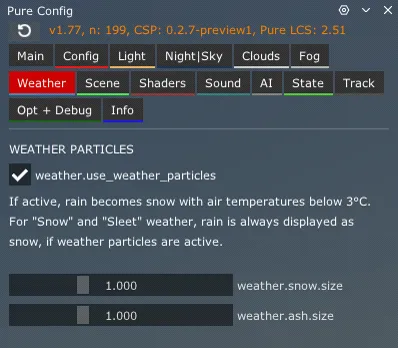
"Weather" tab in Pure Config, to customize weather particles (Snow and Ash)
"Economic mode" in weatherFX settings
switch off Pure's shaders, clouds and Spice effects
wider CPU split, for less CPU consumption
IMPROVEMENTS
fixed exposure in tunnels with Pure's exposure handling in "hybrid" mode
pure.utils.CamIsInTunnel() works in Pure Gamma too
pure.world.getPureGammaFogTable() to get Pure Gamma's fog engine parameters
pure.utils.CamFacesSunRaw() for an unsmoothed state of a visible sun in the camera
better bloom shader in the lightweight PP (Pure LCS / VR)
FIXES
Pure Gamma and LCS are now working in showrooms
fixed the FXAA 3.1 bug
fixed a problem with the dummy skydome mask (missing moon or stars in clear weather)
Highres - 3.3 GByte
mega: Pure 2.51 - Highres
mediafire: Pure 2.51 - Highres
If you want to install the Lowres packages, please go to Pure's Discord.
Link your Discord account in Patreon settings - More - Connected apps. You will be automatically connected and you get a role to access the Pure content.
As always, you need a CSP preview version to get rain and snow !!!
Like the most recent one (0.3p140)
https://www.patreon.com/posts/quick-fix-for-142367147
CSP is the work of Ilja Jusupov. I'm Peter Boese the creator of Pure (the weather and graphics mod for CSP). Pure also works with the free public version of CSP. If you want rain, you also need to be subscribed to Ilja Jusupov!

Comments (317)
i just paid for a membership and im locked out and cant download????
The PP filters list is unavailable in my content manager Can someone suggest a fix? I have followed all the steps provided in the video guide, but the filters are not there
nice work
already paid and its now not working
Hello, i follow every task but at the moment of setup pure, there is nothing on my settings about pure, anyone can help me ?
when i installed i tried to change my weather style off of defult it didnt work
how do i fix the triple screens with this csp it has screwed with my triple screen and now the triple screen doesnt open on all 3 monitors
00007FFCD7515369 (KERNELBASE): (filename not available): RaiseException f:\dd\vctools\delayimp\delayhlp.cpp (315): __delayLoadHelper2 f:\dd\vctools\delayimp\delayhlp.cpp (437): __HrLoadAllImportsForDll AC\acs.cpp (348): wWinMain f:\dd\vctools\crt\crtw32\dllstuff\crtexe.c (618): __tmainCRTStartup 00007FFCD8EB7374 (KERNEL32): (filename not available): BaseThreadInitThunk 00007FFCD9CBCC91 (ntdll): (filename not available): RtlUserThreadStart
I get these when I try to load it up
hi peter, i have make clean install csp and pure 3. i load nice , but when i click drive , ac crash. i have 5080 i9 64goram quest3
do you want crash files
como descargo la version con hud
Sorry, i don't know what you are talking about!
hi i did everything step by step but in game it dont shows me the pure menu or how to call it.
It is not installed properly then! Please be sure you install Pure exactly like shown in the install video! You must use 7zip app and you must use the "Extract" button to extract the 4 folders to your used AC root folder. Also check your used AC root folder in CM - settings - Content Manager - general!
I just paid for my membership, when I went to the rain link its asking me to pay again.
I‘m Peter Boese, the creator of Pure! Pure works with the free and paid version of CSP! If you want rain, you need the paid version of CSP! You get this from the creator of CSP, Ilja Jusupov! That’s why you need to subscribe to him too!
Worked great
Im a beginner at this and did it first time, people just need to follow the video tutorial
I don't know if someone else has this issue as well, but how do I fix the game looking very dark? My car's headlights don't seem to do much, everything is very dark and the lighting in general seems very weird (at least in rainy weather). Basically how it looks, is that the sky is very bright and has a lot of bloom, and the wetness on the track reflects really well but all the surroundings are very dark and headlights don't do almost anything on any car... And also in sunny weather everything is too bright, the sky is completely white and it just looks weird.
Did you check if Pure even runs? Like in the last chapter of the official install video...
It doesn't work it doesnt show anything to weather style.
It is not installed properly then! Please be sure you install Pure exactly like shown in the install video! You must use 7zip app and you must use the "Extract" button to extract the 4 folders to your used AC root folder. Also check your used AC root folder in CM - settings - Content Manager - general!
Hi Peter (thx for all this improvement work!) , just out of interest, have you have any comms with the Kunos team over EVO and its moddability, and if you have, are you able to share any insights?
Sorry, really i have NO insides from Kunos! The only time i spoke to one of the developers was like 9 years ago, where i just asked if there was any way to improve the "clouds-system". But the answer i got was very enlightening! He said they have no time to improve the graphics and they are working on a new engine. So i then started my work with Ilja on a new way to bring weather and such things. Some months later or so they announced ACC and this had no modding at all. So we never spoke again and Kunos also said we raped their product. REALLY! There is no communictation between Kunos and us! From my personal view out of all those official communication Kunos did about AC EVO is: There will be no modding like you know with AC. Because: 1.) Such modding possibility would kill AC EVO, if you look into the AC modding forum, the modding was already too much for Kunos in the beginning of AC! 2.) They want the product in their hands. And free modding means you don't have the control over what is getting into the game. And so i think modding will only be possible to registered modding groups in a shop-based system. So they can control the quality of the mods and what content is put into! 3.) The only free modding i can imagine are skins and things where copyright is not a big problem. At this point on the development i don't think we see modding in the near future. They delayed the open world thing to the 1.0 release. This alone just shows that they have too much to do with the original content of it. And don't get me wrong. I always try AC EVO if something is new and i really think this will be a great product if it is ready. BUT it will never have the modding possibilities like AC, because this is too much for a company to get a strait line into this. You would need a big number of support workers to even answer all the questions about this and that. Modding is a big universe and no one knows all the things that actually exists nowdays in AC.
everything works when i load but sometimes the game crashes and i keep seeing a thing on my screen that says "backed does not respond" and its very annoying
This might not be Pure's fault! Reset CSP settings completely! Goto /Documents/Assetto Corsa/cfg/ rename the "extension" folder to something different. Restart CM. It will create a new "extension" folder. You can restore it later. Select Pure as weather style again in CSP weatherFX settings. Use the "pure" ppfilter and also please use Kunos cars and tracks to test it in an offline session! THose crashes can have multiple reasons and Pure might not be the reason for them!
Hello, I dont know why but whenever I try to change anything in the weather preset nothing changes I want to inrease wetness but it doesnt increase the ground is just dry what should I do?
The weather presets are not the way how weather is changed. Those presets are just used to define the default properties of the different weather types. Please watch the last chapter of the install video. There you see how you actually change the weather!
hey whenever i use the CSP preview it doesn't let me start a race is there a fix?
Reset CSP settings completely! Goto /Documents/Assetto Corsa/cfg/ rename the "extension" folder to something different. Restart CM. It will create a new "extension" folder. You can restore it later. Select Pure as weather style again in CSP weatherFX settings.
mr boese
at the moment with red and green i need to subscribe to his patreon to get it after i subscribed to yours do i have too because the rally and more link which is in the install video isnt there for this version
I don’t know what you mean! You just need to subscribe to Ilja Jusupov‘s Patreon if you want to download a CSP preview version! No matter which version this is…
Hello! On the latest pure version the Weather Preset Option was constantly malfunctioning on the pure planer. Wetness and rain or Clouds couldnt be added there and it was quite useless. Is this problem fixed now?
The weather presets are not the way how weather is changed. Those presets are just used to define the default properties of the different weather types. Please watch the last chapter of the install video. There you see how you actually change the weather!
my game has a black screen everytime i load up and it doesn’t even load fully
Reset CSP settings completely! Goto /Documents/Assetto Corsa/cfg/ rename the "extension" folder to something different. Restart CM. It will create a new "extension" folder. You can restore it later. Select Pure as weather style again in CSP weatherFX settings.
Hello. I subscribed to you and am now using your video ( https://www.youtube.com/watch?v=SX25fVdnI_A&ab_channel=PeterBoese ) with instructions on how to install Pure. At the end of the post, it says to follow the link to download, but this link now leads to another page where I am asked to subscribe again — this time to a different author. I'm a little confused: do I need to subscribe not only to you, but also to someone else in order to get Pure? How many more subscriptions will I need to get access to the modifier itself? I would appreciate an explanation. Thank you!
Idk what you actually mean! At Patreon you must click on the post title or the "show more" link to read a post!
Hello, I can't see the applications in the assetto (pure pp, pure planer and pure config)
It is not installed properly then! Please be sure you install Pure exactly like shown in the install video! You must use 7zip app and you must use the "Extract" button to extract the 4 folders to your used AC root folder. Also check your used AC root folder in CM - settings - Content Manager - general!
when i go on content manager in drive to select the weather, pure doesnt show up. Only: random, original, by type, sol and mods
You must update Content Manager and Custom Shaders Patch! Please watch the install video!!!
I can’t activate pure at all I’ve bought it but in the config it just doesn’t activate I’ve done all the steps but it’s just fucked
It is not installed properly then! Please be sure you install Pure exactly like shown in the install video! You must use 7zip app and you must use the "Extract" button to extract the 4 folders to your used AC root folder. Also check your used AC root folder in CM - settings - Content Manager - general!
the config menu is flickering i cant get past the strobe effect notice
It is not installed properly then! Please be sure you install Pure exactly like shown in the install video! You must use 7zip app and you must use the "Extract" button to extract the 4 folders to your used AC root folder. Also check your used AC root folder in CM - settings - Content Manager - general!
the rain works but it doesnt fall on my windscreen its just ingnores it for some reason any tips?
The car must support it. It works with the Kunos cars? Then it is up to the car modders to support rainFX
how to activate rain mode
Please read the rain disclaimer at the bottom of the post! If you have a preview version of CSP, better install it manually: Delete the dwrite.dll in AC root folder. Open the CSP preview zip file and EXTRACT the "dwrite.dll" and the "extension" folder to your AC root folder (Steam install folder of AC "common\assettocorsa").
I can't use pure in online servers pls help
Pure is only on the client side! It has nothing to do with online sessions and servers!
hey, im stuck w 2 parts. When I extracted the pure files, I wasn't given the option to replace the old files. It will not let me change the weather in the drive menu, Help please!
1) There is a newer version of Pure 2) You must use 7zip app and you must use the "Extract" button to extract the 4 folders to your used AC root folder. Also check your used AC root folder in CM - settings - Content Manager - general! 3) Don't select "ideal" or "real" condition in CM Drive menu, it will block the weather selection!
hy i have a problem
Actually you must write something which describes the problem. If the problem is related to Pure / CSP i can help you. Otherwise if its a life problem, maybe better to ask your family or friends...
Salut Jai bien suivis les étapes mais quand je change de météo cela ne me prend pas en compte
Sorry I don’t know what you mean, I’m not French and the translation makes no sense! If you mean that you can’t select anything in the CM Drive weather selection, don’t select ideal or real condition. That will block the weather menu! Otherwise please write in English please!
it says pure is not working
You must use 7zip app and you must use the "Extract" button to extract the 4 folders to your used AC root folder. Also check your used AC root folder in CM - settings - Content Manager - general!
when will a new version be available?
There is a new version 2.57 available and a hotfix to 2.60! Look at the 2.57 post and in the hotfix channel in the community chat…
i cant change the weather to pure in content manager in Drive
Don’t select ideal or real conditions there! This will block the weather menu!
hey i bought the csp preview, did all the steps correctly then when i load up CM it gives me a screen where it says failed to do something then i try update it it gives me this what am i doing wrong? can't remove original file content manager content manager .exe to install update try remove it manually and then run content manager update .exe
If you have a preview version of CSP, better install it manually: Delete the dwrite.dll in AC root folder. Open the CSP preview zip file and EXTRACT the "dwrite.dll" and the "extension" folder to your AC root folder (Steam install folder of AC "common\assettocorsa").
Hi, so i just downloaded everything i needed and watched instalation video couple of times in a row and im still struggling to get it working. My issue is that I load the game and try to load Pure by pressing "Activate it with full flashing effects" and than it just reverts to original AC look. I have latest light patch (lights-patch-v0.2.12-preview1-full), and latest pure (Pure_2.57 Highres). What im I doing wrong?
Maybe try to use the uninstall_pure.bat from the Pure zip and install it again: You must use 7zip app and its Extract button to extract the 4 folders to your used AC root folder! If you have a preview version of CSP, better install it manually: Delete the dwrite.dll in AC root folder. Open the CSP preview zip file and EXTRACT the "dwrite.dll" and the "extension" folder to your AC root folder (Steam install folder of AC "common\assettocorsa").
I just bought it and i don't see where to download it
At Patreon you must click on the post title or the "show more" link to read a post! Please read the post and watch the install video! And if you want to know what is new in this Pure update, please watch the new features video...
Hello, I installed latest content manager & CSP preview 2.8preview but under weather only sol comes up? Can you help?
Then something is not installed properly. If you have a preview version of CSP, better install it manually: Delete the dwrite.dll in AC root folder. Open the CSP preview zip file and EXTRACT the "dwrite.dll" and the "extension" folder to your AC root folder (Steam install folder of AC "common\assettocorsa").
all i see is sol on weather
and i paid btw..
wheres download link?
At Patreon you must click on the post title or the "show more" link to read a post! Please read the post and watch the install video! And if you want to know what is new in this Pure update, please watch the new features video...
where is pure download link?
At Patreon you must click on the post title or the "show more" link to read a post! Please read the post and watch the install video! And if you want to know what is new in this Pure update, please watch the new features video...
i do not see the download link for pure,
At Patreon you must click on the post title or the "show more" link to read a post! Please read the post and watch the install video! And if you want to know what is new in this Pure update, please watch the new features video...
i cant see rain. i hear it tho, but there is no raindrops and no street wetness anymore. it worked but suddenly it didnt.
You always need a CSP preview version for rain! Please notice the rain disclaimer at the bottom of this Pure update post!
cant see clouds with pure planner
Install the latest version 2.57. Don't set the weather within Pure Planner settings Weather presets. Set the weather in the weather slots, like shown in the install video...
when i open pure config in assetto the pures lightning shader doesnt lett me trough
it blinks rapidly
Hello my game is completely invisible but i can still hear and see guis
Reset CSP settings completely! Goto /Documents/Assetto Corsa/cfg/ rename the "extension" folder to something different. Restart CM. It will create a new "extension" folder. You can restore it later. Select Pure as weather style again in CSP weatherFX settings.
I have installed pure version 2.57 and my CSP version is 0.2.7 and when I load in is super laggy and im getting like 5 fps
Then it is not installed properly and therefore an error occurs! You see this in CSP LUA Debug app. Please install everything like shown in the install video! It will work then...
HELP i cant find the "pure" option in the weather drop down as seen at this timestamp: https://youtu.be/4tp9TbJx474?si=Llkm57axyXJrsy0B&t=380 and when i load in the game my screen is a red tint. any fixes? (i did not select ideal or real condition, also i checked and don't have multiple AC installs)
Hi Peter, Pure LCS looks great, very realistic, good job. Thanks!
Hello i has problem the rain is not visible but hear.I has paid version preview
for you to have rain you gotta pay 1 dollar for a paid csp
Hi, i dont know why i cant use the planner, and i cant chance de weather in the Drive area and i cant change it to "pure"
Don't select ideal or real condition. That blocks the weather selection!
I have done everything as stated, and when I get into CM i can't see the PURE settings in the Weather style tab inside Weather FX.
same trouble im having, wondering if anyone knows a fix?
C'est vraiment incroyable !! Un grand merci pour tout ce travail
Hi man I bought for and when I click on the folder it doesn't work I don't see the install folder to appear I only see uninstall
Please watch the install video and follow the steps exactly! There is a reason why this is the very first big message you see, even without opening the post!
Hey I was installing Pure and in the video it instructs to change the PP filter to "Pure". Is it required or can I use anyother?
Sure you can use other ones too! But if you discover problems, please change back to the standard pure filter to find out where the problem comes from.
posso usare pure nelle sessioni online ?
Yes...
I installed Pure many times, and it always has very bright colors, I don't know how to fix it. What should I do?
Did you ever had a look at Pure Config app Main tab. Is there a warning or an error?
Hi all - been using Pure for a while now on latest patch (2.51) - everything is up to date (CSP 0.2.8preview, Pure 2.51) however i just got the newly released Garry Real PP update last night and ever since my game has ben unplayable.
what i mean is that for lack of a better phrase the whole screen is "smearing" if that makes sense. it almost looks like my GPU is fried. but when I put the Weather settings to default everything is back to normal. Does this mean the new Garry Real update is not compatible currently with Pure 2.51? or is there something i am missing.
Hi all, the game crash with view F3 key after few seconds
Sorry, but this is not a Pure problem. You could test this: Switch to default weather style in weatherFX settings. If the problem is still there, Pure is not the cause. You can try this: Reset CSP settings completely! Goto /Documents/Assetto Corsa/cfg/ rename the "extension" folder to something different. Restart CM. It will create a new "extension" folder. You can restore it later. Select Pure as weather style again in CSP weatherFX settings.
i bought patreon and it still says locked
I don't know what you mean. Also you can just contact Patreon support team if you have problems! And also, please don't post your things multiple times here in the Patreon chats...
C'est parfaitement parfait !!! Merci beaucoup !!
how do install
Just watch the install video and follow the steps exactly!
Hi, when I launch the game lot of track init message "error missing" but the game launch, crash game with cam F3
Sorry, but this is not caused by Pure!
when i download it their is so install only uninstall
Please watch the install video and follow the steps exactly!
posso utilizzare pure nelle sessioni online ? se si quali sono le sessioni online ?
When I play No Hesi and change the weather, the effects like thunder and lightning work fine, but instead of the realistic rain I get in single-player, it just turns into snow. Plus, the ground doesn’t get wet or form puddles like it should.
Please just read the text in Pure Planner. In online sessions you can't change time, date or rain!!!
Hi! Everything works well, but somehow my wheel stopped working. In CM it's recognized. Any idea of how to solve it?
In settings/control you need your wheel as a device on the right? Make sure you have wheel selected and your buttons binded etc. if you have a Logitech g29 I noticed I have to run the Logitech hub app to get the wheel to have spring action etc. idk if this helps or not but hope you get it resolved
how to download it takes me to the picture thing but its still locked even though im subscribed to you
At Patreon you must click on the post title or the "show more" link to open a post. Open it and watch the install video...
I subscribed to the server but I don't know where to download Pure
Click show more and just go down and look for "download here"
Absolutely Awesome!!!!
Thanks, great work as always! With this version, whenever I go into a tunnel it gets a lot brighter instead of dimmer. Any idea what that could be?
This is actuall a try to fix the exposure in tunnels of Shutoko. But sadly i forgot to exclude this for all the other tracks. I will release an update next week, which fixes this and also the update has many more fixes and some new features.
may i have the discord server link?
Link your Discord account in Patreon settings - More - Connected apps. You will be automatically linked with Pure Discord Server and get a role to view the Pure channels.
In CM quando tento di entrrare il un Server, dice che il server e crasciato impossibile collegarsi al server remoto
Sorry, but this has nothing to do with Pure. You could just try to switch to "default" weather style in CM - settings - CSP - weatherFX. Then Pure in no longer active...
Ciao Pietro. Volevo chiederti Quali sono i server online che utilizza Pure?
Pure only works on the client side. It has nothing to do with a Server. It's like a graphics mod. The server sets a certain weather and Pure displays it in its way....
I closed my pure planner one time, and it hasn't shown up ever again and google has no answer what do I do?
Maybe you accidentally "hide" it in the apps menu?! Right click on the all apps menu button (in-game right side app menu - top button). You then get into the menu setting and there is a list of hidden apps.
yall i just got it wice
You can only subscribe to 1 tier once at a time, so what you mean?
Hi Peter, great work as always. Just one slight bug that I have encountered, I only play in VR and sometimes (like 1 out of 5 times) when I load into the game everything is super-bright over exposed (it's like the PPfilter didn't kick in). If I exit and load back in again everything works fine with the correct colours and brightness etc. I use Natural Mod PP but I've tried with a few different PPfilters with the same issue. It's not a big deal but something I noticed with the new update. Everything is installed correctly, running a Pimax Crystal Light with a 4090/13700k/64gb DDR5 on Win 10 22H2 - 572.16 nVidia driver
if it happens again, please have a look at the Pure Config "State" tab and make a screenshot of it. Are the numbers of the "Cubemap Brightness Estimation" really low? If so, it could be some bug with the Cubemap reflections! Are there any error in the Pure Config Main tab? Also please show me then a screenshot of the CSP - reflectionsFX settings
hey peter, when i add the puer gamma weather scrip it throws off my gpu and cpu and spikes them way over 100+
Seems you did not install it properly! Also use the "pure" PPfilter first to test if Pure is working. Actually just do the steps from the official install video!
where to find pure discord??
Link your Discord account in Patreon settings - More - Connected apps. You will be automatically linked with Pure Discord Server and get a role to view the Pure channels.
where do you download this
Id you didn't know yet, at Patreon you must actually click on the post title or the "show more" link to open a post. Please open the post read it and watch the install video!
Headlight Beams do not work on replays.. Is that a pure or csp problem?
The usually work by default. Check if you set a key binding to high/low beams. Also it could be a problem of the car mod. So maybe also try different cars, like the default Kunos road cars.
Maybe this information will be useful to someone. For people with Intel 13th and 14th generation processors, if you have updated the BIOS on your motherboard as Microsoft recommends to update Intel ME (Management Engine). I do not recommend additionally installing Intel Management Engine Interface for Windows 10. In the case of Pure 2.51 and CSP 2.81, the game would hang the computer after a few moments after start with no reason, and end up with a hard reset and restarting the system. After uninstalling IME for Windows, everything works as it should again. I had this problem with 13900k and an Asus motherboard with the Z790 chipset.
14900k and commonly got issues similar to this turn down clock speed slightly and u will be fine, game will stutter at start for 3-5min then ur good to play without issues
I just started asseto whats the best pack to date for me to download/
Please watch the install video. It will show you all the things you need. You can decide to use the free public CSP for now. Later you could also buy the preview version and then you have also rain in game.
Is there a way in LCS to brighten only the night view without interfering with the day? I managed to get perfect settings in case of one LUT, working in all options Hybrid, AE, CBE. However when I change it in Color grading to another LUT that suits me better the night becomes too dark.
Did you already found the Pure Config app Night tab. There is a lowest ambient light slider
Question. After installing pure. It makes my sceenfade huge. takes up half my 1st and 3rd monitor is there a way to fix this?
Maybe use the community chat and post a screenshot. Also provide a screenshot of Pure Config app Main tab, Pure PP app Script and Spice tab
Hi Peter, Is there any documentation available online? I am working on my own PP filter but need a better understanding of how AE, CBE Hybrid etc. work.
AE is the classic Autoexposure which uses the render image to determine the brightness of the actual scenery. CBE (Cubemap Brightness Estimation) is a method where the cupemap is use to determine the actual scenery brightness. The cubemap is the view from the camera in all 3d directions up, down, left, right, fore, back. So its a cube with six images, representing the world arround you. It is typically used for reflections and such. The CBE is more stable than AE, because it can analyze the surrounding for the brightness detection. But it can't react to small bright things. Therefore i made the "hybrid" method. It brings AE and CBE together and also at very dark sceneries, like night, it tends to a static exposure, so you have no exposure fluctuations in those dark conditions. For low exposure values, so in bright conditions, the exposure is mainly calculated by CBE. So you also get a very stable exposure at bright days. For twilight and semi-bright conditions CBE and AE are combined to bring a good matching exposure. Then the exposure has a very good adaption of the camera view.
hello peter great work but after a reinstall of os i can not download pure says to upgrade but im allready subbed
Don't know what you mean! What happens if you click on the post title or the "show more" link?
i install all mods but when i go to cm i cant find the "pure" for weather FX
It is not installed properly then! Please be sure you install Pure exactly like shown in the install video! You must use 7zip app and you must use the "Extract" button to extract the 4 folders to your used AC root folder. Also check your used AC root folder in CM - settings - Content Manager - general!
i set the wetather to rain but i can't see, and i can't find RainFX, My csp is 0.27
You use the public/free version of CSP! You need a CSP preview version for rainFX. Please read the post, scroll down to the bottom, there you see the rain disclaimer.
can i get the pure mod link install
What do you mean. Maybe just watch the install video and look how you need to install the things! Also at Patreon you need to click at the post title or the "show more" link to get into the content of the post!
during the sunset I see red flickering covering the screen
Which ppfilter do you use? Always try with "pure" ppfilter. Also check Pure Config app Main tab for errors. Maybe your "Farplane" settings are wrong! CM - settings - CSP - graphics adjustments - Farplane
for what reason did you remove the installer.bat?
Because in newer Windows systems and updates the installer does not work properly anymore, esp. if you have MS Defender running. MS Defender can block the copy of files (mostly files with plain code in it). And it makes no report or errors. So if you use such bat file, the chance is high that not all xcopy commands are successful. But you don't get neighter an error from it, nor from MS Defender or Windows. So you think everything is installed right, but it isn't! I discovered more and more problems with ongoing Windows updates and the reports of users that try to drag'n'drop files out of MS explorer's zip extraction also gives no hope that this is a safe method. The only 100% safe method for now is the usage of a decent file extractor like WinRAR or 7zip and the usage of the internal "Extract" function. So the file extraction and the placement of the files is only done by this app. Everytime Windows is invloved i got reports of not completely copied files and errors in-game. (Sure only if MS Defender or the Smart Protection tool is running). If you use a decent AntiVir software, which blocks MS Defender, you will not have any problems. But i like to share a 100% safe install method with 100% success of getting all files in the right place. So i removed the installer, because it does not give that 100% success....
after I installed latest one my pure config keep saying there is no pure activate even though I did everything it recommend
How did you install it? Did you use 7zip app and its "Extract" button?
Hello Peter, when i change the weather (clouds) there is mostly wind added. Is it possible to have all the presets (except the windy ones of course) without wind?
You could change the wind speed in the weather presets in Pure Planner for every single weather type. Pure Planner - settings - weather presets.
Hello Peter, when i use "actual sun trajectory" and i set a special time in CM, after the track and pure is loaded its 1 hour later. is this a summertime wintertime thing? I switched to "with date set" and it works fine.
Yes, thats a bug esp. in march and october.
I'm not sure if it's because of pure but i don't have any godrays anymore, like the sun rays doesn't travels trough the sky to my car..
What ppfilter do you use?
what happens if i delete sol in the pure file?
I don't know what you mean! Please explain a bit further...
Ok, deselezionando SOL, funziona. Cerco i parametri per impostare manuale per inserire : intermittenza, moderato, veloce, ma non trovo l'impostazione
CM - settings - AC - controls - Patch - Car (wipers)
when i wanted to change the weather option to pure gamma or pure lcs it doesnt even show any option, only default and i followed all steps. what do i do?
You could watch the install video and follow the steps exactly! Pure is not installed properly! You must do it like in the video! Maybe you have multiple AC installs?! If you look in CM - settings - Content Manager, you see your use AC root folder. YOu must extract the 4 folders in this folder!!!
ciao Pietro. Ma come devo attivare i tergicristalli, sia che in automatico é manuale ? Poi c'è la messa a fuoco da vicino le auto le vedo un po sfocate è pure
automatic: CM - settings - weatherFX - "turn wipers on and off..." Or bind keys to the wipers in CM -settings - AC - controls If you still have Sol installed, deactivate all Sol apps in CM - settings - AC - python apps.
how do I get rain to show up? i have the full version of csp and pure installed but nothing is happening
If you have a preview version of CSP, better install it manually: Delete the dwrite.dll in AC root folder. Open the CSP preview zip file and EXTRACT the "dwrite.dll" and the "extension" folder to your AC root folder (Steam install folder of AC "common\assettocorsa").
bonjour j'ai acheter pure a 2 fois mais et je le telecharge comme dans la vidée mais il me manque des fichier a linstalation
je voudrais savoir si il faut effectuer la mise a jour car je n'est que trouver la version du discord qui est beaucoup plus viellle merci de votre attention
Hi How to renew your subscription , i dont have csp 0.2.8 preview1 anymore
I don't know what you mean! Btw I'm not the creator of CSP. You can use Pure with the free public version of CSP too. To renew a subscription you just select a tier again, like the 1$ tier
This update breaks the SnowyMoon's DLAA mod for me, any idea what new setting might be interfering?
I tested it and it works! Did you deactivate all AA in AC an CSP?
hello Peter, i have see and respect step by step but on content manager-drive : my weather styl blok on random, it change if i choose real condition but i can't change more. Any solution ?
Idk what you mean! If you select real or ideal condition, you CAN'T choose a weather or weather controllers there!
followed the steps exactly how they are explained. everything seemed to work perfect until i tried a rain race..zero rain fall now. sound it there , lightning is there during thunder storm but no physical rain. iv got the latest lights patch (2.8) the latest CM and the latest pure .. what should i check ?
If you have a preview version of CSP, better install it manually: Delete the dwrite.dll in AC root folder. Open the CSP preview zip file and EXTRACT the "dwrite.dll" and the "extension" folder to your AC root folder (Steam install folder of AC "common\assettocorsa").
allo jai acheter le produit mais je ne trouve pas le fichier instalation merci de m'aider
Please watch the install video and follow the steps exactly!
i just got this member ship im happy cant wait to play with pure
hello, i would like to ask - where can i find gloom and tone mapping on Pure 2.51?
Use the Pure PP app...
Hi Peter, may I know how to run pure with rain. I'm running pure but there is no rain, Any advice.
Do you have the preview patch of CSP?
hi Peter i would like to ask you if it is possible to reduce the amount of water lifted by the tires during wet races because it becomes really complicated to drive with very poor visibility. i searched among the various settings but i didn't find anything. help!!!
Sorry, thats out of Pure's possibilities and imo that is hardcoded for now in CSP. But maybe I'm wrong...
absolutely brilliant graphics!! I had a ton of trouble getting everything done today but you just have to follow the video exactly!!! Just keep trying and I guarantee you will be so happy!!!
works fine for me. With pureVR filter is awesome. thanks for this fantastic work
when i set 0 to road wetness rain texture on the road goes away and raining. how do i play full grip with the wet road texture ?
Use CSP weatherFX debug app ingame and set rain thickness to 0 there in the rain debug tab!
I love the content man its lovely
Hi please link of the discord server pure ?
Link your Discord account in Patreon settings - More - Connected apps. You will be automatically linked with Pure Discord Server and get a role to view the Pure channels.
it works, but now it keep saying i missing some file but noo
Please use the community chat and make a screenshot!
Hey Peter, having some trouble getting Pure to work. The debug statement says that it cant find any skydome in assettocorsa\extension\config-ext\Pure\Skydome_sets, which makes sense because I checked the file and there is no Skydome_sets file. Was this file supposed to be downloaded with Pure or does it come from somewhere else. Currently, my game has no sky and Pure refuses to get passed the "Pure whether script is not running!" even after multiple reinstalls of pure, csp and content manager. let me know what i should do Thanks
Please watch the install video and follow the steps exactly!!!
videos are absolutely no help i cant find a single link and instruction its telling me to, waste of my bread
Are you serious?? You just need to click on the post title or the "show more" link exactly how i do it in the video!!! Then you can read the contents of the post...
Just a quick one to say (again) what absolutely fantastic work this is. It’s continuing to push AC forward and keeps the game (in my mind) streets ahead of ACC and Evo. I’m experimenting with Evo and even though it’s in early release I still don’t think it will be as good as AC with mods is now
yo what do i do if my car wont turn when i have rain wettnes set to 100% ?
Rain wetness at 100% is like a rain you never saw in real life. A normal rain is like 10% wetness and heavy rain is like 40% wetness. Just use the weather presets. Why you set it to 100%???
where do i downlaod
Just watch the install video!!!
How I reset content manager setting and pure pp,config
In CM settings Content Manager general, you see the "open apps data folder" button. Maybe make a backup and delete this folder. This will reset CM completely. To reset CSP: Goto /Documents/Assetto Corsa/cfg/ rename the "extension" folder to something different. Restart CM. It will create a new "extension" folder. You can restore it later. Select Pure as weather style again in CSP weatherFX settings. For Pure, just use the Pure Config app and "reset to defaults" at the Main tab.
Why does snow show up as rain? The temperature is set to 0
You need the latest CSP 0.2.7p1 for that. If you have it, better install it manually: Delete the dwrite.dll in AC root folder. Open the CSP preview zip file and EXTRACT the "dwrite.dll" and the "extension" folder to your AC root folder (Steam install folder of AC "common\assettocorsa").
What is your discord
https://discord.gg/jWK2ZXK9
salut peter pourquoi je n est pas c est option cercler de bleu sur mon CM.pas possible de vous envoyé photo ici je vous ai envoyé par e-mail merci
Please, just use the community chat! on the left side of the Patreon page!
After i download it do i just drag it into Content Manager? i can not view the install video
I reuploaded the install video. Please watch it...
bro wtf is the link to downlowd this
click show more, its at the bottom under the big green "download link" click pure 2.51 Highres.
Bad news: Install video "This video has been removed for violating YouTube's Terms of Service"
Idk why Youtube was deleting it, but maybe its time to go away from Youtube now, because there is no explanation of why it was deleted nor you can contact someone to get this information. Feels like they give up all human support. anyway i reuploaded the video now to Vimeo and mayb i also try other hosters...
I wanted to say huge huge thank you, been using sol and pure for some time now. Seriously best mod ever, you are a true hero to the SIM racing community
I’m reaching out again regarding the DXGI mode, as I’ve encountered an issue with the frame rate. As I mentioned previously, DXGI seems to limit the frame rate to 60 FPS, but I wanted to follow up and get some further clarity on the matter. In the HDR manual, it shows 59.8 FPS as the maximum for the previous session, and there are no examples or illustrations indicating any frame rate beyond that. Based on this, I’m wondering if there’s a possibility that the DXGI mode hasn’t been tested for frame rates exceeding 60 FPS, as the manual only references that specific number. Could it be that there’s a limitation in place that hasn't been fully explored or documented yet? I understand that you've mentioned the DXGI option wouldn't affect frame rates, but the documentation doesn’t seem to fully address scenarios where higher frame rates might be achievable. I’d really appreciate any additional insight you might have, especially if there’s something I could try on my end to test for higher frame rates or if there’s any other factor I should be aware of. Thank you so much for your time and assistance. I look forward to your response.
This was for HDR if I wasn't clear.
i paid but its saying i now need to pay for Ilja Jusupov aka x4fab to upgrade and unlock?
Pure is a weather and graphics mod based on Ilja's CSP. You can use Pure also with CSP free public release, which you can install directly in CM. But if you want to have physical rain, then you need CSP's paid preview versions, because rain is part only of that versions! Please read the Pure development update post. At the bottom of it, you see the rain disclaimer. If you don't want rain, you just need the free public CSP!
How do I use the additional apps? Like Pure Config and Pure Planner?
Watch the install video!
WHY My wiper not work when use prue, Sol is No problem
Because Sol has python apps, and they have its own wiper control!!! Youust deactivate their wiper control or just deactivate all Sol python apps! CM - settings - Assetto Corsa - python apps...
Hi, I’ve installed latest version of pure and I have it selected everywhere I need to except I can’t change it when I’m in drive menu it just says weather! Anyone help please??
Don't select ideal or real condition in the CM Drive menu. That blocks the weather menu!
Peter, this is absolutely stunning, with your help and x4fab you made all modern triple A titles look like a laugh. Truly spectacular experience!
I have a problem with Pure Planner not installing and have v.1.23 not v.2.51. Any ideas what I might be doing wrong?
Don't know what you mean with v1.23???!!!! Please watch the install video and follow the steps exactly!!! Maybe try to use the uninstall_pure.bat in the Pure zip and install Pure again.
Since iv updated to 2.51, my game wont actualise it self when im launching a map. Only the Ath does, only add the new position and keeping the old ones displayed
It only actualise when im changin my pp filter, and do it for 1 frames only XD
thank you
Really good job! Thank you for you work for our pleasure
Thanks Peter. Not changed anything and it looks better than ever in VR 👌
Am I playing on a private server with the folder? Can it be added to the online server? It was a previous version, and when I installed it, I had problems with freezing and crashing :(
What, idk what you even mean. Pure is only on the client side!
Great work! Thanks!
Thanks for your Work Peter :)
Thank you Peter ! everything is working fine!
Thanks for the update. But the grip in wet weather is too good. Is something wrong with the installation?
rain and grip has nothing to do with Pure. It is CSP rainFX witch handles this. Maybe your extended physics is not active in CM Drive menu...
getting micro stutters since the update any resolution to this?
You could monitor the GPU and CPU charts with the CSP render stats app ingame. Mabye you see what it causes it. Also if you switch to "default" weather style in weatherFX setting, the microstutters are gone? Which Pure fork do you use Gamma or LCS? Maybe post some screenshots in the communisty chat and show the CSP render stats app (expand its size). Also show the Pure Config app Main page and the Pure PP app Script page.
working great here , thanks for all your hard work Peter
Great work Peter, looks amazing after the update and fixes 👍
What does the n mean in the version numbers at the top? On pp it says n: 89 and on the pure config it says n: 186. Your screenshots have higher number. Is this something to do with AA method?
When i try to launch the game it tells me this. Audio log (AudioEngine.cpp:1198): Loading bank C:\Program Files (x86)\Steam\steamapps\common\assettocorsa\extension\weather\pure\audio/sol.bank Audio log (AudioEngine.cpp:1198): Loading bank C:\Program Files (x86)\Steam\steamapps\common\assettocorsa\extension\weather\pure\audio/rain.bank 00007FFB2A1F0CB7 (DWrite): (filename not available): DWriteCreateFactory 00007FFB2A1C6CDC (DWrite): (filename not available): DWriteCreateFactory 00007FFB2A1C7FC6 (DWrite): (filename not available): DWriteCreateFactory 00007FFB2A1C94D4 (DWrite): (filename not available): DWriteCreateFactory 00007FFB2A1C7FC6 (DWrite): (filename not available): DWriteCreateFactory 00007FFB2A1C94D4 (DWrite): (filename not available): DWriteCreateFactory 00007FFB2A1F0CB7 (DWrite): (filename not available): DWriteCreateFactory 00007FFB2A1C6CDC (DWrite): (filename not available): DWriteCreateFactory
Seems it is not properly installed. Maybe use the uninstall_pure.bat in the Pure zip before you install Pure. You must install it exactly like shown in the Pure install video! Use 7zip and extract it manually into your used AC root folder. In CM settings Content Manager general you see your used AC root folder!
I installed it and all I got was a black screen when I joined any server so I changed it back to default and everything worked
I had the same issue. once you extract the zip folder. Don't drag it to the content manager screen but instead open your actual Asseto Corsa Root folder in your Files and add it that way. Thats what we have to do in order for it to work properly.
Completely reset all my stuff, game look terrible now?
Why should it?
anyone able to help? whenever i attempt to change weather or time in a online server, it doesnt work, even when in pure direct mode, i may be dense or something but it just isnt working, also i have been trying to save presets but they dont load when i load them, any help?
Please just read the text in Pure Planner! You can't change date, time and rain in online sessions!!! The server is the master and only the server can do this!
does it automattically update or do i have to do something
You need to install it. It's always the same process. You download it and you manually extract the 4 folders apps, content, extension and system to your AC root folder!
Hi Peter. Thanks for the update. Any news on why the Jumbo screens don’t work in Gamma in the daytime. Work fine when going into night. Weird.
Sorry idk ...
installed everything correctly everything seems to work as is, only thing is every time i try to get into a server right before it loads fully it crashes have any idea how to fix it?
I guess it has nothing to do with Pure. If you switch the "default" weather style in weatherFX settings it still crashes? Maybe then try to reset CSP settings completely! Goto /Documents/Assetto Corsa/cfg/ rename the "extension" folder to something different. Restart CM. It will create a new "extension" folder. You can restore it later. Select Pure as weather style again in CSP weatherFX settings.
Hi friend! With this version RainFx doesn't work for me, with 2.38 it does. I have CSP 2.6. Should I install 2.7? I had some problems and I prefer not to do it. Thanks!!!!!!!!!
Has nothing to do with Pure! For rain you always need a CSP preview version!
what is the 'spice filter' ?
That's not a filter. It's a bundle of post processing effects. You find it in Pure PP app spice tab
Hi. I still have the FXAA 3.1 bug
Maybe try to use the uninstall_pure.bat and install it again like in the video...
Merci pour votre travaille ac est vraiment bien maintenant
Hi Peter, thank you for your hard work. I would like to ask you something, I recently changed my monitor to an ultrawide 49" OLED 1800R. And I have noticed that when I drive at dusk and the sun shines in my face, the sunblinding shader appears with a vertical line of a different tone slightly to the right of the middle of the screen, as if the homogeneity were broken, it looks like a small glitch. I would like to comment that I have the monitor configured with the triple monitor app to correct the distortion produced by its curvature.
Could you post a screenshot in the community chat. Also did you already tried the curved screen effect in Pure PP app spice tab. Maybe you don't see this because you use HDR and its an LDR effect.
This is awesome. Great fixes and additions Peter. Thank you. 🙏🏻
I can’t find the download link
Please watch the install video!!! And please don't create new posts over and over...
hey so how i update to 2.51
https://www.youtube.com/watch?v=456BO7vKui0&t=282s
halo effect on skyes using vr and gamma. No problem in lcs .
Could you do a screenshot and post it in the community chat?
Hi Peter! Thanks for all your work. I have a question: even after installing the new Pure files, I don't have the v1.77 and v0.51 version showing in the title bar of the Pure PP and Pure config UI. On top of than I don't have access to Spice. Should it be an issue with my CSP install?
Maybe try to use the uninstall_pure.bat before you install Pure. Be sure you use the right AC root folder. You find your used AC root folder in CM - settings - Content Manager - general. You must open the Pure zip with 7zip app. You must mark the 4 folders apps, content, extension and system and you must hit the "Extract to" button and there you select your AC root folder!
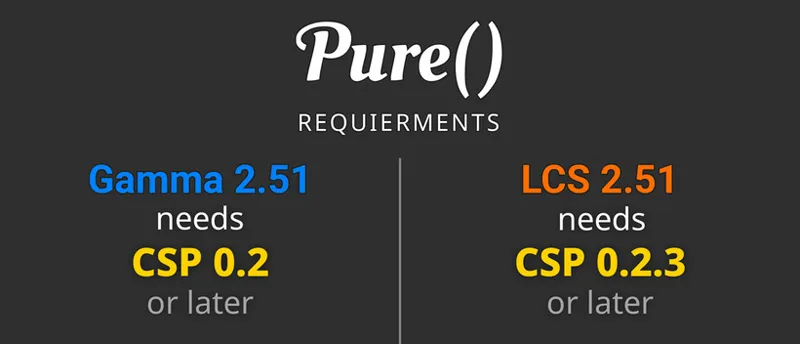
Thank you for all your hard work! Quick question, can the latest version of pure be used with older version of csp? The latest csp caused bad stuttering on my end so I rolled back to previous version.
Just look into the post. There is a minimum CSP chart.
What weather type is “Ash” a part off?
Smoke
Awesome new update, your hard work is appreciated Peter!
Hallo, i have last Pure update 2.38 and for me everithing working perfect. Thank you for your hardwork
Thanks! If you have problems with FXAA 3.1 or some other things, please update to this version!
Excuse my ignorance, but aren't we on 2.71 or something? Are you just updating and older version that is still being used frequently?
No, There was a Pure 0.271 in the past. But now Pure includes 2 versions: Pure Gamma and Pure LCS and at some point i decided to name it Pure 2.xx. So the former version was 2.38 (from 24.12.2024) and now the new version is 2.51. You see all the changes are done with every little version increment in the full changelog in the Pure zip file. Just scroll down here at Patreon and you see all the older versions... In this post it is described why i change the version numbers: https://www.patreon.com/posts/future-of-pure-105813188