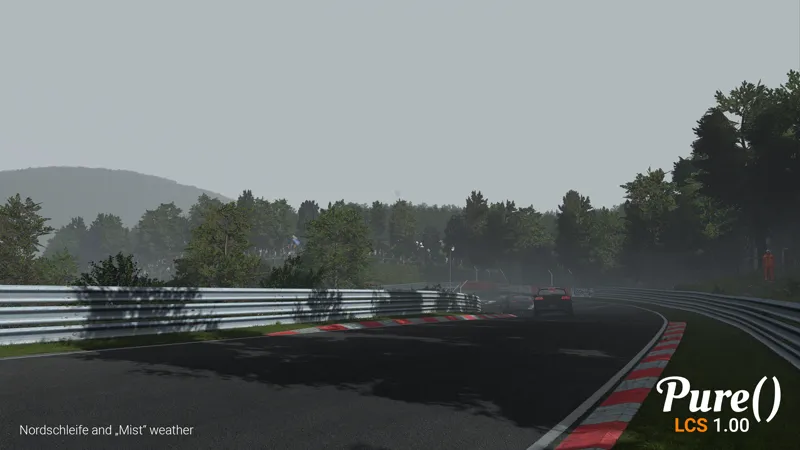
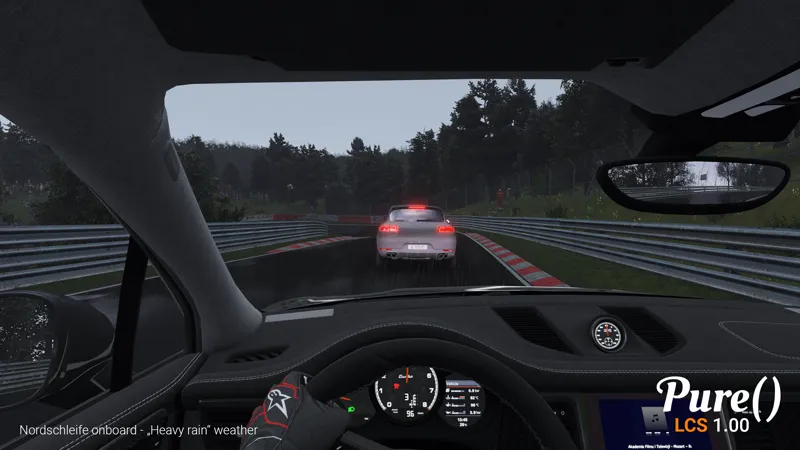
Sunblinding shader: completely reworked, works now in all screen modes and ALL VR modes properly! Better visuals, more controls in its shader settings.
Skydomes: Fixed online override
Landscape shader: added ocean texture
PP: expand godrays angle in triple screens
PPfilters: reworked pure, pureCandy and pureLinear
Config: fixed some bugs, added videomode + track related config system
for all changes, please have a look at the complete changelog inside the Pure zip
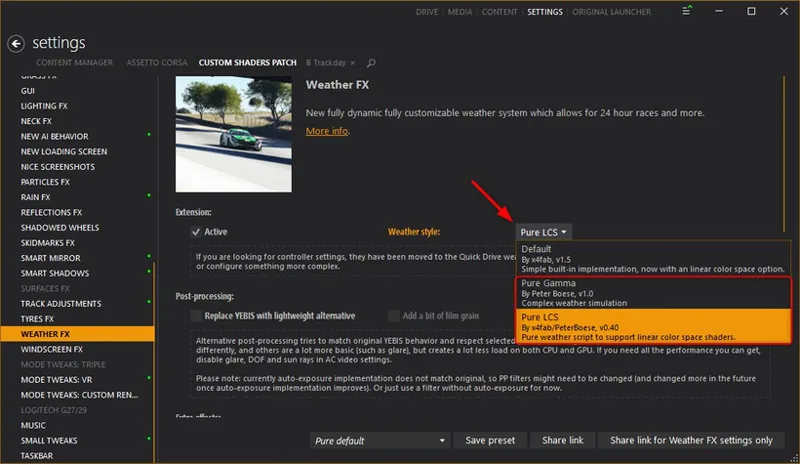
There are now 2 Pure variants! "Pure Gamma" and "Pure LCS"
If you want to install the Lowres packages, please go to Pure's Discord. Link your Discord account in Patreon settings - More - Connected apps. You will be automatically connected and you get a role to access the Pure content.
i have fallowed the tutorial but when i go into content manager it does not show pure in the setting
S
Samuel CUBIO · October 19, 2025
Hello Peter I wanted to download the file on mega there is nothing at all is it normal or not. Have a good day
c
chris hawkins · August 28, 2025
I just got pure installed. Everything is working but I have rain on my gloves in first person
C
Caden krallis · July 22, 2025
when i use this, for some reason the game runs at 22 fps, but my gpu is only using 33% and my cpu is using 11%
a
aiden perez · May 22, 2025
i bought the membership and cant find the link anywhere to even download
d
dragon balls · February 22, 2025
can you simply just add the link to donload ts
O
Otaku Specialist · March 22, 2025
LMAO
H
Hunissan · January 24, 2025
Hello, the sky is changing, I can hear the sound effect but no rain and no snow falling ? Could you give ma a hand please?
P
Peter Boese · February 11, 2025
You need a CSP preview version for rain. And you need esp. CSP 0.2.7p1 for snow. So just please watch the install video and follow the steps and you see how you get the CSP preview version!
C
Cole · December 18, 2024
why is my game red and reading upgrade CSM and i have the 0.2.5p1
P
Peter Boese · December 18, 2024
If you have a preview version of CSP, better install it manually: Delete the dwrite.dll in AC root folder. Open the CSP preview zip file and EXTRACT the "dwrite.dll" and the "extension" folder to your AC root folder (Steam install folder of AC "common\assettocorsa").
J
Jeff Martin · December 15, 2024
it not working
P
Peter Boese · December 15, 2024
Please watch the install video and follow the steps exactly!
s
slicks · December 9, 2024
followed word for word on install now got no sky at all says pure not running please help!
P
Peter Boese · December 10, 2024
Check your AC root folder in CM settings Content Manager general. You must install everything in this folder!
N
Nono Demellier · December 1, 2024
Did you have discord for a call because now I'm at the end of my rope and I don't understand at all
P
Peter Boese · December 1, 2024
Link your Discord account in Patreon settings - More - connected apps. You will be automatically connected to the Pure Discord Server then. Make a new post in the pure support channel.
N
Nono Demellier · December 1, 2024
Sorry really but as 4.53minutes I didn't pure while I followed all as the letter you would have discord for more information or not sorry again
P
Peter Boese · December 1, 2024
Try to install Pure that way: If you have WinRAR, open the Pure zip with it. Go into the Pure folder and mark the 4 folders apps, content, extension and system. Press the Extract button and select the AC root folder.
N
Nono Demellier · December 1, 2024
exuser me but when I'm on winrar there is no install file I only have the uninstall file how to do it please sorry
P
Peter Boese · December 1, 2024
Yes, just read the post and watch the install video!
A
Ayaan Rehan · December 1, 2024
I've downloaded pure and when i go in a game it comes up with a message saying "pures's lightning shader can produce stroboscopic effects" and it keeps on flashing on/off and i cant press anything to continue.
P
Peter Boese · December 1, 2024
Try to install Pure that way: If you have WinRAR, open the Pure zip with it. Go into the Pure folder and mark the 4 folders apps, content, extension and system. Press the Extract button and select the AC root folder. Be sure you use the correct AC root folder. Check it in CM - settings - Content Manager - general
r
reynaldo tan · December 1, 2024
download link couldnt even work
P
Peter Boese · December 1, 2024
They all work. Try again, use another browser.
S
SCHELETROBOMB · November 30, 2024
how do i install pure override?
P
Peter Boese · November 30, 2024
Pure override is a mode of the Pure Planner app. You can activate it to override the weather look in online session. But you can't change time, date and rain.
N
Nono Demellier · November 30, 2024
When I install Pure I can only uninstall Pure and Sol I can't install Pure how to do it please
P
Peter Boese · November 30, 2024
Please read the post and watch the install video!
m
martin browne · November 30, 2024
pure lcs wont work with csp 0.2.3 preview any fix gamma works fine
P
Peter Boese · November 30, 2024
Please read the post!!! You need at least CSP 0.2.3preview211 or 0.2.4 public to run Pure LCS!
G
George siabanis · November 29, 2024
I don't get the pure weather drop-down in the Weather FX. Is anyone able to help?
P
Peter Boese · November 29, 2024
Try to install Pure that way: If you have WinRAR, open the Pure zip with it. Go into the Pure folder and mark the 4 folders apps, content, extension and system. Press the Extract button and select the AC root folder.
Z
Zeta · November 28, 2024
I have been able to do all the steps except the last one, I don't get Pure in the weather dropdown of the drive menu. Can anyone help me?
Z
Zeta · November 28, 2024
solved
B
Brandon Wicks · November 27, 2024
so i followed the youtube video step by step but i couldnt manage to find the weather controller for pure?
P
Peter Boese · November 28, 2024
Try to install Pure that way: If you have WinRAR, open the Pure zip with it. Go into the Pure folder and mark the 4 folders apps, content, extension and system. Press the Extract button and select the AC root folder. Be sure you use the correct AC root folder. Check it in CM - settings - Content Manager - general
P
PANOS · November 27, 2024
Hi ! , i downloaded this pure but when i extracted the folder ,I opened it and there was no files for download anywhere.
P
Peter Boese · November 27, 2024
Try to install Pure that way: If you have WinRAR, open the Pure zip with it. Go into the Pure folder and mark the 4 folders apps, content, extension and system. Press the Extract button and select the AC root folder.
N
Noah · November 26, 2024
peter pls can i have some help when i download the file there is no install_pure bit for me to do only uninstall_pure
P
Peter Boese · November 26, 2024
Just read the post! The first message you see there tells you that there is no install_pure.bat anymore. Please watch the install video!!!!!!!
O
Otylia Burak · November 26, 2024
idk if its my pc but when i activate pure it starts to lag badly i have an rtx 3060ti and an i5-12400f 16 gb of ram
P
Peter Boese · November 26, 2024
Try to install Pure that way: If you have WinRAR, open the Pure zip with it. Go into the Pure folder and mark the 4 folders apps, content, extension and system. Press the Extract button and select the AC root folder.
s
scode dead · November 26, 2024
may i know its support 32 bit or only 64 bit ?
P
Peter Boese · November 26, 2024
Due to CSP you will need 64bit anyway!
s
scode dead · November 25, 2024
i am a newbie of crossover and i see on youtube video is using pure 0.234 and i didnt find it on here should i just using latest version or how ? currently i only have assetto corsa v1.6 . hope someone gimme a link for the version or any suggestion ?
s
scode dead · November 25, 2024
for example : can i install highres first to test the install lowres it can be replace and safe or how ?
A
Ai · November 25, 2024
where is weather mod file
P
Peter Boese · November 25, 2024
Here at Patreon you must click on the post title or the "show more" link to open a post. Read the post and watch the linked install video....
Z
Zach Roberts · November 25, 2024
(csp preview0.2.5-preview1, latest PURE) Using Vr initially i was able to use Pure LCS weather fx after first installing, it would flicker upon load in but work fine. But after turning my computer off and the back on it loads into flicker then black screen when i use the Pure LCS weather fx, but it works fine with default LCS weather fx settings. Even tried uninstall using bat file and fresh install, issues still remains. Are there some fixes for this? it looked really good id like to keep playing that way.
P
Peter Boese · November 25, 2024
Maybe better you go to Pure Discord Server and report it there. Link your Discord account in Patreon settings - More - Connected apps. You will be automatically connected to Pure Discord Server. Make a new post in the Pure support help channel.
M
MODSANDGAMEPLAY · November 24, 2024
when i try to change the weather on a sever it dont do anything like i try to make it stop raining
P
Peter Boese · November 24, 2024
You can't do that! The server is setting the weather. Pure Planner is telling you this. You can't change time, date or rain!
K
Kash Gagnon · November 24, 2024
how do i install
P
Peter Boese · November 24, 2024
Please read the post and watch the install video! You open a Patreon post when you click on the post title or on the "show more" link.
L
LyzenGX · November 24, 2024
I cant get over 18 fps and I dont know why. Even if I put all my settings to the lowest the fps are still 18. Please help me
P
Peter Boese · November 24, 2024
Try to install Pure that way: If you have WinRAR, open the Pure zip with it. Go into the Pure folder and mark the 4 folders apps, content, extension and system. Press the Extract button and select the AC root folder.
J
Jack · November 23, 2024
yea. you say theres no more link in this chat and to watch the youtube video but the video uses the link that was in this chat. soooo where do i download this
J
Jack · November 23, 2024
nvm i got it. video not helpful.
I
Inxby · November 23, 2024
the link isnt working
P
Peter Boese · November 24, 2024
I checked them and they are working. Maybe try with another browser. Also please, only use the links here in the post. I need to change them every day, because of people sharing and pirating them.
f
fyntik · November 23, 2024
The download link for pure is not working for me
P
Peter Boese · November 24, 2024
I checked them and they are working. Maybe try with another browser. Also please, only use the links here in the post. I need to change them every day, because of people sharing and pirating them.
a
a.shinny · November 21, 2024
hi do i uninstall the old pure before dropping the new pure files in the route folder?
P
Peter Boese · November 22, 2024
There is an uninstal_sol.bat inside the Pure zip. Just execute it and select the AC root folder.
L
LuxVision · November 20, 2024
It dos not work
P
Peter Boese · November 20, 2024
Would be good you describe what is not working! Use the Patreon chat: https://www.patreon.com/messages/a3e3fe9eebb1430d9273711e80960e75?mode=campaign&tab=chats Or the Pure Discord Server: Link your Discord account in Patreon settings - More - Connected apps. You will be automatically linked with Pure Discord Server and get a role to view the Pure channels.
s
st4rdust_j · November 19, 2024
i have downloaded pure and the grahphics dont look good and i seen youtube vids but it still doesnt work and i caint get the florr to be wet can anyone help me plz
Z
Zediton · November 19, 2024
RainFX is a seperate mod
L
Lacarete33 · November 17, 2024
Hello, the file "pure_install" is missing. Thank you
P
Peter Boese · November 17, 2024
Please read the post! It is written twice that it is no longer part of the install. Also the official install video is not referring to it.
R
Reailiyy · November 17, 2024
i have rain but when i use the rain on the pure planner it doesnt work i can only hear the rain
P
Peter Boese · November 17, 2024
If you have a preview version of CSP, better install it manually: Delete the dwrite.dll in AC root folder. Open the CSP preview zip file and EXTRACT the "dwrite.dll" and the "extension" folder to your AC root folder (Steam install folder of AC "common\assettocorsa").
C
C · November 16, 2024
I'm getting one eye only in VR on loading then it quickly switches to a totally black screen, have to alt-tab and stop the process. Any ideas what is happening and how I can fix it. Latest Pure and CSP preview Thanks
P
Peter Boese · November 16, 2024
If you switch to "default" weather style in weatherFX settings it is the same?
M
Marc · November 15, 2024
Is there any way to have decent graphics in VR (Quest 3) with this Pure? It looks really bad as if antialiasing was turn off. I tried almost every CSP setting with no luck. Also it got my shaders so bad that even turning Pure off I had to reinstall Assetto to have my visuals back. The rain is prime reason I would like to keep it but I cant at this state. Any help appreciated.
P
Peter Boese · November 15, 2024
It's the poor render layer of the Quest that gives this aliasing. You just raise the render resolution in the quest to the max.
s
sanandale · November 14, 2024
I'd like to thank Peter for consistently offering us excellent modifications. I'm really struggling to find a solution to this one.I wonder if I might ask your advice. I am running CSP 0.2.5preview1, Pure 2.16 PureLCS&Gamma, CM ver. 0.8.2727.39678 I've encountered an issue when trying to adjust the glare item in the pp filter with these applied. It seems that no matter what I do, including changing the csp ver. or creating a new pp filter in game, I'm unable to make any changes. I'm really struggling to find a solution to this problem.
P
Peter Boese · November 14, 2024
Maybe it's better you report it at Pure Discord Server. Link your Discord account in Patreon settings - More - Connected apps. You will be automatically connected to Pure Discord Server and you get the role to access the Pure channels. Make a new post in the Pure support help channel.
D
Davi · November 13, 2024
i have to buy the other thing to the rain works?
D
Davi · November 13, 2024
or the rain could also work but not the best?
d
damas005 · November 13, 2024
why is my sky black since i switcht to this version
P
Peter Boese · November 13, 2024
Try to install Pure that way: If you have WinRAR, open the Pure zip with it. Go into the Pure folder and mark the 4 folders apps, content, extension and system. Press the Extract button and select the AC root folder.
V
Valerio Oro · November 13, 2024
Ciao no si vede la pioggia cosa devo fare ho installato lcs si sente ma non si vede
P
Peter Boese · November 13, 2024
Please use English here!
F
Filip Łukasik · November 13, 2024
Hello Peter, - I type this again since I still have this issue. I've noticed that road studs and road signs don't reflect for me since installing Pure 2.0. I'm running Pure LCS. Any idea how to get them working? CSP ver 0.2.4 Track: Highforce
P
Peter Boese · November 13, 2024
Is it the same if you switch the "default" weather style and LCS activated in weatherFX settings?
y
yousef ahmed · November 13, 2024
i dont see it on the weather fx
P
Peter Boese · November 13, 2024
Try to install Pure that way: If you have WinRAR, open the Pure zip with it. Go into the Pure folder and mark the 4 folders apps, content, extension and system. Press the Extract button and select the AC root folder.
D
Delta · November 13, 2024
I run at dawn with the lights on, but on replay the lights go off and I have to change the time in the Pure config to make it darker and the lights turn on. Could it be that even if there is sun the headlights can be turned on?
P
Peter Boese · November 13, 2024
In Pure Config app AI tab you have a headlights control
P
Pitrell · November 10, 2024
Is there any way to make Pure LCS compatible with Snowy Moon's good TAA/DLAA patch? Currently only Pure Gama runs with it.
P
Peter Boese · November 11, 2024
What's the problem in LCS. It should work even in VR with it!
j
jay jones · November 10, 2024
hi no matter what car and track combo i use i get micro stutters/lag and ideas what can cause this and any fix?
P
Peter Boese · November 10, 2024
Please use the problems and bugfix channel to report it. Or use the Pure Discord Server. Link your Discord account in Patreon settings - More - Connected apps. You will be automatically connected to Pure Discord Server. There please make a new post in pure support help channel and show a screenshot of the in-game Lua Debug app.
P
Pricenm · November 8, 2024
mine is 3045 but I need 3116 to drive a newer car
P
Peter Boese · November 9, 2024
Please just answer in the same thread! That is the internal code version. For Pure Gamma you need at least CSP 2.0 and for Pure LCS you need at least CSP 2.3p211.
Z
Zombi Plays · November 8, 2024
guys i have a question is it possible to put the rain settings in wether presets to 100% without sliding around with the car? so is there maybe a hidden settings to tweak the physics to eazy? i just want to drive normal but with rain reflections. Thanks
P
Peter Boese · November 8, 2024
Open the weatherFX Debug app ingame and lower the rain thickness to 0% in the rain section.
J
Jasilva81 · November 6, 2024
Why when I activate the pure my fps drop from 150 without the pure and with the pure to 10-13, does anyone have a solution for this?
P
Peter Boese · November 6, 2024
It is not properly installed then! Did you watch the offical install video? If so, try to install Pure that way: If you have WinRAR, open the Pure zip with it. Go into the Pure folder and mark the 4 folders apps, content, extension and system. Press the Extract button and select the AC root folder. Be sure you use the correct AC root folder. Check it in CM - settings - Content Manager - general
A
Angpao Yothaitheang · November 6, 2024
how to fix if my aurora is not appearing in shaders
P
Peter Boese · November 6, 2024
Maybe ask the creator...
G
GnoP · November 6, 2024
when is the next update? :)
P
Peter Boese · November 6, 2024
A new version will be released end of November or early December. It will contain a big graphics update. The Skydomes look much better then and the new version will have additional postprocessing effects which bring the look to a new level. Also I will finally get the lighting in LCS to a new level. Day and night transitions will look much better in terms of CSP lights. So the cars headlights will finally have a reality like behavior and look when the sun sets.
j
junior on 90 FPS · November 6, 2024
hijueputa
P
Peter Boese · November 6, 2024
Take a break from the Internet little kid!
P
Pricenm · November 5, 2024
to drive the Audi TCR, I need the 3116 CSP build but I don't want to lose pure, what to do
where is the link and how do i even download it im so confused
P
Peter Boese · November 4, 2024
Don't you see the big "Download links" sign? You must click on the post title or the "show more" link to actually open a post on Patreon!
M
Mazinho · November 4, 2024
Good evening Mr. Peter, could you help me reduce the spray from cars, because I can't see anything?
H
Hade · November 3, 2024
Great Job on this.
f
forthus · November 3, 2024
Hi, I have your pure and x4fab's csp mod and they're latest versions The mod works beautiful on singleplayer but I couldn't manage to run it properly on "RainFX" tagged servers. Apparently they require Sol but isn't sol the alternative of Pure? Would Sol corrupt Pure's files?
P
Peter Boese · November 3, 2024
Actually Sol or Pure only run on the client side and so it doesn't matter what you are using. The server shouldn't care about.
R
Razvan Nita · November 3, 2024
does it differ fron pure 2.15.1 ? OR IT IS THE SAME ONE?
P
Peter Boese · November 3, 2024
Thats the fixes for Pure 2.16: Pure LCS 1.16 - apps: Pure Config, fixed headlight control, if Pure Config is hidden - sunblinding: # fixed cubemaps look if sun is not visible
h
helo · November 3, 2024
pure is not showing in my weather
P
Peter Boese · November 3, 2024
Please watch the install video and follow all the steps exactly? if it is still no working try to install Pure that way: If you have WinRAR, open the Pure zip with it. Go into the Pure folder and mark the 4 folders apps, content, extension and system. Press the Extract button and select the AC root folder. Be sure you use the correct AC root folder. Check it in CM - settings - Content Manager - general
ي
يحيى ربيع · November 3, 2024
I have a messing file (install_pure.bat) i don’t have it
P
Peter Boese · November 3, 2024
Please watch the install video! Also read the post!
X
XELIO92 · November 3, 2024
Am I missing a configuration? my sky looks dark during the day?
P
Peter Boese · November 3, 2024
Maybe just reset to default in Pure Config app. Also Try to install Pure that way: If you have WinRAR, open the Pure zip with it. Go into the Pure folder and mark the 4 folders apps, content, extension and system. Press the Extract button and select the AC root folder.
j
jim · November 2, 2024
I was wondering if you have any settings recommendations for this new update? I can not get it to look nothing like your images. I am running very good PC with RTX 3080 single 32" screen. Any help would be appreciated.
P
Peter Boese · November 2, 2024
Maybe just go to Pure Discord and post some pictures in the Pure support channel there.
J
Jhonatan Perez · November 2, 2024
esta es la ultima version o son las 2.54 que estan publicadas abajo?
P
Peter Boese · November 2, 2024
Please use English here ..
S
Sebastiano Seri · November 1, 2024
Been planning on getting pure for a while, just finished the install and it looks great. Only issue im having is with the weather controller. The changeable weather settings are numeric rather than providing a couple drop down boxes as seen in the video. Did i do something different/wrong? Not the end of the world but it would be nice to know what setting "7" is.
P
Peter Boese · November 1, 2024
Just restart CM
J
Josh Slack · October 31, 2024
the only way i could find pure is with installing it with content manager but i get 19 fps how can i do it the propper as i follow the video but i couldnt find the script in weather fx
P
Peter Boese · October 31, 2024
Please answer in the same thread. You must do it like in the video. But it could be your windows can't unpack the zip properly. So please use WinRAR and use the "Extract" button!
J
Josh Slack · October 31, 2024
hi i did the same thing for the pure install on the video but i cant seem to find the script in the weather fx can u help me and i used winrar and did the extract thing
P
Peter Boese · October 31, 2024
Try to install Pure that way: If you have WinRAR, open the Pure zip with it. Go into the Pure folder and mark the 4 folders apps, content, extension and system. Press the Extract button and select the AC root folder.
j
jamal · October 30, 2024
hi is it just me or do stars not work on this new version or am I completely missing something?
P
Peter Boese · October 30, 2024
Select clear weather. If you are in big cities, maybe light pollution is too high. Uncheck "stars adaption" in Pure Config app Night tab then
P
Phillip Washington · October 29, 2024
were is pure 2.00 not 2.16
P
Peter Boese · October 29, 2024
I recommend to use the latest version! And actually there is no 2.00 version. It is this version with all the needed fixes ..
S
SkinsMaker · October 28, 2024
Hello, with version 0.2.3 (3040 ID), I cannot get the raindrops to work in LCS, it only works in gamma ... What could I have wrong?
P
Peter Boese · October 29, 2024
You need a CSP preview version to get rainFX. If you have a preview version of CSP, better install it manually: Delete the dwrite.dll in AC root folder. Open the CSP preview zip file and EXTRACT the "dwrite.dll" and the "extension" folder to your AC root folder (Steam install folder of AC "common\assettocorsa").
D
Diego Perez · October 27, 2024
After tweaking a little bit the sliders, I feel very confortable using LCS, landscapes and surroundings look more real.
H
Hassan Tidwell · October 26, 2024
i dragged and dropped pure and it worked but the pure config is not working do i do it in the ac root folder
P
Peter Boese · October 26, 2024
Please watch the install video and follow the steps exactly! Try to install Pure that way: If you have WinRAR, open the Pure zip with it. Go into the Pure folder and mark the 4 folders apps, content, extension and system. Press the Extract button and select the AC root folder.
E
Elias Isberg · October 26, 2024
Hello! I just installed Pure and everything was fine until I can't choose "pure" for weather in drive mode!.
P
Peter Boese · October 26, 2024
Try to install Pure that way: If you have WinRAR, open the Pure zip with it. Go into the Pure folder and mark the 4 folders apps, content, extension and system. Press the Extract button and select the AC root folder.
R
Rezulo · October 26, 2024
Hello! I just started playing asetto corsa about a week ago and im loving it! Heard good stuff about your work so i decided to give it a shot, i just have one question. I will play asetto mainly on vr, is there something special i have to do for pure to work for vr? or do i just do as you show in the video and it will all just work? even in vr?
P
Peter Boese · October 26, 2024
If you use Pure LCS you just need to select the "pure" ppfilter in AC video settings. Otherwise you need to do the stuff to play AC in VR in general. If that already works, just use Pure LCS and the "pure" ppfilter then.
R
Romteen Azmoodeh · October 26, 2024
I downloaded pure and my video settings are all on maximum but my graphics have gotten worse for some reason. Did I do something wrong?
P
Peter Boese · October 26, 2024
Please use the chat in community to post screenshots. Please show Pure Config app Main and PP tab.
d
debread os · October 24, 2024
hey my pure config is just flashing the photo-sensitive warning on and off without letting me touch the menu itself its stuck on the warning of epilepsy and turns it on and off, basically wont let me do anything, ive tried every version of CSP above 0.2 including, any idea what could cause the problem?
M
Martyn · October 24, 2024
did you drag Pure to content manager to install it? Need to manually install if so
a
ahmad karam · October 24, 2024
bro, whats the difference between gamma and LCS pure.... and can you say who is better to use? and thank you so much
P
Peter Boese · October 24, 2024
Gamma Color space is used in older games and also in Vanilla Assetto Corsa. In video games, you calculate the lighting with a much higher dynamic, than you can output on the Monitor. A monitor usually only has 8bit color resolution per channel (RGB). But this is very rough to calculate light. You would see many quantification then. So internally you use a much higher range, but then you must compress it, to display it on monitors. That is what tonemapping does. But tonemapping is an additional render pass. In Gamma Color space, the light calculation uses a higher dynamic, but it is already compressed in the calculation. A "gamma" curve is used to shrink high tone values to lower ones. Therefore it is still possible to output the result of that calculations without tonemapping. That is what AC uses, if you deactivate PP on the video settings. Those calculations are done in different "shaders". They calculate the sun, ambient and many other lights on the materials. So AC uses Gamma shaders and CSP also do to be compatible. But this Gamma calculations bring many errors into the calculation. The lighting is already compressed and high tone values are wrongly mixed. Kunos prevents this by keeping the sunlight (which has the highest value) low. That works for most cases, but the result always feels dull and you always have the feel of missing sunlight. But it can work without Postprocessing and tonemapping. In Postprocessing you have the same functions to handle dynamics. Gamma is a function there too, but PP is already at the end of the render path and it has no meaning for the shaders. That's why it is called POST processing . . So now comes a new part of CSP, to improve lighting. Ilja added new shaders to calculate the lighting linear, like in every modern game. The tone values are no more compressed within the color mixing and light calculation. So you have a very natural processing of the light. But now you really need tonemapping to compress the resulting tones to displayable tones on the monitor. The new shaders are called LCS shaders. Linear color space shaders. To work with them it was needed to rewrite the weather style and therefore there are now 2 versions of Pure. Pure Gamma is the Pure which works with the older gamma shaders. And it represents my 3 year long work to create a very natural light in Gamma space. Pure LCS is a new weather style which exclusively uses LCS shaders and it is completely different to Pure Gamma. In Pure LCS I introduced a lot more methods to make the weather style efficient to save fps and keep the frame flow steady and equal. So Pure LCS is the newest invention in terms of a weather style and it will give you great performance. But Pure LCS is no more usable with Postprocessing deactivated. But it has a way better color presentation and better ways to create real life like graphics.
K
Keyontay 125cc Crist · October 24, 2024
why i got the file but it dont say install Thing in the file
P
Peter Boese · October 24, 2024
Please watch the official install video! It is linked here in the post. It will show you everything you need to do!!!
L
Liubomyr Maleta · October 23, 2024
how do i download whenever i try to i cant its just doesnt let me like the cursor doesnt show to click
P
Peter Boese · October 24, 2024
Maybe try a different browser...
Å
Åke Undeman · October 23, 2024
I cant play the game because the frame rate is so low. Is this mod only for high end pc
P
Peter Boese · October 23, 2024
No, just install it properly! Try to install Pure that way: If you have WinRAR, open the Pure zip with it. Go into the Pure folder and mark the 4 folders apps, content, extension and system. Press the Extract button and select the AC root folder.
雨
雨澄 蔡 · October 23, 2024
How can I get the full version of the CM?
S
Shoor · October 21, 2024
What’s the newest version of pure and how do I get it? And what’s your discord server?
P
Peter Boese · October 22, 2024
You are actually posting in the comments of the newest version post! Just open the post by clicking the title of the post or the "show more" link. Then please read the post and watch the install video! If you link your Discord account in Patreon settings - More - connected apps, you will be automatically connected to Pure Discord Server.
P
Peter Fransson · October 20, 2024
I get som kind of weird glitch sometimes. Like a white strobe into the sky. Looks like it comes from cars in the pits. Is this a known bug or is it just me? Have picture but doesn't seems possible to attach here
P
Peter Boese · October 21, 2024
Please use the chat to post pictures.
C
Christian · October 20, 2024
Hey Peter! Love the new csp but i am a little new to assetto and i do not see lightning in my pure config shaders tab.. i have the latest csp which is the 0.2.5-preview1 and i have installed the latest pure you have posted here. If you could help me out that would be great! Thank you again Peter.
P
Peter Boese · October 20, 2024
Try to install Pure that way: If you have WinRAR, open the Pure zip with it. Go into the Pure folder and mark the 4 folders apps, content, extension and system. Press the Extract button and select the AC root folder.
L
Luca Mihaila · October 20, 2024
I clicked on Pure Config, then enable Pure and now my game gets 11 fps from 140 and it looks like dog water
P
Peter Boese · October 20, 2024
Did you watch the install video? Try to install Pure that way: If you have WinRAR, open the Pure zip with it. Go into the Pure folder and mark the 4 folders apps, content, extension and system. Press the Extract button and select the AC root folder. Be sure you use the correct AC root folder. Check it in CM - settings - Content Manager - general
b
bigy gameur2 · October 20, 2024
Hello, I was able to buy pure today but once put in asseto corsa, I go to content managers and I can put pure in the graphic options, but in the menu I cannot put it for the weather
b
bigy gameur2 · October 20, 2024
and I took the time to uninstall sol, but when I install pure on my game, sol is reinstalled..
0
0w3nR_ · October 19, 2024
I have downloaded and installed pure but no matter what i do i just cant get any clouds to show up in the sky. its just plain blue. and i cant find any videos on how to fix this. does anybody know how?
P
Peter Boese · October 19, 2024
Please post a screenshot of Pure Config app in the Chat.
b
bob jef · October 18, 2024
where is the download link ive been searching for a while cant find I paid the 1.06$
P
Peter Boese · October 18, 2024
On Patreon you must click the post title or the "show more" link to get into the post. Please read it and watch the install video!
Q
QC TheArchitect · October 18, 2024
Just installed everything, everything is fine until I have to choose Pure as Weather in DRIVE... it doesn't show me any pure ones, only SOL even if I uninstalled SOL with the bat file (even ran the pure one to make sure) ... I have CSP 2.2.9 and CM 0.826xx... what could be the problem ?
P
Peter Boese · October 18, 2024
Try to install Pure that way: If you have WinRAR, open the Pure zip with it. Go into the Pure folder and mark the 4 folders apps, content, extension and system. Press the Extract button and select the AC root folder.
p
proracerprokid · October 18, 2024
Hey, I just downloaded pure following the video you provided but when I select the either of the pure weather styles under the custom shaders patch weather FX tab the "Pure LCS" and "Weather Style" text turn red, like they are indicating that they are not working right. Is this an issue that I can fix or is this not a problem?
P
Peter Boese · October 18, 2024
This is just the CM highlight color for "not default value". You can change this color in CM settings. So everything is ok...
I
II-Jxnas-II - · October 17, 2024
why my rainfx not working
P
Peter Boese · October 17, 2024
If you have a preview version of CSP, better install it manually: Delete the dwrite.dll in AC root folder. Open the CSP preview zip file and EXTRACT the "dwrite.dll" and the "extension" folder to your AC root folder (Steam install folder of AC "common\assettocorsa").
Z
Zach Jewkes · October 15, 2024
Im genuinely unsure if this is a Pure or general CSP fault, but I have noticied that the waving grass with the Grass FX is stationary in one eye in VR, but moving and waving in the other, giving this really weird depth in VR - do you have any advice for this please? As always, brilliant work.
P
Peter Boese · October 15, 2024
Reset CSP settings completely! Goto /Documents/Assetto Corsa/cfg/ rename the "extension" folder to something different. Restart CM. It will create a new "extension" folder. You can restore it later. Select Pure as weather style again in CSP weatherFX settings.
L
Luke Spiteri · October 15, 2024
rain not working , but it was yesterday ...
P
Peter Boese · October 15, 2024
If you have a preview version of CSP, better install it manually: Delete the dwrite.dll in AC root folder. Open the CSP preview zip file and EXTRACT the "dwrite.dll" and the "extension" folder to your AC root folder (Steam install folder of AC "common\assettocorsa").
R
Rhys Morgan · October 15, 2024
why do i get 15 fps max?
P
Peter Boese · October 15, 2024
Because it is not installed properly! Please watch the install video and follow the steps exactly! If you have WinRAR, open the Pure zip with it. Go into the Pure folder and mark the 4 folders apps, content, extension and system. Press the Extract button and select the AC root folder.
M
Mounir ABDI · October 15, 2024
Hello Peter i dont have rain anymore with Pure LCS and i have 0.2.4 preview 1 do you know what i can do to have the rain ?
P
Peter Boese · October 15, 2024
If you have a preview version of CSP, better install it manually: Delete the dwrite.dll in AC root folder. Open the CSP preview zip file and EXTRACT the "dwrite.dll" and the "extension" folder to your AC root folder (Steam install folder of AC "common\assettocorsa").
H
Hassan Tidwell · October 14, 2024
got 10 frames
P
Peter Boese · October 15, 2024
Try to install Pure that way: If you have WinRAR, open the Pure zip with it. Go into the Pure folder and mark the 4 folders apps, content, extension and system. Press the Extract button and select the AC root folder. And please answer in the same post and don't create new posts for the same issue. Also please use the chat then...
H
Hassan Tidwell · October 14, 2024
soo if i have 3050 can i run itttttttttttt
P
Peter Boese · October 14, 2024
Why not??? Just test it
L
Luke Spiteri · October 14, 2024
when i switch u night , i see small boxex , lines ... how to get rid of them pls
P
Peter Boese · October 14, 2024
Please use the Patreon chat or the Pure Discord Server to post such things and makes screenshots!
H
Hassan Tidwell · October 14, 2024
bro this aint working its glitching like crazy it switches from consent to nopure i have 7zip
P
Peter Boese · October 14, 2024
Try to use the uninstall_pure.bat and uninstall Pure, then reinstall it. Otherwise please use the Pure Discord Server and report it there.
H
Hassan Tidwell · October 14, 2024
where is the video
P
Peter Boese · October 14, 2024
Just read the post in which you are commenting. Click the post title or the "show more" link to open a Patreon post...
F
FRAZLINGTON · October 14, 2024
why does mine not have the intall folder only uninstall
P
Peter Boese · October 14, 2024
Please watch the official install video! The install_pure.bat was removed due to problems with Windows Updates...
_
_osflips _ · October 14, 2024
I just installed pure and when i go to activate it, it switches between (consent) and (no pure). When i try to click activate it doesnt do anything. It also makes my game super blue and drops the fps from around 90 to 11.
P
Peter Boese · October 14, 2024
Did you watch the official install video and did you follow all the steps? Try to install Pure that way: If you have WinRAR, open the Pure zip with it. Go into the Pure folder and mark the 4 folders apps, content, extension and system. Press the Extract button and select the AC root folder.
S
Selcuk · October 13, 2024
Hi Peter, thank you a lot for all your efforts! I have a quick question. I race in VR with the latest Pure and the PureCS_2.0 Filter. The image always gets dark when my car faces the sun. Thats quite annoying. How can I disable that? I tried disabling sun blinding but it still drops the brightness down when facing the direction of the sun. I amped up overall brightness but still.
S
Selcuk · October 13, 2024
So I figured out it´s exposure settings in PP filter in pure config. It adjusts brightness automatically depending on the scene. If you look left or right out of the window it makes everything darker. But it´s kind of annoying in VR. I completely disabled it but then it didn´t look good. Unfortunately I have no idea about all this stuff. I just want a constant brightness. What do I have to set?
a
anthony · October 13, 2024
How do i get my pure config updated? mine is at v1.29 and my pure says 0.234 while yours is at v1.30 and pure 0.246
P
Peter Boese · October 13, 2024
Try to install Pure that way: If you have WinRAR, open the Pure zip with it. Go into the Pure folder and mark the 4 folders apps, content, extension and system. Press the Extract button and select the AC root folder.
G
Game Pass · October 13, 2024
Hello, there seems to be no rain or puddles on any map even when I specify it through weather. how can I fix this? thanks in advance <3
P
Peter Boese · October 13, 2024
For rain you need a CSP preview version. You find the link to CSP Patreon at the bottom of this post.
C
Cameron Smith · October 12, 2024
when i try activate pure it starts glitching ?
P
Peter Boese · October 13, 2024
Try to install Pure that way: If you have WinRAR, open the Pure zip with it. Go into the Pure folder and mark the 4 folders apps, content, extension and system. Press the Extract button and select the AC root folder. Be sure you use the correct AC root folder. Check it in CM - settings - Content Manager - general
A
Alessandro Fini · October 12, 2024
hi, i have a question. is there a way to increase render distance of shadows and grass, because i can see all thi stuff popping in 5 meters in front of me and it ruins all the immersion. thnk you in advance.
g
george burrell · October 13, 2024
yes absolutely car shadows can be shown to usable limit, but the rest and other objects can be seen until they are too small. It is all in the track files and settings I have them set beyond what is shown in the slider. My nordschlife has no pop ups when you view in the distance everything is there pre drawn. Example coming around the corner onto the final straight you can see the castle perfectly on a clear day no stutter...smooth as silk. I spent a lot of time setting up the graphics on this track in the files. any other track still goes beyond the set limits automatically due to the graphic settings in the sim. I use a rxt 3060 clocked to 1777 nothing special it has 12gigs memory that's it.
F
Flyx · October 9, 2024
Can we get a comparison in difference of pure highres and pure lowres? Also, what is the difference between pure gamma and pure lcs?
P
Peter Boese · October 10, 2024
Gamma Color space is used in older games and also in Vanilla Assetto Corsa. In video games, you calculate the lighting with a much higher dynamic, than you can output on the Monitor. A monitor usually only has 8bit color resolution per channel (RGB). But this is very rough to calculate light. You would see many quantification then. So internally you use a much higher range, but then you must compress it, to display it on monitors. That is what tonemapping does. But tonemapping is an additional render pass. In Gamma Color space, the light calculation uses a higher dynamic, but it is already compressed in the calculation. A "gamma" curve is used to shrink high tone values to lower ones. Therefore it is still possible to output the result of that calculations without tonemapping. That is what AC uses, if you deactivate PP on the video settings. Those calculations are done in different "shaders". They calculate the sun, ambient and many other lights on the materials. So AC uses Gamma shaders and CSP also do to be compatible.
J
Jusuf Liv · October 9, 2024
My Pc Specs: RTX 3070 Fe/Amd Ryzen 7 580x b450 motherboard 32gb ram wondering who i can contact to help me squeeze absolutely the most quality that is consistent Fps?
P
Peter Boese · October 9, 2024
For most fps don't use the fps eaters like CSP extraFX and real mirrors (in Smart mirrors).
A
Alex Tabor · October 8, 2024
hi, my AC is super over exposed, im using LCS with pure pp filters i alredy tried reinstalling pure and playing with values in pure config but it didn't work.
P
Peter Boese · October 8, 2024
Maybe i activated DXGI - HDR? in CSP DXGI settings. Also check Pure Config app Main tab for errors ans warning. And check your internal exposure multiplier - pageUP/DOWN keys. It should be 100%.
I upgraded from SOL to pure and it works great in non-vr, but every time I try VR, the game crashes. I uninstalled SOL, tried every version of pure, csp, tried every setting change, nothing. I can't launch the game in VR at all unless I downgrade back to SOL. Any help?
P
Peter Boese · October 8, 2024
Reset CSP settings completely! Goto /Documents/Assetto Corsa/cfg/ rename the "extension" folder to something different. Restart CM. It will create a new "extension" folder. You can restore it later. Select Pure as weather style again in CSP weatherFX settings.
b
benyoride 4 · October 6, 2024
Bro, after the update, my cars steering wheel, and interior lights are super bright. What can I do?
P
Peter Boese · October 6, 2024
Which ppfilter do you use?
D
Dušan Klenovič · October 6, 2024
Hi Peter. I need your help. When I turn on the LCS, my car looks like this. they have sharp edges as if anti-aliasing was bad. It also looks like it is hovering over the road. Also, the reflections of the car on a wet road are much weaker than in the Gamma. Help please.
K
Kad Dad · October 5, 2024
i cant play cuz it say i need 0.024
P
Peter Boese · October 6, 2024
I think you mean CSP 0.2.4?! For Pure LCS you need at least CSP 0.2.3p211 preview or CSP 0.2.4 version. Just install this then!
f
farzan86g · October 5, 2024
Hi , i have downloaded everything but in weather config when i choose to have rain there is the sound of it but i don't get the rain effect (on the street and on the car) and the rain fx is already active, do you have a solution for that?
P
Peter Boese · October 5, 2024
Please read the update post, scroll down to the bottom, there is the disclaimer about rain and a link to the CSP Patreon...
K
Ken Taylor · October 5, 2024
I just installed this and first time I drove it was magnificent - looked a million times better than ever before. Then the next time, without touching a single setting, it was so overexposed I could hardly see anything except dark colours. I have tried multiple different settings now and can't get it back to anywhere near that first time :( I have CSP 0.2.4 and initial run was Weather FX set to LCS and Drive Weather set to Random no other changes. Now when I chage back to those settings it is still overexposed. Any ideas on how to get back to that amazing view ? Oh and no PP Filters at any time since I am in VR and they do nothing but tank my FPS
P
Peter Boese · October 5, 2024
LCS needs PostProcessing activated! Also try to reinstall Pure: Execute the unisntall_pure.bat in the Pure zip (go into Pure ... folder) and select your AC root folder. If you have WinRAR, open the Pure zip with it. Go into the Pure folder and mark the 4 folders apps, content, extension and system. Press the Extract button and select the AC root folder.
s
shawn desousa · October 5, 2024
i can not get it to actually rain. what am i doing wrong. i hear the rain but dont see it on the track or windsheild
P
Peter Boese · October 5, 2024
You need a CSP preview version for rainFX! There is a disclaimer at the bottom of the Pure development update post!
W
Wolfskind exe · October 4, 2024
Any idea why there is no Skybox and the sky is just dark blue once i activate LCS in PURE? edit: nvm. I was stupid and made the problem myself. is solved. Love the work you do, Peter. Cheers :)
C
Cody Stanfield · October 5, 2024
what did you do to cause/remedy this issue?
R
Roland Maros · October 4, 2024
hi I have a problem why i cant acces replay and controller mode in pure planner?
P
Peter Boese · October 4, 2024
Please make a screenshot in the bug report channel
L
Lado Papunashvili · October 4, 2024
Warning just keeps flashing whenever I'm trying to open Config manager
L
Lado Papunashvili · October 4, 2024
Can someone lease help? as soon as I press activate my fps drops to 10
m
mani montazeri · October 3, 2024
I bought pure rn and my pure config tab is empty, I just can see save, load, export and import. how can I fix it?
P
Peter Boese · October 3, 2024
Try to install Pure that way: If you have WinRAR, open the Pure zip with it. Go into the Pure folder and mark the 4 folders apps, content, extension and system. Press the Extract button and select the AC root folder.
B
Bigdotta Rondo · October 3, 2024
i have everything my rain does not show
Y
Yuri Lopes · October 4, 2024
RAIN NEEDS CSP PREVIEW VERSION, PURE DOES NOT HAVE RAIN
E
Elrond · October 3, 2024
I tried downloading pure 2.16 high res but it says decryption key is invalid
P
Peter Boese · October 3, 2024
Please try a different browser...
L
Luis Robles · October 3, 2024
every time i try to open pure config and activate pure it keeps openening it and closing it and i cant close it till i close out the game
P
Peter Boese · October 3, 2024
Try to install Pure that way: If you have WinRAR, open the Pure zip with it. Go into the Pure folder and mark the 4 folders apps, content, extension and system. Press the Extract button and select the AC root folder.
M
MedaSNZ · October 2, 2024
how do i use the sol .bat uninstall thing
P
Peter Boese · October 2, 2024
Double-click "uninstall_sol.bat" and select the AC root folder
D
Dooky · October 2, 2024
Thank you for the hard work, I love using your work. But I have some issue, my sun is in totally black when its daylight, can you help me to fix it?
P
Peter Boese · October 2, 2024
Sorry I never saw this issue on my side. Is TAA of in extraFX on your side? Try to reset your CSP settings: Goto /Documents/Assetto Corsa/cfg/ rename the "extension" folder to something different. Restart CM. It will create a new "extension" folder. You can restore it later. Select Pure as weather style again in CSP weatherFX settings.
B
Barnage Someone · October 1, 2024
Thankyou Peter for this awesome mod. Unfortunately I need some help, Im using 0.2.5-preview1. Whenever I switch to LCS in Weather FX and then launch a session everything is red. I then open the Pure Config app and Pure is not running, so I start it and everything looks good. But then when I finish and go back to CM and check Weather FX it says its using Pure Gamma. If I switch to LCS I go through the same cycle. Help please.
P
Peter Boese · October 1, 2024
If you have a preview version of CSP, better install it manually: Delete the dwrite.dll in AC root folder. Open the CSP preview zip file and EXTRACT the "dwrite.dll" and the "extension" folder to your AC root folder (Steam install folder of AC "common\assettocorsa").
L
Luke Watts · October 1, 2024
Thank you for all your amazing work! Quick question - using the new Pure Planner, where are the rain traction difficulty settings? I haven't played AC for about a year and I can't seem to find them anywhere...
P
Peter Boese · October 1, 2024
There isn't one. You can just lower wetness on Pure Planner. Or you use the weatherFX Debug app, and there you can lower water thickness in the rain group
M
Michael DiGuilmi · October 1, 2024
Yeah i’ve hit every reset butt in the pure config gui for purelinear and purevr. I also went through every tab of content manager settings to make sure i had nothing weird changed from default. Can’t figure it out, but i’m almost 100% sure its autoexposure because the game starts with normal lighting then fades to extremely bright
P
Peter Boese · October 1, 2024
Please go to Pure Discord Server and report it! And please answer in the same thread here. You create a new post every time! Then please make a new post in Pure support channel.
M
Michael DiGuilmi · October 1, 2024
Peter, i have an issues with LCS. Autoexposure makes things way too bright sometimes using PureLCS, with any pure PP filter (VR, default, LCS...). Issue is completely fixed when swapping to PureGamma. I mainly play in VR and the PureVR PP filter doesn't allow you to adjust autoexposure, but i would think the default exposure values shouldn't be this bright. The worst is when I turn the corner into the sun blinding me I can't see anything. please let me know if there's any fix to this or if you're aware of the issue. I'll be using Gamma for now
M
Michael DiGuilmi · October 1, 2024
And I don't have HDR selected in DGXI
k
kiritsisgeorge · September 30, 2024
where is the link to download
P
Peter Boese · September 30, 2024
For the download links, read the Pure development update post and watch the install video. To open the post you must click the post title or the "show more" link...
c
char · September 29, 2024
ANSWER ASAP!! just wondering whats the difference between pure lcs and pure gamma
D
Delivery Depo · September 29, 2024
GAMMA is original assetto corsa coloring, LCS is brand new coloring from csp that is considered better in some ways in the future.
M
Marco Giugiaro · September 29, 2024
Ciao Peter, ho già formattato il Windows 11 e installato DirectX, AiO dei Framework e aggiornato la Scheda Video ma non mi apre la CM Showroom con relativo messaggio: "Impossibile avviare Showroom personalizzato: Eccezione lanciata da un componente esterno." Cosa devo vedere?
P
Peter Boese · September 29, 2024
Please use english here!
M
Moeya K · September 29, 2024
what's a good ppfilter that's a compatible and available with this?
P
Peter Boese · September 29, 2024
Did you already try the Pure PPfilters: pure, pureCandy or pureLinear?
v
vMascarita · September 29, 2024
how do i install pure
P
Peter Boese · September 29, 2024
Please read the post and watch the install video!
A
ASC · September 28, 2024
hey Peter i just installed the new update and i now i have a lot of chromatics details it's no nice to see
P
Peter Boese · September 29, 2024
What do you mean? Please use the Pure chats or the Pure Discord Server to show a screenshot of what you mean!
F
Francesco · September 28, 2024
sorry but where is the download folder located
P
Peter Boese · September 28, 2024
What do you mean? Did you already downloaded it, or do you search the download links? For the download links, read the Pure development update post and watch the install video. To open the post you must click the post title or the "show more" link...
R
Ryland · September 28, 2024
I know im asking a lot of questions but im so confused i wet to the zip and did the uninstall but when ever I put in my AC root folder it says thats not the root folder sorry but im just getting very frustrated because I want to relax and play assetto corsa with good graphics.
P
Peter Boese · September 28, 2024
You also find the AC root folder in Content Manager - settings - Content Manager - general. You must select exactly this folder! Sorry about your problems, but if you would have followed the install video it would work! This whole thing here is about modding of AC. You must have a bit of a knowledgement of AC in general and how you install mods in AC. Therefore I made the install video and after years of experience with AC and the casual user, I chose the safest way to install Pure. So please be sure you don't have 2 AC installs and find your used AC root folder CM. Then uninstall Pure and install everything like shown in the install video!
R
Ryland · September 27, 2024
Thank you peter but now The game keeps crashing and i think i have to uninstall pure then install it again but how do i uninstall pure because i drag and dropped it into content manager when i first installed it and that's what i did wrong and i don't know how to uninstall it from content manager.
P
Peter Boese · September 27, 2024
Open the zip and go into the Pure folder. Execute the uninstall_pure.bat!
F
Facundo Medina · September 27, 2024
Hi, I had version 2.15 and I updated to version 2.16 and now the rain doesn't appear, is there any way to fix this?
P
Peter Boese · September 27, 2024
Pure has nothing to do with rain. Pure only controls RainFX. RainFX is a module of CSP. If you have a preview version of CSP, better install it manually: Delete the dwrite.dll in AC root folder. Open the CSP preview zip file and EXTRACT the "dwrite.dll" and the "extension" folder to your AC root folder (Steam install folder of AC "common\assettocorsa").
j
johannis · September 27, 2024
Hi Peter I have the impression that since these new updates, it is darker (even when the weather is nice with sun) Do you know where it comes from? Thanks
P
Peter Boese · September 27, 2024
Which ppfilter do you use? Do you use Pure Gamma or Pure LCS weather script?
R
Ryland · September 26, 2024
hello peter can you help me i have a high end spec pc and asseto corsa ran fine but ever since i installed pure its been laggy like 17fps is there anyway to fix this and get my fps back up without getting rid of pure
P
Peter Boese · September 27, 2024
It is just not installed properly! Try to install Pure that way: If you have WinRAR, open the Pure zip with it. Go into the Pure folder and mark the 4 folders apps, content, extension and system. Press the Extract button and select the AC root folder.
J
Jacobo Gonzalez · September 26, 2024
hi peter could you please add me to the discord? i have my stuff linked but im not getting any pop-up to join, my discord is @wertycop
P
Peter Boese · September 26, 2024
The connection to discord is directly linked with the tier you currently have...
I
InGroover · September 26, 2024
Hi - what issue in my setup could lead to a black sun disk and no sunblinding effects in screen mode (all pp filters) - but works well in VR with pureVR filter. My guess is something with old Yebis but how do I install or activate the correct version?
P
Peter Boese · September 26, 2024
I don't know right now, but you could come to Pure Discord Server and show some screenshots of your settings. Maybe I can reproduce it then.
L
Life is alright · September 25, 2024
My pure config app keeps flashing when I click the "activate pure" any fixes? "Lifevfx" from youtube if you have not seen me I downloaded pure but it is doing exactly what I have explained. It flashes the pop up after you activate it and makes my game LAG (like 20 fps, I run assetto corsa with max graphics 144fps which is my hz) any fix
P
Peter Boese · September 25, 2024
It is just not installed properly! Try to install Pure that way: If you have WinRAR, open the Pure zip with it. Go into the Pure folder and mark the 4 folders apps, content, extension and system. Press the Extract button and select the AC root folder.
g
gogumasi Marlin · September 25, 2024
Hello, to use PURE Gamma or PURE LCS, do I need to get the preview version from Patreon in Ilja?
P
Peter Boese · September 25, 2024
No, you can use the free public CSP. For Pure Gamma you need at least CSP 0.2, for Pure LCS you need at least CSP 0.2.4!
C
Carson Norman · September 22, 2024
Is there any reason on my weather fx i still only see sol and default, even after uninstalling sol?
C
Carson Norman · September 22, 2024
ive watched it over and over i even deleted everything and reinstalled. I will pay someone to help me with this on discord.
E
Eino Haataja · September 22, 2024
I cannot find Pure as a weather option in the "drive" tab. Do I need to install something other than pure, sol, csp?
P
Peter Boese · September 23, 2024
Please watch the install video and follow ALL steps exactly. Like you need to update CM.
M
Mateo Vinagre · September 22, 2024
Hello, has anyone come across with the damned black screen issue with Pure LCS? It's seems it's totally random, some times it will happen, and some others not. Is there any workaround for this bug?
P
Peter Boese · September 22, 2024
Reset CSP settings completely! Goto /Documents/Assetto Corsa/cfg/ rename the "extension" folder to something different. Restart CM. It will create a new "extension" folder. You can restore it later. Select Pure as weather style again in CSP weatherFX settings.
N
Nicola Arisci · September 22, 2024
If I already have pure, do i need to uninstall the current version to update?
P
Peter Boese · September 22, 2024
You don't need to, but if you experience problems, you could try to uninstall it first
s
sstoness · September 21, 2024
Any one else seen the "laser beams" coming from the exhaust on some cars lately? Not sure if this is a pure or csp thing.
P
Peter Boese · September 21, 2024
That is a CSP issue with certain cars.
B
Bruddah Plz · September 21, 2024
hello i dragged and dropped the latest pure download but when i go to weather fx, weather style i dont have any of the pure options?
B
Bruddah Plz · September 21, 2024
Never mind, I just had to restart content manager, sorry for the inconvenience
E
Ezra · September 21, 2024
Does rain not work on Custom Shaders Patch 0.2.4? Custom shaders patch removed it's most recent version so I went reverted back to 0.2.4 (the minimum version to plan no hesi) and now I can only hear the rain. I have another friend with the same issue.
P
Peter Boese · September 21, 2024
This is not a Preview version! Rain only works with the preview versions from Ilja's Patreon. It is also described in the install video!
S
Septumal · September 21, 2024
I downloaded this and why did my fps drop to 20? i was running on EVERYTHING max settings and i have a 4090 before this. I was running at 140 fps. NOW IM GETTING 20???? i remember this happening before but it was just a setting i ticked but i forgot what setting it was. HELP! I also am having trouble with the pure config. It is asking me to stroboscopic effects and im clicking turn on all of it... at its just like glitching out and flashing. I legit cant even use pure config anymore -_-
P
Peter Boese · September 21, 2024
Try to install Pure that way: If you have WinRAR, open the Pure zip with it. Go into the Pure folder and mark the 4 folders apps, content, extension and system. Press the Extract button and select the AC root folder.
g
gabriele · September 20, 2024
i used the 0.2.4 shaders patch version but i cannot see the rain. How i can do?
P
Peter Boese · September 21, 2024
This is not a Preview version! Rain only works with the preview versions from Ilja's Patreon. It is also described in the install video!
J
Justin thompson · September 20, 2024
Hi Peter, I've run into an issue on a handful of tracks where the skyboxes seem to be slightly glitched. Essentially most of the sky will look normal but there will be one large rectangular area typically that is just bright glowing whit where there is no texture. Not sure if this is an issue that's been brought up already or not, if so do you have any suggestions to fix this? Thank you.
P
Peter Boese · September 20, 2024
Please use default far plane settings in CSP graphics adjustments.
J
Jaxon · September 19, 2024
where are the download links
S
Sosman · September 19, 2024
Just under where it says in green DOWNLOAD LINKS, you have to choose either PURE 2.16 Highres or Lowres
S
Si erra · September 19, 2024
I'm currently using Pure Gamma, and when I go into the game, the frame doesn't go up more than 20. The graphics card and CPU are using 70%, 30% share, but I don't think the graphics are very good compared to Gamma to use LCS, and can I fix the frame issue? And what is the key to opening the configuration app?
P
Peter Boese · September 20, 2024
It is not install properly then... If you have WinRAR, open the Pure zip with it. Go into the Pure folder and mark the 4 folders apps, content, extension and system. Press the Extract button and select the AC root folder.
S
Spaceshark · September 19, 2024
for pure LCS, should I use the pure or pureLinear pp filter?
P
Peter Boese · September 19, 2024
You can use any PPfilter with Pure LCS. PPfilters are like beer or whine. Just start with the Pure PPfilters pure, pureCandy or pureLinear. pure is the standard PPfilter and very balanced. pureCandy is for more visual effects. pureLinear is for the best color reproduction but therefore it is darker. But there are many other PPfilters you could like better...
R
Robert Savoy · September 19, 2024
when i put on LCS the clouds mess up. gamma works fine. but on lcs when i change the cloud to normal from 16k the sky renders but dosent look like its working very well. can i get some help here? im in VR with quest 3 using. im using the version just before the rally was released. am i suppose to be using PureVR filter? please help
H
HUBR · September 19, 2024
what is this sunblinding shader mentioned in screenshot 3?
P
Peter Boese · September 19, 2024
Its an internal shader in Pure which imitates a blinding effect. It gains tonal dynamic and adds a blinding area. You don't have this effect in standard AC/CSP.
r
robert wilson · September 18, 2024
do not see the option to change weather fx style
P
Peter Boese · September 19, 2024
Then it is not installed properly. Please watch the install video and follow the steps exactly!
x
xavier armstrong · September 18, 2024
my pure config says "pp filter has no script" it does it no matter the filter
P
Peter Boese · September 19, 2024
Maybe it is not installed properly. If you have WinRAR, open the zip with it and go into the Pure folder. Then select the 4 folders apps, content, extension and system and press the Extract button. Then select your AC root folder.
L
Luca Bertozzi · September 18, 2024
The last version is 2.16 right?
P
Peter Boese · September 18, 2024
Yes
G
German Dopazo · September 18, 2024
No me anda la lluvia en esta actualización,alguno sabe cómo hacerla funcionar ? La única forma que tengo de hacerla andar en con el csp 1.79 pero si pongo eso no corre la actualización .
P
Peter Boese · September 18, 2024
Actually CSP 0.1.79 is too old for the latest Pure. Also for rain you need a CSP preview version! You get it from Ilja Jusupovs Patreon page.
F
Fede Grmek · September 18, 2024
hey, i got a problem, when i start with a rain setting it inmediatly stops idk why, i got pure and csp premium haha
P
Peter Boese · September 18, 2024
What stop. You need to describe it a bit more, maybe with screenshots. What do you set in CM drive? Please use the Pure Q&A chat. https://www.patreon.com/messages/961720fb219143d0afe9ea51ae9b8931?mode=campaign&tab=chats
M
Martin Šimša · September 18, 2024
Hello, I am new to AC modes and I know it is probably my mistake but UI of Pure doesnt work in game and also I can not select controler as weather option could someone possibly help me thanks.
P
Peter Boese · September 18, 2024
Did you watch the install video? Please follow the steps exactly. For Pure installation: If you have WinRAR, open the Pure zip with it. Go into the Pure folder and mark the 4 folders apps, content, extension and system. Press the Extract button and select the AC root folder.
a
andrea calabria · September 18, 2024
boss...I don't understand what I have to do when I create custom leagues..does it work normally even setting and even planne lcs or even standard? or do I have to do something to make it work in custom leagues?
P
Peter Boese · September 18, 2024
do you mean online events?
e
eagletrippin · September 18, 2024
I think...that I still like Gamma better than LCS?🤔 Is it just me, or are the God-rays more visible in Gamma? Or am I missing the option in LCS?
P
Peter Boese · September 18, 2024
Those are different with the sunblinding shader in Gamma. BUT in Gamma those are using many additional render passes and therefore they are not compatible with some screen modes in VR and therefore those are causing way more fps drop then Pure LCS. In Pure LCS those are very efficient and the graphics are rendered with less passes in the sunblinding shader. You can just try to boost godrays with the godrays slider in Pure Config PP tab - PP adjustments group.
a
andrea calabria · September 17, 2024
How can I save the settings of pure planner so that at each race the time starts as I created the boxes? in sol planner I ticked the box, it became red and so it started
a
andrea calabria · September 17, 2024
Non credo tu abbia capito bene la domanda...
a
andrea calabria · September 17, 2024
hi Peter..I don't understand what I have to do to make pure lcs or pure normal work in custom championship..
Z
Zbigniew · September 17, 2024
Just installed the new Pure LCS and as I look at sky the sun is black
P
Peter Boese · September 17, 2024
Please update CSP to the newest version. This is a bug with extraFX TAA and it is solved in the newest version. If you have a preview version of CSP, better install it manually: Delete the dwrite.dll in AC root folder. Open the CSP preview zip file and EXTRACT the "dwrite.dll" and the "extension" folder to your AC root folder (Steam install folder of AC "common\assettocorsa").
A
Alexis Desjardins · September 17, 2024
Noob beginner:Is there a way to have the same preset than default (csp)with pure (drive section and csp). I want something more simple but I want to benefit of pure lcs. When I set up clear with pure on the drive menu, I got way to much light and sun. . I found the default in csp is the best for me but I want a bit more of sun and extra.
P
Peter Boese · September 17, 2024
Open Pure Config in-game and switch to the ligth tab. There you can change all lighting parameters
e
eagletrippin · September 17, 2024
Sorry, I've been out of the loop since the end of last year; just rejoined the AC modding... So, which is the best looking, best performing? Pure Gamma, or Pure LCS???
P
Peter Boese · September 17, 2024
Looking is subjective - But Pure LCS performs the best. Its also the most recent development. It is build for efficiency. LCS is a better way to calculate lighting. So CSP introduced those LCS shaders and Pure LCS is now using them.
F
Finn Dog · September 16, 2024
Yes I’ve reset CSP which gave me the default weather and it runs fine then. The only way I can get decent stable FPS with Gamma/LCS is turning off MSAA in video settings. Thanks
F
Finn Dog · September 16, 2024
Hi Peter, any advice to try and get a stable frame rate in VR. I’ve quite a decent system and had no issues up until the last two releases but now what ever I try it still goes up and down from 60-80 fps and is slightly worse on LCS? Thank you
P
Peter Boese · September 16, 2024
Is it different with default weather style and LCS option active?
A
Alex H · September 16, 2024
I seem to be getting stutters when playing in VR after updating today. Can I get a copy of 2.1 please?
P
Peter Boese · September 16, 2024
https://mega.nz/file/Ae1jzagS#F9EPtIvchm8EdHIu93QH2qqq6W3OM8ud-4slKqXkCHQ But please try to install Pure 2.15 again: If you have WinRAR, open the Pure zip with it. Go into the Pure folder and mark the 4 folders apps, content, extension and system. Press the Extract button and select the AC root folder.
J
Jan Van de Vliet · September 16, 2024
When using pure 2.15 LCS icw csp 0.2.5 preview 1, when setting rain conditions, there's a dry spot under all cars. Any way to solve this? On Gamma all is ok.
P
Peter Boese · September 16, 2024
which ppfilter do you use?
l
leglaude robert · September 16, 2024
This update (2.1 to 2.15) have fixed the benchmark issue (crashing) ; now all is working fine, thanks a lot, have a good day !
P
Peter Boese · September 16, 2024
Ok, thanks for the feedback!
J
John Gamston · September 16, 2024
can someone tell me how to have light mist on the track with sunny or part cloudy skies, instead of foggy skies as the standard preset?
P
Peter Boese · September 16, 2024
Just use Pure Planner and set higher humidity and a bit of mist in the weather slot / data page
B
Bazzite · September 16, 2024
¿Whats the difference between 2.10 and 2.15? Because its the same post
P
Peter Boese · September 16, 2024
- More bugfixes - Sunblinding shader: completely reworked, works now in all screen modes and ALL VR modes properly! Better visuals, more controls in its shader settings. - Config: fixed some bugs, added videomode + track related config system I highlighted it in the "Whats fixed" section.
D
Diego Perez · September 16, 2024
Don't call me Peter Boese, just call me Peter Boss, THE BOSS
G
Granit Ajeti · September 15, 2024
HI , WHY I DONT HAVE 3D CLOUDS ? I JUST HAVE BLUE SKY NOTHING ELSE ?
P
Peter Boese · September 16, 2024
There is also a problem with your keybaord, it only produces big letters! Please use the bugfix chat and post screenshots! https://www.patreon.com/messages/a3e3fe9eebb1430d9273711e80960e75?mode=campaign&tab=chats
G
Granit Ajeti · September 15, 2024
GU M
X
Xavi Lapuerta · September 15, 2024
Buenas! Tengo un problema, la descarga del archivo y todo ha funcionado correctamente, pero a la hora de entrar en el archivo solamente me sale la opcion de desinstalar el sol y el pure, en ningun sitio pone instalar pure, podeis ayudarme? Gracias
P
Peter Boese · September 16, 2024
Please watch the install video and follow the steps exactly!
S
Sebastian Erdmann · September 15, 2024
Hello, in the „drive“ tab I can‘t change weather. It is set to random. i‘m on csp 0.2.4 and weather fx is set to gamma. Any ideas?
P
Peter Boese · September 15, 2024
Are you able to open the weather selection or is it greyed out?
S
Stephen De Tomasi · September 15, 2024
Just an FYI Peter, you can make the downloadable archive much smaller by using 7Zip with LZMA2 + Ultra compression. Windows 11 now supports 7z archives, no extra software required. I just tried re-archiving with these settings and got the file down from 3.5GB to 2.6GB. Proof: https://i.imgur.com/aBKQ5CT.jpeg
P
Peter Boese · September 15, 2024
I had 7zip before, and yes its better. BUT! all the trouble started with Windows Defender which marked the Pure 7z archive as a trojan. Only MS Defender did this and it was a support hell to tell the people there is no trojan in it. Many people have MS Defender activated and i don't trust it Also not all of the people have Windows 11 and not all have the latest updates. I have to think for all people, otherwise it will cause a tremedous support work to find proplems. So i stick with the safest option available, because i like to do the support, but therefore i need to limit the possible errors.
t
tigerbalm · September 15, 2024
I'm running .0.2.4, but in Weather FX under "Weather Style", there is NO Pure Gamma or LCS to select!!!! Help, thx!
P
Peter Boese · September 15, 2024
It is not install properly then... If you have WinRAR, open the Pure zip with it. Go into the Pure folder and mark the 4 folders apps, content, extension and system. Press the Extract button and select the AC root folder.
k
kenny moss · September 14, 2024
Cheers Peter.
k
kenny moss · September 14, 2024
Hi Peter. When I open the Pure config and choose to use all strobe effects after I do I just get a screen with load , save,export ect and no options to change anything. Any help please. Many thank. Tried uninstalling and installing again but still the same. Have latest CSP and running Pure Gamma.
P
Peter Boese · September 14, 2024
Please install the hotfix https://www.patreon.com/chats/8a8d7f99b6b344c3a80e8a732f611c60?focused_message_id=2fdf3425-0bd9-4774-88e1-aa5b7b7639fc
t
tonytaylor25 · September 14, 2024
is there a reason i have rain sound effects but no visual rain ? im running 0.2.5 csp
P
Peter Boese · September 14, 2024
Delete the dwrite.dll in AC root folder and reinstall CSP preview
M
Marco · September 14, 2024
Peter, what could that be? 00007FFE6A998155 (DWrite): (filename not available): DWriteCreateFactory 00007FFE6A962E92 (DWrite): (filename not available): DWriteCreateFactory 00007FFE6A96040A (DWrite): (filename not available): DWriteCreateFactory AC\game.cpp (126): Game::onIdle AC\game.cpp (210): Game::run AC\acs.cpp (477): wWinMain f:\dd\vctools\crt\crtw32\dllstuff\crtexe.c (618): __tmainCRTStartup 00007FFEBF927374 (KERNEL32): (filename not available): BaseThreadInitThunk 00007FFEBFB1CC91 (ntdll): (filename not available): RtlUserThreadStart Please help
P
Peter Boese · September 14, 2024
Reset CSP settings completely! Goto /Documents/Assetto Corsa/cfg/ rename the "extension" folder to something different. Restart CM. It will create a new "extension" folder. You can restore it later.
a
andrea calabria · September 14, 2024
peter what is the most updated pure that I can use with the csp 1.8 preview (I'm keeping that one because it's the one I like the most) if I put the pure 2.00 on the csp 1.8 but I use sol planner..pure 2.0 config works or not?
P
Peter Boese · September 14, 2024
That would be Pure 0.190: https://mega.nz/file/BDd1TI7b#qZSIrgr643JSVKpB8rNBrsWo9EP1_nwj9MJ5KDpS6fk But please - no more support for this old versions...
A
Algir2liz Nwm · September 14, 2024
Hi, does lowres skydomes save me some vrams?
R
RiZou71 · September 14, 2024
The answer is no. We gain nothing or not much in terms of FPS. Peter gave the explanation but I don't remember the details
주
주찬 강 · September 13, 2024
pure config app broke when i export pure config as ppfilter related config. all adjustable tabs disappear.
P
Peter Boese · September 13, 2024
Sorry, will be fixed at Monday with some more Bugfixes...
A
Ali Said · September 13, 2024
I have a problem where im stuck on the warning page and 3 options about pure's lightning to choose but whenevr i click an option nothing happens and the window keeps flickering, it flickers to a tab saying pure script not running and flickers back, also fps goes down to 15
P
Peter Boese · September 14, 2024
It is not install properly then... If you have WinRAR, open the Pure zip with it. Go into the Pure folder and mark the 4 folders apps, content, extension and system. Press the Extract button and select the AC root folder.
T
Takahashi Nakano · September 13, 2024
alguien sabe a que mod pertenece el exeso de fisicas cuando frenas y aceleras y el conductor se inclina hacia adelante y hacia atras?
P
Peter Boese · September 13, 2024
I think you mean "neckFX", its a CSP modul
T
Tibor Kottmann · September 13, 2024
Hi, i have problem with headlights light, its seems like there is almost no difference when they are off or on :/
P
Peter Boese · September 13, 2024
Sorry, that mostly depends on the car.
N
Nik Foad · September 13, 2024
Completed the installation. This game lives on.. and on.. and on - mostly to the mods we see being applied by you and Ilja. Thanks for the comprehensive guides and ongoing work!
I
Izzat K · September 13, 2024
Appreciate your hard work man, AC isn't the same without this!
D
Delivery Depo · September 13, 2024
thank you 4 the update please bring back "contrails" into the skydome! they looked real
P
Peter Boese · September 13, 2024
What do you mean???
a
andrea calabria · September 12, 2024
how do I do it with pure planner..if I set the rain, set the difficulty to easy..as if you were running on dry ground..in sol planner there was this option..
P
Peter Boese · September 12, 2024
Just reduce wetness in Pure Planner. Click a weather slot and then the data tab.
J
Jose Vasquez · September 12, 2024
Hi, so for LCS 1.10 using Pure HDR filter, i have these white square dots mesh pattern on the darkest spots of the screen. And on night times they are highly visible and very noticeable on the screen. They show up on PUREHDR CANDY and PURE, but they disappear on Linear. Also HDR GAMMA works fine, no white blocks on screen. I will use Gamma for now even though i prefer LCS for the fog feature but HDR has a problem with the meshy like white blocks on the screen when dark. If anyone has a solution or similar problem, let me know what i can fix.
P
Peter Boese · September 12, 2024
Could be a CSP option what cause this...
C
ClassyTricky · September 12, 2024
hi so i am testing out the new lcs, and there are often wihite lines or small glitches, in replays or when the car is far and coming closer. is htis a bug on my part or just how lcs looks right now?
P
Peter Boese · September 12, 2024
I don't know what you mean. Please make a video or screenshots.
a
andrea calabria · September 12, 2024
having a pure version 1.90 (because I currently have csp.180) do I first have to uninstall pure in the general folder of the racing asset before dragging the new folders of the new pure?
P
Peter Boese · September 12, 2024
Yes, just do an uninstall.
a
andrea calabria · September 12, 2024
hi peter..in your opinion which more stable version of csp should I use? 2.3 or 2.5...and which more stable version of pure should I use? what is the difference between pure and lcs?
P
Peter Boese · September 12, 2024
Just try CSP 0.2.4 / 0.2.5p1 with Pure LCS 1.1 Pure Gamma uses the CSP Gamma shaders. Pure LCS uses the CSP LCS shaders (Linear Color Space) Original AC rendering is using gamma color space. There the tones are already compressed to achieve a simpler rendering without tonemapping. It works ok in a defined range, but it is not possible of advanced rendering. So in CSP LCS shaders were introduced to be able to correctly render lighting. But therefore the weather script (which defines the lighting) must be rewritten. So i splitted Pure into Pure Gamma (the old way of doing graphics) and Pure LCS (the new way of doing graphics)
B
Basil Khan · September 12, 2024
hi peter I am new, I just wanted to say that in your YouTube video I see that you downloaded PURE 0.254 but for me it says 2.10 , am I in the wrong post or did u change the name? please do let me know as I am not familiar with patreon.
P
Peter Boese · September 12, 2024
Its all ok, the video just shows the install of an older version. But the install is the same for all versions of Pure. So you have the most recent version and you can use this video to install it...
K
Kenneth Yuen · September 12, 2024
Hi Peter. After upgrading to Pure 2.0 (hotfix), everytime when I perform a benchmark test, the game crashes. No problem while playing single or online. It's just the benchmark that doesn't work. Is this a known problem?. I tried to remane the folder , but doesn't seems to work.
P
Peter Boese · September 12, 2024
If you have WinRAR, open the Pure zip with it. Go into the Pure folder and mark the 4 folders apps, content, extension and system. Press the Extract button and select the AC root folder.
D
Dennis Mart · September 12, 2024
hi, I'm really NEW to this, i followed your video to install Pure, using CM 0.23, but i couldnt select Weather in CM Drive menu, and when i tested it in hotlap, first the sky was pitch black, then uninstall Sol, setup everything again, then went to hotlap to test again, the screen becomes red. need a guide pls
P
Peter Boese · September 12, 2024
Please just follow the steps in the video exactly! Don't select "ideal condition" or "real condition" in CM Drive menu. The weather drop down is then grayed out.
A
Aaron Purnell · September 12, 2024
Is it possible to get the weather slider during a championship? for some reason it works in the drive mode but if i do a championship i cant seem to use it... Any help would GREATLY be appreciated... looks INCREDIBLE though !!!!
P
Peter Boese · September 12, 2024
Did you read the careers and championships PDF? It is in the Pure zip.
A
AkaSenT0 · September 11, 2024
can i use pure weather on my server and will my friend be able to see it if he has it?
P
Peter Boese · September 12, 2024
Pure is only on the client side. So the weather is set by the server. If you both have Pure you will see the same...
A
Adam Ezra · September 11, 2024
Not getting the Weather style options for Pure Gamma or LCS. Last version worked with an installer. Copy and paste to AC root folder doesnt work.
P
Peter Boese · September 12, 2024
If you have WinRAR, open the Pure zip with it. Go into the Pure folder and mark the 4 folders apps, content, extension and system. Press the Extract button and select the AC root folder.
A
Arda Gurcuoglu · September 11, 2024
Hi Peter. Do we need the hotfixes for this version?
P
Peter Boese · September 12, 2024
If you experience a problem with Pure Config with Pure 2.1, please install the Hotfix 1.
R
Regime. · September 11, 2024
Hi! i was trying to install the new sky gt 2 filter and it was said that i had to download the pure 2.0 hotfix, could you please help me find where the download file is? Thanks! Sorry im pretty new to this
when I select the weatherFX menu to change it to pure as in the video tutorial, but the option to select pure lcs or pure gamma is not available, is there a solution?
P
Peter Boese · September 12, 2024
Please watch the install video and follow the steps exactly!
M
Markus Möller · September 11, 2024
Also ACS crashing here while performing the benchmark. But default weather works fine. Oh, and I recognized sensor dust spots on texture 174645428.
P
Peter Boese · September 11, 2024
Does it still crash with the default weather style or with default CSP settings? Reset CSP settings completely! Goto /Documents/Assetto Corsa/cfg/ rename the "extension" folder to something different. Restart CM. It will create a new "extension" folder. You can restore it later.
l
leglaude robert · September 11, 2024
Hello ! Since the update (2.0 to 2.1), the "performance test" video is crashing ; with Pure LCS and Pure Gamma (whatever the PP filter), In game it seems to be good (didn't play, just launched several race and it works). Have a good day ;)
P
Peter Boese · September 11, 2024
You mean the AC "Benchmark"? If you switch the "default" weather style in weatherFX, does it also crash?
R
Robert Wigley · September 11, 2024
please help, cm keeps rebooting my pc evertime i start a race.
P
Peter Boese · September 11, 2024
Reset CSP settings completely! Goto /Documents/Assetto Corsa/cfg/ rename the "extension" folder to something different. Restart CM. It will create a new "extension" folder. You can restore it later.
S
Sebastián Urbano Valdevenito · September 11, 2024
Hi Peter, I hope you're doing well. I wanted to ask you about the "HORIZON_OFFSET" option, under Standard Track Adaptations, in the Track tab of Pure Config. I don't know if it's because of some setting I have wrong or it's because of the PPFilters (I've tried several with the same result), but no matter how much I increase or decrease the value of this option, it always automatically reverts to the default (0). Is this supposed to be the case or am I missing something? Thanks in advance for your answer.
P
Peter Boese · September 11, 2024
This is a track related settings. So actually it is meant, that a track config holds this. But if you want to use this, you need to save it for the track via the save buttons below. "Save custom track settings"
G
Gregory Pruitt · September 11, 2024
Hello sir. I am about to install Pure 1.7 along with LCS 1.1. I have CSP 0.1.79 (Recommended). The instruction graphic says that I need CSP 0.2.3. In CSP it says that 0.2.3 is untested. Is an untested version of CSP a potential problem? Also, should I uninstall the previous version of Pure (Pure 0.238 Highres) before installing Pure 1.7?
P
Peter Boese · September 11, 2024
The status "recommend" or "tested" is no longer updated. So if you would wait for a approved tested and recommend version of CSP, you could wait forever.
m
mkay_sg · September 11, 2024
Hey Peter, thanks so much for your works and contributions to the AC community. Would just like to check - when I use CM -> Pure -> Windy weather, there's a weird schrodinger situation where its raining but not visible to the player, and it makes AI cars actually pit to Wet tyres. I can see rain drops on the screen (like the trailing droplets if its raining), as well as rain in the virtual rear view mirror, but the sky is sunny in the main POV. Windy is included in the Random Dry option, so I'm not sure if this is expected behavior. Just wondering if this has been reported before. Thanks!
P
Peter Boese · September 11, 2024
Go to settings in Pure Planner and select the weather presets tab. There reset to defaults. In former versions Windy had a little chance for rain. The default should remove that. Otherwise you can select Windy there and remove the probability.
w
wavy cheese yt · September 10, 2024
Im on the prue config but everytime I click "activate it with full flashing effects" it doesnt do anything expect say ''config file'' saved, How do I fix it?
P
Peter Boese · September 11, 2024
Sounds it is not installed properly then. If you have WinRAR, open the Pure zip with it. Go into the Pure ... folder and mark the folders apps, content, extension and system. Press the Extract button and select the AC root folder.
C
Cyborg M · September 10, 2024
Which is better as graphic LCS or Gamma? thx
P
Peter Boese · September 10, 2024
Try both. LCS is just at its introduction. It has better colors but the CSP LCS shaders have some issues. But you should try both...
d
dez brwn · September 10, 2024
i cannot find the install file on winrar help pls
P
Peter Boese · September 10, 2024
there is no installer! Go into the Pure ... folder, mark the 4 folder apps, content, extension and system. Press the "Extract" button and select the AC root folder.
e
elmer henriquez · September 10, 2024
Im not getting any rain at all, I know you dont this come with rain but is the CSP at fault here
P
Peter Boese · September 10, 2024
If you have a preview version of CSP, better install it manually: Delete the dwrite.dll in AC root folder. Open the CSP preview zip file and EXTRACT the "dwrite.dll" and the "extension" folder to your AC root folder (Steam install folder of AC "common\assettocorsa").
L
LUTFI ASTANTO · September 10, 2024
hi Peter thank you for the update, I've installed pure as from the video tutorial and now using Pure LCS, however on the bright part like sun and headlamp and highlight it appeared a black pixel, could you help me what might causing this? thanks. i have screenshot but don't know how to post it
P
Peter Boese · September 10, 2024
Which CSP version do you use? In older verions it was related to extraFX and TAA.
D
Diego Perez · September 10, 2024
Hi Peter, thanks a lot for all your hard work to bring us all the Pure goodies to LCS. LCS has something, how it treats light and colors in general, I like more than Gamma, the world look more real and I think this is only the beginning. Besides it looks stunning in VR and all these code optimizations are very welcome. The only but that I can tell you is, in some weather conditions, it looks a little dark, nothing that can't be solved by raising the brightness a touch or two.
P
Peter Boese · September 10, 2024
what about gamma in PP adjustments in Pure Config "PP" tab or some parameter in the tonemapping adjustments.
C
Christopher Dorey · September 10, 2024
Thanks again Peter it looks great !
G
Gerrick Schmidt · September 9, 2024
Anyone else have a blank Pure Config? I only have the Save Load export etc etc
G
Gerrick Schmidt · September 9, 2024
ran the uninstall batch, Manually dropped folders. I get a glimpse of the settings when i allowed flash effects, then instantly just had the save load buttons visible...???
k
kraken · September 9, 2024
rain fx not working i turned it on but i dont see the raindrops but i can hear it
P
Peter Boese · September 9, 2024
You always need a CSP preview version for rainFX. You see a link to CSP Patreon page m the bottom of the Pure development update post. If you already have a CSP preview: Delete the dwrite.dll in AC root folder. Open the CSP preview zip and extract the dwrite.dll and the extension folder to AC root folder.
b
byWolf Assetto Corsa · September 9, 2024
I dont know if its only my issue but when I turn on LCS pure, all car paints with "Material_CarPaint_Metallic" in ext_config turns the clearcoat into gray-ish color. with slight hint of a color... I would rather send u a screenshot but I dont know if I can do it right here...
A
Alex Polyakov · September 9, 2024
some odaer car mods do it, we need to get the next lights patch, hopefully it will be fixed by then
z
zonsi · September 9, 2024
a cant activate pure when i click the green button activate pure there is a pop up about stroboscopic effects and there are 3 options but when i click on one of them nothing happens please help
P
Peter Boese · September 9, 2024
It's not installed properly then. How did you install it?
B
Bill Bradley Yangco · September 9, 2024
Rain doesnt seem to work now. I have CSP preview.
P
Peter Boese · September 9, 2024
Delete the dwrite.dll in AC root folder. Open the CSP preview zip and extract the dwrite.dll and the extension folder to AC root folder.
S
Stan Johnson · September 9, 2024
This is the best in VR that it has ever been and it was great before this update. Frametimes both CPU and GPU have never been lower or steadier and the visuals are as sharp and clear as anything I have seen. Thanks
N
Nathan Mellin · September 10, 2024
What pp filter do you use please
D
Dale Ballweg · September 9, 2024
These newest updates have truly transformed this game visually. It was never bad but it now is just another level. Thank you so much for your HIGH quality work!
K
Kata Totoro · September 9, 2024
It's truly amazing. The clouds in the sky, the wind, the thunder, the rainbow - everything has evolved so realistically. Thank you for the wonderful work.
J
Jose Manuel Abad · September 9, 2024
Hello Peter, everything is pretty good in LCS except when I put traffic with the traffic planer, all the cars are white.... it's a minor problem but realism is lost, thanks for your time
P
Peter Boese · September 9, 2024
Sorry, not a problem of Pure...
D
Deschman · September 9, 2024
Same here. Crashes on Start :(
P
Peter Boese · September 9, 2024
Does it still crash with default weather style at start?
T
TheNepharim · September 9, 2024
first of all, thank you very much for your work !!! Idownloaded the 2.1 Version ,installed the 2.1 package, then I used the unistall pure Batch, after that I copied the apps, content, extension, sytem folders into the assetto corsa root folder, when I started a benchmark via content manager (at this time I used a customized PP Filter as well as lcs) , the game crashed , the error pointed out to the installed csp 0.25 (actual one), the whole pc stopped responding, after a reboot, I restarted a benchmark (this time with gamma and one of the pure PPFs, same result, game crashed with csp error, but system was responsible, well at least I de-installed Pure 2.1 with the uninstall batch, then reinstalled pure 2.0, after that , I just copied the apps, extension,content,system folder of pure 2.1 manually into assetto Corsa Root folder , overwrote the existing files, after that gamma and lcs was actual iaw. Content Manager and AC runs smooth now, also with customized ppf. I just wanted to inform everyone, in case they are facing this issue like me. AC runs well now, looks really nice with LCS as well as with Gamma settings. I did notice any low fps at the moment, regardless of 1st oder 3rd person view, all stable for me
G
Gustavo Galhardo Figueiredo · September 9, 2024
I have an enormous loss of fps (about 30-40%) when moving from 2.0 to 2.10. Any ideas on what might be the cause? I went back to 2.0 for now.Nonetheless, Peter Boese, congratulations for the outstanding work! You deserve a senior job at Kunos!
P
Peter Boese · September 9, 2024
Always open CSP Lua Debug app ingame. Is there a red dot? Also try the last Hotfix for Pure 2.1 Pure 2.10 Hotfix 1 https://drive.google.com/file/d/1Ia_ISHX6GYaofP1w_toVaEhIT6I4L40d/view?usp=sharing Just copy the folders apps, extension and system over Pure 2.10... Pure LCS 1.11 - apps: Pure Config, fixed a bug with blank window - sunblinding: # proper stereo analyzation # fixed a bug with SPS in exterior views
A
Adam Trowers · September 9, 2024
All works great in VR etc. The sky is awesome, good job!
P
Peter Boese · September 9, 2024
I found an error with the sunblinding shader sadly. In cockpit view everything is fine, but not for external cameras in VR. BUT i fixed it and it will be even better then. comes soon with a hotfix...
N
Nathaniel Espinal · September 9, 2024
mines doing the same thing
P
Peter Boese · September 9, 2024
Install the latest hotfix: Pure 2.10 Hotfix 1 https://drive.google.com/file/d/1Ia_ISHX6GYaofP1w_toVaEhIT6I4L40d/view?usp=sharing Just copy the folders apps, extension and system over Pure 2.10... Pure LCS 1.11 - apps: Pure Config, fixed a bug with blank window - sunblinding: # proper stereo analyzation # fixed a bug with SPS in exterior views
s
spukee · September 9, 2024
My Pure config in-game only has options to Load/Save/Export - all other options missing. Anyone else having this issue? I have done an uninstall - reinstall of Pure LCS 1.1 - still the same issue. I did not have this issue with LCS 1.0.
P
Peter Boese · September 9, 2024
Could you please post a screenshot of the CSP Lua Debug app ingame in the bugfix chat: https://www.patreon.com/messages/a3e3fe9eebb1430d9273711e80960e75?mode=campaign&tab=chats
x
xinnam0n · September 9, 2024
Hi Peter, thanks for you genuine effort for the Pure project. I am not sure if this issue come from my settings but some of my refraction and relfection configs do not seem to be working, and lighting becomes a bit odd too. Is there any quick fix to it? Or should I roll back to 1.45 as it worked fine before the update?
P
Peter Boese · September 9, 2024
It would be very productive if you show screenshots of what is not working. Maybe also better you use the Pure Discord Server then for such detailed things...
k
kwacker132 · September 9, 2024
Hi Peter, I'm driving 1991 or 1992 Formula 1 cars on Pyyer 2024 tracks. When I enable LCS, all the cars have their rain lights on. When I enable Gamma they don't. Same time, 2:00pm with scattered clouds, no weather planner and the PureCandy PP filter. Any ideas? Thanks.
P
Peter Boese · September 9, 2024
This will be solved with the upcoming Bugfixes update soon. You can just open Pure Config app for now. That will activate the headlights control. The update will activate it in the background without opening the app...
l
lkspulkkin · September 8, 2024
Looks great but I have a huge problem with Pure anti aliasing, especially in VR. I run 4000x4000 per eye (with 4xmsaa) to get super clear picture. However, Pure seems to force FXAA (or something similar) on native resolution of the headset (2k per eye) which completely ruins the clarity. This only happens when I enable Pure, regardless of settings. Any way to fix this?
P
Peter Boese · September 8, 2024
Pure does not force such things. It is a weatherFX script and does not force video settings.
N
Nicolas Hanset · September 8, 2024
Thanks for the amazing work once again !
A
Algir2liz Nwm · September 8, 2024
I love that lcs and how its look now ^^
C
Chim57 · September 8, 2024
Hi Peter and thanks for your hard work ! Do you have made some hotfixes for lcs because there is some posts on reddit or video on youtube telling about lcs 1.02 version ....? ( sorry for my english, french user )
Hi Peter im having an issue with weather fx, I install pure and csp but no weather fx script?
P
Peter Boese · September 8, 2024
If you have WinRAR, open the Pure zip with it and go into the Pure ..... folder. mark the 4 folders apps, content, extension and system. Press the "Extract" button and select the AC root folder.
J
Jonathan Thomson · September 8, 2024
Thanks for the great work Peter! I had a couple questions about Sunrays. I noticed they don't seem to work for Pure LCS, only Pure Gamma. Additionally, my sunrays flicker quite a lot, even with no clouds setting and car stationary. Perhaps it's not a sunray issue but something else. Interested in your thoughts about this. Thanks again for the amazing work.
P
Peter Boese · September 8, 2024
Please have a look at your CSP graphics adjustments, the far and near plane settings should be default. Right click them to reset them to default...
M
Matt Marantz · September 8, 2024
Hi Peter- I am wondering why cars ahead exhaust flames are green? Like when transmission backfires, the flames are always green. Do I have something set wrong? Otherwise, this is so incredible! Looks like a brand new game to me in HDR. Really can’t beat it.
P
Porta · September 9, 2024
Go to your CSP settings -> Particle FX -> New flames. Check if debug mode is enabled. If it is, uncheck it.
H
Hofmann Christian · September 7, 2024
Hi Peter, again, thank you so much for your genial product. I am enjoing very much. In the dark I get violet to red streaks over the sky both in LCS and in gamma, but only in the VR-Headset (Pimax Crystal), not visible on the screen. On the screen everything is ok. It apperas mostly with dry conditions, when the sky ist very dark to black. No change if I set local dimming to different settings, so it has nothing to do with the headset itself.
a
andrea calabria · September 7, 2024
Hi..where Is the last pure ? Lcs or 2.0?this Is compatibile whit csp 1.8 preview? I have this because for me Is best
R
RiZou71 · September 7, 2024
Both are present in this update. And CSP 0.2 for Gamma and CSP 0.2.3 for LCS are required.
J
Jerry · September 6, 2024
Thanks for the advice! Weirdly I loaded it up with the last filter I was using previously and without making any changes the colour is back to normal! Will check it out in VR when I get the chance!😁
P
Peter A Krause · September 6, 2024
Hi Peter! Thanks for all your incredible work. I absolutely love the way the color comes through when using Pure LCS plus the pureLinear PP filter. The only minor disappointment, for me, is that under this setup, I don't get the sunblinding effect in VR. I do seem to get it when in flat screen mode. I also get it in VR if I use the straight Pure PP filter. Is this expected behavior?
P
Peter Boese · September 6, 2024
Do you use Single Pass Stereo mode in VR tweaks. NVidia VRS must be active. AND all settings in CSP graphics adjustments Far and Near planes must be default!!! Esp the VR far and near planes!
D
DevOps_DAddy · September 6, 2024
Hi Peter! Is there a FAQ that I can view? I am unable to see any weather effects (such as rain). I've installed the latest version of Pure 2.00, I have weather controller set to Pure LCS, and I have installed the latest version of CSP (0.2.4). I even did the manual install of CSP (download zip, extract to AC root)
P
Peter Boese · September 6, 2024
Please read the Pure development update post, scroll all the way down. There you will see the disclaimer about rain and you see the link to CSP Patreon to get a CSP preview version to have rain....
J
Jerry · September 6, 2024
Hi Peter! Just wanted to ask if there is a reason why my in-game visuals are so dark on default settings (regardless of filter used) when applying the LCS preset compared to when I use the Pure Gamma? Many thanks in advance! 🙂
P
Peter Boese · September 6, 2024
Check your exposure multiplier. PageUp/Down keys. It should be 100%
R
Remy de Bruijn · September 6, 2024
Great update again Peter! Although there is one small issue that occurs to me in LCS. I cannot make the ideal line visible enough. In Gamma version I can make it brighter by adjusting the slider for UI whitepoint whereas in LCS I can set to the highest level and still the raceline is barely visible. Although I don't use it myself I would like to make the line visible for racers in my sims who will need the line. Hope you can help, thanks in advance!
S
Sean Doran · September 6, 2024
Thank you for what you do Peter. Absolutely amazing.
K
Kenneth Yuen · September 6, 2024
hi peter, I am not getting rain on my windscreen , but I can see rain? My wipers can't be turned on as well?What did I do wrong?
P
Peter Boese · September 6, 2024
You always need a CSP preview version for rainFX! Just have a look at the Pure development update post and scroll all the way down. There you see the disclaimer about rain...
D
Daniel Janev · September 6, 2024
HI PETER. I have followed all the steps. However when i click on weather fx. PURE doesn't show up. Only SOL which i already have? UPDATE I DOWLOADED IT MANUALLY IT WORKS
P
Peter Boese · September 6, 2024
What you mean with "downlaoded it manually"?
M
Michael Sznytzer · September 6, 2024
hi Peter Could you or anyone please help me. im trying to adjust the day light multiplier in config first slider in lights but it is locked for some reason is there any way i can get it unlocked as my game is way to bright almost to the point i cant even play it \
P
Peter Boese · September 6, 2024
Only a ppfilter + script can do this. Maybe try the pure ppfilters...
A
Abdelkader Dahmani · September 6, 2024
Hello Peter, I just installed pure 2.0 and the rain does not work? can you help me? THANKS
P
Peter Boese · September 6, 2024
Please look at the Pure development update post and scroll all the way down. There you see the disclaimer about rain.
C
Cristian Badia · September 6, 2024
Good morning Peter, first of all I would like to thank you for your great work and effort. When LCS came out, for a moment I thought you would throw in the towel, but I was wrong and you have surpassed yourself once again. Congratulations. I was writing to you because I have a problem with the Purelinear PPF configuration not being saved. I modify a parameter and if I restart the track it changes the configuration? I have reinstalled and it is still the same. Any advice? Thank you very much.
P
Peter Boese · September 6, 2024
Where do you save the PPfilter configuration? You must save the PPfilter settings in the Pure Config PP tab. Scroll down and there you have the script settings buttons.
M
Marco Rollo · September 5, 2024
Hi Peter, am’i totally wrong if I say gamma looks better than lcs and it runs smoother too? Running in VR
P
Peter Boese · September 5, 2024
Pure LCS runs better than Pure Gamma. The look is subjective. If you like Pure Gamma's look better then it is what you think and this is absolutely fine!!!
F
Filip Łukasik · September 5, 2024
Hello Peter, I've noticed that road studs and road signs don't reflect for me since installing Pure 2.0. I'm running Pure LCS. Any idea how to get them working? CSP ver 0.2.4 Track: Highforce
I
Illuminate_ gamer · September 5, 2024
Hello Peter, im not sure whats wrong if its Pure or just my Pc but any time i join an Online server i get low fps like 30 fps and after like 2 minutes my game crashes but in Single player i get about 100 fps and it doesnt crash. Do you know my Problem? Thanks.
P
Peter Boese · September 5, 2024
You could try also default weather style. If it happens there too, Pure is not the cause!
E
Eli bro · September 5, 2024
My game looks weird when I usr the pure lcs script, shadows become too dark, the lights have problems too, could it be my ppf?
P
Peter Boese · September 5, 2024
do you use "pure" ppfilter? You can adjust your preferred look with the "photo-realistic" and "soft-look" slider in Pure Config "PP" tab.
G
Geir Antonsen · September 5, 2024
Its in the name Pure LCS is linear color space :)
J
Jørgen Holtnes · September 5, 2024
When I select Pure LCS as weather style it doesnt give me the option to use linear color space, i have to select default for that
P
Peter Boese · September 5, 2024
You don't have an option for that with Pure, because Pure Gamma is gamma exclusive and Pure LCS is LCS exclusive!
M
Manuel Coutinho · September 5, 2024
Amazing work Peter, thank you very much for your dedication
M
Marco Rollo · September 5, 2024
hello peter, i'm reinstalling AC and everything fresh. is it worth (necessary) to installa SOL as well ? maybe some online servers need SOL ? thanks
P
Peter Boese · September 5, 2024
NO, you don't need Sol for anything - its obsolete...
『
『到着』lyric · September 5, 2024
pure config is bugging, when i open it it says active but it glitches and i cant click it
P
Peter Boese · September 5, 2024
Pure is not installed properly then! Please watch the install video and follow the steps exactly!
A
ALI AHMED KAMAL · September 4, 2024
Hello Peter, sorry for the silly question but I am wondering what are the differences between the Pura Gamma and LCS version? As I'm not sure I read anything about them except that the Gamma is "complex weather simulation" as per content manager, thanks in advance for your response and great work!
A
Andrea Mas · September 4, 2024
simply the lcs version support linear color shaders, as mentioned in some previous post, that basically help with some compatibility with csp stuff.. sorry too dumb to explain XD I assure you they both look awsome tho edit:check june 9 post, it should explain
d
dsdds dsdsdds · September 4, 2024
How do i cancel my membership?
P
Peter Boese · September 4, 2024
In your Patreon settings - Memberships. Click on the "view details" to cancel membership.
J
Jose Manuel Abad · September 4, 2024
Hello Peter, with Pure Gamma everything is perfect, but with Pure LCS the image turns red, I have updated the CSP version, I have deleted the WeatherFX files and I have stopped installing it and it is still the same, I am using VR, what is the problem? Thank you
P
Peter Boese · September 4, 2024
Then reinstall CSP. If you have a preview version of CSP, better install it manually: Delete the dwrite.dll in AC root folder. Open the CSP preview zip file and EXTRACT the "dwrite.dll" and the "extension" folder to your AC root folder (Steam install folder of AC "common\assettocorsa").
M
MurrayCod · September 4, 2024
Thanks for the amazing work Peter. I've just done a couple of night laps in heavy thunderstorm conditions at Spa in the RSS Aero v10 with LCS selected and the lightning effects are absolutely incredible.
c
craig platts · September 4, 2024
Really enjoying the pure vr however I can't turn off ai headlights in the day during a quick race.i have unchecked both ai headlights settings in the weather tab shaderpatch but still doesn't turn them off.
P
Peter Boese · September 4, 2024
and if you set it to "Headlights Pure" in the headlights control of Pure Config app - AI tab
S
Samuli Jänis · September 4, 2024
Amazing work. Which Pure ppfilter you recommend to use?
P
Peter Boese · September 4, 2024
PPfilters are very subjective and an individual choice! Start with purre, pureCandy or pureLinear. You can adjust your preferred look in Pure Config app - PP tab with the photo-realistic and soft-look sliders with this 3 ppfilters. But maybe try also other PPfilters from Pure PPfilter modders! It could be you will find your favourite filter there.
J
Joey · September 4, 2024
I downloaded this and out of habit dragged it to content manager to install. I clicked for it to overwrite existing files and now my game is running terribly. I tried deleting the new pure filter and uninstalling the game but nothing has helped. My frames are much lower and CPU working much harder. I have no idea how to fix it
J
Joey · September 4, 2024
i have found that having the content shader pack on at all now is causing the issue. I'm unsure if deleting and reinstalling Pure could help?? if anyone has any advice it would be greatly appreciated.
K
Kata Totoro · September 4, 2024
Pure LCS has been introduced with skydomes, making it even better. It's now fun to drive and choose the weather.
C
Canvas Airbrushing · September 4, 2024
Hi Peter, thanks for another update. Quick question. When I set weather to rain, I can hear and see all the effects of rain, but i can't see rain drops in the air anymore, nor on the windscreen and wipers don't go on. Tried different cars and tracks. I followed the installation instructions. Have I missed something? Thanks!
P
Peter Boese · September 4, 2024
You always need a CSP preview version for rainFX! Have a look at the bottom of the update posts, there is the link.
E
E · September 3, 2024
Absolutely amazing work! Thank you Peter.
l
lafreu 17 · September 3, 2024
Hey Peter, should I be able to use pure override in an online server while using LCS? Gamma works, but nothing happens with LCS.
P
Peter Boese · September 3, 2024
Please install the Hotfix! https://www.patreon.com/chats/8a8d7f99b6b344c3a80e8a732f611c60?focused_message_id=de6e6c69-d675-4a6a-883a-65c599dfdbb3
D
Dave Brown · September 3, 2024
Hi. Do these download links now include the hotfix?
P
Peter Boese · September 3, 2024
No. these are the inital relase files. You will need to install the hotfix. I will call it bugfix then and the version number will be different to 2.00 then...
M
Mk2.2 · September 3, 2024
HI ! , I am new here and just wonder witch one makes your game look better gamma or lcs ? . Thanks
P
Peter Boese · September 3, 2024
LCS
T
TheBlueTwin . · September 3, 2024
i Use VR and i noticed when i Use LCS in weather script my main screen is way to dark and my vr headset is normal. Is this normal.When i use Gamma in Weather scripts evrything matches well. really liked the LCS and wish i can use it. ty for this update. is there a way to make LCS work without darkend visual on main screen
P
Peter Boese · September 3, 2024
is this with the "pure" ppfilter? I'll check that...
P
Penguin Fun Racing · September 3, 2024
Might be normal, but want to know. When I look at the replay data, I just noticed that the weather is always SOL, although I use Pure. The type is also wrong as I set it to mist, and its noted Few Clouds.
P
Peter Boese · September 3, 2024
Those are just weather preset names. They are still in for compatibility reasons. So online servers still accessing those older weather presets, or Careers and Championships do those too. But thos presets are just a link to CSP's weather types...
C
CB883 · September 3, 2024
hi, when connecting to a session in VR the whole picture flashes few times changing colours etc, then goes back to normal. Is there a way to stop this from happening?
P
Peter Boese · September 3, 2024
It needs to be done to initialize the right post processing mode. You could deactivate the "lightning" shader in Pure Config app - "shaders" tab, then those resets are faster. But actually it should only reset 1 time. Do you have Windows Ondrive installed and running?
b
belh4wk · September 3, 2024
for folks having issues; I uninstalled the previous version using the uninstall.bat file and then reinstalled as per the video instructions and tadaah, all good ;)
P
Peter Boese · September 3, 2024
What problems did you have?
D
Dreamsicle · September 3, 2024
Hey Peter, should I be able to use pure override in an online server while using LCS? Gamma works, but nothing happens with LCS.
P
Peter Boese · September 3, 2024
Oh, it seems the skydomes don't change in online override. Thanks for the report! I'll fix that! Edit: Found it, will come soon with the hotfix...
J
JF V · September 3, 2024
Thankyou Peter. For some reason the sky is blown out when testing LCS out of the box with Pure PP filter. I have to lower the world or scene brightness to almost 0 in order to see the sky domes, is this normal?
P
Peter Boese · September 3, 2024
Don't activate CSP DXGI HDR if you don't use a HDR monitor!
M
Matt Marantz · September 3, 2024
Amazing work! Installed, working, looks beautiful. I love it! HDR looks great. Thank you.
J
Juan Diego Vélez González · September 3, 2024
I installed right just like u show in your video and like ive been doin it for a long time, but for some reason, Pure LCS runs bad, the new Pure Gamma version, looks good and runs good, but when I switch to LCS FPS go down
P
Peter Boese · September 3, 2024
Which CSP version do you use? Open CSP Lua Debug app in-game. Are there any red dots?
M
Marco Fabro · September 3, 2024
Looks amazing and performs sooo good. Thank you for all that you do for this game. Any plans to bring the same amount of sun blinding in Gamma to LCS? It has so many more options.
P
Peter Boese · September 3, 2024
No, I try to keep it simple and efficient in Pure LCS. Just use the sunblinding slider in pure PPfilter script settings to gain the effect. Pure Config app PP tab.
R
Revv · September 3, 2024
Do I have to delete/uninsall the older version to install the new one or can I install over it
J
Joey DiGiovanni · September 3, 2024
Use the pure uninstall bat in the pure download folder. Then install the new pure.
R
Rob PhoboS · September 2, 2024
Awesome work, truly fantastic efforts keeping this game super strong! I updated this morning to test things out and my issue is a little odd. I'm using CSP 0.2.5-preview1, Rift S - LCS v1. PPF = Pure (or PureVR) In game, FPS are fantastic (nearly always 80fps, at 2x oversampling for the Rift) - however the overall look is very odd, extremely bright highlights, and very dark/contrast - it's almost like no global illumination (best way I can describe it). If I try to adjust anything it just doesn't balance out. So for now I've gone back to Pure Gamma + C13AEGIS (if I try other PPF filters with LCS it looks washed out, with no contrast weirdly).
P
Peter Boese · September 3, 2024
If you use the "pure" PPfilter, you can adjust you preferred look with the photo-realistic and soft-look slider like shown in the new features video.
E
Eduardo Garcia · September 2, 2024
I just did a race in the green hell of an hour and a half that started at sunset and ended at night and the only thing I can say is AWESOME!!!!
S
Super Assetto Corsa · September 2, 2024
On PureLCS, there are no Godrays nor Glare FXs in first person view in VR ... with "Single Pass Stereo" ON or OFF, the same ... with "Sunblind" On or Off,it's the same. In Third person view (outside) there are sometimes. Always using Pure PPFilter to test, all reinstalled twice, first CSP then Pure 2
P
Peter Boese · September 3, 2024
You must deactivate the Single Yebis Pass option to have godrays in SPS mode...
R
Raj Shah · September 2, 2024
For every single filter, it says "this filter does not have a pure script", my filters which did have one now say they dont, how can i fix this. I am even using the pure ppfilters, and still no config?
P
Peter Boese · September 2, 2024
Maybe it's not installed completely! If You have WinRAR, open the pure zip with it, mark the 4 folders apps, content, extension and system and use the "Extract" button. Select the AC root folder.
s
shay · September 2, 2024
I’ve installed and reinstalled this, but Sunblazing never seems to work, no matter the time of day or weather I choose. I tested it on the Nordschleife, and it looks nowhere near as good as it does in your video. I also don’t see any indication that LCS is on or activated, nor do I have the cool/warm options like in the video. I do have the weather style set to LCS in Content Manager. It just looks really flat for me any tips?
P
Peter Boese · September 2, 2024
Did you watch the install video? There you see how you check Pure is working with the in-game Pure Config app. Did you select Pure LCS as weather style in weatherFX settings?
S
Sarthak Panda · September 2, 2024
Hey Peter, in the video it is mentioned every pure shader is compatible with single pass stereo mode in VR for LCS. Was this not the case before for gamma and lcs? I don't remember the sunblinding in vr
P
Peter Boese · September 2, 2024
No most of the shaders are not compatible in VR SPS mode in Pure Gamma.
T
Tomasz · September 2, 2024
Thank you Peter. Hats off to you!
m
mforget · September 2, 2024
It never ceases to amaze me how beautiful Pure can make AC look. I don't usually race at night, but I turned on night with the Heavy Thunderstorm preset and dialed up the frequency multiplier and it looked amazing. Definitely did not help my driving, though -- too busy looking at the scenery.
P
Peter Boese · September 2, 2024
Sorry for that :-) Always nice to hear that it has the impact i wanted to create....
S
SW · September 2, 2024
incredible work m8
M
MRC · September 2, 2024
Hi, first of all, great work! Just a quick question what would you recommend using? Gamma or LCS?
P
Peter Boese · September 2, 2024
Pure LCS! Its the most advanced weather style now...
M
Mahinoor Uddin · September 2, 2024
its for pure lcs the skydomes wont render
P
Peter Boese · September 2, 2024
That does not help me to understand what you mean by that! If you open Pure Config app ingame and switch to "Clouds" tab, is clouds render method set to 1? And please answer in the same thread...
M
Mahinoor Uddin · September 2, 2024
Hi there Peter im having issues where the clouds wont render in 360 skydomes
P
Peter Boese · September 2, 2024
What do you mean? You must describe it a bit better! You can post a screenshot in the Pure Q&A chat: https://www.patreon.com/messages/961720fb219143d0afe9ea51ae9b8931
L
Lindvior · September 2, 2024
Can't wait to try this :)))
K
Kiefer Smith · September 2, 2024
Hey Peter, great work as always I really appreciate it. Im using the new LCS. One thing I have noticed is I have no sunrays using your HDR PPfilter, this leads the sun to look like a floating circle and does not have a diffused look to it. If I use the linear filter it looks spot on. I have found the godray slider in your pure settings but it has no effect as the effect appears to be missing, any idea why? Thanks as always!
P
Peter Boese · September 2, 2024
just use the "pure" or "pureCandy" ppfilter. Those are all in one ppfilters and they handle the different screen modes automatically. And BTW you can now use ALL ppfilters and they will work automatically in HDR!
A
Andrei · September 2, 2024
Beautiful, thank you for your work
T
Tobbi · September 2, 2024
Hey, i installed pure but i only have 13 fps, it doesnt matter if i use low end or high end settings. Do you have a solution?
P
Peter Boese · September 2, 2024
Please watch the install video and follow the steps exactly!
P
Pedrete keko simracing · September 2, 2024
gracias,gracias,gracias
P
PIGEON · September 2, 2024
Should I use PureLinear still with PURE LCS in VR?
P
Peter Boese · September 2, 2024
Its your decision! pureLinear has nothing to do with LCS. Its just a ppfilter with color accuracy in mind, but therefore its darker...
R
RSGRAPHICS · September 2, 2024
Hello team, After download and install without problem, start game and screen goes in black....goes to pure setting menu inside game, activate pure and change to blue light screen gamma.....seems like there are something wrong when install with the last CSP version 0.2.5.preview1 PP filter Pure Candy I ve tryied with pure and lcs and same problem....any suggestions to set ok?
P
Peter Boese · September 2, 2024
Then reinstall CSP. If you have a preview version of CSP, better install it manually: Delete the dwrite.dll in AC root folder. Open the CSP preview zip file and EXTRACT the "dwrite.dll" and the "extension" folder to your AC root folder (Steam install folder of AC "common\assettocorsa"). You can also try to reset CSP settings to default: Goto /Documents/Assetto Corsa/cfg/ rename the "extension" folder to something different. Restart CM. It will create a new "extension" folder. You can restore it later.
T
Tim Leighton · September 2, 2024
This is great Peter. Thank you. I was just looking around in VR and I found a setting that let me change the PP filter on the fly while on track. I have now lost it again. Can you help me find it?
P
Peter Boese · September 2, 2024
There is no way to change ppfilters in VR.
O
One8turbo · September 2, 2024
Which setting would affect street light glow intensity? In SRP for example, looking at the street lights at night they don't appear as lit up. Can't seem to find a slider that affects them specifically.
P
Papa Senpai · September 2, 2024
Fantastic!
K
Krazy Whiteboy727 · September 2, 2024
So 2.0 better than 1.45?
K
Krazy Whiteboy727 · September 2, 2024
I'm using 1.45 pure with acreal deattris
R
RICHARD ASHFORD · September 2, 2024
Amazing update Peter. Looks fantastic and performance has greatly improved.I am now able to go from 90fps in VR to 120fps and performance is still great., Thanks
V
Vanzant · September 2, 2024
Excellent work!!
D
Dietmar de Groot · September 2, 2024
Whow what a great update, thank you Peter, looks amazing !
F
Flavio Cardoso · September 2, 2024
Fantastic work as allways! Thanks!
M
Matt Morphosis · September 2, 2024
Hi Peter, many thanks for the update, Gamma works great for me, but when using LCS I have no clouds just a dark grey sky? using pure candy filter
P
Peter Boese · September 2, 2024
What CSP version are you using? Maybe CSP is not installed properly.
Y
Yuri Lopes · September 2, 2024
Hi Peter, insanely amazing work as usual. I do have a small issue, though, if i have PureLCS enabled, and i go to some tracks at night (specifically Daikoku Parking), i get a bugged day skybox. everything else is night time (yellowed lights, car has headlights on, map has city lights on too, and stuff is darker), just the skybox is day time. I'm 90% sure it's PureLCS because whenever i swap to PureGamma and nothing else, the problem is fixed
P
Peter Boese · September 2, 2024
Could you make a screenshot? Just post it in the Q&A chat https://www.patreon.com/messages/961720fb219143d0afe9ea51ae9b8931
D
Davan Nagle · September 2, 2024
Your work is appreciated.
t
tetzip · September 2, 2024
This is fantastic, many thanks for your hard work!
C
Chris Delcasale · September 2, 2024
pure candy was awsome im so excited to try this update
K
KINGCxNTY · September 2, 2024
OOO!! I'm so excited to try. Thank you Peter! I just finally got my game to look amazing, so i am a little affraid i will lose my current look once i install Pure 2.0, but i will try. Thank you!
P
Peter Boese · September 2, 2024
You will not regret it. Pure LCS 1.0 is a performance AND visual improvement...
R
RiZou71 · September 2, 2024
Since everyone easily gets used to the best, I wanted to see what Assetto Corsa was like in its early days. So I completely removed the Custom Shader Patch and Pure to return to the original game. And I launched the game from the original launcher to see what it looked like. And there, the game shows its age! Then I reinstalled the latest version CSP 0.2.5 preview1 and restarted the game from Control manager. It was already better but without relief, without depth. Then I installed Pure 2.0 and chose the LCS style... It’s another world!!! "BRAVO" Peter for your hard work!
U
Uros Ljubicic · September 2, 2024
Hi i downloaded pure 2.0 and installed it like in the video but cm only shows pure lcs 1.0 and pure gamma 1.15
P
Peter Boese · September 2, 2024
Yes, thats right. Pure 2.0 = Pure Gamma 1.15 + Pure LCS 1.0 It includes 2 versions.
A
Andrew Tsousis · September 2, 2024
Bravo Peter!
R
Raoul Branten · September 2, 2024
Epic work, as always!
N
Nico Perez · September 2, 2024
What is this "sunblinding shader" and where do i aquire one? Is it a reshade preset?
P
Peter Boese · September 2, 2024
Those are Pure's own shaders and they are running already if you are using Pure Gamma or Pure LCS. You find their settings in Pure Config app - Shaders tab!
h
hanocq · September 2, 2024
merci good job
M
Mateusz Kais · September 2, 2024
Hi, did everything as in the install video. My game now looks very oversaturated, too bright (even after resetting pure to defaults) using pure PP and pure weather. Im using csp 0.2.5 prev 1. Also it says the pureLCS scripts are in HDR mode - is this the reason? How can I fix it?
P
Peter Boese · September 2, 2024
Did you already read the HDR tutorial? You must set all the listed settings there to successfuly use HDR in AC!!! If you don't have an HDR monitor, please don't set DXGI HDR mode in CM settings CSP - DXGI settings!
S
Saul Ormandy · September 2, 2024
Could just be a me thing but when I use Pure LCS I have a fisheye/dashcam effect I cannot get rid of
P
Peter Boese · September 2, 2024
Thats not cuased by Pure LCS. It could be caused by your used PPFilter. What PPfilter do you use?
D
Dennis Okeefe · September 2, 2024
Heya Peter in the last version? I used LPS which is preference but if i set time at either sundown or sunrise i get just red godray like effects. I've probably mucked with a setting but can't find the solution and don't want to reset because Assetto looks beautiful with the current! Any input as to what it may be? Can send photos if need be.
P
Peter Boese · September 2, 2024
Which PPfilter do you use?
P
Petro1head · September 2, 2024
I'm must be getting old. Confused will all the versions. Pure 2, Gamma 1.15 and LCS 1.00. Which do I need please?
P
Peter Boese · September 2, 2024
Pure 2.0 is a combination of Pure Gamma and Pure LCS. Pure Gamma is a weather style which is based on the OLD AC Gamma shaders. Pure LCS is a weather style, which is based on the NEW CSP Linear Color Space shaders. LCS brings many improvements to rendering and color stability. So Pure LCS 1.0 is the newest version of Pure. LCS is very new to AC, so i still provide the older Pure Gamma versions with the complete Pure update...
P
Paul Racecraft Studio · September 2, 2024
You are our King ! Update after update , i keep being truly impressed. Thank you !
A
Angel Renard · September 2, 2024
Decryption error when trying to download from Mega, unable to copy all data from Mediafire link which causes the game to crash before it can load from CM.
P
Peter Boese · September 2, 2024
please try to download it again with another browser like Chrome. Maybe your used browser causes problems because of the file size...
J
Jacopo Di Giuli · September 2, 2024
I think it's one of the updates I was most looking forward to this year...truly epic work...you're the man, Peter! 👏🏻
P
Peter Boese · September 2, 2024
Thanks, and it got better than i thought...
M
Manuel Salgado · September 2, 2024
Just saw the features video. My bad.
S
Shane Byrne · September 2, 2024
Omg it's here
S
Saul Ormandy · September 2, 2024
What’s new in this update or where can I see the change logs ?
P
Peter Boese · September 2, 2024
Maybe watch the new feature video and read the included changlog!
M
Manuel Salgado · September 2, 2024
Thanks Peter. I’ve been waiting and excited for the September update. Does it bring the skydomes and lightning back?