If you want to install the Lowres packages, please go to Pure's Discord. Link your Discord account in Patreon settings - More - Connected apps. You will be automatically connected and you get a role to access the Pure content.
Hello Peter I wanted to download the file on mega there is nothing at all is it normal or not. Have a good day
T
Trgk · February 18, 2025
wish someone could just install it for me..followed everystep but just wont work its so complicating
P
Peter Boese · February 22, 2025
Please be sure you use the right AC root folder. Maybe you have multiple AC installs. You see your used AC root folder in CM - settings - Content Manager - general
c
chevy · January 19, 2025
why does it only say uninstall pure and not install
P
Peter Boese · February 22, 2025
Maybe read the post and watch the install video...
W
WWol B1 · November 8, 2024
Excuse me Mr.Peter, this is on the home page after making the payment, where do I have to go to install the pure?
P
Peter Boese · November 8, 2024
You just have to read the Pure development update posts! Like this recent one and please watch the official install video! https://www.patreon.com/posts/pure-2-16-update-111252341
B
Bruggi · October 23, 2024
Hi is there any way to get the pure New_baked_vous beacuse it doesnt pop up in the pure folder and i dont have the instal_pure.bat so mayne thats the problem could you respond and i dont see th dc server so if the solustion is there coukld you send it
P
Peter Boese · October 23, 2024
They are no longer part of the Pure package. They are distributed with the tracks or CM downloads them automatically
E
Emmanuel Smith · September 29, 2024
Where do I click to download the pure it doesn’t give me a choice it just say preview
P
Peter Boese · September 30, 2024
Click on the post title or the "show more" link to open the post. Then please read the post and watch the install video!
Z
Zbigniew · September 17, 2024
Just installed the new Pure LCS and as I look at sky the sun is black
Y
Y L · September 23, 2024
update your csp
J
J · September 14, 2024
How do i uninstall pure, might seem a dumb question but the uninstall_pure wont work
P
Peter Boese · September 14, 2024
What does not work with it?
K
Kris · September 9, 2024
is this the same as pure 2.00 and the 2 hotfixes??
P
Peter Boese · September 9, 2024
Why should Pure 1.45 be the same as Pure 2.00 with Hotfixes. This is an older release...
M
Mamour · September 9, 2024
Thanks you PB for your works, everything looks great. I haven't tried VR yet tho
R
Rain Alex · September 5, 2024
why lcs looking even bad than gamma
P
Peter Boese · September 5, 2024
Just try the newest version of Pure..
F
Fabian · September 3, 2024
I dont have "install pure"
P
Peter Boese · September 4, 2024
Please watch the install video and follow the steps exactly!
N
Nightclaw · August 30, 2024
Hello, I just got pure working and I used Pure LCS in the weatherFX tab in content manager and when I am in a track I crash when i try and change my views.. I used Pure Gamma and it fixed it. Would it be a setting i have or is it a bug I found? Thank you.
V
Vanzant · September 1, 2024
My guess is you didn’t install right
R
Razvan S_M · August 30, 2024
Ay man, sorry for bothering. Idk if im the only one who have this problem but i when im at the WeatherPreset tab i press save as default- restart game and the default is not what i saved. Same thing when i press Save Presets File - Planner settings dir - and i create a preset myself. i do the same thing about the day and the time of the day. I restart the game the preset is still there but it does not apply the settings i had when i saved :(. Can you help me? Am i doing something wrong or is it a bug?
P
Peter Boese · August 30, 2024
Weather presets are not what you mean to save a plan! Save the plan in the left tools side bar. Activate the help and you have a tooltip help.
S
Sergio fiorenza · August 28, 2024
I don't have istall pure file
P
Peter Boese · August 28, 2024
Please watch the install video and follow the steps exactly!!!
i
iam 18 · August 27, 2024
hi im new how do i download it?
P
Peter Boese · August 27, 2024
Click on the post title or the "Show more" link to read the full post. Read the post, watch the install video and follow the steps exactly!
R
Robert Wigley · August 27, 2024
Hi, Im getting a csp mismatch error when I try test the game after changing the settings, can anyone help?
P
Peter Boese · August 27, 2024
Did you already watch the install video?
T
Tim Leighton · August 27, 2024
This is absolutely fantastic Peter! With LCS, and the Spa benchmark, I am getting a steady 80fps with the Rift S (the max possible) with everything maxed out and the Rift at 2.5 pixels per display (!) which makes things look very sharp. With Gamma this drops to 47fps. With a single screen I get over 430fps with LCS and 470fps with Gamma. Will the new full-featured LCS Pure coming in September maintain these kinds of framerates? If so I am very happy! Thanks for your work as always.
P
Peter Boese · August 27, 2024
Actually fps in Pure LCS 1.0 are even better. With the skydomes CPU and GPU is less occupied and i optimized the core code of Pure LCS tremendously. So you will really notice the better frameflow and lower CPU usage of it.
O
Oluken TV · August 25, 2024
I did everything just like in the video, but the game starts very quickly and stays on a black screen, but I can hear and see the sound of the car and the f9 panel. while the game is opening. "failed to create texture ---------------------------" Failed to launch the race --------------------------- Failed to create texture “UI IMGUI final”. Creation parameters aren't valid. Some tips that might help: • Make sure your settings aren't too extreme; • Try default settings to compare; • Try a different version of CSP. Your CSP version is 0.1.79. Detailed report “crash_20240825_095627.report” has saved in “Documents\Assetto Corsa\logs”. Would you like to see it? --------------------------- Yes No --------------------------- " Content Manager Screen: Error might have something to do with: AC\racemanager.cpp (174): RaceManager::loadSessions AC\sim.cpp (320): Sim::Sim AC\splashscreen.cpp (319): SplashScreen::postRender AC\game.cpp (181): Game::onIdle AC\game.cpp (210): Game::run AC\acs.cpp (477): wWinMain f:\dd\vctools\crt\crtw32\dllstuff\crtexe.c (618): __tmainCRTStartup
P
Peter Boese · August 25, 2024
Did you update CSP to 0.2? Because CSP says that you still have 0.1.79!!!
M
Mamour · August 24, 2024
Great work Peter like usual i must said. But at this date which one you suggested btw Gamma and LCS?
P
Peter Boese · August 24, 2024
If you want all the Pure features like Skydomes, you must use Pure Gamma. With the next update at 2nd September Pure LCS will have all the features, plus it is more fps friendly ..
V
Vanzant · August 24, 2024
Peter, what is your suggestion for VR?
P
Peter Boese · August 24, 2024
With Pure Gamma use the "pureVR" ppfilter. With Pure LCS use the "pure" ppfilter...
E
Elliott · August 24, 2024
just recently installed the new version of pure. Im now getting the error "the current pp filter has no pure script". Nothing I tried fixed it, reinstalled an older version and now still have the same issues.
P
Peter Boese · August 24, 2024
What if you use the "pure" PPfilters. It just means that your current used PPfilter has no script, that specified Pure's parameters. Such scripts are made by the PPfilter modders. Please just try "pure", "pureCandy" or "pureLinear"
E
Eli McCormick · August 24, 2024
Hi, is there a way to reduce the amount of mist coming up from behind the cars when it’s raining? I can barely see anything when driving behind another car and its pretty annoying. Thanks
P
Peter Boese · August 24, 2024
That is a CSP related problem and I don't think it's possible for now
D
Dreamsicle · August 23, 2024
Hey, I noticed that while using the LCS option I'm no longer getting any feedback from driving through puddles. Is that normal for now?
T
Tuner X Official · August 24, 2024
you need to go in in the planner and make the asphalt feel normal you have now like 5 mode easy where you feel nothing like almost normal and realistic where puddle at 200 make you crash for sure xD
M
Max Schrappe · August 23, 2024
Hi Peter, for a while I'm experiencing problems with adaptative clipping planes. Most of times it does not work properly. Inside the car everything looks right, but when using external car cameras itclips and show only ghosts. I realized that opening the photo mode app and increasing slightly the zoom (something above a FOV of 60) it fixes the problem. I also realized that Pure config identifys the problem and try to fix, but it's not consistent, the Pure solution most of cases then breaks the inside camera advancing too much the initial close clip in a way half of the view just disapears. I think it's CSP related, but once you provide a fix in Pure and it's not working decided to report. Another problem identified by the Pure config is related with Sound Config, it says something is not right and asks to fix and does something I don't know what, but I couldn't perceive the difference. In both cases once the game is closed and reopened the problem appears again. Another new issue I realized is that some of the "roadverge" segments in tracks (the object that connect the asphalt to the grass) is showing some kind of emissive light or become brighter at night. Another problem at night I realized with a track I'm modding is related to emissive, I added in a background scenery object and set a very small amount of emissive just to appear it has some city ligths in it. In transitions from day to night it's working properly but when I start a session at night or change the time of a replay to night it breaks. I tested with the extension file and it appeared to me that the color channels values were being read inverted, instead of RGB, it was reading BGR, once I changed the values it appeared to work, what is very weird. That's it for now! Thanks for your great work!
P
Peter Boese · August 24, 2024
Maybe it's better you go to Pure Discord Server and make a new post in the support channel. BUT most of your mentioned things are CSP related bugs. So Pure can't influence it. Maybe just double check those things with switching to the default weather style and switch LCS on and off. So you directly test with LCS shaders or Gamma shaders. The Patreon chat here is not really helpful to discuss such complex things...
d
dyno · August 23, 2024
its doesnt work i have tried everything it doesnt even show up in content manager when i install it i have even reinstalled cm pls help
P
Peter Boese · August 24, 2024
Please watch the install video and follow the steps exactly! Also just try to restart CM after you install it. If it's still not working, please go to Pure Discord Server and report it in the Pure support channel. It's much easier to help you there. You need to provide screenshots. Also if you have WinRAR, please try to use this. Open the Pure zip with WinRAR and mark the 4 folders and use the "Extract" button and then select your AC root folder. Also be sure you use the right AC root folder. Some users have 2 or more AC installs and mostly they using the wrong install folder and then complaining about that nothing works. Please double check your AC root folder in CM settings - Content Manager - general and the one you select when installing Pure!!!
N
Nathan · August 23, 2024
Hello I have a problem, when I open Pure Config app, I don't have the consent, I don't have the same menu and I'm missing some sections.
P
Peter Boese · August 23, 2024
Please watch the new features video. Pure LCS don't have all the features yet. There are in with the upcoming version. Release is at 2nd September.
K
Kacper Zaborski · August 22, 2024
Is Custom Shaders Patch Preview needed to use pure?
P
Peter Boese · August 23, 2024
No, you can use the public CSP version. You need at least CSP 0.2. Please watch the install video and follow the steps exactly!
E
Emanuele Zucca · August 22, 2024
i dont have the install pure bat why???
P
Peter Boese · August 23, 2024
Please watch the install video and follow the steps exactly! There is no install bat anymore because it causes problems on newer Windows Updates.
D
Discord Account · August 22, 2024
where tf is the download
P
Peter Boese · August 22, 2024
Please be polite! You must click on the post title or the "show more" link to open the post. Then please read it and watch the install video and follow the steps exactly!
F
Fleece Johnson · August 22, 2024
why don't i have the clouds tab in the pure config menu?
F
Fleece Johnson · August 22, 2024
im also missing shaders, sound, and opt + debug
O
Orca Orca · August 21, 2024
I think a cool idea would be the ability to control the amount of lightning in the weather by going to the Pure Planner App > Weather Selection > Data > Slider from 0% - 100% for lightning
P
Peter Boese · August 22, 2024
There is no way to have a control like this in the weather controller. The data structure of the CSP weather controller is already fully used. So the only way is to link it to the weather type.
S
Saad Mirza · August 21, 2024
it works for me on hotlap solo sessions but not in servers I am picking the broken clouds one It works for a second and then the clouds go away in no hesi?
P
Peter Boese · August 21, 2024
You change it online ingame with Pure Planner app?
m
mark · August 21, 2024
When I download any cps after 179 it lags and I only get about 10 FPS do you know what's causing this
P
Peter Boese · August 21, 2024
Reset CSP settings completely! Goto /Documents/Assetto Corsa/cfg/ rename the "extension" folder to something different. Restart CM. It will create a new "extension" folder. You can restore it later. Then install the newest Pure. If its still lagging, please open in-game CSP Lua Debug app and make a screenshot. Post it in the Pure Q&A chat or use Pure Discord Server.
C
Cameron Mackenzie · August 20, 2024
i downloaded and works fine, but when i put the rain on i cant see it, only hear it. please help
P
Peter Boese · August 20, 2024
Please have a look at the post again. Scroll all the way down. There you see the disclaimer about rain and a link to CSP Patreon where you get the CSP preview.
J
Jérôme Judek · August 20, 2024
Hello, Since the installation -> no more rain. I try 0.2.4/0.2.3/0.2.2 ..
P
Peter Boese · August 20, 2024
Those are public CSP versions. You need a CSP preview version for rain!!! It's also said in the Pure install video, that if you install a public CSP, you will loose the rain feature...
A
Andre Ong · August 20, 2024
Hello, I have the newest version of sol rn, do I need to uninstall that before installing pure?
P
Peter Boese · August 20, 2024
I would recommend to uninstall Sol. In the Pure download there is a uninstall_sol.bat Use it to uninstall it.
D
Davis Fisher · August 19, 2024
Hello Mr. Boese. Why can I not get rain in online servers but I can get it in a singleplayer map?
P
Peter Boese · August 19, 2024
The server controls the rain. You need a server with running rain weather!
A
Aimar Rodriguez Padron · August 19, 2024
Hi I just Installed Pure but I can't configure it, when I Open Pure Config in game, the Config app starts blinking through the Config and the Effects tab, I downgraded CM, I reinstalled CSP a couple of times, the same w SOL and It doesn't work, what can I do?
D
Davis Fisher · August 19, 2024
you may not have installed pure manually using the video? You do need to drag and drop the correct files to the Assetto root folder. https://www.youtube.com/watch?v=KJE2xac5f8s&t=221s Timestamp is around 3:40
D
Davis Fisher · August 19, 2024
I have installed the lights patch preview for the link you sent for the rain, how do i install this file to assetto corsa
P
Peter Boese · August 19, 2024
Just watch the Pure install video! it will show you everything!!!
T
Terence Ho · August 18, 2024
Please help. In Weather FX page, I selected Pure for Controller script, and Pure Gamma for Wealther script. But in Drive, Weather, Pure does not show.
T
Terence Ho · August 18, 2024
Oh, I am using CSP 0.1.79, it works after update to 0.2.4.
W
Will K. · August 18, 2024
Pure is an absolute game changer, but I've noticed that the whites in game with menus and some cars getting blown out. What setting can I change to bring these back down? Thanks.
P
Peter Boese · August 18, 2024
It depends on the used PPfilter. Which one you are using and do you use Pure Gamma or Pure LCS?
T
ThePlux · August 17, 2024
Hey i've installed Pure and deleted sol into my local assetto corsa files. When I go select Weather FX and the controller and weather script. Pure does not show up.
P
Peter Boese · August 17, 2024
PLEASE just watch the install video and follow the steps EXACTLY! Be sure you use the right AC root folder. Maybe you use not only one AC install?!
c
caiden brown · August 16, 2024
how do i make assetto corsa a file
P
Peter Boese · August 17, 2024
I really don't understand the question! Why would you want to make Assetto Corsa a file? What are you trying to say???
A
Arda Isbir · August 16, 2024
Hi peter when i enable rain i cant see the particles can you help please? Thank you in advance
P
Peter Boese · August 16, 2024
You need a CSP preview version for rain! If you have a preview version of CSP, better install it manually: Delete the dwrite.dll in AC root folder. Open the CSP preview zip file and EXTRACT the "dwrite.dll" and the "extension" folder to your AC root folder (Steam install folder of AC "common\assettocorsa").
M
Melkward · August 16, 2024
whats the map on the second picture?
P
Peter Boese · August 16, 2024
Red Bull Ring - original Kunos track with the track textures correction pack from the Pure Discord Server.
V
VLUSE EDITOR · August 16, 2024
hello peter what is the best version of pure ? and can you give me the link
I downloaded the latest pure but nothing happens when i drag them into content manager or when i put the files into the game folder. Do you know what the problem is?
E
Eduardo Garcia · August 15, 2024
do not drag the file, see the video tutorial is easy https://www.youtube.com/watch?v=KJE2xac5f8s
E
Eduardo Garcia · August 15, 2024
Anybody knows why if I select Pure LCS in game the white light is so strong? It is not shows like a YouTube vídeo I see. For the momento I am using Pure gamma with a PPfilter but I would like test LCS but now is not posible with this white light that overshadows everything
P
Peter Boese · August 15, 2024
what do you mean with white light??? Which ppfilter do you use?
M
Malou · August 15, 2024
hello I need help because I currently took the latest version of Custom Shader Patch and Pure but when I want to put the rain on the Pure Planner, the rain effect doesn't fall there is nothing... please help me
P
Peter Boese · August 15, 2024
You always need a CSP preview version for rain!
t
t.0mm Z · August 15, 2024
Hey guys, Ive followed the instruction video. Except the newest pure doesnt show up. can only select pure 0.271 after installing the newest version. Anyone has some tips to get the newest on working?
J
Jarred Shakespeare · August 15, 2024
Im having the same issue!
M
Michael Carrasco · August 15, 2024
hey how come i can get the galaxy sky on this pure
P
Peter Boese · August 15, 2024
In Pure Config app ingame, switch to "Night" tab and uncheck " stars dynamic adaption"
W
Woody Cheung · August 15, 2024
Greetings peter , If I use the CM CSP version about preview 0.2.5-preview1, should use this pure or previous version of pure? Which version of pure would you recommand? Thank you sooooo much!
P
Peter Boese · August 15, 2024
Use the latest Pure. You can decide between the Gamma or LCS shaders. Just select Pure Gamma or Pure LCS in weatherFX. The PPfilters are handled automatically. So just select pure, pureCandy or pureLinear. In Pure LCS the screen mode is also handled automatically. So I would prefer Pure LCS.
ه
هاشم الشريف · August 14, 2024
what have batter grafic pure gamma or lcs
P
Peter Boese · August 15, 2024
LCS shaders have the better lighting and color computation.
E
Ewgenij michaelis · August 14, 2024
Thank u...u welcome
E
Ewgenij michaelis · August 14, 2024
Hey...shuld i have lcs in contenmamager off or on? Thx
P
Peter Boese · August 14, 2024
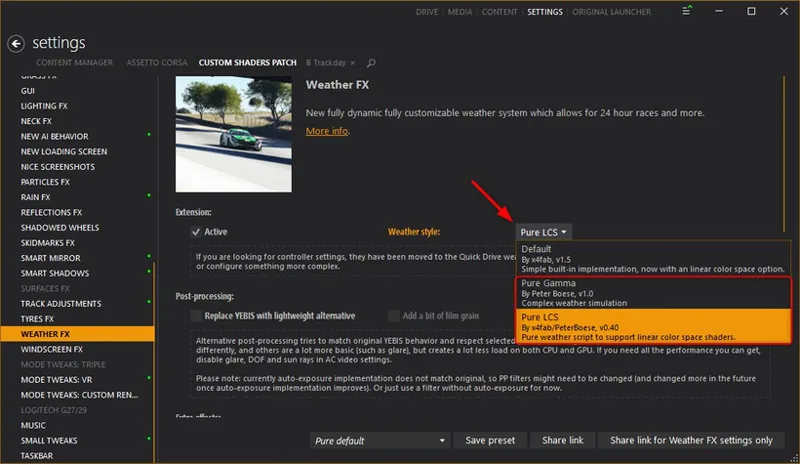
with the latest Pure 1.45 you don't have the option anymore in weatherFX. You then chooes Pure Gamma for CSP gamma shaders OR Pure LCS for CSP LCS shaders. Pure LCS activates the CSP Linear Color Space rendering automatically. LCS is a complete different set of lighting shaders in CSP and those are fixing many render problems and bugs in CSP. Gamma Color space is the old lighting rendering like in original AC.
A
Alessio · August 14, 2024
Hello,got an issue with LCS,the sun has got like a black dot in the middle and the gear shifting lights in red and green are empty in the middle and only showing their colour on the edge,blue lights are ok,if I select sol weather filter these 2 issues don't happen any help please?
P
Peter Boese · August 14, 2024
Update CSP to 0.2.4 or 0.2.5p1
J
Jade Leon · August 13, 2024
Hi, I got the CSP preview version and still don't have rain, am I missing something?
P
Peter Boese · August 13, 2024
If you have a preview version of CSP, better install it manually: Delete the dwrite.dll in AC root folder. Open the CSP preview zip file and EXTRACT the "dwrite.dll" and the "extension" folder to your AC root folder (Steam install folder of AC "common\assettocorsa").
S
Sultan Namnkani · August 11, 2024
where TF is the download link why cant you make this easy bro i got a headache from searching please make is easer
P
Peter Boese · August 11, 2024
Please!!! Just click on the post title or the "show more" link to open the post! Read it and watch the install video!
A
ANIS hammoum · August 11, 2024
hi I haven't the "install_pure.bat" in my file pure 1.45 highres can I have some help pls
P
Peter Boese · August 11, 2024
Please watch the install video and follow the steps exactly! There is no install_pure.bat anymore! It is also written in the post!
m
meezoh tak · August 11, 2024
hey i dont have a pure weather
P
Peter Boese · August 11, 2024
What do you mean exactly? If you mean the weather presets in CM, then they will always called like "Clear (Sol)" and those are just there for compatibility reasons.
C
Claudio Souza · August 10, 2024
Hello!!! Great work Peter!!! But for me the Pure LCS seems too bright, to the point of not seeing the clouds, or does this happen to anyone else too??
M
Moritz Henry Benkel · August 10, 2024
it wont innstall on mega
P
Peter Boese · August 10, 2024
Maybe try downloading again or use the Mediafire link!
K
Khai · August 10, 2024
where is sol
P
Peter Boese · August 10, 2024
https://www.overtake.gg/downloads/sol.24914/
j
joe Badra · August 10, 2024
Hi Peter, is it normal that my car is not stable on wet track ? no grip and drift always,
D
Dennis Okeefe · August 20, 2024
Remove extended physics
E
Evan Clark · August 10, 2024
youre awesome for almost singlehandedly propping up this games visual modding community <3
G
Gage Caputo · August 9, 2024
still trying to figure out how to download, i put the 4 files into the root folder and it still wont come up in weather fx
P
Peter Boese · August 9, 2024
Are you sure you use the AC root folder? Could it be you have 2 AC installs?
r
riotng · August 9, 2024
is this the most recent version
P
Peter Boese · August 9, 2024
Yes, it's the latest post! There is a hotfix, but you only need this if you use CSP 0.2.3p1
E
EduardMeLLaman · August 9, 2024
is this the most recent version?
P
Peter Boese · August 9, 2024
Yes, it's the latest post! There is a hotfix, but you only need this if you use CSP 0.2.3p1
D
Dominick Lafleur · August 9, 2024
just sub and installed the pure config but i have no rain fx in csp ?
P
Peter Boese · August 9, 2024
Because rainFX is not part of Pure! Please scroll down in the Pure 1.45 update post. There you will find the link to Iljas Patreon page where you get a CSP preview version. Install it like it is shown in the Pure install video...
D
Danylo Kobzar · August 9, 2024
Hi! Graphics looks great! But in the Pure Config (last seconds of video) I have no "ReflectionFX" messages in Pure checklist. My ReflectionFX is enabled but has less options than other menu from videos. Is that a problem?
P
Peter Boese · August 9, 2024
No, there is no problem with that. I just reduced the info to 1 line if everything is ok, because there were people who were confused by those 3 messages. So everything is ok if there is just that 1 line telling you that there are no errors.
J
Jarrett Moore · August 8, 2024
i got the the very last step where you click "activate with full flashing effects" and that box just flashes and i cant click anything
P
Peter Boese · August 9, 2024
It's not install properly then or there is still an error. Did you try to install the latest hotfix? You find it in the community chat here or at Pure Discord Server. There are some CSP preview versions that missing some functions like CSP 0.2.3p1.
B
Benjamen White · August 7, 2024
where is the link?
P
Peter Boese · August 8, 2024
On Patreon you need to click on the post title or the "show more" link to read the full post. Then please watch the install video. This will show you everything.
f
frami cordero · August 7, 2024
eres una maquina esto es una pasada mejorlo es casi imposible gracias por tu trabajo
P
Peter Boese · August 8, 2024
Thank you, but the upcoming version of Pure LCS will be even better. It has all the Pure Gamma features but is running with higher fps.
A
Ayrton Richards · August 7, 2024
i need help installing and seting up pure im very confused
P
Peter Boese · August 7, 2024
Please watch the install video and follow the steps exactly!
S
SimonDesign · August 6, 2024
where the fuick is the download link ?....
P
Peter Boese · August 6, 2024
On Patreon you need to click on the post title or the "show more" link to read the full post. Then please watch the install video. This will show you everything. Just don't think there is a scam. Mostly the solution is nearer than you think!!!
R
Robin · August 6, 2024
Do you know why every time i start a session the sky is always full of clouds and then they disappear after a second (because i've got it set to clear sky). It is a bit immersion breaking. Doesn't matter if i use a plan or check 'last used'.
T
Tobias Neuwirth · August 5, 2024
how do i instal it without the instal pure.bat
P
Peter Boese · August 6, 2024
Please watch the install video and follow the steps exactly!
R
Ryan Fnnds · August 5, 2024
ill buy this but my rain doesnt work :(
P
Peter Boese · August 5, 2024
Please watch the post again and scroll all the way down. There is the disclaimer for rain and the link to Ilja's Patreon page where you get the CSP preview version, which you need for RainFX.
R
Robin · August 4, 2024
Thanks for the tutorial video. Made upgrading from my old Sol and csp versions very easy. Game looks stunning! Staying at the gamma version for now, with those nice skydomes.
H
Henrik Dietze · August 3, 2024
Just drove Targa Florio '73 with the Crystal and Pure LCS graphics for the first time... what a bliss! It's just amazing! And it even runs like a charme, unbelievable... ^^
T
Tanem · August 3, 2024
where do i download it on the page? i don't see anything
P
Peter Boese · August 3, 2024
Please watch the install video and follow the steps! Don't you see the big "Download links" sign? To open a patreon post, click on the title or on "show more"!
B
Brendin Talley · August 3, 2024
I downloaded and now all my cars are blurry
P
Peter Boese · August 3, 2024
Pure doesn't make the cars blurry! It could be a CSP setting you made!
C
Carlos Llano · August 2, 2024
after I installed the new pure, its like stars all over my interior but the car doesn't have stars. Anyone know the fix?
P
Peter Boese · August 3, 2024
Please go to Pure Discord server or here in the community chat to post a picture! Also please open Pure Config app and make a screenshot of the Main page and the PP page!
P
Patryk Zasadowski · August 2, 2024
I did exactly like on video, but rain is not visible, all graphic mods appear, even i can hear rain, but cant to see
P
Peter Boese · August 2, 2024
Sure, for rain you need a CSP preview version. Please have a look at the Pure development update post and scroll down. There you see the disclaimer and the link to the CSP patreon page.
m
me mi · August 2, 2024
I've been trying to install pure with CM and i install it, select the PP and weather FX is set to Pure gamma but when i open the game i cant see anything but the sky, cant see the car, driver, track, only the sky or more like a blue color which i presume is the sky, i have tried everything and cant get it to work, does anyone know how to solve this issue?
P
Peter Boese · August 2, 2024
Please watch the install video and follow the steps exactly!
s
sinan · August 1, 2024
when i open the pure in the game i dont see the settings
P
Peter Boese · August 2, 2024
Did you follow the steps of the official install video exactly?
A
Aaliyah Spencer · July 31, 2024
Pure config stuck on the consent page.
V
Vanzant · July 31, 2024
I had the same issue. Pete told me to simply follow the install tutorial video. I installed, uninstalled reinstalled at least four times. I was doing everything right. Then I realized somewhere along the way I lost the content in the folders I was importing. I redownloaded the files and installed. It worked.My point is Peter was right, regardless whether or not I followed the steps, pure was not being installed properly. Check everything again and good luck!
W
Wyles · July 31, 2024
dont know if this is the right place to ask this question but her goes ig. im in vr and and using the new pure (LCS). i am also using vr, however i dont seem to get any rain drop on any camera angles (such as cahse camera and replays and such.). this wouldn't its not that that doesnt bother me however. what does bother me is that i cant seem to find an option to get rain drops in f1 style cars with an open cockipt. any idea:?
R
Rizmy · July 31, 2024
Thered a recent glitch ive been getting on pure gamma, the screen is all white its so bad. Any fix??
S
Smit Snyman · July 30, 2024
I am very new to all this. I installed Pure as directed. Everything seems fine except the sun is black? I did uninstall SOL but only after installing Pure.
P
Peter Boese · July 30, 2024
It's not Pure, it is a bug in the former CSP versions. Please use the latest public or preview CSP (0.2.4 or 0.2.5p1). It's a problem with activated extraFX and TAA. The latest CSP will fix this.
X
Xavier nicolas · July 30, 2024
Hi. in VR, and cant get AC to work well since the past few weeks. Using Pure Gamma and CSP 0.2.5. the game is very bright and the light very uniform. any ideas?
P
Peter Boese · July 30, 2024
Did you already open Pure Config app. It will tell you incompatible CSP settings.
M
Mathieu · July 30, 2024
Hey, still seeing the Pure Config v1.54, Parameters: 139, CSP: 0.2.5-preview1, Pure LCS: 0.45 Anything wrong? Thx
P
Peter Boese · July 30, 2024
Idk what you mean. This is just an info in Pure Config. It is always there and helps me doing support.
F
Francisco Gonzalez · July 29, 2024
which version works best with VR HP reverb G2
P
Peter Boese · July 30, 2024
Pure Gamma is the most efficient weather style for now. With the new upcoming version of Pure LCS it will be the best then. It will be even more powerful and more efficient than Pure Gamma then.
J
Jett Cooke · July 29, 2024
Hey Pete! I recently downloaded pure LCS and loaded into a session but when I did, I looked into the sky and noticed that the clouds were very low. Is there a setting or something that could fix this? Thanks!
M
Mike Lord · July 29, 2024
I still don't know why I have to click " Disable puddles " to prevent track from turning green after a few laps
S
Sylvano · July 29, 2024
I change the weather in there for replays. In the “day” option of pure planner there is no weather option for me anymore to change. It happened out of nowhere
S
Sylvano · July 29, 2024
At the Pure Planner, I can't change the weather at the ''Day'' option. Live, stamp etc. work. Somehow this suddenly dissapeared. Any idea how to solve this problem?
P
Peter Boese · July 29, 2024
I must know what you do there exactly
B
Brad · July 28, 2024
I 100% install exactly as the video but theres no option to set my weather to ''Pure''
P
Peter Boese · July 29, 2024
Are you sure you use the right AC root folder? Nearly all people that reported me this problem have 2 AC installs and they used the wrong install folder!
M
Morgan Hillier · July 28, 2024
hello I have no config apps but all the other steps are completed> Help Please...
M
Mazinho · July 27, 2024
Mr. Peter, how do I put the fireworks on the assetto corsa.
A
AdzP · July 28, 2024
Settings > CSP > Particles FX > Fireworks to ACTIVE .. you can also change when it occurs. I have mine set to "At Night and after finish"..
D
David Djp · July 27, 2024
hello which shader? because 0.2.3 and 0.2.4 do not work for me thank you
P
Peter Boese · July 27, 2024
How did you install CSP? What exact version. What means "not work"?
C
Ciprian Ivanoiu · July 26, 2024
Hey I have an issue with the overcast weather. I play in VR and when driving open wheelers, if I look up at the clouds, my performance tanks dramatically. My GPU goes from around 60% with 72fps to 100% usage and 60fps. This only happens in overcast so maybe it has something to do with the clouds? Is there anything I can do to make it not have such a high impact on performance? I'm using Pure LCS in weather fx. Also, a small issue, the rev lights on the in game wheel are over exposed to the point where they become white. Is there any setting I can change to fix that?
P
Peter Boese · July 27, 2024
Pure LCS uses 3d clouds for now. It will be solved with the upcoming Pure LCS version. Then Skydomes are back and it will take much less fps then, esp in Overcast weather.
M
Michael Talbot · July 25, 2024
hi peter. for some reason the latest update has made ac stuck in night, no matter what time i try change it to ? have tried uninstalling and dl it again? any ideas
P
Peter Boese · July 26, 2024
Maybe you did not install it properly. If you open CSP Lua Debug app in-game, is there a red dot?
و
والتر وايت · July 25, 2024
hi i need help with downloading it, i donloaded the hires version and when i unzipped it doesnt show install pure?
P
Peter Boese · July 25, 2024
Yes, please watch the install video! there is no install_pure.bat anymore!
O
Oskrw · July 25, 2024
I have a problem that i cant consent to the epilepsy warning and also the sky is just night sky with stars but in pure planner its 12:00 and also my fps are dead i have lik 10FPS when i normaly have like 55, i used pure gamma and i have CSP 0.2.3, i need help
P
Peter Boese · July 25, 2024
Please watch the install video and follow the steps exactly! If you use CSP 0.2.3 preview 1, then you must install the latest hotfix: https://drive.google.com/file/d/1AfeY0zZNCR-qHJHT5bq_DwgH5UVo3VsC/view?usp=sharing
A
Ac Pcv2 · July 22, 2024
peter so what should i use pure lcs or pure gamma{when i try puregamma everything looks dark and the screen looks black}
P
Peter Boese · July 22, 2024
Maybe it is not installed right, do you use CSP 0.2.3p1 ? If so you need to install the latest hotfix. This CSP version has some missing function. But the latest hotfix will solve this
J
Josh C · July 22, 2024
Is my understanding correct that Pure LCS currently does not have all the features of Pure Gamma integrated yet? Is there any reason to use LCS over Gamma at this point in time? I've noticed I get slightly lower FPS using LCS. Thanks.
P
Peter Boese · July 22, 2024
Yes Pure LCS takes more fps die to the 3d clouds. With the next version of it and the skydomes it will have even more fps than Pure Gamma. For now you can already test Pure LCS and its better color composition.
J
Josh C · July 22, 2024
I'm having an issue with Pure LCS where the Pure Config app is unresponsive when I try to get past the lightning effects warning page. I click the button to accept, but nothing happens. The config app works fine with Pure Gamma, and I've already accepted the lightning warning for Gamma. I tried reinstalling Pure as well but no change.
A
Arron Mitchell · July 26, 2024
Make sure you have latest Content Manager and also using lights-patch-v0.2.4-preview1-full. This seemed to fix all my issues.
C
Carlito Jay · July 22, 2024
damn alr
C
Carlito Jay · July 21, 2024
im using acreal2024 pp filter and its not letting me change anything cause of some script with pure im confused asf
P
Peter Boese · July 22, 2024
Are the pure standard ppfilters working? pure, pureCandy and pureLinear?
C
Colin Tucker · July 21, 2024
hey so when i down load pure its just shows uninstall sol or uninstall pure install pure in the folder is not showing up
P
Peter Boese · July 21, 2024
Yes, please read the post and watch the install video. There is no uninstaller anymore.
a
adam00_. · July 21, 2024
i average 6 fps in assetto even though i followed the instructions from the install video which means i installed it correctly so there shouldn't be any problem. Any way to fix this?
S
Samil Cil · July 21, 2024
whats ur pc specs?
S
Samil Cil · July 20, 2024
Does highres 1.45 work with llja's new lightpatch 2.04?
P
Peter Boese · July 21, 2024
Sure
B
Brandewyn · July 20, 2024
Install script isn't a thing I don't think anymore. Just take the pure files you get and put them in your game directory/folder. for me it's C:\Program Files (x86)\Steam\steamapps\common\assettocorsa
J
Janessa Johnson · July 20, 2024
I have followed every last step and my files that i downloaded did not come with an install script.
P
Peter Boese · July 20, 2024
There is no install script anymore! Please watch the install video!
M
Manuel Salgado · July 20, 2024
Hey Peter. I know lightning and skydomes are coming in September. Is the aurora night sky available or will it be? I see in the pure config app in the past there was a tab for shaders but I dont see it in this version or did it move? Might have been on the older CSP 0.2.3p211 and not pure, just trying to verify. Thanks man
P
Peter Boese · July 20, 2024
The tab will come with the next version. Aurora are already in this version but it is the integration of the default wfx and those Auroras are only seen for tracks near the piles and only for certain times. But with the next version of Pure it is possible again to use the 3rd party Aurora shader which can be activated and customized like you want.
M
Mohamed Ramadan · July 19, 2024
why is it that sometimes the pure planner works in replay mode and other times it doesnt?
P
Peter Boese · July 19, 2024
It always works in replay mode. What let you think it does not work?
D
David Sprkha · July 18, 2024
Hello, I'm getting a completely black sun with the LCS version. Appeared after a direct update from older from 0.271. Tried to completely uninstall using the .bat file and new fresh installation by copying the files according the guide. Still the same. Any solutions, please?
R
RiZou71 · July 18, 2024
Uncheck TAA (Temporal anti-aliasing) in Settings/Custom Shaders Patch/Extra FX Answer provided several times by Peter Boese
A
Alexey Davydov · July 17, 2024
For some reason reflections starts to flicker bad when using any SSLR setting with Pure LCS and stops flickering when i switch back to Gamma or default or turn off SSLR completely which look pretty bad
A
Addicted to Speed · July 17, 2024
same reflection flickering :(
H
Henri Rebane · July 17, 2024
peter i have a problem, i cant acess the pure planner, it says pure controller not working
R
RiZou71 · July 17, 2024
Watch and follow the installation video exactly. In Settings/Custom Shaders Patch/Weather FX/Weather Style select Pure, In Settings/Assetto Corsa/Video choose Pure as ppfilter and In Drive/Weather choose Pure. Regardez et suivez la vidéo d'installation à la lettre. Dans Paramètres/Custom Shaders Patch/ Weather FX/ Weather Style sélectionner Pure, Dans Paramètres/Assetto Corsa/ Vidéo choisir Pure comme ppfilter et Dans Drive/Meteo choisir Pure.
I
InGroover · July 17, 2024
Hi Peter, the new look is amazing in VR - I only observed that the scenery during noon -/+ 3hours is great but before and after this sweet spot the environment has too less light - the sun is too weak for this times of the day. Don't know if this is CSP or Pure relevant.
V
Vanzant · July 16, 2024
Hi Peter, I saw/read… I can’t remember where, you talking about how the Pure PPfilter now serves as the all in one (vr, hdr,etc). In my drop down list I see Pure Linear, which appears to be the only one that looks right with LCS and triple screens. Is that right? Is that what I should be using with VR as well. Thanks!
C
Charles Montgomery · July 16, 2024
in vr using the pure vr preset on 24 preview 1 causes a black screen on desktop
C
Charles Montgomery · July 16, 2024
game is viewable in headset
m
mahmoud alfulaij · July 16, 2024
MY WHOLE GAME IS RED
P
Peter Boese · July 16, 2024
READ THE POST AND WATCH THE INSTALL VIDEO! FOLLOW THE STEPS EXACTLY...
R
RnM Playz · July 16, 2024
im having trouble installing pure no install file when i downloaded the file
R
RiZou71 · July 16, 2024
Peter said: "Please just watch the install video! Its always the easiest way to follow it! There is no installer anymore, because with newer Windows updates, the installer does not work properly anymore. So always follow the install video!!!"
S
Snefee_ · July 16, 2024
Hi, I installed Pure exactly like in the tutorial video and everything is working perfect except for the "New smoke and dust" from ParticlesFX, there is no smoke at all when the option is selected. I've tried completely turning off vanilla smoke and it also didnt help. I'm running CSP0.2.3-p211 with Pure LCS. Is there any way to fix this? I would prefer to use the new smoke rather than the vanilla one.
P
Peter Boese · July 16, 2024
Did you try the extra heating? Otherwise I don't know...
m
mr robot · July 15, 2024
hello peter ! what is the difference of yebis in weatherfx, its better with yebis lightweight alternative? or nope ? sorry for my bad english
P
Peter Boese · July 15, 2024
"lightweight alternative" is a very basic post processing effects library. It has most of the Yebis effects, but in a very basic form, so it will have lower impact on the GPU. But Yebis looks much better, but has a decent impact on GPU.
J
Jaspreet Maan · July 15, 2024
I copied the files from archive to game folder but in content manager its showing Gamma v1.0 and LCS v0.40 which is previous.
G
Ghola Hayt · July 15, 2024
Many thanks Peter . Everything works perfectly except for a small display bug during the replays: the rain is not present visually, it only appears around the car which is fixed by the replay camera (like a halo that surrounds it).
P
Peter Boese · July 15, 2024
Sorry, can't do much there. Maybe it's a big with a certain CSP Preview. Or LCS shaders in general....
J
Jon Cerveny · July 15, 2024
my shit just blinks when i try to install idk why
P
Peter Boese · July 15, 2024
Blinks red, you need at least the CSP 0.2.0 for Pure Gamma and CSP 0.2.3 for Pure LCS. Its described in the Pure update post! Did you already watch the install video?
T
Terry Rock · July 14, 2024
I'm getting a weird smearing on the windshield of some...not all cars during wet running. While I do realize Ilja is responsible for rain, I'm not sure it is a rainFX issue. I only started getting it after the latest PURE installation. It doesn't completely block the driving view and I get it regardless of if LCS or Gamma is selected.
Z
Zryvx · July 14, 2024
no install_pure.bat file? If I drag and drop into CM I get extremely low fps... disappointing
k
kobabukob · July 14, 2024
Do not drop it into CM. You have to extract .zip file and move extracted files into game folder by YOUR HAND.
G
Gérald · July 14, 2024
hello, i have CSP 0.2.4-preview1 and Pure installed, but no puddles, can you help me to have puddles please? thank you
P
Peter Boese · July 14, 2024
Do you have rain?
r
ramtin badianat · July 13, 2024
my first person view looks ass for some reason
P
Peter Boese · July 13, 2024
Pure does not change the first person view. I also don't know how "ass" looks. So maybe just provide a screenshot.
c
c7md pat · July 13, 2024
na wrd
K
Kata Totoro · July 13, 2024
I think PureLCS has improved the fog and light effects immensely.
K
Kata Totoro · July 13, 2024
I think PureLCS has improved a lot. If I could be greedy, I'd like the clouds to be more realistic.
P
Peter Boese · July 13, 2024
The next version of Pure LCS has the skydomes of Pure Gamma and it's even more efficient than Pure Gamma. Pure LCS 1.0 will have half the CPU consumption of Pure LCS 0.4 if Skydomes are used.
V
Vanzant · July 12, 2024
Hi Peter, LCS pure looks incredible. Great Work! - I have a question. My Config stopped working. When I’m given the option to activate (flashing lights warning page) nothing happens. I’m not able to open the config.
P
Peter Boese · July 13, 2024
I think it's not installed properly then. Did you watch the install video?
W
Walker · July 12, 2024
Everything seems to be working but I have red font when updating weather fx to use pure gamma or LCS, and I see red also when selecting Weather>Pure>and CM Weather. ShouldI not worry about it? Thanks
P
Peter Boese · July 12, 2024
This is just the CM "non default value" color. You can change this in CM settings to a color you like better.
o
okbool · July 12, 2024
idk man ive been using these mods for years now i think i know how to follow install instructions pretty sure this is just a broken mess in VR
P
Peter Boese · July 12, 2024
Please report it at Pure Discord server. I tested it much in VR and it works.
N
Nelson Ha · July 12, 2024
Thanks Peter. I am new to modding, what is the difference between LCS and Gamma and how to determine which to use?
P
Peter Boese · July 12, 2024
I always use this link: https://docs.unity3d.com/Manual/LinearRendering-LinearOrGammaWorkflow.html It will show you the main difference. In Gamma shaders (the original AC color rendering) the colors are processed with a gamm curve before they are calculated in the lighting shaders. This helps with tonemapping and you can even use no tonemapping and it will work. But this method has a downside. Colors are getting compressed and can't be displayed properly. So LCS (linear color space) brings the lighting calculation back to a linear environment and so many of the currently know render problems can be prevented. Like the crazy reflections with CSP lights. Currently LCS is still in development and there are still bugs with it. So just try Pure LCS out of interest. Pure LCS also has a different more leightweigt code base than Pure Gamma. Pure Gamma is a weather style which is in development since 3 years and i can say that it is like in a final stage when it comes to the weather and lighting features. Pure LCS is its successor for the future. CSP is moving constantly in the LCS direction and so it will need a decent weather style with LCS support. With the next version of Pure LCS i want to get all the features of Pure Gamma in it, like the skydomes and Pure's own shaders (sunblinding, lightning, ground fog)
A
Alex Polyakov · July 12, 2024
Once the latest CM update happened all the graphics started looking horrible... Beyond horrible, please help.
P
Peter Boese · July 12, 2024
It would be nice you could provide some screenshots. Maybe please come to Pure Discord Server and make a new post in the Pure help channel.
D
Douglas Batista · July 12, 2024
Do I need a PP filter to work with this version? If so, which one should I get?
P
Peter Boese · July 12, 2024
Just try the Pure standard ppfilters "pure" ore "pureCandy" at first. Then you could try other Pure compatible ppfilters.
·
·Junky502 · · July 11, 2024
Yea i have the same issue and also while that is happening im getting 8 fps with the pure gamma
P
Peter Boese · July 11, 2024
It's not properly installed! If there is an error, the whole system will slow down. Please install everything like shown in the install video.
M
Miles Odell · July 11, 2024
pure config keeps saying "the current pp filter has no pure script!" how can ifix that error? i installed both pp and pure correctly
P
Peter Boese · July 11, 2024
Which ppfilter do you use?
J
Jeramiah cabarroguis · July 11, 2024
Weirdly enough I see clouds while it's raining but when the weather is set to clear or anything besides rain; nothing. The main page shows no errors. I see the skybox for a second when I start the session but it fades away when I start driving in clear weather.
P
Peter Boese · July 11, 2024
Better you go to Pure Discord Server and report it in the Pure help channel. It would need a better communication than here.
J
Jeramiah cabarroguis · July 11, 2024
Why can't I see skyboxes when everything is installed? I've check pure config and the setting is at 1
P
Peter Boese · July 11, 2024
What weather is set? Are there any warnings in Pure Config Main page?
S
SLV_JonathanC15 · July 11, 2024
If I install Pure do I still need Sol?
S
StarDog · July 11, 2024
Nope!
R
RiZou71 · July 11, 2024
Why does Peter have to constantly repeat the same things with each update? No install.bat..... watch the installation video... No rain.... No relation to Pure. No download link..... Open your eyes.... Frankly, it pollutes the comments, we have the impression of having to deal with elementary school children! Pour quelle raison faut-il que Peter répète constemment les mêmes choses à chaque mise à jour ? Pas d'install.bat..... regardez la vidéo d'installation... Pas de pluie.... Aucun rapport avec Pure. Pas de lien de téléchargement ..... Ouvrez les yeux.... Franchement, ça polue les commentaires, on a l'impression d'avoir à faire à des enfants de cours élémentaires !
y
yawood W · July 11, 2024
because there are always new friends joining in who do not know those previous patches/comments.
k
kenny moss · July 11, 2024
If you have downloaded the hot fix do you need the new version as well. Cheers.
P
Peter Boese · July 11, 2024
No the new version is just Pure 1.40 plus the hotfixes...
J
Jacob Bossing · July 11, 2024
Does this update give VR users groundfog again? We had it, then the most recent "1.0 gamma" build says groundfog doesn't work with single pass stereo when it did previously? When can VR users expect to have access to groundfog again?
P
Peter Boese · July 11, 2024
Ground fog does not work in SPS mode. So no matter which Pure version you use, it will not work in this economy VR mode. You have no depth map in this mode and the depth map is needed for this shader.
G
Gary NeoGunzeus Malmgren · July 11, 2024
why are my steam screen shots turning all black after installing...not sure what option to turn off just yet
S
Saul Ormandy · July 11, 2024
so honestly for the bestlooking picture should i be using gamma or lcs? rain seems to acc make the road look wet with gamme, with lcs it just looks abit off colour no puddles or anything
K
Kris · July 11, 2024
for best picture dont use pure... use csp with lcs, default weather. Pure is playing catchup, purelscs doesnt look as good as default weather on csp and is reliant on ppf makers catching up also, for which they havent. current pure should be a free beta as it is shit compared to csp without pure.
h
hanocq · July 11, 2024
csp 0.2.4 preview 1 tout est ok chez moi
M
Martin Hardi · July 11, 2024
I have the Problem that my picutre is oversaturated and overbright ... any idea to fix this.
S
SW · July 11, 2024
can you open the ingame CSP settings ? look for a tab about lighting and play around the sliders there.
R
RistaR 420 · July 11, 2024
I have a problem with CSP. I have the latest version, CSP 0.2.4, but the game shows an error saying it needs a newer version, as if it doesn't recognize it. :(
P
Peter Boese · July 11, 2024
Then reinstall CSP. If you have a preview version of CSP, better install it manually: Delete the dwrite.dll in AC root folder. Open the CSP preview zip file and EXTRACT the "dwrite.dll" and the "extension" folder to your AC root folder (Steam install folder of AC "common\assettocorsa").
A
ALPHA 2-1 fr · July 11, 2024
yes me too
P
Peter Boese · July 11, 2024
You must follow the steps of the install video exactly. Trust me, you did something different. Be sure you don't use 2 different AC installs
a
alfie robe · July 11, 2024
hey, ive installed exactly like the video says, but when im ingame i only see pure config on the sidebar. pure planner isnt there. when i search for it, it doesnt come up.
P
Peter Boese · July 11, 2024
Then you did not install it properly. Be sure you use the right AC root folder! Some users have 2 and they select the wrong folder. If it is still not working, please go to Discord Server and make a new post in the Pure help channel. After hundreds of people I help with the install it is always they did not follow the video exactly. Some users accidentally copy the 4 folders into a sub folder of the AC root folder for example.
T
Tom Tam · July 10, 2024
hi, I would like to set the weather as random but every time when I start a race, the weather is set by the system as CM. please help
P
Peter Boese · July 10, 2024
It's the question what do you set in CM? If you set the dynamic "Pure" controller, you can set the weather to random there.
A
Ahmed Alansari · July 10, 2024
pure menu is glitching dont know why im getting 15 fps maximum
P
Peter Boese · July 10, 2024
Please watch the install video and follow the steps exactly!
A
Alex Polyakov · July 10, 2024
Ok, watched the video, so skydomes coming in September. Why extra FX and TAA don't work? Without them smoke looks like cardboard...
P
Peter Boese · July 10, 2024
Its a problem within CSP. Don't ask me. It's the same with the default weather style.
D
Deaquan · July 10, 2024
My dashboard is blurry, hard to tell rpms
P
Peter Boese · July 10, 2024
That is not caused by Pure. Maybe camera focus?
F
Ferri Nazari · July 9, 2024
I DONT HAVE INSTALL FILE
P
Peter Boese · July 9, 2024
Please just watch the install video and follow the steps exactly!
T
Toon · July 9, 2024
Peter i have a question, whenever i download pure and open the file it only has the uninstall pure and uninstall sol but not the install pure.
P
Peter Boese · July 9, 2024
Please just watch the install video! Its always the easiest way to follow it! There is no installer anymore, because with newer Windows updates, the installer does not work properly anymore. So always follow the install video!!!
M
Maxo · July 9, 2024
When i extract the file there is no install_pure.bat pls help me
F
Freddy John · July 9, 2024
same idk why?
t
tales de mi leto · July 9, 2024
I paid for the subscription but I don't have access to the discord
P
Peter Boese · July 9, 2024
You must link your Discord account in Patreon settings - More - Connected Apps. You will be autoconnected then...
B
Bryan Williams · July 8, 2024
Is the a link to the discord
P
Peter Boese · July 8, 2024
Link your Discord account in Patreon settings - More - Connected apps. You will be automatically connected and get a role to view the Pure channels.
P
Peter Boese · July 8, 2024
I fixed some bugs already! Please have a look at the hotfix section in Pure Discord or here in the Community channel: https://www.patreon.com/messages/8a8d7f99b6b344c3a80e8a732f611c60?mode=campaign&tab=chats
B
Bryce Dodd · July 8, 2024
Hi Peter. I have an issue where every race I loas into has a starry sky and pure config doesnt work. Everything was working fine and then this started last night. I am on the right CSP version and I have uninstalled and reinstalled Pure and it keeps happening. Do you have any idea how to fix this?
L
Luis Adrian · July 8, 2024
i need sol i dont found the link :(
P
Peter Boese · July 8, 2024
https://www.overtake.gg/downloads/sol.24914/
M
Maddy Brayson · July 7, 2024
I cannot get rain effects can see the rain when in game but no effects of hitting windscreen, i have csp preview 211 any other settings i need to tweek?
M
Maddy Brayson · July 7, 2024
is there new 0.2.4 csp preview is this what i am missing ?
A
AC Racer · July 6, 2024
Thank you for this post and your hard work!
S
Super Assetto Corsa · July 6, 2024
Hi!, just wondering Petter if are you sure that the inside the tunnels exposure thing it's right on PureLCS ? ... Because I think the exposure need to be increased when you enter the tunnel and not decresing as it's happeding now, please check it in Day time inside a tunnel (on illuminated tunnels and dark tunnels) and at Night Time inside a tunnel (on illuminated tunnels and dark tunnels). On Pure Gamma it's working fine.
P
Peter Boese · July 6, 2024
I never experienced this. In my case it increases, but you must keep in mind, that the Shutoko tunnels are bugged and the sky shines through them in the reflections layer. And exposure is mainly calculated by the reflections layer. Did you already update Shutoko to the latest version?
m
mark sandom · July 6, 2024
Thanks Peter will I be able to use it in the future ?
P
Peter Boese · July 6, 2024
Please answer in the same post! What GPU you have? Maybe a GTX 1650 or something similar?
m
mark sandom · July 6, 2024
Hi I still can’t get it to work black sky and low fps I have followed instruction correctly more than once the pure config is saying post processing disabled when I reinstall either of the previous versions it works fine ?
P
Peter Boese · July 6, 2024
There is a bug with post processing deactivate right now. Just use Pure 0.271 for now. It's the same like Pure Gamma 1.0
D
Daniel Flink · July 6, 2024
i downloaded the 1.4 pure version but there is no installation aplication only delete sol and delete pure in the previous version there was an install aplication
U
Unwichtiger · July 6, 2024
me too
d
daniel kambouris · July 6, 2024
this is so heavy on fps and 0.23 preview/x4fabs rain fx wont work with lcs
K
KS001 · July 6, 2024
cant use skydomes, have no option in config anymore , where can switch from volumetrical clouds to skydome?
P
Peter Boese · July 6, 2024
Please watch the new features video!
J
Jay Jay · July 5, 2024
Is it possible to add snow like in driveclub? I think that would be an amazing feature. I presume you wanted to add it as its in pure?
A
Andre Warringa · July 5, 2024
I have to do some more testing but I got a huge fps drop. Normally I get a stable 90fps in VR at 100% resolution, now even dropping to 70% resolution my fps switched between 70 and 90fps. I opened the performance monitor and GPU usage was constantly switching between 70% and 100% usage. Turning off the Pure script immediately gave me a stable 90fps again. I uninstalled this version, installed the former 0.271 and was back at a stable 90fps. Since I didn't read anyone else posting about this issue I assume it's something on my end.. can't figure out what though.
P
Peter Boese · July 5, 2024
Do you use Pure Gamma or Pure LCS?
z
zzzzzzzz · July 5, 2024
Peter i found in net PURE 1.41 HOTFIX why i can t find here?https://imgur.com/YoNmYCs
hmm dont know how to explain thats bug i cant access exit button when i press esc ingame its now out of screen - if i launch the game after 2 time i need to restart my entire pc cause content manager wont launch again like if steam was close my cm showroom in bugged at the point its all dark i cant see nothing anymore - showroom normal crash 1 time on 2 xS i reinstalled the game full clean instal pure and preview and thats continue to happen is it normal
X
Xavier Futrell · July 5, 2024
i cant change the time of say cant click on pure controll
P
Peter Boese · July 5, 2024
Idk what you mean. Please make a screenshot.
S
Sebastian Bhoday · July 5, 2024
i am not sure what to do for when i click on the weather fx to chose pure i am left with just default or sol
P
Peter Boese · July 5, 2024
Please watch the install video and follow the steps exactly. Be sure you use the right AC root folder!
B
Boost · July 5, 2024
Thank you for your great work Peter. If you don't mind allow me to give an advice which could be beneficial for PURE and the community in general. As we are now in the LCS era means the Gamma should be deprecated. In other word we are in the physically correct Pure era so the app in general should be less complicated with lot of chageable parameters and sliders like still it is now. The UI is very confusing. PURE should just have on/off and quality preset parameters. Peter should put the correct value like PP filter, sky color , brightness. etc. Users should not be able to tweak those value like before where most of feature was hacked now all values have to be unique and physically correct. Lot of games like GT , Forza, etc have beautiful graphic without letting users to go in-depht with the parameters, just let users enjoy the driving aspect of the sim.
P
Peter Boese · July 5, 2024
I like to have a new "basic" UI for Pure Config. But actually it will be a step backwards if i completelly throw out such customization. People like to play and adjust and this is what modding makes possible.
A
Abdus-sallam Shabir · July 5, 2024
https://www.reddit.com/r/assettocorsa/comments/1bzvbyj/pure_config_has_weird_flickering_and_cant_click/ ive been having this problem and ive reinstalled everything multiple times, could you help me please?
A
Abdus-sallam Shabir · July 5, 2024
fixed by downgrading pure to 0.271
M
Matthias Peitsch · July 5, 2024
I can't find the install Pure.bat in the zip file. Can someone help out with this?
M
Matthias Peitsch · July 5, 2024
Or can I use a previous install.bat file?
J
Juraj Greš · July 5, 2024
i dont know to community
P
Peter Boese · July 5, 2024
What do you mean?
J
Juraj Greš · July 5, 2024
hm why 0.2 or 0.2.3
j
jay jones · July 4, 2024
hi ive installed new pure gamma , lcs , but pure config isnt showing anything , all i see is SAVE , LOAD , EXPORT & IMPORT
R
RiZou71 · July 5, 2024
please watch the new features video and the install video. It will tell you everything you need.
I
Inf2 · July 4, 2024
wow, September really came early this year eh? Jokes aside, top job Peter, it might not have all the features, but the core stuff is there and that's what's most important, its genuinely impressive that you managed to get it out this quick with no more bugs than AC tends to randomly have.
A
Al3 G · July 4, 2024
Hello Peter, am I the only one who has really bright screen using LCS version of Pure? Regardless the pp filter I use.
t
tales de mi leto · July 4, 2024
same error
k
kenny moss · July 4, 2024
Hi Peter . Just a quick question. What impact on fps does the high res version have over low res version. Many thanks.
R
RiZou71 · July 5, 2024
Peter confirmed there was no impact. Peter a confirmé qu'il n'y avait aucun impact.
d
dc20 · July 4, 2024
Hello, with both Pure LCS and gamma when I switch car lights on during daylight, it is barely visible. Especially tail lights. I have to set CSP Lights emissive all the way up to 10 to see it just OK. Second issue I have is only with Pure LCS. The Sun, and LEDs in the interior of a car, the middle of them is black and sun is just solid black circle. I have found out that this happens when the temporary antialiasing in ExtraFX is turned on. Any advice how to fix these two issues? Thanks
C
ChilledDVS · July 4, 2024
disable TAA in extra fx he said this a bit higher up. agree on the car lights etc they seem realy dim
c
codron gontran · July 4, 2024
bonjour installation suivit a la lettre avec la vidéo plus tuto HDR mais sa demande d'activer pure dans pure config et la tout deviens bleu et si je relance ses pure gamma qui se lance sans que je touche au paramètre sous csp 0.2.3 preview211
a
arkcle arf · July 5, 2024
Idem
l
lane knicely · July 4, 2024
so I followed every step in the video two times over and still I don't have any pure weather controller in weather fx and in the main screen I still only have sol controllers can anyone help?
P
Peter Boese · July 4, 2024
The controller is no more part of weatherFX. It's in the weather selection in the drive menu. Please watch the video carefully. You need to update CM as well.
M
Mateusz Braciszewski · July 4, 2024
On the LCS version I have one small issue, my sun appears as a black dot.
P
Peter Boese · July 4, 2024
Don't use TAA in ExtraFX for now!
C
CB883 · July 4, 2024
Hi, I've just updated to CSP 0.2.4-preview1 and Pure 1.40. I must say I love how Pure LCS looks and you're developing it in the right direction. Thank you :)
E
Ensar Unver · July 4, 2024
ion understand is this better then 2.71
P
Peter Boese · July 4, 2024
I think yes.
K
Kris · July 4, 2024
no more install.bat made it confusing...
P
Peter Boese · July 4, 2024
Why? Just do it like in the install video. The installer is not safe anymore since some windows updates!
C
Cristian Badia · July 4, 2024
Good morning Peter, thank you for your work and dedication to the great simulator that you are supporting, which is assetto corsa, I wanted to tell you that in this latest Pure 1.40 update, when activating Pure LCS with HDR, the "FidelityFX CAS by AMD for extra sharpness" is disconnected. ". In the game it looks blurry and when I enter Pure options it tells me that it is not compatible with HDR, I have HDR activated and the filter is PureHDR, is this a problem or does LCS work without HDR? Once again, thank you very much for the work, greetings.
P
Peter Boese · July 4, 2024
Yes, its not compatible for now in the LCS shaders. Thats why there is a warning in Pure Config app! Maybe you have not activated HDR properly. Otherwise you would have a strange picture if you activate FidelityFX CAS in HDR. Maybe have a look at the HDR tutorial inside the Pure zip! A little hint: Fullscreen must not be active! If you deactivate CAS and setup HDR properly it will work with Pure LCS really nice
T
TIGERSFUSION · July 4, 2024
is this a new pure or something beacuse it wont say instal in the files>
P
Peter Boese · July 4, 2024
please watch the new features video and the install video. It will tell you everything you need...
m
mark sandom · July 4, 2024
Still can’t get this to work I have installed everything correctly but still keep getting black sky and low fps if I reinstall the older version in the same way works fine ?
P
Peter Boese · July 4, 2024
Please watch the install video and follow the steps exactly!
T
Tenexir · July 4, 2024
Where is the download link for pure?
P
Peter Boese · July 4, 2024
What about the big "Download link" sign? Also please watch the install video and follow the steps exactly!
h
hugo de la hoy · July 4, 2024
how do i get csp 0.2.3
P
Peter Boese · July 4, 2024
Please just watch the install video and follow the steps exactly!
A
Alex Ferdinand · July 4, 2024
Link is 2 posts down.
h
hugo de la hoy · July 4, 2024
i just got the membership whre is the link to get pure
P
Peter Boese · July 4, 2024
Please watch the install video and follow the steps.
A
Alex Polyakov · July 4, 2024
skydomes are not working with LCS... And there is no function to turn them on...
P
Peter Boese · July 4, 2024
Please watch the new features video!!!
C
Chris TaT · July 3, 2024
I can no longer see lightning strikes or flashes. Only Audio. Ideas Anyone?
P
Peter Boese · July 4, 2024
Please watch the new features video!!!
p
ppc123 · July 3, 2024
VR AC just got even better; EVO might be in a trouble...
H
Hayden McDonald · July 3, 2024
Thanks Peter. Seem to get overexposure in HDR. Is HDR compatibility to come later? Thanks.
P
Peter Boese · July 3, 2024
HDR is already working. Please read the HDR tutorial pdf in the archive. Also open Pure Config app and look at the Main page if there is an error
A
Alu Lobo · July 3, 2024
Hello Peter! Thank you for your amazing mod! -- While using Pure LCS: *** As someone else did experienced this as well, I'd like to tell you that after a few seconds inside tunnels, it gets really pitch dark. *** And also the best lane (you know the coloured line on track) does really loose contrast, not visible at all, sadly :/ -- While using Pure Gamma, everything works fine!! So I please hope, whenever you can of course, replicate those issues. :D
A
Alu Lobo · July 3, 2024
OH WAIT! MY BAD! I've just realized (I'm dumb it seems), Do I need LCS for it to proper show everything? As I didn't get any errors and didn't entered any tunnels yet, I thought it was working already lol
c
codron gontran · July 3, 2024
qu'elle csp pour accompagner se pure ?
P
Peter Boese · July 3, 2024
Just watch at the big pictures in the post!!!
A
Andrew · July 3, 2024
i cant find the install.bat file on highres
P
Peter Boese · July 3, 2024
Please watch the install video! There is no install.bat anymore...
m
mine73k · July 3, 2024
Hi,peter. I like the effect of Pure LCM in VR, but it's too dark in the tunnel during the day (it's good in the tunnel at night). When I try to fix this by changing the light reflection parameters, it becomes unbalanced and looks awful. Any ideas?
m
mine73k · July 4, 2024
The tunnel blackout issue has been resolved in a hotfix! Thanks to Peter for the awesome Pure!
S
Steve Collis · July 3, 2024
I should have added - thanks for your excellent work in keeping this game so relevant.
S
Steve Collis · July 3, 2024
I have always found the clouds appear static when using Pure. I know a must be doing something wrong but I don't know what. I have 1.4 with skydomes and I never see the clouds move.
P
Peter Boese · July 3, 2024
Yes. Because Skydomes are just static clouds photography. But they move with the sun and moon.
B
Brian · July 3, 2024
I have a black sun with blue outline when using Pure LCS, but not with gamma 1.0. I've followed the install steps carefully. Is this a known issue ?
P
Peter Boese · July 3, 2024
Don't use extraFX and TAA with LCS for now!
J
Justin Tense · July 3, 2024
Thank you for all your hard work! Ilja's LCS with default weatherfx looked great but now with Pure's LCS day and night compatibility it looks amazing maxed out on my 4090/13900k VR PC using the PureVR PP Filter. It is borderline ridiculous that you can make a 11 year old game keep up with the graphical fidelity of modern AAA releases from this year!
j
johannis · July 4, 2024
Hi, I'm play in VR too. I would like to know how you get the PureVR PP filter pls ? What version of Pure and csp do you have ? Do you have any compatibility problems? big thanks
R
RoastedRat711 · July 3, 2024
Thank you you're a LEGEND!!!
J
Joe 121 · July 3, 2024
Thank you for your unwavering efforts to always update and improve Pure. It does not go unnoticed. We truly appreciate you!!!
R
Roland Harb · July 3, 2024
Thank You Peter :) You Make Great Work :)
M
Mihir · July 3, 2024
Beaut, thank you :)
A
Andrew Tsousis · July 3, 2024
WOW LCS looks great!
w
wilfredo carlo · July 3, 2024
I'm have ing fps issuse with Gamma, and the clouds and trees look weird. With Sol everything is fine.
P
Peter Boese · July 3, 2024
Please watch the install video and follow the steps exactly!
M
Manuel Salgado · July 3, 2024
Hi Peter. Thanks a million for making this game so beautiful. I wanted to ask if you have any recommended video settings (as far as maximum, high, medium) in content manager for medium to high end systems. I have a 3090ti and 12900k. I play in VR with the quest 3 at 90hz. I usually leave it on maximum but was getting some drops under 90fps, especially with rain. With this new update I was just wondering what you would recommend. I have been only using LCS. Thanks in advance.
M
Manuel Salgado · July 3, 2024
I have not tried gamma but will now to see if it help the fps.
S
Sebastian Lugo · July 3, 2024
Friend, you can upload a configuration that you use, I already installed everything but the LCS looks very bad and the GAMMA a little better but the clouds and trees don't look good
w
wilfredo carlo · July 3, 2024
I'm having the same issue.
H
Hello Mihai · July 3, 2024
Having an issue - going through tunnels goes to complete darkness... day or night. It's only an issue with pure LCS, not with Gamma or when not using PURE. Any help? Latest CP/CSPpreview/nVidia drivers/win11pro/rtx4080
H
Hello Mihai · July 3, 2024
video of the issue: https://youtu.be/SJH3BUL3u94
Y
Yokai · July 2, 2024
You should separate Pure and Skydomes so we don't gotta download 3gb every time lol, the skydomes don't change that much I think?
R
Ray C · July 2, 2024
Is the Pure ppfilter , being an all in one , is that fore pure gamma, pure lcs, or both?
M
Morten Eriksen · July 2, 2024
I have an issue where the sun is a black or blue dot, depending on the time of day, like it is untextured. When taking a screenshort it looks fine. Amy ideas?
P
Peter Boese · July 2, 2024
Turn if extraFX TAA
M
Mikey · July 2, 2024
w peter in the chat
S
Super Assetto Corsa · July 2, 2024
As always, the passion for improvement coming from you and Ilya, It's unmatched, not even Kunos has it I think, lol. Now AC looks like any good game from 2022 and on. With the Sky Domes will be insane, Thanks for your amazing work.
C
Christopher Dorey · July 2, 2024
Looks very crisp Peter, great job again !!
T
Tobi M · July 2, 2024
Is ground fog shader broken in VR? ...getting really weird images on both eyes until i disable the shader in pure settings.
P
Peter Boese · July 2, 2024
Do you use VR tweaks, Single Pass Stereo or such thing?
S
Sébastien Magnin · July 2, 2024
Awesome update, thank you! Do you have any suggestions on how to address an issue with my championships? They are all set up with old weather slots, using either random or real conditions. When I race in my championships, the pure controller isn't triggered. It appears I need to edit each championship to select the pure weather slot, but I have 300 championships... In the past, previous last CM update, Pure was always triggered.
D
David Manole · July 2, 2024
hi, i installed the mega highers but there is no install.bat i tried to drag and drop everything form the unzipped file in assetto corsa folder and now my pure config app is blank and doesnt work anymore how am i supposed to install it ?
D
David Manole · July 2, 2024
nvm i managed to install it and now works
m
mark sandom · July 2, 2024
hi i did the install fps went down to 16 and sky was black looked really wierd any ideas ?
j
johnny CILLIERRE · July 2, 2024
me too, sky black with gamma, and red light with LCS
H
Hernan Suarez · July 2, 2024
Got it working. Awesome job. Thanks!
R
Rimzar · July 2, 2024
What ppfilter comes from those pics? Looks amazing
P
Peter Boese · July 2, 2024
I think i used "pureCandy"
F
Filip Novak · July 2, 2024
First of all, thanks a lot Peter. But clouds are weird for me in LCS, so I prefer Gamma. Maybe something needs to be turned on or off somewhere in pure config? When I go to Gamma, everything is BEATIFUL. I also have more fps on Gamma. Thanks again.
P
Peter Boese · July 2, 2024
That will change with the skydomes. Then it will be more beautiful and will have more fps.
J
Josep · July 2, 2024
Peter THE GOAT, thanks a lot amazing work as always
P
Paul Devine · July 2, 2024
Awesome! Thank you 😊
M
Marco Fabro · July 2, 2024
I'm excited to try LCS but all the features in Gamma currently make the game look great so I may wait until September when these features are added. Am I right to assume this update doesnt add anything to Gamma?
P
Peter Boese · July 2, 2024
Its your decision, But imo it adds already many things to it. The rendering is much better and the fog algorithm in LCS is way better then in Gamma. Also in Pure LCS ppfilter modders have much more freedom to do things and i think there will come many great things soon. Sure the skydomes are an important part, but the features that are already in it now, like the better color reproduction and the solved render problems (like reflections of CSP track and car lights) are already a reason to try it. But its your decision...
R
R Ernst · July 2, 2024
Great work Peter. You consistently provide high quality updates. It sounds like the migration to the new format was not trivial. Thank you for what you do.
G
Gweek · July 2, 2024
Thank you for your hard work Peter, your work is invaluable
K
KERO · July 2, 2024
Hello, Doesn't the new version of Pure create bugs with the installed graphics packs and servers?
P
Peter Boese · July 2, 2024
No, why? Pure or Sol are just an the client side.
R
Raven Plummer · July 2, 2024
Love every single update you put out! A bit concerned about the all-in-one PPfilter though, as I use VR and monitor for different occasions. Will it still be able to auto-detect the render method and load the appropriate config? And has VR performance been impacted at all by the consolidation?
P
Peter Boese · July 2, 2024
You can still load the "pureVR" ppfilter! It actually runs the same script like for the "pure" filter then. Just try it. The "pureVR" filter is just a junction to the "pure" filter, but you then save your script settings to a different file. You can even export a ppfitter related config then in the PP tab.
C
Ciriaco Cervantes · July 2, 2024
What’s the Island map called?
M
Morten Eriksen · July 2, 2024
Union Island I believe, it’s on Overtake.
M
Mika Saari · July 2, 2024
which is better, gamma or lcs?
P
Peter Boese · July 2, 2024
for now its your desicion. Please just try it, BUT LCS will be the future, because it solves render problems and with the next version Pure is completely converted to it...
M
Morten Eriksen · July 2, 2024
The skydomes in this version is only available in the gamma version, right?
T
The Vampire · July 2, 2024
That's right.
E
Erik Vreven · July 2, 2024
Hey Peter, great work as always! Quick question, are the tunnel effect and godrays part of your sun blinding shader, or are they native now? And if not native, any chance in the shader working in single pass stereo now?
B
BOOST 219 · July 2, 2024
I’ll give lcs a go in September it sounds like. C13 just looks too damn good currently. The tunnel fx and the way the godrays are on lcs are getting close tho.
R
Riverdex · July 2, 2024
appreciate your work, it never fails to amaze me every update, in one year the thought of cancelling this subscription never crossed my mind because you really deliver it everytime
J
Jacopo Di Giuli · July 2, 2024
Really impressed... amazing work as always, Peter! Thanks really for your hard work!!!
M
Mike gentry · July 2, 2024
Thank you
F
Flavio Cardoso · July 2, 2024
I dont know what im doing :) BUT i prefer much more the old and good GAMMA approach. At least, it goes much better here. Will wait for more info about the LCS thing. I think im doing something wrong because i dont get the wow factor averybody is talking about. :D
P
Peter Boese · July 2, 2024
it is more in the details. Like reflections of CSP lights and such. Also color composition is much better. But it really is in the details. And Pure LCS provides more features to customize like the fog and weather which is great for modders. Ah, and the fog in Pure LCS is way better the in Gamma. The skydomes with the next release will make a better comparison. The skydomes have a huge effect...
L
Leo Moraes · July 2, 2024
Awesome
F
Flavio Cardoso · July 2, 2024
Hi Peter! Thanks for the update. I saw the video for install, but just to be sure, no more .BAT file to install? Just copy the folders to AC root? Thanks again!