

The Fantasy Save file: The Elvenwood Update
August 2026: this is an ancient post but gets lots of social media attention. There is an updated version of the save file that includes Nordhaven / Gnomehaven. Please visit collections to access.
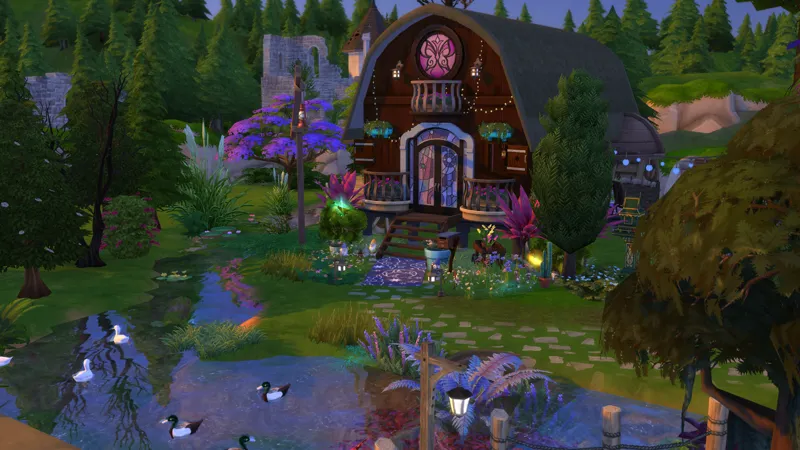
Many thanks to DRAUFILM for the render for this edition of the save! Hi everyone! We are live with the new and latest version of the fantasy
Many thanks to DRAUFILM for the render for this edition of the save!
Hi everyone!
We are live with the new and latest version of the fantasy save file. The new save slot is save slot "d".
Early release: 11 March 2025 (for paid members)
Public release: 18 March 2025 (free to all members)
or
The Elvenwood collection (updated over time)
Please de-activate EP18 (Businesses and Hobbies) while playing this save for your best experience, since Nordhaven is not completed and it will break your immersion when their townies and NPC's start showing up. There are also some save breaking bugs reported for this expansion.
Our original save file has been updated too on the original post. New players should probably read it to orientate themselves to the save.
Caution: If you have another save that occupies save slot d, putting this save in your save file folder will overwrite it! Renumber as needed and always back up your existing save file folder before placing a new save in your folder.
A word on renumbering the save file for the extra cautious among us!
How to use save files:
Don't know how to use other people's save files in the Sims?
1. Backup your current saves in a folder on your desktop
2. Save files are accessed by the game via the "saves" sub folder in your "The Sims 4" main folder [in the same place you find the mods folder].
3. Place the save file attached to this post in your "saves" folder.
You might have to renumber the save if you already have a save with that number. Here is a good set of instructions that was included for the "Simsiesave", or if you're more of a video person --> HERE.
From now on, I will only be giving technical advice, answer technical issue questions and offer troubleshooting tips for members of this patreon. You can join for free. It doesn't cost a thing and it's a small courtesy to me when I offer my time freely to help and assist.


Comments (16)
Heyyy!! I hope your day is going great!! I was just wondering if the update is still set to come out today?!
Possibly! In game now, checking stuff and probs making a video because the render is not ready!
Is it okay to download the save file or wait for the new one? I
Hey Ashley! You can download it of course, but I’m so close to releasing Gnomehaven. It’s finished, I just don’t have a render … and I’m procrastinating for the last 2 weeks on this because work’s been crazy and then I just can’t face it. Bad bad bad. I fully intend to release the save file this weekend, but I don’t want to make an empty promise. Can you wait till Sunday?
Hey I have always wondered something... All the additional downloads on your patreon aside from the main save files, are they all separate downloads or do they all come automatically with each new save file you upload? And if they are separate is there a specific collections list with all additions so i can tell them all apart from stuff that may already come in the game?????? Love your save files! Absolutely my favorite one to play
Hey! So usually when I make the posts I make sure to say “these are for people who are updating their old save files, if you’re already playing the “X” (insert update name) update to the save file eg the Elvenwood update, no need to download anything”. This will say in the actual post. There are people who have progress in the save file they don’t want to lose so they manually update. They don’t download the latest save file. I hope this makes sense to you. The posts offer a deeper dive and gameplay ideas or the characters stories. I hope this makes sense. I am not sure which posts you refer to. All posts are organized under collections. Most nocc characters are included in the save file but obviously the cc characters are not. Do you know how to access collections in Patreon?
Hey there! I've just discovered your save file and oh my goodness it is so cool, I can't wait to dive in! As I'm new, I wondered where the best place to go is to read your Lore from the very beginning? Thank you!
Hey there! I would access the “Collections” tab here on Patreon as a start. Also go to the original download post for the save file. Under Collections: go to Fantasy save file. There you will find it. It has links to the magazines that focus on specific neighbourhoods etc.
Hello ! I think I'm having an issue where it just stays on the loading screen :[ I have a non fantasy save which works fine Im able load in and play but for some reason Im not able to load the fantasy save, first time downloading this save file so im not sure if I did something wrong? Please lmk ^^
Hey there! First let us be sure you have all the packs. This version will begin in Ravenwood so obviously you will need Ravenwood / the life and death expansion pack for it to load. You can dm me on Blue Sky or here. Happy to spend some time with you and help you to see if we can get your save to work. The save file is in tact and working for 1000’s of people. It will be a problem on you end. Let’s spend some time together on this!
so I have the latest save, I've never saved any before. do I put it in the mods folder for it to work?
ALyssa, please put your > save < file in the > save < folder. It is located between the sub folders like the mods folder but it is NOT the mods folder. It will be labeled saves. I hope you find it. If not, let me know and we will screenshare
it's a dream come true! I'm speachless! thank you so much for sharing this masterpiece
Thanks so much Francesca!! For your best result, turn situational outfits off in MC command! It really ruins the vibe haha. If you’d like to support me in a way that is free, you can use my creator code at checkout when you buy a pack on the EA app: LilRedRidingSim. Appreciate you!
Thank you :) - (Honeylhai21)
thank you!!!!